
TOMLOV DM9 Digital Microscope
4.4Editor score
Large seven-inch LCD
Adjustable 1200X magnification
Stable metal stand
A magnifier for electronics should reveal tiny components, solder joints, and markings while keeping the workpiece clear and well illuminated. The right choice depends on whether you need digital imaging, hands-free optical magnification, or a flexible handheld option for reading, inspection, and delicate repair work.
We compared ten magnifiers based on magnification, lighting, viewing format, focus controls, recording features, portability, and suitability for electronics tasks. The list includes digital microscopes for circuit boards, illuminated loupes for soldering, headband magnifiers for hands-free work, and desktop readers.
Each review explains the product’s strongest use case, notable limitations, and ideal buyer. Ratings and specifications reflect the supplied product information, while availability and prices can change over time. Always confirm current details and accessory inclusion before ordering.
4.4Editor score

4.5Editor score
4.5Editor score
As an Amazon Associate we earn from qualifying purchases.
The table below compares all ten options by viewing method, magnification, lighting, and practical electronics features, helping readers identify the most suitable tool for inspection, soldering, repair, or documentation.




The Elikliv Digital Microscope earns a 4.5 rating and stands out as the most versatile all-around option in this guide. It combines 1000X-class digital magnification, a 4.3-inch HD display, eight LED fill lights, PC connectivity, and a height-adjustable stand. That combination makes it effective for circuit-board inspection, soldering work, coin examination, and detailed hobby projects.
We may earn a commission when you buy through this link, at no additional cost to you.
Its real-time screen is especially useful because the display provides a larger viewing area than a small handheld loupe. The microscope can connect to Windows or a MacBook for a larger presentation, share live views with multiple viewers, and save images or videos for analysis. Adjustable LEDs help reduce darkness around small components, while the stand lets the user control camera-to-object distance and angle.
The main trade-offs concern portability and recording accessories. It is described as handheld, but the included adjustable stand is what makes prolonged electronic inspection more comfortable. Photo and video functions require a memory card, and that card is not included. Actual digital magnification also varies with screen size and object distance, so buyers should judge usability and clarity rather than expecting a fixed physical enlargement.
This is the strongest recommendation for users who want one magnifier for both hands-on repair and visual documentation. It is particularly useful for hobbyists, students, technicians, and collectors who will value screen sharing and captured evidence. Those wanting a completely self-contained recording setup should add compatible storage, but otherwise it offers a capable electronics-focused package.
The digital display makes tiny traces, solder joints, and component markings easier to inspect without forcing your face close to the workbench. Its wider viewing area also reduces the eye and neck strain associated with prolonged use of a conventional handheld loupe.
Eight adjustable LEDs illuminate the work area, while photo and video capture preserves findings for repair records, teaching, sharing, or later comparison. Connecting to a computer extends the image to a larger screen when collaboration is useful.
We may earn a commission when you buy through this link, at no additional cost to you.
The TOMLOV DM9 has a 4.4 rating and is the premium choice for a dedicated electronics workbench. Its defining feature is the seven-inch LCD, which provides a generous image for inspecting small circuit boards, solder joints, watch components, coins, and other detailed subjects without requiring constant repositioning of a handheld magnifier.
We may earn a commission when you buy through this link, at no additional cost to you.
The package is thoughtfully arranged for sustained use. A solid metal base and 8.5-inch metal stand create a stable platform, while height adjustment helps set the viewing range and focus. The microscope supports up to 1200X digital magnification, 12MP photos, and 1080P video. A 16GB memory card is included, along with a USB cable, remote control, light barrier, and user manual.
Lighting is another major strength. Eight built-in LEDs provide adjustable brightness, while two flexible gooseneck lights can be positioned from different angles to reduce shadows and reveal surface texture. PC connectivity offers a larger real-time view for demonstrations and collaborative inspection. The trade-off is footprint: a seven-inch screen and metal stand occupy considerably more space than a compact digital microscope.
Choose the DM9 when your work benefits from a large, stable, shareable display and when you want a complete setup for documenting discoveries. It is a strong fit for serious electronics hobbyists, educators, coin collectors, and repair tinkerers. Users needing maximum portability may prefer a smaller handheld model, but for a fixed workstation the DM9’s screen, stand, and included storage are hard to overlook.
The weighted metal base and adjustable stand reduce the visual disturbance caused by a moving microscope. This stability is valuable when inspecting a stationary board or working around a small component that must remain precisely positioned.
The large display, 12MP camera, 1080P recording, PC connection, and included memory card create a flexible documentation workflow. Results can be saved, shared, or displayed to a group without relying on a phone camera.
We may earn a commission when you buy through this link, at no additional cost to you.
The Handheld 500X Digital Microscope has a 4.4 rating and offers a compact balance of portability, imaging, and ease of use. It combines a three-inch HD IPS screen with 500X digital magnification, a dual-camera design, automatic focus, and an adjustable white LED. It is well suited to portable inspection of components, coins, jewelry, and other small subjects.
We may earn a commission when you buy through this link, at no additional cost to you.
Its dual-lens arrangement can switch between microscopic magnification and regular shooting, while autofocus helps maintain sharpness without repeated manual adjustment. The product data notes that microscope mode requires keeping the lens cover close to the object, which is a meaningful limitation when examining larger or irregularly shaped parts. USB connectivity allows real-time display on a computer and supports data transfer and further analysis.
The camera supports 12MP photos and video recording directly on the device. A TF card slot supports local storage up to 4TB, although no card is included. That means buyers who want to retain images must provide their own compatible card. The adjustable light helps reveal fine details, but it is simpler than the multi-position lighting offered by larger bench microscopes.
This microscope is a good match for users who need portability without giving up a built-in display and recording tools. It works especially well for quick inspections away from a permanent workbench, as well as coin and jewelry evaluation. For larger, steadier electronics projects, a model with a stand may be more comfortable, but this unit offers strong functionality in a smaller package.
Automatic focus reduces the need to make small manual adjustments when moving between nearby components. The close working distance required by microscope mode should be considered when checking larger boards or awkwardly positioned parts.
The built-in display, 12MP camera, video recording, and USB connection make the microscope useful beyond a simple optical loupe. It can support both immediate inspection and later transfer of captured images to a computer.
We may earn a commission when you buy through this link, at no additional cost to you.
The JARLINK Magnifying Glasses with LED Light has a 3.9 rating and focuses on hands-free optical inspection. Its 14 interchangeable lenses cover 3X, 4X, 5X, 6X, 7X, 10X, and 15X, giving users a broad range of views for soldering, watch repair, jewelry inspection, and fine electronics assembly.
We may earn a commission when you buy through this link, at no additional cost to you.
A built-in LED provides illumination directly around the work area, while the headset format leaves both hands available for holding a soldering iron, tweezers, probe, or component. The lightweight frame and adjustable elastic headband are designed for extended wear, making this a practical alternative to holding a magnifier above a work surface.
The main limitation is its single-eye construction. The product is explicitly intended for single-eye viewing and not binocular use. It is also not recommended over prescription eyeglasses because the fit and view may be poor. Furthermore, high-power lenses require a very short working distance, so the user must move the head and workpiece together carefully.
This headset is best for technicians, crafters, and hobbyists who want natural depth perception and both hands free. The range of lens powers makes it adaptable to different tasks, although the lowest rating in the group suggests buyers should examine the optical design and fit closely. It offers a useful combination of magnification, lighting, and mobility without digital displays.
Low and medium powers are easier to position over a workbench, while the strongest lenses demand a very short viewing range. Practicing the movement of the head and workpiece together helps prevent the lens from drifting away from the target.
The multiple interchangeable lenses allow the same headset to serve different stages of a repair. Lower magnification supports orientation, while stronger options help reveal small markings, joints, and component details.
We may earn a commission when you buy through this link, at no additional cost to you.
This Rechargeable Headband Magnifier has a 4.4 rating and is a comfortable option for close electronics work, soldering, sewing, and detailed hobbies. Four replaceable acrylic lenses offer 1.5X, 2X, 2.5X, and 3.5X magnification, allowing users to balance field of view against detail.
We may earn a commission when you buy through this link, at no additional cost to you.
Four LED lights offer two illumination modes and adjustable angles, helping direct light into recessed areas and reduce shadows. The battery compartment is detachable and charges through a Type-C cable. Once fully charged, the stated continuous operating time is four to six hours, making it practical for extended bench sessions without disposable battery replacement.
Comfort is a major strength. The headband uses soft sponge padding with a leather cover, while three adjustment knobs control lens height, viewing angle, and head size. It is also designed to fit over prescription eyeglasses, unlike some head-mounted magnifiers. The main limitation is its 3.5X maximum, which is less suitable for very tiny component inspection than digital microscopes or higher-power loupes.
This model is an excellent choice for users who need both hands free and wear prescription glasses while working. It is particularly helpful for soldering, assembly, beadwork, and other tasks that combine visual detail with tool use. If microscopic examination is the primary goal, consider a higher-power digital tool; otherwise, the adjustable lighting and comfortable fit make this a strong general-purpose magnifier.
Independently repositioned LEDs can illuminate solder joints and recessed components from more useful angles. The two modes make it easier to balance visibility and comfort as the work moves around the bench.
Soft padding, multiple adjustment points, and compatibility with prescription glasses reduce common fit barriers. These features are especially helpful during soldering, where a stable working position and clear view are both important.
We may earn a commission when you buy through this link, at no additional cost to you.
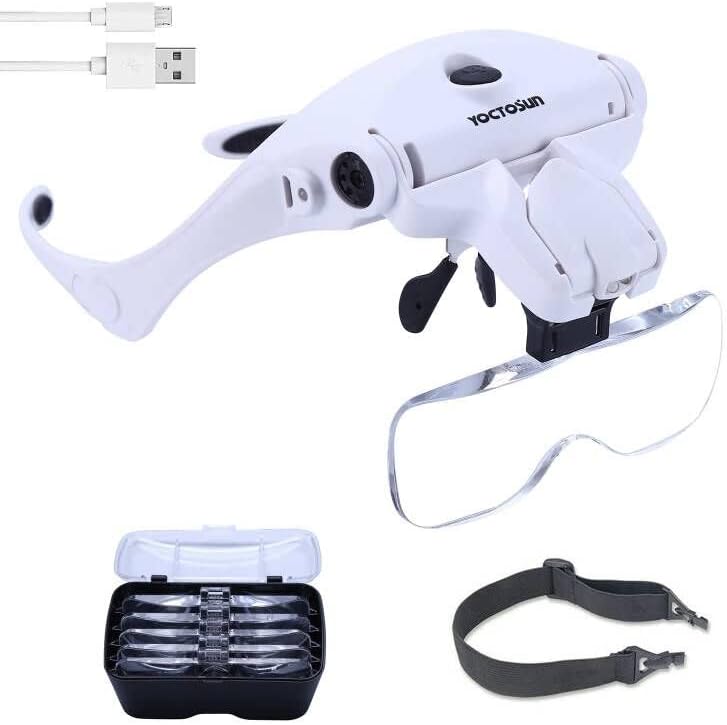
The YOCTOSUN Magnifying Glass with Light has a 4.5 rating and delivers a useful set of features at an accessible tier. Five interchangeable lenses provide 1.0X, 1.5X, 2.0X, 2.5X, and 3.5X magnification. A simple click-and-release system makes changing powers fast enough for most close-work sessions.
We may earn a commission when you buy through this link, at no additional cost to you.
The headset can be worn like eyeglasses or used with the included head strap for a more secure fit. Flexible rubber nose pads distribute pressure and can be shaped to suit the wearer. Two LED brightness levels illuminate small details, while the built-in rechargeable lithium battery eliminates recurring disposable battery purchases. A USB charging cable is included.
Compared with digital microscopes, the trade-offs are clear: there is no built-in screen, camera, or computer connection, and the maximum 3.5X power is better for solder joints, wiring, and larger components than for truly microscopic features. It also lacks the multi-angle lighting and adjustable stand of higher-end options. These limitations do not reduce its value as a simple optical work aid.
This is the best budget pick for electronics hobbyists who want comfortable hands-free magnification without paying for a digital system. It suits soldering, wire work, hobby assembly, and general inspection around the home. Users who need to document components or examine sub-millimeter details should move up to a digital microscope, while most repair tasks are well served by this straightforward headset.
The lens range covers broad context at 1X through more detailed inspection at 3.5X. Quickly switching lenses can reduce eye strain because users do not have to remain at a high power when their task does not require it.
The rechargeable design keeps illumination available without disposable batteries. Once charged, the headset supports convenient cord-free work with both hands available for tools and components.
We may earn a commission when you buy through this link, at no additional cost to you.
The JMH Handheld Magnifier has a 4.4 rating and is best suited to quick visual checks of labels, small electronic parts, contacts, and markings. Its large 3.15-inch lens and 18 integrated LEDs make it easy to illuminate a small area while remaining simple enough for users who do not want to adjust complex electronic settings.
We may earn a commission when you buy through this link, at no additional cost to you.
The lighting system includes cold, warm, and mixed modes with stepless dimming. This lets the user adapt brightness and color to the environment or reduce visual fatigue during reading. A single on-off button controls operation, and the product requires three AAA batteries, which are not included. It is more suitable for occasional inspection than for continuous workstation use.
One important limitation is that the product description does not specify an adjustable magnification level. It should therefore be viewed as a general illuminated reader and detail magnifier rather than a calibrated loupe for extremely fine electronics work. It offers no recording, screen, or stand, and its handheld format means the user must maintain a steady distance and angle.
This magnifier works well for reading tiny component markings, inspecting a connector, checking a circuit board in the field, or helping a visually impaired user with print. Electronics hobbyists can keep it nearby as a quick-reference tool, while the more serious repairer may prefer a digital microscope or interchangeable-lens headset.
Cold, warm, and mixed modes accommodate bright rooms, dim workspaces, and sensitive viewing preferences. Stepless dimming provides finer control than a simple two-level setting.
The compact handheld form is convenient for inspecting installed equipment, reading component labels, or checking small objects without setting up a digital microscope. Battery power also removes the need for a USB connection during use.
We may earn a commission when you buy through this link, at no additional cost to you.
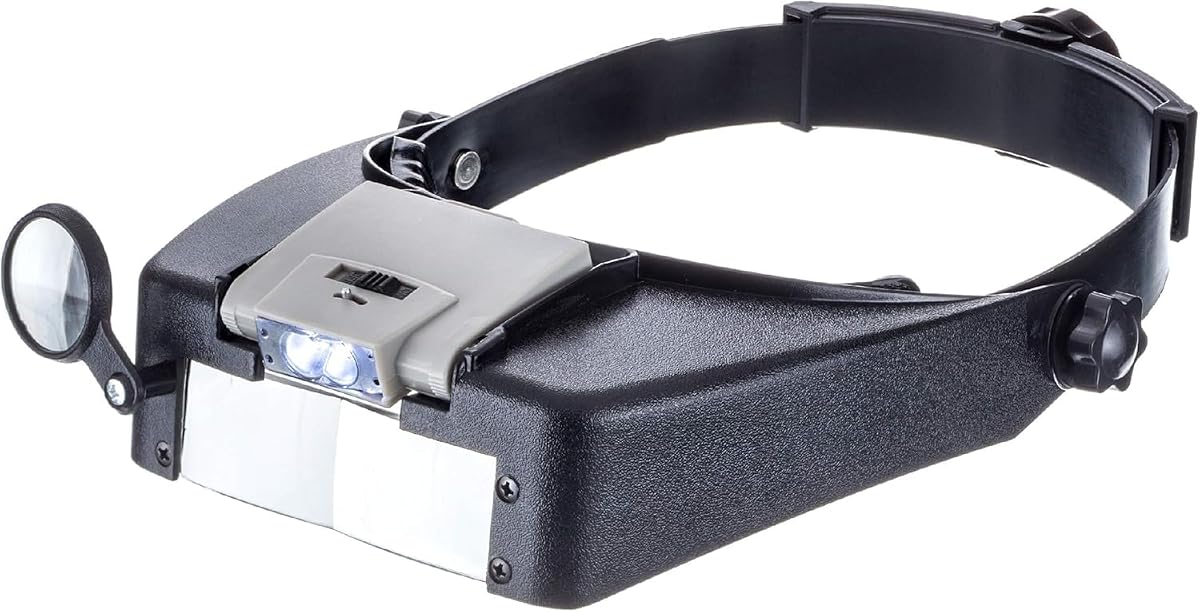
The SE Illuminated Dual Lens Flip-In Head Magnifier has a 4.4 rating and targets precision work where depth perception matters. Its 4.5X flip-in loupe can be brought into view when needed and moved away again, allowing the user to alternate quickly between normal sight and detailed inspection.
We may earn a commission when you buy through this link, at no additional cost to you.
Two stereo lenses provide a more realistic sense of depth than a single monocular lens. That feature is valuable when positioning a probe, aligning tiny parts, judging solder-joint shape, or following a wire across a densely populated board. An integrated LED improves visibility around the loupe, and an improved knob adjusts the headband circumference for a secure fit.
The principal limitation is that the loupe is fixed at 4.5X rather than offering several power levels. It also cannot record, display, or connect to a computer. Users who need to document a repair or share a live view should choose a digital microscope, while those focused on direct hands-on manipulation may find this flip-in format efficient.
This head magnifier is a good option for jewelry making, watch repair, fine electronics, and other precision hobbies. The combination of stereo vision, a useful 4.5X power, and integrated lighting gives it a distinct advantage over a simple handheld magnifier. It is especially appealing for users who need both normal vision and close inspection during the same task.
Stereo lenses give the wearer a more natural view of spatial relationships. That helps when guiding a tool, lifting a tiny component, or checking whether a wire and terminal are properly aligned.
The flip-in design allows users to move the loupe out of the way without removing the headset. This is convenient during repeated cycles of inspection, tool handling, and visual orientation.
We may earn a commission when you buy through this link, at no additional cost to you.
The Satechi ReadMate LED Desktop Magnifier has a 4.5 rating and provides a convenient way to inspect small printed details, component markings, photographs, coins, and stamps. Its optical lens offers up to 5X magnification, while three integrated LED lights illuminate the viewing area through a simple touch control.
We may earn a commission when you buy through this link, at no additional cost to you.
The freestanding desktop format lets the magnifier sit directly over a document or small object without requiring a handheld grip. A separate on-off switch helps conserve power and reduces accidental activation. Setup is straightforward, with the supplied plastic tab in the battery compartment removed before use. A carrying case and cleaning cloth are also included for protection and maintenance.
Unlike a digital microscope, this is a straightforward optical magnifier with a fixed maximum power of 5X. It does not provide focus adjustment details, digital recording, or a live screen, and its larger desktop shape is less convenient during active soldering. Nevertheless, it is excellent for reference tasks where a steady, illuminated image is more important than mobility.
Choose the ReadMate for inspecting tiny component labels, reviewing schematics, examining solder pads on a removed board, or keeping a magnifier ready at a workbench. It is also suitable for users who want a durable optical tool without software, memory cards, or computer connectivity. The included case makes it easy to move between desks or store safely between projects.
The desktop base keeps the optical view steady over a document, circuit board, or small object. This makes it a practical complement to a digital microscope when quick reference work does not require recording.
Touch lighting and a separate on-off switch make operation straightforward. The supplied case and cleaning cloth help protect the lens and simplify long-term storage.
We may earn a commission when you buy through this link, at no additional cost to you.
The Precision LED Magnifier is included for its high-power optical design and electronics-focused features, although the supplied product data does not include a customer rating. Replaceable lenses provide magnification from 10X to 20X, making it one of the strongest conventional optical options in the list for inspecting tiny components, solder joints, and detailed work.
We may earn a commission when you buy through this link, at no additional cost to you.
High-quality optical lenses are intended to deliver a clear, sharp image with reduced distortion. A dual LED system allows the illumination angles to be adjusted independently, which can reduce shadows over tiny parts. The lightweight frame resembles ordinary glasses and keeps both hands available for soldering, electronics repair, jewelry appraisal, and watch repair.
As with other high-power loupes, the narrow field of view and short working distance require practice. Moving the magnifier too far from the workpiece can reduce clarity, while high magnification can make it harder to navigate around protruding components. The product also offers no screen, image capture, or computer connection, so its value rests entirely on direct optical viewing.
This is a promising option for experienced users who need more power than a standard headband magnifier and do not require digital documentation. New electronics hobbyists may find the lower-power products easier to position, while serious inspection and repair users may prefer a digital microscope. Buyers should confirm the included lens powers and fit expectations before making a final choice.
The 10X to 20X range offers considerably stronger magnification than common headband magnifiers. It can reveal small markings and component edges, provided the user maintains the correct focal distance.
Independently adjustable LEDs help illuminate areas that a single overhead source would leave dark. Repositioning the lights can improve visibility around solder joints, component sides, and recessed traces.
We may earn a commission when you buy through this link, at no additional cost to you.
The best magnifier for electronics depends on the size of the details, your working posture, lighting conditions, and whether you need to record or share what you see. Compare viewing formats, optical power, and practical accessories before choosing.
A digital microscope displays an enlarged electronic image on a screen, making it easier to inspect, record, and share tiny details. It is especially useful for circuit boards, solder joints, coin surfaces, and teaching demonstrations. An optical loupe magnifies the object directly and usually provides a more natural view with immediate depth perception, making it well suited to active repair and hand tool use.
Choose a digital microscope when documentation, screen sharing, or a wide viewing area matters. Choose an optical loupe when you need direct vision, lightweight handling, and the ability to work without looking away from the workpiece.
Magnification is useful only when the image remains sharp and the working distance is practical. Headband magnifiers commonly provide lower powers for general close work, while digital units may advertise several hundred times magnification. Optical products with 10X or more usually require a very short focal distance, which can make component positioning harder.
Match power to the task rather than choosing the largest advertised number. Use moderate magnification for wiring and larger components, and reserve stronger views for markings, small joints, and inspection tasks where a narrow field of view is acceptable.
Small electronics work often takes place in shadowed areas or on reflective circuit boards. Adjustable LEDs, directional gooseneck lights, multiple brightness levels, and independently movable light sources can reveal contours that would otherwise disappear. Digital microscopes often integrate lights into the camera assembly, while headband magnifiers place illumination near the wearer’s eyes.
Look for adjustable brightness and positioning rather than simply counting LEDs. Angled light can reduce shadows and reveal scratches, contours, and solder-joint structure more effectively than a fixed beam aimed directly at the workpiece.
Hands-free operation is valuable when one hand holds a soldering iron, tweezers, probe, or part. A headband keeps the lens aligned with your eyes, while a desk-mounted digital microscope gives you both a stable image and a clear path to the board. A handheld loupe offers mobility but requires a free hand and careful positioning.
For frequent soldering or assembly, prioritize a stable stand, adjustable headband, or flip-in loupe. For portable inspections, a compact handheld digital microscope may be more useful than a fixed workstation model.
Electronics details can disappear when a magnifier is slightly out of focus, so focus control is a critical feature. Digital models commonly use autofocus or adjustable height and focus, while optical loupes depend on focal distance and lens placement. A larger screen can improve comfort, but magnification alone does not guarantee a clear image.
Use autofocus as a convenience for rapid portable inspections, and consider a stand with precise height adjustment for detailed bench work. With optical magnifiers, test the lens at the working distance you expect to use and verify that the edge of the view remains clear.
Digital microscopes can capture images and video for repair records, teaching, collection catalogs, and troubleshooting. PC connectivity can provide a larger live view and allow transfer of files to a computer. Optical loupes generally lack these features, but they provide immediate direct viewing and often work better for active soldering.
Choose a digital model with an included memory card if you want a ready-to-use documentation setup. If you only need to inspect live parts, recording is optional. If permanent visual evidence matters, verify storage support, included accessories, and computer compatibility before ordering.
A magnifier that is uncomfortable quickly becomes a tool you avoid using. Headband products should offer adjustable head sizing, padded contact points, and a stable lens position. Users who wear prescription glasses should verify whether the magnifier is specifically designed to fit over them, as some compact frames are incompatible.
For long sessions, pay attention to weight distribution, nose-pad flexibility, strap security, and lens positioning. A digital microscope may be more comfortable than a headset when the user naturally prefers to look at a screen rather than through an optical lens.
A fixed microscope with a metal base and large screen is ideal for a permanent bench but less suitable for field work. Handheld digital units are easier to carry, while desktop optical magnifiers are portable enough for a desk but occupy a fixed viewing position. The supplied accessories also affect readiness, particularly memory cards, stands, cables, remote controls, and cases.
Check what is actually included before purchase. A product that supports recording but does not include storage may require an additional compatible card, while a packaged stand, USB cable, and case can make setup easier. Consider how often you will move the tool and how much bench space is available.
Begin by setting up a clean, well-lit work surface and disconnect power to the device under inspection. Position the magnifier before picking up tools, then adjust its height, focus, or lens angle until the component is centered and sharp. For a digital microscope, start at lower magnification to find the target and increase the view only after it is properly framed.
Use the lighting to reveal structure rather than creating glare. Change the angle or brightness when a solder joint looks flat, a trace disappears into shadow, or reflections obscure the component. Optical magnifiers should be moved slowly with the head, while digital models should be adjusted gently through their documented focus controls to avoid shifting a delicate board.
After use, switch off lights, disconnect electronics safely, and remove batteries from models that use them during long storage. Clean the lens with the supplied cloth or another soft, lint-free material, and avoid abrasive cleaners. Keep digital units dry, protect their screens from impact, store memory cards properly, and return headbands and desktop magnifiers to their cases when available.
For active soldering, moderate optical magnification around 2X to 3.5X is often easiest to use because it provides a useful view while leaving enough room to move a soldering iron. Digital microscopes are better when you need to inspect joints closely or record the work. Choose based on the component size, available space, and whether you need direct vision or a screen.
A digital microscope is better for detailed inspection, recording, sharing, and keeping a steady view of a stationary board. A headband magnifier is better for direct hands-on work, natural depth perception, and mobility. Many electronics hobbyists benefit from having one of each style for different stages of a repair.
Yes, provided the image is clear and the component is held at the correct focal distance. Digital models generally offer stronger magnification and easier adjustment, while optical loupes can reveal larger markings and solder details. For extremely small printed text, use a digital microscope rather than relying on a high-power loupe with a very narrow field of view.
It depends on whether you want to save photos or videos directly on the device. Some models include a card, while others support cards that must be purchased separately. The Elikliv Digital Microscope supports recording with a memory card but does not include one. Check the package list and storage format before buying additional equipment.
Some models are designed for that use, while others may fit poorly or produce a blurred view. The Rechargeable Headband Magnifier is specifically described as fitting over prescription eyeglasses. The JARLINK model is not recommended over prescription glasses, so always verify the stated fit and adjustability before ordering.
Yes. Small components and solder joints can be hidden by shadows, and glossy boards can reflect a concentrated light source. Adjustable LEDs, angled lighting, and multiple brightness levels help reveal texture, contours, and workmanship. Position the light across the surface rather than directly toward your eyes to improve visibility and reduce glare.
No. Higher magnification reduces the field of view and often shortens the working distance, making navigation around a board more difficult. Moderate power is often sufficient for soldering and wiring, while very high digital magnification is most useful for inspecting minute details. Choose the lowest magnification that reveals the feature you need clearly.
A stand is strongly preferable for prolonged or precision work because it reduces movement and keeps the camera in a consistent position. Handheld operation is useful for quick mobile inspections, but sustained viewing can become tiring and produce an unstable image. Models such as the TOMLOV DM9 and Elikliv Digital Microscope include or describe adjustable stands for this reason.
The Elikliv Digital Microscope is the strongest all-around recommendation because its display, LED lighting, PC connectivity, and adjustable stand cover inspection, repair, and documentation in one package. The TOMLOV DM9 is the premium pick for a large screen, sturdy workstation setup, and included storage, while the YOCTOSUN headset provides the best budget path to hands-free illumination.
Prioritize the viewing method that matches your work. Choose a digital microscope for detailed inspection, recording, and shared screens; choose an optical headband for direct hands-on soldering; or select a desktop magnifier for steady reference work. High-power optical tools can reveal tiny details, but their short working distance and narrower view require more practice.
Before purchasing, verify the current specification list, package contents, fit, and accessory requirements. Ratings and product configurations can evolve, and prices and promotions change frequently. Checking the latest listing details helps ensure that the magnifier remains suitable for your specific electronics projects.