
Infomir MAG555 4K Streaming Media Player
4.0Editor score
Official Google TV platform
4K playback at 60fps
Dual-band Wi-Fi and Ethernet
Google Assistant voice remote
Our Media Streamer for Netflix guide compares 10 devices for picture quality, Netflix access, connectivity, features, and ease of use.
A media streamer for Netflix can turn an older television into a modern entertainment hub, but the strongest choice depends on your screen, connection, viewing habits, and preferred features. Important considerations include Netflix certification, output resolution, HDR support, navigation, app availability, wireless speed, and whether you want a simple stick or a full media center.
This guide compares ten streaming devices using their supplied specifications, platform information, compatibility details, and customer ratings. It covers Google TV and Android TV models, a Linux set-top box, an older Roku player, an LG streaming upgrade, a portable AR entertainment system, and a local-network media player to show the meaningful differences among each option.
Each review explains who the device is best suited for, along with its advantages, limitations, and key specifications. The award labels identify only three standout choices, while the complete ranking helps compare every model. Prices and availability can change, so shoppers should verify current listings, Netflix subscription requirements, and app support before purchasing.
4.0Editor score

5.0Editor score
4.3Editor score
The comparison below highlights each device's platform, connectivity, output capabilities, and main use case, making it easier to identify the right fit for Netflix and your wider home entertainment setup.



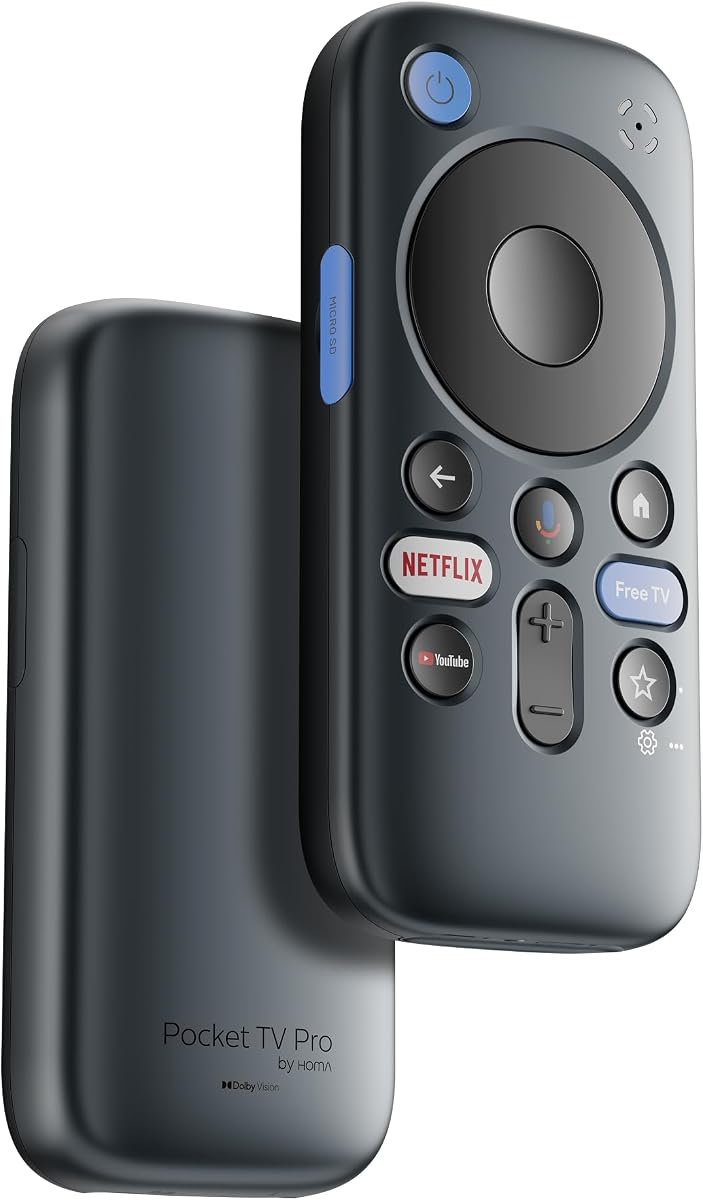
The RayNeo Pocket TV Pro is the most unconventional media streamer for Netflix in this guide, with a 4.3 customer rating. Rather than competing only as a living-room box, it is engineered to pair with RayNeo GT or GT Max glasses and create a portable Dolby Vision entertainment system. Its certified Google TV platform includes native Netflix, Widevine L1, and access to major streaming applications.
We may earn a commission when you buy through this link, at no additional cost to you.
The standout benefit is frame-by-frame Dolby Vision metadata delivered through compatible RayNeo glasses, supported by an Amlogic S905X5M-J chip and Vision 4000 display engine. Real-time SDR-to-HDR conversion can add depth and clarity to ordinary streams and local files. A 6,500mAh battery supports up to 5.5 hours of viewing, while 3GB of RAM and 64GB of storage provide resources for apps and downloaded content.
There are important compatibility boundaries. Full Dolby Vision applies to the GT and GT Max rather than the Air Series, and the streamer is not compatible with other manufacturers' AR glasses. It also requires one USB-C DisplayPort 1.2 connection to the glasses, making the setup less familiar than plugging a conventional box into HDMI. Those constraints reduce its appeal for buyers who want a simple universal television accessory.
This is the right choice for a buyer who already owns compatible RayNeo GT or GT Max glasses and prioritizes portable, private, high-fidelity viewing. It is especially compelling for travel, commutes, and hotel nights where using a television screen is impractical. For an ordinary living room, one of the Google TV boxes in this list will usually be simpler and more versatile.
The Pocket TV Pro is built for users who want Netflix away from a wall-mounted screen. Its battery, wireless connectivity, and USB-C glasses connection create a self-contained viewing setup for flights, hotel rooms, and daily travel.
Compatible GT-series glasses can use the device's Dolby Vision capabilities and real-time HDR conversion. A microSD slot can expand storage to 2TB, giving travelers room for downloadable films when network access is inconsistent.
We may earn a commission when you buy through this link, at no additional cost to you.
The Phantom Dcolor GD2 is a certified Android TV 12 streaming box with a 4.2 rating and a broad set of familiar entertainment functions. It supports Netflix 4K, includes a voice remote, and has built-in Chromecast support. Its quad-core 64-bit Cortex-A35 processor and 2GB of RAM position it as a straightforward mainstream streamer rather than a specialist gaming or local-media machine.
We may earn a commission when you buy through this link, at no additional cost to you.
The device's strongest qualities are practical rather than spectacular. Dual-band 2.4GHz and 5GHz Wi-Fi supports modern streaming demands, while 32GB of eMMC storage provides room for applications. Google Cast integration allows compatible phones, tablets, and laptops to send photos, video, and music to the television. The Google Assistant can also be used for content searches and control of compatible smart-home devices.
Its limitations come from the processor and memory configuration. Two gigabytes of RAM and an older Cortex-A35 chip may feel less fluid than more recent hardware, especially as app requirements grow. The included power connector is a three-pin UK plug, which may matter to buyers traveling from other regions. Google Cast is useful, but it is not identical to the Google TV experience found on competing models.
The GD2 makes sense for a second television, bedroom setup, or household that wants Netflix and Chromecast without a large media-center investment. It is a good fit when Android TV is acceptable and voice search is useful. Buyers seeking the latest interface should compare it carefully with the Google TV models, while those wanting advanced 4K or HDR processing may prefer the RockTek GX1.
The certified Android TV 12 platform provides a familiar tile-based home screen and access to the Play Store. Netflix 4K support makes it a practical option for upgrading a television that lacks modern streaming apps.
Built-in Chromecast support makes the box useful beyond Netflix, allowing compatible mobile devices and computers to send media to the screen. The voice remote adds quick search and smart-home control without requiring a separate keyboard.
We may earn a commission when you buy through this link, at no additional cost to you.
The RockTek GX1 UHD Streamer has a 5.0 customer rating, the highest among the ten products listed, and combines Google TV with an ambitious set of display and connectivity features. It supports 4K Dolby Vision, HDR10+, and Dolby Atmos, while Wi-Fi 6 provides a modern route to high-bandwidth streaming on compatible networks.
We may earn a commission when you buy through this link, at no additional cost to you.
Its Realtek RTD1325 processor is designed for Google TV, and the supplied specifications describe smooth operation for streaming, applications, and everyday navigation. Picture processing includes AIPQ optimization, AISR super-resolution, and QMS quick media switching. These tools are intended to improve clarity, perceived detail, and transitions, although actual results depend heavily on the source, television, display settings, and content.
The important caveat is that the listing does not explicitly state Netflix certification. Google Cast, Hey Google voice commands, and smart-home integration make the GX1 broadly useful, but shoppers seeking Netflix should confirm that the Netflix app is available and licensed for their region before ordering. Dolby Vision and Dolby Atmos also require compatible content, apps, a capable television, and an appropriate audio system.
This is a compelling Editor's Choice for buyers who want more ambitious picture processing and current connectivity than a basic Google TV box provides. It is well suited to a modern television, home theater, or upgraded living room where Wi-Fi 6 and HDR formats matter. It may not be the simplest choice for a basic Netflix-only setup, where the MAG555 offers clearer platform and connectivity information.
AIPQ, AISR, and QMS give the GX1 a more processing-oriented feature set than many simple streamers. These capabilities can refine streaming and media presentation on compatible 4K televisions, although they cannot create detail or HDR information that is absent from the source.
Wi-Fi 6 is the GX1's most distinctive everyday specification. On a compatible router and in a favorable signal area, it can provide the bandwidth headroom needed for high-resolution streams and large local media files.
We may earn a commission when you buy through this link, at no additional cost to you.
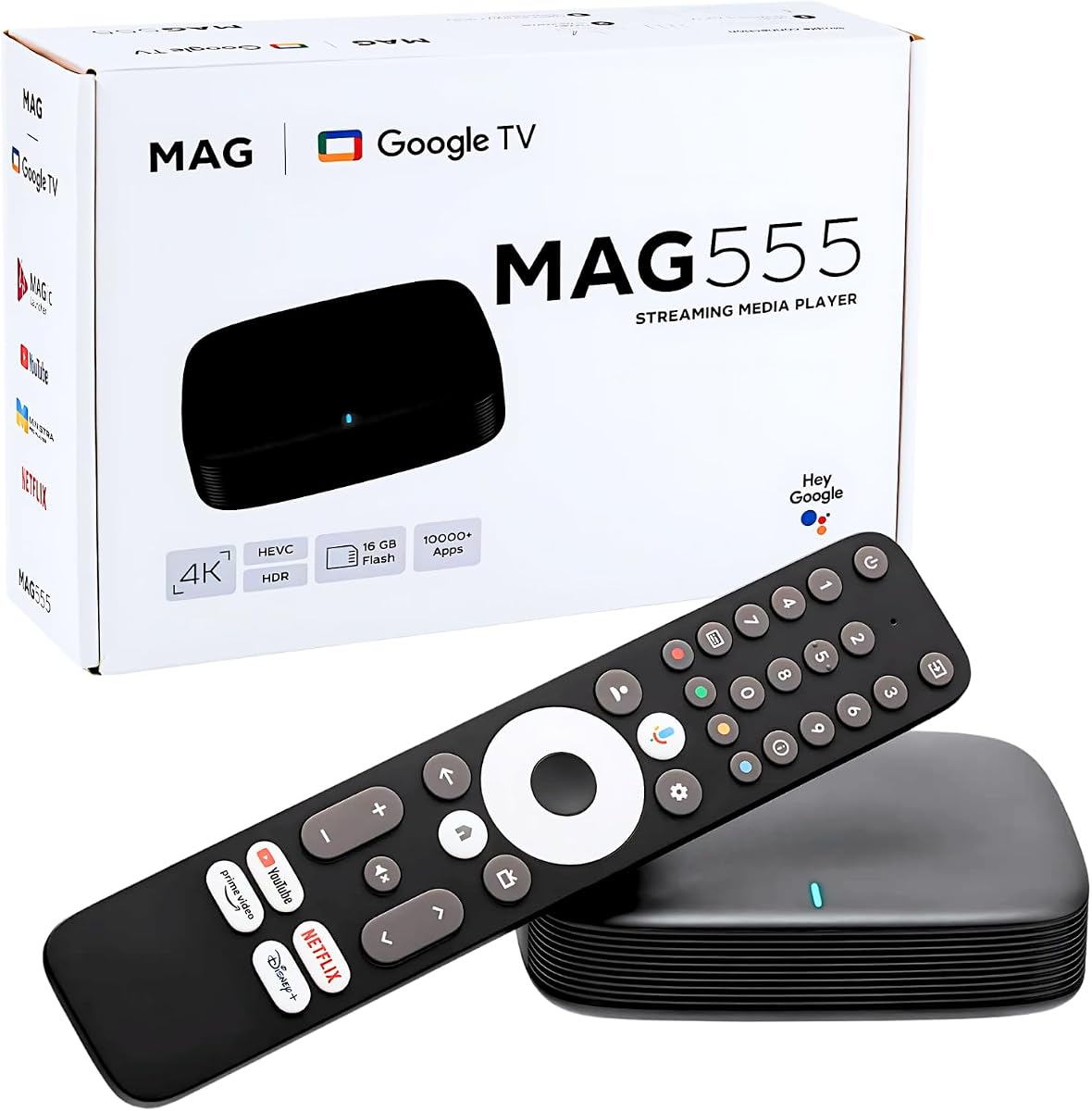
The Infomir MAG555 is a 4.0-rated Google TV 12 streamer offering a balanced mix of licensed applications, 4K output, and flexible connectivity. It is one of the clearest options for Netflix because the supplied information specifically names Netflix alongside Amazon Prime Video, Disney+, YouTube, and access through the Google Play Store.
We may earn a commission when you buy through this link, at no additional cost to you.
Its Amlogic S905Y4-B chipset supports 4K Ultra HD playback at 60fps, while dual-band Wi-Fi with 2×2 MIMO and a dedicated Ethernet port gives buyers two ways to stabilize streaming. HDMI 2.1, HDCP, and two USB 2.0 ports make it practical for connecting a modern television and external storage. The Google Assistant voice remote, Chromecast integration, and smart-home functions round out a versatile platform.
The device is compact at 106 by 106 by 23.5 millimeters, which helps it blend into an entertainment setup, but the listing provides less information about RAM and internal storage than several competing models. It supports Dolby Audio rather than specifying the same broad Dolby Vision and Atmos feature set as the GX1. Netflix picture quality will also depend on the television, Netflix tier, source quality, and account settings.
For someone upgrading a television with a straightforward Google TV box, the MAG555 offers an attractive balance of official services, strong networking, and compact design. It is a sensible choice for a bedroom, guest room, or main television where reliable Netflix access matters more than gaming or elaborate media processing. Confirm the available Netflix experience in your region before finalizing the purchase.
The combination of 2×2 MIMO dual-band Wi-Fi and Ethernet is especially useful for high-bitrate streaming. Buyers with a stable wired location can reduce wireless variability, while others retain flexible placement near the television.
Google TV 12, Chromecast, the Play Store, and the Google Assistant provide a complete ecosystem for Netflix and other applications. Personalized recommendations and unified app access are particularly convenient for households that switch among different services.
We may earn a commission when you buy through this link, at no additional cost to you.
The NEUMI Atom 4K Max is primarily a network and local-media player rather than a conventional Netflix streaming device. Its 1.0 customer rating gives potential buyers a clear reason to investigate compatibility before buying. The supplied specifications emphasize direct playback from USB drives, microSD cards, a NAS, or a Windows PC over Wi-Fi or Ethernet.
We may earn a commission when you buy through this link, at no additional cost to you.
Local storage is where the Atom stands out. It supports numerous video, music, photo, and subtitle formats, including H.265/HEVC and H.264 video, FLAC and APE music, PGS subtitles, and FAT32, exFAT, or NTFS storage. HDMI supports resolutions up to 2160p at 60Hz, while optical and analog AV outputs offer compatibility with older televisions and stereo systems. The included learning remote can operate television volume.
Its network playback is more limited, with the specification describing the smoothest network performance at up to 1080p and recommending USB or microSD for high-bitrate 4K. It is therefore best viewed as a media-center tool for people who already own digital files. A learning remote can operate television volume, and automatic playback, resume, looping, portrait rotation, and unattended operation make it useful for digital signage and dedicated media rooms.
The Atom is not the right primary recommendation for someone whose main goal is a Netflix app. Its value lies in local libraries, network folders, automatic operation, and compatibility with older audio equipment. Buyers should carefully assess the low rating, confirm that their preferred file formats and storage systems are supported, and ensure its streaming application limitations align with their expectations.
The Atom supports a wide range of containers, codecs, audio formats, images, and subtitle types. Buyers with USB collections, microSD libraries, or a Windows-based NAS can use the device as a dedicated playback machine without needing to manage every file through a cloud service.
Automatic playback, resume after an outage, continuous folder looping, and 90- or 270-degree rotation make the player useful for unattended displays. A front LED clock and fanless construction also suit environments where simplicity and low noise matter.
We may earn a commission when you buy through this link, at no additional cost to you.
The Raxxio MAG544w3 is a Linux-based 4K HDR set-top box with a 4.0 customer rating. Unlike a Google TV or Android TV streamer, it is explicitly hardware for compatible, user-configured third-party services. It does not run Android applications, and no television channels, subscriptions, or content are included with the device.
We may earn a commission when you buy through this link, at no additional cost to you.
The box uses an Amlogic S905Y4 chipset and supports 4K HDR output with AV1 and HEVC decoding. Ethernet and dual-band Wi-Fi offer flexible network connections, while Dolby Digital Plus support can provide compatible pass-through or output when the television, service, and content all support it. The package includes the device, infrared remote, HDMI cable, and power adapter.
The central limitation is service compatibility. Not every third-party provider supports this model, so buyers need to confirm before purchasing. Netflix should not be assumed to be available merely because the box can stream media or connect to the internet. A subscription and a compatible provider account may be required, and the experience will depend on the software interface supplied by that provider.
The MAG544w3 is best for users who already know which provider and operating environment they intend to use. It can serve as a compact 4K media endpoint with a useful mix of wired and wireless connectivity. It is not a general-purpose Netflix shopping choice unless the relevant provider explicitly supports the device and Netflix access through its service.
The Linux foundation makes the MAG544w3 more flexible for provider-specific deployments than ordinary app-based boxes. Its capabilities become useful only when the selected service is designed to run on it and supports the hardware model.
AV1 and HEVC decoding support modern high-efficiency video files, while 4K HDR output suits compatible televisions. Ethernet gives power users a stable option, and dual-band Wi-Fi keeps placement flexible when cabling is impractical.
We may earn a commission when you buy through this link, at no additional cost to you.
The Roku 3 is a 2014-era streaming media player with a 4.4 customer rating and a deliberately uncomplicated design. It provides up to 1080p HD video, extended-range dual-band wireless performance, and a channel-based interface that many viewers find approachable. Netflix is one of the prominent services supported through its unified search and channel experience.
We may earn a commission when you buy through this link, at no additional cost to you.
The supplied remote includes a headphone jack, allowing private listening without changing the television volume. Depending on the manufacturing date of the unit received, the remote may also include four shortcut buttons for Netflix, Amazon Instant Video, Rdio, and Hulu Plus. The free iOS and Android companion app can serve as a remote and can send music or photos from a phone or tablet to the television.
This is an older model, and its specifications reflect that generation. The 1080p ceiling is the largest limitation when compared with 4K Google TV and Android TV options. It also lacks the newer Dolby Vision, HDR10+, Wi-Fi 6, and advanced processing features found in current devices. Roku accounts are free, although payment information is requested during setup to support purchases from the Roku Channel Store.
The Roku 3 remains attractive for a secondary television, older HDMI television, or buyer who values simple navigation over 4K. Its dedicated streaming design and strong listed rating make it less intimidating than a feature-heavy box. For a new primary setup, however, a modern 4K Google TV model offers more longevity and broader support for current picture and audio formats.
Roku's channel-based layout places streaming services in a consistent visual format, reducing the need to move between differently designed apps. The included mobile app adds useful remote, music, and photo functionality for existing phone or tablet owners.
A headphone jack on the remote is a useful feature for late-night viewing because viewers can listen through earbuds while leaving the television volume low. It is a simple convenience that remains uncommon on many modern streaming boxes.
We may earn a commission when you buy through this link, at no additional cost to you.
The LG ST600 is a 2011 smart television upgrade stick with a 3.8 customer rating. It was designed to add internet-based entertainment to televisions that lacked suitable streaming capabilities. Netflix is explicitly among its supported services, along with Vudu, YouTube, CinemaNow, Hulu Plus, Picasa Web Albums, and Twitter.
We may earn a commission when you buy through this link, at no additional cost to you.
The device uses integrated Wi-Fi and HDMI output, includes an integrated web browser, and can download applications from the LG App Store. Its appeal is therefore focused: it can bring Netflix to an older LG television that has HDMI but lacks a modern smart platform. The concept is straightforward and less expensive than replacing a television.
The major concern is age. This product belongs to a generation of streaming devices whose apps, services, security standards, and video capabilities may be limited or outdated. The listing does not state 4K output, HDR support, modern audio formats, current app-store availability, or up-to-date casting features. Long-term Netflix support should be verified before purchase, especially because Netflix has evolved far beyond its early smart-TV application.
The ST600 makes the most sense for someone with an older television who wants a simple, inexpensive way to check whether Netflix remains accessible through the legacy LG platform. It is less compelling for a new installation or a household expecting current 4K, HDR, voice search, and broad app support. In those cases, a modern certified Google TV device is a safer long-term choice.
The ST600 adds streaming and web functionality without requiring a television replacement. It is especially relevant for owners of compatible older LG sets that have HDMI inputs but lack current smart-TV capabilities.
The LG App Store and familiar streaming services make the interface straightforward for its era. However, buyers should check current Netflix and app compatibility because hardware from 2011 may not receive the same updates or content features as modern certified platforms.
We may earn a commission when you buy through this link, at no additional cost to you.
The Raxxio MAG555 is a hardware-only Google TV streaming player with a 3.8 customer rating. It combines the official Google TV interface with an Amlogic S905Y4-B2 processor, 2GB of RAM, 4K HDR playback at 60fps, and a Bluetooth voice remote. Applications can be downloaded from the Google Play Store, but content and subscriptions remain the user's responsibility.
We may earn a commission when you buy through this link, at no additional cost to you.
Dual-band Wi-Fi and Bluetooth 5.0 provide modern wireless connectivity. The included voice remote can search within installed applications, control playback, and navigate menus where the relevant app supports voice commands. Playback supports Dolby Digital audio, while the device can handle 4K HDR content from compatible applications. USB expansion and 16GB of internal storage provide some room for apps and files.
The listing does not mention an Ethernet connection, which may be an important limitation for buyers who want a wired path for high-resolution streaming. It also does not explicitly identify Netflix certification or native Netflix availability, so users should confirm the app and service experience for their region. Dolby Digital support is less ambitious than the Dolby Vision and Atmos specification listed for the RockTek GX1.
This MAG555 is a solid option for adding Google TV to a television that needs a modern interface, particularly when voice control and wireless streaming are priorities. It should not be selected solely on the basis of the MAG555 name because other devices use similar branding with different specifications. Confirm Netflix support, regional service availability, and the absence or presence of Ethernet before ordering.
The Bluetooth remote's built-in voice functionality makes content search and playback control convenient when supported. It reduces the need to navigate long on-screen keyboards, particularly when searching across installed streaming applications.
The S905Y4-B2 processor and 2GB of RAM provide a modern platform for standard streaming tasks. The comparatively small 16GB storage pool can fill quickly with apps, although USB expansion provides a path for additional media.
We may earn a commission when you buy through this link, at no additional cost to you.
The NVIDIA Shield TV Pro is a well-known streaming hardware platform with a 4K Ultra HD display output, Wi-Fi, Ethernet LAN, and a Tegra X1+ processor. The supplied listing identifies 2GB of RAM, 8GB of internal storage, and a microSD slot. Its 2.0 customer rating is the lowest among the products in this guide and warrants careful consideration.
We may earn a commission when you buy through this link, at no additional cost to you.
Although the listing provides little beyond the model and core hardware, the device's principal appeal is its established streaming-platform foundation and combination of local gaming, media, and casting functions. A wired Ethernet connection is useful for stable high-bandwidth streaming, while Wi-Fi allows flexible placement. Four gigabytes of memory can help with navigation and multitasking compared with basic boxes.
The most obvious limitation is storage. Eight gigabytes is extremely limited for modern applications, downloads, and temporary files, making the microSD slot an important part of the setup. The rating also suggests that buyers may encounter dissatisfaction related to performance, software support, storage, or another issue not detailed in the supplied information. Detailed Netflix compatibility and current app behavior should be verified before purchase.
The Shield TV Pro is best considered when the buyer specifically values the NVIDIA ecosystem, already uses its services, or can obtain the device in a particularly favorable condition. It offers strong hardware fundamentals with 4K output, 2GB of memory, and Ethernet, but the low rating and limited storage prevent it from being a strong general recommendation for a new Netflix-focused setup.
The Tegra X1+ platform, Google-based streaming environment, casting functions, and local media capabilities make the Shield recognizable for gaming and media users. Its Ethernet option is particularly helpful for high-resolution streaming and large local files.
With only 8GB of built-in storage, buyers should think about the limited room available for applications and downloads. The microSD expansion slot helps with local files, but it does not expand the operating system's internal app storage.
We may earn a commission when you buy through this link, at no additional cost to you.
The right media streamer for Netflix depends on more than headline resolution. Platform certification, picture formats, connection options, storage, navigation, and intended viewing location should all be evaluated before making a choice.
A device can technically support streaming without offering the most complete Netflix experience. The Infomir MAG555 and RayNeo Pocket TV Pro explicitly identify Netflix support, while the Phantom Dcolor GD2 lists Netflix 4K streaming. The RockTek GX1 uses Google TV and includes casting and voice functions, but its supplied information does not explicitly confirm Netflix certification. Linux-based models are provider-dependent, so a customer must verify that a compatible service supports the exact hardware and Netflix access.
Choose a model with a current app store, licensed Netflix application, and clearly documented regional availability. Certification generally indicates a baseline of platform compatibility, app access, and security expectations, but it does not guarantee every picture feature or the highest streaming quality.
A 4K-capable device is worthwhile when the television can display 4K content, but the output specification is only half the equation. The Infomir MAG555 supports 4K at 60fps, and the RockTek GX1 adds Dolby Vision, HDR10+, and Dolby Atmos. The RayNeo Pocket TV Pro delivers Dolby Vision through compatible GT-series glasses, while the Raxxio MAG544w3 supports 4K HDR and modern AV1 and HEVC decoding.
Match the streamer to the display and sound system. HDR requires compatible source content, an appropriate app, suitable television processing, and sometimes a capable audio system. A lower-resolution model can still be sufficient for an older or secondary television, while modern 4K features add flexibility in a main entertainment room.
Google TV and Android TV provide familiar app-based experiences, but they are not identical. Google TV emphasizes recommendations and integrated casting, while Android TV offers a flexible app grid. The Raxxio MAG544w3 uses a provider-specific Linux interface and does not run Android apps, while the older Roku 3 offers a focused channel menu. Legacy devices may feel simpler but offer fewer current features and potentially limited long-term support.
Consider how your household searches for programs, switches between Netflix and other services, and uses voice commands. A platform with an active app ecosystem, regular updates, and current streaming applications usually represents a safer long-term investment than dated hardware or a provider-dependent system.
Streaming quality depends on a stable connection, not merely a fast headline standard. Dual-band Wi-Fi appears throughout many of the current models, while the RockTek GX1 adds Wi-Fi 6. The Infomir MAG555 and Raxxio MAG544w3 also include Ethernet, giving buyers a wired option for high-bitrate streams, large files, and homes where wireless coverage is inconsistent. The Raxxio MAG555 listing mentions only dual-band Wi-Fi, while the NVIDIA Shield TV Pro includes both wireless and Ethernet LAN.
Use Ethernet when the streamer will sit near the router or a structured home network can support a cable. Otherwise, place the device where 5GHz Wi-Fi signal is strong and avoid congested channels. A modern wireless standard cannot compensate for an unreliable router or internet service.
Streaming boxes may need storage for applications and updates even when most viewing happens online. The Phantom Dcolor GD2 provides 32GB, the RayNeo Pocket TV Pro provides 64GB plus microSD expansion, and the Raxxio MAG555 provides 16GB with USB expansion. At the other end, the NVIDIA Shield TV Pro has only 8GB, making the microSD slot particularly relevant for local media.
The NEUMI Atom is built primarily around direct playback from USB drives, microSD cards, and Windows SMB network folders. It supports extensive media formats but is not positioned as a standard Netflix device. If you own large local libraries, prioritize ports, codec support, and network browsing. If you stream primarily, prioritize app support and stable wireless or wired connectivity.
Most streaming boxes are designed to sit near a television, but the RayNeo Pocket TV Pro offers a genuinely portable alternative for travel. Its built-in battery supports up to 5.5 hours of uninterrupted viewing, and its USB-C DisplayPort connection is designed for compatible RayNeo GT and GT Max glasses. This makes it useful in flights, hotels, and commutes, but it does not replace a conventional HDMI television streamer.
Consider room size, screen size, and whether privacy matters. A portable AR system can provide a personal viewing experience in shared spaces. For a living room, however, a box with HDMI, broad app support, and familiar remote navigation will generally be more convenient. Do not buy portable hardware unless the required glasses and viewing workflow fit your habits.
Picture quality is only one part of the entertainment experience. The RockTek GX1 supports Dolby Atmos, the Raxxio MAG544w3 supports Dolby Digital Plus, and the NEUMI Atom includes optical and analog audio outputs for older equipment. Built-in casting appears on the Phantom Dcolor GD2, RockTek GX1, Infomir MAG555, and other compatible devices, while voice remotes are common among current Google TV and Android TV products.
Prioritize audio support that matches your sound system and apps that work together with your phone or smart-home devices. Older televisions and receivers may benefit more from optical or analog outputs, while modern home theaters can take full advantage of object-based audio when the source and application support it.
Support can influence ownership as much as the hardware. The RockTek GX1 includes a 12-month television-box warranty and a three-month accessory warranty, with support available by email and Amazon messaging. The NEUMI Atom includes a one-year warranty. By contrast, the Raxxio MAG544w3 requires a compatible third-party provider, and provider support may determine the device's usefulness more than its own specifications.
Read the service requirements, included accessories, warranty length, and regional compatibility notes before ordering. Also check the television's HDMI and HDCP support, the available app version, and whether a newer device would offer better long-term service continuity. Good support cannot compensate for a platform that lacks the applications you need.
Start by confirming that the streamer supports Netflix in your country, then connect it using the appropriate HDMI or glasses connection. For a conventional box, connect the supplied HDMI cable to the television, attach the power adapter, and select the correct HDMI input. The RayNeo Pocket TV Pro follows a different process: it is engineered for compatible RayNeo GT or GT Max glasses and uses a USB-C DisplayPort 1.2 cable rather than a standard television connection.
Complete the platform's setup process, connect to a reliable network, and sign in to the required streaming accounts. Enter Netflix credentials, select the appropriate viewing or download options, and adjust the television's picture and sound settings. Use Ethernet for a stable wired connection where available, or place a wireless streamer within strong 5GHz coverage. Voice search can help locate programs, but direct app navigation remains useful when a search result is unavailable.
For maintenance, keep the device ventilated and away from enclosed or dusty locations. Clean the exterior with a dry, soft cloth rather than pouring liquid into the box. Update the operating system and applications when updates are offered, and use only compatible storage formats for USB drives or microSD cards. If media playback is interrupted, check the connection, restart the application, and confirm that the account and service are operating normally.
Yes, viewing Netflix content requires a valid Netflix subscription. The streaming device provides access to the app and television experience, but it does not include Netflix memberships, shows, or subscriptions. Some providers also require separate accounts or compatible third-party service configurations, particularly for Linux-based set-top boxes.
Google TV is generally easier to navigate for users who want recommendations, voice search, and integrated casting, while Android TV provides a more flexible app-oriented grid. Both can support Netflix when the app is available and licensed in the region. The best choice depends on interface preference, hardware, and the other features offered by the particular device.
A 4K streamer can often connect to an older television through HDMI, but the television may display only 1080p or another lower resolution. HDR, high frame rates, and advanced audio also require compatible equipment and content. Legacy devices such as the Roku 3 and LG ST600 are limited to the capabilities of their older generation.
Ethernet is generally more consistent because it avoids wireless congestion and signal fluctuations. It is especially useful for 4K streams, large local media files, and homes where the streamer can be connected by cable. Dual-band or Wi-Fi 6 can perform very well when the router is modern, the signal is strong, and the internet service is stable.
The Pocket TV Pro is designed to pair with compatible RayNeo GT or GT Max glasses and is not compatible with other manufacturers' AR glasses. Dolby Vision support depends on the specific RayNeo model, and the Air Series receives SDR playback rather than the full Dolby Vision experience. It is therefore a specialist portable system rather than a universal living-room streamer.
The NEUMI Atom 4K Max is designed specifically around USB drives, microSD cards, and network browsing from Windows SMB shared folders. It supports a broad selection of video, music, photo, and subtitle formats, including H.265/HEVC and H.264. Its network playback is specified as smoothest up to 1080p, so local USB or microSD storage is preferable for demanding 4K files.
That depends on the platform and service, so current compatibility should be confirmed before purchase. The 2014 Roku 3 and 2011 LG ST600 provide Netflix access according to their supplied information, but they lack modern 4K, HDR, and platform features. A current Google TV or Android TV model usually offers better long-term application and hardware support.
No. The RockTek GX1 lists Dolby Vision, HDR10+, and Dolby Atmos, while the RayNeo Pocket TV Pro supports Dolby Vision through compatible GT-series glasses. Other devices offer Dolby Audio or Dolby Digital Plus, which are not the same feature set. The app, content, television, and audio system must also support the selected format.
The RockTek GX1 earns the Editor's Choice position for its strong listed rating, Google TV foundation, Dolby Vision and Dolby Atmos support, Wi-Fi 6, and broad picture-processing features. The Infomir MAG555 is the Best Budget option for buyers wanting explicit Netflix support, official Google TV 12, 4K output, and both Ethernet and dual-band Wi-Fi. The RayNeo Pocket TV Pro takes the Best Premium position because its Dolby Vision AR experience and battery-powered portability serve a distinctive use case.
Most households should prioritize a current platform with the Netflix application, dependable connectivity, and features that match the television and sound system. A modern Google TV model is the safest all-around approach, while Android TV offers flexibility and the Roku 3 provides a simple, familiar alternative. Provider-dependent Linux boxes and local-media players require more specific purchase conditions and should not be chosen as generic Netflix devices without confirming compatibility.
Before purchasing, check the current listing, regional Netflix support, included accessories, app requirements, and warranty details. Prices, promotions, software availability, and product configurations can change over time, so the final choice should reflect current conditions as well as the specifications and features compared in this November 2026 guide.