
ZUNE Charger Cable, USB Sync & Power Charge Cord for Microsoft Zune
4.5Editor score
Charging and USB synchronization
Wide Zune model support
Three-foot PVC cable
Works with common USB chargers
Our Microsoft Zune Charger Cable Replacement guide compares 10 options for charging, syncing, compatibility, cable length, build, and everyday reliability.
A Microsoft Zune Charger Cable Replacement is a small accessory with an important job: restoring dependable power and data connections for classic Zune players. The right cable should match the connector, support the intended charging method, and provide a secure fit without damaging the device’s charging port.
This guide compares ten replacement options listed for Zune devices and closely related portable media players. We considered the stated Zune compatibility, charging and synchronization functions, connector design, cable length, current rating, shielding, construction details, warranty information, and customer ratings.
The results include dedicated Zune cables, broader alternatives, and a few options intended for other legacy players. Each review explains who may benefit from that cable and where it falls short. Availability and prices can change, so confirm the connector, player model, and current listing before purchasing.
4.5Editor score

4.6Editor score

4.4Editor score
The table below compares each cable by its stated device support, charging function, synchronization capability, and key construction details. It includes dedicated Zune replacements and alternative legacy-player cables whose usefulness depends on connector compatibility.


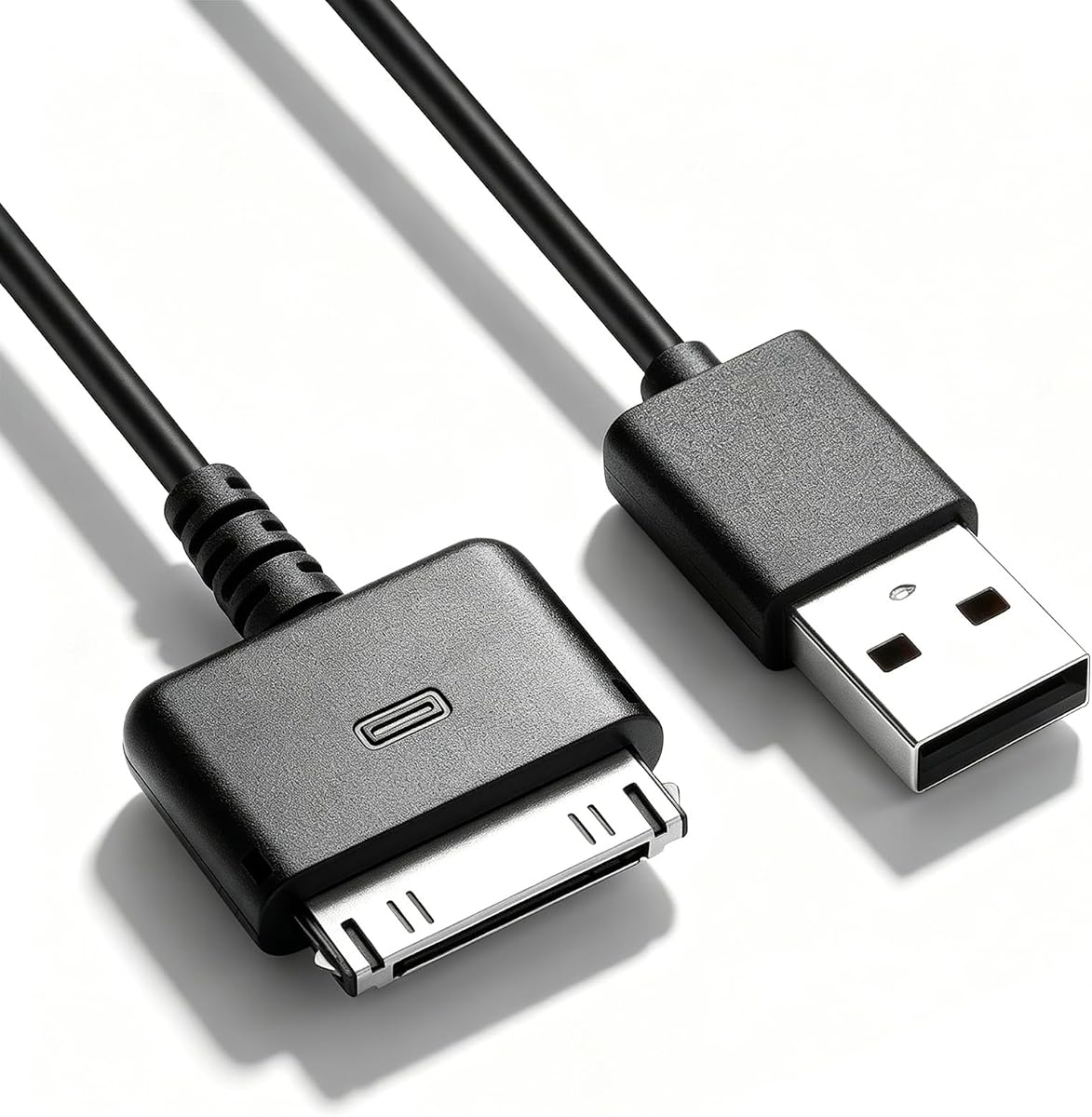


This replacement cable combines power charging and USB synchronization in a straightforward three-foot design. It carries a 4.5 customer rating and stands out for its unusually broad list of supported Microsoft Zune models, including the Zune 80, 120, 4, 8, 16, 30GB, 4GB, 8GB, 80GB, 120GB, and several Zune HD storage configurations.
We may earn a commission when you buy through this link, at no additional cost to you.
Its main strength is flexibility at the power source. The listing says it can recharge through a car charger, phone charger, tablet charger, computer USB port, or USB battery pack. A stated 2A carrying capacity gives it more current headroom than many replacement cables, while the PVC jacket is positioned as a durable, straightforward option for regular home, office, and travel use.
The trade-offs are its basic construction and lack of a stated warranty. Unlike the metal-connector and dual-shielding options in this list, it does not describe foil shielding, bare copper conductors, or enhanced interference protection. Those omissions may matter for a desktop syncing setup, but they are less concerning for straightforward charging from a modern wall adapter.
This is a strong choice for a Zune owner who wants one inexpensive, versatile cable for charging and occasional synchronization. Its model coverage, current rating, and range of compatible USB power sources give it more everyday utility than a narrowly specialized replacement.
The cable's ability to work with wall adapters, car chargers, power banks, tablets, phones, and computer USB ports makes it convenient for travel and emergencies. Its three-foot length provides enough reach for many desk setups without creating unnecessary cable clutter.
The extensive compatibility list is especially helpful for collectors who own more than one generation or storage configuration. Buyers should still compare the player’s physical connector with the product images before ordering.
We may earn a commission when you buy through this link, at no additional cost to you.
This USB charging and synchronization cord is designed for Microsoft Zune 80, 120, 4, 8, and 16 models as well as 30GB, 4GB, 8GB, 80GB, 120GB, and Zune HD 16GB, 32GB, and 64GB variants. Its 4.4 rating reflects a generally favorable customer reception, while its strongest feature is the breadth of stated compatibility.
We may earn a commission when you buy through this link, at no additional cost to you.
The cable can draw power from a computer USB port, wall charger, car charger, power bank, or tablet charger. This makes it a practical all-purpose lead for owners who want to restore basic charging without tying the player to a single outlet type. The listing also emphasizes stable data synchronization for moving files between the Zune and a computer.
Data syncing is not as simple as plugging in the cable. The product information advises installing official Zune 4.8 software and recommends a rear-panel computer USB port when a connection is unstable. That software requirement is inherent in the listed transfer process and should be considered before purchase.
This option is well suited to collectors who own several listed Zune configurations and want both charging and syncing in one lead. Its unspecified cable length makes it less ideal for buyers with a precise reach requirement, but its charging-source flexibility and model coverage remain compelling.
Compatibility with power banks, car chargers, wall adapters, tablets, and computers means the cable can travel easily. This broad source support is valuable when the original proprietary Zune charger is no longer available.
The recommendation to use the rear USB port can help reduce connection problems caused by a loose front-panel socket. Official Zune 4.8 software remains necessary for the synchronization workflow described by the manufacturer.
We may earn a commission when you buy through this link, at no additional cost to you.
This black three-foot replacement cable is specifically designed for Microsoft Zune, Zune2, and Zune HD players. It carries a 4.3 rating and differentiates itself through a more technical construction, including metal connectors, bare copper conductors, and both metal and aluminum-foil shielding layers.
We may earn a commission when you buy through this link, at no additional cost to you.
The cable is rated at 1.5A and 26 AWG, providing a suitable baseline for charging while also supporting data synchronization. Its double-shielded construction is intended to reduce jamming and interference, which can be useful when transferring files in environments with nearby electronic equipment or when working at a desk with several USB devices attached.
Compatibility is intentionally narrow. The product information clearly says it fits the listed Zune models but does not fit SanDisk or other MP3 players. It also requires official Zune 4.8 software for computer connection, and a rear computer USB port is recommended if the front socket is loose.
This cable is a good match for a Zune owner who values shielding and a clearly defined Zune-specific fit more than cross-device versatility. The explicit incompatibility warning reduces confusion, while the construction details give it an edge for regular syncing or for users who keep their player connected for extended periods.
Metal and aluminum-foil shielding are intended to limit electromagnetic interference and data errors. The bare copper conductors also support the product’s stated goal of stable charging and synchronization.
The Zune-only warning is important because similar legacy media players may use different connectors. Checking the player and the included connector shape avoids buying a cable that cannot physically attach.
We may earn a commission when you buy through this link, at no additional cost to you.
This replacement Microsoft Zune cable combines charging, data synchronization, and broad support for Microsoft Zune, Zune2, and Zune HD players. Its 4.6 rating is the highest numerical rating among the products with an established rating in this guide, giving it the strongest customer-feedback signal among the dedicated options.
We may earn a commission when you buy through this link, at no additional cost to you.
Its 100-centimeter, or 3.3-foot, cable includes metal connectors, bare copper conductors, and dual shielding through metal and aluminum-foil layers. The stated 1.5A and 26 AWG rating supports the intended charging function, while the shielding is designed to reduce interference and signal errors during data transfers.
As with the other Zune-specific synchronization cables, computer syncing requires official Zune 4.8 software. The recommendation to use a rear-panel USB port is useful because loose front sockets can interrupt older USB connections. These are setup considerations rather than major flaws for a buyer who intends to transfer files as well as recharge.
The included 12-month warranty and customer service make this the most complete overall proposition in the list. It suits most Zune owners seeking a modern replacement cable, dependable construction, and a stated support period without moving to the more specialized 2-in-1 offering.
Rather than focusing on power alone, this cable supports both charging and synchronization. That versatility makes it useful for routine top-ups as well as moving music and other supported files between a computer and player.
Metal connectors, copper conductors, and dual shielding provide a more reassuring specification set than a basic cable. The stated 12-month warranty adds visible support for buyers who want some recourse if a replacement fails.
We may earn a commission when you buy through this link, at no additional cost to you.
The DTOL cable is a basic USB-to-Zune power charger aimed at owners who want an uncomplicated replacement lead. It has a 4.0 rating and covers the Zune 80, 120, 4, 8, 16, 30GB, 4GB, 8GB, 80GB, 120GB, and multiple Zune HD capacities.
We may earn a commission when you buy through this link, at no additional cost to you.
Its main practical advantage is ease of use. The cable can recharge through a car charger, phone charger, tablet charger, computer USB port, or USB battery pack. This broad source compatibility mirrors the convenience of the first-ranked budget cable, although the DTOL listing provides fewer details about the physical construction and synchronization workflow.
The absence of technical information is the primary drawback. There is no stated shielding, conductor material, current rating, or cable length, so buyers cannot assess those characteristics from the supplied listing. Its 4.0 rating is also the lowest established score among the products in the guide.
Choose this cable when basic power restoration is the priority and the player is one of the listed compatible models. It is less compelling for buyers who require a known cable length, advanced shielding, detailed warranty terms, or heavily documented data-transfer performance.
The plug-and-play approach suits a Zune owner who primarily needs to charge from an existing wall adapter or computer. It also allows the same cable to be used across several familiar charging locations.
Buyers seeking details about conductor material, shielding, or current handling may find more transparency in the ranked metal-connector alternatives. A visual check of the connector remains essential for any legacy-player purchase.
We may earn a commission when you buy through this link, at no additional cost to you.
This 2-in-1 cable is positioned as a complete charging and synchronization solution for Microsoft Zune players. It supports Zune 4GB, 8GB, 16GB, 30GB, 80GB, and 120GB models, plus HD-16GB, HD-32GB, and HD-64GB versions, covering both V1 and V2 models.
We may earn a commission when you buy through this link, at no additional cost to you.
Its strongest feature is the USB 2.0 data-transfer function. The cable can synchronize a music library and other listed content, including digital photos, camcorder videos, contacts, emails, appointments, and ringtones, with a PC or laptop. It can also charge through a computer USB port or a phone USB charger, giving it a clear two-function role.
Some technical information is not provided, including exact cable length, conductor materials, shielding, and a warranty period. Those omissions prevent it from being a better universal recommendation than the Editor’s Choice cable, which supplies a current rating, shielding description, and warranty term.
This is the strongest option for a collector with multiple Zune generations or for someone who prioritizes transferring media rather than merely restoring power. Its stated all-model support and USB 2.0 syncing focus justify considering it ahead of simpler charging leads.
Combining USB 2.0 synchronization with charging reduces the need to alternate between separate cables. This is particularly helpful when building or updating a Zune music library on a computer.
The stated support for V1 and V2 players and a wide range of standard and HD capacities makes this appealing to collectors. Physical connector inspection is still a sensible final step before purchase.
We may earn a commission when you buy through this link, at no additional cost to you.
This four-foot replacement charging cable is primarily marketed for Barnes & Noble Nook HD 7, HD+ 9, BNRV400, BNTV400, and BNTV600 tablets. Its listing compares it with a Zune charger cable and describes it as an alternative for similar charging needs, but it does not claim direct Microsoft Zune compatibility.
We may earn a commission when you buy through this link, at no additional cost to you.
The cable includes built-in smart chips intended to protect against over-voltage, over-current, and short-circuit conditions. It is designed for plug-and-play use at home, in an office, or while traveling. The manufacturer recommends a 5V/2A USB adapter and states that a full charging cycle takes approximately 3.5 hours.
Its four-foot length is the longest specified in the comparison, which may be useful for reaching a wall outlet from a bed, desk, or sofa. However, the product is not presented as a Zune-specific cable, its 3.9 rating is the lowest established score in the guide, and no data-cable length or Zune model coverage is clearly specified.
This is a conditional alternative rather than a primary recommendation for a Zune owner. Consider it only after confirming that the cable’s connector physically fits the Zune and that charging—not synchronization—is the sole requirement.
The four-foot lead provides more reach than the three-foot alternatives for bedside or countertop charging. Its plug-and-play design keeps setup uncomplicated.
The stated safeguards against over-voltage, over-current, and short-circuit conditions are useful qualities in a replacement cable. They do not, however, replace the need to verify physical connector compatibility.
We may earn a commission when you buy through this link, at no additional cost to you.
This cable is explicitly described as a USB synchronization and charging lead for Microsoft Zune HD, 80GB, and 120GB MP3 and MP4 players, with V1 and V2 support stated in the title. It serves the same core purpose as the dedicated Zune cables: restoring a connection for power or file transfer.
We may earn a commission when you buy through this link, at no additional cost to you.
Its focused compatibility makes it potentially useful for owners of the named models. The combined charging and sync description is attractive because it suggests the cable can handle routine replenishment and computer transfers without requiring two separate leads.
The available product information is sparse. No numerical customer rating, cable length, current rating, connector material, shielding description, or warranty is supplied. As a result, it is harder to compare with the more fully documented alternatives and carries more uncertainty for buyers who need precise specifications.
This listing is best treated as a simple secondary option for a compatible Zune owner. A product with documented shielding, current handling, length, and customer feedback would be easier to recommend, but the basic charging-and-syncing proposition remains clear.
The listing centers on Zune devices rather than presenting a generic multi-purpose USB lead. That focus can make the purchase decision simple when the buyer knows the player model.
Because the listing provides minimal specifications and no numerical rating, buyers should review the current connector images and description carefully. A confirmed fit is more important than an attractive listing title.
We may earn a commission when you buy through this link, at no additional cost to you.
This three-foot black cable uses a USB 2.0 Type-A male connector on one end and a Micro-B male connector on the other. It is designed for the SanDisk Sansa Clip Zip SDMX22 rather than Microsoft Zune, and it has a 4.6 rating that makes its customer feedback stronger than several dedicated alternatives.
We may earn a commission when you buy through this link, at no additional cost to you.
The listing describes a secure connection without gaps or static electricity and advertises data transfer of up to 480Mbps. Its three-foot length is practical for a computer desk setup, and the cable supports both synchronization and power delivery for the specified player.
There is a wording inconsistency in the product description: the connector is clearly identified as USB-A to Micro-B, while one bullet refers to a USB-C-compatible computer. For a Zune-focused buyer, the more important issue is that the SanDisk Sansa Clip Zip is not listed as compatible with this cable.
This cable is an excellent option for a Sansa Clip Zip owner but not a verified Microsoft Zune replacement. Zune buyers should only consider it after confirming that the player actually uses a matching Micro-B connector and that the Zune’s data and charging protocols are supported.
The USB-A to Micro-B specification makes the physical connection easy to understand. A stated transfer rate of up to 480Mbps aligns with the USB 2.0 standard identified in the title.
This cable serves the SanDisk Sansa Clip Zip SDMX22, not a Microsoft Zune. Similar connector shapes do not guarantee compatible charging and synchronization behavior across legacy media players.
We may earn a commission when you buy through this link, at no additional cost to you.
This third-party replacement cable is intended for the WMC-NW20MU Walkman MP3 and MP4 player. It uses a USB-A to WM-Port connector, measures 3.3 feet, and supports charging plus high-speed music data transfer. The player itself is not included.
We may earn a commission when you buy through this link, at no additional cost to you.
Its durable, flexible wire and plug-and-play arrangement make it a convenient replacement for the specified Walkman. The product clearly identifies itself as a third-party accessory rather than an original factory cable, which helps set appropriate expectations about fit and performance.
The product is not listed as a Microsoft Zune replacement, and Zune players use their own proprietary charging connector design. Because the WM-Port connector is shaped differently, this cable should not be expected to fit a Zune even if the player’s USB-based charging behavior sounds similar.
The recommendation applies to someone restoring the specified Walkman connection. For a Zune buyer, the dedicated cables in the upper ranks are substantially safer choices because their listings expressly identify Zune compatibility.
The WM-Port connector is specifically matched to the WMC-NW20MU player. This focused design makes the cable useful when a compatible Walkman’s original lead has been lost or damaged.
The WM-Port and Zune connectors are not interchangeable. Zune owners should choose a listing that expressly names their player and should confirm the visible connector shape before ordering.
We may earn a commission when you buy through this link, at no additional cost to you.
The most important consideration is physical compatibility with the specific Zune player. Once that is confirmed, charging sources, synchronization support, construction, length, and warranty terms can help distinguish otherwise similar replacement cables.
Microsoft produced several Zune families, and replacement listings use overlapping labels such as Zune 4, 8, 16, 30GB, 80GB, 120GB, Zune HD, and Zune2. The guide’s leading dedicated cables claim support for wide combinations of these models, but a seller’s broad compatibility statement should still be compared with the player in hand. Look at the charging socket rather than relying only on storage capacity or generation. A collector may need a cable that handles several models, while a single-device owner can prioritize the most exact match and avoid paying for features they will never use.
A cable advertised only for power may be sufficient for listening and routine battery maintenance. A USB sync cable can additionally transfer supported files between the player and a computer. Products using the Zune 4.8 software mention that requirement for synchronization, so a buyer planning to manage a music library should confirm that official software is available and compatible with the computer being used. Dedicated data cables are the better choice when transfer reliability matters; a basic charging lead makes more sense when the original computer connection is no longer needed.
Two of the better-documented dedicated replacements state a 1.5A rating, while another states that it can carry 2A. These figures help assess whether a cable is designed for ordinary Zune charging rather than merely fitting the socket. Also consider the power source. The strongest listings mention computer USB ports, wall adapters, car chargers, phone or tablet chargers, and USB battery packs. A cable that works with a wall adapter but cannot safely carry data is not equivalent to a full USB 2.0 synchronization lead, even if both physically plug into the player.
Metal connectors, bare copper conductors, and shielding provide stronger technical specifications than an unreported basic cable, though they do not guarantee flawless performance. The higher-ranked replacement cables describe metal connectors and dual shielding with metal and aluminum-foil layers. One alternative also states a 26 AWG conductor size. These details are most relevant to buyers who will use the cable for repeated syncing or keep a player connected near other electronics. For occasional charging, secure connector fit and sound physical construction may matter more than advanced shielding claims.
Most dedicated Zune replacements in the guide are 3.3 feet long, while the Nook-focused alternative measures four feet and the Walkman replacement also uses 3.3 feet. Length determines where the player can sit relative to a wall outlet, computer, or power bank. A short cable can reduce clutter at a desk, while a longer lead provides more freedom around furniture. Avoid choosing solely by appearance: the cable must also reach comfortably without pulling against the player’s connector or creating a sharp bend where it meets the plug.
Legacy Zune synchronization is not always a completely modern plug-and-play process. Multiple dedicated cables recommend installing official Zune 4.8 software and recommend a rear-panel USB port when a computer’s front socket feels loose. These instructions may improve connection stability and help manage files consistently. If the goal is only charging, software requirements are less relevant. If the goal is synchronization, buyers should be prepared to use the appropriate official software and may need to experiment with different computer USB ports.
The Editor’s Choice replacement includes a stated 12-month warranty and customer service, while the Adhiper cable mentions warranty and support without giving the same duration in the supplied details. A warranty can be useful for a frequently handled lead that may be dropped, twisted, or stored in a bag. It is less important for a stationary desktop setup where the cable is unlikely to be stressed. Warranty language does not substitute for confirming compatibility, but it can help distinguish otherwise similar replacement cables.
Some legacy players use Micro-B, WM-Port, or other connectors that may look superficially similar. The SanDisk and Walkman cables in this guide are useful for their named devices but are not Zune replacements. Even if a plug appears to enter the Zune socket, proper charging and data communication may still be uncertain. A Zune-focused listing, clear connector imagery, and an explicit model list provide a safer basis for purchase than assumptions based on the player’s age or storage size.
Before connecting the cable, inspect the player’s charging port and both cable ends for dust, bent pins, or damage. Make sure the connector fits without force. For charging, connect the Zune end first, then attach the USB end to a compatible wall adapter, computer port, car charger, power bank, or another listed USB power source. If synchronization is required, install the official Zune 4.8 software and use a stable computer USB connection, preferably a rear port if the front connection is loose.
To protect the cable and the player, hold the connector housing rather than pulling the wire when unplugging. Avoid sharp bends, twisting the lead tightly around the Zune, and using a port that requires excessive force. Do not use a visibly frayed cable, a connector with a loose fit, or a charger whose output does not meet the cable’s requirements. Keep the cable away from heat, moisture, and pets that might chew the insulation.
For storage, loosely coil the cable rather than winding it tightly around a small radius. Store it separately from keys, tools, and other objects that could scratch the connector. If syncing becomes unreliable, test another USB port, reconnect the Zune, confirm that the official software is running, and inspect the socket for debris. A replacement cable solves connector and cable damage, but it cannot repair a blocked or damaged Zune charging port.
Microsoft Zune players use their own proprietary charging and data connector rather than a standard USB-A or USB-B plug on the player end. The other end is USB, allowing connection to a computer, wall adapter, power bank, or other stated USB power source. Check the physical socket and the replacement listing’s images before ordering, especially when comparing it with cables for SanDisk or Sony Walkman players.
Only if it has the correct Zune-side connector and is designed for Zune charging. A generic USB cable with a Micro-B or other end may fit neither the player nor its proprietary socket. Even similarly shaped legacy-player connectors should not be assumed to support charging and synchronization correctly.
No. Some dedicated cables are described as USB sync and charging cables, while others emphasize power charging. For file transfers, choose a cable that explicitly states USB data synchronization and expect to use the official Zune 4.8 software described by the relevant listing.
The leading dedicated options state that they can charge through common USB sources, including wall chargers, car chargers, tablet or phone chargers, USB battery packs, and computer ports. Verify that the USB power source uses a standard USB-A connection and supplies appropriate current. A suitable cable makes charging more flexible without requiring the original Zune dock.
The cable may fit but still lack data conductors, or the computer connection may be unstable. Install the official Zune 4.8 software, reconnect both ends, and try a rear-panel USB port rather than a loose front socket. Inspect both the cable connector and the player’s port for dust or damage, and confirm that the cable is listed for synchronization.
Several replacement listings state that one cable supports multiple standard and HD Zune capacities, including 80GB, 120GB, 16GB, 32GB, and 64GB configurations. Still, the safest approach is to verify the player model and connector before purchasing rather than relying only on shared capacity labels.
A 3.3-foot cable is common among the dedicated options and works well for many desk, bedside, and travel arrangements. The four-foot Nook-focused alternative offers more reach but is not established as a Zune cable. Choose enough length to reach the power source comfortably without creating strain at the player’s connector.
Do not assume that you can. The SanDisk option in this guide uses USB-A to Micro-B, while the Walkman option uses a WM-Port connector. Neither is listed for Microsoft Zune. Choose a cable that expressly names Zune, Zune2, or Zune HD compatibility and confirm the player-side connector before ordering.
The Editor’s Choice replacement offers the strongest overall balance, combining a 4.6 rating, charging and synchronization, metal connectors, copper conductors, dual shielding, a stated 1.5A rating, and a 12-month warranty. The ZUNE Charger Cable stands out as the budget choice because of its 2A capacity, broad model support, and ability to use many common USB power sources.
For buyers who want the strongest emphasis on transferring media, the 2-in-1 USB 2.0 cable covers every listed Zune generation and supports both charging and synchronization. Priority should always go to connector fit and correct model support, followed by whether you need data transfer, the intended charging source, cable length, shielding, and warranty coverage.
Availability and prices can change across the shopping year, so check the current listing before purchasing. Confirm the cable image, connector, stated model support, and required software, then compare the current customer rating and warranty details with your own priorities.