
Fanless Mini PC N5105 with 4 Intel i226-V 2.5G LANs, No RAM No SSD
5.0Editor score
Barebones configurable foundation
Quad Intel i226-V LAN
Storage and system boot
Explore the best Mini PC with SIM Card Slot options, comparing processors, memory, storage, networking, displays, and cellular connectivity.
A Mini PC with SIM Card Slot is especially useful when a location needs compact computing, flexible networking, and a direct path to cellular service. The strongest choices combine a capable processor, flexible memory and storage, multiple display outputs, and network ports suited to routing, industrial, or remote-access workloads.
We compared the supplied products by processor capability, memory configuration, storage expansion, display support, wired and wireless networking, port selection, physical design, and the presence or practical usefulness of a SIM interface. The list also identifies several nearby options that lack a built-in computer form factor or require additional hardware.
Each numbered review explains the standouts, limitations, and best use for every product in the list, while the summary table makes the major differences easier to scan. Product configurations and availability can change, so verify the current listing details and SIM compatibility before purchasing.
5.0Editor score
5.0Editor score
4.8Editor score
The comparison below highlights the major hardware and connectivity differences, while also distinguishing complete mini computers from barebones systems, general-purpose mini PCs without SIM support, and cellular adapters that require additional components.



This barebones N5105 router-style mini PC combines four Intel i226-V 2.5GbE network interfaces with a built-in SIM card slot and storage support. Its 5.0 rating reflects a strong overall result in the supplied marketplace data, although that figure should not be mistaken for evidence of independent laboratory testing.
We may earn a commission when you buy through this link, at no additional cost to you.
The main appeal is unusual network density for a compact computer. Two DDR4 SO-DIMM slots support 3200MHz modules and compatible lower-speed configurations, while one M.2 2280 NVMe position and one SATA 3.0 connection allow both solid-state and larger secondary storage. An M.2 E-key wireless slot and a SIM slot broaden the possibilities for remote or cellular connectivity.
The trade-off is that this is not a ready-to-use everyday desktop. Buyers must install compatible memory and a boot drive, and they may also need to select compatible cellular hardware and antenna equipment. The N5105 is better suited to routing, lightweight administration, network monitoring, and embedded services than demanding desktop applications.
This is the best choice for buyers who already know their memory, storage, operating system, and cellular requirements, or who want the freedom to build a purpose-specific network appliance. It is also a sensible first recommendation for technically confident users because the four-port design and flexible expansion options are unusually valuable in this category.
Four 2.5GbE ports make this enclosure useful for firewalls, multi-WAN routing, monitoring stations, and segmented laboratory networks. Auto Power On, Wake-on-LAN, GPIO, and PXE support further favor unattended network roles.
Separate DDR4, NVMe, and SATA expansion paths let buyers match capacity to the application. The included SATA cable and system-boot support through the SIM slot make it easier to create a dedicated cellular network node.
We may earn a commission when you buy through this link, at no additional cost to you.
This complete N5105 configuration is the most balanced option in the guide because it combines a usable 8GB memory module, 128GB SSD, four 2.5GbE ports, and a built-in SIM card slot. It carries a 5.0 rating in the supplied data and is positioned as a versatile router, firewall, or light-use mini computer.
We may earn a commission when you buy through this link, at no additional cost to you.
Unlike the barebones version, the included memory and storage remove the need to select those components before the system can be installed. Memory remains upgradeable through two DDR4 SO-DIMM slots, and storage can be expanded through an M.2 2280 NVMe slot plus a SATA 3.0 connection. Intel i226-V controllers, four LAN ports, and BIOS support for remote operation reinforce its network-appliance strengths.
Its limitations are normal for a low-power N-series platform. The processor is appropriate for administration, monitoring, routing, and light productivity, but it is not the right foundation for intensive compilation, high-end gaming, or heavy content creation. The SIM slot does not itself guarantee that every cellular carrier, module, or antenna arrangement will work, so buyers should confirm the required hardware.
For someone seeking the strongest balance of readiness, networking, expandability, and cellular potential, this is the leading recommendation. Choose it over the barebones model when convenience matters, or over a general desktop mini PC when the four 2.5GbE interfaces and dedicated SIM slot are central to the planned installation.
The 8GB memory and 128GB SSD provide a more convenient starting point than a barebones system. That makes the unit practical for firewall duties, dashboards, remote administration, or a small always-on server that also needs cellular failover.
The four 2.5GbE interfaces allow LAN, WAN, management, and segmentation arrangements without requiring several external adapters. The fanless design and low 10W processor power target quiet, energy-conscious installations.
We may earn a commission when you buy through this link, at no additional cost to you.
The Pentium 4417U model combines four Intel i226-V 2.5GbE interfaces, two SATA connections, NVMe support, and a SIM card slot in one network-oriented enclosure. It has three display outputs—HDMI, DisplayPort, and USB-C—which distinguish it from the dual-display N5105 models.
We may earn a commission when you buy through this link, at no additional cost to you.
The processor uses two cores and four threads at a 2.30GHz clock speed with a listed 15W TDP. Two non-ECC DDR3 SO-DIMM slots support 1600MHz memory, while an M.2 2280 PCIe 3.0 x4 NVMe position and two SATA 3.0 interfaces provide generous storage options for its size.
Because the supplied listing provides no marketplace rating, this review does not assign a positive score. The lack of a rating also makes it harder to judge long-term customer satisfaction. DDR3 components are less attractive for new long-term builds than newer memory, and a SIM slot may still require a compatible modem, antenna, and driver stack.
This product makes the most sense for a user who prioritizes four wired network interfaces, triple-display capability, and multiple storage connections over contemporary platform polish. Verify the current operating-system image, cellular module requirements, and available memory before committing to an installation.
HDMI, DisplayPort, and a USB-C connection that supports display and USB 3.0 functions allow three 4K@60Hz outputs. This is useful for a network control station that needs separate administration, monitoring, and status screens.
Two SATA 3.0 ports and an NVMe slot are useful for separating operating systems, logs, and application data. The four-port network layout also makes this enclosure suitable for complex routing and traffic-inspection experiments.
We may earn a commission when you buy through this link, at no additional cost to you.
This barebones J6412 network computer provides four Intel i226-V 2.5GbE ports, a SIM card slot, and an especially flexible set of expansion options. Its 4.0 rating comes from the supplied marketplace information and reflects a single listed rating rather than a broad review history.
We may earn a commission when you buy through this link, at no additional cost to you.
The Pentium Silver J6412 has four cores and four threads with a maximum turbo frequency of 2.6GHz and a 10W TDP. Two DDR4 SO-DIMM slots accept 3200MHz modules and compatible 2400MHz or 2666MHz modules. Storage includes one M.2 2280 NVMe slot and one SATA 3.0 connection, while an M.2 PCIe wireless slot supports Wi-Fi or USB-protocol cellular modules.
As a barebones system, it demands a compatible boot drive and memory kit. Cellular operation may likewise require a supported 4G or 3G module and suitable antennas. Although the J6412 has more cores than the 4417U option, its single supplied rating means buyers should not treat that score as a robust consensus.
This is a strong choice for advanced users creating a custom router, virtualized gateway, or cellular network appliance. Its combination of low power, newer DDR4 support, four fast Ethernet ports, and replaceable storage gives it more flexibility than a fixed consumer mini PC.
DDR4 support gives this system a more current foundation than the 4417U model. It also allows users to begin with modest memory and expand as virtual machines, monitoring tools, or concurrent network services are added.
The wireless slot supports Wi-Fi and USB-protocol 4G or 3G devices, while the dedicated SIM slot supports cellular identification and service. Confirm module, antenna, band, carrier, and operating-system compatibility before installation.
We may earn a commission when you buy through this link, at no additional cost to you.
The GEEKOM Air12 is an exceptionally compact general-purpose mini PC with a Pentium Gold 7505, 8GB memory, a 256GB SSD, and support for three displays. Its 4.3 rating makes it a solid compact-office choice, but the supplied specifications do not identify a SIM card slot.
We may earn a commission when you buy through this link, at no additional cost to you.
The enclosure measures only 4.6 by 4.4 by 1.35 inches and includes an operating system for straightforward setup. Its 48-EU Intel UHD Graphics provides more graphics capability than common 16-EU N95 and N5095 systems, while AV1 hardware decoding supports efficient 4K media playback. HDMI 2.0, Mini DisplayPort 1.4, and USB-C enable the three-display arrangement.
Although the product is extremely small and supports business-oriented remote functions, it does not answer a SIM-equipped search directly. A separate cellular modem would be needed for direct mobile service, and buyers should not treat a USB hotspot as equivalent to a native SIM slot. The installed 8GB memory is modest for more demanding virtualization.
Choose the Air12 for compact office computing, cloud-based workflows, media, digital signage, or light server duties where size matters more than native cellular hardware. It is a useful mini PC, but it is not among the most targeted choices for this particular keyword.
The compact chassis fits behind monitors, on counters, and in confined workspaces. Dual copper heat pipes and a quiet fan are designed to support long work sessions and unattended workflows.
AV1 decoding and 48 graphics execution units make this model more suitable for 4K playback and visual dashboards than entry-level N-series alternatives. Three display outputs also support productivity-focused multitasking.
We may earn a commission when you buy through this link, at no additional cost to you.
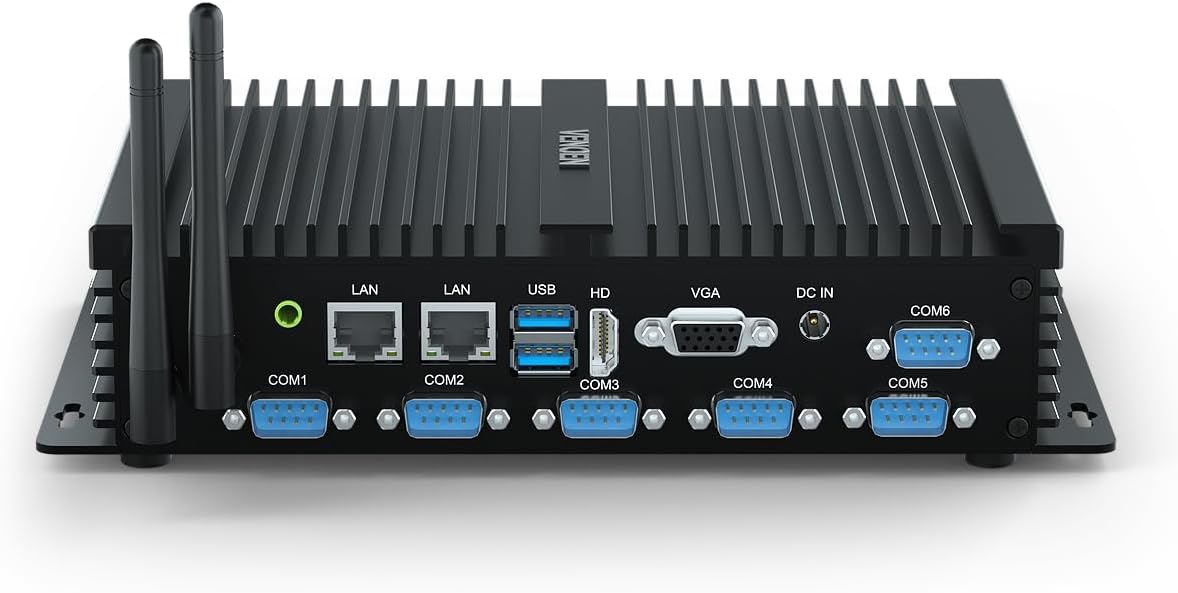
This industrial Core i7 8550U system is the premium choice for installations that need more computing capacity and extensive peripheral connectivity. It combines dual 2.5GbE networking, a 3G/4G SIM slot, six RS232 ports, and a fanless metal enclosure, earning a 4.8 rating in the supplied data.
We may earn a commission when you buy through this link, at no additional cost to you.
The eight-generation Core i7 provides four cores, eight threads, an 8MB cache, speeds up to 4.0GHz, and a 15W TDP. It supports Windows 11 Pro, Windows 10 Pro, and Linux, while two DDR4 SO-DIMM slots allow expansion to 64GB. Storage can be divided between an MSATA SSD and a 2.5-inch SATA drive.
The six serial ports are the defining feature for printers, scanners, access-control equipment, CNC systems, and other specialist devices. Its fanless brushed-aluminum enclosure and stated 7-by-24 operation make it better aligned with industrial or vehicle installations than a conventional office desktop. The older mobile processor and larger dimensions reduce its appeal for minimal-footprint desk use.
This is the best recommendation for industrial, workshop, kiosk, or vehicle-edge projects where cellular service and legacy serial equipment are both valuable. Buyers should validate the cellular module, antenna arrangement, operating system, and device voltage requirements against the final installation plan.
Six RS232 ports allow several supported devices to be connected without a large collection of external adapters. Dual 2.5GbE ports provide strong wired connectivity for data transfer, segmented networks, and gateway duties.
The 24 by 15 by 5.7 centimeter brushed-aluminum enclosure improves durability and heat dissipation. Dual-display output through HDMI and VGA supports separate control and information screens.
We may earn a commission when you buy through this link, at no additional cost to you.
The Bmax B1 Plus is designed primarily for home and office productivity rather than cellular networking. Its Celeron J3355, 6GB of LPDDR3 memory, 128GB onboard storage, and preinstalled Windows 11 Home support browsing, document editing, and routine daily tasks, contributing to its 4.2 rating.
We may earn a commission when you buy through this link, at no additional cost to you.
Storage can be expanded through two M.2 positions, one supporting SATA and one supporting NVMe, with the listing indicating expansion as large as 2TB. Dual HDMI outputs support 4K@60Hz content, while dual-band Wi-Fi 5, Bluetooth 5.0, Gigabit Ethernet, and a VESA mounting option cover common desk needs.
The primary drawback for this guide is the absence of a stated SIM card slot. Adding mobile service would require separate hardware and may not provide the same integration as a dedicated cellular system. The 6GB memory configuration is also modest for heavy multitasking, and onboard storage may be limited for large local media libraries.
This product is well suited to browsing, office applications, digital displays, and a tidy mounted workspace. Buyers searching specifically for a Mini PC with SIM Card Slot should choose one of the dedicated cellular models, while home-office shoppers may find the B1 Plus more immediately useful.
The unusual combination of SATA and NVMe M.2 positions allows buyers to add fast primary storage or secondary capacity. A VESA bracket helps reclaim desk space, which is useful in a home office.
A smart fan and heat-sink system support quiet operation, while the One-Click Restore function can simplify recovery. These qualities suit routine work sessions and unattended light-duty tasks.
We may earn a commission when you buy through this link, at no additional cost to you.
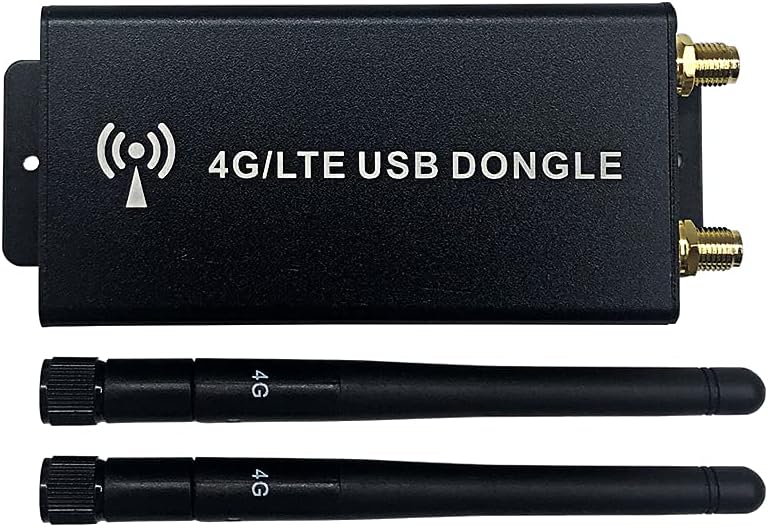
The 4G USB modem is a compact cellular adapter with a standard SIM card slot, not a complete mini PC. It can connect a laptop or desktop to a 4G LTE network and share that connection as a travel hotspot, making it a relevant alternative for users who only need cellular internet.
We may earn a commission when you buy through this link, at no additional cost to you.
Its plug-and-play USB design is advertised for Windows, Mac, and Linux systems without complicated configuration. A standard SIM slot supports widely used network providers, and the hotspot function can serve phones, tablets, and other Wi-Fi devices. Advanced antenna technology is intended to improve stability in weaker coverage areas.
The 3.5 rating suggests moderate customer satisfaction. Actual speed and reliability depend heavily on carrier coverage, local congestion, signal conditions, antenna placement, and the data plan attached to the SIM. It also lacks the processing power, storage, displays, and application support of a true mini computer.
Choose this device for travel, backup connectivity, or a lightweight cellular connection to an existing computer. It is not a substitute for the dedicated N5105, 4417U, J6412, or industrial models when the requirement is a complete cellular-capable computing platform.
Inserting a SIM and connecting the USB modem provides a simple way to reach cellular service without changing the computer's internal hardware. This is useful at temporary offices, events, or locations without wired broadband.
The modem can share its 4G connection over Wi-Fi, extending mobile access to nearby phones and tablets. It therefore functions as a compact networking accessory rather than a standalone workstation.
We may earn a commission when you buy through this link, at no additional cost to you.
The EXVIST device is an industrial Mini PCIe-to-USB adapter with a SIM card slot, rather than a mini PC. It supports 4G LTE modules such as the Quectel EC25-AF and EG25-G, allowing a compatible computer to connect directly to cellular infrastructure after the appropriate module and driver are installed.
We may earn a commission when you buy through this link, at no additional cost to you.
Its industrial circuit design uses a DC-DC power chip and two external tantalum capacitors for more stable operation under demanding conditions. USB input is converted to the 3.6V needed by the module and SIM interface. A Mini PCIe socket and USB Type-C connector provide the physical expansion path.
The supplied 3.0 rating is the lowest among the listed products. More importantly, the matching Mini PCIe module is excluded, and the push-push SIM slot does not support hot-plugging. This means the adapter is only suitable for builders who are comfortable selecting compatible cellular hardware, installing drivers, and planning shutdown before card or module changes.
This adapter is most appropriate for industrial computer builders needing to add WWAN service to an existing system. For a turnkey mini computer with a SIM slot, the purpose-built N5105, 4417U, J6412, or industrial Core i7 systems are considerably more convenient.
Supporting common 4G LTE Mini PCIe modules gives experienced integrators flexibility in antenna, carrier, and regional-band selection. The module and its software support must be purchased and configured separately.
Dedicated DC-DC conversion and external tantalum capacitors support reliable module operation. The lack of hot-plugging requires planned installation or shutdown rather than frequent live SIM changes.
We may earn a commission when you buy through this link, at no additional cost to you.
The ORIGIMAGIC C4 SE is a capable general-purpose mini PC built around the Ryzen 5 3500U, with four cores, eight threads, and boosts up to 3.7GHz. Its 4.4 rating makes it one of the stronger performers in the supplied list, particularly for office work, media, and light content creation.
We may earn a commission when you buy through this link, at no additional cost to you.
It includes 8GB of DDR4 memory and a 256GB PCIe 3.0 NVMe SSD. A second M.2 2280 position supports additional storage, while dual SO-DIMM slots allow memory expansion to 32GB. HDMI 2.0, DisplayPort, and USB-C support three simultaneous 4K@60Hz displays, and two Realtek Gigabit Ethernet ports suit soft-routing or server tasks.
The decisive limitation is that the supplied specifications do not mention a SIM card slot. It can still provide internet access through Ethernet, Wi-Fi 5, Bluetooth 5.0, or an external cellular adapter, but those methods are not equivalent to the dedicated SIM-equipped systems in this guide.
Choose the C4 SE for stronger general computing, triple-display productivity, and compact server potential. It is an attractive performance mini PC, but users whose primary requirement is native SIM connectivity should favor one of the explicitly cellular-equipped models.
The Ryzen processor offers a stronger foundation than the low-power N5105 alternatives for office suites, media handling, and light creation. Its eight threads also help when several modest applications run concurrently.
Auto Power On, RTC Wake, and Wake-on-LAN support unattended kiosks, signage, and remote server use. Dual Gigabit Ethernet adds flexibility for network segmentation and gateway projects.
We may earn a commission when you buy through this link, at no additional cost to you.
The best choice depends on whether cellular access is essential, how much local processing is required, and which peripheral and network interfaces the installation must support. Reviewing the SIM implementation, processor, memory, storage, ports, and thermal design before ordering prevents costly mismatches.
A genuine SIM card slot is the defining requirement, but the slot is only one part of a working cellular installation. The system may still need a compatible WWAN or 4G module, SIM card, antenna, drivers, carrier support, and an operating system configured for the selected hardware. The N5105, 4417U, J6412, and industrial Core i7 listings explicitly identify SIM slots, while the other general-purpose mini PCs do not.
Prioritize products that clearly explain the cellular path and supported module. A built-in slot is not equivalent to an included modem, and a USB hotspot provides a different and more portable form of connectivity. Verify hardware support before buying.
Low-power Intel N-series, Pentium, and Celeron processors are appropriate for routing, firewalls, dashboards, and light administration. The Ryzen 5 3500U and Core i7 8550U offer more headroom for office applications, media, and specialized workloads. Compare core count, thread count, clock speed, cooling, and supported operating systems rather than relying on a single frequency figure.
Choose processing power according to sustained tasks, not the most demanding program you might occasionally open. Low-power models suit dedicated appliances, while more capable processors benefit multi-service servers and productivity systems.
The N5105, J6412, and industrial Core i7 use dual DDR4 SO-DIMM arrangements, while the 4417U uses DDR3. General-purpose alternatives in the list range from 6GB to 8GB of installed memory. A barebones system gives the most control over capacity and module quality, but it also requires installation before use.
Consider the operating system, concurrent services, virtualization, browser workload, and local data services. For a dedicated router, 8GB may be ample; for heavier administration or multiple containers, more memory and a stronger processor are advisable.
NVMe offers the fastest and most compact option for operating systems and active applications, while SATA supports larger and less expensive secondary drives. Several products support both, and the industrial Core i7 separates MSATA and 2.5-inch SATA storage. The B1 Plus also uses a dual M.2 design, while the C4 SE includes NVMe and reserves a second M.2 position.
Match capacity to the role and consider what happens if the boot drive fails. Network appliances may benefit from separate storage for logs, while general desktops need enough room for applications, updates, and working files.
Four 2.5GbE ports provide exceptional flexibility for firewalls, multi-WAN routing, traffic monitoring, and segmented networks. The industrial Core i7 combines two 2.5GbE ports with extensive serial connectivity, while the Air12, B1 Plus, and C4 SE offer more conventional desktop network arrangements. Count WAN, LAN, management, and device-facing connections rather than choosing by port count alone.
High-speed ports also help when moving large files or bridging faster networks, provided the connected switch, cables, and storage can sustain that throughput.
HDMI and DisplayPort combinations cover standard installations, while USB-C display output and three-screen support are useful for control rooms and specialized workstations. Industrial projects should also account for serial devices, power, reset controls, mounting, and display voltage compatibility. A mini PC can be compact yet still lack the connector mix required in a harsh equipment environment.
List every required peripheral before ordering, then confirm whether adapters are acceptable. Adapters can add cost, consume space, introduce failure points, and make a tidy installation harder to maintain.
Fanless enclosures are attractive for quiet offices, vehicles, and control rooms because they eliminate moving parts, while active cooling can sustain stronger processors under prolonged load. The N5105, 4417U, J6412, and industrial models emphasize fanless operation. The Air12 and B1 Plus use compact active cooling arrangements for general-purpose computing.
Match cooling to the expected load and ambient environment. Also check dimensions, mounting options, and whether the advertised operating system is included, because industrial and barebones configurations can differ substantially.
The listed products come with differing support statements: the Air12 includes a three-year limited warranty, the B1 Plus a 12-month warranty, and the C4 SE a one-year limited warranty, with varying technical-support availability. The network-focused listings do not present equally detailed support information in the supplied data. Buyers should check the current listing and seller terms for coverage, return periods, firmware access, and replacement parts.
Support matters most when a mini computer must operate unattended or in a difficult-to-service location. Reliable documentation and accessible replacement components can be more valuable than a small specification advantage.
Before installing a SIM, identify the exact cellular module, supported frequency bands, antenna requirements, and operating-system drivers. Power the system down for hardware changes when the manual requires it, and avoid inserting or removing cards while the device is active unless hot-plugging is explicitly supported.
Start with a clean operating system installation, update the firmware and network drivers, and confirm that the SIM is recognized by the cellular software. Test wired Ethernet, Wi-Fi, and cellular failover independently before deploying the unit. In a router role, configure WAN, LAN, DNS, firewall rules, monitoring, and automatic restart behavior in the order required by the network design.
Keep the enclosure away from direct heat, dust, moisture, and obstructed airflow. Periodically clean vents and check cables, antennas, and storage health. Back up configurations, maintain a replacement memory or storage module when uptime is important, and schedule a controlled test of the cellular connection and network failover to confirm the installation remains dependable.
It can provide cellular internet, but it is not automatically configured as a router. The system also needs compatible cellular hardware, appropriate drivers, a provisioned SIM, and network software or firewall configuration. Dedicated network models are usually easier to adapt because they include multiple Ethernet interfaces and remote-management features.
That depends on the internal hardware supplied with the computer. A SIM slot identifies where the card fits, but it does not always confirm that a modem is included. Verify whether the product includes WWAN hardware or supports a specified module, and check antenna and driver requirements before purchasing.
A native SIM slot is integrated into the computer and can offer a more permanent cellular connection after suitable hardware and software are configured. A USB hotspot is a separate accessory that creates or supplies a mobile network connection. The USB approach is easier to carry between computers, while native integration is usually neater for a fixed installation.
No. The SIM must match the cellular module's supported bands, regional standards, carrier, and service plan. Some carriers also use device-identification or activation policies. Check the module specifications, antenna requirements, and carrier compatibility rather than relying on the physical size of the SIM.
The complete N5105 configuration is the most straightforward overall option because it combines four 2.5GbE ports, 8GB of memory, a 128GB SSD, and a stated SIM slot. The barebones N5105 and J6412 offer more customization for advanced installers, while the industrial Core i7 model is preferable when serial equipment or more processing capacity is central.
A barebones model is better when you want to select memory and storage yourself, reuse compatible components, or build several matching systems. A complete model is more convenient because it can be installed without sourcing essential parts. The complete N5105 is usually the better starting point for a first deployment, provided its included capacity meets the intended workload.
Several can. The 4417U supports HDMI, DisplayPort, and USB-C display outputs, while the Air12 and C4 SE support three displays through combinations of HDMI, Mini DisplayPort or DisplayPort, and USB-C. The N5105 and J6412 listings specify dual-display support through HDMI and DisplayPort. Verify resolution, refresh rate, and adapter requirements for the exact arrangement.
The supplied specifications for the GEEKOM Air12, Bmax B1 Plus, and ORIGIMAGIC C4 SE do not state that they include a SIM card slot. They are still capable computers, but native cellular service would require additional compatible hardware. The travel modem and Mini PCIe adapter are cellular accessories, not complete mini computers.
The complete N5105 stands out as the best overall match because it combines a ready 8GB memory module, 128GB SSD, four Intel i226-V 2.5GbE ports, and a stated SIM slot. The barebones N5105 is the best budget foundation for experienced builders, while the industrial Core i7 8550U is the premium choice when serial interfaces, stronger processing, and rugged enclosure design matter.
Prioritize a genuine SIM implementation, compatible cellular hardware, and the number of network ports required by the installation. Memory and storage should be selected around the actual services running on the system. Do not assume that a physical SIM slot, a USB hotspot, or a Mini PCIe cellular adapter offers the same level of integration as a dedicated cellular mini PC.
Finally, check the current product listing for included components, supported modules, antenna requirements, warranty terms, and operating-system details. Pricing, configurations, ratings, and availability can change, so the live listing should be the final source of truth before making a purchase.