
Cooler Master Q300L V1
4.5Editor score
Supports Micro-ATX and Mini-ITX
Accommodates 360mm graphics cards
Perforated airflow-focused panels
This minimalist PC cases guide compares 10 models for airflow, cooling capacity, cable management, component clearance, connectivity, and understated design.
Minimalist PC cases appeal to builders who want a clean, organized system without sacrificing cooling or component support. The best enclosure balances a restrained exterior with practical details such as mesh airflow, hidden cables, removable panels, front connectivity, and enough room for modern graphics cards and power supplies.
We compared ten cases using the specifications and feature information supplied for each product. The list covers compact Micro-ATX and Mini-ITX models, larger ATX-compatible mid-towers, cases with pre-installed fans, and designs offering tempered glass, liquid-cooling support, adjustable layouts, and dedicated cable-management provisions.
Each selection highlights a different reason to build: the Q300L V1 serves budget-conscious builders, the NZXT H5 Flow emphasizes compact cooling, and the CORSAIR 4000D RS ARGB Frame focuses on customization. The remaining recommendations cover modern connectivity, restrained styling, spacious component clearance, and visually coordinated builds. Availability and market conditions can change, so confirm current details before ordering.
4.5Editor score

4.7Editor score

4.7Editor score
The comparison below places all ten cases side by side, focusing on motherboard format, cooling provisions, graphics-card clearance, practical connectivity, and the features that distinguish compact minimalist builds from more spacious mid-tower designs.


The NZXT H5 Flow is a compact ATX mid-tower for builders who want a restrained black enclosure without giving up airflow, cooling flexibility, or organized cable routing. It holds a 4.7 rating, and its appeal comes from a practical combination of fine-mesh panels, two included 120mm Quiet Airflow fans, and a cable-management system designed to keep the interior visually tidy.
We may earn a commission when you buy through this link, at no additional cost to you.
Cooling is the H5 Flow's strongest feature. The perforated PSU shroud allows airflow from both its side and bottom, while the front can accept up to a 360mm radiator and the top supports a 240mm radiator. Ultra-fine mesh covers the top, front, and side panels to promote airflow and filter dust. A 120mm fan in the front and another in the rear provide a sensible initial configuration without requiring the builder to source every fan separately.
Its cable-management features deserve particular attention in a minimalist build. Wide routing channels, hooks, and straps help separate power, data, and other wiring from visible areas. That makes it easier to achieve the clean look associated with this category without sacrificing access to components. The compact ATX designation also appeals to builders who want full-size motherboard support in a smaller footprint than a conventional mid-tower.
The main limitation is that top-mounted radiator support tops out at 240mm, even though the front accepts a 360mm unit. A builder who wants a 360mm radiator specifically above the motherboard may need to look elsewhere. Even so, the NZXT H5 Flow balances space, included equipment, cooling options, and neat presentation unusually well, making it our strongest all-around recommendation for a minimalist PC build.
The H5 Flow arrives with front and rear 120mm fans, while perforated shroud panels and ultra-fine mesh support a high-airflow layout. The front can take a 360mm radiator and the top a 240mm model, giving builders useful options for either air or liquid cooling.
Wide channels, hooks, and straps help builders conceal cables effectively. Combined with the compact ATX format, these details make the case a good match for a clean desk or entertainment setup where component clutter would be distracting.
We may earn a commission when you buy through this link, at no additional cost to you.
The Cooler Master Q300L V1 is a budget-focused Micro-ATX or Mini-ITX case with an unusually generous set of component allowances. Its 4.5 rating reflects a design that prioritizes airflow, hardware compatibility, and flexible installation over decorative features, making it an appealing foundation for a minimalist build that still exposes selected components through a transparent side panel.
We may earn a commission when you buy through this link, at no additional cost to you.
The interior accommodates graphics cards up to 360mm long, CPU coolers up to 159mm high, and power supplies up to 160mm long. Cooling flexibility is another major strength: the case supports a 240mm liquid cooler and up to five fans. Perforated panels on all sides promote air movement and heat dissipation, while the magnetic dust filter has a distinctive pattern that adds a small visual signature.
The modular I/O panel is unusually useful for a compact chassis. It can be positioned at the front, top, or bottom on either side, allowing the builder to preserve a cleaner appearance or align ports with the preferred orientation of the case. A transparent side panel offers a view of the internal components, and the edge-to-edge panel can show off a carefully arranged build with minimal visual interruption.
This is not the most restrained enclosure in the group, since the transparent panel and patterned filter are more expressive than a completely opaque design. It also does not include the advanced lighting or customization features found in some newer alternatives. Nevertheless, the Q300L V1 delivers a strong combination of affordability, airflow, clearance, and installation flexibility, making it an excellent budget recommendation.
Graphics cards up to 360mm, CPU coolers up to 159mm, and power supplies up to 160mm give builders considerable room within a compact platform. These allowances are especially useful when a larger GPU or aftermarket air cooler is already part of the planned build.
Perforated panels and support for five fans and a 240mm liquid cooler create several cooling paths. The result is a practical enclosure for a Micro-ATX system that values thermal performance over decorative complexity.
We may earn a commission when you buy through this link, at no additional cost to you.
The CORSAIR 4000D RS ARGB Frame is the most customizable option in this guide, using a modular FRAME system to let builders change components such as the motherboard tray and front I/O panel. It carries a 4.7 rating and combines a restrained steel exterior with high-airflow panels, pre-installed lighting, and flexible fan placement.
We may earn a commission when you buy through this link, at no additional cost to you.
Three CORSAIR RS ARGB PWM fans come pre-installed at the front. They use daisy-chainable four-pin PWM connections, support Zero RPM operation at low loads, and connect to a motherboard's five-volt ARGB header. The InfiniRail mounting system allows fans up to 200mm to be positioned in the front and fans up to 140mm in the roof, so builders can tailor the airflow path rather than accepting one fixed arrangement.
The case's side panel near the motherboard tray has two roles. It can remain in place as a cable cover, helping preserve a clean internal appearance, or it can be removed and used as a side fan mount for more cooling potential. At the front, a steel panel perforated with a three-dimensional Y pattern creates a low-obstruction route for incoming air while maintaining the industrial appearance associated with the FRAME platform.
Some builders will consider the ARGB lighting excessive for a strictly minimalist theme, and the modular design adds more complexity than a simple fixed-layout enclosure. Even so, the ability to replace or reposition major case elements makes the 4000D RS ARGB Frame particularly compelling for someone who wants a polished system that can evolve over time rather than a case treated as a static purchase.
The FRAME system allows major elements such as the motherboard tray and front I/O panel to be changed. That makes the enclosure easier to adapt to evolving hardware, connector needs, or visual preferences without treating every internal decision as permanent.
Although the case supports ARGB lighting, its steel structure and perforated front panel preserve a controlled industrial appearance. The removable side cover also gives builders a simple way to keep cables hidden or create an additional fan position.
We may earn a commission when you buy through this link, at no additional cost to you.
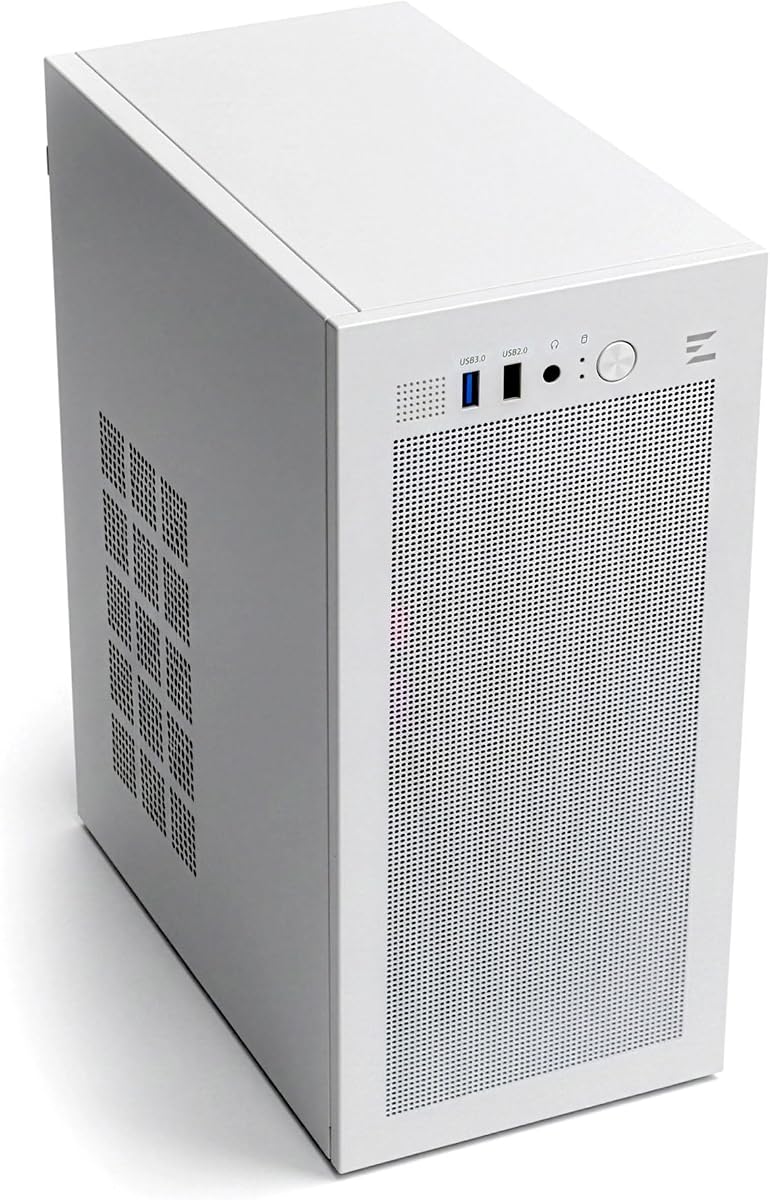
The Zalman CUBIX is the clearest interpretation of a genuinely small minimalist PC case in this roundup. With a total volume of 17.1 liters, it is designed for Micro-ATX or Mini-ITX systems where every millimeter matters. Its 4.5 rating complements a simple design that pairs a clean white appearance with steel construction and a perforated front panel.
We may earn a commission when you buy through this link, at no additional cost to you.
Despite its compact dimensions, the CUBIX accepts standard ATX power supplies, graphics cards up to 260mm long, and CPU coolers up to 137mm high. A perforated front panel draws air into the system, and an 80mm fan is pre-installed to provide immediate airflow. The restrained component list avoids unnecessary visual and technical complications for builders who simply want a small, functional enclosure.
Its front I/O includes one USB 3.0 port, one USB 2.0 port, and a 3.5mm stereo AUX connection. That selection is more limited than newer cases offering USB-C, but it covers the essentials without drawing attention. More importantly, the case is built from 0.8mm steel, giving the compact shell a sturdy foundation despite its modest size.
The trade-off is clear: the 260mm graphics-card limit rules out many longer modern GPUs, and the included 80mm fan offers a more modest starting point than 120mm options found in larger cases. CPU coolers must also remain within 137mm. For a builder choosing compatible compact components and prioritizing a small footprint, however, the Zalman CUBIX is a distinctive and highly practical recommendation.
The 17.1-liter design is paired with support for standard ATX power supplies and Micro-ATX or Mini-ITX motherboards. It offers a practical route to a small system without requiring unusual power-supply formats.
A single pre-installed 80mm fan, a perforated intake panel, and a straightforward set of front ports keep the design uncomplicated. That restraint suits builders who want the case to disappear into the setup rather than dominate it.
We may earn a commission when you buy through this link, at no additional cost to you.
The Cooler Master Elite 301 Lite combines an explicitly minimalist purpose with roomy Micro-ATX compatibility. It has a 4.6 rating and is designed for builders who want modern ports, generous graphics-card clearance, and liquid-cooling flexibility in a relatively compact enclosure. Its restrained layout is backed by a large intake grill and broad internal dimensions.
We may earn a commission when you buy through this link, at no additional cost to you.
Graphics cards up to 365mm are supported, including hardware from the RTX 5090 or RX 9070 XT class according to the supplied compatibility information. The case can also accommodate CPU coolers up to 163.5mm and power supplies up to 160mm long. For liquid cooling, it supports a radiator up to 280mm and can host as many as six case fans, providing a good foundation for a high-performance compact system.
The large intake grill is designed to avoid unnecessary airflow restriction, while a 120mm fan is included. A tempered-glass side panel gives the build a clean presentation without relying on aggressive decorative elements. USB-C connectivity is another useful inclusion for a contemporary system, reducing the need to reach around the case for compatible accessories.
The main limitation is that the enclosure supports only Micro-ATX and Mini-ITX motherboards, so it is unsuitable for a full-size ATX build. It also includes just one fan, meaning a multi-fan configuration may require additional components. For a builder assembling a modern compact system around compatible hardware, though, the Elite 301 Lite offers an effective balance of space, cooling, and understated appearance.
The 365mm graphics-card allowance is one of the strongest in this guide. It gives builders more freedom when selecting a visually substantial GPU without moving to a full-size tower.
Support for a 280mm radiator and six fans makes the case suitable for a more elaborate thermal layout. USB-C on the front panel adds everyday convenience while the tempered-glass panel preserves a tidy presentation.
We may earn a commission when you buy through this link, at no additional cost to you.
The Zalman CUBIX-G brings coordinated lighting and modern connectivity to a compact Micro-ATX platform. It carries a 4.4 rating and is aimed at budget gaming and clean desktop setups that benefit from preinstalled fans, a restrained black exterior, and a more finished visual presentation than a completely bare enclosure.
We may earn a commission when you buy through this link, at no additional cost to you.
Three preinstalled FRGB fans provide both airflow and fixed RGB illumination through their three-pin DC connections. Hardware support covers graphics cards up to 280mm, CPU air coolers up to 155mm, and ATX power supplies up to 140mm. Storage flexibility includes room for up to three 2.5-inch hard drives and one 3.5-inch hard drive through a two-bay and one-combination arrangement.
The front panel adds a welcome USB Type-C connection alongside USB 3.0. That combination suits current accessories and reduces reliance on adapters when the case is positioned with its I/O panel conveniently accessible. A black finish also allows the fixed lighting to blend more naturally into a dark, coordinated build rather than appearing as a disconnected accent.
The main drawback is that the RGB lighting is fixed rather than configurable through a more flexible control system. The 140mm power-supply limit is also more restrictive than that of many modern cases, and the rating is slightly lower than the leaders in this group. Even so, the CUBIX-G gives a builder a ready-made combination of compact size, three fans, lighting, and modern front I/O with minimal assembly planning.
The three included FRGB fans remove the need to match several separate light and cooling components. They use fixed lighting, which keeps the appearance consistent but limits personalization.
USB-C and USB 3.0 front connectivity improves daily use, while storage support provides room for multiple drives. The compact format is most appropriate for builders using Micro-ATX boards and compatible power supplies.
We may earn a commission when you buy through this link, at no additional cost to you.
The Cooler Master Elite 502 Lite offers the spaciousness of an ATX mid-tower with a deliberately restrained presentation. Its 4.5 rating reflects a case that can accommodate full-size motherboards, very long graphics cards, large power supplies, and substantial cooling hardware. It is a strong choice for a minimalist workstation or gaming build where internal capability matters more than decorative lighting.
We may earn a commission when you buy through this link, at no additional cost to you.
Motherboard support covers both ATX and Micro-ATX formats. Graphics cards can be up to 410mm long, CPU coolers can reach 170mm, and power supplies can measure up to 170mm. The cooling specification is equally accommodating, with support for a radiator up to 410mm and as many as seven case fans. These figures leave considerable freedom for future component upgrades.
A large intake grill is intended to support unrestricted airflow, while one 120mm fan provides a starting point for the thermal layout. The tempered-glass side panel lets the builder appreciate a tidy internal arrangement, and the front panel includes USB-C for modern accessory support. The overall visual treatment remains restrained even with the glass side.
Because only one fan is included, a builder expecting immediate high airflow will need to add more. The case also does not have the built-in RGB emphasis of the standard Elite 502. Even so, the Lite model is compelling for anyone who values ATX compatibility, long-hardware clearance, and a large cooling envelope in an understated chassis.
The 410mm GPU allowance, 170mm CPU-cooler clearance, and 170mm power-supply support give builders ample room. That makes the case less likely to dictate hardware choices as the system evolves.
Support for up to seven fans and a 410mm radiator enables a high-airflow configuration. The supplied 120mm fan provides a starting point, while the large intake grill supports unrestricted airflow.
We may earn a commission when you buy through this link, at no additional cost to you.
The Cooler Master Elite 502 is the standard version of the spacious Elite 502 platform, adding a triple set of 120mm ARGB fans to a chassis designed for ATX and Micro-ATX systems. It has a 4.2 rating and shares the same generous component allowances as the Lite model, making it a ready-made option for builders who want more visual impact and a stronger initial fan count.
We may earn a commission when you buy through this link, at no additional cost to you.
Graphics cards up to 410mm, CPU coolers up to 170mm, and power supplies up to 170mm fit inside. The cooling platform supports up to seven case fans and a radiator up to 410mm, giving builders a broad range of thermal configurations. A large intake grill reinforces the high-airflow positioning, while the tempered-glass panel keeps the resulting build visually connected.
The distinction from the Lite model is straightforward: three 120mm ARGB fans are included instead of a single 120mm fan. That provides more immediate cooling hardware and a coordinated lighting effect. USB-C front connectivity and a minimalist layout temper the visual impact of the lighting, although this is still a more expressive case than one designed around a completely plain exterior.
Its 4.2 rating is the lowest among the ten products and is the main reason it does not rank higher. The shared specifications are strong, but the included ARGB configuration may not match every definition of minimalist. Buyers who value the larger ATX-compatible interior but prefer no preinstalled illumination can consider the Lite model instead.
Three 120mm ARGB fans provide a more developed initial configuration than the Lite model's single fan. They can contribute to cooling and create a coordinated appearance without requiring the builder to match three separate fan models.
The Elite 502 retains broad ATX, GPU, power-supply, radiator, and fan support. The tradeoff is that ARGB lighting makes the build more visually conspicuous than a strictly monochrome minimalist design.
We may earn a commission when you buy through this link, at no additional cost to you.
The LIAN LI Vector V100 MINI is the highest-rated product in this guide, earning a 4.8 rating. It is a compact Micro-ATX platform with a panoramic design, extensive fan support, and four ARGB PWM intake fans already installed. The result is visually striking and well equipped, although the word MINI should be understood within the case market rather than as a claim of ultra-small dimensions.
We may earn a commission when you buy through this link, at no additional cost to you.
The chassis measures 436 by 221.5 by 443.9mm and supports standard Micro-ATX, back-connect Micro-ATX, and Mini-ITX motherboards. It does not support full-size ATX, an important limitation that should be checked before purchase. Four 120mm ARGB PWM side intake fans and a 120mm rear exhaust fan are included, and the case can ultimately support as many as nine fans.
A 4mm tempered-glass front panel and matching side panel provide a 270-degree view, while an integrated ARGB strip adds customizable illumination. Cooling can be expanded with a top-mounted 360mm or 240mm radiator. The included components referenced in the supplied information, such as the radiator and additional parts, are not included with the base configuration.
Hardware support is generous for the format. Graphics cards can reach 415mm, CPU coolers can reach 163.5mm, and ATX power supplies up to 200mm are supported. An adjustable horizontal GPU anti-sag bracket is included. The main caveat is that the case is not an ultra-small SFF design, and it excludes ATX motherboards, but it is an excellent choice for a compact build that prioritizes presentation and cooling hardware.
The 4mm tempered-glass front and side panels create a 270-degree view of the system. Combined with the integrated ARGB strip, this makes the case well suited to builds where cable routing and component arrangement are part of the visual experience.
Four side intake fans and one rear exhaust fan form a useful included airflow configuration. Support for nine fans and top-mounted 360mm or 240mm radiators provides room for a more advanced cooling arrangement later.
We may earn a commission when you buy through this link, at no additional cost to you.
The ASUS Prime AP201 is a compact 33-liter Micro-ATX case built around spatial efficiency and understated presentation. It has a 4.6 rating and uses finely perforated mesh panels to balance airflow with a clear view of the internal components. Rather than depending on a large exterior volume, it aims to make a small enclosure work efficiently.
We may earn a commission when you buy through this link, at no additional cost to you.
The mesh design contains more than 57,000 precision-machined 1.5mm holes across the panels, combining airflow with visual openness. Cooling support includes 280mm and 360mm radiators and room for up to six fans. The case also supports custom liquid cooling, making it a flexible platform for builders who want a discreet exterior without giving up water-cooling options.
Despite the 33-liter footprint, it supports ATX power supplies up to 180mm long, graphics cards up to 338mm, various storage devices, and custom liquid-cooling hardware. Tool-free side panels can be removed through a simple clip mechanism designed to resist accidental dislodging, while the extended motherboard tray, strategically placed cutouts, and 32mm gap provide room to conceal cables.
The main limitation is the 338mm graphics-card allowance, which is shorter than the maximum supported by several larger cases in this guide. The supplied information also does not specify how many fans are included, so a builder should verify the current configuration before assuming additional cooling hardware is present. Even so, the AP201 is a refined, space-efficient choice with one of the strongest cable-management provisions in the roundup.
The AP201 fits standard-size ATX power supplies, graphics cards up to 338mm, storage devices, and custom liquid cooling into a 33-liter footprint. It is particularly useful for builders who need substantial hardware support in a restricted desk or room.
Tool-free clips make the side panels convenient to remove while helping keep them secure. An extended motherboard tray, dedicated cutouts, and a 32mm cable gap support the clean, uncluttered look expected from a minimalist build.
We may earn a commission when you buy through this link, at no additional cost to you.
A minimalist case should simplify the appearance of a system without creating difficult installation or cooling decisions. Compare motherboard format, graphics-card length, component clearance, fan support, radiator positions, cable-management provisions, connectivity, and the amount of visual detail you actually want on display.
The motherboard standard is the first constraint to resolve because it determines which cases can be used at all. Micro-ATX cases in this guide support Micro-ATX and usually Mini-ITX boards, while the NZXT H5 Flow and the Elite 502 models accept full-size ATX. The LIAN LI Vector V100 MINI explicitly does not support ATX, even though its name can initially make it sound like a very small chassis. Back-connect motherboard compatibility may also vary, so verify the connector layout and the case's mounting provisions before purchase.
Choose based on the board you already own or the exact board you intend to buy. A smaller board can reduce the overall footprint of a build, but a full-size ATX board may be easier to find and offers a broader internal layout.
Graphics cards are often the longest components in a modern build, making their dimensions more useful than the case's external volume. The options here range from the Zalman CUBIX at 260mm to the LIAN LI Vector V100 MINI at 415mm. The Elite 501 Lite reaches 365mm, the ASUS Prime AP201 supports 338mm, and the other models fall between those figures. Always compare the case's maximum GPU length with the dimensions of the actual card, including any connector or bracket protrusion.
Shorter clearance limits future upgrades, while generous clearance allows a more dramatic card and simplifies planning around power and cooling cables. Measure before choosing.
CPU air coolers can be taller than expected once their mounting hardware and heat pipes are accounted for. Clearance figures range from 137mm in the Zalman CUBIX to 170mm in both Cooler Master Elite 502 models. The NZXT H5 Flow's listed specifications do not provide a specific CPU-cooler height, so builders using a tall tower cooler should verify the manufacturer's current dimensions and fit information.
A low-profile cooler can suit a compact system, but it may restrict airflow or require a more specific mounting arrangement. Check the cooler and processor platform together rather than relying only on the case specification.
A case that supports more fans and larger radiators gives a builder more freedom in thermal configuration. The ASUS Prime AP201 accepts 280mm and 360mm radiators with up to six fans. The Elite 502 models support radiators up to 410mm and as many as seven fans, while the LIAN LI Vector V100 MINI supports up to nine fans and a top-mounted 360mm or 240mm radiator. Smaller models may rely more heavily on air cooling or a modest liquid-cooling layout.
Count included fans separately from maximum fan positions. Also check radiator location, not just maximum radiator length, because a long unit may only fit in a particular part of the chassis.
Power-supply length is easy to overlook when comparing compact cases. The CUBIX uses a standard ATX power supply, while the CUBIX-G supports ATX units up to 140mm. The ASUS Prime AP201 accommodates ATX power supplies up to 180mm, the Elite 502 models up to 170mm, and the LIAN LI Vector V100 MINI up to 200mm. The included length of a modular or semi-modular power supply can also influence cable management.
Favor a case with enough clearance for the exact power-supply model and a reasonable margin for cable routing. A tight fit may complicate installation even when the component technically fits.
Minimalism depends on whether cables can be routed behind the motherboard tray and kept out of view. The NZXT H5 Flow provides wide channels, hooks, and straps. The ASUS Prime AP201 adds an extended motherboard tray, strategically placed cutouts, and a 32mm gap, while the CORSAIR 4000D RS ARGB Frame can use its internal side panel as a cable cover. Look for dedicated storage space behind the tray rather than assuming standard cutouts will be sufficient.
Good cable provisions improve both appearance and maintenance. They also make it easier to access connectors without dragging a bundle of wiring into the main compartment.
Front I/O determines which accessories can be connected without reaching around the case. USB-C appears in the Cooler Master Elite 301 Lite, both Elite 502 models, the Zalman CUBIX-G, the LIAN LI Vector V100 MINI, and the ASUS Prime AP201. The NZXT H5 Flow's supplied details do not list USB-C, while the CUBIX provides USB 3.0, USB 2.0, and a 3.5mm stereo AUX connection. Consider the accessories you actually use instead of assuming more ports always improve the experience.
Choose a port layout that matches your desk, monitor, headset, controller, and storage habits. Check whether the connector is on the top, front, or another position and whether the case can be oriented conveniently.
Minimalist can mean plain black surfaces, concealed wiring, restrained materials, or a carefully coordinated display case. The NZXT H5 Flow and ASUS Prime AP201 emphasize clean structure, while the LIAN LI Vector V100 MINI uses panoramic tempered glass and an ARGB strip. The CORSAIR 4000D RS ARGB Frame and Zalman CUBIX-G include adjustable or fixed lighting. Decide whether lighting supports your concept or becomes the main visual feature.
A restrained exterior still needs an attractive interior. Choose a case with removable panels, useful cable routes, and enough visibility to appreciate the components when the system is switched on.
Begin by assembling the system outside the case, checking the motherboard, power supply, graphics card, CPU cooler, storage devices, and radiator dimensions against the supported clearances. Install the power supply and storage first, then route the necessary cables through the designated channels before attaching the motherboard. Connecting the processor and memory is easier before the board is fixed inside the chassis.
After the core components are installed, attach storage, front-panel wiring, fans, and any liquid-cooling hardware according to the case and component instructions. Keep power cables behind the motherboard tray where possible and use the provided hooks, straps, clips, or cutouts to separate wiring. Fit the side panels only after checking that no cable is pinched and that every component has adequate clearance.
For routine care, power the system down before opening the case and use compressed air to remove dust from filters, vents, fans, radiators, and interior surfaces. Clean removable panels with a soft, dry cloth rather than aggressive cleaners. Inspect dust filters regularly, especially in a ventilated minimalist chassis, and confirm that all panels, screws, fan connections, and cable routes remain secure after servicing.
Choose a board that the case explicitly supports, not merely a board with a similar dimensions rating. The Zalman CUBIX, Cooler Master Elite 301 Lite, LIAN LI Vector V100 MINI, and ASUS Prime AP201 focus on Micro-ATX or Mini-ITX platforms. The NZXT H5 Flow and both Elite 502 models support full-size ATX, while the Q300L V1 supports Micro-ATX and Mini-ITX.
A restrained exterior does not necessarily mean restricted airflow. Models such as the ASUS Prime AP201, Cooler Master Elite 301 Lite, and both Elite 502 cases use large intake grills or mesh panels specifically to support airflow. The NZXT H5 Flow also combines fine mesh panels with perforated shroud sections and pre-installed fans. Actual cooling performance still depends on the complete component layout and the chosen CPU cooler.
It depends on whether lighting is part of your definition of minimalist. The NZXT H5 Flow, ASUS Prime AP201, and Cooler Master Elite 301 Lite offer restrained designs without making lighting the central feature. The CORSAIR 4000D RS ARGB Frame, Zalman CUBIX-G, and LIAN LI Vector V100 MINI emphasize RGB or ARGB elements. A fully coordinated illuminated build can still look clean when the cable management and component colors are consistent.
You need at least the full length of the graphics card, plus enough room for cables and any connector protrusion. The cases in this guide support graphics cards ranging from 260mm to 415mm. Long cards look impressive inside a glass or mesh case, but they can also complicate side-panel clearance and front cooling, so check the complete dimensions rather than relying on the chip itself.
Yes, but radiator dimensions and mounting position must be checked carefully. The Q300L V1 supports a 240mm liquid cooler, while the Elite 301 Lite supports a 280mm radiator. The ASUS Prime AP201 accepts 280mm and 360mm radiators, and the Elite 502 models support up to 410mm. The LIAN LI Vector V100 MINI supports top-mounted 360mm or 240mm radiators. Verify that the pump, tubing, and fittings will also fit.
A clean layout depends on hidden or neatly routed cables, consistent component colors, restrained materials, and a deliberate choice about lighting. Cases such as the NZXT H5 Flow and ASUS Prime AP201 emphasize organization and structure, while the LIAN LI Vector V100 MINI presents components through panoramic glass. The most effective approach is to treat the case, lighting, fans, and internal components as one coordinated design.
Tempered-glass panels are generally easy to wipe with a soft, lint-free cloth, but panels should be removed before cleaning if the manufacturer recommends it. Avoid abrasive pads and liquid cleaners that could leave residue. Clean the mesh and dust filters at the same time because airflow performance depends on keeping those surfaces clear.
No. The best case balances usable component clearance with the space you actually have. A larger chassis can simplify cooling and future upgrades, while a smaller model may better suit a clean desktop setup. Measure the available area, then compare the case dimensions, motherboard format, GPU length, power supply, and radiator support before making a final choice.
The NZXT H5 Flow stands out as the most balanced overall recommendation because it combines a compact ATX format, two included fans, useful radiator positions, fine-mesh airflow, and effective cable routing. The Q300L V1 is the value-focused selection for Micro-ATX builders, while the CORSAIR 4000D RS ARGB Frame is the premium option for buyers who value modular customization and flexible fan placement.
The rest of the guide broadens the definition of a minimalist case. The Zalman CUBIX is the smallest true compact option, the Elite 301 Lite fits long GPUs in a Micro-ATX chassis, and the Elite 502 models support spacious ATX builds. The LIAN LI Vector V100 MINI prioritizes panoramic presentation, while the ASUS Prime AP201 emphasizes spatial efficiency and clean cable concealment.
Before purchasing, verify the exact motherboard size, graphics-card dimensions, CPU-cooler height, power-supply length, and radiator position. Also consider the included fans, front connectors, dust-filter access, and how much visual lighting you want. Product details and market conditions can change, so confirm the current listing and manufacturer specifications before finalizing your build.