
Calibrite Display 123
4.0Editor score
Guided 1 2 3 workflow
Supports two connected displays
Native and Photo targets
Compact USB C design
This Monitor Calibration Tool guide compares ten colorimeters for photo, video, design, HDR, and multi-display workflows, helping you choose the best fit.
A monitor calibration tool measures and corrects the color, brightness, contrast, and tone response of a display so creative work appears more consistent and predictable. The right device matters because modern LCD, OLED, Mini LED, HDR, and Apple XDR screens can behave very differently, making guided software, sensor range, and supported workflows essential considerations.
This guide compares ten colorimeters based on their documented specifications, supported display technologies, software features, measurement capabilities, and suitability for photography, video, design, and multi-monitor studios. It covers accessible guided tools, professional profiling platforms, high-luminance sensors, and complete camera-to-display color workflows without suggesting that every model serves the same purpose.
The selections reveal how calibration priorities change with the job: the top picks offer distinct advantages for simpler setups, professional creative work, and advanced HDR workflows. Each review explains the relevant benefits and limitations, while current pricing and availability should be checked on the linked product pages because they can change over time.
4.0Editor score

4.4Editor score

4.0Editor score
The table below compares all ten colorimeters by their core strengths, sensor range, software approach, and ideal creative workflow, making it easier to identify the model that matches your display setup and calibration experience.



The Calibrite Display Pro HL combines a high-luminance colorimeter, professional PROFILER software, and a 3000-nit measurement ceiling in a package suited to demanding creative work. Its 4.3 rating reflects a capable balance of modern display compatibility and practical validation features. It stands out for photographers, designers, and video professionals who need more control than a basic guided calibrator provides.
We may earn a commission when you buy through this link, at no additional cost to you.
The advanced sensor is designed for bright LCD, Mini LED, OLED, and Apple XDR displays, where ordinary colorimeters may struggle to capture highlights accurately. PROFILER offers Basic and Advanced modes, allowing beginners to use established targets while experienced users can adjust white point, luminance, contrast ratio, gamma, and other settings. Custom patch sets are another meaningful feature for teams that need repeatable results across specific images or production tasks.
Its validation features distinguish it from simpler calibrators. Quick Check, profile validation, uniformity checking, and flare correction help determine whether a profile is performing as intended and whether glare is affecting the result. Multi-display profiling and shared presets support studios where several editors need to begin from a common color baseline. These capabilities do make the learning curve steeper than that of a simple wizard-driven device.
This is the most balanced recommendation for a creator who wants professional features without moving to the highest-luminance tier. It is particularly attractive for modern Mini LED and OLED workstations, though users who only need an easy photo-editing setup may find the Display 123 more direct. For color-managed work across a serious multi-screen desk, the Display Pro HL is the strongest all-around choice in this list.
The key advantage is that it gives an image-focused professional both measurement range and post-calibration diagnostics. That combination makes it easier not merely to adjust a display, but also to check whether the result remains dependable as lighting, panel aging, and working habits change. For that reason, it earns the Editor's Choice position here.
The 3000-nit sensor range is especially relevant for modern bright panels and HDR-related creative workflows. It gives the software a broader measurement window than most conventional photo-focused colorimeters while avoiding the extreme specialization of the 10000-nit Display Plus HL.
Quick Check, uniformity checks, and flare correction make the Display Pro HL useful for ongoing studio quality control. These tools help identify problems that a simple before-and-after image comparison may not fully explain.
We may earn a commission when you buy through this link, at no additional cost to you.
The Calibrite Display 123 is designed to make calibration approachable for photographers and creators who do not need a deeply technical control panel. Its 4.0 rating and guided 1 2 3 workflow make it a practical entry point for photo editing, web graphics, and general color-accurate viewing. The core promise is clear: reduce common color shifts without requiring advanced calibration experience.
We may earn a commission when you buy through this link, at no additional cost to you.
The workflow includes brightness target selection, including Native and Photo options, followed by a before-and-after check that displays the visible difference. That immediate visual feedback is useful for confirming that the process has improved the display. Support for up to two displays also covers a common editing arrangement in which a laptop is paired with a larger external screen, although it is more limited than the multi-display flexibility of professional studio packages.
Its compact body, approximately 34 millimeters tall and 37 millimeters in diameter, is easy to position on different panels. The adjustable counterweight helps keep the device in place, and the USB C connection simplifies modern computer setups. A clear limitation is that the product focuses on conventional color correction rather than advanced high-luminance HDR profiling, making it less appropriate for demanding reference workflows on exceptionally bright displays.
Choose the Display 123 if you want an understandable, fast path to better color and own one or two standard editing displays. It is also a strong option for photographers who have been editing without a dedicated colorimeter and need a practical first tool. Advanced colorists seeking custom patch sets, studio-wide presets, or comprehensive uniformity diagnostics should move to a professional tier. For straightforward color accuracy at an accessible entry point, this is the budget recommendation.
Its strength is deliberately focused: it removes complexity while preserving the steps that matter most to a non-specialist. Rather than burying the user in technical targets, it guides the process and then provides visible confirmation of the result. That makes it easier to establish a consistent routine, which is ultimately more important than owning an advanced tool that is rarely used.
The Easy 1 2 3 process removes much of the guesswork from color management. It is particularly helpful for creators who understand the importance of accurate color but do not routinely tune white point, gamma, or luminance themselves.
Two-display support addresses a common real-world arrangement without adding the complexity of studio-scale profile management. Users can create a more consistent viewing experience across a laptop and a separate editing monitor.
We may earn a commission when you buy through this link, at no additional cost to you.
The Calibrite Display Plus HL is the specialist in this group, with an advanced high-luminance sensor capable of measuring up to 10000 nits. Its 4.0 rating does not diminish the significance of that specification: the product is built for HDR-capable Mini LED, OLED, Apple XDR, and super-bright displays where accurate highlight measurement is essential. It also supports compatible projectors through the same PROFILER software.
We may earn a commission when you buy through this link, at no additional cost to you.
PROFILER provides Basic and Advanced modes, detailed control over white point, luminance, contrast ratio, and gamma, and support for custom patch sets and shared presets. The display-specific features are particularly valuable for video. Rec.709 support, BT.1886 tone-curve options for Rec.2020 workflows, and multiple-monitor profiling help teams approach grading and monitoring with a repeatable process rather than relying on visual guesswork.
Validation is comprehensive, with Quick Check, Profile Validation, Uniformity Check, and Profiler Manager included. These functions make the tool more than a one-time correction device. They can help professionals determine whether a profile is still working, whether a panel is uniform, and whether a multi-screen environment is closely matched. The trade-off is added complexity and a feature set that will be excessive for someone who only wants to tune a single standard office display.
This is the recommendation for HDR-focused video editors, colorists, and high-end creative studios with exceptionally bright panels. It is also appropriate for photographers who regularly work in HDR or require a device that can remain useful as display technology advances. Users should confirm that their intended displays and workflow justify the premium feature set. If they do, the 10000-nit range and professional validation tools make this a particularly capable choice.
The Display Plus HL separates itself through measurement reach rather than a small software convenience. It gives demanding users a way to profile, compare, and monitor the displays most likely to challenge conventional colorimeters. For that reason, it is the premium selection and a strong match for professional HDR and reference-display environments.
A 10000-nit measurement ceiling offers substantial headroom for modern HDR panels. This is particularly important when judging highlight roll-off, bright output, and tone response across displays that exceed ordinary indoor brightness levels.
Rec.709, BT.1886, and Rec.2020-oriented options make the software more relevant to grading pipelines. Shared presets and multi-monitor profiling also support teams that need consistent starting points across several editing stations.
We may earn a commission when you buy through this link, at no additional cost to you.
The Datacolor Spyder X Pro offers an established, approachable route to color accuracy for photographic and general creative work. Its 4.4 rating is the highest among the products in this guide, giving it a strong customer-feedback signal. The device combines a lens-based color engine, room-light monitoring, automatic profile changing, and software designed to complete calibration in a matter of minutes.
We may earn a commission when you buy through this link, at no additional cost to you.
Its one-click process and wizard workflow reduce the perceived complexity of color management, while 12 predefined targets provide more choices than a minimal entry-level calibrator. These presets are useful for users who want sensible starting points without learning every technical parameter first. SpyderProof adds a before-and-after evaluation with the user's own images, creating a visually intuitive way to assess whether the correction has improved the screen.
The automatic profile-changing feature is especially convenient when a laptop is regularly connected to a different display. It also supports multiple laptops and desktop monitors, expanding the device beyond a single-panel setup. However, users working with exceptionally bright HDR panels may need a higher-luminance sensor, and the Spyder interface offers less of the granular studio management found in Calibrite PROFILER. Its strengths are speed, clarity, and accessibility.
The Spyder X Pro is a strong choice for photographers, designers, and general enthusiasts who want a quick and dependable calibration routine. It suits first-time users particularly well because the software handles much of the decision-making. A video specialist requiring Rec.2020 and BT.1886 controls, or a studio that needs uniformity checks and custom patch sets, should consider a more specialized alternative. For accessible multi-monitor photo work, however, the Spyder X Pro remains an excellent pick.
Its appeal lies in turning calibration into a repeatable part of the creative process. Automatic profiles, environmental monitoring, and a clear visual result reduce the chance that users will defer calibration because it feels intimidating. The combination of a strong rating and beginner-friendly operation makes it a particularly trustworthy choice for everyday color-managed work.
Automatic profile changing simplifies use when the same computer drives more than one display. It removes some of the need to remember which profile belongs to each screen, making consistent viewing easier in a changing workspace.
SpyderProof can display full-screen reference imagery, including the user's own, before and after calibration. This gives less technical users a direct way to understand what the process has changed.
We may earn a commission when you buy through this link, at no additional cost to you.
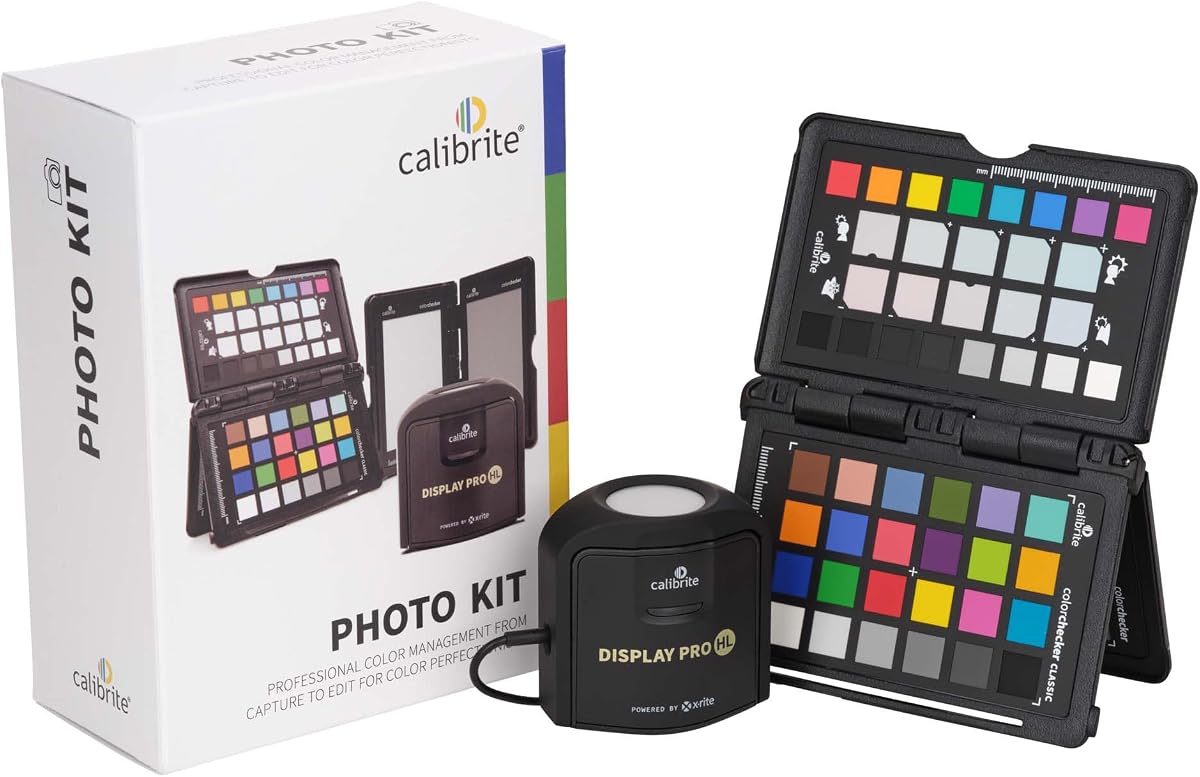
The Calibrite Photo Kit stands apart because it combines a Display Pro HL colorimeter with a ColorChecker Passport Photo 2, addressing both camera capture and monitor viewing. Its 4.5 rating is the highest listed for this group. Rather than treating calibration as an isolated display operation, the package supports a capture-to-edit process in which camera profiles, white balance, exposure reference, and accurate screens work together.
We may earn a commission when you buy through this link, at no additional cost to you.
The ColorChecker Passport Photo 2 enables custom camera profiles for RAW still workflows and provides a consistent reference for white balance and exposure. That can reduce unwanted shifts before an image reaches the editing stage. The included Display Pro HL then calibrates modern laptop and desktop displays, including Mini LED, OLED, and Apple XDR panels, with Calibrite PROFILER providing the adjustment controls.
This combined approach is most valuable to photographers who already work systematically with RAW files and care about repeatable results across locations or lighting conditions. It can reduce the color guesswork that otherwise enters when different cameras, scenes, and displays produce inconsistent starting points. The limitation is scope: a photographer who only needs a simple monitor correction may find the broader capture workflow unnecessary, while more technical users may need to establish their own shooting and profiling routine.
The kit is best suited to a photographer who wants to document a repeatable RAW workflow rather than merely tune one display. It supports both camera profiling and modern display calibration in one coordinated package, which can be more practical than assembling separate components. For photo editing, the Display Pro HL contributes a 3000-nit measurement range and professional PROFILER controls, while the ColorChecker expands the toolset beyond the monitor.
The primary reason to choose this kit is consistency across the entire photographic chain. A calibrated monitor is less useful if the camera profile or white balance reference is inconsistent, and the Passport bridges that gap. The package is especially attractive for studio, editorial, and location photographers who want a structured method for moving from capture to retouching. Its strong rating reinforces the value of that integrated approach.
Combining camera profiling with display calibration creates a more coherent color-managed process. The result is particularly useful when a photographer needs comparable color references across multiple shooting sessions and different editing displays.
The ColorChecker Passport Photo 2 supports custom profiles for RAW workflows and provides a reference for white balance and exposure. These features help establish consistency before creative adjustments begin.
We may earn a commission when you buy through this link, at no additional cost to you.
The Datacolor Spyder X Elite is designed for expert photographers, professional image-makers, and users who want more control than a preset-oriented beginner tool. Its 4.4 rating reflects strong user reception, while the software combines a step-by-step assistant with an expert console and unlimited calibration settings. It supports still photography, motion work, monitors, and projectors.
We may earn a commission when you buy through this link, at no additional cost to you.
StudioMatch Assistant is a notable feature for multi-screen environments because it helps bring displays closer to matching one another. The lens-based color engine focuses on color accuracy, shadow detail, and white balance, while room-light monitoring and automatic profile changing reduce the chance of viewing under poorly controlled ambient conditions. The step-by-step assistant keeps the process accessible even though the control panel offers extensive options.
TV and video standards expand the device beyond a photo-focused workflow, and SpyderProof provides before-and-after evaluation with full-screen images. The main consideration is that this belongs to an older Spyder product generation, and its measurement capabilities are not aimed at the most extreme modern HDR panels. Users working with super-bright displays may benefit more from a dedicated HL sensor. At the same time, projectors and unlimited settings make the X Elite versatile for established studios.
The Spyder X Elite is a sensible choice for professionals who want expert-level control without moving to a more specialized high-luminance platform. It is particularly useful when matching multiple displays, calibrating a projector, or working across photo and video targets. Those focused on the newest Mini LED and OLED panels at very high brightness should compare its range with the Display Pro HL and Display Plus HL. For traditional studio color management, the X Elite remains a well-rounded professional tool.
The balance between an assistant and an expert console is the defining feature. Users can begin with guidance and move into detailed settings as their knowledge grows, making the device useful at different stages of a career. Its combination of display matching, standards, and project support gives it a broader studio role than a simple photo monitor calibrator.
StudioMatch Assistant helps users make multiple displays more similar. This is useful in editing rooms where color decisions made on one screen may need to translate cleanly to another.
An expert console and unlimited calibration settings offer more control than preset-focused packages. The step-by-step assistant preserves an accessible route for users who are still developing their color-management process.
We may earn a commission when you buy through this link, at no additional cost to you.
The Datacolor Spyder4Pro S4P100 focuses on the fundamentals of dependable monitor calibration: automated color and brightness adjustment, a full-spectrum color sensor, and support for multiple displays using one device. Its 4.2 rating indicates solid reception, and the feature set is attractive for users who want effective correction without an elaborate professional control suite.
We may earn a commission when you buy through this link, at no additional cost to you.
The fourth-generation Spyder design uses double-shielded color filters intended to match CIE color standards more closely while improving long-term stability. Datacolor states that average accuracy is improved by up to 26 percent and consistency between Spyder units by 19 percent. Those figures relate to the device generation rather than a universal guarantee, but the design indicates attention to repeatability and unit-to-unit consistency.
The ReCAL feature makes recurring calibration less disruptive. Displays can change as they age, and many calibration profiles become less representative over time, so a quick recalibration assistant is valuable for maintaining consistency. The limitation is that the Spyder4Pro does not emphasize the advanced standards, studio matching, custom patch workflows, or high-luminance measurement found in more specialized products. It is a focused tool for correcting displays rather than managing a complete reference facility.
This model suits photographers, designers, students, and home studios that need dependable color and brightness correction across one or several displays. It is particularly useful for users who value a single device that can move between a laptop and desktop monitor. A professional colorist who needs Rec.2020 controls, custom tone curves, or advanced diagnostics should look toward the Spyder X2 Elite or a Calibrite PROFILER device. For straightforward recurring calibration, however, the Spyder4Pro remains practical and focused.
The ReCAL assistant is arguably the feature that most improves long-term ownership. Calibration is not a permanent cure, and a process that makes regular checks less cumbersome is more likely to be used consistently. Combined with automated corrections and multi-display support, that makes the Spyder4Pro a solid choice for everyday visual work.
ReCAL helps users respond to display drift without repeating the entire setup process from scratch. A routine that is easy to maintain can produce more dependable results over months of creative work.
The single sensor can calibrate multiple displays, reducing the need for separate hardware in a mixed desktop or laptop setup. It is a practical feature for users who rotate between panels regularly.
We may earn a commission when you buy through this link, at no additional cost to you.
The ASUS ProArt CaliContrO MCA02 takes a different approach from conventional colorimeter packages by combining a colorimeter, display OSD controller, and ASUS Dial functionality in one device. Its 1.5 rating is substantially lower than those of the other products, so prospective buyers should examine current customer feedback and compatibility carefully. The underlying specification set is ambitious, including measurement up to 10000 nits.
We may earn a commission when you buy through this link, at no additional cost to you.
The integrated hardware and software calibration approach is intended to maintain long-term color accuracy on compatible ASUS displays. Hardware and software calibration through ASUS tooling can simplify the relationship between the colorimeter and the display's own controls. The 10000-nit range also makes it relevant to LED, OLED, Mini LED, and other high-brightness creator panels, particularly when the connected display offers a compatible calibration pathway.
The built-in five-way navigator and shortcut key provide direct OSD access, while the ASUS Dial can be assigned shortcuts for creator applications. This integration is the device's strongest differentiator: it reduces the need to handle a separate remote or physical controller near the display. The reversible USB C connection supports straightforward setup, and the package includes a counterweighted cable, quick-start guide, and warranty card.
Compatibility is the critical caveat. The device is most compelling within an ASUS ProArt ecosystem, while mixed-brand studios may find its OSD and shortcut features less useful. The low rating also makes it prudent to validate software behavior, display support, and cable compatibility before committing. A colorist who needs portable cross-brand calibration or a photographer seeking a mature software ecosystem may prefer a dedicated Calibrite or Datacolor device.
For an ASUS ProArt creator who wants one device to handle calibration and display navigation, the CaliContrO is appealing. Its integration could make the monitor easier to tune during creative sessions, while the broad luminance range supports advanced panels. The disadvantages are meaningful, however, and make this a conditional recommendation rather than a universally safe choice.
The three-in-one format reduces desk clutter by combining measurement, menu navigation, and creator shortcuts. For users of compatible ASUS ProArt displays, this creates a more unified control experience.
The 10000-nit capability is impressive for modern creator panels, but much of the hardware and software advantage depends on compatible ASUS hardware. Mixed-brand users should confirm that the OSD and calibration functions meet their needs before purchasing.
We may earn a commission when you buy through this link, at no additional cost to you.
The Datacolor Spyder X2 Elite is built for creators who move between photography, video, and digital design. Its 4.0 rating reflects a capable professional package, while the remastered software provides a cleaner and more concise user interface than earlier Spyder generations. Video and Cinema Targets, advanced display mapping, unlimited settings, soft proofing, and Studio Match provide a broad set of tools.
We may earn a commission when you buy through this link, at no additional cost to you.
The presence of both Rec.709 and Rec.2020 targets makes the device particularly relevant to hybrid workflows. A photographer who also produces motion material can use recognized video standards without moving to a completely different color-management system. Soft proofing is another valuable addition for designers and retouchers who need to assess how images may appear in a targeted output environment, while advanced display mapping and analysis offer deeper insight into screen behavior.
Unlimited calibration settings support users who want to define their own parameters, but recommended presets also help newer users begin from sensible values. Studio Match is useful for multi-monitor workspaces where consistent output between screens matters. The limitation is that the product does not advertise the extreme luminance range of dedicated HL devices, making it less compelling for very bright modern HDR panels. Its strengths are broader traditional and hybrid workflow support.
The Spyder X2 Elite is a good fit for hybrid photo-video freelancers, design professionals, and studios that use different standards across projects. It is more capable than the Spyder X Pro without requiring the newest generation of hardware. Users working with super-bright XDR or Mini LED displays may need to investigate whether the sensor range suits their calibration targets, especially for high-end reference work.
Its key advantage is a unified software environment for multiple forms of digital imaging. Rather than treating video targets as a niche addition, it presents them alongside photo, mapping, proofing, and multi-display tools. That makes it versatile for independent creators whose assignments can change from one project to the next.
Rec.709 and Rec.2020 targets help bridge still photography and motion work. The result is more useful for hybrid creators than a purely photographic calibration package would be.
Advanced Display Mapping and Analysis provide information beyond a basic before-and-after comparison. These features help users investigate how a display behaves across colors and tonal values.
We may earn a commission when you buy through this link, at no additional cost to you.
The Datacolor Spyder4Elite S4EL100 is a broad-purpose display colorimeter for users who need to calibrate different kinds of screens. Its 3.5 rating is the lowest among the established Spyder products in this comparison, so it should be considered alongside current software requirements and customer feedback. Its documented compatibility includes LED, OLED, LCD, and CRT displays, laptops, and front projectors.
We may earn a commission when you buy through this link, at no additional cost to you.
A full-spectrum sensor supports automated color and brightness correction, while the fourth-generation double-shielded filters are designed to improve matching to CIE standards and long-term stability. Datacolor cites average accuracy improvements of up to 26 percent and 19 percent better consistency between Spyder units. The ReCAL assistant helps users repeat calibration efficiently as a display changes over time.
The product's strength is versatility across display types rather than advanced creative workflow tools. It does not emphasize advanced mapping, soft proofing, studio matching, custom video standards, or high-luminance HDR measurement. That makes it a sensible choice for a general creative professional who needs a portable device for ordinary LCD or OLED editing, while users working with super-bright reference panels should favor an HL model.
The Spyder4Elite is most appropriate for photographers, educators, and general users who want automated calibration without the complexity of a professional reference ecosystem. It can also handle projectors, which broadens its usefulness for presentation or small production environments. The lower rating warrants attention, especially if modern color-managed applications, macOS versions, or updated workflows are central to the purchase. Confirming current software compatibility is essential.
Despite its age, the product retains a clear advantage in simple, broad compatibility. It gives users a full-spectrum sensor, automated correction, and a convenient recalibration path without demanding advanced tuning. As a general-purpose tool it remains functional, but the market has since shifted toward newer models with brighter sensors, clearer interfaces, and more capable analysis features.
Support for LED, OLED, LCD, CRT, laptops, and front projectors gives the Spyder4Elite broad practical coverage. That makes it useful in mixed workspaces where display technology changes from one screen to another.
ReCAL reduces the friction of maintaining accuracy as a display changes. A shorter recurring process helps ensure that calibration becomes a regular habit instead of a rare reset.
We may earn a commission when you buy through this link, at no additional cost to you.
The best monitor calibration tool should match your display technology, creative discipline, operating system, and tolerance for technical setup. Sensor range, software guidance, validation features, and multi-display support are the most important factors to compare before purchase.
The sensor's upper luminance limit determines which displays it can measure effectively across their full brightness range. A conventional colorimeter may be sufficient for an office LCD, while Mini LED, OLED, Apple XDR, and HDR panels can require an HL sensor. The Display Pro HL reaches 3000 nits, the Display Plus HL reaches 10000 nits, and the ASUS ProArt CaliContrO also claims measurement up to 10000 nits. Matching the tool to the brightest panel in your workspace is more important than choosing the highest available number without considering your actual display.
The practical rule is simple: choose enough measurement range for your brightest target, not simply the largest specification. Very bright monitors can still be calibrated within a suitable portion of their range, but an HL sensor gives more headroom for highlight analysis and modern HDR workflows.
Calibration software must recognize and properly handle the characteristics of your display. The newer Calibrite products explicitly support LCD, Mini LED, OLED, and Apple XDR panels, while the Spyder4 models are described as compatible with LED, OLED, LCD, CRT, laptops, and front projectors. Compatibility should be considered alongside the sensor range, because nominal support alone does not guarantee accurate measurement across every brightness mode and panel generation.
Check the manufacturer's current compatibility list before buying, particularly if your display is unusually new, extremely bright, or connected through an adapter. Stable software support matters as much as the headline sensor specification.
The best software balances reliable guidance with meaningful customization. The Display 123 uses an Easy 1 2 3 workflow, while the Spyder X Pro offers a one-click wizard and 12 predefined targets. Professionals may prefer the deeper controls in Calibrite PROFILER, the Spyder X Elite expert console, or the X2 Elite's unlimited settings. Consider whether you want the device to recommend appropriate targets or expect to adjust white point, gamma, luminance, contrast, and patch sets yourself.
Begin with a guided workflow if this is your first colorimeter. Move to advanced controls only when you have a clear reason, because additional settings can introduce inconsistency if they are changed without understanding their effect.
A photography-focused tool should provide accurate color, brightness, and white-balance control with visual before-and-after feedback. Video and HDR work benefits from recognized standards such as Rec.709, Rec.2020, and BT.1886, along with sufficient luminance range for the target display. The Display Plus HL and Spyder X2 Elite are the strongest fits for those requirements, while the Calibrite Photo Kit focuses on a broader photographic RAW workflow.
A hybrid creator should avoid choosing solely by media label. The software targets, sensor range, tone-curve controls, and actual panel type all influence whether the tool can support the intended work.
Users with more than one display need a tool that can assign and switch profiles reliably. The Display 123 supports up to two displays, the Spyder X Pro and Spyder4Pro support multiple screens, and the higher-end Calibrite products support multi-display profiling with shared presets. StudioMatch, Profiler Manager, and shared preset options are especially relevant to teams that need matched starting conditions across several workstations.
The number of supported displays matters, but profile management is equally important. A tool that can calibrate ten screens but makes profiles difficult to identify and activate may be less convenient than a simpler two-display system.
A useful colorimeter does more than create a profile. The Calibrite Display Pro HL and Display Plus HL include Quick Check, profile validation, uniformity checks, and flare correction, while the Profiler Manager adds organizational tools. These features help determine whether a profile is performing correctly and whether panel uniformity, reflections, or environmental conditions are affecting results.
Choose a product with validation tools if you maintain displays for clients or work in a shared studio. For a single home display, a before-and-after comparison may provide sufficient confirmation.
Connection standards determine whether the tool integrates cleanly with your computer. USB C is standard across most of the newer products in this guide, and the Calibrite models include USB A adapters. The Spyder X2 Elite likewise includes a USB-A adapter, while the ASUS device uses a reversible USB C connection. Confirm that the included cable, adapter, and operating-system software will support your workstation before purchase.
Compatibility with the desired version of MacOS or Windows is essential. A strong hardware specification cannot compensate for software that is unavailable, unstable, or missing features on your chosen platform.
Photographers who need repeatable RAW processing may benefit from a package that includes a color reference target as well as a display colorimeter. The Calibrite Photo Kit includes the ColorChecker Passport Photo 2 and supports custom camera profiles, white balance, and exposure reference. This broader approach can improve consistency between capture and editing, although it requires a more structured shooting and profiling process.
If display correction is your only goal, a dedicated colorimeter will usually be simpler. Choose a camera-to-display kit when establishing consistent references at the capture stage is part of your professional workflow.
Begin by installing the manufacturer's current software, connecting the colorimeter as directed, and allowing the display to warm up for a stable period. Before calibration, set the monitor to its native resolution and choose an appropriate preset. Make sure the room lighting is consistent, because ambient light changes how the display is perceived and can influence target selection or validation results.
Follow the software instructions in sequence, keeping the sensor in the required position and preventing interference from direct light or glare. Do not move the display or significantly alter its brightness during the measurement process. Once calibration finishes, review the before-and-after comparison, validation results, and uniformity information when available, then save the profile and ensure the operating system is using it for the calibrated display.
Treat calibration as a recurring maintenance task rather than a one-time correction. Recalibrate when you notice a change, after moving the display, when ambient lighting changes substantially, and according to the manufacturer's recommended interval. Handle the sensor carefully, keep the aperture and light-blocking surfaces clean, and use the supplied cable or counterweight so the device stays stable against the panel.
A calibration tool is highly useful for photo editing because monitors vary in color accuracy, brightness, gamma, and contrast. Calibration creates a more predictable starting point, while a controlled room and suitable reference display still influence final results. Even a simpler guided model can help reduce unwanted color shifts and improve consistency between editing sessions.
An HDR or high-luminance colorimeter with a sensor range that comfortably covers the display's operating brightness is the most appropriate choice. The Calibrite Display Pro HL reaches 3000 nits, while the Display Plus HL and ASUS CaliContrO reach 10000 nits. You should also confirm support for your exact display and the HDR workflow you intend to calibrate.
The right interval depends on the display, environment, and how critically you work. Many creators calibrate when a visual shift is noticed, after moving a display, or when room lighting changes, while manufacturers also provide recommended schedules. ReCAL and similar recurring-calibration features can make frequent checks more convenient and less disruptive.
Yes, nearly all of the products listed can calibrate more than one display, although the supported number and profile-management features vary. The Display 123 explicitly supports up to two displays, while several professional products provide broader multi-monitor workflows, shared presets, or display-matching tools. Always confirm that each screen is supported before beginning.
No. Calibration can correct color, brightness, gamma, contrast, and related profile settings, but it cannot repair physical panel defects, dead pixels, uneven aging, or severe backlight problems. A uniformity or validation check may reveal such issues, in which case display service or replacement is the appropriate solution.
A controlled, consistent environment produces more dependable results. Ambient light can influence the appearance of the screen and should remain stable during the process. Some professional software includes room-light monitoring, but avoiding strong reflections and avoiding direct light on the sensor remains sensible for every product.
Not always. The Display 123 and Spyder X Pro are designed to make the process approachable, while advanced tools add custom targets, validation, high-luminance measurement, and studio management. Beginners can start with a guided model and move up only when their display type or professional requirements justify the added complexity.
Yes. Calibration manages the behavior of a display but cannot overcome poor hardware, limited gamut, low resolution, weak contrast, or inadequate brightness for your work. The best results come from pairing a capable colorimeter with a quality display, appropriate software, and a viewing environment that supports the intended creative task.
The Calibrite Display Pro HL is the strongest all-around recommendation because it combines modern display support, a 3000-nit sensor, flexible PROFILER controls, and useful validation tools. The Spyder X Pro is an excellent guided alternative for photographers and general creators, while the Display 123 provides a more approachable route to better color for standard one- or two-display setups.
Your priority should reflect the hardware you actually use. Choose an HL sensor for exceptionally bright Mini LED, OLED, or XDR panels; professional validation and shared profiles for studio work; recognized video targets for motion; and a camera reference kit for a structured RAW workflow. More features are not automatically better if they make the process harder to use consistently.
Before purchasing, verify current operating-system support, display compatibility, included accessories, and the latest product feedback. Current prices and availability can change, so use the linked listings to confirm the latest details. Once chosen, install the software promptly, calibrate in controlled lighting, and make regular recalibration part of your creative routine.