
B85M PRO LGA 1150
4.4Editor score
Native i5-4690K socket support
Dual-channel DDR3 memory
Micro-ATX form factor
Our guide compares the 10 best Motherboard for Intel i5 4690k Processor options, checking socket, memory, expansion, networking, and i5-4690K compatibility.
The Intel Core i5-4690K is a powerful Haswell-era processor, but finding a modern replacement for its motherboard requires careful attention to socket, chipset, and memory standards. A capable board should support the processor, provide suitable expansion options, and fit the dimensions and components of the intended build.
We compared all ten listed boards by examining processor support, socket type, memory generation, expansion slots, storage connections, networking, form factor, and power-delivery features. The comparison also separates boards that natively support the i5-4690K from newer LGA 1700 and LGA 1851 models that require a different processor.
Our top selections show the range of available choices: one direct match for an existing Haswell system, a feature-rich DDR4 micro-ATX option for compact builds, and a full-size ATX board for buyers planning a modern platform. Specifications and availability can change, so confirm current listings and compatibility before purchasing.
4.4Editor score

5.0Editor score
4.5Editor score
The table below compares the included boards by processor platform, memory support, size, and key connectivity, making clear which option directly accepts an i5-4690K and which requires a modern replacement processor.


The MSI PRO B760-P WiFi DDR4 is a full-size ATX motherboard built around Intel's LGA 1700 platform. It carries a 4.6 rating and stands out for balanced power delivery, extensive storage and networking options, and a practical ProSeries design. However, it cannot be installed with an i5-4690K because that processor uses LGA 1150 rather than LGA 1700.
We may earn a commission when you buy through this link, at no additional cost to you.
Its principal strength is a versatile feature set. The board supports 12th-, 13th-, and 14th-generation Intel Core processors, as well as compatible Pentium Gold and Celeron models. A 12+1 Duet Rail power system with P-PAK, eight-pin and four-pin CPU power connectors, Core Boost, and Memory Boost provides a solid foundation for a power-hungry desktop processor. The six-layer PCB uses two-ounce thickened copper and server-grade materials for added rigidity.
Memory support is another important advantage. Dual-channel DDR4 memory can reach stated overclocked speeds of 5333 MHz or higher, allowing a new system to retain the affordability of DDR4 without moving to DDR5. The board also includes an extended VRM heatsink, MOSFET thermal pads rated at 7W/mK, additional choke thermal pads, and an M.2 Shield Frozr for storage cooling.
This is an appropriate choice for someone building a modern LGA 1700 system and planning to use DDR4 memory. It should not be considered a direct motherboard upgrade for an i5-4690K; that would require retaining a compatible LGA 1150 board or replacing the processor, cooler, and potentially the entire platform. For a new DDR4-focused build, however, its combination of ATX expansion, fast networking, and solid power hardware is compelling.
The combination of a 12+1 power design, thickened six-layer PCB, and enhanced thermal components makes this board well suited to mainstream performance builds. Its DDR4 support also offers a practical path for buyers who want modern platform features without purchasing a complete DDR5 memory kit.
Integrated 2.5Gbps LAN, Wi-Fi 6E, and Bluetooth 5.3 reduce the need for add-in network adapters. M.2 storage, PCIe 4.0 expansion, and front-facing USB options make the board convenient for a contemporary desktop.
We may earn a commission when you buy through this link, at no additional cost to you.
The B85M PRO LGA 1150 is the only board in this list that explicitly lists the i5-4690K among its supported processors. Its 4.4 rating and LGA 1150 socket make it the practical choice for retaining a Haswell processor. The micro-ATX design also helps it fit into a wider range of cases than a full-size ATX board.
We may earn a commission when you buy through this link, at no additional cost to you.
The board supports 4th-generation Intel Core i7, i5, and i3 processors, along with Pentium, Celeron, and E3-series models. It provides dual-channel DDR3 memory support at 1333, 1600, or 1866 MHz, with a maximum stated capacity of 32GB configured through four memory slots. Users can therefore preserve compatible DDR3 modules from an existing system.
Storage and expansion are handled through an M.2 connector that automatically switches between NVMe and SATA modes, three SATA 3.0 ports, a PCIe x16 3.0 slot, a PCIe x1 2.0 slot, and two conventional PCI slots. Display outputs include VGA, DVI, and HDMI-compatible connections, while an RJ45 port provides Gigabit Ethernet. A four-phase power design uses all-solid-state capacitors, and the eight-layer PCB is intended to improve durability and heat management.
This board is recommended for builders who already own an i5-4690K and want to retain it instead of replacing the processor. It is less suitable for a new system because DDR3 and LGA 1150 are legacy standards, and older graphics hardware may also be required for some multi-display configurations. Buyers should also note that the package does not include a user manual or CR2032 battery, and should confirm that their case, power supply, memory, and graphics card are compatible.
Choosing a board with the correct socket is essential because a physical socket match alone does not guarantee full platform support. This model expressly names the i5-4690K, reducing the risk of discovering a chipset or BIOS limitation after installation.
The M.2 connector can use NVMe or SATA-mode storage, while three SATA 3.0 ports accommodate conventional drives. This combination can modernize an older system without requiring a complete change to its memory or processor platform.
We may earn a commission when you buy through this link, at no additional cost to you.
The MSI PRO B760M-P DDR4 combines a modern Intel chipset with the smaller micro-ATX format and affordable DDR4 memory support. Its 4.4 rating reflects a balanced option for compact builds using 12th-, 13th-, or 14th-generation processors. Like the other LGA 1700 boards in the list, it cannot accept an i5-4690K.
We may earn a commission when you buy through this link, at no additional cost to you.
Core Boost and a premium component layout are designed to support processors with multiple cores, while Memory Boost is intended to improve the purity of data signals for stability and compatibility. The board supports dual-channel DDR4 memory at stated overclocked speeds of 4800 MHz or higher, providing enough bandwidth for mainstream gaming, productivity applications, and memory-intensive everyday work.
Its PCIe 4.0 expansion support and Lightning Gen4 x4 M.2 interface allow current graphics cards and NVMe storage to operate on modern PCIe generations. The M.2 Shield Frozr adds thermal protection around storage, which is particularly useful when installing a high-performance drive in a compact chassis with limited airflow.
This motherboard makes sense for buyers creating a small system with a newer Intel processor and existing DDR4 memory. It is a sensible alternative to the full-size MSI PRO B760-P WiFi DDR4 when case space is more important than integrated high-speed networking. An i5-4690K owner should not purchase it for an in-place processor upgrade, because both the socket and chipset platform would need to change.
The micro-ATX format can make component selection easier in compact cases while still providing a PCIe x16 graphics slot, M.2 storage, and modern rear connectivity. Buyers should compare the board dimensions with their enclosure before ordering.
The board accepts current 12th-, 13th-, and 14th-generation processors while retaining access to DDR4 rather than requiring DDR5 memory. PCIe 4.0 and Gen4 M.2 support keep the storage and expansion path current.
We may earn a commission when you buy through this link, at no additional cost to you.
The ASRock H610M-HDV/M.2 R2.0 is an entry-level micro-ATX motherboard for 12th-, 13th-, and 14th-generation Intel Core processors. Its 4.0 rating and specifications position it as a straightforward platform for basic office, home, and light gaming systems. The socket is LGA 1700, so an i5-4690K is not supported.
We may earn a commission when you buy through this link, at no additional cost to you.
The board's most useful qualities are its compact size, DDR4 3200 support, PCIe 4.0 capability, and Ultra M.2 storage connection. Triple display support is listed among its headline features, giving users more flexibility when selecting integrated or discrete graphics solutions. These characteristics make it useful in smaller enclosures where expansion space is limited.
The H610 chipset is designed for straightforward computing rather than enthusiast overclocking. As a result, buyers should not expect the extensive power stages, multiple high-speed M.2 sockets, advanced audio, or premium networking found on larger boards. The comparatively modest rating also makes it wise to examine the available rear ports and accessories closely before making a final selection.
This motherboard is best suited to a new LGA 1700 build that prioritizes basic functionality and physical compactness. It is a poor match for an i5-4690K system because the CPU must be replaced and the platform changed. For users who only need everyday performance and one modern NVMe drive, the simpler feature set may be sufficient, provided the board's connectors match the intended case and peripherals.
The micro-ATX layout and restrained feature set can suit a compact office, home, or media system. A current processor, DDR4 memory, and NVMe storage are enough to create a responsive general-purpose machine.
Support for three current Intel processor generations and PCIe 4.0 makes the platform less dated than a legacy alternative. Ultra M.2 connectivity allows a modern solid-state drive to be used for primary storage.
We may earn a commission when you buy through this link, at no additional cost to you.
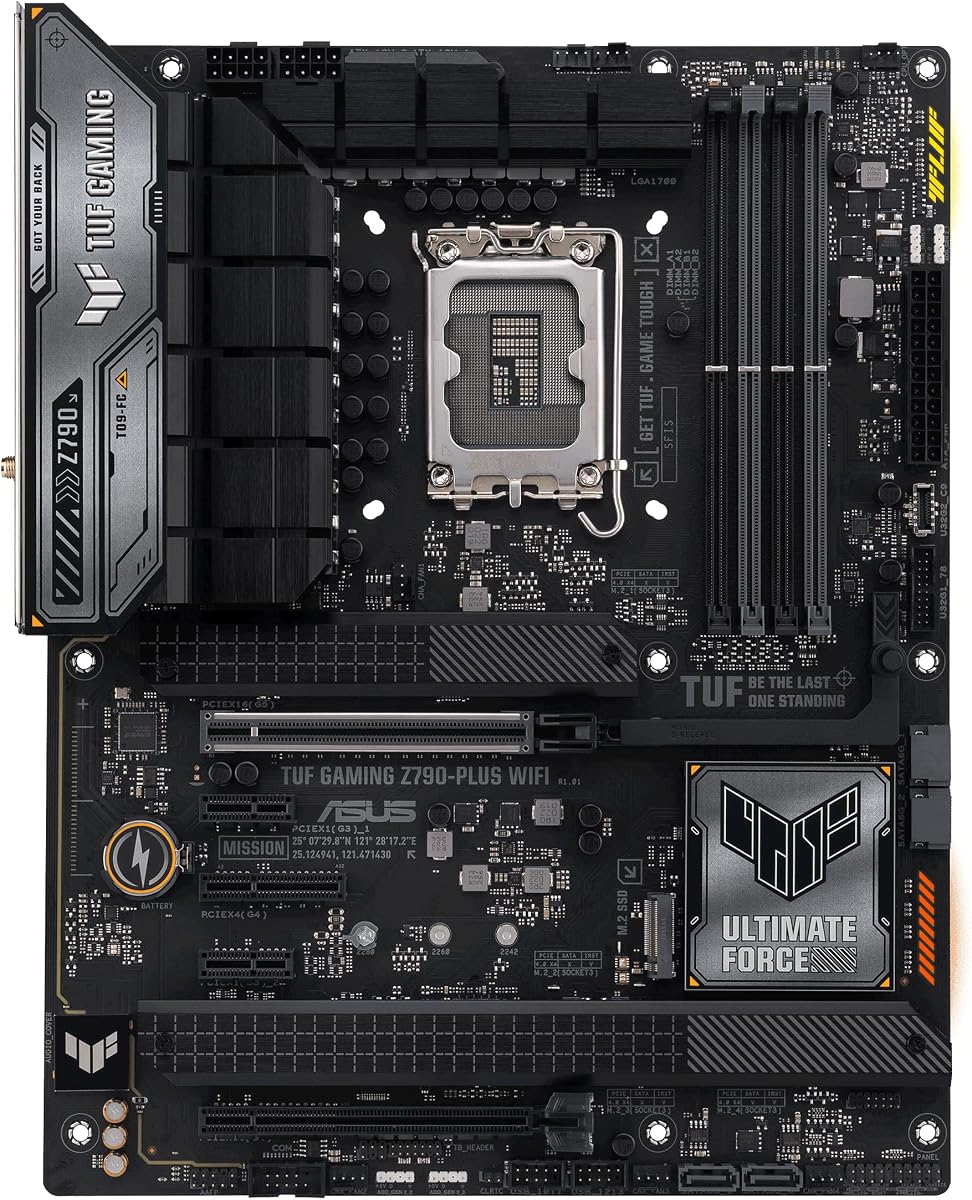
The ASUS TUF Gaming Z790-Plus WiFi is the most comprehensively equipped LGA 1700 board in this group. Its 4.5 rating reflects a high-end ATX design with a 16+1 DrMOS power solution, four M.2 slots, PCIe 5.0 support, DDR5 memory, and both high-speed wired and wireless networking. It is a modern platform, not a direct match for the i5-4690K.
We may earn a commission when you buy through this link, at no additional cost to you.
Power delivery is handled by 16+1 DrMOS stages, ProCool sockets, military-grade TUF components, and the Digi+ VRM system. Cooling includes a VRM heatsink, fanless PCH heatsink, M.2 heatsink, hybrid fan headers, and the Fan Xpert 4 utility. Together, these features make the board a suitable foundation for a powerful gaming or workstation-oriented configuration.
Storage and expansion are similarly generous. Four M.2/NVMe SSD positions provide room for multiple high-speed drives, while PCIe 5.0 opens the main graphics slot to the newest generation of graphics hardware. A front-panel USB 3.2 Gen 2 Type-C header, a rear USB Gen 2×2 Type-C connection, and a Thunderbolt 4 or USB4 header provide broad peripheral support.
Network connectivity includes Intel AX201 Wi-Fi 6 and an Intel I225-V 2.5Gb LAN adapter, supplemented by TUF LANGuard and TurboLAN. The board is best for a new high-end DDR5 build that values storage expansion, robust power delivery, and integrated connectivity. It offers no path to retaining an i5-4690K, and potential buyers should also account for the additional cost of DDR5 memory and the more demanding platform requirements.
Four M.2 positions, a PCIe 5.0 graphics slot, and front and rear Type-C connectivity provide room for high-speed storage and current peripherals. The result is a flexible platform for a new gaming or productivity system.
A 16+1 DrMOS configuration, reinforced power connectors, and multiple dedicated heatsinks provide a substantial foundation under sustained processor loads. Fan Xpert 4 simplifies the management of the board's hybrid fan headers.
We may earn a commission when you buy through this link, at no additional cost to you.
The MSI B760 Gaming Plus WiFi is an ATX gaming motherboard for current Intel processors and DDR5 memory. It has a 4.5 rating and offers a balanced mix of networking, expansion, memory performance, and thermal hardware. The product listing clearly states that DDR5 memory is required, making it a distinct platform from the DDR4-focused MSI options.
We may earn a commission when you buy through this link, at no additional cost to you.
The board supports 12th-, 13th-, and 14th-generation Intel Core processors as well as compatible Pentium Gold and Celeron models. Dual-channel DDR5 memory can reach a stated overclocked speed of 6800 MHz or higher. A PCIe 4.0 graphics slot and Lightning Gen4 x4 M.2 interface support current high-speed components without requiring PCIe 5.0 hardware.
Thermal engineering is a notable strength. The extended heatsink, MOSFET thermal pads rated at 7W/mK, and additional choke thermal pads help maintain stable operation under demanding workloads. Connectivity is equally strong, with 2.5G LAN, Wi-Fi 6E, Bluetooth 5.3, HDMI and DisplayPort, and USB 3.2 Gen2 support.
This motherboard is a strong candidate for a new DDR5 gaming build where users want modern wireless and wired networking without moving to a flagship board. It cannot support the i5-4690K because of both the socket and memory-generation differences. A buyer who already owns compatible DDR5 modules may reduce the platform cost, while someone starting from an i5-4690K system would need to replace the processor, cooler, and memory.
Stated dual-channel speeds of up to 6800 MHz provide ample memory bandwidth for current games and applications. The board's emphasis on DDR5 also makes it more future-facing within the LGA 1700 ecosystem than a DDR4 alternative.
The combination of 2.5G Ethernet, Wi-Fi 6E, and Bluetooth 5.3 gives a system flexible wired and wireless options. That makes the board convenient for gaming, remote work, streaming, and general home networking.
We may earn a commission when you buy through this link, at no additional cost to you.
The ASRock B760M Pro-A/D4 WiFi is a compact LGA 1700 motherboard that pairs current Intel platform support with DDR4 memory. Its 5.0 rating is the highest among the listed products, and the combination of dual 2.5G networking, Wi-Fi 6E, two M.2 connectors, and a small footprint makes it particularly appealing for compact builds.
We may earn a commission when you buy through this link, at no additional cost to you.
The board supports 12th-, 13th-, and 14th-generation Intel Core processors, but it does not support an i5-4690K. Its 7+1+1 Dr.MOS design provides dedicated phases for the processor core and integrated graphics, while four DDR4 DIMM slots support dual-channel configurations and stated overclocked speeds of 5333 MHz or higher using Intel XMP 2.0.
Expansion is unusually flexible for a micro-ATX board. It includes two PCIe 4.0 x16 slots and one PCIe 4.0 x1 slot. Storage consists of two Hyper M.2 positions capable of supporting PCIe Gen4 x4 NVMe SSDs, one with a dedicated heatsink, plus four SATA3 ports. Integrated graphics support includes HDMI 2.1 and DisplayPort 1.4, with both listed as supporting 4K output at 60Hz when paired with a compatible processor.
Networking includes a Dragon 2.5G LAN controller and Killer 802.11axe Wi-Fi 6E with Bluetooth 5.3. USB connectivity covers a rear Type-C port, Type-A ports, and six USB 2.0 connections. This is an excellent modern compact board for someone comfortable upgrading the processor and retaining DDR4 memory, although it remains entirely unsuitable as an in-place motherboard for an i5-4690K.
At 9.6 by 9.6 inches, the board fits many compact and standard cases, but exact enclosure measurements should be checked before purchase. Despite its small size, it offers two full-length PCIe 4.0 x16 slots and two dedicated NVMe positions.
A 2.5G wired connection, Wi-Fi 6E, and Bluetooth 5.3 cover most modern networking needs. Two Gen4 M.2 slots and four SATA ports allow a mix of fast and conventional storage devices.
We may earn a commission when you buy through this link, at no additional cost to you.
The ASUS ROG Strix Z890-E is an advanced ATX motherboard for Intel's LGA 1851 platform and Core Ultra Series 2 processors. Its 4.4 rating reflects a high-end feature set that includes extensive power delivery, AI-oriented software and hardware features, Wi-Fi 7, Thunderbolt 4, and as many as seven M.2 positions.
We may earn a commission when you buy through this link, at no additional cost to you.
The board's 18+2+1+2 power-stage configuration uses 110-amp, 90-amp, 90-amp, and 80-amp components in the listed groups. ProCool II power connectors, MicroFine alloy chokes, and premium metallic capacitors support the design. Its stated power configuration is aimed at high-end processors, intensive workloads, and users who want considerable headroom.
AI-related features include NPU Boost, ASUS AI Advisor, AI Overclocking, AI Cooling II, and AI Networking II. Memory tools such as DIMM Fit, DIMM Flex, and AEMP III are included to simplify setup and improve performance. Storage and peripheral connectivity are extensive, with seven M.2 slots, Thunderbolt 4, and USB Type-C listed among the major features.
This motherboard is intended for a completely new enthusiast build rather than an i5-4690K upgrade. It is most appropriate for users who want the newest Intel platform, fast networking, abundant storage, and premium power hardware. The same platform separation also means an existing Haswell system cannot be transferred into this chassis without replacing the motherboard, processor, memory, and potentially the operating-system setup.
LGA 1850 support brings access to Intel Core Ultra Series 2 processors and features designed for advanced AI PCs. This board is forward-looking but offers no socket or chipset path for an i5-4690K.
Seven M.2 positions allow extensive high-speed storage configurations, while AI Advisor, AI Overclocking, and AI Cooling II assist with setup and control. DIMM Fit, DIMM Flex, and AEMP III simplify memory configuration.
We may earn a commission when you buy through this link, at no additional cost to you.
The ASRock B760M Pro RS is a micro-ATX motherboard centered on LGA 1700 processors and DDR5 memory. With a 4.6 rating, it stands out for a high stated memory speed of 7200 MHz, support for up to 192GB, and a PCIe 5.0 graphics slot. It is suitable for a modern desktop but not for retaining an i5-4690K.
We may earn a commission when you buy through this link, at no additional cost to you.
The board supports 12th- and 13th-generation Intel Core processors, with the product title also indicating support for 14th-generation models. Its 7+1+1 Dr.MOS power phase is intended to supply the processor core and integrated graphics with stable power. Memory support is the primary attraction, particularly for users who want high bandwidth and a large installed capacity.
Expansion includes a PCIe 5.0 x16 slot and a PCIe 3.0 x16 slot. Display connectivity consists of HDMI and DisplayPort, while the title also references eDP support. An M.2 Key E position provides a dedicated mounting point for a wireless network module, subject to the required module and antenna configuration.
This board is well matched to a compact modern workstation or high-performance gaming system that uses DDR5. Its maximum memory capacity and high stated speed can be useful for content creation, large datasets, and memory-heavy multitasking. An i5-4690K owner would need a new CPU, cooler, and DDR5 memory, making this a platform replacement rather than a motherboard upgrade.
The combination of a stated 7200 MHz memory speed and support for up to 192GB provides considerable configuration flexibility. These are particularly useful specifications for modern workstations, although the CPU and memory kit must both support the intended operating mode.
A primary PCIe 5.0 x16 slot supports current high-end graphics hardware, while the secondary PCIe 3.0 x16 slot offers additional possibilities. HDMI and DisplayPort provide convenient display options for compatible integrated graphics.
We may earn a commission when you buy through this link, at no additional cost to you.
The ASUS TUF Gaming B760-Plus WiFi is a well-rounded ATX motherboard for 12th-, 13th-, and 14th-generation Intel processors. It has a 4.5 rating and combines a 12+1+1 DrMOS power design, DDR5 memory support, three M.2 connectors, and integrated networking. Like the other modern ASUS options here, it cannot accept the i5-4690K.
We may earn a commission when you buy through this link, at no additional cost to you.
Its power solution includes 12+1 DrMOS stages, a six-layer PCB, 8+4 ProCool sockets, military-grade TUF components, and the Digi+ VRM system. Cooling hardware includes enlarged VRM heatsinks, M.2 heatsinks, a PCH heatsink, hybrid fan headers, and Fan Xpert 4. The design is suitable for a mainstream gaming system without requiring a flagship motherboard.
The board includes a PCIe 5.0 graphics slot, multiple PCIe 4.0 M.2 positions, a rear USB 3.2 Gen 2×2 Type-C port, a front-panel USB 3.2 Gen 2 Type-C header, and a Thunderbolt 4 or USB4 header. Intel Wi-Fi 6 and Realtek 2.5Gb Ethernet provide integrated networking, while TUF LANGuard is included for connection protection.
This is a good recommendation for a new DDR5 gaming build that needs current expansion and network features in a conventional ATX package. Two-way AI Noise Cancelation can improve microphone and output clarity during gaming and video calls. It is not appropriate for an existing i5-4690K system without a full platform change, and buyers should verify their chosen memory and graphics card against the board's supported configurations.
The 12+1+1 power stages, six-layer PCB, and extensive heatsinks provide a robust foundation for mainstream performance processors. Fan Xpert 4 provides centralized control over the board's cooling setup.
Wi-Fi 6, 2.5Gb Ethernet, Type-C connectivity, and a Thunderbolt 4 header provide flexible peripheral options. Three M.2 positions allow a high-speed storage configuration without requiring add-in cards.
We may earn a commission when you buy through this link, at no additional cost to you.
Choosing a motherboard for an i5-4690K starts with physical socket compatibility, but processor support alone does not guarantee a suitable system. Form factor, memory generation, expansion, networking, cooling, and the possibility of a complete platform upgrade all deserve careful consideration.
The i5-4690K uses Intel's LGA 1150 socket and belongs to the 4th-generation Haswell family. A replacement motherboard must therefore use LGA 1150 and explicitly support 4th-generation Core i5 processors. The B85M PRO in this comparison does so and names the i5-4690K among its supported processors. LGA 1700 boards support newer Intel processors but are physically and electrically incompatible, while LGA 1851 belongs to the still newer Core Ultra platform. Checking only the Intel branding is not enough because several generations of Intel processors use different sockets.
The original i5-4690K platform uses DDR3 memory, normally with dual-channel configurations. The B85M PRO supports DDR3 at 1333, 1600, or 1866 MHz and lists a maximum capacity of 32GB across four slots. Modern B760 boards divide into DDR4 and DDR5 variants. DDR4 models can help reduce the cost of a new LGA 1700 build, while DDR5 boards offer newer memory technology but require a completely different memory kit. Whichever route you choose, memory type, supported speed, capacity, and module layout should be checked before assembling the system.
Motherboard size affects case compatibility, expansion options, and airflow clearance. ATX boards provide four full-size rear expansion slots and more motherboard traces for add-in cards, while micro-ATX is a common compromise for compact builds. The ASRock B760M Pro-A/D4 WiFi measures 9.6 by 9.6 inches, and the B85M PRO is also micro-ATX. Before buying, measure the case's motherboard area, check the permitted board length, account for the CPU cooler and graphics card, and verify that the power supply has the required connectors.
A robust power-delivery system helps maintain stable voltage under sustained processor load. Among the modern boards, the ASUS TUF Gaming Z790-Plus WiFi uses 16+1 DrMOS stages, the ASUS ROG Strix Z890-E uses an 18+2+1+2 configuration, and the MSI PRO B760-P WiFi DDR4 uses a 12+1 Duet Rail design. Smaller boards may use fewer phases and simpler cooling. In every case, quality heat sinks, thermal pads, chassis airflow, and a CPU cooler appropriate for the processor's heat output are just as important as the number of advertised phases.
The number and generation of expansion slots determine which graphics cards, capture cards, and other devices can be installed. The B85M PRO offers one PCIe 3.0 x16 slot, which is sufficient for a compatible graphics card but does not match newer PCIe generations. Several B760 boards support PCIe 4.0, while the ASRock B760M Pro RS and ASUS TUF Gaming B760-Plus WiFi include a PCIe 5.0 slot. The ASRock B760M Pro-A/D4 WiFi is notable for offering two PCIe 4.0 x16 slots in a compact form factor. Check the physical clearance of large graphics cards against the chosen case.
M.2 support can modernize a build by accommodating compact NVMe SSDs, but connector generation, lane sharing, and cooling deserve attention. The B85M PRO includes an M.2 position with automatic NVMe and SATA mode switching, while the MSI PRO B760-P uses a Gen4 x4 M.2 interface and M.2 Shield Frozr. The ASRock B760M Pro-A/D4 WiFi has two Gen4 x4 Hyper M.2 slots, one with a heatsink, plus four SATA ports. More storage positions offer flexibility, but each additional drive consumes power, cooling, and sometimes shared PCIe lanes.
Integrated networking can make a new build more convenient by avoiding add-in Wi-Fi or Ethernet cards. Modern options include 2.5Gbps LAN, Wi-Fi 6E, Bluetooth 5.3, and on the ROG Strix Z890-E, Wi-Fi 7. USB Type-C, front-panel headers, Thunderbolt 4, and USB4 are also important for modern peripherals, docks, and external storage. For an i5-4690K system, integrated graphics can be helpful, but the i5-4690K's display capabilities and the board's outputs should be checked together. The B85M PRO lists VGA, DVI, and HDMI-compatible outputs.
A board's BIOS and accessory package can affect setup and troubleshooting. Older platforms may require a supported BIOS version for the intended processor, while newer boards generally target current hardware from the start. The B85M PRO does not include a user manual or CR2032 battery, so those items may need to be obtained separately. Modern ASUS and MSI boards include several software utilities for fan control, memory configuration, and diagnostics. Review the listing, manual, BIOS support list, and included cables before installation to avoid discovering a missing component after delivery.
Before installation, confirm that the processor, motherboard socket, memory type, cooler mounting pattern, case form factor, and power-supply connectors are all compatible. Read the motherboard manual, identify the front-panel header markings, install the I/O shield if the case requires it, and populate RAM in the slots recommended by the manual. Handle the board by its edges and avoid touching contacts, sockets, or exposed circuitry.
Install the processor and cooler according to the manufacturer's instructions, apply the correct thermal interface material, and connect the processor power cables to the board's designated headers. Install storage and graphics hardware only after the board is secured in the case. Connect SATA data and power cables, M.2 devices, fan headers, and front-panel switches, then use the manual to verify the front-panel connections before powering on.
After assembly, enter the BIOS to confirm that the processor and memory are recognized, update the firmware if needed, and save an appropriate memory profile such as XMP 2.0 only when the memory and processor support it. Keep airflow unobstructed, clean dust from heatsinks and fans, inspect cables for strain, and monitor temperatures under sustained workloads. When upgrading, remove static charge, handle components carefully, and follow the manual's reset and update procedures.
The Intel Core i5-4690K requires an LGA 1150 motherboard that supports 4th-generation Haswell processors. In this list, the B85M PRO LGA 1150 is the direct match because it explicitly names the i5-4690K. LGA 1700 and LGA 1851 boards are not compatible even though they use newer Intel processors.
No. B760 boards use LGA 1700, while the i5-4690K uses LGA 1150. The processor physically cannot fit, and its electrical and firmware requirements are also different. Installing one of the B760 choices means replacing the processor, motherboard, and usually the memory, cooler, and possibly the operating-system installation.
The B85M PRO supports dual-channel DDR3 memory at 1333, 1600, or 1866 MHz. Its listed maximum capacity is 32GB across four memory slots. You should check each module's voltage, capacity, speed, and timing specifications because not every DDR3 module will be suitable for dual-channel operation.
Micro-ATX is often easier to fit into smaller cases and can still provide a full-length graphics slot, M.2 storage, and modern networking. ATX offers more rear expansion slots and generally more room for add-in cards. The right choice depends on case dimensions, cooling clearance, graphics-card length, and the number of expansion devices you need.
The i5-4690K includes integrated graphics, so a discrete card is not always required for basic desktop output. Modern games and demanding applications may benefit greatly from a dedicated graphics card. The B85M PRO lists VGA, DVI, and HDMI-compatible outputs, while the motherboard's available connections should be matched to your monitor's cable and resolution requirements.
Choose a cooler that explicitly supports LGA 1150 and is appropriate for the processor's thermal output. The cooler must also fit the selected case and clear the memory modules and graphics card. Apply thermal compound as directed, secure the mounting hardware evenly, and verify that the fan is connected to a CPU fan header.
Only if you intend to replace the i5-4690K and upgrade the rest of the platform. A modern board may provide newer connectivity, faster storage, newer memory, and a more capable upgrade path, but it will not accept the existing processor. If the goal is solely to replace a failed motherboard while retaining the CPU, choose a verified LGA 1150 option instead.
First confirm that the power supply and CPU power cables are securely connected, the memory modules are seated in the recommended slots, and the selected display cable is attached to the correct port. Check that the monitor is powered on and that the graphics output corresponds to the installed hardware. The B85M PRO listing also recommends checking CPU and memory compatibility and clearing CMOS after eliminating basic connection issues.
The B85M PRO LGA 1150 is the only board here that directly supports the Intel Core i5-4690K, making it the logical recommendation for preserving an existing Haswell processor. The ASRock B760M Pro-A/D4 WiFi is an excellent compact modern DDR4 board for a new LGA 1700 system, while the ASUS TUF Gaming Z790-Plus WiFi offers the most comprehensive premium feature set among the compatible current-platform alternatives.
If retaining the i5-4690K is the priority, prioritize the LGA 1150 socket, 4th-generation processor support, DDR3 memory, and correct case dimensions before considering secondary features. If replacing the processor is acceptable, compare DDR4 and DDR5 platforms, form factors, expansion needs, M.2 support, and networking. A motherboard upgrade that ignores socket and memory compatibility can become a much larger and more expensive rebuild.
Finally, verify the current listing, BIOS details, package contents, and current price before ordering, as product information and market conditions can change. For the i5-4690K specifically, confirm explicit CPU support rather than assuming that every similarly named Intel board will work. The right motherboard is the one that matches the processor, memory, case, cooler, graphics, and expansion plan as a complete system.