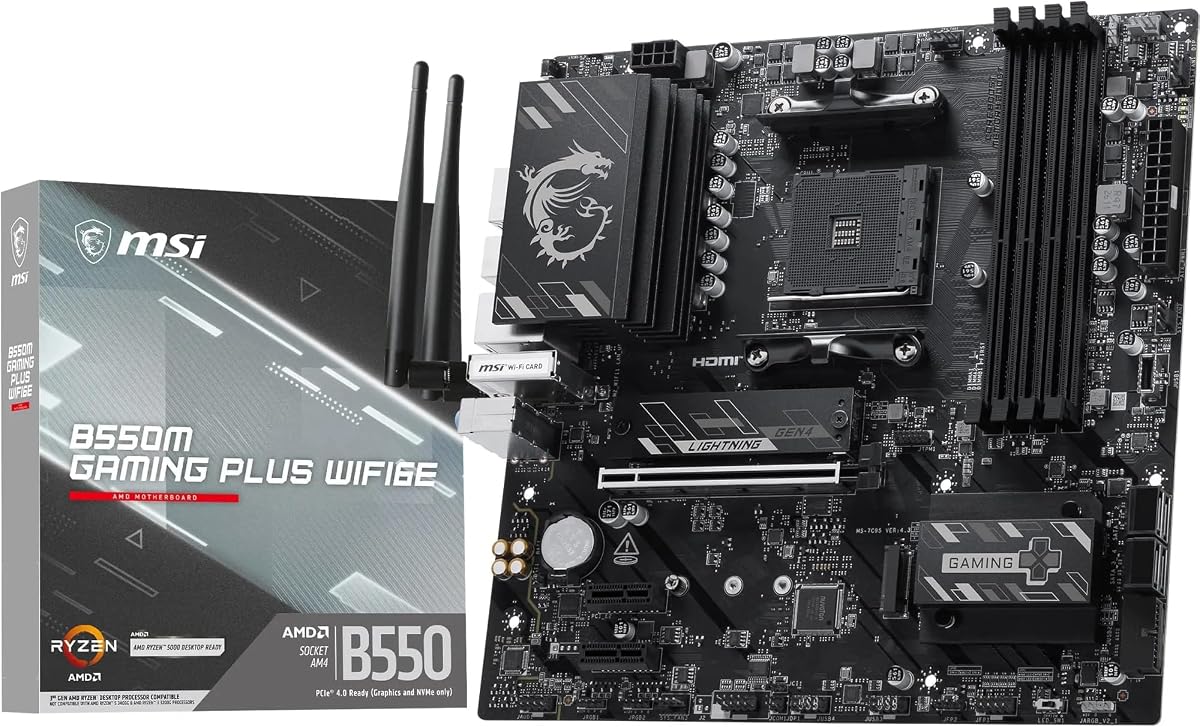
MSI B550M Gaming Plus WIFI6E
4.8Editor score
Compact micro-ATX footprint
Dual NVMe storage support
WiFi 6E and Bluetooth 5.3
Four DDR4 memory slots
PCIe 4.0 graphics support
Discover the best motherboard for video editing by comparing AMD platforms, power delivery, storage, networking, memory, and expansion options.
A video-editing motherboard must handle demanding CPUs, fast NVMe storage, substantial memory, and demanding graphics workloads without becoming the weak point in the build. Socket, power delivery, PCIe support, and cooling are especially important because timeline playback, rendering, and exports can keep both processor and storage systems busy for long periods.
We compared ten AM4, AM5, and sTR5 motherboards using the specifications provided for each model. The guide covers processor compatibility, VRM design, PCIe and M.2 connectivity, memory support, networking, display outputs, power features, and practical features such as BIOS Flashback, EZ-Latch, and Q-Release.
The selections range from compact micro-ATX models to E-ATX boards designed for high-end Threadripper workstations. Each entry identifies the strongest feature and any meaningful limitation, giving desktop editors, motion designers, and content creators a clearer way to match a board with their software and hardware.
4.8Editor score

4.4Editor score

4.0Editor score
This side-by-side comparison highlights each motherboard's processor platform, power delivery, storage support, networking, and form factor, making it easier to identify the right foundation for a video-editing workstation.


The ASUS ROG Strix B550-F Gaming WiFi II combines a well-balanced ATX layout with strong AM4 processor support, making it a versatile foundation for a Ryzen-based video-editing system. Its 4.6 rating reflects a strong overall feature set, particularly its 12+2 teamed power stages, dual M.2 slots, 2.5Gb Ethernet, and support for Ryzen 3000, 5000, and supported 4000 and 5000 G-series desktop processors.
We may earn a commission when you buy through this link, at no additional cost to you.
Its appeal for editors comes from the balance between platform maturity and useful connectivity. The board supports PCIe 4.0, USB 3.2 Gen 2 Type-C, HDMI 2.1, DisplayPort 1.2, WiFi 6E, and Intel 2.5Gb Ethernet. A ProCool power connector, alloy chokes, durable capacitors, and BIOS Flashback help make both performance builds and practical workstation maintenance easier to manage.
The main limitation is the platform ceiling. AM4 and DDR4 are established technologies, and this board does not offer the newest memory generation or the latest PCIe generation. Editors planning to retain the same CPU and memory for several years may find that an AM5 board offers a more future-oriented base, particularly when considering Ryzen 7000, 8000, and 9000 series support.
Choose this motherboard when you want a well-equipped ATX editing build without moving into premium workstation territory. It is especially attractive for creators who need fast wired networking, flexible display connections, multiple fast storage devices, and a robust power system. For most AM4 editing builds, it is a confident all-around recommendation.
Two M.2 slots make it practical to keep an operating system and project drive separate, while the 2.5Gb Ethernet connection is well suited to transferring large media libraries from a network or NAS.
BIOS Flashback simplifies firmware recovery and updates, while the included UEFI BIOS dashboard and AIDA64 Extreme subscription add useful tools for configuration and system evaluation.
We may earn a commission when you buy through this link, at no additional cost to you.
The GIGABYTE B850 AORUS Elite WIFI7 is a modern AM5 board suited to creators who want support for Ryzen 7000, 8000, and 9000 desktop processors. Its 4.4 rating is supported by a 14+2+2 power design, three M.2 slots, PCIe 5.0, DDR5 support, and current wireless and wired networking options.
We may earn a commission when you buy through this link, at no additional cost to you.
For video editing, the three M.2 slots offer a useful balance between operating-system storage, cache-heavy project drives, and scratch storage. The board also includes an M.2 Thermal Guard, VRM thermal features, USB-C connectivity, a Sensor Panel Link, and EZ-Latch. Those details matter because a content workstation may contain several SSDs and need a stable thermal environment.
Buyers must account for the cost and availability differences associated with a DDR5 platform, although the instructions prohibit discussing monetary values rather than compatibility. More importantly, older AM4 components generally cannot be transferred directly into an AM5 system. The processor, memory, and operating-system configuration should therefore be planned as a coordinated platform rather than a partial upgrade.
This is a strong recommendation for a new AM5 editing workstation that needs modern connectivity without moving to the highest-end enthusiast or professional workstation models. It is particularly suitable for editors using NVMe project storage, high-resolution media, and demanding multicore applications who also appreciate EZ-Latch and contemporary network hardware.
Three M.2 positions make it easier to separate the system drive, active project drive, and media cache. Thermal Guard coverage helps each installed drive operate within a more controlled thermal environment.
The 14+2+2 power phase provides a stronger foundation for sustained multicore workloads than basic boards, while DDR5 memory support gives new builders access to the latest AMD platform features.
We may earn a commission when you buy through this link, at no additional cost to you.
The GIGABYTE B650 AORUS Elite AX is an excellent general-purpose choice for a new AMD video-editing system. It supports Ryzen 9000, 8000, and 7000 series processors, uses a 14+2+1 power phase with 70A power stages, and pairs that foundation with a 4.4 rating and an extensive set of modern connectivity features.
We may earn a commission when you buy through this link, at no additional cost to you.
The board's 8-layer, two-ounce copper PCB, 6mm heatpipe, fully covered MOSFET heatsinks, M.2 Thermal Guard, and PCIe Ultra Durable Armor are especially relevant for sustained editing and rendering sessions. Editors can use PCIe 5.0 for high-bandwidth components, while dual front and rear USB-C connectivity simplifies modern peripherals and external storage workflows.
The main decision factor is that B650 is a mature AM5 platform rather than a direct upgrade from AM4. Existing DDR4 memory and older processors will not work, so this is most appropriate for a fresh workstation. Compared with the B850 AORUS Elite WIFI7, it supports the same broad processor range but has one fewer listed M.2 slot and WiFi 6E rather than WiFi 7.
Choose the B650 AORUS Elite AX when you want a strong, well-rounded AM5 editing motherboard with robust power delivery, modern storage support, fast networking, and convenient installation features. It is a particularly sensible fit for a new tower built around a Ryzen 7000, 8000, or 9000 series processor and a dedicated graphics card.
The 14+2+1 design with 70A power stages, alloy chokes, and durable capacitors provides a robust foundation for processors that remain busy during multicore rendering and export tasks.
Front and rear USB-C, WiFi 6E, 2.5Gb Ethernet, Q-Flash, and EZ-Latch cover connectivity, recovery, and installation needs that are often overlooked when comparing workstation boards.
We may earn a commission when you buy through this link, at no additional cost to you.
The ASUS Prime B550M-A WiFi II delivers a surprising amount of flexibility in a micro-ATX board. It supports third-generation AMD Ryzen processors, DDR4 memory, dual M.2 storage, WiFi 6, and three display outputs, making it a compact option for editing systems that still need a discrete graphics card.
We may earn a commission when you buy through this link, at no additional cost to you.
The board includes one PCIe 4.0 x16 SafeSlot, a PCIe 4.0 x4 M.2 connection, a second M.2 slot, USB 3.2 Gen 2 Type-A, HDMI 2.1, DisplayPort, and D-Sub. ASUS OptiMem trace layout is designed to improve memory behavior, while VRM and chipset heatsinks, hybrid fan headers, and Fan Xpert 2 assist with thermal management.
Its wired network connection is limited to 1Gb Ethernet, which may be less attractive for editors moving large projects between a NAS, shared drive, and workstation. The micro-ATX format also offers less expansion room than a full-size ATX board. However, those constraints can be reasonable for a focused build that uses the board's two M.2 positions and a single high-performance graphics card.
This motherboard is best for creators seeking a smaller Ryzen 3000-based system with good display flexibility and modern wireless connectivity. It also suits builders who value ASUS protection features, including LANGuard, DRAM overcurrent protection, overvoltage protection, SafeSlot Core safeguards, and a stainless-steel rear I/O panel.
HDMI 2.1, DisplayPort, and D-Sub allow flexibility when configuring displays. This is useful for a dedicated editing system with a discrete GPU, although the selected graphics output must still match the graphics card and monitor connection.
Five X Protection III features cover several areas of system integrity, while the ASUS OptiMem layout is intended to help compatible DDR4 kits operate efficiently at lower voltages and higher frequencies.
We may earn a commission when you buy through this link, at no additional cost to you.
The GIGABYTE B550M K is a straightforward AM4 micro-ATX board for a cost-conscious video-editing build. It supports Ryzen 3000, 4000, and 5000 series processors, DDR4 memory, two M.2 slots, and a PCIe 4.0 x16 graphics slot, giving an editor several ways to create a capable but economical workstation.
We may earn a commission when you buy through this link, at no additional cost to you.
Its two M.2 positions include one PCIe 4.0 and one PCIe 3.0 connection, allowing an operating system or active project drive to use the faster interface while another drive handles library or scratch storage. Four USB 3.2 Gen 1 ports, 1Gb Ethernet, Q-Flash, and support for Extreme Memory Profile keep the feature set functional.
The 3+3 digital VRM is less substantial than the power designs found on the premium ATX models. That difference matters most for sustained high-power workloads and high-core-count processors, although the board is still compatible with the listed Ryzen families. It also lacks the richer display, wireless, and audio feature sets of many competitors in this roundup.
Choose the B550M K when a basic AM4 system is the goal and you already own compatible memory and a processor. It is well suited to learning, secondary editing machines, and modest production systems where the dedicated graphics card will carry most of the video workload and the motherboard simply needs to provide reliable platform support.
The combination of PCIe 4.0 and PCIe 3.0 M.2 slots allows the operating system and primary project drive to benefit from the faster interface while a second drive stores media or less frequently accessed project files.
Four DDR4 slots, Q-Flash, and support for several Ryzen generations make it easier to construct a system around components already on hand, provided every part is checked for AM4 and DDR4 compatibility.
We may earn a commission when you buy through this link, at no additional cost to you.
The GIGABYTE TRX50 AERO D is the dedicated workstation option in this guide. Built for AMD Ryzen Threadripper PRO 7000 series processors on the sTR5 socket, it brings a 16+8+4 digital VRM, four DDR5 R-DIMM slots, dual high-speed networking, and extensive PCIe 5.0 connectivity.
We may earn a commission when you buy through this link, at no additional cost to you.
Its professional feature set is designed for demanding editing, rendering, and virtual-production environments. The board supports PCIe 5.0 M.2 storage, dual USB4 Type-C connections, 10GbE and 2.5GbE Ethernet, WiFi 7, AMD EXPO, Intel XMP, and screwless EZ-Latch storage and expansion connectors. Four R-DIMM slots can also serve workstations configured for large memory capacities and specialized professional memory.
This is not a general-purpose entry board, and its requirements are correspondingly specific. A Threadripper PRO processor, compatible registered DDR5 memory, an E-ATX-capable case, and a suitable cooling solution are essential. The 4.0 rating should also be considered in the context of a specialized product whose key strength is its professional platform rather than broad appeal.
Choose the TRX50 AERO D for studios and individual professionals who regularly work with exceptionally large timelines, many simultaneous media streams, complex project archives, or compute-intensive effects. Its network throughput, storage connectivity, and Threadripper PRO support make it the most purpose-built selection for a high-end video-editing workstation.
The Marvell 10GbE connection is particularly relevant for studios moving large project libraries between networked storage, render machines, and editing workstations, while 2.5GbE and WiFi 7 provide additional connection options.
Four DDR5 R-DIMM slots and support for EXPO and XMP make this board suitable for high-capacity professional configurations, though registered memory and Threadripper PRO must be selected with the platform in mind.
We may earn a commission when you buy through this link, at no additional cost to you.
The ASUS ROG Strix X870E-E Gaming WiFi is the most feature-dense AM5 board in the guide. It supports Ryzen 7000, 8000, and 9000 processors, uses an 18+2+2 power solution rated at 110A per stage, includes five M.2 slots, and provides WiFi 7, 5Gb Ethernet, dual USB4 Type-C, and multiple high-speed USB ports.
We may earn a commission when you buy through this link, at no additional cost to you.
Storage is a major strength for professional editors. Three onboard PCIe 5.0 M.2 slots and two PCIe 4.0 M.2 slots allow a workstation to contain several NVMe drives, each with substantial cooling solutions. A pair of PCIe 5.0 x16 SafeSlots, a 20Gbps front-panel USB-C connector, and nine additional 10Gbps USB ports support demanding peripherals and expansion configurations.
The board also includes an extensive collection of installation and management tools, including Q-Release Slim, M.2 Q-Latch, M.2 Q-Release, M.2 Q-Slide, Q-Antenna, Q-Dashboard, Q-Code, Q-LED, BIOS FlashBack, Clear CMOS, a Start button, and a pre-mounted I/O shield. These features add value when the system will be serviced or upgraded repeatedly.
Choose this motherboard for a high-end AM5 editing system that needs extensive storage, very strong power delivery, and premium connectivity. It is well suited to users who plan to add multiple fast SSDs or specialized cards over time. Buyers who need only one or two drives and a straightforward workstation may find a less elaborate AM5 option easier to justify.
Five M.2 slots let an editor separate operating systems, current projects, source media, caches, and archives across high-speed drives. Three listed slots support PCIe 5.0, while thermal solutions help manage heat from sustained transfer workloads.
The 18+2+2 design, dual ProCool II connectors, 5Gb Ethernet, and WiFi 7 create a high-end foundation for sustained multicore processing and rapid communication across a modern editing studio.
We may earn a commission when you buy through this link, at no additional cost to you.
The ASUS TUF Gaming B550-PLUS WiFi II is a mature ATX option for creators who prefer the established AM4 platform. It supports third-generation AMD Ryzen CPUs, DDR4 memory, PCIe 4.0, WiFi 6, 2.5Gb Ethernet, BIOS Flashback, and both HDMI 2.1 and DisplayPort 1.2 outputs.
We may earn a commission when you buy through this link, at no additional cost to you.
Its 8+2 DrMOS power stages, alloy chokes, and durable capacitors provide reliable power delivery for supported high-core-count Ryzen processors. The board's dual M.2 arrangement includes a PCIe 4.0 x4 NVMe connection, while front USB 3.2 Gen 1, rear USB 3.2 Gen 2 Type-C and Type-A, and a Thunderbolt 3 header broaden peripheral options.
Thermal controls are handled through a fanless VRM design, a PCH heatsink, multiple hybrid fan headers, Fan Xpert 4, and UEFI Q-Fan Control. This is useful for a workstation that needs to balance processor cooling, graphics-card airflow, storage temperatures, and quieter operation during routine editing.
Choose the B550-PLUS WiFi II when you want a complete ATX editing foundation with fast networking and flexible cooling controls. It is a good match for an existing AM4 component collection or a Ryzen 3000 build. New systems intended to remain on a current platform for longer should be compared carefully against the AM5 alternatives in this guide.
The 2.5Gb Ethernet connection is more useful than gigabit networking for sustained transfers from shared storage, while WiFi 6 provides a convenient secondary route for configuration and administrative tasks.
Multiple hybrid fan headers, Fan Xpert 4, and Q-Fan Control allow the editor to tune cooling for a graphics-heavy workstation rather than relying on a single default fan curve.
We may earn a commission when you buy through this link, at no additional cost to you.
The MSI B550M Gaming Plus WIFI6E is the best budget pick in this guide, combining the highest listed product rating with a compact micro-ATX design. It supports Ryzen 3000, 4000 G-series, 5000, and 5000 G-series processors, along with four DDR4 memory slots and both PCIe 4.0 x16 and M.2 storage connections.
We may earn a commission when you buy through this link, at no additional cost to you.
Its dual M.2 arrangement includes a PCIe Gen4 x4 slot with an M.2 Shield Frozr and a PCIe Gen3 x4 slot. The Steel Armor graphics slot, PCIe 4.0 x16 interface, and support for memory overclocking speeds up to 4400+ MT/s in OC provide a capable gaming-oriented foundation that can also serve a practical editing system.
MSI Core Boost VRM technology, thermal pads, choke thermal pads, an extended heatsink, a chipset heatsink, and a pump-system fan header support stable operation. Wireless connectivity includes WiFi 6E and Bluetooth 5.3, but the primary wired network is limited to 1Gb Ethernet, and the listed rear specification does not include integrated display outputs.
Choose this board for a compact, budget-conscious AM4 editing system with a dedicated graphics card. It is a good fit for secondary workstations, students, and editors who already own compatible DDR4 memory and a Ryzen processor. For studios transferring very large files over a wired network, select a model with 2.5Gb or 10Gb Ethernet instead.
The Gen4 x4 M.2 slot provides high bandwidth for active projects, while the M.2 Shield Frozr is intended to reduce thermal throttling. A second Gen3 x4 slot provides room for additional storage.
The micro-ATX footprint can simplify a smaller workstation, but the case must support micro-ATX boards, the graphics card must fit, and a discrete GPU is advisable when the editing software requires dedicated graphics acceleration.
We may earn a commission when you buy through this link, at no additional cost to you.
The ASUS TUF Gaming B850-PLUS WiFi offers a well-rounded AM5 foundation for video-editing systems that need modern storage, networking, and processor support. It is compatible with Ryzen 9000, 8000, and 7000 series desktop processors and includes DDR5 memory support, a 14+2+1 power design with 80A stages, and three M.2 positions.
We may earn a commission when you buy through this link, at no additional cost to you.
One M.2 slot supports PCIe 5.0, while two use PCIe 4.0, and all three have listed heatsinks. The board also provides a PCIe 5.0 x16 slot, WiFi 7, Realtek 2.5Gb Ethernet, DisplayPort, HDMI, a rear USB 20Gbps Type-C port, a front USB 10Gbps Type-C connector, and Thunderbolt or USB4 header support.
Its 8-layer PCB, 8+8-pin ProCool connectors, alloy chokes, and durable capacitors provide a robust platform for sustained processor workloads. The AI Ready designation reflects the manufacturer's focus on current and future AI computing applications, while BIOS Flashback provides a convenient firmware recovery path.
Choose this motherboard for a modern AM5 editing tower that needs three fast storage positions, capable networking, and a strong but less expansive board than the ROG Strix X870E-E. It is a particularly good fit for creators planning to use one PCIe 5.0 NVMe drive, a dedicated graphics card, and the remaining M.2 positions for project and media storage.
Three cooled M.2 slots, 20Gbps rear USB-C, 10Gbps front USB-C, and USB4 header support give the board enough flexibility for fast SSDs, external drives, and accessory-heavy editing desks.
AM5 support spans three major Ryzen families, while WiFi 7 and 2.5Gb Ethernet cover both wireless administration and faster wired transfers of project media.
We may earn a commission when you buy through this link, at no additional cost to you.
The right motherboard should support your chosen processor and memory, provide stable power, accommodate fast storage, and leave room for the graphics and network equipment used by your editing workflow. These factors matter more than gaming-oriented aesthetics or unnecessary expansion features.
Begin with the processor platform rather than the board model. AM4 supports Ryzen 3000, 4000, and 5000 families, while the listed AM5 boards support Ryzen 7000, 8000, and 9000 series processors. The sTR5 platform is reserved for Ryzen Threadripper PRO 7000 processors and requires a compatible E-ATX case, registered DDR5 memory, and appropriate processor support. A motherboard cannot compensate for an incompatible CPU, and reusing an existing processor may be the clearest way to narrow the shortlist.
AM4 boards in this guide use DDR4, whereas the AM5 and sTR5 models use DDR5. Memory generation affects available module options and platform flexibility, so check the full system rather than selecting a board in isolation. Four DIMM slots are common across the guide, while the Threadripper board specifically supports DDR5 R-DIMMs. Editors should consider their operating system's memory requirements, the amount needed for large media libraries, and whether future capacity expansion is important.
Video exports and effects rendering can hold a multicore processor at high utilization for extended periods. The power design therefore matters more than a headline clock speed. Options range from the B550M K's 3+3 VRM to 12+2, 14+2+1, 14+2+2, 16+8+4, and 18+2+2 designs. The Threadripper board and higher-end Ryzen boards are the strongest choices for the heaviest sustained workloads, while simpler boards can still serve mainstream editing builds with appropriately matched processors.
At least two M.2 positions allow the operating system and active projects to live on separate drives, which simplifies troubleshooting and can improve workflow organization. The guide includes boards with two, three, or five M.2 slots, and some include PCIe 5.0 positions for the highest bandwidth. Editors should also examine whether every drive has a listed thermal solution, since sustained transfers can generate considerable heat. Capacity, interface generation, and cooling should be considered together.
A dedicated graphics card is central to many editing systems because software such as 3D compositing, color grading, and video effects benefits from GPU acceleration. The listed boards provide PCIe 4.0 or PCIe 5.0 x16 slots, with some including reinforced SafeSlot or Steel Armor construction. Check the physical spacing of expansion slots, the case's clearance, and the number of M.2 devices that can be installed without interfering with a large graphics card.
Wired network speed can determine how quickly a workstation accesses shared media, project databases, and render storage. The guide ranges from 1Gb Ethernet to 2.5Gb Ethernet, 5Gb Ethernet, and the Threadripper board's 10GbE connection. For a single computer, WiFi 6E or WiFi 7 may be convenient, but a wired connection is generally more consistent for sustained large-file transfers. Studios should consider the speed of the other network equipment, because a faster motherboard cannot accelerate an incompatible switch or storage server.
Integrated display outputs such as HDMI 2.1, DisplayPort, DVI, and D-Sub can assist with basic setup or troubleshooting, although a capable editing system will normally use a dedicated graphics card. USB-C is increasingly important for external drives, docks, and front-panel connections. Look for both rear and internal Type-C headers when the case supports them, and check the listed USB generation when connecting high-speed storage or capture equipment.
ATX provides a broad selection of expansion slots and generally easier component access, while micro-ATX can reduce the physical footprint of a workstation. E-ATX is required by the Threadripper model and may also require a larger case than expected. Serviceability features include BIOS Flashback, Q-Flash, EZ-Latch, Q-Release, Q-Latch, pre-mounted I/O shields, Clear CMOS buttons, and onboard diagnostic displays. These features are especially useful for creators who frequently replace SSDs, add memory, or troubleshoot a working system.
Before assembly, read the motherboard manual and verify the CPU socket, memory type, case form factor, storage interface, and graphics-card clearance. Install the processor and cooler according to the manual instructions, confirm that the CPU retention mechanism is fully secured, and apply only the thermal compound required by the cooler manufacturer. Handle the board by its edges and avoid touching contacts, sockets, and exposed circuitry.
Configure the system in UEFI BIOS after the first boot. Enable the appropriate memory profile such as AMD EXPO or XMP only when the memory kit supports it, and confirm that all installed drives, memory modules, and expansion devices are recognized. Update the firmware through BIOS Flashback, Q-Flash, or the normal BIOS update process when appropriate, taking care to follow the manufacturer's instructions exactly.
For a stable editing workstation, apply monitoring software and watch CPU temperatures, memory use, storage activity, and network throughput during representative projects. Keep airflow around the VRM, chipset, M.2 drives, and graphics card, and confirm that fan curves suit both sustained rendering and quieter desktop work. Back up active projects, preserve motherboard drivers and BIOS files, and perform a clean shutdown before changing hardware.
AM5 offers a newer platform with DDR5 memory and support for the listed Ryzen 7000, 8000, and 9000 processor families. AM4 remains practical when compatible components are already owned or when a lower-complexity build is the goal. The right choice depends on your processor, memory, upgrade plans, and case compatibility rather than editing software alone.
No. A Ryzen-based AM5 or AM4 system can support mainstream and advanced editing workflows, particularly when paired with a capable graphics card and fast NVMe storage. Threadripper PRO becomes more relevant for exceptionally large projects, heavy multicore rendering, high-capacity memory, and professional studio environments where the additional platform capability is consistently useful.
Two slots provide a practical minimum because they allow an operating system and project drive to be separated. Three or more slots provide more flexibility for source media, caches, archives, and scratch disks. The best number depends on your storage arrangement, available case space, cooling, and the speed of the drives you plan to install.
It can be important when a workstation regularly accesses a NAS, shared project drive, or other server over a wired network. It handles large transfers more efficiently than gigabit Ethernet. The improvement depends on the storage system, network switches, client devices, and file sizes, so the entire network path should be considered.
A dedicated graphics card is generally preferable for GPU-accelerated editing, 3D work, and color-intensive displays. Onboard outputs can still be useful for initial setup, troubleshooting, or a secondary display when the graphics card does not expose every needed connection. The listed micro-ATX models have fewer built-in outputs, so their graphics-card requirements deserve particular attention.
A stronger motherboard can improve stability, provide faster storage, and support a more capable processor or memory configuration, but it does not automatically accelerate every export. Export speed usually depends on the CPU, GPU, codec, software settings, and project complexity. The board is most valuable when it enables the rest of the system to operate effectively and remain stable.
These profiles can make supported memory operate at its intended higher speed, but they are not mandatory and stability must be verified under the intended workload. The listed boards support these profiles according to their specifications. Start conservatively, test memory stability, and leave the setting disabled if the system is not fully stable.
Micro-ATX can be highly suitable because editors often need a powerful processor, graphics card, memory, and two or three NVMe drives rather than numerous expansion cards. The main trade-offs are fewer expansion slots, smaller heatsinks, and less physical room for extra devices. Choose a case designed for the board and verify graphics-card and cooler clearance.
The MSI B550M Gaming Plus WIFI6E is the best budget choice for a compact AM4 system, the GIGABYTE B650 AORUS Elite AX is the strongest all-round AM5 recommendation, and the GIGABYTE TRX50 AERO D is the specialized premium workstation option. Other boards excel in specific areas, including the B850 AORUS Elite WIFI7 for three M.2 slots and the ROG Strix X870E-E Gaming WiFi for five.
Prioritize the processor and memory platform first, followed by power delivery, the number and speed of NVMe slots, graphics support, and network connectivity. A workstation that handles large media should also account for case size, cooling, and serviceability. Avoid paying for expansion features that will never be used, especially when every added drive and card affects thermals and physical clearance.
Product availability and prices change, so confirm current specifications, memory compatibility, case support, and the latest BIOS details before purchasing. Comparing the board with the rest of the planned system will produce a more reliable result than choosing on a chipset or product name alone.