
SteelSeries Wireless Gaming Mouse CS2 Dragon Lore Edition
3.7Editor score
18K TrueMove Air sensor
Up to 200-hour battery
2.4GHz wireless connection
CS2 Dragon Lore design
Discover the best Mouse for CS2 in 2026, comparing wireless speed, sensors, weight, polling, battery life, ergonomics, and competitive features.
A Mouse for CS2 should translate quick mouse movements into consistent, accurate aim without adding delay, excessive weight, or distracting distractions. The most important considerations include sensor performance, polling rate, switch response, shape, weight, grip compatibility, and reliable wireless connectivity.
This guide compares ten competitive and customizable gaming mice using their supplied specifications, including tracking capability, connectivity, battery life, switch technology, programmable controls, and intended play styles. It covers lightweight esports options, ergonomic models, wired and wireless designs, and CS2-themed releases without claiming personal testing.
Each review explains who a mouse may suit, where it stands out, and which compromises may matter. Ratings reflect the supplied customer feedback, while practical details such as hand size, grip style, mousepad surface, and software preferences can influence the final choice. Prices and availability change frequently.
3.7Editor score

4.6Editor score

4.6Editor score
The comparison below highlights the principal differences among ten CS2-focused gaming mice, including weight, tracking, connection type, polling capabilities, battery life, and control layout.




The Logitech G PRO X2 SUPERSTRIKE is a premium wireless gaming mouse built around speed, customization, and physical trigger feedback. Its supplied rating is 4.6 out of 5, and the most unusual feature is the Haptic Inductive Trigger System, which provides real-time feedback as the buttons actuate. That distinction could make it especially appealing to players who enjoy a clear sense of confirmation without relying only on sound.
We may earn a commission when you buy through this link, at no additional cost to you.
The HERO 2 sensor tracks at over 888 IPS, supports up to 44,000 DPI, and is rated for 88 g-force, providing a strong specification base for precise CS2 movement. Its 10-level actuation settings and five-level rapid trigger reset can be tuned through Logitech G HUB, while LIGHTSPEED Wireless supports polling rates up to 8 kHz. The stated battery life of 60–90 hours balances long sessions with the demands of high-frequency operation.
There are trade-offs within the premium feature set. The HITS system, detailed trigger behavior, and advanced customization depend on G HUB, so buyers who prefer a straightforward plug-and-play mouse may find that setup takes more work. The optional POWERPLAY 2 ecosystem can support endless wireless play, but the receiver or charging solution is sold separately. The included USB-A-to-USB-C cable provides a wired fallback, and compatibility extends to PC and Mac.
This mouse is best for competitive players who want a distinctive trigger experience, extensive actuation tuning, and high-end tracking. It may be less suitable for someone who prioritizes the lightest possible shell, a simple three-button layout, or a mouse that works fully without configuration software. For players who value tactile feedback and granular control, the SUPERSTRIKE stands out as the most feature-focused choice in this guide.
The Haptic Inductive Trigger System delivers immediate physical feedback during actuation, giving CS2 players a clearer signal than a conventional click alone. It is a genuinely specialized feature rather than merely a visual or lighting-based distinction.
Ten actuation points and five rapid-trigger reset levels allow users to tailor the response to their preferred play style. G HUB makes those adjustments available, making the mouse particularly suitable for players who enjoy refining their settings.
We may earn a commission when you buy through this link, at no additional cost to you.
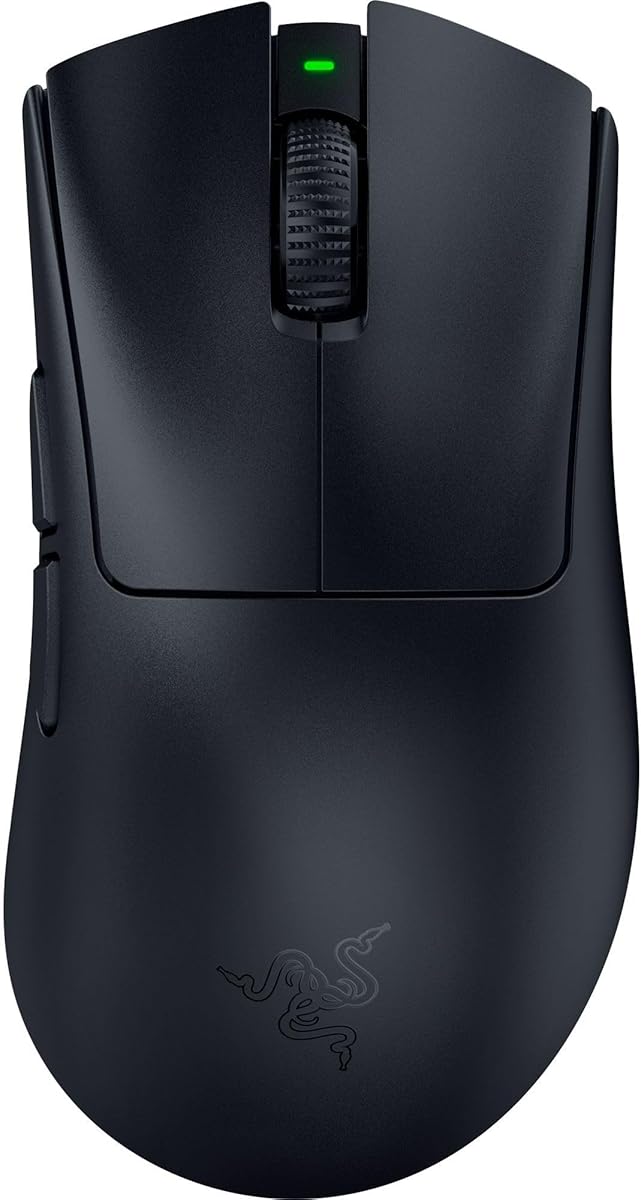
The Razer Viper V3 Pro CS2 Edition is a 54g wireless esports mouse designed specifically for players who want rapid movement and a focused competitive setup. It carries a supplied rating of 4.6 out of 5. Its restrained button layout, balanced shape, and strong sensor specifications make it a convincing all-around choice for CS2, where repeatable flicks, steady tracking, and uncomplicated controls are often preferred over extra features.
We may earn a commission when you buy through this link, at no additional cost to you.
Razer combines the 35K Focus Pro Gen-2 optical sensor with HyperPolling technology for true polling rates of up to 8,000 Hz. The Gen-3 optical switches offer 0.2 ms actuation without debounce delay and are rated for a 90-million-click lifecycle. Battery life reaches up to 95 hours, while HyperSpeed wireless is designed to remain stable in demanding tournament environments. The sensor can also track on glass and supports one-DPI-step adjustments for fine sensitivity control.
Its minimalist layout is one of the main compromises as well as a strength. There are no extra side controls, which keeps accidental inputs to a minimum but removes shortcuts that some players may expect. Razer also recommends disabling Windows pointer acceleration and using Synapse to optimize performance. While this is not a criticism of the hardware, players moving from a feature-heavy mouse may need time to adjust to the no-extra-button format.
Choose the Viper V3 Pro when low weight, high polling, dependable optical switches, and a traditional esports shape matter most. It is a strong match for fingertip or claw-grip players who favor a streamlined shell. For CS2 players who want a long battery, advanced sensor, and tournament-oriented wireless response without a larger ergonomic body, it remains one of the most balanced selections here.
At 54g, the Viper V3 Pro supports quick directional changes while remaining light enough for long competitive sessions. Its balanced construction is especially relevant during rapid repositioning and repeated flicks in CS2.
HyperPolling and HyperSpeed combine to support a true polling rate of up to 8,000 Hz. The included dongle is designed for a stable connection, including in environments with competing wireless signals.
We may earn a commission when you buy through this link, at no additional cost to you.
The SteelSeries Wireless Gaming Mouse CS2 Dragon Lore Edition combines CS2-inspired styling with practical wireless specifications. Its supplied rating is 3.7 out of 5, placing it behind the more highly rated models in this list, but the product remains notable for its long stated battery life, 18K TrueMove Air sensor, and limited-edition AWP Dragon Lore design.
We may earn a commission when you buy through this link, at no additional cost to you.
The TrueMove Air optical sensor, co-developed with PixArt, supports up to 18,000 DPI and true 1-to-1 tracking. Players can use 2.4GHz wireless for gaming or switch to Bluetooth for general device use. Battery life is listed at up to 200 hours, and the buttons are guaranteed to remain snappy for 80 million clicks. These characteristics make it a straightforward option for CS2 sessions, menus, and everyday wireless use.
The principal limitation is that its supplied specification does not include the very high polling rates or equally high sensor ceiling featured by several rivals. Its rating is also lower than those of the other products in the guide. Players should not expect the same level of explicitly stated competitive hardware acceleration found on the Logitech and Razer flagships. Bluetooth is useful for non-gaming use, but competitive players should use the 2.4GHz mode for their primary input connection.
This is the option to consider when a CS2-specific appearance, wireless convenience, and long battery life are the main priorities. It is particularly suitable for players who appreciate Dragon Lore aesthetics and want a dependable wireless mouse without focusing primarily on the highest possible polling specification. The lower rating and less aggressive performance specifications should be weighed before choosing it over the stronger-rated alternatives.
The AWP Dragon Lore-inspired exterior gives the mouse a clear connection to Counter-Strike without adding complexity to its everyday controls. It offers a distinctive look for players who want their gaming gear to reflect the game.
A stated battery life of up to 200 hours reduces the need for frequent charging. 2.4GHz wireless provides the competitive connection, while Bluetooth offers a convenient alternative for other devices.
We may earn a commission when you buy through this link, at no additional cost to you.
The Razer Viper V3 HyperSpeed is a lighter-weight 82g gaming mouse that stands apart through its exceptional stated battery life of up to 280 hours. Its supplied rating is 4.4 out of 5. Rather than emphasizing the highest possible polling rate, this model focuses on an efficient single-AA-battery design, a forward-placed 30K sensor, and a conventional competitive shape.
We may earn a commission when you buy through this link, at no additional cost to you.
The Focus Pro 30K optical sensor provides intelligent tracking functions and is designed to work across a wider range of surfaces, including glass. HyperSpeed wireless is intended to remain stable in noisy environments, and the mouse supports multiple devices. A top-mounted button gives quick access to five DPI stages, although Razer Synapse can reassign it. Mechanical Gen-2 switches are rated for 60 million clicks and use gold-plated contacts.
Players prioritizing very high polling will find that the specification is less aggressive than the Viper V3 Pro, Viper V4 Pro, DeathAdder V4 Pro, or Logitech SUPERSTRIKE. The 82g weight is also higher than those 49g, 54g, and 56g alternatives. On the other hand, the long battery life can substantially reduce interruptions, and the single-AA format makes the design straightforward to keep ready for play.
The Viper V3 HyperSpeed is a strong choice for players who want a lightweight esports mouse but rank battery life and broad sensor tracking above top-tier polling specifications. It suits competitive practice sessions, travel, and tournament use where dependable power matters. For someone seeking the absolute lightest shell or the fastest advertised polling, a higher-tier Viper or DeathAdder model may be more appropriate.
The up-to-280-hour claim makes this one of the most convenient wireless mice for frequent CS2 sessions. A single AA battery also allows players to keep replacements simple rather than relying on a rechargeable cell.
The top DPI button cycles through five stages without requiring software interaction. It can also be reassigned in Synapse, giving the shell quick control alongside deeper configuration options.
We may earn a commission when you buy through this link, at no additional cost to you.
The Razer DeathAdder V4 Pro combines a 56g shell with high-end tracking and up to 8,000 Hz wireless polling. Its supplied rating is 4.4 out of 5. It is a particularly compelling option for CS2 players who prioritize fast movement, a recognizable ergonomic lineage, and the ability to use either HyperSpeed wireless or a USB-C wired connection.
We may earn a commission when you buy through this link, at no additional cost to you.
Its second-generation Focus Pro sensor reaches 45,000 DPI, tracks at 900 IPS, and carries a stated 99.8% accuracy figure. HyperSpeed Wireless Gen-2 supports up to 8,000 Hz, while the wired mode also supports that polling level. Gen-4 optical switches are rated for 100 million clicks, and the optical scroll wheel provides tactile feedback without relying on a conventional mechanical wheel mechanism.
The battery figure requires context. Razer states up to 150 hours at 1,000 Hz, so players running the highest polling setting should expect a different experience. Synapse provides control over DPI, lift-off distance, polling rate, Dynamic Sensitivity, and Smart Tracking. This is a strong toolkit, but deep configuration may be unnecessary for players who already have a preferred sensitivity and aim routine.
The DeathAdder V4 Pro is worth considering for players who want an extremely light mouse without giving up a high polling rate or flexible wired operation. Its shape may be particularly comfortable for established DeathAdder users and right-handed players. Those seeking a more neutral, symmetrical esports shape should consider the Viper line instead, while the wired Basilisk V3 remains an option for users who do not need wireless freedom.
The mouse can operate through HyperSpeed Wireless or USB-C wired mode while maintaining up to 8,000 Hz polling. That flexibility helps players use their preferred setup without sacrificing advertised input frequency.
Synapse controls lift-off distance, sensitivity behavior, and other precision settings. These options can help players minimize unintended movement while refining the way a fast crosshair placement feels.
We may earn a commission when you buy through this link, at no additional cost to you.
The Razer Basilisk V3 is a wired ergonomic gaming mouse that favors control, comfort, and customization over the minimal shape of a tournament mouse. Its supplied rating is 4.6 out of 5. The right-handed design includes a thumb rest and accessible side controls, giving it a different feel from the smaller, lighter Viper models included in this guide.
We may earn a commission when you buy through this link, at no additional cost to you.
The Focus Plus 26K sensor provides high-resolution tracking without smoothing, while Gen-2 optical switches actuate in 0.2 ms and are rated for 70 million clicks. Eleven programmable buttons can be assigned macros and secondary actions. The HyperScroll tilt wheel supports free-spinning and tactile modes, while 11 Chroma RGB zones provide extensive lighting customization and reactions within supported games.
The wired connection is both a limitation and a strength. It removes concerns about wireless interference, charging, and battery life, making the mouse predictable for a fixed gaming desk. However, the larger ergonomic form and additional buttons may feel unnecessary for players who prefer a small shell, a light shell, or a two-button layout. Razer also recommends disabling Windows pointer acceleration and optimizing settings through Synapse.
Choose the Basilisk V3 for right-handed players who want a comfortable, feature-rich mouse and do not need wireless operation. It is well suited to long sessions where a thumb rest and broad button access are valued. Competitive CS2 players who want the lightest possible movement, extensive side controls, or the newest polling specifications should look to the Viper, DeathAdder, or Pro X families instead.
The thumb rest supports a relaxed right-hand posture and gives the larger shell a different feel from symmetrical esports designs. This can be useful for players who prefer palm control and a more ergonomic shape.
Eleven programmable buttons can carry communication shortcuts, ability macros, or other secondary commands. For CS2, the extra controls may be less essential than in a busy MMO, but they remain available for personalized workflows.
We may earn a commission when you buy through this link, at no additional cost to you.
The Razer Basilisk V3 X HyperSpeed combines the Basilisk line's right-handed ergonomic shape with wireless connectivity. Its supplied rating is 4.4 out of 5. It is aimed at players who want a comfortable, thumb-rest design and several accessible controls but do not need the extreme lightness of a 49g or 54g tournament shell.
We may earn a commission when you buy through this link, at no additional cost to you.
The 18K Razer optical sensor provides sensitivity settings designed for responsive, pixel-precise aim, and it is described as tracking without spinouts. The mouse supports low-latency HyperSpeed wireless as well as Bluetooth for extended use away from a gaming PC. Razer states up to 285 hours on HyperSpeed and up to 535 hours on Bluetooth, though actual results depend on usage.
Nine customizable controls provide more flexibility than a minimalist esports mouse, while Gen-2 mechanical switches are rated for 60 million clicks. Chroma RGB lighting adds another layer of customization. On the downside, the supplied specifications do not advertise the extreme polling rates available on newer Viper and DeathAdder models, and the ergonomic shell is naturally larger and less mobile-oriented than those ultralight alternatives.
This Basilisk model makes sense for a CS2 player who wants wireless freedom but values hand support, a broad control layout, and exceptional battery life. It is less compelling for someone optimizing every gram for rapid flicks. Players who need a neutral esports shape should compare it with the Viper V3 HyperSpeed, while those wanting a wired version can consider the Basilisk V3.
The Basilisk form supports the right hand through its thumb rest and accessible button placement. Adding wireless connectivity allows that comfort-focused design to move freely around a desk.
HyperSpeed is intended for low-latency gaming, while Bluetooth provides longer-lasting connectivity for general computer use. This separation makes the mouse more versatile outside CS2 matches.
We may earn a commission when you buy through this link, at no additional cost to you.
The Razer Viper V4 Pro is a 49g wireless esports mouse that combines an extremely light shell with a 50,000 DPI sensor and up to 8,000 Hz polling. Its supplied rating is 4.5 out of 5. Among the products reviewed here, it has the lightest stated weight and the highest listed DPI resolution, making it a natural candidate for players who want a highly responsive CS2 mouse.
We may earn a commission when you buy through this link, at no additional cost to you.
The third-generation Focus Pro sensor tracks at up to 930 IPS and 90 G acceleration. Frame Sync is intended to align sensor data with the PC and reduce latency, while the optical scroll wheel provides more consistent tracking than a mechanical wheel and adds tactile feedback. Gen-4 optical switches offer a true tactile click and a stated 100-million-click lifespan. The box includes grip tape, a HyperSpeed dongle, and a USB-A-to-USB-C cable.
Razer states battery life of up to 180 hours at 1,000 Hz and up to 45 hours at 8,000 Hz, illustrating the direct relationship between polling frequency and power consumption. Synapse 4 compatibility allows sensitivity, mouse rotation, one-DPI-step adjustments, and other fine-tuning on PC and Mac. The feature set is impressive, although its advanced customization is unnecessary for a player who only needs a responsive, lightweight shape.
The Viper V4 Pro is best suited to competitive players who aggressively optimize movement and want the lightest shell in this comparison. Its narrow esports form may be less appealing than the Basilisk line for palm-oriented users, and its maximum polling demands greater attention to battery management. Even so, it offers one of the strongest combinations of weight, tracking resolution, and input frequency for CS2.
The lightweight shell is designed to make quick swipes and rapid repositioning easier. At 49g, it is the lightest model listed in this guide, which may appeal to players who prefer minimal hand movement.
Up to 180 hours at 1,000 Hz provides lengthy use between charges, while the 8,000 Hz mode offers the lowest-latency configuration. Players can select the balance that best fits their practice schedule.
We may earn a commission when you buy through this link, at no additional cost to you.
The Razer Basilisk V3 Pro is a wireless ergonomic mouse that brings a 35K sensor, 13 customizable controls, and a configurable HyperScroll tilt wheel together in a comfort-focused body. Its supplied rating is 4.4 out of 5. It is a versatile option for CS2 players who want useful secondary commands and a familiar right-handed shape rather than a strictly minimal esports design.
We may earn a commission when you buy through this link, at no additional cost to you.
The Gen-2 Focus Pro 35K sensor supports tracking on surfaces including glass and offers one-DPI-step adjustments for granular control. The mouse's Smart-Reel mode can automatically switch between smooth free-spinning and tactile scrolling based on scrolling speed, and the behavior is configurable through Synapse. The multi-function trigger can execute actions such as push-to-talk, ping, and assigned macros.
Wireless operation provides up to 140 hours of stated battery life. A true 8,000 Hz polling rate can be unlocked with the Razer Mouse Dock Pro or HyperPolling Wireless Dongle, although both are sold separately. Without those accessories, the product does not advertise the same high-frequency polling figure as several lighter esports mice. Its larger footprint and 13-control layout also make it less minimalist by design.
The Basilisk V3 Pro suits players who want a comfortable, highly programmable mouse with flexible wireless setup. It may be a better daily driver for work and gaming than a compact tournament shell, especially if communication shortcuts and scroll behaviors have practical value. For the lightest esports experience, however, a Viper model is more direct; for the most controls in this guide, this mouse is the leading contender.
The Smart-Reel scroll behavior changes between smooth and tactile modes according to use. This creates a more versatile wheel for menus, long lists, and gameplay without requiring separate controls.
The trigger can be assigned to communication commands, pings, and macros beyond standard firing. That flexibility makes the mouse useful for players who mix CS2 with streaming, team chat, or other daily applications.
We may earn a commission when you buy through this link, at no additional cost to you.
The Logitech G PRO X Superlight 2 is a 60g wireless esports mouse that pairs a well-established lightweight design with HERO 2 tracking and up to 8,000 Hz polling. Its supplied rating is 4.5 out of 5. It remains a strong CS2 option for players who want a restrained, familiar shape and competitive specifications without a larger ergonomic footprint.
We may earn a commission when you buy through this link, at no additional cost to you.
The HERO 2 sensor tracks at over 888 IPS, supports up to 44,000 DPI, and is calibrated for zero smoothing, acceleration, or filtering. Logitech describes it as the company's most advanced optical sensor for gaming. LIGHTFORCE hybrid switches provide a tactile click, while Zero-Additive PTFE feet are designed to deliver smooth gliding. The mouse supports USB-C charging and POWERPLAY compatibility, although compatible POWERPLAY hardware is a separate consideration.
At 60g, the Superlight 2 is lighter than most conventional gaming mice but not as light as the 49g Viper V4 Pro, 54g Viper V3 Pro, or 56g DeathAdder V4 Pro. It also lacks the SUPERSTRIKE's haptic trigger system and the newer Viper models' very high sensor ceilings. These differences matter most to players who place extreme priority on weight, tactile feedback, or maximum specifications.
The Superlight 2 is a compelling choice for right-handed players who prefer a classic esports shape, straightforward controls, and a proven lightweight balance. It is well suited to players who value 44,000 DPI tracking and 8,000 Hz polling but do not need the Superlight's 60–90-hour battery range or additional trigger customization. It remains a balanced alternative to the newer premium models in the Logitech and Razer ranges.
The shell offers a middle ground between the newest 49g models and larger ergonomic mice. Its 60g construction supports quick movement while preserving a shape familiar to many competitive shooters.
HERO 2 supports up to 44,000 DPI and is described as operating without smoothing, acceleration, or filtering. Those characteristics suit players who want movement to reflect their input as directly as possible.
We may earn a commission when you buy through this link, at no additional cost to you.
The best Mouse for CS2 is the one that fits your grip, movement style, and preferred competitive setup. Sensor quality, latency, weight, controls, battery life, and software should be considered together rather than judged by a single headline specification.
A competitive mouse should track smoothly, accurately, and consistently on the surface you use. The products in this guide range from 18,000 to 50,000 DPI, but maximum DPI does not automatically produce better aim. Actual precision depends on sensitivity, available space, sensor behavior, control, and whether the surface supports tracking. Several Razer models and the Logitech HERO 2 sensor are specifically described as capable of tracking on glass, which can provide more placement flexibility if the glass surface is suitable for play.
Choose a sensor that is accurate, stable, and free from unwanted spinouts or correction behavior. Very high resolution can be helpful for fine sensitivity adjustments, although players should avoid increasing sensitivity simply because the sensor supports it. A high-DPI sensor paired with a sensible sensitivity is more useful than an extreme setting that causes repeated micro-corrections.
Polling rate describes how frequently the mouse reports input to the computer, and competitive models increasingly offer rates as high as 8,000 Hz. The Viper V3 Pro, DeathAdder V4 Pro, Viper V4 Pro, Logitech Pro X Superlight 2, and Logitech PRO X2 SUPERSTRIKE advertise support for this frequency. The SteelSeries Dragon Lore and Viper V3 HyperSpeed do not make an equivalent high-frequency claim, while the Basilisk V3 Pro can reach 8,000 Hz when paired with separately sold accessories.
Polling should be considered alongside the quality of the wireless connection. A stable 2.4GHz link, properly placed receiver, manageable battery draw, and consistent frame synchronization matter more than the largest advertised number. Wired operation is also worth considering because it eliminates wireless variability altogether. Competitive players should test the complete setup under realistic conditions and avoid assuming every advertised rate produces identical perceived latency.
Lighter mice can make rapid swipes and repositioning feel effortless, while heavier shells may feel more stable during controlled aiming. This guide includes 49g, 54g, 56g, 60g, and 82g wireless options, plus larger ergonomic wired and wireless models. The relationship between weight and accuracy is personal, however, and a lighter mouse is not automatically better for every player.
Look for a model whose weight and balance suit your grip. Fingertip players often appreciate low-mass shapes, palm-grip users may favor the Basilisk family, and claw-grip users may prefer a moderate compromise. The Razer Viper V4 Pro at 49g is the lightest option here, while the Viper V3 HyperSpeed at 82g gives the lightweight line a noticeably greater mass. Consider how often you make emergency corrections and whether that effort causes strain.
The Viper and Pro X models use relatively traditional esports shapes, while the DeathAdder and Basilisk lines are more ergonomic. Shape should be assessed in relation to hand size, preferred palm, claw, or fingertip positioning, and the depth of the buttons. A large palm rest may feel supportive to one player and obstructive to another, while a narrow shell can be ideal for quick movement but uncomfortable during a long session.
Avoid selecting solely by appearance. Compare length, width, button placement, thumb support, and the location of the sensor. For a right-handed configuration, the Basilisk and DeathAdder lines may feel more natural, while the Viper family is often considered for players who favor a less pronounced ergonomic shape. Product photography can show the general design, but personal hand geometry is the deciding factor.
CS2 can be played effectively with a small number of buttons, so a minimalist mouse may help reduce accidental inputs. The Viper models provide a streamlined competitive layout, whereas the Basilisk products add several programmable controls. The SUPERSTRIKE goes further with a Haptic Inductive Trigger System, 10 actuation points, and five rapid-trigger reset levels for players who want highly adjustable click behavior.
More buttons offer shortcuts for communication, macros, and other applications, but they can also be pressed accidentally during a tense firefight. Trigger design is particularly important because repeated clicking can expose differences in feel, actuation speed, and debounce. The Razer optical switches are rated for 0.2 ms actuation, while the Logitech model uses LIGHTFORCE hybrid switches in the Superlight 2 and a more elaborate haptic system in the SUPERSTRIKE.
Battery life can determine how frequently a wireless mouse needs attention. The SteelSeries CS2 Dragon Lore lists up to 200 hours, the Viper V3 HyperSpeed up to 280 hours, the Basilisk V3 X HyperSpeed up to 285 hours on HyperSpeed, and the Viper V4 Pro up to 180 hours at 1,000 Hz. High polling rates can shorten those figures, so the operating mode must be considered.
A wired mouse avoids charging and wireless interference entirely, which is why the Basilisk V3 remains relevant in a competitive guide. Some wireless models also include cables for wired operation. Check the expected battery duration at your preferred polling rate, keep a charging routine manageable, and consider whether your desk setup offers a clean way to position a wireless receiver.
Most modern gaming mice use companion software for DPI, polling, button mapping, lift-off behavior, and lighting. Razer Synapse and Logitech G HUB are central to the feature sets of the respective products. Synapse can refine the Basilisk V3 Pro's scroll behavior, while G HUB unlocks the SUPERSTRIKE's actuation points, rapid-trigger settings, and broader customization.
Software access is a benefit when you want precise control, but it can be a drawback if you prefer a device that works without configuration. Some options, such as the Viper V3 HyperSpeed's five-stage DPI button, also provide convenient onboard access. Before buying, consider whether your computer supports the software, whether you use Windows or Mac, and how much time you want to spend adjusting settings.
Begin by installing the mouse on a clean, suitable surface and updating its companion software before changing sensitivity. Set an in-game sensitivity that feels consistent with your current setup, then test the mouse with a repeatable warm-up routine rather than making large adjustments after every few rounds. If using a high polling rate, confirm that the mouse is connected through its intended wireless receiver or cable and that the selected mode is active.
Use the mouse's DPI controls and software to match sensitivity to your resolution and play style. The Razer models recommend disabling the Windows setting labeled Enhance pointer precision, and similar acceleration-related adjustments may be useful depending on your setup. Keep in-game sensitivity and mouse sensitivity conceptually separate, and avoid repeatedly increasing one because of a difficult opponent or a cluttered scene.
Care for the mouse by keeping the sensor and feet free of dust and debris, and clean the underside gently rather than scratching the tracking surface. Charge wireless models before long sessions or use a wired connection where available. Replace the battery in AA-powered models as needed, keep receivers unobstructed, and periodically inspect the cable, feet, and buttons for wear. A consistent surface and clean sensor help maintain the tracking performance you selected.
A higher polling rate can report input more frequently, and several options in this guide support up to 8,000 Hz. However, connection stability, frame timing, sensitivity, and personal response to delay also influence how the setting feels. Choose a rate your wireless connection can maintain consistently, and test it in controlled matches rather than assuming a higher number always produces a visible improvement.
A lightweight mouse can make rapid swipes and repositioning feel easier, particularly for fingertip and claw-grip players. Weight does not determine accuracy by itself, and a well-shaped heavier model may feel more controlled for someone accustomed to it. The most useful comparison is between the mouse's mass, balance, shape, and the way you naturally move your hand.
A wired mouse provides a direct connection and avoids charging, interference, and wireless configuration concerns. Modern wireless mice can offer excellent competitive performance, but players should verify receiver stability, battery behavior, and polling performance in their own environment. Choose wired for maximum simplicity or wireless for freedom, provided the connection remains consistently stable.
A high maximum DPI provides room for fine sensitivity adjustments, but it does not guarantee better aim. The Razer Viper V4 Pro supports up to 50,000 DPI, while several other models reach 44,000 or 35,000. Use a sensitivity that produces stable crosshair placement, and increase sensor resolution only when it improves control rather than merely because a higher number is available.
A right-handed ergonomic mouse can be excellent for CS2, particularly for palm-grip players who value a thumb rest and comfortable long sessions. The Basilisk models offer additional programmable controls, while the DeathAdder V4 Pro provides a lighter and faster competitive specification set. Hand size and grip preference should determine whether the larger ergonomic shape feels natural.
The Viper V4 Pro is listed at 49g with a 50,000 DPI sensor, while the Viper V3 Pro weighs 54g and uses a 35,000 DPI sensor. Both support up to 8,000 Hz polling, optical switches, and advanced Synapse configuration. The Viper V4 Pro also adds a 50K Gen-3 sensor, while the CS2 Edition Viper V3 Pro includes a stated battery life of up to 95 hours and a more explicitly CS2-focused presentation.
A themed appearance does not directly improve tracking or accuracy. The SteelSeries CS2 Dragon Lore Edition pairs its themed shell with an 18,000 DPI sensor, 2.4GHz wireless, and up to 200 hours of stated battery life, making it a practical choice for fans of the design. Players should still consider shape, sensor behavior, connection stability, and weight alongside appearance.
Inspect the sensor and feet regularly, especially if you notice tracking changes, cursor stutter, or irregular movement. Gentle cleaning helps preserve accurate tracking and smooth gliding without introducing scratches. Also check the charging port or battery compartment, wireless receiver, and cable for damage, and clean around buttons where dust can affect feel or operation.
The Razer Viper V3 Pro is the most balanced overall recommendation, combining a 54g esports shape, 35K sensor, true 8,000 Hz wireless polling, fast optical switches, and a long stated battery life. The Logitech G PRO X2 SUPERSTRIKE is the premium choice for players who value haptic trigger feedback and unusually deep actuation customization. The SteelSeries CS2 Dragon Lore Edition serves as the value-oriented, CS2-themed option with a 2.4GHz connection and exceptional stated battery life.
Prioritize the factors that affect your own play: a stable connection, a sensor that behaves well on your mousepad, a shape that suits your hand, and a weight you can move confidently. Highly rated specifications cannot overcome poor fit, and the newest polling rate is not the only measure of competitive performance. For broader control, the Razer Basilisk family adds ergonomics and programmable buttons, while the Viper V4 Pro and DeathAdder V4 Pro prioritize lightweight movement.
Before purchasing, check the current product details, software compatibility, included accessories, and current price on the linked listing. Stock, configurations, promotions, and prices can change, so the information shown at the time of purchase may differ from this guide. The right Mouse for CS2 ultimately combines dependable hardware with a setup that matches your grip, sensitivity, and competitive routine.