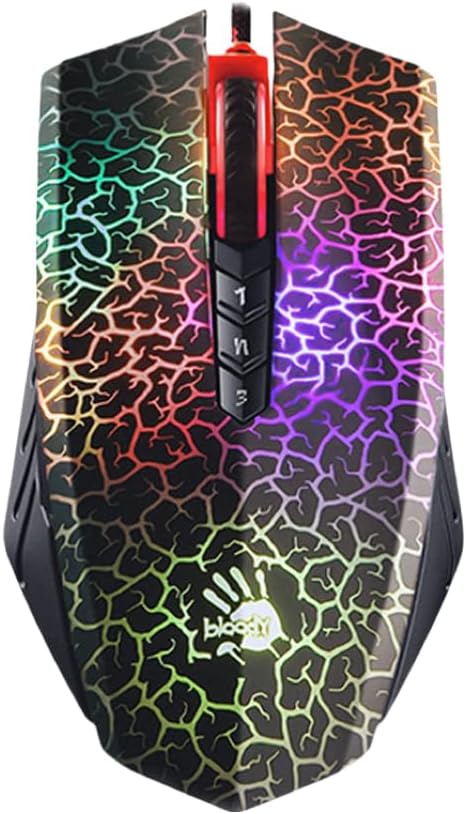
Bloody A70 II
4.5Editor score
Light Strike optical switches
Less than 0.2ms response
Adjustable 8000DPI sensor
Our best Mouse for Drag Clicking guide compares 10 gaming mice across switch response, durability, wireless latency, precision, comfort, macros, control, and
Drag clicking places a special demand on a mouse because it depends on sustained, deliberate movement while a primary button remains held down. The best options combine responsive switches, predictable tracking, a comfortable grip, and enough control to prevent accidental releases during rapid repositioning and repeated clicks.
This guide compares ten gaming mice using the supplied specifications, including switch technology, actuation speed, click durability, sensor performance, weight, wireless capabilities, programmable controls, and intended gaming or productivity use. It covers models suited to competitive play, macro-heavy games, and extended desktop work.
Each review explains where a mouse stands out, where compromises may appear, and which users are most likely to benefit. Rankings reflect the supplied feature information and customer ratings rather than personal testing, while prices and availability can change at any time.
4.5Editor score

4.6Editor score

4.6Editor score
This side-by-side comparison highlights the switches, sensors, controls, connectivity, and physical designs that matter most to drag clicking, while also showing how each mouse balances gaming performance with productivity features.


The Bloody A70 II is a wired gaming mouse built around Light Strike optical switches, programmable controls, and a stated click response of less than 0.2 milliseconds. Its 4.5 rating reflects a well-established option with a clear emphasis on immediate input and macro flexibility, making it a practical candidate for users who drag click frequently and prefer a consistent wired connection.
We may earn a commission when you buy through this link, at no additional cost to you.
The most important feature for drag clicking is the Light Strike switch system, which avoids traditional metal-contact bouncing and is rated for more than 20 million clicks. An adjustable 8000DPI optical sensor gives the mouse room to work across different sensitivity preferences, while the advanced macro options let users assign repeated commands without repeatedly pressing the primary button.
The A70 II is not the most modern option in this list because it lacks a wireless receiver, long battery life, and today’s heavier emphasis on multi-device productivity. Its supplied X'Glide Armor feet are designed to improve glide, which can be useful during the controlled lateral movements involved in dragging, although actual feel depends heavily on the mousepad.
This mouse is best for budget-conscious gamers who value low-latency wiring, immediate switch response, and programmable macros more than wireless convenience. It is a sensible first choice for learning drag-clicking techniques or for maintaining a responsive setup without the added complexity of charging and wireless management.
Because a drag click requires a button to remain registered while the pointer moves, delayed or inconsistent activation can be especially disruptive. The wired design and advertised sub-0.2-millisecond Light Strike response make the A70 II a direct, uncomplicated option for latency-conscious users.
Fully programmable and advanced macro functions can automate sequences that would otherwise demand repeated dragging. They can also create a consistent setup across different applications, provided the user takes time to configure controls correctly.
We may earn a commission when you buy through this link, at no additional cost to you.
The Razer Basilisk V3 combines an ergonomic shape, eleven programmable buttons, 26,000DPI optical tracking, and Gen 2 optical switches rated for up to 70 million clicks. Its 4.6 rating and broad feature set make it the strongest all-around choice in this roundup for gamers who want responsive inputs without giving up productivity-oriented controls.
We may earn a commission when you buy through this link, at no additional cost to you.
Its 0.2-millisecond optical actuation is particularly relevant to drag clicking because it minimizes the delay between the physical press and the command reaching the computer. The 26,000DPI sensor provides detailed tracking, and the button arrangement allows users to remap secondary inputs without changing their grip. A tilt-enabled Hyperscroll wheel adds useful functionality for long documents, game menus, and weapon or skill cycling.
The primary compromise is its wired design. While a cable removes concerns about wireless interference and battery management, it also anchors the mouse to the desk and makes it less convenient for mobile work. The many controls may feel excessive for someone who only wants a basic drag-clicking mouse, although the customizable options give it clear value for advanced users.
The Basilisk V3 is an excellent recommendation for competitive gamers, content creators, and productivity users who want one dependable mouse for many roles. Its combination of fast switches, accurate tracking, ergonomic support, and extensive programmability makes it easier to recommend than a narrower specialist.
The Basilisk V3 does not rely on switch speed alone. Its 26,000DPI sensor and zero-smoothing tracking give the user a responsive foundation for the small corrections and sustained movements required during a drag operation.
The shaped body and thumb rest support a more natural hand position during long work or gaming sessions. That comfort advantage is important because repeated drag clicking can fatigue the hand when the mouse lacks adequate support.
We may earn a commission when you buy through this link, at no additional cost to you.
The Logitech G PRO X2 SUPERSTRIKE is a premium wireless gaming mouse with a 4.6 rating, haptic inductive triggers, ten-level actuation adjustment, and 8K polling. It is the most distinctive choice for drag clicking because it lets users tune how far a button must be pressed and provides immediate physical feedback while the action is being performed.
We may earn a commission when you buy through this link, at no additional cost to you.
The Haptic Inductive Trigger System can give real-time feedback during play, while the ten actuation points and five rapid-trigger reset levels allow users to find a switch feel suited to their technique. The HERO 2 sensor tracks at up to 44,000DPI and handles movement above 888 IPS, providing a high level of control for rapid repositioning. LIGHTSPEED Wireless, an 8K polling rate, and a 60–90-hour battery further strengthen its competitive credentials.
Its advanced behavior depends on Logitech G HUB software, and the optional POWERPLAY 2 setup requires a separate purchase. The mouse also carries a premium positioning that may not align with a strict budget. For users who specifically value adjustable actuation, haptics, and very high wireless responsiveness, however, these limitations are understandable parts of the feature set rather than shortcomings.
This is the strongest pick for serious competitors, streamers, and advanced users who want precise control over click behavior. It is particularly attractive for drag-clicking learners because the adjustable trigger system allows experimentation rather than forcing one fixed switch feel.
Ten actuation points let users experiment with the amount of travel required to register a click. A lighter setting may support rapid corrections, while a more deliberate setting can help users maintain confidence that a drag command has engaged.
The haptic trigger system supplies physical confirmation during an action. Such feedback can make it easier to understand whether the switch has actuated, although the final preference will depend on personal sensitivity to vibration.
We may earn a commission when you buy through this link, at no additional cost to you.
The Razer Basilisk V3 X is a wireless version of the Basilisk family with nine customizable controls, an 18,000DPI optical sensor, and mechanical Gen 2 switches rated for up to 60 million clicks. Its 4.4 rating makes it a solid choice for users who want the familiar ergonomic Basilisk shape with the freedom of wireless connectivity.
We may earn a commission when you buy through this link, at no additional cost to you.
Its nine buttons provide enough control for common game commands, rebinds, and productivity shortcuts, while the signature form is designed to accommodate different grip styles. The Focus Pro 18K sensor supports precise tracking without emphasizing surface restrictions. Razer HyperSpeed Wireless and Bluetooth add useful flexibility, and stated battery figures of up to 285 and 535 hours respectively reduce the need for frequent charging.
Compared with the wired Basilisk V3, this model offers a more flexible desk setup but a lower listed sensor resolution. Its mechanical switches are rated for a long service life, yet it does not advertise the 0.2-millisecond optical actuation of the wired version. Users seeking a more aggressively adjustable competitive response may therefore prefer that alternative.
The Basilisk V3 X is well suited to gamers who also use their computer for work, travel between desks, or simply prefer not to manage a cable. It balances ergonomics, programmable controls, and long battery life effectively enough to serve as a strong all-purpose drag-clicking mouse.
HyperSpeed wireless preserves the low-latency focus expected from a gaming mouse while removing the cable from the desk. The ergonomic body helps minimize the fatigue that can accompany long drag-clicking sessions.
Stated battery life of up to 285 hours on HyperSpeed and 535 hours on Bluetooth suits a mouse that moves between gaming and productivity applications. Actual longevity depends on activity, polling, lighting, and usage conditions.
We may earn a commission when you buy through this link, at no additional cost to you.
The Razer Viper V3 HyperSpeed is an 82g wireless gaming mouse with a 30,000DPI Focus Pro sensor, 60-million-click mechanical switches, and a stated battery life of up to 280 hours. Its 4.4 rating reflects a performance-oriented design aimed at competitive players who prefer fast movement over a large collection of extra buttons.
We may earn a commission when you buy through this link, at no additional cost to you.
The mass-centralized construction should support controlled swipes and quick directional changes, both valuable during drag operations. A forward sensor placement is intended to improve tracking consistency, including on glass, while the on-mouse DPI control allows rapid movement among five stages. HyperSpeed wireless is designed to remain stable in crowded wireless environments, and multi-device support adds practical flexibility.
The minimalist approach may be a limitation for users who depend on extensive macros or need a convenient scroll wheel for productivity. It also lacks a listed rapid-trigger adjustment or haptic feedback system, so users who want to tune click travel precisely must look elsewhere. The 82g weight remains light without entering the extreme ultralight category represented by the Viper V3 Pro SE.
The Viper V3 HyperSpeed is a strong recommendation for competitive gamers who want quick swipes, dependable wireless input, and minimal distractions. It is particularly attractive when the goal is responsive drag clicking without a crowded control layout.
At 82g, the Viper V3 HyperSpeed offers a middle ground between heavy control and extreme lightness. A centered mass can make fast directional movement feel more consistent during repeated drag actions.
The forward-mounted Focus Pro 30K sensor is specified to track accurately on a wider variety of surfaces, including glass. This flexibility gives users more choice when adjusting their workspace.
We may earn a commission when you buy through this link, at no additional cost to you.
The Razer Pro Click V2 Vertical is built around a six-button ergonomic design that encourages a natural handshake grip. With a 4.1 rating, it stands apart from the gaming-focused list through its emphasis on wrist positioning, extended daily use, and five-device connectivity rather than competitive specifications alone.
We may earn a commission when you buy through this link, at no additional cost to you.
The angled body and raised base support are intended to reduce wrist friction and make long sessions more comfortable. Its Focus Pro 30K sensor offers 99.8% stated resolution accuracy and tracks on glass, while mechanical switches have a 60-million-click lifecycle. Up to five devices can be connected through 2.4GHz HyperSpeed, Bluetooth, or wired mode, making the mouse well suited to a multi-computer workspace.
The trade-off is that the vertical shape requires an adjustment period and may not suit users accustomed to a traditional low-profile gaming mouse. Its 4.1 rating is also the second-lowest among the products here. For drag-clicking specifically, the restrained six-button layout offers fewer mappings than the Basilisk or Naga families, although the sensor and switches are still capable of supporting the action.
This mouse is best for office-focused users who experience discomfort with a flat mouse and also want occasional gaming capability. It is less likely to appeal to someone seeking maximum polling, rapid-trigger features, or dozens of programmable commands.
The vertical handshake shape rotates the forearm into a less pronated position than many conventional mice. It may be especially helpful for users who spend long periods dragging windows, selecting text, or navigating creative applications.
Support for up to five devices across HyperSpeed, Bluetooth, and wired modes offers genuine desk flexibility. A productivity-minded user can move between systems without maintaining a separate pointing device for each one.
We may earn a commission when you buy through this link, at no additional cost to you.
The Razer Viper V3 Pro SE is a 54g wireless esports mouse with a 4.6 rating, a 35,000DPI Focus Pro sensor, and Gen 3 optical switches that offer 0.2-millisecond actuation. Its design was developed with esports professionals and emphasizes swift flicks, precise aiming, and a balanced ultralight shell.
We may earn a commission when you buy through this link, at no additional cost to you.
The low weight can reduce the effort required for rapid swipes, while the sensor supports one-DPI-step adjustments for detailed control over sensitivity. The switches have a stated 90-million-click lifecycle and are described as resistant to double-clicking. A 1000Hz wireless polling rate keeps the connection responsive, and the stated 95-hour battery is sufficient for many competitive sessions.
The smooth-touch finish is designed to provide grip while limiting skin friction, though individual preferences will vary. The mouse does not list a rapid-trigger adjustment or haptic system, and its battery figure is lower than that of the larger Basilisk V3 X, Viper V3 HyperSpeed, and Cobra Pro models. Those limitations are the normal trade-offs of pursuing an aggressively light design.
The Viper V3 Pro SE is best suited to competitive players who value immediate movement and precise tracking above button variety or extended battery life. It is an excellent option for drag-clicking users who want to move the mouse quickly without sacrificing switch speed.
At 54g, the Viper V3 Pro SE is among the lightest models in the guide. The reduced mass can make repeated lateral corrections feel easier, particularly when a drag is being repositioned repeatedly.
Gen 3 optical switches combine a stated 90-million-click lifecycle with 0.2-millisecond actuation and no debounce delay. These characteristics align well with fast, repeatable drag-clicking input.
We may earn a commission when you buy through this link, at no additional cost to you.
The Razer Pro Click V2 is a right-handed ergonomic wireless mouse with an extended thumb rest, a Focus Pro 30K sensor, and a 3.9 rating. It is primarily designed to bridge gaming and productivity, offering five-device connectivity, a Hyperscroll wheel, and programmable AI shortcuts in a sculpted right-hand shape.
We may earn a commission when you buy through this link, at no additional cost to you.
The wider thumb rest and shaped body are intended to promote better wrist posture during extended sessions. The 30,000DPI sensor provides accurate tracking, and the mechanical switches carry a stated 60-million-click lifecycle. Hyperscroll can move rapidly through long content or switch to a tactile mode for controlled navigation, while the claimed 3.5-month battery life is useful for a mouse that will spend time outside gaming.
Its 3.9 rating is the lowest in the group, which should give cautious buyers pause. The design is specifically right-handed, and the productivity-oriented shape may not provide the same effortless movement as a lightweight esports model. It also offers fewer specialized competitive features than the Viper, Basilisk, and Pro X2 selections.
The Pro Click V2 is best for right-handed users who spend equal or greater amounts of time working than gaming and want a mouse to handle both roles. It remains suitable for drag clicking, but the case is strongest for buyers prioritizing comfort and versatile controls over tournament-oriented performance.
The wider thumb rest gives the right hand a broader support area than many gaming mice provide. That shape may reduce strain during extended dragging, selection, and navigation sessions.
Dedicated shortcuts and the AI Prompt Master can streamline common text tasks, while Hyperscroll handles long documents efficiently. These features add value for users who want one mouse to cover gaming and office work.
We may earn a commission when you buy through this link, at no additional cost to you.
The Razer Naga V2 HyperSpeed is an MMO-focused wireless mouse with 19 programmable buttons, a 30,000DPI Focus Pro sensor, and a 4.0 rating. It is the clear option in this guide for users who view drag clicking as part of a broader macro-driven control system rather than merely a single mechanical action.
We may earn a commission when you buy through this link, at no additional cost to you.
The deep button arrangement places numerous commands under the fingers, making it possible to assign spells, abilities, work functions, and advanced macros without returning to the keyboard. Mechanical Gen 2 switches have a 60-million-click lifecycle, while the sensor supports tracking on glass. HyperScroll allows repeated commands or free-spinning content movement, and the mouse offers up to 250 hours on HyperSpeed or 400 hours on Bluetooth.
More controls do not automatically mean a better experience. The large layout can take time to learn, may encourage unnecessary repositioning, and can become tiring during long sessions. Its 4.0 rating is lower than several lighter and more specialized alternatives, and the wide body may not suit every grip style. Casual users who only need a primary drag button can find the extra controls excessive.
The Naga V2 is ideal for MMO players, macro enthusiasts, and power users who want extensive command access. It stands out for productivity as well as gaming, particularly when combined with its multi-device support and long battery life.
Nineteen programmable buttons make the Naga V2 a natural fit for games that bind many abilities to the mouse. A carefully arranged layout can reduce keyboard interruptions and keep high-frequency actions close at hand.
The free-spinning mode moves through lengthy content quickly, while tactile mode provides more deliberate feedback. The same versatility makes the wheel useful outside games, particularly in spreadsheets, browsers, and creative applications.
We may earn a commission when you buy through this link, at no additional cost to you.
The Razer Cobra Pro Wireless combines ten customizable controls, five onboard memory profiles, a 30,000DPI Focus Pro sensor, and Gen 3 optical switches. Its 4.6 rating makes it one of the strongest balanced choices in the list, particularly for users who switch between games or applications and want saved configurations close at hand.
We may earn a commission when you buy through this link, at no additional cost to you.
A profile button at the base lets users move among as many as five presets without opening software each time. The optical switches are rated for 90 million clicks and offer 0.2-millisecond actuation without debounce delay, making them well aligned with quick drag inputs. The sensor tracks accurately across a wider range of surfaces, including glass, and HyperSpeed wireless supports responsive gaming.
The mouse provides up to 100 hours on HyperSpeed and 170 hours on Bluetooth, with USB Type-C charging for added convenience. Its wireless connection introduces the usual need to manage a receiver and battery, while the ten-button layout is less extensive than the Naga V2. Onboard profiles also take planning and setup time before they deliver their full benefit.
The Cobra Pro Wireless is a strong all-round recommendation for gamers who alternate between titles, use macros, or want lighting and onboard memory in a compact gaming package. It balances fast switches, accurate tracking, and useful customization without requiring a specialized MMO-style layout.
The base-mounted profile control makes it easy to change between saved configurations. This is useful when a game requires different bindings, sensitivity, or lighting from a productivity application.
Gen 3 optical switches provide quick actuation and a stated 90-million-click lifecycle, while the battery figures support extended use. Together, these features make the mouse practical for regular gaming sessions and daily productivity.
We may earn a commission when you buy through this link, at no additional cost to you.
The right drag-clicking mouse should keep a held button registered, move predictably, and remain comfortable through repeated actions. Switch design, sensor accuracy, grip, controls, connectivity, battery life, and software support all influence the experience.
A drag click depends on a button remaining pressed while the pointer travels. Optical switches are especially compelling because several models in this list advertise 0.2-millisecond actuation, while mechanical alternatives often highlight longer click lifespans. A longer rating can indicate durability, but it does not reveal whether a switch feels stable during a sustained hold. Users who struggle with accidental releases should favor a switch that provides clear tactile feedback, then adjust actuation settings if the model supports them.
Prioritize quick, consistent activation and a mechanism that resists double-clicking or unwanted release. Check the stated lifecycle as a durability reference, but do not treat it as the only measure of switch quality.
Dragging requires the pointer to remain accurate while the button is held, particularly in games that combine movement with firing or selection. The models here range from an adjustable 8000DPI sensor to 44,000DPI sensors with higher tracking speeds. Resolution is not the same as real-world precision, and users should choose a sensitivity they can control consistently. Forward sensor placement, zero-smoothing tracking, and support for glass or other surfaces can provide additional flexibility.
Choose a sensor with enough resolution for your preferred sensitivity and verify that it performs on the surface you actually use. Fine DPI adjustment can be helpful, but control and consistency matter more than chasing the highest headline number.
Repeated dragging can place more strain on the hand and wrist than ordinary clicking. The Basilisk models use a shaped ergonomic form with thumb support, the Viper models favor a lighter competitive shape, and the Pro Click V2 offers a substantially more vertical handshake grip. Palm, claw, and fingertip users may all succeed with different models, so hand size and preferred posture should influence the decision more than a generic comfort label.
Select a shape that lets the hand relax without forcing an awkward wrist bend. If you already know your preferred grip, use that knowledge to avoid choosing solely by weight or feature count.
Wired mice provide a direct connection and remove battery and interference concerns, making the Bloody A70 II and wired Basilisk V3 straightforward choices. Wireless models provide desk flexibility and multi-device support, but their practical performance depends on the connection quality and the environment. Razer lists high polling options on some products, including 8K for the Logitech G PRO X2 SUPERSTRIKE and 1000Hz for the Viper V3 Pro SE. Even with a high polling rate, interference from nearby devices can affect a connection, so testing in the intended environment remains valuable.
Choose wired operation for maximum simplicity or wireless operation for flexibility and multi-device use. If latency is a primary concern, use a high-quality receiver position and keep the mouse unobstructed.
The number of buttons matters only when they serve a useful purpose. The Naga V2 provides 19 controls for complex games, the Basilisk V3 has 11, and the Cobra Pro offers 10 with five onboard profiles. The Pro Click models add productivity shortcuts, while the Bloody A70 II emphasizes advanced macros. Users should consider whether they need momentary abilities, persistent bindings, repeated sequences, or device switching. More controls can increase productivity but also require a period of adaptation and careful profile organization.
Match the button count to the number of actions you realistically need. A compact layout can be better for drag clicking because large grids may encourage unnecessary hand movement.
The lightest option here is the 54g Razer Viper V3 Pro SE, while the Viper V3 HyperSpeed uses a centered 82g design. Low weight can make rapid corrections easier, and a centered mass can improve directional consistency. Neither factor guarantees better control: heavier mice may feel steadier, and a very light shell can move more than a user expects. Drag-clicking users should consider how quickly they reposition the mouse and whether they tend to use controlled, linear movements or frequent flicks.
Treat weight as a preference rather than an absolute ranking. Choose a mass and balance that match your movement style and feel comfortable through a full session.
Battery life ranges from a stated 95 hours for the Viper V3 Pro SE to 400 hours on Bluetooth for the Naga V2 HyperSpeed, with the Basilisk V3 X also offering exceptional stated figures. Some models use replaceable batteries, while others use rechargeable USB-C systems. The relevant figure depends on whether the mouse is used through its high-performance wireless mode, Bluetooth, or a wired connection. Lighting, polling, sensor activity, and gaming intensity can all affect the result.
Match the power system to your routine. Frequent travelers may prefer long battery life, while users who dislike charging can favor replaceable-battery models.
Razer Synapse, Logitech G HUB, and Bloody configuration software can manage sensitivity, buttons, lighting, and macros. Software support is valuable when the mouse is intended for several games, but it also adds a setup requirement. Onboard memory is helpful because a saved profile remains available without opening the application. Users who prefer simple hardware operation may value direct DPI or profile buttons more than extensive lighting effects and cloud features.
Check whether essential settings can be stored on the mouse and whether the required software supports your operating system. Favor a model whose customization remains useful after the novelty of the lighting features fades.
Begin with a comfortable grip and a controlled movement surface. Place the mouse so that the primary button sits beneath the finger without requiring the wrist to angle sharply. A consistent sensitivity setting is important because frequent adjustments can make drag positioning less predictable. If the mouse offers on-mouse DPI controls, choose a level that permits smooth movement without requiring large physical sweeps.
Practice holding the primary button while moving in short, controlled paths. For desktop tasks, use a slow drag and release only after the intended item has been selected. In games, use the technique only where the interface supports it, because some games interpret held inputs differently or block modified clicks. Configure macros carefully, test them in a noncritical application, and avoid assigning actions that could make accidental input difficult to reverse.
Keep the underside and mousepad clean, and avoid pulling the mouse by its cable. For wireless models, recharge the battery before long sessions and verify that the receiver is connected to the intended computer. Periodically review button assignments, DPI stages, profiles, and actuation settings through the appropriate software. If clicks become inconsistent, check for debris around the switches and update the configuration software before considering more involved troubleshooting.
A good drag-clicking mouse combines a switch that registers quickly and holds predictably with an accurate sensor and a shape that supports the hand. Low-latency wired or stable wireless connectivity also helps. Features such as rapid-trigger adjustment can provide further control, although the best choice ultimately depends on grip preference, surface, and the games or applications being used.
Optical switches can actuate faster and avoid the mechanical debounce found in some traditional designs, which may benefit rapid input. However, switch feel, durability, and reliability vary by model, so a durable mechanical switch can still be appropriate. Users should compare actuation claims, feedback, and their own tolerance for accidental releases.
Higher maximum DPI does not automatically make dragging easier. It simply permits finer sensor adjustment, and the useful setting depends on mousepad size, display resolution, and application sensitivity. The better approach is to select a DPI that permits smooth movement and consistent positioning without requiring excessive hand travel.
Wired mice offer the simplest connection and eliminate concerns about wireless interference or battery life. Wireless mice provide greater desk flexibility and multi-device support, with some models offering high polling rates and long battery life. If low latency is the priority, a reliable wired model is straightforward; if flexibility matters, a strong wireless model can perform well in a clean signal environment.
No. Game support depends on how each title handles held mouse inputs, anti-cheat rules, and interface design. Some games permit it, while others may ignore modified clicks or penalize unusual input patterns. Always check the rules of a particular game before relying on drag clicking in competitive play.
It can. A supportive shape, suitable weight, and comfortable grip may reduce strain during long sessions compared with a small or poorly fitting mouse. The vertical Pro Click V2 may help users who prefer a handshake posture, while the Basilisk models offer a more conventional ergonomic shape. Personal hand size and grip style remain more important than any broad comfort label.
Macros usually require the manufacturer’s software, while some models can save profiles or button assignments onboard. Software can make drag-clicking easier by assigning repeated actions or adjusting button behavior, but it can also create setup complexity. Users should test macros in a safe application and keep a manual method available.
Start by choosing a switch with clear feedback and a reliable hold, then reduce the force needed to keep the button pressed. If the model supports adjustable actuation or rapid-trigger reset levels, experiment with settings that minimize accidental activation without making the action difficult to perform. Grip technique, mouse weight, and surface quality can also affect consistency.
The Bloody A70 II is a compelling budget option because its wired connection, light-driven switches, and less-than-0.2-millisecond response prioritize straightforward responsiveness. The Razer Basilisk V3 is the strongest all-round recommendation, combining fast optical switches, a precise 26,000DPI sensor, ergonomic support, and eleven programmable buttons. For users willing to invest in specialized technology, the Logitech G PRO X2 SUPERSTRIKE offers the most distinctive premium experience through adjustable actuation, haptics, and 8K wireless polling.
Most buyers should prioritize a comfortable grip, dependable switch behavior, and accurate tracking before paying attention to extra buttons or dramatic specifications. Competitive players may place greater value on low weight and high polling, while productivity users may prefer programmable controls, multi-device connectivity, and long battery life. The right choice is the one whose shape and features suit the way you actually move the mouse.
Finally, check the current price, availability, software compatibility, and warranty terms before purchasing. Product costs and promotions can change, and the best-performing drag-clicking mouse is not necessarily the right investment for every hand, grip, and application.