
TP-Link TL-SG105
4.7Editor score
Five Gigabit Ethernet ports
Plug-and-play unmanaged operation
Fanless shielded metal design
Discover the best Network Switch for Xfinity with our expert comparison of port counts, speeds, PoE, management, and features for home networks today.
A network switch can give an Xfinity home more room for wired devices, faster local connections, and a cleaner way to connect computers, televisions, game consoles, printers, and access points. The right model depends on port count, link speed, PoE needs, physical design, and whether you want simple or managed controls.
We compared ten switches based on the supplied specifications, including Ethernet port counts, supported speeds, switching capacity, PoE output, management features, mounting options, and energy-related features. The list includes compact gigabit models, multi-gigabit options, PoE switches, easy smart managed equipment, and a more advanced lite-managed model.
Each recommendation highlights a different reason to consider a switch, from straightforward network expansion to support for modern high-speed devices. Ratings and product information reflect the supplied listings, while availability, configurations, and market conditions can change, so confirm the current listing details before buying.
4.7Editor score

4.7Editor score

4.8Editor score
The comparison below covers ten switches designed for different home networking needs, ranging from simple five-port gigabit units to PoE systems, 2.5G models, and feature-rich managed options.



The TP-Link TL-SG105 is a straightforward five-port gigabit switch that earns a place as the best overall option for many Xfinity households. Its 4.7 rating reflects a strong combination of useful features, easy installation, and a compact metal design. It expands the number of wired connections available to a home network without introducing complicated configuration requirements.
We may earn a commission when you buy through this link, at no additional cost to you.
All five RJ45 ports support 10/100/1000 Mbps speeds and automatic negotiation, while Auto MDI/MDIX removes the need to select crossover settings manually. Port-based 802.1p/DSCP quality of service and IGMP Snooping add a measure of traffic control despite the switch being unmanaged. IEEE 802.3X flow control supports reliable transfers, and the energy-efficient design is intended to reduce unnecessary power consumption.
The main limitations are easy to identify. Five ports may be insufficient for a large collection of wired devices, particularly once the uplink to the Xfinity equipment and several entertainment devices are connected. The TL-SG105 also has no PoE capability, so it cannot power a compatible access point, network camera, or other PoE device. Unmanaged operation is convenient for most homes but offers no VLAN or browser-based controls.
It remains an excellent recommendation for apartments, small homes, offices, and straightforward network expansions where five wired endpoints are enough. Plug-and-play setup means it can be connected to compatible equipment with minimal effort, while the fanless metal housing makes it suitable for quiet rooms. For most buyers seeking a dependable, uncomplicated way to add gigabit Ethernet ports, this is the model to prioritize.
The TL-SG105 turns one available network connection into several wired ports without requiring installation software or manual configuration. That simplicity makes it well suited to adding a desktop, printer, game console, or television to a home network.
The fanless metal housing keeps operation quiet, while shielded ports and flow control support dependable performance. Traffic-priority features can also help preserve the quality of important voice or video traffic on a busy local network.
We may earn a commission when you buy through this link, at no additional cost to you.
The TP-Link TL-SG108 expands the category with eight gigabit Ethernet ports, making it a natural choice for Xfinity users who need more connections than a five-port model can offer. Its 4.7 rating and plug-and-play design show that it prioritizes accessibility. Computers, printers, gaming consoles, and other Ethernet-enabled devices can be connected without software installation or a separate configuration process.
We may earn a commission when you buy through this link, at no additional cost to you.
The switch supports 10/100/1000 Mbps links and includes IEEE 802.3x flow control for smoother data transfer. Its advanced traffic optimization is designed to reduce bottlenecks, while automatic adjustment of power consumption based on link status and cable length helps limit energy use. A shielded metal housing supports heat dissipation and protection from electromagnetic interference, and the fanless construction remains quiet.
This is still an unmanaged gigabit switch, so buyers should not expect VLAN creation, port-level configuration, or detailed traffic monitoring. It also cannot supply power over Ethernet, and its maximum individual link speed is 1 Gbps. Those limitations are reasonable for basic network expansion but less suitable for a home that already uses 2.5G storage, a 2.5G access point, or other multi-gig equipment.
Choose the TL-SG108 when the priority is a larger number of reliable gigabit ports with minimal setup. It is particularly useful in a home office, entertainment area, or larger living space where several wired devices need connectivity. Its combination of eight ports, quiet operation, sturdy construction, and simple administration gives it broad everyday appeal.
Eight gigabit ports provide room for a broader mix of wired devices while preserving the uncomplicated experience of an unmanaged switch. This makes the TL-SG108 attractive when everyone in the household should be able to connect a device without technical configuration.
Shielded ports, a durable metal housing, and a fanless design make the switch suitable for continuous operation in a home office, bedroom, conference room, or entertainment cabinet. Energy-conscious link behavior adds another practical benefit.
We may earn a commission when you buy through this link, at no additional cost to you.
The TP-Link TL-SG105S-M2 is the editor's choice for households that want more than standard gigabit performance. It provides five 2.5-Gigabit ports, up to 25 Gbps of switching capacity, and a 4.7 rating. That combination makes it well suited to modern devices such as 2.5G access points, network-attached storage, high-performance gaming computers, and workstations.
We may earn a commission when you buy through this link, at no additional cost to you.
Auto-negotiation allows each port to operate at 100 Mbps, 1 Gbps, or 2.5 Gbps, which makes the switch compatible with a mixed collection of equipment. It can connect 2.5G Wi-Fi 6 access points, 2.5G NAS systems, PCIe adapters, servers, gaming computers, and 4K video devices. The result is a flexible way to introduce multi-gig Ethernet without requiring every connected device to support the same speed.
The five-port count is the clearest constraint. One port may be needed for the uplink or other network equipment, leaving four for endpoints. Although the supplied information notes that the design can avoid the need to upgrade to Cat6 wiring, actual cable and device support still matters. This is also an unmanaged model without PoE, VLAN controls, or browser-based management.
The TL-SG105S-M2 is a strong recommendation for a modern home, compact office, or workstation setup that already includes 2.5G hardware. It is also sensible for a new installation because auto-negotiation allows faster and slower devices to coexist. For buyers who want a compact, quiet, high-speed switch without administrative complexity, it offers an especially balanced feature set.
The switch can connect devices operating at 100 Mbps, 1 Gbps, or 2.5 Gbps, allowing a household to upgrade incrementally. It gives newer hardware access to faster local transfers while retaining compatibility with conventional gigabit equipment.
Measuring 5.45 by 4.96 by 3.98 inches, the durable metal unit can sit on a desk or be mounted on a wall. Its fanless construction suits quiet home offices and entertainment areas where faster equipment is needed but advanced administration is not.
We may earn a commission when you buy through this link, at no additional cost to you.
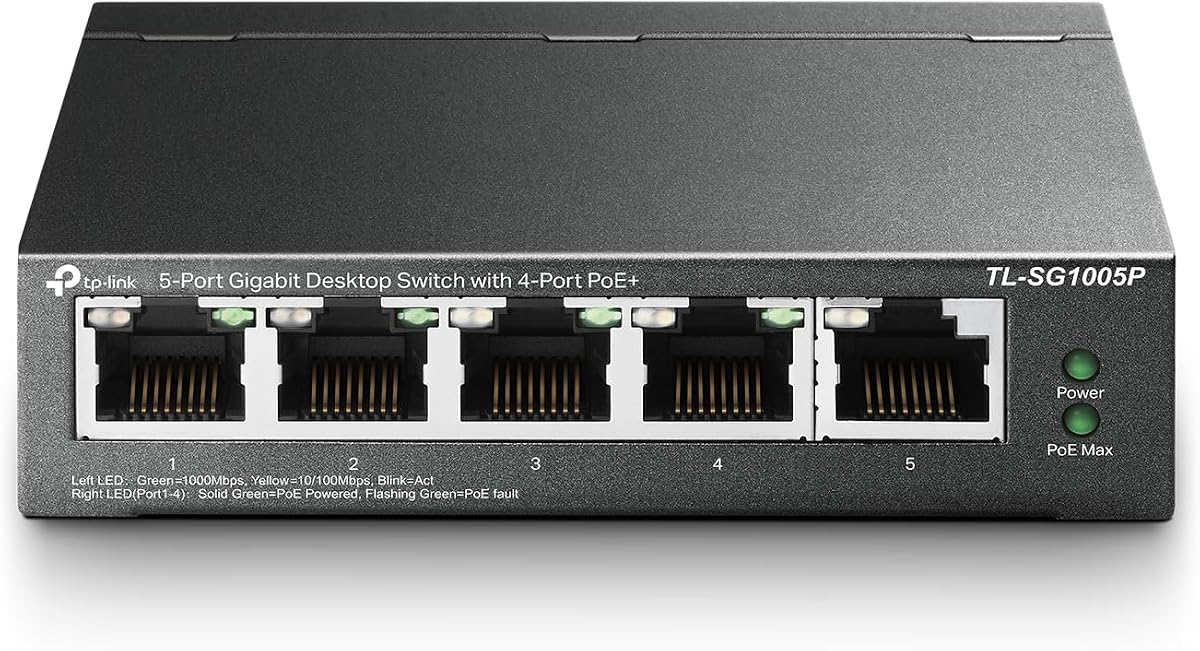
The TP-Link TL-SG1005P is built for Xfinity homes that need to place more than one network device without running a separate power adapter to each one. Its four PoE+ ports can deliver up to 30 watts per port within a 65-watt total budget, and a fifth gigabit port provides a non-PoE connection. The 4.7 rating reflects a practical design with useful management features.
We may earn a commission when you buy through this link, at no additional cost to you.
PoE+ is especially relevant for compatible Wi-Fi access points, IP cameras, and other powered networking equipment. Because data and power share the same Ethernet cable, the setup can be cleaner than powering every device separately. Port-based 802.1p/DSCP quality of service and IGMP Snooping help manage traffic, while IEEE 802.3X flow control supports reliable data transfer.
The switch does not provide 2.5G or 10G links, so it is better for conventional gigabit networks than for emerging high-speed equipment. Only four ports offer power, and the total 65-watt budget must be shared among connected PoE devices. It is also unmanaged, so advanced segmentation and detailed monitoring are outside its feature set.
The TL-SG1005P is a compelling recommendation for a home that already uses compatible PoE accessories or plans to add them. Plug-and-play setup lowers the barrier to installation, and the fanless metal chassis can remain in a media cabinet, office, or mounted location. For users prioritizing a balance of network connectivity and wired power delivery, it offers more purpose than a basic non-PoE switch.
PoE+ can simplify deployment by carrying network data and power over each Ethernet connection. That is useful for access points and cameras positioned where nearby outlets are inconvenient.
Quality of service and IGMP Snooping provide useful controls for prioritizing voice or video traffic and managing multicast streams. These features improve the switch's suitability for homes with active streaming and communications.
We may earn a commission when you buy through this link, at no additional cost to you.
The TP-Link TL-SG108S-M2 combines eight 2.5-Gigabit ports with a 4.8 rating, the highest numerical rating among the listed products. It is an attractive high-speed option for a larger Xfinity home where several modern devices need 2.5G connections and ordinary five-port designs would be too restrictive.
We may earn a commission when you buy through this link, at no additional cost to you.
The switch provides up to 40 Gbps of switching capacity, giving it considerably more headroom than a five-port 2.5G model. Auto-negotiation recognizes 100 Mbps, 1 Gbps, and 2.5G connections, so newer and older Ethernet devices can operate at their appropriate speeds. It is positioned for LAN parties, home entertainment, small offices, and fast workstation transfers.
Its main drawback is that eight fast ports do not make it a managed or PoE switch. There are no listed VLAN tools, per-port controls, or power delivery over Ethernet. A home that relies on access points, cameras, or other PoE equipment would need a different model, while a household that values advanced network segmentation may want a managed option instead.
The TL-SG108S-M2 is best for users who already recognize the value of multi-gig networking or anticipate adopting it. It is especially appealing for a busy home office, advanced gaming setup, media room, or network-attached storage environment. The combination of eight ports, flexible speed negotiation, quiet operation, and strong switching capacity makes it a notable step up from basic gigabit expansion.
Eight 2.5G ports and 40 Gbps of switching capacity create useful room for several fast endpoints. This is a better fit than a five-port model when the home or office includes multiple storage, gaming, or workstation connections.
Automatic negotiation lets conventional 100M and 1G equipment coexist with 2.5G devices. That makes the switch useful during a gradual upgrade instead of requiring every connected product to be replaced at once.
We may earn a commission when you buy through this link, at no additional cost to you.
The TP-Link TL-SG116 is the high-port-count option in this roundup, with 16 gigabit RJ45 ports for a large collection of wired devices. Its 4.7 rating and straightforward setup make it suitable for a busy home, small office, classroom-like workspace, or shared area where avoiding individual network adapters is important.
We may earn a commission when you buy through this link, at no additional cost to you.
Every port supports 10/100/1000 Mbps with automatic negotiation and Auto MDI/MDIX, while IEEE 802.3X flow control supports dependable data transfer. Port-based quality of service and IGMP Snooping help prioritize important traffic, including voice and video. Energy-efficient technology is designed to expand capacity while reducing unnecessary power consumption.
The switch is unmanaged and does not include PoE, so it cannot power network devices and does not offer advanced configuration tools. Its 1 Gbps maximum link speed also means it cannot take full advantage of 2.5G endpoints. The larger port count may also be unnecessary for a typical apartment or modest home, and cable management can become more involved with that many connections.
The TL-SG116 is most appropriate when the number of endpoints is the central concern. A game room, office, dorm-style space, or large residence with numerous televisions, computers, and printers can benefit from consolidating connections into one unit. For buyers who need more links but not faster links or wired power, it offers a clear and capable solution.
Sixteen ports reduce the need to replace one network port with multiple adapters or separate unmanaged units. The result is a more centralized home or office network for numerous devices.
The fanless metal housing can be placed on a desk or mounted on a wall. Its stated operating range from 32 to 104 degrees Fahrenheit supports use in varied indoor environments.
We may earn a commission when you buy through this link, at no additional cost to you.
The Ubiquiti 8-Port PoE Network Switch provides a compact Layer 2 alternative for Xfinity users who want to connect several PoE-compatible devices. Its 4.6 rating reflects a solid overall proposition, and the eight-port layout offers a practical balance between capacity and physical size for a home office or controlled installation.
We may earn a commission when you buy through this link, at no additional cost to you.
The supplied information highlights silent fanless cooling and an external 60-watt power adapter. That adapter supplies 52 watts of total PoE capacity across the eight-port switch. PoE can simplify the installation of compatible access points, cameras, and similar equipment by carrying power and network data over Ethernet connections.
The provided specifications are limited, so buyers should confirm detailed port speeds, supported PoE standards, configuration requirements, and compatibility with their intended equipment before making a final choice. The listed 52-watt shared capacity may also be constrained for power-hungry devices, and the product does not offer the detailed traffic features or switching capacity figures shown for several competing models.
This switch is most attractive to buyers who value the Ubiquiti name, a compact PoE design, and Layer 2 functionality more than extensive specification availability in the listing. It may suit a structured home network that already uses compatible Ubiquiti equipment. Confirming current features and device support is especially important for this pick because the supplied data is concise.
Eight PoE-capable ports can reduce cable clutter around compatible powered devices. The external power supply keeps the switch itself compact and avoids requiring a broad range of ports to provide both data and power.
Fanless cooling is useful in a home office or living space where continuous noise would be unwelcome. Layer 2 operation places the switch in a category suited to basic local network switching, although specific configuration options should be verified.
We may earn a commission when you buy through this link, at no additional cost to you.
The NETGEAR GS308EP is the best premium pick for a home that needs both wired power and basic network management. It has a 4.8 rating, eight 1 Gbps ports, eight PoE+ ports, and a 62-watt total power budget. The Easy Smart interface adds VLANs, QoS, port monitoring, and security controls without moving into a fully enterprise-oriented category.
We may earn a commission when you buy through this link, at no additional cost to you.
All eight Ethernet ports support PoE+, allowing compatible devices to receive power and network connectivity through one cable. Uninterrupted PoE and per-port PoE controls give the installer a way to manage power delivery more deliberately. The switch's compact metal design supports desktop or wall mounting, making it suitable for an entertainment cabinet, utility area, or home office.
The 62-watt budget is divided among connected PoE devices, so buyers need to check each device's power requirements before filling every port. Individual links remain limited to 1 Gbps rather than 2.5G or 10G. The Easy Smart feature set is also a step above an unmanaged switch, but it does not imply the extensive controls of a fully managed professional platform.
The GS308EP is ideal for a structured Xfinity home using compatible access points, cameras, or other PoE equipment while also needing VLANs or traffic-priority controls. It is particularly attractive for users who want more control than a plug-and-play switch but do not need a complex managed system. The combination of full-port PoE availability and useful management functions makes it a strong all-around premium selection.
VLANs, QoS, port monitoring, and network-security settings make it possible to organize a more deliberate home network. These options are especially useful when connected devices have different roles or performance priorities.
Every Ethernet port supports PoE+, and per-port controls let an installer determine how power is distributed. A 62-watt total budget provides a useful foundation for compatible access points and surveillance devices.
We may earn a commission when you buy through this link, at no additional cost to you.
The D-Link 5-Port 2.5G Unmanaged Ethernet Switch is a versatile 2.5G option for an Xfinity home focused on modern Wi-Fi 6 equipment, high-performance computers, media, or gaming. Its 4.7 rating reflects a useful balance of speed and traffic-handling features, while five ports keep the unit compact and approachable.
We may earn a commission when you buy through this link, at no additional cost to you.
All five ports operate at 2.5 Gbps, with automatic negotiation supporting 100 Mbps, 1 Gbps, and 2.5G links. The switch provides up to 25 Gbps of switching capacity and can accommodate a 2.5G Wi-Fi 6 access point, network-attached storage, a server, a gaming computer, an 8K video device, or IPTV equipment. This makes it a credible fit for homes where the internet service and local devices can benefit from faster links.
Unlike a fully managed model, it does not offer user-created VLANs or detailed browser configuration. The QoS feature can classify traffic in eight priority levels, while flow control helps limit dropped packets and IGMP Snooping improves multicast handling. These functions add control, but they do not turn the switch into a comprehensive network-management platform.
The D-Link unit is a good recommendation for a home that wants multiple 2.5G connections, automatic speed handling, and better traffic prioritization without complex administration. Backward compatibility with Cat5 and Cat6 cables eases installation, and per-port LEDs make link status easy to inspect. For users comparing it with the TL-SG105S-M2, the D-Link's deeper QoS feature set is the principal distinction.
Five 2.5G ports support current high-speed accessories such as Wi-Fi 6 access points, NAS systems, and gaming computers. Automatic negotiation allows those devices to work alongside older 1G and 100M equipment.
Eight-level QoS, flow control, and IGMP Snooping provide meaningful traffic handling while preserving a simple plug-and-play setup. The result is useful for mixed media and gaming households that want more than a completely basic switch.
We may earn a commission when you buy through this link, at no additional cost to you.
The QNAP QSW-L3208-2C6T-US is the most advanced network design in the roundup, with six 10GbE RJ45 ports, two combo SFP+/RJ45 ports, and lite-managed controls. Its 4.0 rating is the lowest among the ten products, but the underlying specifications make it a specialized option for Xfinity users with unusually demanding local networking requirements.
We may earn a commission when you buy through this link, at no additional cost to you.
The six copper ports support 10G, 5G, 2.5G, 1G, and 100M rates, while the combo ports allow fiber or copper connections. VLAN, QoS, LACP, IGMP Snooping, and loop detection provide a more structured approach to network design. With 160 Gbps switching capacity and 80 Gbps non-blocking throughput, the switch can handle demanding local data movement and media workloads.
Jumbo frame support of 12K can improve the efficiency of large file transfers and smooth media streaming, although every connected device and the relevant network path must support the configuration. The switch uses 36 watts according to the supplied information, which is a consideration for always-on installations. Its advanced feature set also creates more setup and maintenance complexity than a simple unmanaged switch.
Choose the QNAP model for a sophisticated home lab, advanced home office, NAS environment, or shared media system where 10GbE and optional fiber connectivity matter. It is less likely to be necessary for everyday internet browsing, a few wired devices, or a basic Xfinity network. Buyers should confirm that their equipment, cabling, and operating plan justify the sophistication; otherwise, the 2.5G and easy managed options offer more focused solutions.
Six multi-rate 10GbE RJ45 ports serve modern wired devices, while the two combo SFP+/RJ45 ports add deployment flexibility. This mix supports copper connections today and provides a path toward fiber in more advanced environments.
VLANs, LACP, QoS, IGMP Snooping, and loop detection create a practical management foundation for structured networks. Combined with jumbo frames and substantial throughput, these features suit demanding storage and media setups.
We may earn a commission when you buy through this link, at no additional cost to you.
Choose a network switch by matching port count, link speed, wired power requirements, and management complexity to the devices in your home. The most suitable option is the one that provides needed capacity without adding unnecessary configuration or hardware.
Begin by listing every wired device that will use the switch, including desktops, televisions, printers, game consoles, and network-attached storage. Add the connection back to the Xfinity gateway or another upstream device, because that uplink normally occupies one switch port. A five-port switch therefore may provide only four usable endpoint connections in a typical arrangement.
Choose the next logical port count when several devices are already connected or more are likely to be added. Five- and eight-port models cover many homes, while a 16-port switch suits larger offices or shared spaces. Remember that port count and link speed are separate qualities: a larger switch may still offer only gigabit connections.
Gigabit Ethernet is sufficient for many web, streaming, and gaming experiences, particularly when the service provided by the internet plan matches the local connection. Multi-gig switches become more valuable when a home includes a 2.5G access point, NAS, gaming computer, server, or other endpoint that can genuinely use faster local transfers.
A five-port 2.5G model is a focused upgrade, while an eight-port 2.5G model supports more high-speed devices at once. Advanced 10GbE equipment suits specialized networks rather than a typical basic home. Check the speed supported by both ends of every cable and select Cat5e or Cat6 cabling appropriate for the required link.
Power over Ethernet can supply a compatible device with electricity and network data through a single Ethernet cable. This is useful for access points, cameras, and other equipment that would otherwise require a nearby outlet or separate power adapter. PoE+ models offer more power per port than basic PoE equipment, but the total budget still matters.
Compare the per-port power allowance with the requirements of each powered device, then check the switch's total PoE budget. The TL-SG1005P provides four PoE+ ports and a 65-watt total budget, the GS308EP includes PoE+ across eight ports with a 62-watt budget, and the Ubiquiti model supplies 52 watts across its eight-port design.
An unmanaged switch is normally connected and used without a configuration interface. It is simple, dependable, and appropriate when every connected device belongs to the same home network and the goal is merely to add Ethernet ports. The TL-SG105, TL-SG108, and several 2.5G options fall into this category.
Easy smart or lite-managed switches provide capabilities such as VLANs, QoS, port monitoring, link aggregation, or loop detection. Those tools are valuable when separating devices, prioritizing traffic, or operating a more structured network. They also require more planning, so managed does not automatically mean better for every household.
Switching capacity describes the aggregate amount of data a switch can process internally. A full-duplex gigabit switch with five ports can have a switching capacity of 10 Gbps, while an eight-port model can reach 16 Gbps. The two 2.5G TP-Link models provide up to 25 and 40 Gbps respectively, and the QNAP model reaches 160 Gbps.
For most homes, advertised port speed is more noticeable than headline switching capacity, but the figure provides useful context. A larger capacity can matter when many ports operate simultaneously or when demanding local transfers occur. Avoid judging a switch by one isolated specification; consider link speed, port count, processing capacity, and traffic features together.
A home network switch may live in an office, entertainment center, utility closet, or mounted near other networking equipment. Metal housings and fanless cooling are useful in confined or quiet spaces because they provide a durable enclosure without mechanical fan noise. Models offering desktop or wall mounting give the installer more placement flexibility.
Pay attention to the dimensions and cable arrangement rather than selecting a large unit for a small cabinet. A compact five-port switch may be easier to conceal than an eight-port model, while a higher-capacity unit can help avoid adding multiple devices. Ensure the location has suitable ventilation and that power and Ethernet cables can reach without sharp bends.
Energy-efficient Ethernet and automatic power adjustments can reduce consumption when links are inactive or operate at lower speeds. The GS308EP uses IEEE 802.3az Energy Efficient Ethernet, while several TP-Link models adjust power behavior according to link status and cable length. These features are helpful for switches that remain powered continuously.
IGMP Snooping can make multicast traffic more efficient, which is relevant to IPTV and other streamed content delivered across a local network. QoS and flow control help maintain quality during congestion. These capabilities are not substitutes for adequate port speed, but they can make a busy mixed network behave more consistently.
Place the switch near the Xfinity gateway or another upstream network device, then connect the upstream link to a suitable Ethernet port. Plug the remaining devices into the available ports and allow the link indicators to show an active connection. For an unmanaged model, no software installation or detailed configuration is required.
For a PoE switch, identify which connected devices require power over Ethernet and check their power requirements against the per-port and total budgets. For a managed switch, connect a computer on the same local network, open the documented management interface, configure the desired VLANs or traffic priorities, and save the settings before moving the unit to its final location.
Keep the enclosure dry, ventilated, and away from direct heat sources. Avoid placing cables under strain or tightly bending them, and leave enough room around a fanless metal chassis for heat dissipation. Periodically check indicator lights, connections, and power cables. If performance changes after adding equipment, test the cables and review port speed, PoE capacity, and traffic-priority settings.
A switch is useful when the Xfinity gateway does not have enough Ethernet ports for every wired device you want to connect. It also provides a central, organized way to link computers, televisions, printers, game consoles, and other Ethernet-compatible equipment. If your current setup has plenty of available ports and no need for faster local links or PoE, a switch may not be necessary.
An unmanaged Ethernet switch is designed to forward traffic between connected devices without requiring special configuration. It can be used to expand the number of wired connections available from a compatible gateway or other network device. The most important check is that the upstream device provides a standard Ethernet connection and that the cables and endpoint speeds are supported.
Choose gigabit if the connected devices only support 1 Gbps and your priorities are standard network expansion, printing, gaming, and general local traffic. Choose 2.5G when you have compatible equipment such as a 2.5G Wi-Fi 6 access point, NAS, server, or modern gaming computer. A multi-gig switch can still connect older 100M and 1G devices through automatic negotiation.
PoE delivers electrical power and network data over the same Ethernet cable. It can simplify installations for compatible access points, IP cameras, and similar devices by reducing the need for separate power adapters. Before buying, verify the device's PoE requirements, the switch's per-port output, and the total power budget available across all connected devices.
VLANs and other managed features are most useful when you need to separate device groups, prioritize certain applications, monitor ports, or manage a structured network. A simple home with a handful of trusted wired devices can usually use an unmanaged switch. A larger or more complex installation may benefit from the segmentation and traffic controls offered by easy smart or lite-managed models.
A fanless switch can be a good fit for a media cabinet because it does not add mechanical fan noise to the room. Metal housings also assist with heat dissipation. The switch should still have sufficient ventilation, and cables should be arranged so that connections are not bent sharply or placed under heavy strain.
Yes, when the multi-gig switch supports automatic negotiation across the relevant speed ranges. A device can then operate at 2.5 Gbps, 1 Gbps, or 100 Mbps as supported by both the device and the network path. Port count and available bandwidth still matter, so several simultaneous high-speed connections may justify an eight-port model over a five-port option.
Place it near the gateway or another central network connection, or directly near the group of devices that need additional Ethernet ports. Use the shortest practical Ethernet runs that meet the required network standard and leave space for cooling and cable management. A managed switch can initially be configured near a computer and then moved after the settings are saved.
The TP-Link TL-SG105 is the most straightforward all-around choice for basic gigabit expansion, while the TP-Link TL-SG105S-M2 stands out for homes ready to use 2.5G connections. The NETGEAR GS308EP is the strongest premium option when eight PoE+ ports and useful easy management features are priorities.
Before choosing, count the endpoints you have and expect to add, then decide whether they need standard gigabit, 2.5G, 10GbE, or PoE connectivity. Add management only when the network's complexity justifies it. For a typical home, a quiet fanless switch with enough ports and proper cable support will provide the most practical foundation for an Xfinity network.
Finally, verify the current listing, port specifications, PoE requirements, and device compatibility at the time of purchase. Product configurations and market conditions can change, and current prices should be compared before making a final purchasing decision.