
AHGEIIY Switch 2 Dock
4.3Editor score
Broad multi-device compatibility
Up to 4K at 60Hz
100W USB-C power delivery
Compact 39g travel design
Our Nintendo Switch Replacement Dock guide compares 10 options for compatibility, video output, charging, portability, port selection, accessories, and value.
A Nintendo Switch replacement dock can restore convenient TV output, charging, and organized tabletop play when the original dock is inconvenient, unavailable, or no longer needed. The right model must match your console, provide the required power delivery, support the display connection you use, and fit your travel and accessory needs without unnecessary complexity.
This guide compares ten replacement docks and one charging-port repair component using the information supplied for each product. We examine console compatibility, included accessories, power requirements, display modes, USB connectivity, portability, safety features, and practical differences between original and third-party designs, including products intended for newer Switch 2 systems.
The selections range from lightweight travel docks to complete desktop-style kits, so each entry highlights a different use case rather than treating every replacement as interchangeable. Ratings and specifications can change over time, marketplace offers also fluctuate, and accessories are not always included, so verify the current listing and console compatibility before ordering.
4.3Editor score

4.0Editor score

4.2Editor score
The table below compares the ten listed products by their intended console, core connectivity, portability, and included components. Product 10 is a console charging-port repair component rather than a full docking station, so it serves a narrower maintenance purpose and should not be compared with complete TV docks.


This 3-in-1 dock is a practical replacement for original Switch and Switch OLED owners who want a ready-to-use television setup without separately finding every required cable. Its supplied 4.0 rating reflects a generally positive marketplace reception, while the most compelling feature is the combination of a dock, 39W power-delivery charger, and high-speed HDMI cable in one package.
We may earn a commission when you buy through this link, at no additional cost to you.
The dock sends 1080p video at 60Hz through its HDMI connection and can power the console through the integrated 39W PD charging system. A USB 3.0 port and two USB 2.0 ports create more attachment options than many compact travel docks, and the non-slip base plus integrated cable channels are designed to keep a tabletop installation more orderly. The original-grade chipset and multi-protection system are also useful selling points for buyers concerned about charging stability.
There are two important limitations. It has no built-in Ethernet or LAN port, so it cannot provide a wired-network connection without an additional solution. It is also explicitly not compatible with Nintendo Switch 2, even though the name references the original Switch and Switch OLED. Buyers who need a current-generation Switch 2 dock should look toward the dedicated alternatives in this list instead.
This is the strongest choice for a Switch or Switch OLED owner who wants a complete desktop-style replacement with charging and display accessories included. It suits households that want a simple stationary setup, multiple USB devices, and a tidy footprint. For Switch 2 owners, those two limitations rule it out, but for the consoles it supports, it minimizes extra purchases and offers a balanced set of connectivity options.
Because the package includes the dock, AC charger, and high-speed HDMI cable, it reduces the number of separate accessories required for a TV installation. The 39W PD system also supports charging while the console is connected for play.
The USB 3.0 and USB 2.0 connections are useful for supported controllers and peripherals, but the missing Ethernet port keeps this model focused on simpler wired arrangements rather than a network-centric desktop station.
We may earn a commission when you buy through this link, at no additional cost to you.
The SIWIQU TV Dock Station recreates the familiar original-dock experience for standard Switch and Switch OLED consoles in a smaller package. It carries a 4.1 rating and emphasizes portability, straightforward setup, and a physical one-button method for moving between tabletop and television output modes.
We may earn a commission when you buy through this link, at no additional cost to you.
Its most attractive feature is its low weight of 109 grams, paired with dimensions of approximately 7.5 by 2.3 by 1.3 inches. That makes it easier to carry than the official dock and useful for travelers who want a recognizable charging cradle. A spring-buffered guide notch helps protect the console port as it enters the dock, while the anti-skid pad helps prevent sliding or accidental falls.
The dock can charge the console in TV or tabletop mode, and its built-in smart chip is described as providing short-circuit, over-power, recovery, and overheating protection. However, only the docking station is included. Buyers must already have, or separately purchase, an appropriate charger and HDMI cable. It also does not work with Switch 2, and a protective console case may need to be removed.
Choose the SIWIQU dock when portability and the traditional physical-button workflow matter more than having every cable supplied in the box. It is a particularly good fit for owners who already own suitable charging and display accessories. Its lighter construction and straightforward cradle design make it more travel-conscious than many desktop replacements.
The rear TV or tabletop mode button offers a direct, familiar way to change the console's display behavior. This makes the dock approachable for users accustomed to the standard Switch desktop setup.
The compact 109-gram body is easy to pack, but the missing charger and HDMI cable mean travelers should account for those items separately. It is a better fit for an existing accessory kit than for a completely new setup.
We may earn a commission when you buy through this link, at no additional cost to you.
The pdobq Switch Dock stands out for broad platform support, covering the original Switch, Switch OLED, and Switch 2 while also being presented as compatible with a Steam Deck and other compatible USB-C devices. Its 4.2 rating reflects a favorable balance of versatility, portability, and modern connector support.
We may earn a commission when you buy through this link, at no additional cost to you.
The adapter provides HDMI 2.0, USB 3.0, and USB-C power delivery in a small travel format. It can connect to HDTVs, monitors, projectors, and other HDMI-equipped displays. Although the product title references 4K at 60Hz capability, the listed Nintendo Switch output is 1080p at 60Hz, and a compatible 4K display and HDMI 2.0 cable are required for 4K use with supported devices such as the Steam Deck.
The supplied instructions outline a specific sequence: connect the appropriate PD wall charger, plug in the HDMI cable, wake the console, and then attach the adapter's USB-C output. The display may take several seconds to wake after connection. The dock does not support Switch Lite, and the listed package does not indicate that an official Nintendo charger or HDMI cable is included, so users should verify their accessory situation.
This is a compelling option for a household with more than one supported device or for a buyer who wants one travel adapter to serve several USB-C ecosystems. It is not the simplest choice for someone expecting a console-shaped charging cradle, but it offers wider device reach and a modern port selection in a highly portable package.
Support for Switch, Switch OLED, Switch 2, Steam Deck, and other compatible USB-C products reduces the need to carry several travel adapters. The limitation is that every connected device must meet the required USB-C and display-output conditions.
HDMI 2.0 and USB 3.0 make this dock relevant for contemporary televisions, monitors, and peripherals. Nintendo Switch output remains 1080p, while 4K support depends on the connected source device and display.
We may earn a commission when you buy through this link, at no additional cost to you.
This third-party TV Dock Station is presented as a functional replacement for the dock originally supplied with the Nintendo Switch system. It includes an upgraded IC module, AC charger, and high-speed HDMI cable, creating a convenient package for restoring a basic television connection.
We may earn a commission when you buy through this link, at no additional cost to you.
Its clearest use case is keeping more than one dock around the home. That can make it easier to move the same console between televisions without repeatedly carrying a single dock and its loose accessories. The included charger and cable reduce setup friction, while the product description emphasizes operation comparable to the standard first-party dock rather than an unusually complex multi-port hub.
The most important limitation is compatibility. It is intended for the original Switch system and expressly excludes the new Switch 2 console. The supplied information also provides a much shorter feature description than several competing docks, without a detailed port inventory or a clear list of supported accessories. Buyers should consult the current listing for any technical details not included in the available product information.
This dock is a sensible choice for owners of an original Switch who want a second stationary dock or a complete replacement package. It is less suitable for Switch OLED users looking for specific modern connectivity, and it cannot serve Switch 2 owners. Its convenience comes from having the core charger and HDMI cable included rather than from an expansive port array.
The stated ability to maintain several docks around the home is useful for people who play on different televisions. A dedicated dock in each room reduces the inconvenience of moving equipment every time.
The supplied charger and high-speed HDMI cable make the package more complete than bare-dock alternatives. The upgraded IC module is the principal technical feature highlighted for this otherwise straightforward replacement.
We may earn a commission when you buy through this link, at no additional cost to you.
The Nintendo of America Nintendo Switch Dock Set is the official option for standard Nintendo Switch owners who value the original design and a package containing the core television accessories. It has a 4.2 rating and is explicitly listed as compatible with the Nintendo Switch system.
We may earn a commission when you buy through this link, at no additional cost to you.
The box includes the dock itself, an AC adapter, and an HDMI cable. That combination covers the basic elements required to connect a supported console to a television, charge it, and play in TV mode. For someone building a permanent home setup or replacing a missing original dock, the familiar first-party format offers a straightforward proposition without needing to evaluate various third-party port layouts.
Its focus is narrower than many alternatives in this roundup. The supplied information identifies the original Nintendo Switch system but does not extend compatibility to Switch OLED or Switch 2, and it does not list features such as USB hub functionality, Ethernet, portability claims, or multi-device support. The dock is also the more traditionally substantial option when compared with compact travel models.
This is the premium recommendation for owners who specifically want an official Nintendo dock and the reassurance that comes with a first-party package containing both power and HDMI accessories. It is a less compelling fit for people seeking broad compatibility, a pocketable travel solution, or an expanded USB hub. For its intended standard Switch system, however, it remains a simple and recognizable choice.
Choosing the official set means receiving the dock with its AC adapter and HDMI cable in the same package. That is particularly convenient when replacing a complete original setup rather than a single failed component.
The standard full-size presentation works well for a fixed television and entertainment area. Travelers seeking a smaller alternative may find one of the portable third-party docks easier to pack.
We may earn a commission when you buy through this link, at no additional cost to you.
This replacement TV base is built specifically for Nintendo Switch 2, making it a focused choice for owners of that system. Its 4.2 rating and modern feature set center on 4K at 60Hz output, 1080p at 60Hz support, and a dock-style connection that allows the console to be used on a larger screen.
We may earn a commission when you buy through this link, at no additional cost to you.
The dock includes a Type-C power input, HDMI 2.0 output, and a USB 3.0 port. It supports charging while playing and external controller connections, which are the two most important functions for a stationary Switch 2 setup. The product description also states that it can provide stable 1080p mirroring for broader big-screen use.
Compatibility is deliberately limited: the listing says this dock is for Switch 2 only. It therefore does not serve as a universal replacement for an original Switch, Switch OLED, or Switch Lite owner. The available information also does not identify a complete accessory bundle, and no details about included cables or a charger are provided in the product description.
A Switch 2 owner should consider this when the priority is a dedicated replacement base with current video capabilities and useful charging. It is less relevant to anyone hoping for one dock to cover several Nintendo generations. Its narrower platform scope is not necessarily a flaw, but it makes model verification especially important before ordering.
Support for 4K at 60Hz and 1080p at 60Hz gives the dock a clear advantage for compatible Switch 2 systems and modern televisions. The connected display must also support the desired resolution and refresh rate.
Type-C power and USB 3.0 make charging and controller access part of a compact desktop arrangement. That combination suits owners who regularly move between handheld and television play.
We may earn a commission when you buy through this link, at no additional cost to you.
The RuntoGOL TV Docking Station combines a compact replacement cradle with an unusually generous USB selection. It is designed for the original Switch and Switch OLED, carries a 4.2 rating, and measures approximately 6.8 by 2.5 by 1.5 inches, making it smaller and easier to pack than the official dock.
We may earn a commission when you buy through this link, at no additional cost to you.
Its connectivity includes one HDMI output, one USB-C power port, one USB 3.0 port, and two USB 2.0 ports. The product also includes an HDMI cable and a Type-C cable, so users have more of the necessary connection hardware than bare-dock models provide. A one-touch button changes between television and console modes, while the tilted design is intended to improve the tabletop viewing angle and reduce the risk of screen scratching.
The product listing describes support for 4K by 2K output and backward compatibility with 1080p and 720p, but it also makes the important qualification that a 4K or 8K television still operates at the Nintendo Switch's 1080p capability. An original Nintendo power adapter is required for charging while playing, and the dock is not compatible with Switch 2.
This model works well for owners who want a travel-friendly cradle without giving up multiple USB ports. It is especially attractive for using a Switch in hotel rooms, at friends' homes, or around a shared television. The included video and Type-C cables improve convenience, although the separate power adapter and 1080p ceiling for older Switch models should be considered before purchase.
The dock packs one USB 3.0 and two USB 2.0 connections into a body smaller than the official dock. This makes it useful when the travel setup must support more than the console and a display.
The angled design is intended to provide a better view during handheld use and reduce the possibility of the screen contacting the base. Cooling holes also help address heat buildup during extended sessions.
We may earn a commission when you buy through this link, at no additional cost to you.
The AHGEIIY dock is the lightest full-featured travel adapter in this list, weighing approximately 39 grams and combining a Switch 2 dock, USB-C hub, and Samsung DeX-style station concept in one compact device. It has the highest listed rating among these products at 4.3 and is designed to serve a broad collection of compatible USB-C hardware.
We may earn a commission when you buy through this link, at no additional cost to you.
Its three core connections are 4K at 60Hz HDMI, USB 3.0, and a USB-C power-delivery port rated to 100 watts. The product description lists compatibility with Nintendo Switch 2, Switch 2 OLED, the original Switch, Switch OLED, Steam Deck, iOS devices, MacBook models, and iPad Pro. Original Switch systems are limited to 1080p by the console itself, while other compatible sources may use the dock's higher display capability.
The major caveat is that the wall charger, HDMI cable, and USB-C charging cable are not included. It also does not support Switch Lite, and compatibility depends on a device's USB-C port supporting DisplayPort Alternate Mode. When using it with a Switch or a device in Samsung DeX mode, an external power source is required, and the recommended charger output is greater than 39W or the original Switch charger.
This is the top pick for travelers and multi-device owners who value weight and broad compatibility above a bundled accessory package. At only 39 grams, it is easy to carry in a pocket or computer bag. It is also a sensible choice for a household containing both Switch 2 and original Switch hardware, provided the user already owns the necessary cables and power supply.
Rather than functioning only as a console cradle, this device uses its USB-C design to serve several compatible hardware categories. That makes it a flexible travel tool for anyone who wants one compact adapter to cover gaming and general display needs.
The 100W PD input gives compatible devices useful charging flexibility while the dock is in use. For Nintendo systems, an appropriate external charger and correct connection order remain important for normal operation.
We may earn a commission when you buy through this link, at no additional cost to you.
The KEKUCULL TV Docking Station is a compact replacement for owners of the original Switch and Switch OLED. With a 4.2 rating, it combines a familiar cradle form, one-button TV mode, multiple USB connections, and a tilted viewing position in a body weighing approximately 95 grams.
We may earn a commission when you buy through this link, at no additional cost to you.
The dock offers one HDMI output, one USB-C power input, and three USB connections, with the description also highlighting USB 3.0 support. It can charge the console in television or handheld mode, and the built-in smart chip is described as offering short-circuit, overcharge, recovery, and overheating protection. The angled base is intended to provide a more comfortable view and reduce the likelihood of screen scratching.
Buyers must provide their own power adapter and HDMI cable. The listing specifically calls for the original Nintendo charger or a compatible 15V, 2.6A unit. The console's protective case should be removed, and the USB-C connector must be fully inserted. The screen may remain dark for several seconds while the input changes. The product is also explicitly incompatible with Switch 2.
This dock is a good fit for a standard Switch owner who already owns suitable cables and wants a smaller, less bulky alternative to the official dock. It offers more peripheral connections than a minimal portable adapter and includes basic charging protections. The separate accessories and case requirement should be understood before buying.
The small footprint reduces desk and luggage space, while three USB connections offer room for supported controllers and other accessories. The angled cradle adds comfort without requiring a separate tabletop stand.
This dock is intended to work with a separately supplied Nintendo-compatible charger and HDMI cable. It is a flexible choice for owners who already have those accessories and want to reduce the size of their dock.
We may earn a commission when you buy through this link, at no additional cost to you.
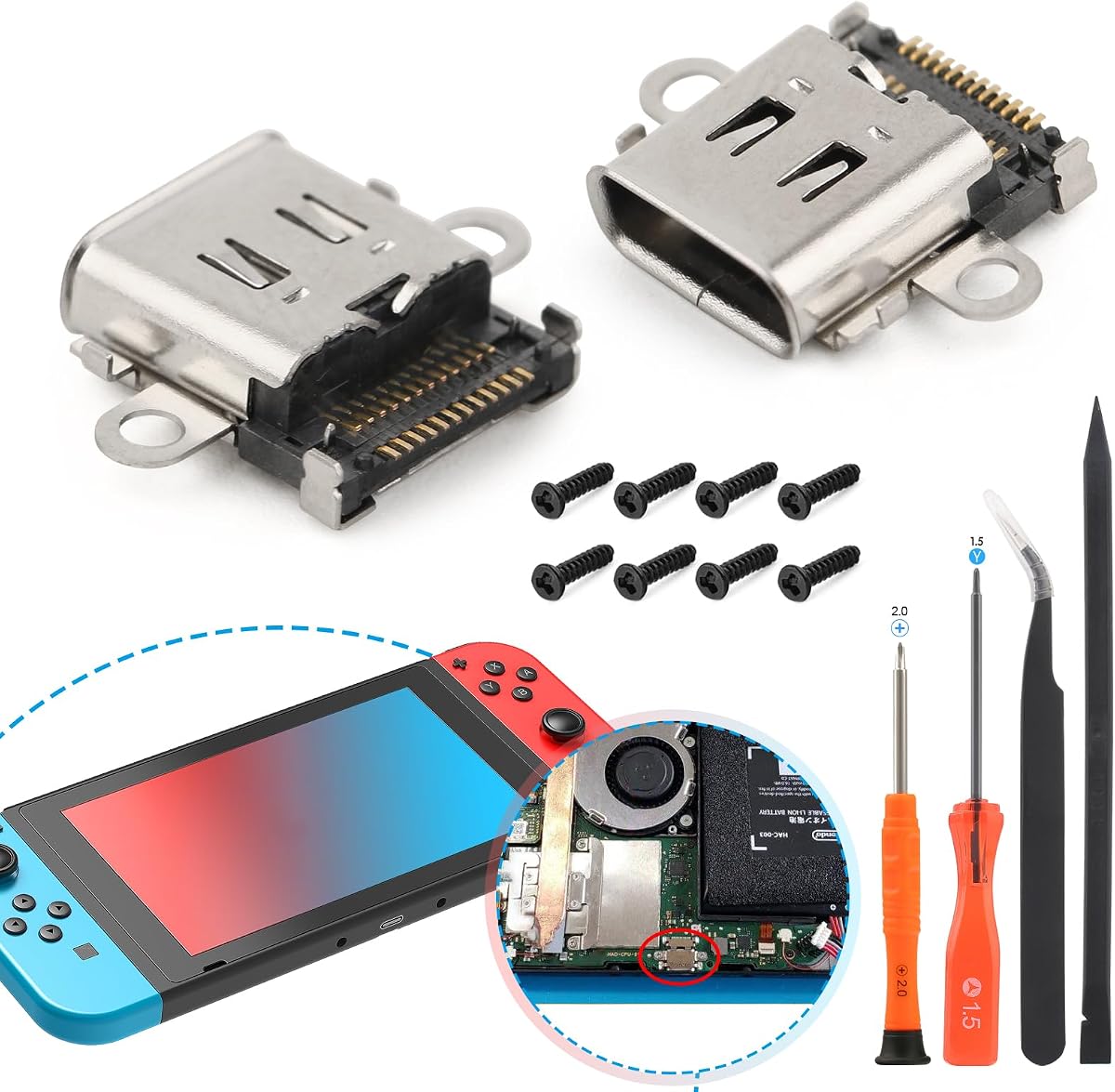
This two-pack charging-port replacement is different from every other item in the roundup: it is a repair component for the original Nintendo Switch console's USB-C charging port, not a complete television docking station. It may still interest someone searching for a Nintendo Switch replacement dock whose charging connection has become loose, insensitive, or otherwise damaged.
We may earn a commission when you buy through this link, at no additional cost to you.
The kit includes two USB-C charging-port assemblies, replacement back-cover screws, and tools intended to make disassembly and replacement more convenient. The listed compatibility is limited to the original Nintendo Switch and expressly excludes Switch Lite and Switch OLED. The product is designed for users who can transfer the relevant dock connector assembly from an existing console.
Installation is the decisive drawback. The listing notes that the process requires console disassembly and soldering and suggests professional assistance for anyone without installation experience. It also explains that the replacement should be compared with the original part to confirm the correct size and form. It cannot provide HDMI output, a charging cradle, or any of the functionality expected from a dock.
This kit is worth considering only when the goal is to repair a damaged original console charging interface rather than obtain a dock for television play. It may extend the useful life of an existing charging setup, but it carries more technical risk and installation effort than simply selecting a compatible dock from the list.
The kit is intended for ports that no longer charge properly, feel too loose, have failed touch detection, or are physically damaged. It provides replacement assemblies along with the screws and tools needed for the described repair process.
If an existing dock arrangement is still functional except for the console's charging port, repair may be a narrower solution. The soldering requirement makes professional installation the safer option for inexperienced users.
We may earn a commission when you buy through this link, at no additional cost to you.
The right replacement dock depends on your exact console, television setup, power accessories, and need for portability or extra ports. Checking these factors before ordering prevents the most common problems: incompatible connectors, missing cables, inadequate charging, or expectations of output the console itself cannot provide.
Nintendo's docking ecosystem includes models with different connectors and capabilities, and the products in this guide are not universally interchangeable. The original Switch and Switch OLED options are specifically identified by several listings, while the dedicated Switch 2 products are restricted to the newer console. The AHGEIIY travel adapter covers a broad range of devices but excludes Switch Lite, and its broader compatibility still depends on DisplayPort Alternate Mode support in the connected USB-C device. The charging-port repair kit is even narrower, applying only to the original Switch and not to Switch Lite or Switch OLED. Always match the model name on the console and the listing before ordering, especially if you own multiple generations.
A dock may advertise 4K or 4K at 60Hz because it can pass higher-resolution signals from a compatible source, but that does not mean every Nintendo console will output 4K through it. The original Switch and Switch OLED are limited to 1080p output according to the supplied information. The dedicated Switch 2 dock is described as supporting both 4K at 60Hz and 1080p at 60Hz, while the AHGEIIY adapter offers broader source-device support. Also consider the television, monitor, or projector, because it must support the desired resolution and refresh rate. For the widest standard Switch experience, think in terms of a reliable 1080p at 60Hz connection rather than treating a dock's maximum specification as the console's output.
Charging while playing requires a suitable power source, and the distinction between a dock-only product and a complete kit can determine what you need to buy. The 3-in-1 TV Dock Station includes a 39W PD charger, while the SIWIQU and KEKUCULL docks do not include a charger. The pdobq model is designed for a 15V, 2.6A or 20V, 3A PD wall charger, and the RuntoGOL model calls for the original power adapter. The AHGEIIY dock also requires external power and recommends the original Switch charger or output above 39W. Using an unsuitable supply can prevent proper charging or normal operation, so confirm both the dock's power requirements and the connector format before building your setup.
The phrase replacement dock can describe a complete kit, a bare cradle, or a small travel adapter. The 3-in-1 TV Dock Station and the TV Dock Station Set include chargers and HDMI cables, and the official Nintendo Dock Set includes an AC adapter and HDMI cable. The RuntoGOL dock includes an HDMI cable and Type-C cable. By contrast, the SIWIQU, pdobq, KEKUCULL, and AHGEIIY products do not provide the full set of power and display accessories. Inventorying what you already own prevents unnecessary spending and ensures the dock can be connected immediately when it arrives.
USB connections are useful only when you have a reason to use them, so the right port count depends on your controller and peripheral setup. The 3-in-1 model offers one USB 3.0 and two USB 2.0 ports but lacks Ethernet. The RuntoGOL and KEKUCULL docks also provide three USB connections, while the dedicated Switch 2 dock includes one USB 3.0 port. The pdobq and AHGEIIY travel adapters emphasize USB 3.0 for faster data transfer. A dock with several USB-A ports can simplify a permanent station, whereas a single-port travel model may be more appropriate for minimal travel use. Do not choose by port count alone; consider the dimensions, power, and connector type of the accessories you plan to attach.
Travel docks are measured by weight, dimensions, and ease of packing, while permanent docks may offer a more traditional cradle, cable management, and a broader port selection. The SIWIQU dock weighs 109 grams, the KEKUCULL dock 95 grams, and the AHGEIIY adapter only 39 grams. The RuntoGOL unit is approximately 6.8 inches wide, while the AHGEIIY product is also highlighted as pocket- or computer-bag friendly. If the dock will remain beside one television, weight matters less than stability, port access, and cable organization. If it will accompany you to hotels or friends' homes, compact dimensions should take priority.
A TV dock provides a physical platform, video output, power management, and usually a way to charge the console while playing. A charging-port replacement component does none of those things. The two-pack repair kit in this list is intended for a damaged USB-C interface on the original Switch console, not for replacing the dock's video system. It requires disassembly and soldering, so it belongs in a repair guide rather than a general TV-dock shopping list. If your goal is to connect a console to a television or create a reliable tabletop station, select a complete docking station instead.
Several third-party docks require a specific setup sequence to ensure the console recognizes the television connection. The pdobq instructions call for connecting power and HDMI first, waking the console, attaching the USB-C output, and then waiting several seconds for the display. The KEKUCULL guidance similarly warns that the screen may go dark while changing inputs. The AHGEIIY product recommends connecting external power before HDMI, with a brief black screen possible during attachment. Following the supplied directions reduces confusion when the first connection does not immediately produce a television image.
Begin by confirming that the dock supports your exact console model and that you have a compatible power adapter, HDMI cable, and television input. Place the dock on a stable, level surface near the display. Connect the charger to the dock's power input, connect HDMI to the selected television or monitor, and then attach the console's USB-C connector fully into the dock. For models with a TV or tabletop button, use that control after the console is awake. Follow the listing's connection order if the first image does not appear, and allow several seconds for the display to change.
When switching between handheld and television play, move the console carefully rather than pulling it directly from the connector. The SIWIQU model's spring-buffered guide notch is designed to help protect the port during insertion, and the tilted designs of the RuntoGOL and KEKUCULL docks can reduce screen contact with the base. Before docking, remove a bulky protective case if the manufacturer says it will interfere. Do not place the dock where cables are under tension, and leave the ventilation openings unobstructed during extended play.
For care, keep the dock and its connector surfaces away from liquids, dust, and excessive heat. Use the specified compatible charger rather than an underpowered or incorrectly configured supply. If a port becomes loose, stops charging, or behaves inconsistently, disconnect the console and inspect the connector for visible debris or damage. Third-party charging protections are helpful but do not eliminate the need for correct accessories. Before traveling, pack the required charger and HDMI cable separately if they are not included, and test the setup with your intended television before leaving home.
No. Compatibility varies by model, and several products in this guide are limited to the original Switch and Switch OLED. The dedicated Switch 2 docks are designed for Switch 2 only, while the AHGEIIY adapter supports several USB-C devices but excludes Switch Lite. The charging-port repair kit applies only to the original Switch console. Always check the exact compatibility statement before purchasing.
No, not natively. The supplied information states that the original Switch and Switch OLED remain limited to 1080p output. A dock may advertise 4K capability for other compatible devices or displays, but the console itself remains the limiting factor. The dedicated Switch 2 dock is the option in this list described as supporting 4K at 60Hz for its intended console.
It depends on the dock's requirements, but using the original compatible charger is generally the safest choice. The KEKUCULL listing specifically requires the original charger or a compatible 15V, 2.6A supply, while the pdobq and AHGEIIY products support specified PD chargers. Some docks include a charger, whereas others include neither a charger nor an HDMI cable. Check the package contents and power requirements before ordering.
First confirm that the television is on the correct HDMI input and that the console is awake. Follow the recommended order for attaching power, HDMI, and the console, and wait several seconds for the display to change. Fully insert the USB-C connector and confirm that the selected dock supports your console model. If the image remains absent, test with the required power supply and cable before assuming the dock has failed.
It depends on where and how often you play. A travel dock is easier to carry and may support several USB-C devices, but it may require you to bring your own charger and HDMI cable. A full-size official dock provides a familiar home setup and includes its AC adapter and HDMI cable. A compact model is generally more convenient for travel, while a full-size model may be more appropriate for permanent use.
It depends on the model and its ports. The featured 3-in-1 TV Dock Station explicitly has no built-in Ethernet or LAN port. Some portable USB-C hubs can provide wired networking through an adapter, but that depends on device support and is not a standard feature of every dock. Check the physical ports and current product documentation rather than assuming all docks provide Ethernet connectivity.
No. It is a repair kit for the original Switch console's USB-C charging interface. It does not provide HDMI output, a TV mode, or a replacement docking cradle. Installation requires opening the console and soldering, so it is appropriate only for a specific charging-port failure and should not be selected as a substitute for a functional TV dock.
This guide cannot provide a universal warranty answer because terms can vary by region, retailer, and manufacturer policy. Using a compatible accessory generally does not itself tell you whether a warranty claim will be accepted, while unauthorized repair or damage from an unsuitable charger or installation could create problems. Review the current manufacturer and retailer terms, and use professional service for internal console repair.
The AHGEIIY adapter is the standout choice for travelers and owners of multiple compatible USB-C devices because it weighs only 39 grams, supports up to 4K at 60Hz depending on the source, and includes 100W power delivery. The TV Dock Station 3-in-1 is the most convenient complete kit for original Switch and Switch OLED users, while the official Nintendo Switch Dock Set is the premium choice for a conventional, first-party home setup.
Before choosing any model, prioritize exact console compatibility, required charger support, and whether the television and source device support the desired resolution. Then decide whether you need a permanent dock with multiple USB ports or an ultra-light travel adapter. Remember that cables and wall chargers are frequently separate purchases, and that the charging-port repair kit serves a completely different maintenance need.
Finally, check the current listing, included components, warranty information, and marketplace offer before ordering. Ratings and product details can evolve, while availability and pricing change over time. Comparing the current package with the console model and your existing accessories is the most reliable way to select a Nintendo Switch replacement dock that fits the setup you actually use.