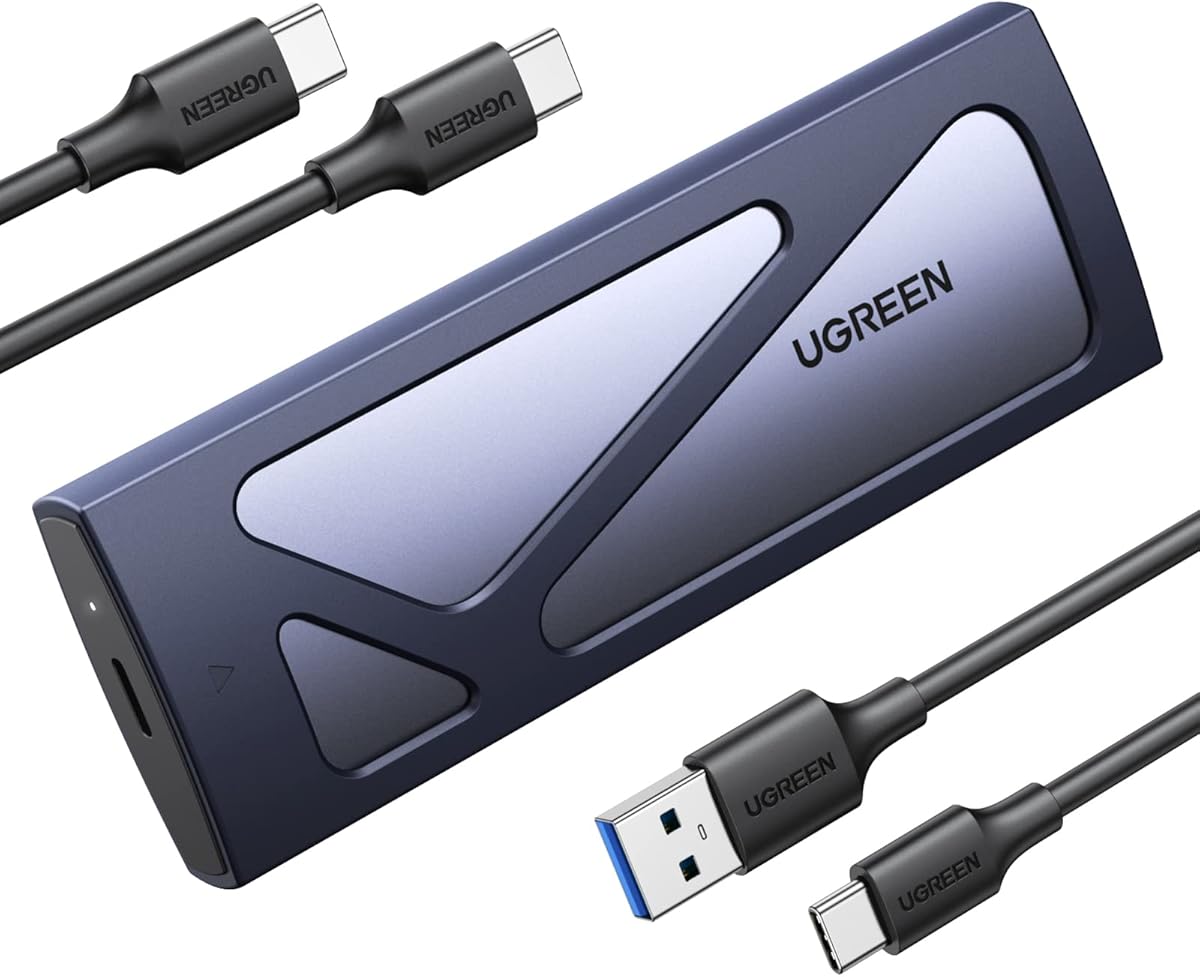
UGREEN USB-C M.2 NVMe SSD Enclosure
4.4Editor score
10Gbps USB 3.2 Gen2
Tool-free M.2 installation
Supports eight-terabyte SSDs
Our NVME Enclosures for Mac guide compares ten options across speed, cooling, capacity, compatibility, portability, and ease of installation for every Mac user.
An NVMe enclosure turns a compatible M.2 drive into fast, flexible external storage for a Mac. The right model should match your port capabilities, tolerate demanding transfers, accommodate your chosen SSD, and remain portable enough for the way you work.
We compared all ten enclosures using their stated interface speeds, host compatibility, SSD support, cooling design, capacity limits, installation method, and physical design. The list covers budget USB-C models, USB4 and Thunderbolt options, and premium high-bandwidth enclosures.
Each pick reveals where it fits best, along with important limitations involving host ports, SSD thickness, protocols, cooling, or power. Specifications and prices can change, so check the current listing and confirm your Mac and SSD before buying.
4.4Editor score

4.5Editor score

4.5Editor score
This side-by-side comparison shows each enclosure's interface, transfer capability, cooling approach, and supported drive format, making it easier to match an enclosure with your Mac, SSD, and storage workload.



The UGREEN 40Gbps M.2 NVMe Enclosure offers a compelling mix of transfer speed, portability, and fanless construction for Mac users. It carries a 4.3 rating and uses an ASM2464PD controller to reach a stated maximum of 3,600MB/s when connected through USB4 or compatible Thunderbolt hardware.
We may earn a commission when you buy through this link, at no additional cost to you.
Its double-sided fin and three-dimensional cooling structure is designed to dissipate heat without adding fan noise. The enclosure accepts common M.2 NVMe sizes from 2230 through 2280 and supports drives up to 8TB. Compatibility includes macOS systems such as the Mac Mini M4, M5 Pro, and M6.
The important caveat is host speed. A basic USB-C port will not unlock the enclosure's full USB4 capability, and Thunderbolt 4-compatible devices and cables are specifically required for the stated 3,600MB/s maximum. Some unusually thick SSDs may also require a thinner thermal pad.
This is a strong choice for MacBook and Mac Studio owners who want high throughput without active fan noise. It is especially suitable for creative work, large project backups, and fast scratch storage when the Mac has a USB4 or Thunderbolt port.
The 40Gbps interface can greatly reduce transfer time when paired with a compatible Mac. Its passive three-dimensional cooling system helps maintain performance without introducing mechanical noise during editing, backups, or sustained transfers.
Support for common NVMe sizes and capacities makes the enclosure flexible, but host ports and drive thickness remain important. Check your Mac's available interface and the physical dimensions of your SSD before ordering.
We may earn a commission when you buy through this link, at no additional cost to you.
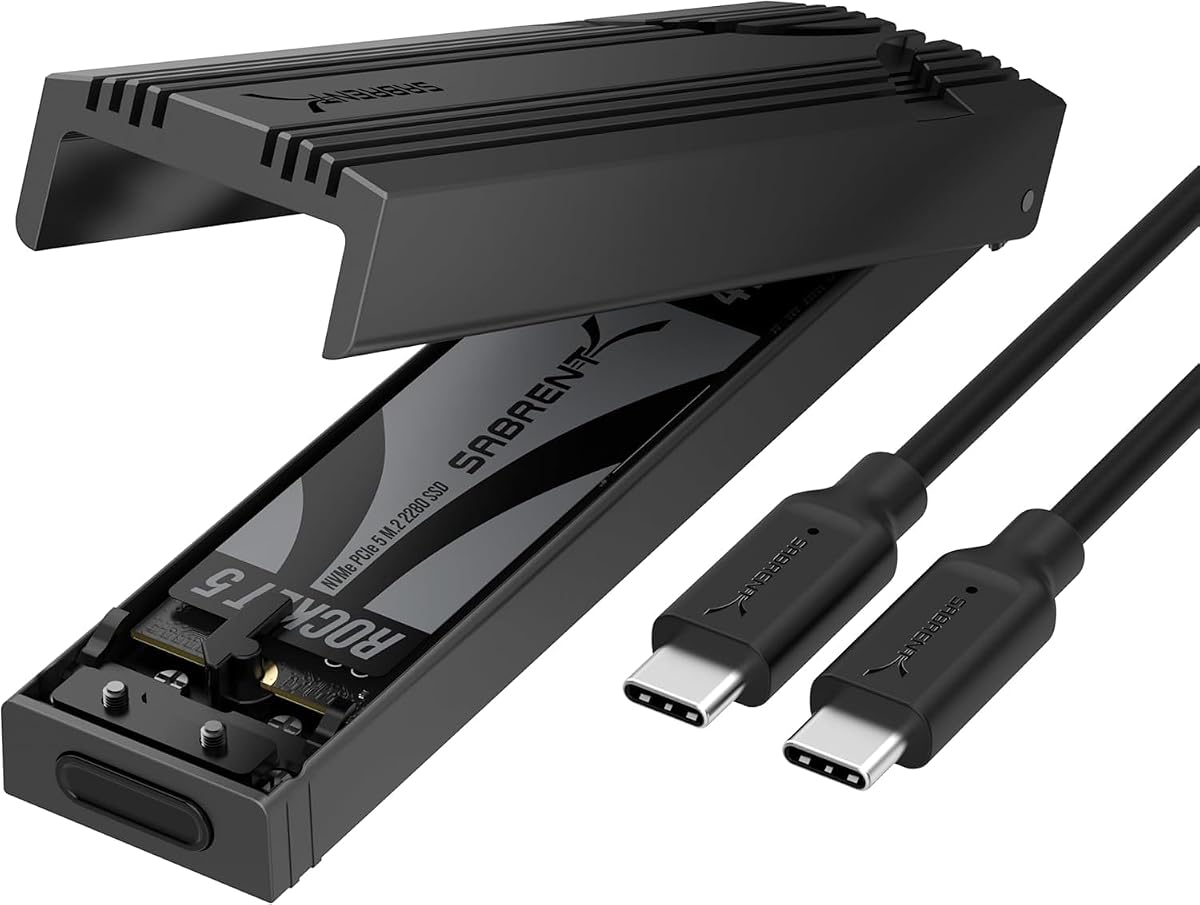
The SABRENT USB-C NVMe Enclosure and Reader delivers useful everyday performance at a modest interface level. Its 4.5 rating, plug-and-play operation, and 10Gbps USB 3.2 Gen2 connection make it a practical budget enclosure for MacBook, desktop, and other USB-C users.
We may earn a commission when you buy through this link, at no additional cost to you.
The flip-open design eliminates screws and tools. Its aluminum enclosure presses the thermal pad directly against the SSD, improving heat transfer and helping sustain 10Gbps performance during extended transfers. M.2 NVMe drives in 2230, 2242, 2260, and 2280 formats are supported up to at least 8TB.
This is not a universal M.2 case. It accepts PCIe NVMe drives but not M.2 SATA SSDs, and its 10Gbps ceiling will trail USB4 and Thunderbolt enclosures. Nevertheless, that limitation can be acceptable for backups, document transfer, media libraries, and lighter creative tasks.
Choose this enclosure when straightforward installation, cool operation, and broad USB-C compatibility matter more than maximum throughput. It is a sensible entry point for Mac users building a portable external drive from an SSD they already own.
Opening the cover, positioning the drive, and closing the enclosure is all the installation requires. This makes swapping storage convenient for users who alternate between projects or maintain separate system and media drives.
The aluminum body and direct pad contact create a simple cooling path from the SSD. It is especially helpful during sustained transfers, though the enclosure still cannot exceed its 10Gbps interface limit.
We may earn a commission when you buy through this link, at no additional cost to you.
The UGREEN USB-C M.2 NVMe SSD Enclosure is a well-rounded 10Gbps option with a 4.4 rating. It combines a straightforward installation process, broad system compatibility, and an RTL9210 bridge controller with short-circuit and over-current protection.
We may earn a commission when you buy through this link, at no additional cost to you.
The buckle-style enclosure secures common M.2 NVMe drives from 2230 through 2280 and supports capacities up to 8TB. It is compatible with macOS, Windows, Linux, Android, and iOS, while the aluminum body and included silicone case help with durability and portability.
A matching USB 3.2 Gen2 cable is needed for the stated 10Gbps rate, and the enclosure does not support SATA NGFF or mSATA drives. Some older Mac models with limited USB-C bandwidth will operate more slowly than the headline interface suggests.
This model works well for everyday backups, external boot media, photo libraries, and general-purpose storage. It is a dependable choice for users who want a recognizable enclosure design and tool-free operation without moving to a more demanding USB4 platform.
Short-circuit, over-current, and multi-protection features add safeguards around the installed drive. UASP and TRIM support further align the enclosure with modern storage workflows on compatible systems.
The buckle design keeps the drive secure while allowing quick installation and removal. It is convenient for people who change between a personal system drive and a larger work drive.
We may earn a commission when you buy through this link, at no additional cost to you.
The UGREEN 80Gbps M.2 NVMe SSD Enclosure represents the most ambitious interface in this roundup. Its 4.6 rating accompanies a dual-chip design using Intel JHL9480 and JMicron JMS583 controllers, with stated speeds reaching as high as 7,000MB/s.
We may earn a commission when you buy through this link, at no additional cost to you.
Its advanced cooling system uses dual-sided aluminum fins and a spatial airflow structure. The stated design improves heat dissipation while reducing surface temperatures. The enclosure supports standard M.2 NVMe sizes up to 8TB and works with macOS, Windows, Linux, and Android.
Exceptional speed depends on equally capable equipment, so most users will require a host and cable that support the full 80Gbps USB4 bandwidth. SSDs with preinstalled heatsinks are not supported, and unusually thick drives may need a thinner thermal pad to fit correctly.
This enclosure is aimed at Mac users with cutting-edge USB4 infrastructure who routinely move multi-gigabyte files. For high-resolution media, large backups, and demanding scratch storage, it offers more headroom than conventional 10Gbps enclosures.
Combining Intel and JMicron controllers creates a high-bandwidth architecture aimed at stable, rapid transfers. The enclosure is designed to take advantage of the full potential of compatible USB4 hardware and fast NVMe drives.
Dual-sided aluminum alloy fins and airflow-focused spacing increase the available cooling surface. This design supports sustained performance while retaining a compact, travel-friendly enclosure.
We may earn a commission when you buy through this link, at no additional cost to you.
The ACASIS 40Gbps M.2 NVMe SSD Enclosure with Cooling Fan is built for sustained demanding transfers. Its 4.4 rating reflects a combination of an Intel JHL7440 controller, USB4 capability, and an active fan designed to reduce thermal throttling.
We may earn a commission when you buy through this link, at no additional cost to you.
The fan is controlled by a switch, giving users a direct way to enable cooling during heavy workloads. It supports Thunderbolt 4, Thunderbolt 3, and older USB 3.2 connections. Mac compatibility includes M1, M2, and M3 Pro and Max MacBook models, along with iPad Pro, Windows, and Linux.
Product testing cited in the supplied details reports read and write speeds of up to 2,805MB/s and 2,734MB/s with a Samsung 980 Pro on a MacBook. Actual results depend on the SSD, Mac, cable, and workload, and the enclosure's 40Gbps interface remains below the fastest 80Gbps models here.
This is a convincing choice for editors and power users who value active cooling and broad Thunderbolt support. It is especially useful when an external drive must sustain repeated large-file transfers without relying on a passive thermal solution.
The built-in fan is engaged through a physical switch, making cooling behavior visible and user controlled. It can help maintain throughput during long editing sessions or repeated backup operations.
Thunderbolt 3 and 4 support gives modern Mac users useful flexibility. Older USB connections remain usable at their native speed limits, which is useful when moving between workstations.
We may earn a commission when you buy through this link, at no additional cost to you.
The SABRENT Tool-Free NVMe and SATA M.2 SSD Enclosure stands apart for accepting both major M.2 protocols. Its 4.5 rating and support for PCIe NVMe and M.2 SATA drives make it useful when you own a mixed collection of storage.
We may earn a commission when you buy through this link, at no additional cost to you.
The 10Gbps USB 3.2 Type-C interface can deliver up to 1,000MB/s in real transfers and remains backward compatible with USB 3.1 and USB 3.0. Installation requires no screwdriver, and the enclosure is powered through the bus without external power.
Its format support is not completely universal. It handles 2242, 2260, and 2280 lengths but not 2230, and bare drives are required because a preinstalled heatsink will not fit. It also does not accept 2.5-inch SATA drives or mSATA modules.
For a Mac user who already owns an M.2 SATA drive, this enclosure avoids buying another one. Even without SATA drives, its slim aluminum design, included Type-C cable, and tool-free setup remain attractive for backups and everyday portable storage.
Supporting NVMe and SATA M.2 drives gives this enclosure unusual flexibility. It can serve newer PCIe storage while remaining useful for compatible SATA modules from an earlier generation.
The enclosure draws power from the connected Mac and requires no separate supply. That keeps the travel kit simple while preserving full 10Gbps operation on compatible ports.
We may earn a commission when you buy through this link, at no additional cost to you.
The SABRENT USB4 NVMe SSD Enclosure offers one of the strongest overall combinations of speed, cooling, and setup convenience. It carries a 4.5 rating, supports up to 3,900MB/s over USB4, and can reach up to 2,700MB/s with Thunderbolt 3 or 4.
We may earn a commission when you buy through this link, at no additional cost to you.
Its aluminum and ABS construction surrounds an integrated active cooling fan. The tool-free installation accepts PCIe NVMe drives in 2230, 2242, 2260, and 2280 sizes. Plug-and-play operation works with Thunderbolt 3, Thunderbolt 4, USB4, and USB-C hosts on Windows and macOS.
SATA M.2 drives are not supported, so the case is aimed specifically at modern PCIe storage. The advertised transfer rates also depend on a suitable host, cable, SSD, and source drive. USB-C ports with 20Gbps, 10Gbps, or 5Gbps remain usable at their respective limits.
This is our top overall recommendation for Mac users who want serious throughput and thermal management in a tool-free enclosure. It is particularly appealing to creative professionals who regularly transfer large projects between a Mac and portable storage.
The enclosure reaches its highest stated rate over USB4 and remains fast with Thunderbolt 3 or 4. Backward compatibility makes it a flexible choice for MacBook owners who move between different ports and workstations.
The integrated fan helps keep the installed SSD stable during demanding workloads. Combined with the metal-and-ABS shell, it provides a practical cooling strategy for repeated large-file transfers.
We may earn a commission when you buy through this link, at no additional cost to you.
The OWC Express 1M2 80G USB4 is a premium enclosure built around high-end storage performance. Its 4.5 rating and stated peak real-world speed above 6,000MB/s place it alongside the most advanced models in the roundup.
We may earn a commission when you buy through this link, at no additional cost to you.
OWC's patented heat-dissipating design protects the SSD while silently maintaining cooling. The enclosure supports PCIe Gen3, Gen4, and Gen5 NVMe drives in 2242 or 2280 formats, and it works with Macs, PCs, iPad Pros, Chromebooks, and Surface devices.
Power is the key consideration for newer Gen5 SSDs. OWC recommends selecting a PCIe Gen5 drive that consumes 11 watts or less during sustained reads or writes because host computers, docks, and hubs impose their own bus-power limitations.
This enclosure is best for Mac users who have an 80Gbps-capable USB4 environment and need near-internal-drive responsiveness. Its performance potential, broad device support, and upgrade flexibility justify a premium position for demanding professional workflows.
With peak real-world transfer rates stated above 6,000MB/s, the enclosure can serve demanding scratch-space and media workflows. The actual result still depends on the SSD, cable, host, and files being moved.
OWC's patented heat-dissipating structure manages drive temperature without mechanical noise. It offers an alternative to active-fan enclosures for users who prefer a quiet workspace.
We may earn a commission when you buy through this link, at no additional cost to you.
The Satechi USB4 Slim NVMe SSD Enclosure is designed as much for visual integration with a Mac setup as it is for performance. Its 4.1 rating accompanies a 40Gbps interface, a slim profile, and a hidden compartment for the included braided cable.
We may earn a commission when you buy through this link, at no additional cost to you.
Satechi states read speeds up to 3,840MB/s and write speeds up to 3,200MB/s. The enclosure supports 2230, 2242, 2260, and 2280 NVMe drives up to 8TB. Cooling vents and a thermal pad help manage heat during sustained transfers.
Unlike several tool-free rivals, installation uses an included screw and screwdriver. The included 15-centimeter USB4 host cable may also be too short for some setups, and Satechi recommends a longer USB4 cable for optimal positioning and performance.
This is a compelling option for Mac Mini M4, MacBook, iPad, and PC owners who value a coordinated desktop appearance. Its slim 16mm body and cable storage make it especially suitable for minimalist workspaces.
The enclosure draws on the appearance of Apple's USB SuperDrive and includes a 16mm profile that aligns closely with the Mac Mini M4. Its understated shape suits professional and minimalist desks.
A hidden compartment keeps the supplied cable organized when the enclosure is not in use. This small design detail improves portability and reduces desk clutter.
We may earn a commission when you buy through this link, at no additional cost to you.
The Satechi USB4 NVMe SSD Pro Enclosure differentiates itself through high stated capacity support and a compact, portable format. Its 4.2 rating reflects a 40Gbps interface, support for NVMe drives up to 16TB, and compatibility with Mac, Windows, and Linux.
We may earn a commission when you buy through this link, at no additional cost to you.
The enclosure uses a silicone pin for tool-free SSD installation and includes a thermal pad, clear case, and USB4 cable. All four common M.2 NVMe lengths are supported: 2230, 2242, 2260, and 2280. Read speeds are stated up to 3,840MB/s.
The polycarbonate housing is designed for heat dissipation while keeping the enclosure compact, but its transparent construction requires care when positioning the enclosed cable. SATA M.2 SSDs are not included in the supported format, and the enclosure itself does not include a drive.
This model makes sense for Mac users who want to carry substantial external capacity for backups, archives, or media. Its combination of high capacity, flexible SSD sizes, and tool-free setup is especially useful for storage that changes with the task.
Support for NVMe drives up to 16TB provides ample room for large media libraries, project archives, and backups. Users can select a capacity that fits their current workflow and replace the drive later if needs change.
The silicone pin secures the SSD without a screwdriver, simplifying installation. The clear enclosure still requires the included cable to pass through its designated opening, so users should follow the provided routing instructions.
We may earn a commission when you buy through this link, at no additional cost to you.
The right enclosure depends on your Mac's ports, the SSD format you own, and the kinds of files you transfer. Interface speed, cooling, capacity, installation, and portability should be weighed together rather than judged by headline bandwidth alone.
Start by identifying the ports available on your Mac. A 10Gbps enclosure can be an excellent fit for many MacBook and desktop workflows, while USB4 models need a compatible USB4 or Thunderbolt host to reach their potential. The 40Gbps and 80Gbps interfaces in this list require increasingly capable equipment.
Most modern external storage uses M.2 NVMe, but some enclosures accept only PCIe NVMe while others also support M.2 SATA. Check the drive length, key type, and protocol before purchasing. Preinstalled heatsinks, unusually thick modules, and 2230 drives can also create physical incompatibilities.
Fast NVMe drives generate heat, particularly during extended writes. Passive fin designs, direct thermal-pad contact, vented housings, and active fans are all represented here. A cooling design is especially important if you routinely transfer large projects, clone drives, or use the enclosure as sustained scratch storage.
The enclosure itself does not provide storage, so capacity comes from the SSD you install. Most options support drives up to 8TB, while the Satechi USB4 Pro lists support up to 16TB. If you expect storage needs to grow, favor a case that accepts common 2280 drives and lets you replace modules easily.
Tool-free mechanisms make swapping SSDs easier, but they are not automatically more secure than a screw-fastened design. Consider whether you will frequently change drives, whether you prefer visual confirmation of retention, and whether the enclosure prevents accidental opening during transport.
Aluminum bodies and compact dimensions keep most products suitable for a laptop bag. Weight, thickness, fan noise, cable storage, and visual coordination can matter more than raw transfer speed for frequent travelers or minimalist desk setups.
Most 10Gbps and USB4 enclosures are bus-powered, so they can operate without a separate power supply. However, a PCIe Gen5 SSD may exceed the power available from certain Macs, docks, or hubs. OWC specifically recommends a Gen5 drive consuming 11 watts or less for sustained operations.
Satechi enclosures include a two-year limited warranty, while SABRENT's tool-free model includes an eight-inch Type-C cable. Other products may provide thermal pads, cables, or installation hardware. Accessories are useful, but interface compatibility and cooling should take priority when choosing.
Before installing an SSD, confirm that its protocol, dimensions, and thickness fit the enclosure. Unplug the enclosure from the Mac, open or unscrew the cover according to its instructions, align the M.2 connector correctly, and secure the module without forcing it into place.
Format the new drive using macOS Disk Utility or your preferred management application. Choose a file system and organization appropriate for the drive's role, then connect the enclosure through the fastest compatible port on your Mac. Verify that the system recognizes it before moving important files.
During use, keep the enclosure unobstructed and allow its vents or fins to dissipate heat. Safely eject the volume before unplugging it, avoid sudden removal during transfers, and back up critical data regularly. If performance slows during sustained activity, let the drive cool and confirm that the host, cable, and SSD all support the intended interface speed.
Most of the enclosures listed support macOS, but the host connection still matters. A USB4 or Thunderbolt enclosure can operate on a slower USB-C port, although it will then be limited by that connection. Confirm the enclosure's stated operating-system support and your Mac's available ports before purchasing.
Only the SABRENT Tool-Free NVMe and SATA M.2 SSD Enclosure explicitly supports both M.2 NVMe and M.2 SATA drives. The other listed models are designed for NVMe only, and several explicitly exclude SATA NGFF drives. Also note that mSATA and 2.5-inch SATA drives are different formats and are not interchangeable with M.2 modules.
Only if the Mac, connected cable, and drive can support the relevant interface. Otherwise, the connection falls back to a lower available rate. Thunderbolt 4 and 4 generally provide the bandwidth needed for 40Gbps operation, while the 80Gbps models require a compatible USB4 host and matching cable.
No external power supply is required for the listed models; they are bus-powered through the USB connection. That convenience has a limit, however. Host computers, docks, and hubs can supply different amounts of power, which is particularly important when using a power-hungry PCIe Gen5 SSD.
An active fan can maintain higher throughput during prolonged transfers because it actively moves air across the drive. Passive designs can also perform well when their heatsink or thermal-pad layout is effective and the workload is not continuous. The best choice depends on transfer duration, drive behavior, and your tolerance for fan noise.
No. These products are enclosures, so you must supply a compatible M.2 SSD separately. This lets you choose the capacity, interface generation, and endurance level that suit your needs, but it also means you should verify both physical and protocol compatibility before buying.
Yes, provided the Mac has a compatible USB-C port. The enclosure will use the bandwidth available from the host and cable, which may be below 10Gbps on some older or lower-bandwidth models. It remains a convenient option for backups, documents, photos, and moderate media transfers.
Use an enclosure with an appropriate cooling design, keep the drive unobstructed, and avoid enclosing it in a tight bag during large transfers. For sustained workloads, an enclosure with a fan or extensive aluminum fins is generally more appropriate. Let the enclosure cool if transfer performance falls or the drive becomes unusually warm.
The UGREEN 10Gbps model is a cost-conscious, dependable option for everyday external storage, while the SABRENT USB4 Tool-Free Enclosure is the strongest all-around recommendation for modern Mac users who value speed, active cooling, and convenient installation. The OWC Express 1M2 stands out as the premium option for maximum bandwidth and broad device support.
For most buyers, prioritize a connection your Mac can actually sustain, then choose cooling and physical fit. The 80Gbps UGREEN and OWC models require advanced USB4 infrastructure, the 40Gbps models suit Thunderbolt-capable systems, and 10Gbps enclosures remain highly practical for backups and everyday storage.
Remember that an enclosure does not include an SSD, and performance depends on the drive, cable, Mac, and workload. Review the current specifications, available accessories, and seller details before ordering, as product features and prices can change.