
Canon MegaTank G3270
4.1Editor score
High-volume refillable ink system
Wireless print copy and scan
Color photo and document support
Compact square LCD display
A photo printer with cheap ink should balance vivid color output, manageable ink costs, and dependable photo printing without making ownership complicated. The right model depends on whether you want compact 4×6 prints, portable adhesive photos, borderless letter-size images, or an all-in-one printer that also handles documents, copying, and scanning.
This guide compares ten printers and ink options based on the supplied specifications, including printing technology, output size, wireless connectivity, included media, cartridge yield, and multifunction features. It covers dedicated photo printers, portable models, ink-tank printers, conventional home printers, and a genuine replacement cartridge for compact Nelko devices.
Each review identifies the strongest reasons to consider that product alongside its limitations. The list is designed to help shoppers compare practical capabilities rather than simply identify the highest-rated model, because the most economical choice depends on print size, usage pattern, and whether portability or office-style features matter more.
4.1Editor score

4.4Editor score
4.6Editor score
As an Amazon Associate we earn from qualifying purchases.
The comparison below highlights the principal differences among all ten options, including print format, connection method, included supplies, core functions, and cartridge considerations. Use it to identify the printer category that matches your volume and photo-project needs.



The Liene M100 is a dedicated 4×6-inch photo printer that combines thermal dye-sublimation printing with a generous starting supply of paper and three color cartridges. Its 4.4 rating reflects a favorable balance of print quality, convenience, and included accessories, making it the strongest all-around choice for shoppers who want photos rather than a general-purpose office printer.
We may earn a commission when you buy through this link, at no additional cost to you.
Its biggest advantage is the focus on the photo experience. Dye-sublimation technology is designed to produce vibrant color images with a laminated surface that resists water, scratches, fingerprints, and fading. The package includes 100 sheets of compatible 4×6 paper, which allows users to begin printing immediately and gives the cartridge bundle particularly strong value for a new owner.
The printer also avoids dependence on an existing wireless network. It creates its own hotspot, allowing an iPhone, Android device, or PC to connect directly. Up to five devices can be associated simultaneously, while the Liene app adds square borders, filters, brightness and contrast adjustments, print-status monitoring, and ID or visa photo layouts. No extra cable or Bluetooth connection is required for ordinary phone printing.
The trade-offs are specialization and model-specific consumables. This is not a document printer, so it cannot handle the letter-size paper, duplex documents, and scanning workflow provided by conventional inkjets. Buyers who print only a few small photos each month may eventually need fewer included supplies, while users who want larger formats should choose a letter-size model. Even so, the M100 offers a clear and satisfying solution for dedicated 4×6 photo printing.
It is the recommendation for households, scrapbookers, students, and casual event photographers who prioritize ready-to-print photos, direct wireless access, and a substantial included paper supply. Those seeking a general-purpose printer with scanning and copying should look farther down the list, but for the stated category, the Liene M100 is the most balanced selection.
Thermal dye-sublimation transfers color into the photo paper and creates a laminated surface. The supplied specifications indicate resistance to water, scratches, fingerprints, and fading, making the output well suited to albums, displays, and keepsake projects.
Connecting to the printer's built-in hotspot removes the need to place the device on an existing network. The dedicated app then combines printing controls with basic edits, borders, filters, and ID-photo functions.
We may earn a commission when you buy through this link, at no additional cost to you.
The HP Envy Photo 7975 is a wireless color inkjet and multifunction printer intended for homes where photos and everyday documents share one device. It carries a 4.0 rating and stands out for borderless photo output, an automatic document feeder, two-sided printing, scanning, copying, and a touchscreen that makes the machine approachable despite its broad feature set.
We may earn a commission when you buy through this link, at no additional cost to you.
Photo performance is supported by a separate photo tray and advanced photo features. At the same time, the printer can produce schoolwork, office documents, web pages, and emails, making it much more versatile than a dedicated compact photo printer. Its claimed color speed reaches up to 10 pages per minute, while black output reaches up to 15 pages per minute, which is useful for a family printer that sees mixed workloads.
HP AI is included to format web pages and email content and remove elements that could otherwise produce awkward layouts or wasted pages. Wireless and mobile printing allow users to place output where it is needed, and the large color touchscreen helps with direct navigation. An included three-month Instant Ink trial is also listed among the package benefits.
Its main limitation is that a multifunction photo inkjet is not as focused or compact as a dedicated 2×3 or 4×6 model. It also depends on conventional cartridge-based ink consumption, so the long-term cost depends heavily on how frequently color photos are printed. The supplied information does not establish cartridge yield or an individual cost-per-print figure, making careful planning especially important for high-volume photo users.
The Envy Photo 7975 is a strong recommendation for families that want one machine to handle photos, homework, documents, copying, and scanning. Choose it over a compact dedicated printer when versatile household functions justify a larger footprint and when occasional color-photo printing is the primary goal.
The combination of photo printing, copying, scanning, automatic duplexing, a document feeder, and mobile access is the key advantage. It reduces the need to own separate devices for school projects, household paperwork, and memorable images.
A large color touchscreen makes status checks and menu navigation more intuitive. HP AI assists with common digital-document formatting, while the dedicated photo tray supports a more polished home-photo workflow.
We may earn a commission when you buy through this link, at no additional cost to you.
The Canon PIXMA TS6520 is a compact wireless all-in-one built for homes and hybrid offices that need documents and photos from one relatively small machine. Its 4.2 rating is supported by crisp text, vivid color, dual-band Wi-Fi, automatic duplex printing, and a clear 1.42-inch monochrome OLED display for monitoring ink and printer status.
We may earn a commission when you buy through this link, at no additional cost to you.
Canon describes the output as sharp for text and vivid for color, making the TS6520 a credible choice for photo albums, reports, school projects, and routine household printing. It supports media up to 8.5 by 11 inches, with or without borders, while automatic two-sided printing reduces paper use for longer documents. The integrated scanner and copier round out the multifunction design.
Connectivity is one of its strongest features. Dual-band 2.4 or 5 GHz Wi-Fi can provide a more stable connection than a single-band setup, especially in a busy home network. Canon PRINT, Apple AirPrint, and Mopria Print Service support mobile printing from compatible phones and tablets, making it convenient to produce a photo or document without moving files through a computer.
The compromise is its smaller feature set relative to larger office-oriented models. It uses a two-cartridge hybrid ink system, and the supplied specifications do not list an automatic document feeder. That makes it most suitable for someone who values a compact footprint, simple controls, and strong wireless support more than high-volume copying or the ability to print many pages without touching the machine.
The TS6520 is a sensible middle ground for students, apartment residents, home offices, and hybrid workers. It offers enough photo capability for creative projects while remaining practical for everyday documents, and its compact design makes it easier to place than a larger all-in-one.
Dual-band Wi-Fi is useful for homes where a crowded 2.4 GHz network may be less reliable. Support for AirPrint, Mopria, and Canon PRINT broadens the ways compatible mobile devices can send jobs.
The compact OLED screen displays status and ink information without requiring users to open an app. Automatic duplexing and media support up to 8.5 by 11 inches make the device capable beyond small snapshots.
We may earn a commission when you buy through this link, at no additional cost to you.
The Canon MegaTank G3270 is built around a refillable, high-volume ink system, making it one of the most relevant choices for anyone seeking economical color output. Its supplied specifications claim up to 6,000 black-and-white pages and 7,700 color pages from a single set of inks, while the ink-tank concept is intended to reduce the expense of conventional cartridge replacement.
We may earn a commission when you buy through this link, at no additional cost to you.
The printer remains versatile despite that focus. It supports wireless printing, copying, and scanning through an all-in-one design, while a 1.35-inch square LCD provides basic control and status information. This combination makes it useful for a family office that regularly produces schoolwork, reports, web pages, and color projects without wanting to maintain separate machines.
The page-yield figures are the main reason to consider this model. High-volume ink tanks can be especially attractive to households, students, and small offices that produce many pages and want to reduce interruptions caused by depleted cartridges. They can also make color projects more practical when the printer will be used consistently rather than only for occasional photos.
The listed feature set also reveals clear limitations. The G3270 offers single-sided printing rather than automatic duplexing, and no automatic document feeder is listed. It also does not receive the dedicated photo-paper treatment that appears in the Envy Photo 7975 description, so buyers seeking a clearly photo-focused machine may find the HP more purpose-built for that role.
For a buyer who values economical ink and sustained output, the MegaTank G3270 is among the strongest choices on this list. It is particularly appropriate for homes and small offices that print frequently and need wireless scanning and copying as well as documents and color pages.
The refillable system is designed to support thousands of pages from one set of inks. This makes frequent printing more economical than a workflow built around regularly replacing small conventional cartridges.
Wireless print, copy, and scan functions give the MegaTank broader utility than a photo-only machine. The compact square display is enough for basic navigation, although it offers less direct control than a larger color touchscreen.
We may earn a commission when you buy through this link, at no additional cost to you.
The Canon PIXMA TS4320 is a wireless color inkjet all-in-one that combines photo and document printing with copying, scanning, and automatic duplexing. Its 3.9 rating places it below several higher-rated options, but its dual-band connectivity, mobile printing support, and EPEAT Silver and ENERGY STAR certifications give it a distinct appeal for environmentally conscious home users.
We may earn a commission when you buy through this link, at no additional cost to you.
The printer uses a two-cartridge hybrid ink system that Canon says produces sharp text and vivid color. It supports bordered and borderless output up to 8.5 by 11 inches, making it suitable for photo prints, school assignments, forms, and routine correspondence. Automatic two-sided printing can reduce paper consumption and shorten the time involved in producing multi-page documents.
Wireless access is handled through dual-band 2.4 or 5 GHz Wi-Fi, while the Canon PRINT app, Apple AirPrint, and Mopria Print Service support printing from compatible mobile devices. The compact housing and relatively small footprint help it fit into a home workspace without giving up the scanning and copying functions that dedicated photo printers lack.
Its main drawback is that it does not offer a particularly premium control experience or advanced photo-specific hardware in the supplied feature list. The monochrome OLED display is functional, but users who want a large color touchscreen or a dedicated photo tray may prefer the Envy Photo 7975. Like the TS6520, the TS4320 has no listed automatic document feeder.
The TS4320 is best for eco-conscious households and hybrid workers who need automatic duplexing, mobile printing, and a capable all-in-one in a modest footprint. It is a sensible secondary option in the Canon PIXMA range, especially for buyers who value certified efficiency alongside color photo support.
Automatic two-sided output is especially useful for reports, study materials, and routine documents. It reduces the number of sheets required while adding a more professional finished format.
EPEAT Silver and ENERGY STAR certifications indicate attention to environmental criteria. The compact body also makes the printer suitable for apartments, dorm rooms, and small workspaces where floor space is limited.
We may earn a commission when you buy through this link, at no additional cost to you.
The Nelko 520 is a genuine color ink cartridge for PP01 and PP03 photo printers rather than a complete printer. It earns a 4.6 rating because it is designed to match those devices through an intelligent chip, deliver bright dye-based output, and provide a stated yield of up to 80 photos from one cartridge.
We may earn a commission when you buy through this link, at no additional cost to you.
The cartridge is particularly relevant to owners of the Nelko PP01 who want to keep the compact 2×3-inch printer operating with a compatible genuine cartridge. Dye ink is described as producing saturated color and sharp resolution, while dried photographs are described as water-resistant and smudge-resistant. The smart chip supports smooth, stable printing and is intended to reduce clogging problems.
Installation follows a straightforward sequence. The user opens the cartridge compartment, waits for it to center, removes the cartridge packaging and protective tape, peels away the transparent protective film, and installs it in the correct slot. The cartridge also includes a built-in waste-ink container, which is meant to be replaced along with the cartridge rather than handled as a separate optional component.
This is not a standalone solution. A buyer without a PP01 or PP03 printer cannot use it, and the cartridge should not be confused with a printer-and-paper bundle. Users who already own a compatible Nelko device may find it more convenient than searching for a broadly compatible alternative, while first-time buyers should usually purchase the PP01 package instead.
The Nelko 520 is an excellent supporting purchase for existing PP01 and PP03 owners. Its strong rating, broad compatibility within the stated range, and potential for reduced printing costs make it useful for travel journals, scrapbooks, party favors, planners, labels, and everyday photo printing.
The dye ink and intelligent chip are designed for stable output in PP01 and PP03 devices. Once dry, prints are described as resistant to water and smudging, which helps protect frequently handled photos.
A stated yield of up to 80 full-color photos makes cartridge planning more predictable. Users should still store the cartridge properly and follow the print-head care instructions if the device has been idle.
We may earn a commission when you buy through this link, at no additional cost to you.
The Nelko PP01 is a pocket-sized 2×3-inch inkjet photo printer designed for portable use and adhesive-backed prints. Its 4.3 rating reflects a strong feature set: 600-dpi output, Bluetooth connectivity, a capable editing app, and a compact body weighing 308 grams. It is a particularly good fit for scrapbooks, journals, planners, party favors, and travel memories.
We may earn a commission when you buy through this link, at no additional cost to you.
The sticky-backed paper is one of the product's most useful differentiators. Instead of producing loose snapshots that need separate adhesive, the PP01 can create small photos that can be placed directly into a scrapbook or craft project. The supplied specifications describe the paper as smudge-proof, water-resistant, and tear-resistant once printed, supporting use in a portable craft kit.
Printing is handled through the Nelko app on iOS or Android over Bluetooth. The app includes frames, filters, graffiti, borders, stickers, text, AI image editing, and collage tools. According to the supplied information, edited images can be printed in under 90 seconds, making the device useful for quickly producing multiple items at an event or gathering.
The output size is intentionally small, and the included USB charging cable does not include a power adapter. A user who wants borderless letter-size photographs would need a different printer. Some users may also prefer a dedicated model that offers direct Wi-Fi hotspot printing rather than pairing through Bluetooth, but the app-based workflow remains well suited to phone-first use.
The Nelko PP01 is a compelling choice for students, travelers, crafters, event photographers, and families who value portability. It is less suitable for formal albums or large prints, but within the 2×3-inch category, its combination of resolution, adhesive paper, app features, and pocketable size is difficult to overlook.
The adhesive backing eliminates the need to glue each snapshot into a project. That makes the printer especially convenient for journaling, planners, labels, party favors, and other small-photo crafts.
Frames, borders, text, filters, stickers, collages, and AI editing are available within the Nelko app. This turns the device into more than a basic output device and supports a rapid create-edit-print workflow.
We may earn a commission when you buy through this link, at no additional cost to you.
The HP DeskJet 2955 is a wireless color inkjet all-in-one positioned as an approachable home printer. With a 3.7 rating, it ranks below the other HP and Canon options in this guide, and the supplied listing provides less detail about paper handling and advanced photo features. It is still a practical choice for basic printing, copying, and scanning.
We may earn a commission when you buy through this link, at no additional cost to you.
Its appeal lies in simplicity. Wireless connectivity removes the need for a direct cable, while the all-in-one format consolidates everyday document and color tasks into a single unit. That combination can suit a dorm room, apartment, or home office where the goal is uncomplicated output rather than advanced photo formatting or high-volume document handling.
The main limitation is the lack of detailed specifications in the available product information. There is no listed automatic duplexing, dedicated photo tray, document feeder, display, or stated ink-yield figure. Those omissions do not necessarily mean a feature is absent, but they make it difficult to compare the DeskJet 2955 confidently with models whose capabilities are described in greater detail.
Photo buyers should also note that it is a general-purpose color inkjet rather than a dedicated portrait printer. It can handle color work, but the more photo-focused Envy Photo 7975 offers borderless photos, a separate photo tray, automatic duplexing, an automatic document feeder, and a large color touchscreen. Those are meaningful differences for a household that expects to print photographs regularly.
The DeskJet 2955 is best for basic, space-conscious users who want wireless color printing with copying and scanning in one device. It is less compelling for dedicated photo enthusiasts, high-volume offices, or shoppers who require clearly documented duplexing and advanced paper handling.
Wireless printing allows compatible devices to send jobs without a physical connection. This keeps a shared home printer convenient for a laptop, phone, or other networked device.
Print, copy, and scan functions cover the most common household needs. A buyer seeking a richer control panel, dedicated photo handling, or automatic two-sided output should consider one of the more fully specified alternatives.
We may earn a commission when you buy through this link, at no additional cost to you.
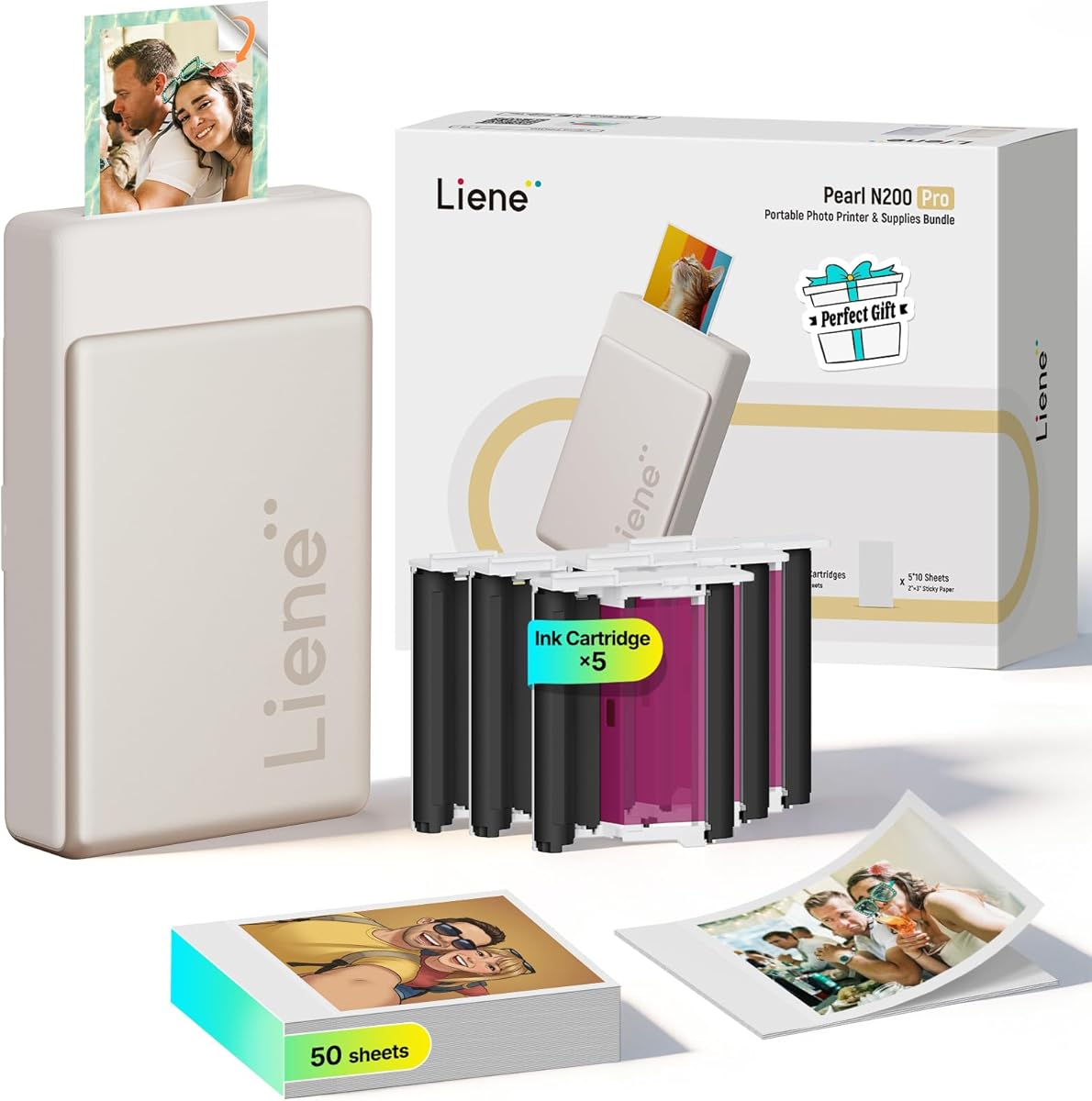
The Liene Pearl N200 Pro is a compact portable printer built around dye-sublimation technology, advanced creative tools, and a two-by-three-inch adhesive-photo format. Its 4.6 rating makes it one of the strongest choices on the list, especially for users who want sharp, vivid portable output and an app capable of transforming ordinary phone photos into personalized designs.
We may earn a commission when you buy through this link, at no additional cost to you.
Unlike many small inkjet models, the N200 Pro uses dye sublimation in a compact three-inch design. The supplied description says it delivers noticeably sharper resolution and more vibrant color than other portable photo printers. Its package includes 50 sheets of two-by-three-inch adhesive paper and five cartridges, providing a substantial starting foundation for sticker photos, gifts, event favors, and scrapbook projects.
The creative feature set is unusually rich. The Liene Photo App can apply artistic styles while keeping the subject intact, remove backgrounds, add frames, personalize watermarks and timestamps, and add official stickers. A one-touch InstaPic Print mode uses a built-in CCD camera with filters to capture and print spontaneously without first navigating through the phone album.
Group use is another differentiator. Fast Bluetooth pairing and multi-device support allow several people at a party or gathering to print without waiting for one designated device owner. A full charge is stated to support as many as 27 stickers, which is useful for a short event but means users should plan charging for longer sessions.
The N200 Pro is best for creative, mobile-first users who value editing, instant camera-style printing, and adhesive output more than conventional document functions. It is less appropriate for large prints or heavy office use, but within portable sticker-photo devices, it offers a particularly complete and polished package.
AI portrait styles, background removal, frames, watermarks, timestamps, and stickers are all presented in one app. These tools make it easier to prepare event photos, party favors, and personalized keepsakes without moving between separate editing platforms.
Multi-device Bluetooth pairing allows a group to create prints in the same space. This shared workflow is particularly useful for celebrations where several people want small photos immediately.
We may earn a commission when you buy through this link, at no additional cost to you.
The HP Smart Tank 5003 combines a refillable ink-tank system with print, copy, scan, wireless, mobile, and borderless photo functions. Its 3.9 rating is modest relative to the leaders, but the claim of up to three years of included ink and an initial output capacity of up to 6,000 color or black pages makes it a notable option for high-volume users.
We may earn a commission when you buy through this link, at no additional cost to you.
The refill process is designed to reduce the inconvenience of traditional ink cartridges. Bottles plug into a cartridge-free tank and drain directly, with no squeezing and less opportunity for spills. This operation model is especially attractive to households or small offices that print frequently and want predictable refills rather than replacing a small cartridge whenever one color runs low.
The 5003 is not limited to monochrome or standard documents. It supports borderless prints, which makes it better suited to photo output than a basic refill-only office printer, while the integrated scanner and copier broaden its usefulness for schoolwork, records, and occasional document needs. Wireless and mobile printing make the device convenient to operate from a phone or laptop.
Automatic duplexing is not listed in the available specifications, and the product information does not provide details about an automatic document feeder, photo tray, or display. Those omissions limit direct comparison with the HP Envy Photo 7975, which explicitly includes several of those conveniences. A buyer who needs automatic two-sided documents should verify the configuration before purchasing.
The Smart Tank 5003 is a good fit for print-heavy households that value economical ink management, easy refilling, and occasional borderless photos. It is less attractive for users who prioritize advanced photo finishing, automated document handling, or a large control screen, but its refill-oriented design makes it a practical long-term choice.
The tank system uses refill bottles rather than conventional cartridges. Plugging bottles into the tanks and allowing them to drain creates a cleaner process for families and offices that anticipate regular printing.
Borderless photo output broadens the machine beyond routine school and office documents. Integrated scanning and copying make it a useful all-in-one, although buyers needing automatic duplexing or advanced photo trays should examine alternatives with those features listed.
We may earn a commission when you buy through this link, at no additional cost to you.
The most economical photo printer is the one whose format, ink system, and running costs align with how you actually print. Start with the size and quantity of your photos, then consider connectivity, editing tools, and the other document functions you need.
Photo size determines the most suitable device. The Liene M100 specializes in 4×6-inch output, while the Nelko PP01 and Liene Pearl N200 Pro create compact 2×3-inch adhesive photos. The HP and Canon inkjets support letter-size media, making them more practical when you want standard-sized images, school projects, and documents on the same machine. A dedicated compact printer is more convenient for small albums and portable projects, while a letter-size model offers greater flexibility for framed prints and mixed paper use.
Match the printer format to your most common output. Choosing a larger model is unnecessary if every image is intended for a planner or scrapbook, and choosing a tiny model can create a bottleneck if you regularly print family photographs.
Ink-tank systems such as the Canon MegaTank G3270 and HP Smart Tank 5003 are intended for high-volume use because their refillable tanks can deliver large stated page yields. The traditional cartridge-based HP Envy Photo 7975 is more versatile as a home multifunction printer, but frequent color photo output can still consume cartridges quickly. The Liene M100 and portable models use model-specific cartridges, so compatible supply availability should be checked before purchase. The Nelko 520 is a genuine replacement cartridge rather than a complete printer.
Prioritize the system that fits your volume. A refillable tank may be more economical for regular printing, while a dedicated photo model may be simpler for occasional keepsakes. Always check cartridge availability and printer compatibility before finalizing a purchase.
Thermal dye-sublimation, conventional inkjet, and compact inkjet printing have different strengths. The Liene M100 uses dye sublimation for 4×6 photos and a laminated result, while the Pearl N200 Pro applies the same general process to 2×3 adhesive photos. The Nelko PP01 uses compact inkjet technology with a stated resolution of 600 dpi. Canon and HP models use color inkjet systems capable of letter-size photos and documents. Consider the finish you want, the size of the image, and whether portability or paper versatility comes first.
Technology is only as useful as it fits the project. Use dye-sublimation for durable dedicated photos, standard inkjets for flexible home documents, and compact inkjets for portable adhesive snapshots.
The Liene M100 creates a built-in hotspot, so it does not need an existing network and can support several connected devices. Canon PIXMA models use dual-band Wi-Fi and support Canon PRINT, Apple AirPrint, and Mopria Print Service. The Nelko PP01 and Liene Pearl N200 Pro use Bluetooth for phone-based printing. The remaining models support wireless or mobile operation. A built-in hotspot is convenient when a shared network is unavailable, while dual-band Wi-Fi can provide a stable connection in a busy home or office.
Check the connection method your devices already use best. Ensure the printer's app is available for your phone system and whether multiple users need to connect at the same time.
A good app can make a compact printer far more useful. The Liene app provides borders, filters, contrast and brightness controls, ID-photo layouts, AI backgrounds, artistic styles, watermarks, and timestamps. The Nelko app includes filters, frames, stickers, text, collages, graffiti, and AI image editing. These tools can replace a separate editing step for casual users, although buyers should consider whether they want full creative control or simply basic image selection and printing.
Prioritize the editing features you will actually use. A well-matched app should make your common project faster without forcing a complicated workflow.
Portable printers are built around smaller bodies, battery use, and phone-first operation. The Nelko PP01 weighs 308 grams, and the Liene Pearl N200 Pro uses a compact three-inch design with a stated charge supporting up to 27 sticker prints. The Liene M100 is also portable, although its larger 4×6 format and built-in hotspot support a different use case. A standard all-in-one is more suitable for a permanent desk and mixed paper handling.
Choose portability only if you will benefit from printing away from a fixed workstation. Otherwise, a larger letter-size model usually provides a broader range of paper sizes and office functions.
Scanning and copying can make a printer useful beyond photographs. The Canon PIXMA TS6520, Canon PIXMA TS4320, Canon MegaTank G3270, HP Envy Photo 7975, HP DeskJet 2955, and HP Smart Tank 5003 are described as all-in-one devices. Among them, the Envy Photo 7975 also lists automatic duplexing, a separate photo tray, an automatic document feeder, and a large color touchscreen. The Canon MegaTank G3270 and HP Smart Tank 5003 stand out for their refillable ink economics, but the HP Envy has the more photo-specific paper handling.
List the functions you will use before choosing an all-in-one. Extra controls and feeders are useful only when they simplify your actual documents, copies, or photo workflow.
Paper and ink are linked. The Liene M100 package includes 100 sheets of 4×6 paper and three cartridges, the Pearl N200 Pro includes 50 adhesive sheets and five cartridges, and the Nelko PP01 uses sticky-backed 2×3-inch media. Canon and HP all-in-one models support broader media but do not have the same dedicated included-photo emphasis in the supplied information. Always check paper dimensions, cartridge type, and yield because a nominal photo printer may not support standard sheets, and a general inkjet may require a separate photo-paper tray.
Treat the full consumable system as part of the purchase. Verify media size, matching cartridge availability, and expected yield before deciding that a model is economical for your use.
Begin by unboxing the printer, installing the supplied ink, loading the correct paper, and completing the manufacturer's setup process. Portable models generally require the Nelko or Liene app, Bluetooth or hotspot connection, and installation of the color cartridge. All-in-one printers should be connected through their available mobile and wireless options before printing a test page. Confirm the paper size and orientation in the app or printer menu, especially when switching between documents and photos.
Use the app to crop images, correct color, and select the intended paper format. For a dedicated 4×6 model, confirm that the image matches the 4×6 canvas so it is not unexpectedly cropped. For 2×3-inch adhesive models, load the sticky paper with the smooth side facing down as directed for the Nelko PP01. After editing, preview the result and print one image at a time to verify alignment, color, and sizing before producing a batch.
Maintain the machine by keeping the print area clean, using compatible ink and paper, and following cartridge-storage instructions. If a compact inkjet cartridge has been unused for a long period and the ink may have dried, remove it and gently wipe the print head vertically with a lint-free cloth or cotton pad. Do not touch sensitive surfaces unnecessarily, and clean the print head promptly if smudges appear. Store paper in a dry, protected area and use the printer's proper cleaning or maintenance cycle when recommended by the manufacturer.
The best answer depends on print volume and format. Refillable ink-tank models such as the Canon MegaTank G3270 and HP Smart Tank 5003 are designed for frequent output, while dedicated cartridge-based photo printers can be economical for occasional printing. Compare compatible cartridge yield, included paper, and refill procedures rather than looking only at the printer's purchase cost.
A dedicated model such as the Liene M100 is focused on 4×6 photos and does not provide the document, scanning, and copying functions of a general-purpose all-in-one. If schoolwork, forms, copying, and scanning are important, consider an HP or Canon inkjet with those functions listed. The Liene M100 is better suited to photo-focused use.
The Nelko PP01 and Liene Pearl N200 Pro both print 2×3-inch adhesive photos in compact bodies. The PP01 is pocket-sized, uses Bluetooth, and offers editing tools including collages and stickers. The N200 Pro adds dye-sublimation output, AI portrait styles, a one-touch camera mode, and group printing. The right choice depends on whether portability, app creativity, or the printing process matters most.
It depends on the printer. The HP Envy Photo 7975 explicitly includes a separate photo tray, which helps protect photo media from being used as ordinary document paper. Other all-in-one models can print photos but may handle paper differently. Check the supported media and tray arrangement before regularly switching between documents and photographs.
Yes. The Liene M100 supports phone printing through its built-in hotspot, while the Nelko PP01 and Liene Pearl N200 Pro use Bluetooth and their respective apps. Canon PIXMA models support Canon PRINT, Apple AirPrint, and Mopria Print Service, and the HP options list mobile printing. You will need a compatible phone, the appropriate app or service, and the printer set up with its ink and paper.
Allow the print to dry before handling it, especially when using the Nelko 520 cartridge or a compact inkjet model. The supplied product information describes those outputs as water-resistant and smudge-resistant once dry. Keep prints away from moisture, avoid rubbing their surfaces, and store them in a clean album or on an adhesive surface that does not trap heat.
Thermal dye-sublimation uses heat to transfer color into photo material and commonly creates a coated or laminated-looking result. Compact inkjet printers spray ink onto the paper and may require separate ink cartridges and print-head care. Both can create appealing small photos, but the available models, paper formats, editing features, and intended uses differ.
Most buyers should begin with a printer that meets their needs. The Nelko 520 is a replacement cartridge for owners of the PP01 or PP03, not a printer by itself. Verify printer compatibility, paper type, and expected usage before ordering replacement ink, especially for model-specific consumables.
The Liene M100 is the strongest overall pick for buyers who want dedicated 4×6 photo printing, a substantial included paper supply, and direct wireless access from several devices. The Canon MegaTank G3270 is the leading value-oriented high-volume option, while the Liene Pearl N200 Pro stands out as the most premium portable model for adhesive photos, one-touch printing, and advanced creative editing.
Your priorities should determine which feature matters most. Choose the MegaTank or Smart Tank when frequent color pages are the main concern, a letter-size all-in-one when documents and photos share a workspace, and a compact model for travel, planners, or event printing. Also consider the supplied paper and cartridge system, since compatible consumables and the required photo size have a direct effect on real operating convenience.
Product specifications, included supplies, and availability can change over time, and the cost of ink depends on the cartridge or refill system selected. Before ordering, verify the current product details, compatible consumables, app requirements, and current retailer information so the chosen printer remains a good fit for your regular photo and document workflow.
