
Also GO Podcast Equipment Bundle for 2
4.5Editor score
Two-person accessory package
Condenser microphone included
Ten built-in sound effects
Bluetooth and wired connectivity
Podcast Equipment Bundles guide compares audio quality, connectivity, microphone count, portability, and setup for podcasters, streamers, and creators today.
Podcast equipment bundles combine microphones, an audio interface, monitoring options, cables, and mounting accessories into a coordinated recording setup. A strong bundle saves time, reduces incompatible connections, and helps new creators begin recording without assembling every essential component separately.
This guide compares ten podcast equipment bundles for two- and four-person productions, portable recordings, live streaming, and video podcasts. The evaluation considers microphone type, input flexibility, connectivity, monitoring, sound controls, included accessories, portability, and suitability for beginners or experienced hosts.
Each review explains what the bundle offers, where it stands out, and where its setup may require more planning. The picks range from entry-level all-in-one systems to advanced multi-person and video production kits, and current availability and pricing can change over time.
4.5Editor score

4.5Editor score

5.0Editor score
The table below compares the ten bundles by capacity, microphone configuration, connection options, and major production features, making it easier to identify the right starting point for your recording format.


The Movo PodPro Portable Podcast Equipment Bundle for iPhone/Android Phones has a 4.5 rating and offers one of the most balanced combinations of portability, recording flexibility, and monitoring. It includes two CastMic XLR dynamic microphones, a dual-channel MDX-2 interface, two studio headphone pairs, desktop stands, XLR cables, and three device connection cables.
We may earn a commission when you buy through this link, at no additional cost to you.
Its strongest feature is the MDX-2 interface, which provides two XLR inputs with 48V phantom power, two headphone outputs, and stereo quarter-inch outputs. The included USB-A, USB-C, and Lightning cables allow the system to work with PCs, Macs, iPhones, iPads, and Android devices, while the battery supports mobile recording away from a wall outlet.
The bundle does have limits. It is structured around two speakers rather than a four-person panel, and the CastMic microphones require a conventional XLR connection into the interface. Creators wanting a larger group setup, onboard voice effects, or integrated video should look elsewhere. Even so, the core recording tools are cohesive and reasonably compact.
This is the strongest general recommendation for a two-host podcast that may record at home or travel. It balances a proper XLR workflow, broad device support, real-time monitoring, and a protective travel case without adding video cameras or complex streaming functions that may remain unused.
The MDX-2 and included travel case make the bundle suited to mobile interviews and recordings away from a permanent studio. Its battery provides an eight-hour operating window, or approximately three hours when phantom power is active.
Two dedicated headphone outputs allow both hosts to hear the mix in real time. This is especially useful for monitoring levels, timing spoken delivery, and identifying audio problems before completing a full recording.
We may earn a commission when you buy through this link, at no additional cost to you.
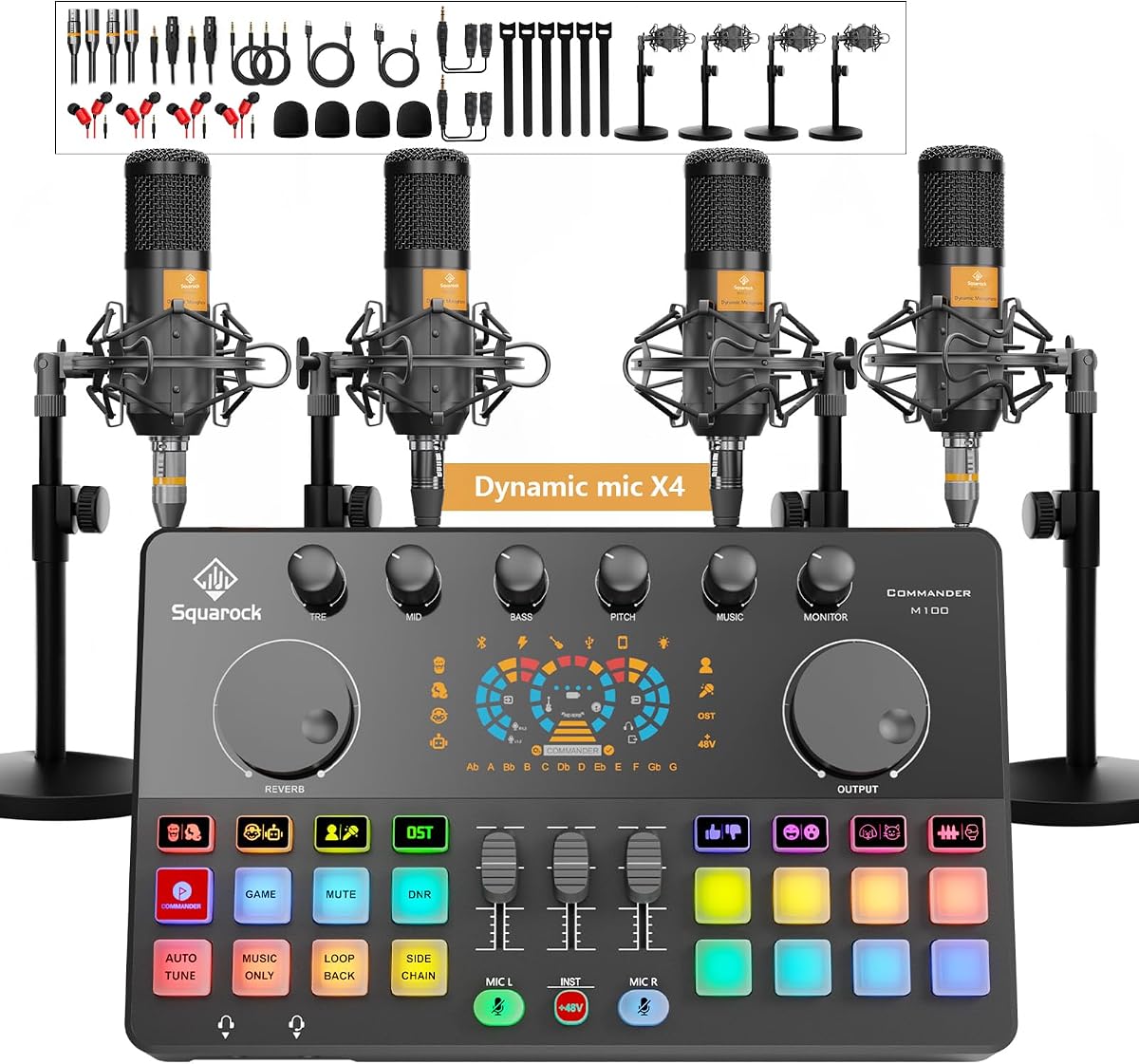
This M100 four-person bundle has a 4.3 rating and is designed for group podcasts, live streaming, vocal recording, and content creation. Its central sound board combines dual XLR inputs, dual 3.5mm microphone inputs, independent channel adjustment, one-click mute controls, and a 4000mAh rechargeable battery.
We may earn a commission when you buy through this link, at no additional cost to you.
The microphones and mixer are built around both conventional and compact connection methods. The mixer includes treble, mid, and bass adjustment, reverb, pitch correction, loopback, side chain operation, voice changing, sound pads, Bluetooth accompaniment, and four RGB lighting modes. It also supports Windows, iOS, and Android without requiring driver installation.
That breadth of features is the main trade-off. New podcasters may need time to understand the controls, and the mix of XLR and 3.5mm microphones may not offer the same consistency as a matched set of broadcast-style dynamics. The listed feature set is extensive, but actual recording quality still depends on placement, room treatment, and operating settings.
The bundle makes sense for a four-person show that wants independent level control and entertainment features in one unit. It is also attractive for streamers who value lighting and voice effects, provided the team is willing to learn the interface before recording.
Each microphone channel offers separate volume adjustment and mute control, helping four participants balance their voices without continually changing the master setting. This is a practical advantage for panel conversations and competitive live streams.
Reverb, pitch, loopback, side chain, sound pads, and voice-changing options extend the mixer beyond straightforward podcast capture. These functions are particularly relevant to livestreams, gaming commentary, and entertainment-oriented shows.
We may earn a commission when you buy through this link, at no additional cost to you.
The Movo PodPro Podcast Equipment Bundle for 2 with Boom Arms and Headphones earns a 4.5 rating and is a strong choice for creators who want a conventional desk podcast station. It combines the MDX-2 interface, two CastMic dynamic microphones, two adjustable boom arms, two headphone pairs, and all necessary XLR and device cables.
We may earn a commission when you buy through this link, at no additional cost to you.
Its defining advantage over many compact bundles is the mounting system. Boom arms let each host position a microphone close to the mouth while freeing desk space. Because consistent distance and angle contribute to stable vocal levels, this arrangement can make a two-host setup feel more controlled from the first take.
The same MDX-2 features provide portability and broad connectivity, including USB-A, USB-C, Lightning, two XLR inputs, phantom power, and dual headphone outputs. The trade-off is that boom arms generally require a compatible desk, clamp, or stand base, and the included components may be more involved to pack for mobile production.
This bundle is ideal for fixed or semi-fixed home studios, remote interviews with a suitable table, and two hosts who value consistent microphone placement. Compared with the portable PodPro bundle, it prioritizes workstation organization and monitoring over minimal travel weight.
Adjustable boom arms support repeatable placement and help keep microphones out of the way of keyboards, notebooks, and other desk equipment. Stable positioning can reduce level changes caused by speakers leaning or turning.
The microphones, interface, headphones, stands, and cables are selected as one coordinated package. This reduces the need to assemble basic components individually and gives a new creator a functional recording path immediately.
We may earn a commission when you buy through this link, at no additional cost to you.
The M100 2-Person Podcast Equipment Bundle has a 4.4 rating and combines two XLR/USB dynamic microphones with a USB-C sound board, headphones, stands, and several cables. Its main distinction is flexibility: each microphone can use XLR or USB, allowing direct computer, phone, laptop, or PlayStation-style connection in USB mode and use with the mixer in XLR mode.
We may earn a commission when you buy through this link, at no additional cost to you.
The sound board offers noise reduction, music-only and loopback functions, side chain, tuning controls, two monitor outputs, independent microphone volume, and one-click mute. A Commander button stores settings for quick recall, while an instrument input supports guitar, bass, and other instruments. Bluetooth accompaniment, RGB modes, voice changes, sound effects, and auto-tune serve livestreaming and entertainment use.
One important caveat is that the RGB and certain microphone functions become inactive when the microphones operate in XLR mode. In that configuration, those controls are handled through the sound board rather than the microphones. The abundance of secondary functions may also require a learning period, and some listed software compatibility depends on the exact device and connection method.
For two creators who want one microphone package that can move between direct USB recording and a central mixer workflow, this is a versatile choice. It is particularly useful for voice-over, gaming, livestreaming, and home podcast sessions where instrument capture or saved presets may add value.
XLR mode provides a conventional routed workflow through the sound board, while USB mode offers a more direct path to compatible computers and devices. This flexibility can simplify projects involving different recording environments.
The Commander button stores knob and button configurations for music, monitoring, reverb, output, microphone channels, instrument input, and sound modes. Recalling a saved setup can reduce disruptive adjustments during a live production.
We may earn a commission when you buy through this link, at no additional cost to you.
The M100 Podcast Equipment Bundle for 4 has a 4.2 rating and provides a large desktop package for panel discussions and multi-host streaming. The included sound board supports two XLR dynamic microphones and dual 3.5mm podcast microphones, with independent microphone and instrument level controls and a 4000mAh battery.
We may earn a commission when you buy through this link, at no additional cost to you.
Dual USB interfaces allow two computers or mobile devices to connect at the same time, which can be useful when a remote guest uses a separate machine. The system works without driver downloads across major operating systems and is listed for use with platforms such as YouTube, OBS, and Audacity. It also adds effects, voice changes, auto-tune, Bluetooth music, RGB lighting, and a Commander preset button.
The microphones do not all use the same connection format, so hosts should confirm which microphones use XLR and which use 3.5mm before planning their layout. The large accessory collection is useful but takes desk space, and the many onboard controls may be more than a simple two-person podcast requires.
This is a practical choice for a four-person production that needs voice, instrument, and simultaneous-device recording in one desktop system. It also serves creators who want livestream features and saved settings without assembling numerous separate accessories.
Dual USB interfaces can connect two computers or mobile devices at once. That arrangement can support local and remote participants, although each guest still needs compatible audio software and a clear recording plan.
A dedicated 6.35mm instrument jack and separate microphone and instrument faders allow music and speech to be balanced independently. This expands the bundle beyond a standard two-mic or four-mic dialogue setup.
We may earn a commission when you buy through this link, at no additional cost to you.
The Also GO Podcast Equipment Bundle for 2 has a 4.5 rating and offers an approachable way to assemble a first podcast or voice-over station. The package includes a BM-800 microphone, an audio interface mixer, boom arm, shock holder, pop filter, foam cover, 3.5mm earphones, and related accessories.
We may earn a commission when you buy through this link, at no additional cost to you.
Cardioid pickup, a dual-layer pop filter, and a windproof foam cover are intended to reduce unwanted sound entering the microphone. The mixer adds noise reduction, reverb, treble, bass, ten sound effects, and four voice-change modes. It supports PCs, smartphones, Xbox, Windows, macOS, iOS, and Android through wired or Bluetooth connections.
As a condenser microphone, the BM-800 can capture detail but is also more sensitive to room reflections, keyboard noise, and background sound than a dynamic microphone. The two-person framing in the product description also needs clarification because the listed core hardware centers on one BM-800 microphone rather than two matched broadcast microphones.
Despite those limitations, this is the strongest entry-level recommendation for a creator who wants the basic tools and entertainment functions in a coordinated package. It is especially suitable for voice-over starters, casual podcast experiments, and streamers who value voice-changing effects over a fully matched multi-host XLR system.
The bundle gathers a microphone, mixer, suspension hardware, filtering accessories, earphones, and connection options into one package. This gives a new creator a functional starting point without assembling every basic accessory independently.
Bluetooth can provide a straightforward connection to phones and tablets, while included cables offer a direct route to computers. Choosing the more convenient method for each device can simplify initial setup.
We may earn a commission when you buy through this link, at no additional cost to you.
The Movo 4-Person Podcast Equipment Bundle has a 4.4 rating and centers on four USB condenser microphones, a UMX-1 four-port hub, and a hard-shell carrying case. The hub powers all four microphones simultaneously through a dedicated 5V USB-C input, helping maintain stable operation across every channel.
We may earn a commission when you buy through this link, at no additional cost to you.
A built-in 3.5mm headphone output allows a creator to monitor the recording in real time. The plug-and-play arrangement is listed for applications including Zoom, GarageBand, Audacity, and OBS on Mac and Windows. Its portable case and compact design make the kit suitable for group podcasts, classrooms, panel interviews, and remote recording locations.
The central trade-off is the use of condenser microphones. They can provide detailed vocal capture but are generally more sensitive to room noise, reflections, and handling than dynamics. Hosts should also verify that the computer has enough USB ports or a compatible hub arrangement to support the four-port UMX-1 and required power.
This is an appealing bundle for creators who want a straightforward four-person USB workflow and value mobility. It is particularly useful for controlled rooms and temporary event recordings where a complete, protected kit is easier to transport than a large mixer-based system.
The dedicated 5V USB-C input gives the four-port hub a consistent power source when all microphones are active. That focus on stable operation is important for long panel discussions and multi-person recording sessions.
The 3.5mm headphone output lets creators hear the live mix, while the driver-free USB approach reduces connection complexity. Standard recording applications can treat the microphones without requiring a specialized control program.
We may earn a commission when you buy through this link, at no additional cost to you.
The Movo 4-Channel USB Audio Interface team bundle has a 3.9 rating and is built for four-person productions using a dedicated computer workflow. It includes a UMX-2 interface, four CastMic dynamic microphones, four tabletop stands, and four adjustable boom arms.
We may earn a commission when you buy through this link, at no additional cost to you.
The interface provides dual XLR/TRS combo inputs, 48V phantom power, zero-latency direct monitoring, and loopback for recording system audio alongside conversation. USB-C connectivity works immediately on macOS, while Windows 10 and later is supported through ASIO driver mode. The four dynamic microphones are designed for speech and do not require phantom power.
This package is less flexible for mobile or mixed-device users because it is explicitly not compatible with phones or tablets. Its four boom arms also demand a stable desk setup and careful positioning. Another consideration is that the listed 3.9 rating is the lowest among the bundles in this guide, so prospective buyers should examine current customer feedback closely.
For a team with a dedicated Mac or Windows computer and a four-person studio, the matched dynamics and coordinated inputs provide a clear advantage. It is better suited to an established workstation than a creator who needs one small, portable, universally compatible podcast package.
Using four CastMic dynamic microphones gives the team a consistent microphone type across all participants. Dynamic designs can also be more forgiving of untreated rooms than condenser microphones because they are less sensitive to ambient sound.
Direct monitoring and loopback provide useful low-latency control and system-audio capture. However, the lack of phone and tablet support makes a compatible computer central to the setup rather than optional.
We may earn a commission when you buy through this link, at no additional cost to you.
The Movo Video Podcast Equipment Bundle with Boom Arms has a 5.0 rating and is the most complete video-oriented option in the guide. It includes two XLR dynamic microphones, two 4K UHD cameras, two adjustable boom arms, and a USB audio interface for a coordinated two-person production.
We may earn a commission when you buy through this link, at no additional cost to you.
The cameras provide separate 4K views, allowing a host and guest to have individual camera angles for YouTube, Twitch, and other video platforms. On the audio side, the interface offers high dynamic range preamps, 48V phantom power, USB-C connectivity, and dual monitor outputs. The cardioid dynamic microphones use a 40Hz-to-16kHz frequency response and are designed to reject background noise.
A two-camera system requires more space, more cables, and more attention to framing than a conventional two-person podcast station. The cameras must also be positioned separately from the boom-mounted microphones, so the physical workflow extends beyond simply placing two microphones beside two hosts. Software configuration for synchronized or multi-angle capture is outside what the supplied specifications establish.
This bundle is best for creators ready to produce a polished video podcast rather than merely record audio. It offers the rare convenience of receiving cameras, microphones, an interface, boom arms, and monitoring capabilities as one coordinated two-person setup.
Separate 4K UHD cameras give each participant an individual visual angle. That arrangement can improve the visual rhythm of interviews, co-hosted shows, and panel discussions compared with placing everyone within one shared frame.
Two XLR dynamic microphones, phantom-power support, and dual monitoring outputs create a conventional broadcast-style audio foundation. The cardioid pattern and dynamic construction are well suited to spoken content in practical rooms.
We may earn a commission when you buy through this link, at no additional cost to you.
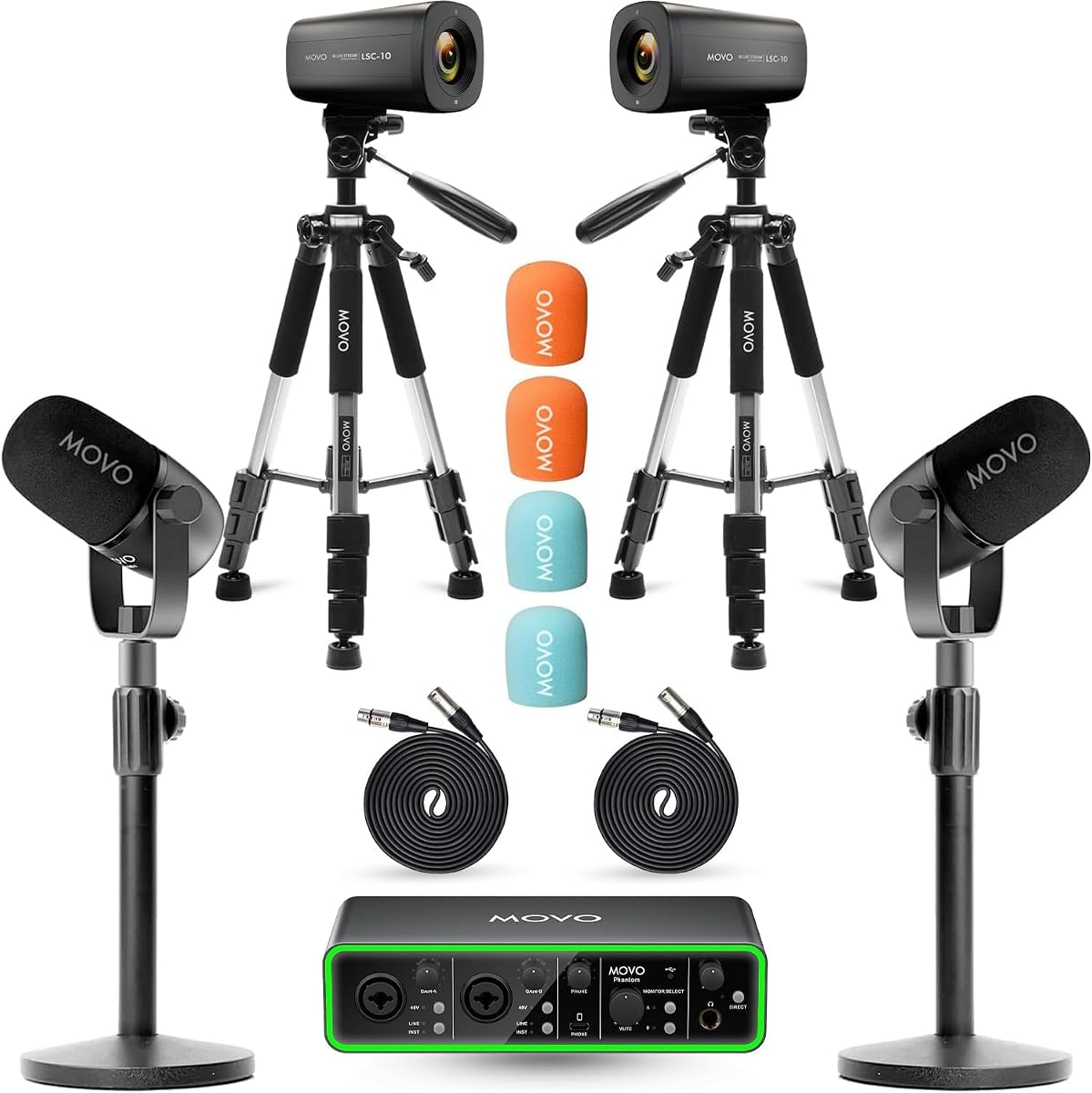
The Movo Video Podcast Equipment Bundle with Desk Stands has a 5.0 rating and is a complete two-person video podcast package. It combines two 4K cameras, two cardioid CastMic XLR dynamic microphones, two desk microphone stands, and a USB audio interface with 48V phantom power.
We may earn a commission when you buy through this link, at no additional cost to you.
The dual cameras allow separate views of the hosts or guests, while the USB-C interface provides a direct route into a recording workflow. Dual monitor outputs support monitoring, and the included dynamic microphones offer a 40Hz-to-16kHz frequency response with background-noise rejection suited to conversation.
Compared with the boom-arm version of this video bundle, the desktop stands require less positioning hardware but offer less precise control over microphone distance and angle. A two-camera setup also needs sufficient desk area, stable camera placement, lighting, and editing or live-production software to manage separate angles.
This bundle is a strong fit for a creator who wants to begin video podcasting with two people and prefers simple desktop stands. It provides the same broad camera-and-audio foundation as the boom-arm package while offering a more compact, less mechanically complex microphone arrangement.
The included stands place each dynamic microphone directly on the work surface. While less adjustable than boom arms, they reduce setup complexity and can be effective when each host has a clearly defined recording position.
Two 4K cameras and a USB-C interface arrive alongside the microphones and stands. This coordinated package helps creators focus on composition and recording software rather than sourcing every element separately.
We may earn a commission when you buy through this link, at no additional cost to you.
The right podcast equipment bundle depends on your number of speakers, recording devices, microphone preferences, room conditions, and production ambitions. Evaluate the complete signal path instead of focusing on a single included accessory.
Begin by counting the people who need independent, usable microphones. Two-person interviews generally require two microphones and a way to monitor both channels, while four-person panels need four inputs, sufficient gain controls, and a mixer or interface with enough preamp capacity. A bundle described as suitable for two may include one microphone and duplicate accessories, so inspect the actual package list rather than relying on the title alone.
Choose a bundle that matches your normal format, not merely the largest group you might record once. Two well-positioned microphones and clean monitoring usually provide a better foundation than four poorly positioned or poorly controlled inputs.
Dynamic microphones generally capture speech with strong background-noise rejection and do not require phantom power. Condenser microphones can provide greater sensitivity and detail but are more likely to capture room reflections, keyboard noise, and distant sounds. The difference matters greatly in untreated rooms, where a dynamic microphone often produces a more manageable recording than a sensitive condenser.
For home studios, consider the room before choosing sensitivity. If the recording space is controlled, a condenser may work well. If it is untreated or shared, favor dynamics or use a condenser with careful gain control, positioning, and isolation.
Check every device that will appear in your recording workflow. USB is convenient for computers, while XLR offers a conventional route through a mixer and can support longer cable runs. Phone and tablet compatibility requires the correct USB or Lightning connection, and some computer-focused interfaces explicitly exclude mobile devices.
Make sure the bundle includes the cables needed for your actual setup. A product that supports many platforms is less useful if the relevant adapter or cable is absent. Confirm operating-system requirements as well, especially when driver-free operation matters to you.
Input count is only one part of a usable mixer. Look for independent channel volume, mute, gain, monitoring, and output controls so one speaker does not force you to alter everyone else's level. XLR/TRS inputs, instrument inputs, Bluetooth music, and loopback can broaden the bundle's usefulness for interviews, gaming, and music.
Prioritize controls you will regularly understand and use. A feature-rich interface can be valuable for live streaming, but extra buttons have limited benefit when they add clutter or invite accidental changes during a focused podcast recording.
Monitoring helps creators hear their own voice and the mix during recording. Headphone outputs are particularly important for two-person shows because both speakers may need independent monitoring. Direct or zero-latency monitoring can make live performance and spoken delivery easier, though the supplied information does not indicate that every bundle offers the same monitoring implementation.
Check whether headphones are included and whether the interface has enough outputs for every participant. A single shared output can work for some workflows, but separate monitoring gives each host more control over personal comfort and level.
Portable bundles are valuable for field interviews, classroom sessions, and remote panel production. Look for a travel case, compact dimensions, rechargeable battery operation, and a clear battery estimate under the conditions you expect to use. Recorded battery life may vary when features such as phantom power or lighting are active.
Desktop systems with boom arms, multiple cameras, and larger mixers may provide better stability at a permanent workstation but take more time to pack. Choose portability only when it supports a location you genuinely record from.
Equipment quality cannot remove echo, impact noise, electrical hum, or unstable levels. Dynamic microphones, shock mounts, pop filters, desk placement, and sound treatment all influence results. A bundle with useful filters may help, but a quieter room and correct technique remain foundational.
Before buying, sketch how the microphones, hosts, computers, cameras, and cables will fit. A compact bundle that fits the available space and recording software is generally more valuable than a larger set with features the workflow cannot use.
Set up the microphones before connecting the complete signal chain. Position each microphone according to its pickup pattern, keep it a consistent distance from the speaker, and use shock mounts or included foam accessories where applicable. Aim to reduce reflections from bare walls, desks, and windows rather than relying solely on post-production processing.
Connect the interface to the intended computer, phone, tablet, or camera workflow using the supplied compatible cable. Install only the software or drivers explicitly required by that product, open the recording application, select the correct input, and raise gain gradually while watching the meter. Confirm headphone monitoring before beginning and save a short test recording.
Care for the kit by keeping microphones away from moisture, direct heat, and impact. Wind protection and pop filters should remain clean and unobstructed. Store cables without sharp bends, close the travel case before moving the equipment, and fully charge the mixer before first use or after a long period in storage.
The best two-person bundle should include two microphones, an interface with two usable inputs, and a headphone monitoring solution. The Movo PodPro Portable Bundle offers matched XLR dynamic microphones, dual inputs, and two headphone outputs, while the boom-arm version is better for a fixed desk setup. Choose based on portability, room noise, and recording device needs.
Yes, many bundles are designed to give new creators a coordinated set of microphones, cables, an interface, and mounting accessories. The simplest setup is still the easiest for a first recording, so beginners should prioritize clear inputs and monitoring over extensive effects. A larger feature set is more useful once the creator understands gain, monitoring, and microphone placement.
Dynamic microphones are generally more forgiving in untreated rooms because they reject more background and handling noise. Condenser microphones can capture finer vocal detail but are more sensitive to room reflections and nearby sounds. Choose dynamics for shared or untreated spaces, and consider condensers when the recording environment is controlled and well treated.
Many bundles can support both because podcast recording and livestreaming both require clean microphone input and monitoring. Features such as sound effects, voice changing, loopback, RGB lighting, and Bluetooth music are particularly useful for streaming. The exact software and platform support vary, so verify the interface with your preferred applications before recording.
Not when the included interface meets your needs. Most bundles provide an interface or sound board as part of the package, and direct-USB microphone models may connect without a separate interface. Check input count, headphone outputs, connection type, and platform compatibility before deciding that another interface is necessary.
Room treatment, microphone placement, gain control, and consistent distance from the speaker usually influence results more than extra onboard effects. Choose a microphone suited to the room, monitor with headphones, record a test, and avoid clipping. A polished effects panel cannot replace a controlled vocal signal.
It depends on the bundle. The Movo four-person USB bundle includes a hard-shell case and is designed for portability, while bundles with cameras, mixers, or boom arms require more space and careful packing. Check the case dimensions, power requirements, and whether every needed connection cable is included before traveling.
Some bundles explicitly support phones and tablets through USB-C, USB-A, Lightning, or Bluetooth, while others are designed only for computers. The Movo PodPro bundles include several device cables, but the four-channel UMX-2 team bundle explicitly excludes phones and tablets. Check the listed compatibility before purchasing.
The Movo PodPro Portable Bundle is the most versatile all-around recommendation, combining two XLR dynamic microphones, a portable dual-channel interface, broad device compatibility, and two-person monitoring. The Also GO bundle stands out as the budget-friendly option, while the Movo Video Bundle with Boom Arms offers the most complete premium audio-and-video package in the list.
Prioritize the number of actual microphone inputs, the type of recording device you use, and the acoustic conditions of your room. Additional effects, lighting, instruments, and cameras can be useful for livestreaming and entertainment, but they should complement rather than distract from your core recording workflow.
Before buying, verify the included components, current platform compatibility, and the physical space required for the setup. Product specifications, bundle contents, availability, and pricing can change, so check the latest listing and manufacturer information before completing your purchase.
