
CORSAIR RM850e (2025)
4.6Editor score
Fully modular cable design
ATX 3.1 transient protection
Quiet 120mm rifle bearing fan
Modern low-load efficiency
Looking for a Power Supply for Rtx 5080? Compare 10 ATX 3.1 and PCIe 5.1 PSUs, wattage, efficiency, modular cables, and features for high-end gaming PCs.
A power supply for an RTX 5080 should deliver stable power, handle demanding transient loads, and provide the right connector for a modern graphics card. ATX 3.1 compliance, a native 12V-2×6 cable, sufficient wattage, and dependable efficiency are more meaningful considerations than decorative features or unnecessary excess capacity.
This guide compares ten ATX 3.1 and PCIe 5.1-ready power supplies in the 750W, 850W, 1000W, and 1200W categories. The comparison considers connector support, efficiency certification, modular cabling, cooling, protection features, physical design, included accessories, suitability for RTX 5080 systems, and potential compromises for different builds.
Each section explains why a particular model may suit a different type of buyer, from compact systems to heavily equipped workstations. Product ratings and specifications reflect the supplied listing information, while availability and pricing can change over time, so readers should confirm current details before making a purchase.
4.6Editor score

4.8Editor score

5.0Editor score
The table below compares each PSU by output class, graphics-card connection, efficiency, and practical design features, making it easier to identify the model that best matches an RTX 5080 build.




The Seasonic Focus GX-850 is an 850W ATX 3.1 and PCIe 5.1-ready power supply designed for demanding RTX 5080 configurations. It carries a 4.6 rating, with its strongest selling points being a native 12V-2×6 connection, dual efficiency certifications, and explicit readiness for NVIDIA RTX 5080 and AMD RX 9000 systems.
We may earn a commission when you buy through this link, at no additional cost to you.
Two recognized efficiency programs support this recommendation. The unit is 80 PLUS Gold and Cybenetics Platinum certified, helping reduce energy loss, heat, and fan activity. Its OptiSink design and 135mm fluid dynamic bearing fan are paired with hybrid fan control, giving builders a combination intended to balance cooling with quiet operation under normal loads.
The main limitation is the 850W power class. That rating is appropriate for many single-GPU gaming systems, but a build with a power-hungry processor, additional expansion cards, extensive storage, or multiple demanding components could benefit from more headroom. Buyers should also confirm the complete cable inventory for their particular motherboard and accessories rather than assuming every required lead is included.
This is a strong general recommendation for an RTX 5080 gaming PC because it directly addresses the platform’s modern connection and transient-load requirements without relying on an adapter. It is especially attractive for buyers who value established efficiency credentials and straightforward 850W capacity over extensive RGB integration or an unusually compact enclosure.
Gold and Platinum efficiency certifications make this a compelling option when system efficiency and acoustic behavior matter. Less wasted energy becomes less internal heat, which can allow the 135mm FDB fan to remain less aggressive during everyday computing and gaming.
The native 12V-2×6 connector removes the need for a 12VHPWR-to-8-pin adapter. That makes installation cleaner and helps avoid cable routing problems around a large RTX 5080, provided the connector is seated fully and the cable is managed without creating a tight bend.
We may earn a commission when you buy through this link, at no additional cost to you.
The Seasonic CORE GX-850 offers a 4.8 rating and a strong combination of modern standards, efficient design, and practical cable provisions. Its 850W capacity sits in the middle of this roundup, while ATX 3.1, PCIe 5.1, and a native 12V-2×6 connector make it particularly relevant to an RTX 5080 build.
We may earn a commission when you buy through this link, at no additional cost to you.
The same 80 PLUS Gold and Cybenetics Platinum certifications found on the Focus GX-850 reinforce the Seasonic CORE’s appeal for buyers seeking lower heat and reduced energy waste. Its OptiSink design supports efficient power delivery, and the supplied 12V-2×6-to-dual-8-pin PCIe cable gives users an additional connection option for compatible hardware.
It shares the same basic capacity constraint as the other 850W choices: there is less room for future upgrades than a 1000W or 1200W unit. The included dual 8-pin adapter is useful, but modern builders may still prefer the native 12V-2×6 connection to reduce dependence on an adapter and make cable management around the GPU more straightforward.
For a focused RTX 5080 gaming system, the CORE GX-850 is an attractive balance of capability and value. It is especially compelling for buyers who prioritize efficiency credentials, a native current-generation GPU connector, and strong listed customer feedback without paying for premium ecosystem features.
A native 12V-2×6 cable supports modern high-power graphics hardware, while the included 12V-2×6-to-dual-8-pin lead adds flexibility. This makes the package practical for users who may also own or plan to install a compatible card with a different connector arrangement.
The combination of 80 PLUS Gold and Cybenetics Platinum certifications is useful in a gaming PC because it indicates that the unit is designed to minimize conversion losses. Lower heat generation can also support a quieter system when the case has adequate airflow.
We may earn a commission when you buy through this link, at no additional cost to you.
The CORSAIR RM1000x is a 1000W ATX 3.1 and PCIe 5.1-ready PSU with a 4.5 rating. It brings a useful amount of capacity above the 850W options while retaining a native 12V-2×6 connector, fully modular cabling, and protection against transient power spikes.
We may earn a commission when you buy through this link, at no additional cost to you.
The fully modular design lets builders install only the cables required by the motherboard, CPU, graphics card, drives, and accessories. Low-profile cable combs help create a more orderly interior, while embossed cables are described as flexible and designed to simplify installation and connection.
Cybenetics Gold certification indicates efficiency of up to 91%, which can contribute to lower power consumption, reduced heat, and quieter cooling compared with a less efficient design. However, this model does not carry the same Platinum certification emphasized by several Seasonic alternatives, so buyers prioritizing maximum stated efficiency may look there first.
The RM1000x is best suited to an RTX 5080 system that may also include a powerful CPU, multiple storage devices, additional PCIe hardware, or room for future expansion. It is less compelling when the goal is the smallest possible or lightest power-supply installation, but its extra headroom can make it the safer long-term choice.
Moving from 850W to 1000W creates additional capacity for demanding CPUs, expansion devices, and other system components. That extra margin can be valuable in a high-end build where the graphics card is only one part of the overall power requirement.
Fully modular construction removes unused cables from the case and avoids an unmanaged bundle behind the motherboard tray. The included low-profile combs also make it easier to maintain straight, deliberate cable runs around a large graphics card.
We may earn a commission when you buy through this link, at no additional cost to you.
The white Seasonic Focus GX-850 is functionally similar to the standard Focus model while serving builders who want their internal components to coordinate with a white case. It has a 4.6 rating and offers ATX 3.1, PCIe 5.1, a native 12V-2×6 connector, and explicit RTX 5080 and RX 9000 readiness.
We may earn a commission when you buy through this link, at no additional cost to you.
Its 80 PLUS Gold and Cybenetics Platinum certifications remain central to the product’s appeal. The OptiSink design, hybrid fan control, and 135mm fluid dynamic bearing fan are intended to provide effective thermal performance without making the PSU unnecessarily noisy during typical workloads.
Its main distinction is appearance rather than electrical capability. A white finish is valuable in a visually coordinated system, but some builders may prefer a conventional black power supply or want to spend their budget on more capacity. As an 850W model, it also has less headroom than the 1000W and 1200W alternatives.
This version makes sense for an RTX 5080 builder creating a white-themed gaming PC and already comfortable with the capacity of an 850W unit. For maximum component headroom, look toward the RM1000x or MSI MAG A1200PLS rather than choosing capacity based on visual coordination alone.
The white finish is a practical reason to choose this version over an otherwise comparable black model. It can help a build look intentionally designed rather than visually interrupted by mismatched components.
Native 12V-2×6 connectivity, ATX 3.1 compliance, and dual efficiency certifications provide the same core platform advantages expected from a current RTX 5080 system. The finish changes the appearance, not the fundamental connection standard.
We may earn a commission when you buy through this link, at no additional cost to you.
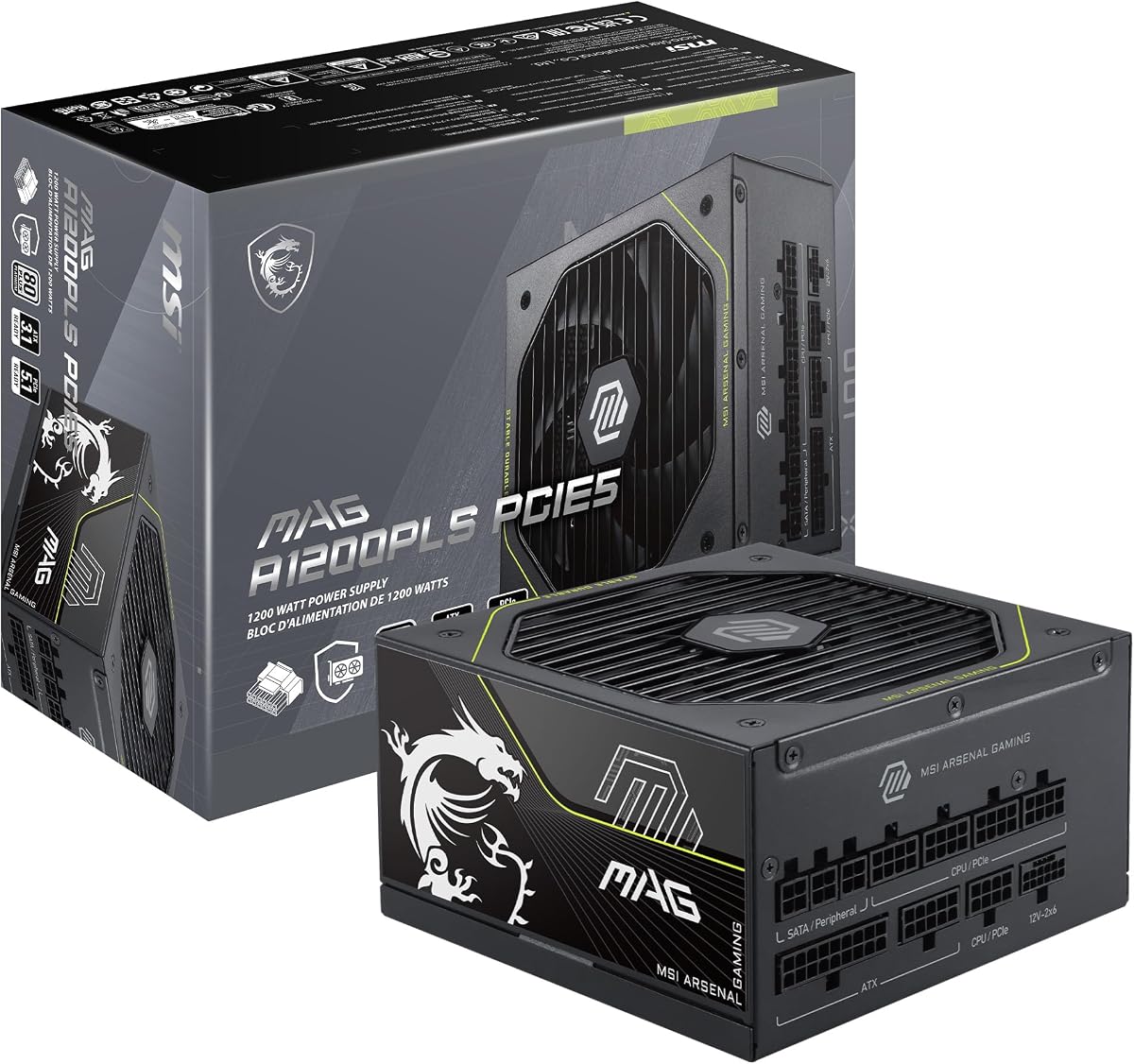
The MSI MAG A1200PLS PCIE5 is the highest-capacity option in this guide and the only model here with a 5.0 rating. Its 1200W output, ATX 3.1 and PCIe 5.1 support, native 12V-2×6 connection, and 80 PLUS Platinum certification make it a strong premium option for a heavily equipped RTX 5080 system.
We may earn a commission when you buy through this link, at no additional cost to you.
GPU Safeguard is the standout feature. It provides real-time current protection and an early alert if the 12V-2×6 current becomes abnormal, allowing a user to investigate before the problem worsens. A 135mm fluid dynamic bearing fan, a 105°C-rated main capacitor, and fan safeguard functions add further emphasis on durability and system protection.
Despite its high wattage, the enclosure measures only 150mm long and 150mm wide, which should simplify installation in many cases and leave more room for cable management and airflow. The downside is that 1200W can be excessive for a focused single-GPU build, and buyers may gain little practical value from capacity they never approach.
This PSU is best for builders combining an RTX 5080 with a power-hungry CPU, multiple expansion cards, extensive storage, or plans to upgrade later. Its compact design and comprehensive protection features make it particularly appealing when maximum confidence and headroom matter more than minimizing the power-supply footprint.
GPU Safeguard watches the current carried by the 12V-2×6 connection and can provide an early warning when it detects abnormal behavior. This is a meaningful distinction for builders who want diagnostics rather than relying only on protection after a fault has occurred.
The 150mm by 150mm ATX format helps offset the usual space concerns associated with a high-output unit. In a compact case, those saved millimeters can be more valuable than an additional several hundred watts of unused capacity.
We may earn a commission when you buy through this link, at no additional cost to you.
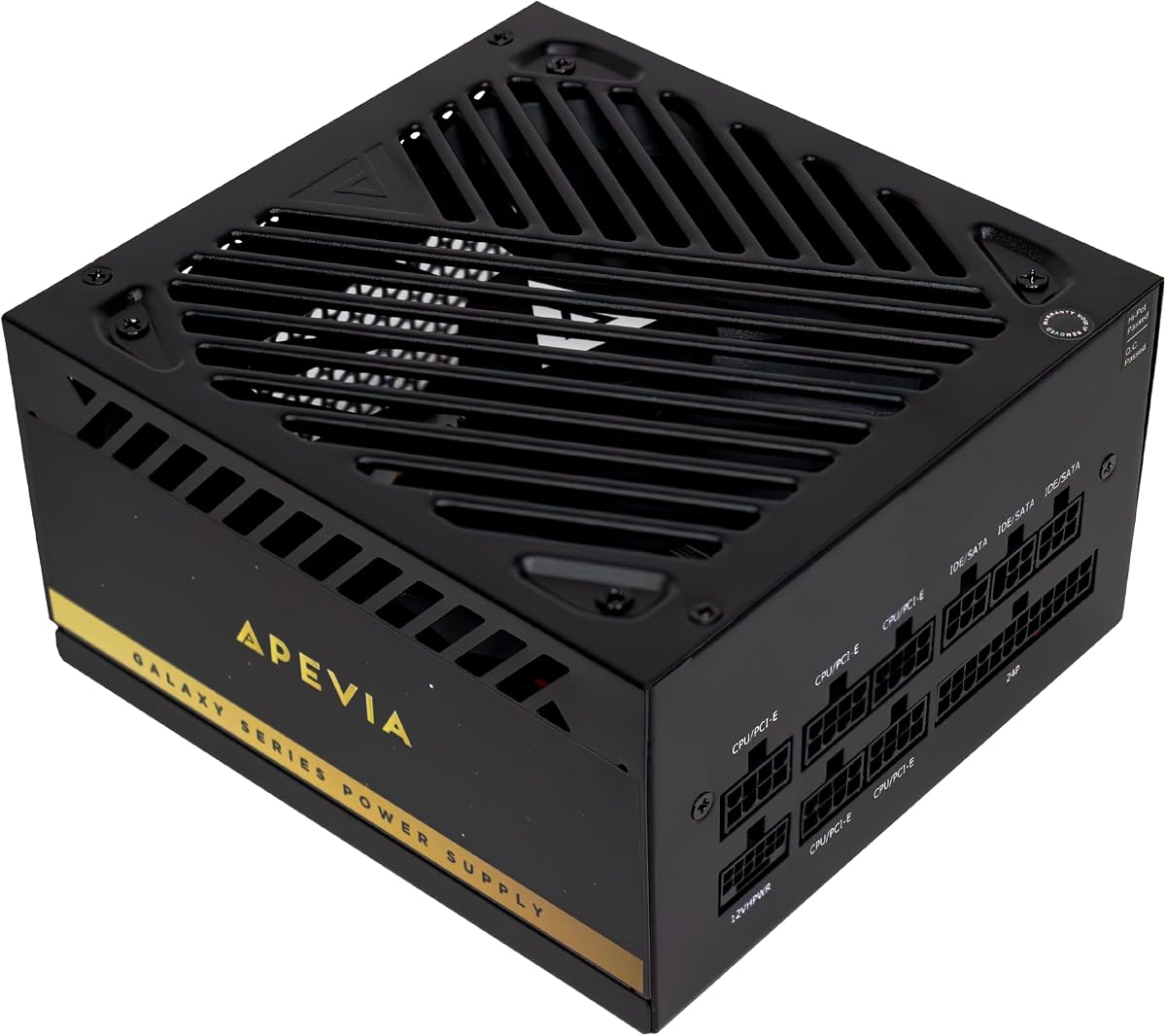
The Apevia Galaxy 1000W is an ATX 3.1 and PCIe 5.1-ready 1000W PSU explicitly marketed for RTX 5070, RTX 5080, RTX 5090, RTX 40-series, and dual-GPU builds. It has a 3.9 rating, the lowest in the group, but its feature set is broad enough to make it worth considering for buyers prioritizing compatibility and protection.
We may earn a commission when you buy through this link, at no additional cost to you.
The native 16-pin 12VHPWR cable is listed as capable of delivering up to 600W. The unit also uses Japanese capacitors, active PFC, full-bridge architecture, and DC-to-DC conversion, while a 135mm fluid dynamic bearing fan provides smart thermal cooling. Fully modular flat black cables simplify routing and improve airflow.
Its protection suite includes short-circuit, over-voltage, over-power, under-voltage, and over-temperature protection. It also supports dual and quad-core CPUs and SLI or Crossfire configurations. These specifications are comprehensive, but the lower 3.9 rating calls for more attention to recent customer feedback and warranty terms before purchase.
The Galaxy 1000W may appeal to builders who want a single power supply to cover several generations of high-end graphics hardware. For an RTX 5080 specifically, its connector, wattage, and standards align well, although products with stronger ratings, more compact dimensions, or additional monitoring features may provide greater confidence.
OVP, OPP, SCP, UVP, and OTP protections cover several common electrical and thermal fault conditions. For a valuable gaming system, this breadth of safeguards is an important part of the purchase decision alongside wattage and efficiency.
The listing calls out dual-GPU configurations and multiple generations of NVIDIA graphics cards. That makes the Galaxy potentially useful for builders sharing components across an upgrade path, although each installed card must still be supported by the motherboard and the combined load must remain within the PSU’s operating limits.
We may earn a commission when you buy through this link, at no additional cost to you.
The MSI MAG A750GL PCIE5 is a compact 750W power supply with a 4.6 rating, ATX 3.1 and PCIe 5.1 compliance, and a native dual-color 12V-2×6 cable. It targets builders who want a modern GPU connection and modular design without carrying the size or capacity of a 1000W or 1200W unit.
We may earn a commission when you buy through this link, at no additional cost to you.
The fully modular format lets owners connect only the leads their build needs. Its 80 PLUS Gold certification supports efficient power delivery, while the included 12V-2×6 connection aligns with current RTX 50-series hardware. A ten-year limited warranty adds a meaningful ownership consideration for buyers planning to keep the PSU for a substantial period.
The 750W rating is the clear compromise. Compared with the 850W models, it leaves less room for a power-hungry CPU, multiple add-in cards, extensive peripherals, and future upgrades. A buyer should calculate the combined demand of every component rather than choosing wattage based on the graphics card alone.
This PSU is most compelling for a restrained RTX 5080 build in a compact case with a modest CPU and few additional power-hungry devices. It may also appeal aesthetically because of the dual-color cable. Builders expecting more expansion should move to an 850W or 1000W model for additional operating margin.
A native 12V-2×6 cable in a 750W unit is useful for builders who want current-platform convenience without a high-capacity enclosure. The connector simplifies the GPU connection, while the lower wattage can make the overall power supply easier to accommodate in a compact chassis.
The ten-year limited warranty provides reassurance that the manufacturer expects the unit to remain relevant across multiple hardware generations. Buyers should retain their receipt and follow the manufacturer’s installation and warranty requirements.
We may earn a commission when you buy through this link, at no additional cost to you.
The CORSAIR HX1000i Shift combines 1000W capacity with an integrated iCUE LINK System Hub. It has a 4.1 rating and is aimed at builders using CORSAIR’s connected cooling ecosystem, offering a simpler way to power and synchronize compatible fans and other devices.
We may earn a commission when you buy through this link, at no additional cost to you.
The built-in hub can control and synchronize up to 24 iCUE LINK devices. Because the hub is built into the power supply, users do not need to install a separate internal hub and run an additional power lead to it. That can reduce internal cable clutter and simplify the physical layout of the system.
Side-mounted modular connectors are another practical feature. They make ports easier to reach during assembly and support cleaner cable routing. The PSU also includes a native 12V-2×6 cable for current NVIDIA RTX 50-series and compatible 40-series graphics cards, while Cybenetics Platinum certification indicates efficiency of up to 91%.
This is an excellent option for an RTX 5080 builder committed to iCUE LINK components, but its specialized value is limited for a system without that ecosystem. The lower 4.1 rating also warrants checking recent feedback. For a more universally efficient option with a simpler design, several other 1000W choices in this guide may be easier to justify.
Integrating the iCUE LINK System Hub into the PSU removes the need for a separate hub and its power cable. Builders can connect compatible devices directly to the power supply, simplifying both placement and cable management.
Putting the connectors on the side of the unit makes them easier to see and reach during installation. That is particularly helpful in tight cases where working around the PSU from the rear can be inconvenient.
We may earn a commission when you buy through this link, at no additional cost to you.
The CORSAIR RM850x is an 850W ATX 3.1 and PCIe 5.1-ready PSU with a 4.7 rating. It combines a native 12V-2×6 connector, fully modular cabling, and Cybenetics Gold efficiency in a conventional design aimed at high-end gaming systems.
We may earn a commission when you buy through this link, at no additional cost to you.
Its efficiency is listed at up to 91%, which can reduce energy consumption, internal heat, and cooling demands. ATX 3.1 compliance adds resistance to transient power spikes, a relevant consideration for modern graphics cards whose power requirements can change rapidly.
The embossed cables are described as ultra-flexible, and low-profile combs help maintain a neat appearance. Full modularity means unused leads do not need to remain in the case, making it easier to route the native GPU cable and preserve clearance around the card. As with every 850W option, capacity is the main constraint.
The RM850x is a compelling choice for an RTX 5080 build seeking a well-rounded unit without specialized RGB or control features. It is especially suitable for buyers who value a strong listed rating, direct 12V-2×6 connectivity, and a tidy installation over maximum wattage or premium ecosystem integration.
ATX 3.1 compliance and support for PCIe 5.1 are central to the RM850x’s relevance with an RTX 5080. This platform alignment is more significant than a cosmetic update because the standard is intended to accommodate the electrical behavior of modern graphics hardware.
Fully modular cabling eliminates unnecessary wires, while flexible embossed leads and low-profile combs simplify the remaining routes. The result is a cleaner interior that can make large graphics cards and their power cables easier to service.
We may earn a commission when you buy through this link, at no additional cost to you.
The CORSAIR RM850e (2025) is an 850W ATX 3.1 and PCIe 5.1-ready PSU with a 4.6 rating. It focuses on the essentials required for a modern gaming system: modular cables, quiet cooling, current electrical standards, and support for transient power excursions from the GPU.
We may earn a commission when you buy through this link, at no additional cost to you.
Its Intel ATX 3.1 certification means the unit supports PCIe 5.1 platforms and can withstand two transient power excursions from the GPU. A 120mm rifle bearing fan uses a specially calculated fan curve to reduce noise, while 105°C-rated capacitors support steady operation and dependable electrical performance.
Modern Standby compatibility is another useful feature, providing fast wake-from-sleep behavior and improved low-load efficiency. Full modularity keeps unused cables out of the case. The listing does not explicitly identify a native 12V-2×6 cable, so RTX 5080 buyers must verify the supplied connector set and obtain the correct cable if needed.
This model is a practical choice for a value-focused RTX 5080 build, especially when the buyer wants current ATX 3.1 support and modular construction without moving to the 1000W class. Confirming the exact graphics-card cable before ordering is essential, and buyers with significant upgrade plans may prefer a higher-capacity option.
The ATX 3.1 platform requirement and stated tolerance for two GPU transient excursions add resilience to a modern graphics-card installation. It is a more relevant indicator of platform alignment than whether the enclosure includes decorative elements.
The calculated 120mm rifle bearing fan curve focuses on reducing noise, while Modern Standby support is intended to improve wake times and low-load efficiency. Together, these details benefit a PC used for long gaming sessions and everyday productivity.
We may earn a commission when you buy through this link, at no additional cost to you.
Choosing a power supply for an RTX 5080 involves balancing electrical headroom, connector compatibility, efficiency, physical fit, protection, and the rest of the PC’s power demands. The graphics card is important, but the processor and other equipment ultimately determine how much capacity the system truly needs.
Choose enough capacity for the complete system, not just the GPU.
Confirm ATX 3.1 and PCIe 5.1 support.
Verify that the native or adapter cable matches.
Balance present demand with future component upgrades.
Compare exact efficiency levels, not just logos.
Check dimensions, sockets, and cable bend clearance.
Look for comprehensive electrical and thermal protection.
Confirm warranty length and included documentation.
Install the PSU in a properly oriented, well-ventilated position with the fan facing an unobstructed area where possible. Connect the motherboard, processor, graphics card, storage, and accessory leads with the system powered off and disconnected from the wall. Use the correct cable for each socket and avoid mixing modular cables between different power-supply models.
A native 12V-2×6 lead should be fully seated and routed so the connector does not bear the weight of the cable. Leave a gentle bend near the graphics-card socket and use the case’s cable-management space to keep the cable away from fans and sharp edges. If an adapter is required, follow the manufacturer’s instructions exactly and ensure every component is completely engaged.
Good airflow, routine dust control, and sensible load management help maintain stable operation. Keep the intake and exhaust paths clear, avoid operating the system with obstructed airflow, and use reliable surge protection where appropriate. Periodically check that connectors remain secure and that no cable has been pinched, sharply bent, discolored, or damaged.
The RTX 5080 uses a modern 16-pin power connection, so the PSU must provide a compatible 12V-2×6 or 16-pin cable. A native cable is the cleanest option, but a quality adapter can work when it is fully connected and routed properly. Always confirm compatibility with the exact power supply and graphics-card cable arrangement before purchase.
An 850W unit can be appropriate for many RTX 5080 gaming builds, especially when the processor and other components are not extremely power hungry. Capacity needs depend on the complete system, however. A high-end CPU, multiple expansion cards, extensive storage, and plans for future upgrades make 1000W or 1200W options more comfortable.
ATX 3.1 is an updated version of the power-supply platform standard designed with modern graphics-card requirements in mind. It includes provisions related to high-current 16-pin connections and transient power excursions. Buying an explicitly ATX 3.1-ready model is a straightforward way to align the power supply with a current RTX 5080 system.
A modular design primarily improves cable management and makes the interior easier to access. Removing unused cables can improve airflow and make component temperatures easier to manage, but it does not directly increase the PSU’s electrical efficiency. Efficiency certification is the better indicator of how much power is lost during conversion.
A 1000W model generally offers a useful balance for component-heavy RTX 5080 builds with room for moderate expansion. A 1200W unit provides more headroom and is appropriate for exceptionally demanding CPUs, multiple GPUs, or extensive future upgrades. Neither is automatically better, because unused capacity adds cost, size, and potentially additional fan noise.
Do not assume modular cables are interchangeable. Even when connectors look similar, pinouts and cable designs can vary between models and series. Use only the cables supplied with the chosen PSU or cables specifically approved by its manufacturer. An incorrect cable can damage components or create an unsafe installation.
Both certifications assess efficiency, but they use separate testing programs and may report results under different conditions. A PSU listed with both 80 PLUS Gold and Cybenetics Platinum offers two useful points of reference. Buyers should still consider noise, protection, capacity, connector support, warranty, and physical design alongside efficiency ratings.
Insert the connector fully, avoid pulling it sideways, and maintain a gentle bend immediately after the socket. Secure excess cable behind the motherboard tray or elsewhere that it cannot contact a fan. Do not place the connector under strain, and inspect it periodically for movement or damage.
The Seasonic CORE GX-850 stands out as the balanced all-around choice, combining strong listed feedback, ATX 3.1 support, dual efficiency certifications, a native 12V-2×6 cable, and a useful adapter. The CORSAIR RM850e (2025) is a value-oriented alternative for builders seeking modular construction and transient-load support, while the MSI MAG A1200PLS PCIE5 delivers maximum capacity, compact dimensions, and active GPU current monitoring.
Prioritize compatibility with the complete system rather than wattage alone. Confirm ATX 3.1 and PCIe 5.1 support, verify that the required graphics-card cable is included, and leave enough capacity for the CPU, expansion devices, and future upgrades. Efficiency, protection, case clearance, and warranty are equally important once the electrical basics are satisfied.
Ratings, bundle contents, and availability can change, so check the current product listing before buying. Use the comparison table to narrow the field, then verify the final specifications and cable diagram for the exact model. That last check can prevent an otherwise well-matched PSU from becoming an installation headache.