
DTF Printhead Cleaning Solution 16.9 fl oz
4.5Editor score
500 ml professional fluid
Broad DTF printhead compatibility
Supports manual and automated cleaning
This guide compares the best print head nozzle cleaning kits for inkjet, DTF, and 3D printers, covering compatibility, fluid, tools, and ease of use.
Print head nozzle cleaning kits help restore ink flow, clear dried residue, and maintain consistent output across inkjet, DTF, and 3D printers. A useful kit should match the printer type, include the correct adapters, and provide clear instructions so the procedure can be completed safely and correctly.
The products in this guide were compared using the supplied compatibility information, included cleaning components, fluid volume, supported ink types, installation details, and customer ratings. The list covers general inkjet cleaning kits, specialized DTF solutions, and mechanical cleaning needles designed for 3D printer nozzles.
Each review explains the strongest reasons to consider a kit, along with important limitations and compatibility caveats. The top recommendations represent different needs rather than a single universal winner. Product availability and prices can change, so readers should confirm the current listing and printer requirements before ordering.
4.5Editor score

4.4Editor score
4.2Editor score
The comparison below highlights the intended printer type, cleaning method, included accessories, and main compatibility considerations for all ten kits, helping readers distinguish fluid-based maintenance from mechanical nozzle cleaning.


This general-purpose inkjet cleaning kit carries a 4.1 rating and is designed for Epson, HP, Brother, Canon, and other popular inkjet families. Its main selling points are the generous 100 ml cleaning fluid supply, a comparatively large 20 ml syringe, and several attachment options designed to make fluid delivery more practical.
We may earn a commission when you buy through this link, at no additional cost to you.
The manufacturer says the solution addresses discoloration, missing colors, low-quality output, blank pages, and streaks. It is also presented as preventive maintenance that can help preserve a printhead and delay replacement. The inclusion of cleaning fluid, syringes, and tools makes it a more complete package than a simple manual cleaning kit.
Compatibility is described across EcoTank, WorkForce, SmartTank, OfficeJet, Pixma, Brother MFC, DTF, and sublimation applications, but the listing does not provide an equally detailed model-by-model list for every family. That means buyers should still confirm that their printer's filling port and procedure are appropriate before applying the fluid.
This is a sensible general option for owners of a mainstream inkjet who want more fluid and a larger syringe than many entry-level kits provide. It is less specialized than the DTF solution and should not be selected for a 3D printer, but it offers a practical balance of tools, coverage, and targeted maintenance support.
The kit is aimed at visible problems such as streaks, incomplete patterns, missing colors, and faded or unclear text. Its fluid-based approach is best suited to residue and clog-related issues that have not already caused severe hardware damage.
The 20 ml syringe is a noteworthy feature for users who may need to move cleaner through several filling ports. It offers more capacity than the smaller 5 ml syringe offered by another kit in this comparison.
We may earn a commission when you buy through this link, at no additional cost to you.
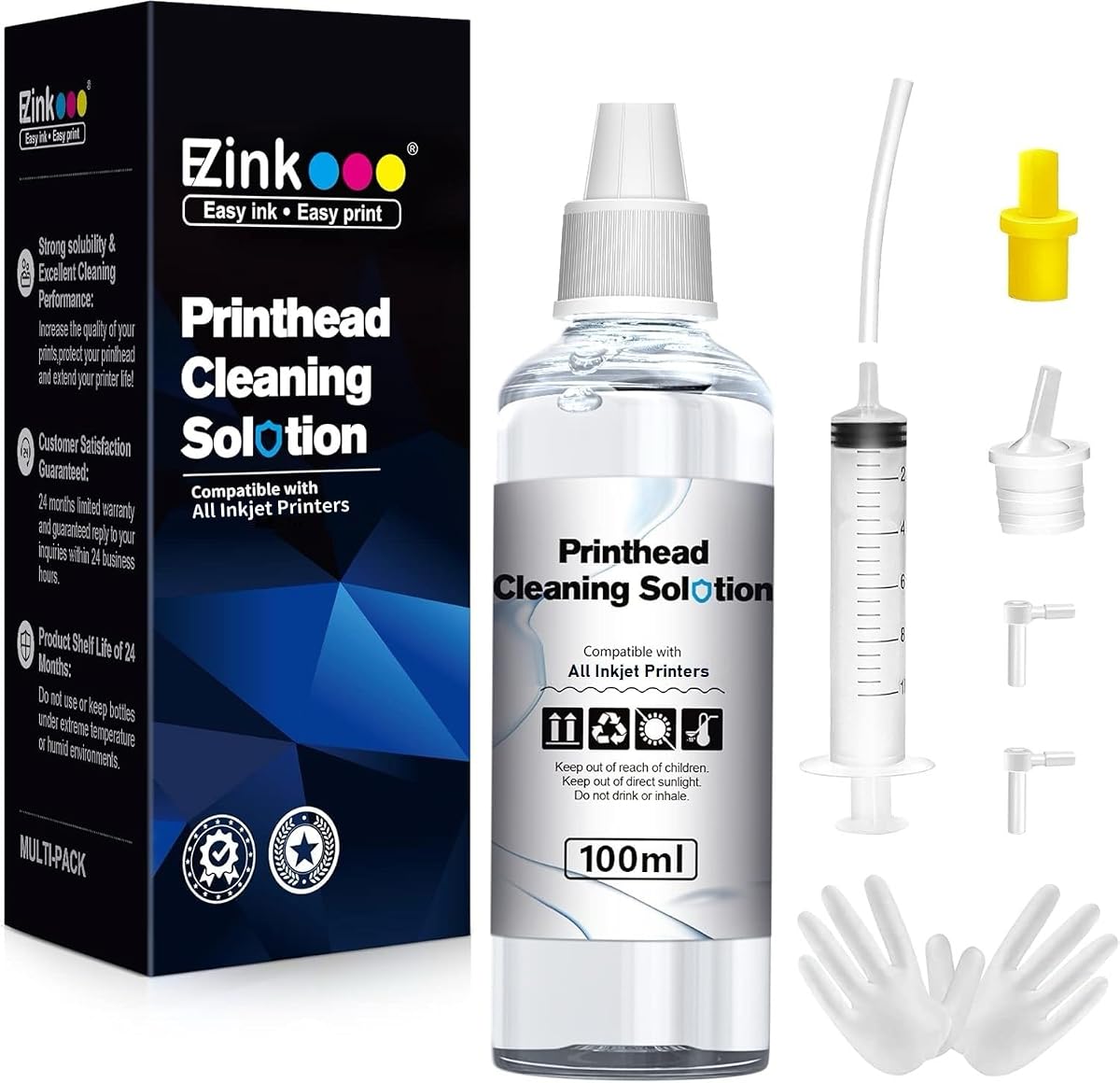
The E-Z Ink Printer Cleaning Kit has a 4.2 rating and stands out for one of the most detailed supported-model lists in the group. It covers Epson, HP, Brother, Canon, and Lexmark inkjet printers, with specific series and model numbers extending across EcoTank, WorkForce, Expression, OfficeJet, Envy, DeskJet, Smart Tank, MFC, Pixma, and MegaTank families.
We may earn a commission when you buy through this link, at no additional cost to you.
Its 100 ml of cleaning fluid is paired with a syringe, silicone hose, gloves, and instructions. The enzyme-based formula is described as dissolving dry ink and soluble impurities, which makes it relevant for clogged nozzles and uneven ink delivery. Users are instructed to unplug the printer before cleaning and to avoid excessive cleaning in a short period.
The main drawback is that the kit asks buyers to choose the right adapter for their printer type. A long compatibility list cannot guarantee that every filling port or internal procedure is identical, so the model should still be checked carefully. The listing also notes that seriously blocked nozzles may require more than one cleaning cycle.
This is a strong budget-oriented choice for someone who can find their exact printer in the detailed compatibility list. The combination of a 4.2 rating, broad model coverage, and a complete accessory set makes it more useful than a basic solution-only product.
Unlike listings that merely mention several brands, this product identifies many individual series and model numbers. That detail gives buyers a stronger starting point when determining whether the kit and included adapter are appropriate.
The product information explicitly acknowledges that severely blocked nozzles may need repeated cleaning. This honest guidance helps set expectations and discourages unnecessary, excessive cleaning cycles.
We may earn a commission when you buy through this link, at no additional cost to you.
The Spaceink kit earns a 4.4 rating and includes 200 ml of fluid in two 100 ml containers. That total volume exceeds the general inkjet kits in this roundup while remaining less focused than the 500 ml DTF product. It is intended for Epson, HP, Canon, Brother, EcoTank, Lexmark, Kodak, and Samsung printers.
We may earn a commission when you buy through this link, at no additional cost to you.
Its accessories go beyond the basic syringe-and-hose format. The package includes a 20 ml syringe, silicone tube, four large rubber stoppers, four cotton swabs, four each of dry and wet wipes, gloves, and an instruction manual. That assortment is useful for cleanup and for connecting the solution to different filling points.
The listing says the enzyme-containing cleaner is designed to dissolve dry ink and other soluble agglomerates, helping restore smoother ink flow. It is advertised for factory inks, dye inks, sublimation inks, and thermal-transfer inks, making it relevant to several home and professional inkjet applications.
Compatibility is broader than the model-specific list provided by the E-Z Ink kit, so buyers with a particular printer may need to contact the seller for confirmation. Even so, the 4.4 rating and generous accessory package make this a strong all-purpose selection for recurring maintenance and multiple compatible machines.
Two 100 ml containers provide a larger overall supply than most entry-level kits. This is useful for users maintaining several supported printers or anticipating more than one cleaning session.
Cotton swabs and both wet and dry wipes make it easier to manage residue around the filling area. The rubber stoppers and silicone tube broaden the available connection options.
We may earn a commission when you buy through this link, at no additional cost to you.
The Absonic Printhead Cleaning Kit has a 4.4 rating and offers 250 ml of cleaning fluid. It combines a substantial fluid supply with white and yellow nozzles, L-shaped tubes, silicone tubing, a syringe, gloves, and instructions, making it one of the most complete general-purpose kits in the comparison.
We may earn a commission when you buy through this link, at no additional cost to you.
Compatibility information includes Epson EcoTank, WorkForce, and Expression families; Canon MegaTank, Pixma, Maxify, Office, and Business lines; numerous Brother MFC models; and HP OfficeJet, DeskJet, Envy, and Smart Tank series. The white nozzle is identified for HP and Canon, while the yellow nozzle is intended for Epson and Brother.
The formula is described as suitable for factory ink, dye, sublimation, and heat-transfer inks. It is marketed against vertical or horizontal stripes, poor text quality, and incomplete patterns associated with printhead clogging. As with other fluid kits, the printer should be unplugged before the procedure to reduce the risk of short-circuit damage.
This is the strongest all-round choice in the group for a household or small workspace that owns printers from several major brands. The combination of 250 ml of fluid, brand-specific nozzle colors, extensive model information, and a 4.4 rating makes it an especially complete maintenance package without narrowing the focus to DTF.
Color-coded white and yellow nozzles reduce uncertainty when selecting an attachment for HP, Canon, Epson, or Brother systems. Buyers should still compare the connector shape with the printer's filling port before use.
The 250 ml supply is substantial for routine maintenance, while the included adapters and detailed model references make the kit suitable for more than one printer family. It offers a good middle ground between general-purpose convenience and specialized DTF care.
We may earn a commission when you buy through this link, at no additional cost to you.
This Epson-focused flush kit has a 4.1 rating and a 100 ml capacity. Its title and compatibility details concentrate on Epson ET, WF, and XP models, including EcoTank and WorkForce series, which makes it easier to evaluate for owners of those particular systems.
We may earn a commission when you buy through this link, at no additional cost to you.
The kit includes a printhead syringe, silicone tube, and instruction manual, and the listing says there is no need to remove the printhead. Its active cleaning ingredients are described as effective against factory, dye, pigment, sublimation, and direct-to-film inks while remaining non-corrosive to the printhead.
The product information recommends treating the procedure as a last attempt because self-repair carries some risk. It also instructs buyers not to rely on a general parts finder and instead to contact the seller when their model is not listed. These cautions are sensible, especially when fluid is being introduced through a printer's filling system.
This is a practical choice for an Epson owner whose exact model appears in the listing and who wants a syringe-based flush without major disassembly. Its narrow brand focus prevents it from being as convenient as the multi-brand Absonic or E-Z Ink kits for users with mixed printer collections.
The syringe, silicone tube, and guided procedure are designed to clean the printhead through the printer's normal access points. Avoiding printhead removal makes the kit less intimidating for careful owners.
The manufacturer explicitly labels self-repair as a last attempt. The built-in printer cleaning functions should therefore be considered first, while this kit serves as a targeted response to a persistent clog-related problem.
We may earn a commission when you buy through this link, at no additional cost to you.
The SHUOLEI kit has a 4.3 rating and provides 100 ml of printhead cleaning fluid. Its package includes a syringe, white and yellow nozzles, L-shaped tubes, silicone tubing, gloves, and instructions, giving users the basic elements needed for fluid-based inkjet maintenance.
We may earn a commission when you buy through this link, at no additional cost to you.
The compatibility description covers Epson, HP, Canon, Brother, Samsung, Lexmark, and Kodak inkjet printers, with numerous series listed for the four leading brands. The white nozzle is designated for HP and Canon, while the yellow nozzle is intended for Brother. Epson users should consult the included guidance for the appropriate connection method.
The cleaner is described as working with factory, dye, sublimation, and heat-transfer inks. It targets uneven output, streaks, and incomplete patterns associated with clogged nozzles. The listing also emphasizes unplugging the printer before cleaning to prevent short-circuit damage.
This is a capable alternative for users who want more adapters than a basic kit but do not need the Absonic kit's 250 ml capacity. Its 4.3 rating and extensive accessory set make it particularly attractive for owners of several supported brands who prefer one general maintenance package.
White and yellow nozzles, L-shaped tubes, and silicone tubing offer several ways to reach different filling ports. The organization makes the kit more adaptable than a simple fluid-and-syringe bundle.
Compatibility with dye, sublimation, and heat-transfer inks extends the kit's relevance beyond ordinary document printing. Users should still follow the procedure approved for their specific printer model.
We may earn a commission when you buy through this link, at no additional cost to you.
This compact inkjet cleaning kit has a 4.2 rating and supports HP, Epson, Canon, and Brother printers, including EcoTank, OfficeJet, DeskJet, and Pixma categories. Its 100 ml cleaning solution is accompanied by a 5 ml syringe, silicone tubing, white and yellow nozzles, two L-shaped tubes, disposable gloves, and instructions.
We may earn a commission when you buy through this link, at no additional cost to you.
The enzyme-based liquid is described as dissolving dry ink while moistening and protecting the printhead. The manufacturer also states that the kit contains no harmful printer ingredients, although buyers should always use a cleaning solution appropriate for their printer and ink system.
Compared with the larger fluid packages and syringes in this guide, this product is more compact. That can be beneficial for occasional maintenance, a small workspace, or storage in a limited tool area. The trade-off is that 5 ml of syringe capacity may require additional fills for some filling ports or larger maintenance jobs.
It is a sensible pick for a common household inkjet that needs occasional cleaning and for owners who want a straightforward, organized kit. The included instructions and multiple nozzle types support easier handling, while the broad brand coverage makes it more versatile than an Epson-only product.
The smaller syringe and focused accessory list keep the kit easy to store. It offers the essentials for routine cleaning without the larger fluid volume provided by the Spaceink and Absonic options.
The enzyme-based formula is intended to address dry ink accumulation, a common source of inconsistent nozzle flow. It is best used for maintenance or moderate clogs rather than as a guaranteed repair for damaged hardware.
We may earn a commission when you buy through this link, at no additional cost to you.
The Printium DTF Printhead Cleaning Solution has a 4.5 rating and is the most specialized fluid product in this guide. Its 500 ml bottle is designed for DTF and DTG systems, including I3200, XP600, TX800, L1800, 4720, DX5, DX7, I1600, R1390, ET8550, XP15000, L800, and P800 configurations.
We may earn a commission when you buy through this link, at no additional cost to you.
The water-based formula is described as odorless, non-toxic, residue-free, and non-corrosive. It is intended to dissolve dried DTF pigment buildup and restore more consistent delivery through blocked nozzles. The product information specifically references streaks, faded output, PET film heat transfers, and garment applications.
Unlike most general inkjet kits, this solution can be used with syringes, capping stations, swabs, or automatic cleaning systems. It can support quick recovery, line flushing, or overnight soaking, while its controlled viscosity is intended to promote steady flow through fine nozzle channels. That makes it more relevant to high-use DTF production environments.
This is the premium selection for serious DTF users, studios, or printers that print frequently and need larger-volume maintenance. It is not a universal inkjet kit and offers no mechanical cleaning tools for 3D printers, but its focus and 500 ml capacity make it the strongest dedicated option for the DTF category.
DTF ink can leave stubborn white and pigment buildup around fine nozzle paths. This solution is designed specifically for dissolving those deposits while preserving consistent flow in demanding heat-transfer printing environments.
The 500 ml quantity supports routine maintenance, repeated flushing, and automated station use. Its ability to work with multiple application methods makes it adaptable to different studio workflows and service routines.
We may earn a commission when you buy through this link, at no additional cost to you.
The 40-piece 3D printer nozzle cleaning kit carries a 4.8 rating and is the strongest choice in this comparison for high-volume mechanical maintenance. The package contains 40 stainless steel needles organized into two storage bottles, with 20 needles in each container.
We may earn a commission when you buy through this link, at no additional cost to you.
Each needle has a 0.4 mm tip, allowing it to pass through the openings of most common 3D printer nozzles. The listing also describes the needles as flexible yet strong, resistant to bending or breaking under repeated use. Beyond nozzle tips, the tools can reach small spaces around feed gears and throttle holes.
This is a hot-side procedure: the nozzle should be heated to 200°C or above before a needle is inserted and removed. The instructions explicitly warn about burn risk, so the user must allow normal caution around the heated nozzle and avoid touching the hot assembly.
It is an excellent pick for 3D printer owners who want numerous inexpensive replacement tools, particularly studios that clean nozzles frequently. It should not be confused with an inkjet fluid kit, and the hot-nozzle requirement makes it unsuitable for users uncomfortable handling heated components.
Forty individually supplied needles provide a useful buffer against contamination, loss, or wear. The dual-bottle arrangement also makes it easy to keep replacement tools organized near a printer.
A 0.4 mm cleaning needle is sized for common 3D printer nozzle openings and can clear compacted debris. It is a practical complement to filament changes and routine heat-creep prevention.
We may earn a commission when you buy through this link, at no additional cost to you.
The YOOPAI kit has a 4.8 rating and combines several mechanical cleaning tools in one package. It includes one nozzle cleaning needle with a soft rubber handle, ten stainless steel cleaning needles in a storage box, and a copper wire brush for more thorough removal of deposits.
We may earn a commission when you buy through this link, at no additional cost to you.
The handled tool is 150 mm long and 1.5 mm in diameter, with an arrow-shaped tip intended to match the shape of a 1.75 mm 3D printer nozzle. The included needles range from 0.2 mm to 0.5 mm, providing options for different openings and hard-to-reach spaces.
The ergonomic handle is designed to improve control and make it possible to clean without disassembling the nozzle. The copper wire brush offers additional scrubbing power and good thermal conductivity, making it useful for heat sinks and other accessible hot-end areas.
The listing names compatibility with several Bambu Lab, Creality, and Ender-3 V3 models, along with other printers that use 1.75 mm filament. This is a highly rated, well-organized option for 3D printer maintenance, though the bulk needle kit offers more individual needles and the print-cleaning fluid products serve an entirely different purpose.
The long handled tool keeps fingers farther from the nozzle area than a short needle alone. Its shaped tip and rubber grip provide a steadier way to clear debris without removing the nozzle assembly.
Fine stainless steel needles suit narrow openings, while the copper brush can scrub accessible buildup from heat sinks and related surfaces. Using the right tool for each job helps avoid unnecessary abrasion.
We may earn a commission when you buy through this link, at no additional cost to you.
The right cleaning kit depends on whether you maintain an inkjet, DTF, or 3D printer. Compatibility, fluid type, included adapters, capacity, and the condition of the nozzle should guide the decision more strongly than the number of advertised applications.
Inkjet and DTF printheads are cleaned by moving a liquid through the ink delivery path and nozzle plate. These kits generally include cleaning fluid, a syringe, tubing, and adapters that connect to a filling port. A 3D printer nozzle is a physical opening in a heated metal component, so it is normally cleared with a fine needle, brush, or both. A fluid-based inkjet kit will not clean a 3D nozzle, and a needle kit will not dissolve dried ink from an inkjet printhead.
Choose fluid kits for inkjet or DTF systems and mechanical tools for 3D printers. For a mixed workshop, separate the two types of equipment rather than assuming a universal nozzle-cleaning product can handle both.
Brand-level compatibility is only the first level of checking. The filling port, internal tube arrangement, and accepted procedure can vary among models from the same manufacturer. A kit with a long list of exact model numbers gives users a better starting point, but the printer's service guidance should remain the authority. For a model that is not listed, contact the seller before using the kit and describe the printer model, ink system, and port configuration.
Prioritize a model-specific or detailed multi-model listing, then verify the connector and procedure. Do not assume an adapter will fit merely because the printer carries the same brand name.
Fluid volume reflects how frequently the kit is likely to be used. A 100 ml package is generally practical for occasional maintenance, while 200 ml to 250 ml kits offer more capacity for multiple printers or repeated service cycles. The 500 ml DTF solution is designed for production-oriented routines, frequent flushing, and automated cleaning stations. Quantity alone does not determine effectiveness, so the formula's stated purpose and compatibility remain more important.
Match the supply to your service frequency rather than buying the largest container by default. For a single home printer, a moderate kit is often easier to store and use consistently.
A useful kit should include more than a bottle of cleaner. Syringes, silicone tubing, L-shaped tubes, nozzles, stoppers, and filling adapters help create a controlled path for the solution. Color-coded nozzles can make selection easier, while swabs and wet or dry wipes support cleanup afterward. Check whether the kit includes the adapter needed for the exact filling port, and consider how fluid will be moved if the package does not include a sufficiently large syringe.
Look for a complete accessory set that matches the procedure your printer requires. A 5 ml syringe may be adequate for careful small applications, while a 20 ml syringe can reduce the number of refills needed for larger jobs.
Many general inkjet kits are described as suitable for factory, dye, pigment, sublimation, or heat-transfer inks. That breadth can be useful for home printers, DTF work, garment printing, and craft systems. A dedicated DTF formula may be better suited to persistent white-ink and pigment deposits in a high-volume transfer workflow. The cleaner should not be assumed to be safe for every ink chemistry, so verify the ink type and printer manufacturer guidance first.
Select the solution based on the ink actually loaded into the machine. Specialized DTF cleaning is most relevant to studios and professional transfer systems, while a general kit serves everyday office and home printers well.
Fluid-based cleaning introduces a liquid where electronics and ink pathways may be nearby. The supplied instructions for every inkjet kit call for unplugging the printer before beginning. Work over a protected surface, avoid forcing connectors, keep the solution away from children and pets, and follow the printer manufacturer's advice about permissible cleaning fluids. A kit with written instructions, diagrams, and defined adapter roles is easier to use safely than one that merely states that it is universal.
Never power the printer on while fluid, loose tubing, or wet connectors are present. If a kit's instructions conflict with the printer manual, stop and seek clarification rather than improvising.
For 3D printer maintenance, needle diameter should be compatible with the nozzle opening without being large enough to scratch or deform it. Kits offering a range from 0.2 mm to 0.5 mm offer flexibility across common nozzle types. The nozzle must be heated before inserting a cleaning needle so the material is soft enough to dislodge. The 40-piece kit specifies a 0.4 mm needle, while the YOOPAI set includes several sizes and a 1.75 mm-nozzle cleaning handle.
Always heat the nozzle to the appropriate temperature and avoid touching the hot metal. Allow the assembly to cool before handling it further, and never force a needle if it does not pass smoothly.
Customer ratings can provide a broad signal, but the most useful information comes from a clear compatibility list, realistic claims, included instructions, and a visible support channel. Some listings cite a claimed success rate, while others are more cautious and acknowledge that results depend on the printer and the severity of the blockage. Accessories such as video guidance, gloves, storage containers, and cleanup wipes improve convenience but should not outweigh correct printer compatibility.
Read both positive and critical feedback, look for recurring questions about fit and instructions, and favor listings that explain limitations honestly. A well-supported product is easier to use correctly on the first attempt.
Begin with the printer's built-in cleaning and maintenance functions. Run the appropriate nozzle check to identify which nozzles are affected, clean the printhead through the manufacturer's menu, and confirm that the correct ink is installed. If the problem remains, place the printer on a protected, level surface and disconnect its power before opening any filling area. Read the complete kit instructions and compare every adapter with the printer's port before introducing fluid.
For an inkjet or DTF kit, connect the supplied syringe and tubing to the appropriate filling port, fill the syringe with the recommended amount of cleaning solution, and work slowly to avoid air pockets, leaks, or excessive pressure. Follow the included procedure for the specific printer model. Stop if fluid escapes through an unintended connection, a fitting does not seat correctly, or the printer does not match the compatibility instructions. Once cleaning is complete, disconnect the kit, remove residue with the provided swabs or wipes, and reinstall any covers or cartridges according to the printer guide.
After cleaning, reconnect power and run the manufacturer's nozzle check or a short test page. A professional DTF user may also follow the fluid's guidance for flushing lines, soaking a printhead, or using a capping and automatic cleaning station. For a 3D printer needle kit, heat the nozzle to the specified temperature, clean with gentle in-and-out movements, and avoid scraping the nozzle plate. Let all hot components cool before further handling, store needles in their supplied container, and keep fluid kits tightly closed and away from heat or freezing conditions.
No. Cleaning kits are primarily intended for buildup, residue, and clogged nozzles that cause streaks, missing colors, uneven text, or incomplete patterns. Physical damage, empty or failing cartridges, incorrect ink, worn printheads, and other hardware faults may look similar but will not be corrected by cleaning fluid. Run the printer's built-in checks and nozzle test before deciding that fluid maintenance is needed.
No single kit should be assumed compatible with every model from every brand. The listings in this guide include broad or detailed compatibility claims, but the exact filling port, internal design, and accepted procedure still matter. Find your model in the seller's list, review the included instructions, and seek confirmation from the seller or printer manufacturer if it does not appear. Never force an adapter or pour fluid into an unidentified port.
Yes. The built-in cleaning cycle is normally the least invasive first step because the manufacturer has designed it for the printer's ink system. Run a nozzle check afterward to see whether missing nozzles remain. A manual cleaning kit is more appropriate when the built-in function cannot clear a moderate blockage or when residue persists after other basic maintenance steps have been completed.
Only if the fluid is specifically listed for the DTF printer, ink type, and cleaning procedure. The DTF-focused product in this guide is explicitly marketed for dried DTF ink, while several general kits mention sublimation and heat-transfer inks. Check the product instructions and printer guidance before use, since an unsuitable fluid can leave residue or affect ink flow.
An inkjet cleaning kit normally contains a liquid that dissolves dried ink inside the printhead and ink paths. A 3D printer cleaning kit uses needles, handles, and brushes to physically remove compacted material from a hot nozzle opening. The two categories should not be substituted for one another because their materials, procedures, and safety requirements are different.
Cleaning should follow evidence of a problem rather than a rigid schedule. Run a nozzle check when output develops streaks, gaps, fading, or inconsistent color, and use the printer's built-in cleaning function first. A manual fluid kit is a more intensive intervention and should not be used repeatedly in a short period, particularly when a blockage is not improving or the hardware may already be damaged.
Needle safety depends on the tip diameter, nozzle design, and whether the user applies the correct technique. The products reviewed use fine stainless steel needles ranging up to 0.5 mm and are intended for common nozzle openings. Heat the nozzle to the appropriate temperature, use gentle movements, and do not force the needle. A 1.75 mm filament description does not necessarily establish the exact internal opening, so inspect the nozzle specification first.
Stop repeating the procedure if there is no improvement, leakage, unusual noise, or a new printing problem. Run the printer's diagnostic tools again and check ink levels, cartridge installation, paper selection, and print settings. The manufacturer's support service can determine whether the printhead is physically damaged or requires replacement. Continuing to flush a damaged system may not help and could create additional problems.
The Printium DTF solution is the premium pick for professional or high-volume DTF maintenance, with 500 ml of purpose-specific fluid and support for several cleaning methods. The Absonic kit is the strongest general option, combining 250 ml of fluid, brand-specific adapters, and broad inkjet coverage, while the E-Z Ink kit offers detailed model support and a complete budget package.
For most inkjet users, prioritize exact model compatibility, a suitable connector, and instructions that match the printer's filling procedure. DTF operators should look for a cleaner designed around the inks and deposits they actually use. 3D printer owners need a completely different type of tool: fine needles, a brush, a safe hot-nozzle procedure, and storage for small metal parts.
Finally, check the current listing details and price before purchasing, because availability, included accessories, and seller information can change. Compare the kit with the printer manufacturer's cleaning guidance, understand the risks of opening a filling system, and keep one of the lighter maintenance tools on hand for routine care before a serious blockage develops.