
Screen Print Direct Waterproof Inkjet Film Sheets
4.7Editor score
100 waterproof film sheets
5 mil PET construction
Broad inkjet printer compatibility
High-definition screen-printing positives
A reliable printer for film positives must deliver dense, sharply defined images that block ultraviolet light effectively enough for screen-printing exposures. The right setup depends on your printer, film size, ink type, artwork, and exposure method, so matching the consumable to the equipment is as important as choosing a capable printing device.
We compared the ten listed products by their relevance to film-positive workflows, including UV-blocking performance, opacity, image definition, flatness, media compatibility, drying behavior, and practical screen-printing features. The list also covers several photo printers that are easy to mistake for film-positive equipment despite serving a different purpose.
Each review explains what the product actually contributes to the workflow, where it fits, and who should consider it. The top picks concentrate on genuine film-positive supplies, while the remaining entries clarify the limits of compact photo printers and general inkjet models. Prices and availability can change, so confirm current details before purchasing.
4.7Editor score

5.0Editor score

4.7Editor score
As an Amazon Associate we earn from qualifying purchases.
This side-by-side comparison distinguishes purpose-built film-positive ink and transparency media from instant-photo and general photo printers, with each entry assessed for opacity, image definition, media support, and relevance to screen-printing workflows.




This refill ink is purpose-built for the demanding part of a film-positive workflow: producing a dense black image that blocks ultraviolet light during screen exposure. With a 4.7 rating, it stands out for a formulation explicitly designed for waterproof inkjet screen-print film. The 500ml container also offers substantial capacity for shops that generate positives regularly rather than occasionally.
We may earn a commission when you buy through this link, at no additional cost to you.
The product is described as compatible with SureColor SC-F100, 7600, 9600, 7800, 9800, 7880, and 9880 models, although buyers should verify the exact printer model before ordering. Its high-opacity dye is intended to create defined edges and precise stencil artwork, while the smooth-printing formula is designed to reduce clogging. These qualities matter because incomplete density or soft lines can allow unwanted light through during exposure.
The main limitation is that this is ink rather than a printer or a complete positive system. It must be loaded into a compatible inkjet printer, and its performance depends on that printer accepting the refill and handling the selected film correctly. The listed compatibility is also model-specific, so the product does not represent a universal solution for every desktop or wide-format inkjet. It is also important to follow the film and equipment manufacturers' handling recommendations.
This is the strongest premium choice in the list for users who already own a supported SureColor printer and need high-opacity black output for screen-printing film. It suits established screen-printing workflows where density, line definition, and repeatable UV blocking are the priority. For everyone else, a complete film-positive set may be easier to start with than a specialty refill alone.
The stated high-opacity dye is intended to provide complete UV blockage, helping preserve sharp edges and fine artwork during exposure. Density is especially valuable when screens contain negative space, halftones, or detailed line art that could otherwise print inconsistently.
A 500ml refill is well suited to high-volume positive production. It reduces the practical inconvenience of replenishing ink frequently, although users should still follow the printer manufacturer's cleaning and storage guidance.
We may earn a commission when you buy through this link, at no additional cost to you.
This 100-sheet package of 8.5 by 11-inch waterproof inkjet film is one of the most practical options for producing letter-size screen-printing positives. It has a 4.7 rating and is made from 5 mil PET with a proprietary microporous coating. The material is designed to accept a heavy ink load while retaining sharp line definition, acuity, and the even tonal reproduction required for exposure work.
We may earn a commission when you buy through this link, at no additional cost to you.
A major strength is its stated compatibility with Epson, Canon, HP, Kodak, and many other inkjet printers. That broad support makes it easier for a small studio or home screen printer to add film without immediately replacing an existing machine. The slight haze in the acetate helps distribute light evenly, while the anti-curl, anti-yellowing, and fast-drying characteristics support a smoother handling process.
One practical concern is the printable side. The instructions advise users to identify it by lightly wetting a finger and touching a corner, because printing on the wrong side can smear the image. Letter size also limits large-format designs unless artwork is tiled or scaled to fit. Users must also ensure their printer can handle the 5 mil PET stock and that their settings will lay down enough ink without over-inking the microporous coating.
This film is a strong budget choice for hobbyists, educators, and small operations producing letter-sized positives on compatible inkjet equipment. Its 100-sheet quantity is especially useful for repeated printing, test exposures, and batch screen-printing jobs. For the most complete setup, pair it with a printer known to accept specialty film and select the correct media settings before starting a long run.
The combination of 100 sheets, letter-size dimensions, and broad printer compatibility makes this an accessible starting point. It is particularly practical for workgroups that frequently need clean letter-size positives without investing in large-format media.
The microporous top coating and high ink-load capacity support the crisp line definition and acuity sought in screen-print film. Even light distribution from the slight haze can also help create more consistent exposure results.
We may earn a commission when you buy through this link, at no additional cost to you.
This 25-sheet pack offers the same core 8.5 by 11-inch format and 5 mil PET construction as the larger Screen Print Direct film package. Its 4.7 rating reflects a well-regarded screen-printing medium with a microporous top coating, high ink-load capacity, and a slight haze designed to distribute light evenly. It is best understood as a smaller-volume alternative for users who do not need to stock 100 sheets.
We may earn a commission when you buy through this link, at no additional cost to you.
The sheets are compatible with Epson, Canon, HP, Kodak, and many other inkjet printers, allowing most existing inkjet setups to serve as a positive-printing station. Their design emphasizes line definition, sharpness, and acuity, while the waterproof base helps them withstand the demanding environment around screen exposure. Anti-curl, anti-yellowing, and fast-drying technology further support handling and storage.
The smaller sheet count is the clearest tradeoff. A 25-sheet package may be more appropriate for occasional projects, trial exposure, or a small screen-print shop, but frequent users may need more media sooner. As with other PET films, the printable side must be identified correctly; the manufacturer recommends a light touch with a wet finger because the wrong side can smear. Printer settings also need to be adjusted for the specialized coating.
Choose this option if you want proven Screen Print Direct media but prefer a lower-volume package for occasional letter-size positives. It is a sensible alternative for screen printers, students, and craft businesses that value sharp results and broad inkjet compatibility without committing to a larger sheet stack. For high-volume production, the 100-sheet version offers more convenient inventory control.
This package provides the same described PET material and microporous coating as the larger option. It suits users who need dependable screen-print film but want a more manageable quantity for occasional work.
A 25-sheet supply is easy to dedicate to trial prints, exposure tests, and small batches. It also reduces the amount of specialized film left open to environmental changes.
We may earn a commission when you buy through this link, at no additional cost to you.
This 13 by 19-inch transparency film is the most directly aligned product in the entire list with professional film-positive production. It carries a 5.0 rating and combines a 5 mil PET base, a lightly milky matte surface, an anti-static construction, and a coating that absorbs ink quickly and dries rapidly. Its large format allows more artwork to be produced in a single impression without tiling.
We may earn a commission when you buy through this link, at no additional cost to you.
The standout feature is ultra-dense black with high ink-load capacity. The stated objective is complete UV blockage during screen exposure, which supports sharp edges and fine detail. The matte surface is also designed to limit light scatter, improving the clarity of exposed results. Beyond screen printing, the product is described as suitable for PCB prototyping, offset proofing, and creative projects, giving it broader professional utility.
Its size and density create a clear requirement: the printer must be able to handle a 13 by 19-inch specialty transparency and deliver enough ink for a fully blocked image. Although the film is described as compatible with the vast majority of inkjet brands, that does not mean every printer can handle its thickness or media width. Printer settings should therefore be selected carefully, and test printing should precede a full production run.
This film is the most complete answer for screen printers, print shops, and serious craft operators who need high-opacity large-format positives. It is our top overall pick because it directly combines the core requirements of film-positive work: density, detail, flatness, rapid drying, and a professional size. Pair it with a suitable wide-format inkjet and calibrate the printer before producing screens.
The 13 by 19-inch sheet can accommodate larger artwork while the ultra-dense black formulation supports full UV blockage. This combination is valuable when fine edges and uninterrupted image areas are essential to the exposure.
The anti-static 5 mil PET base is designed to resist curl from printing through exposure. Stable film lies more predictably against the screen or exposure surface, reducing registration concerns.
We may earn a commission when you buy through this link, at no additional cost to you.
The Fujifilm Instax Mini Link 3 is a compact smartphone printer intended for instant photographs rather than screen-printing positives. Its 4.7 rating indicates strong customer reception, and the clay-white finish gives it a distinctive appearance. However, its defining output format is Instax Mini film, a small instant-photo medium that does not provide the transparent, UV-blocking layer required for exposing a screen.
We may earn a commission when you buy through this link, at no additional cost to you.
The product listed here has minimal supporting information beyond the brand, so its exact capabilities should be confirmed with the manufacturer. Other Mini Link 3 versions in the supplied data support Bluetooth smartphone printing, filters, frames, a rechargeable battery, and 2 by 3-inch prints. Those traits make the printer appealing for parties, scrapbooks, journals, and immediate sharing of personal images.
It is not a screen-printing solution. Instax film is an opaque photographic emulsion rather than a clear PET transparency, and the printer is designed to produce small photo prints rather than artwork for a screen exposure. Attempting to use it for film positives would therefore fail at a fundamental media and device level, not merely because of a compatibility issue.
Choose the Mini Link 3 when your objective is portable instant-photo printing from a phone or tablet. It is a good creative-party accessory, but it should not appear on a shortlist of true film-positive printers. Users creating screen-printing stencils should instead consider waterproof inkjet transparency film, a compatible inkjet printer, and high-opacity UV-blocking ink.
The Mini Link 3 belongs to the instant-photo category, where portability and social effects matter more than high-opacity transparency output. It is therefore better suited to event snapshots than production artwork.
A film-positive workflow requires a transparent medium and a printer capable of producing controlled black density. Instax Mini output provides neither, so screen printers should not treat this model as a substitute.
We may earn a commission when you buy through this link, at no additional cost to you.
The Epson EcoTank Photo ET-8550 is a wireless wide-format all-in-one printer designed for photos, graphics, and creative projects. With a 4.0 rating, it offers a broad set of functions in a single device, including printing, scanning, and copying. Its Claria ET Premium six-color ink system is intended to produce vibrant color photographs and sharp text, while the tank-based design reduces cartridge replacement frequency.
We may earn a commission when you buy through this link, at no additional cost to you.
From a film-positive perspective, its wide-format capability and ability to handle creative media make it more relevant than a compact instant printer. The stated output of up to 6,200 color pages and support for large creative projects could suit a busy design environment. However, the supplied information does not confirm that it is designed to print the 13 by 19-inch 5 mil PET film highlighted earlier, nor does it specify dedicated UV-blocking behavior.
The principal concern is ink density and media handling. A general-purpose photo ink set may not provide the complete UV blockage necessary for a reliable screen exposure unless the printer and film have been properly validated as a system. The 5 mil PET transparency described in the list calls for careful media feeding, clean printheads, and the correct driver settings. Users should test a sample before committing to a production batch.
This printer makes sense for users who need a versatile all-in-one for photographs, graphics, and possible positive work rather than a dedicated screen-printing machine. It may be useful for artwork preparation or smaller film formats if compatibility is confirmed. For dependable film-positive output, pair it with a specifically tested transparency film and consider whether the high-opacity ink in the first pick better matches the exposure requirements.
Photo, document, scanning, and copying functions make the ET-8550 useful for many creative tasks. This broad capability can justify ownership even when dedicated film-positive output represents only one part of the workload.
Because the supplied specifications emphasize general photo and graphic printing rather than UV-blocking film output, users should perform a test exposure. Confirm the film feeds correctly and that the black image blocks light completely before making screens.
We may earn a commission when you buy through this link, at no additional cost to you.
The Fujifilm Instax Mini Link 2 is a compact, lightweight Bluetooth printer for 2 by 3-inch Instax Mini photos. Its 4.7 rating shows that it is well regarded for its intended use. Features such as frames, filters, sketches, stickers, photo-from-video printing, and the INSTAXAiR creative mode make it engaging for personal photographs and informal gatherings.
We may earn a commission when you buy through this link, at no additional cost to you.
It connects wirelessly to a smartphone and includes a USB cable and a one-year limited product warranty. Instax Mini film is sold separately, and the compact design makes the printer easy to carry or place on a desk. The supplied information does not indicate any transparent-film pathway, UV-blocking ink, wide-format capability, or screen-printing exposure function.
These omissions are decisive. The Mini Link 2's purpose is to produce small instant photographs, not high-opacity positives. Its media is not a clear transparency, and the device does not expose artwork onto a photosensitive screen. Any apparent overlap with a film-positive workflow is therefore superficial rather than functional.
Pick this model for portable instant-photo printing, creative photo sharing, or event use. It is a thoughtful gift and a convenient personal printer, but it belongs in a guide to instant-photo devices rather than a screen-printing supply list. For real film positives, choose a compatible inkjet printer together with waterproof transparency film and black ink that provides dependable UV blockage.
Bluetooth connection and app-based editing make the Mini Link 2 easy to use without complex setup. Filters, frames, sketches, and stickers support creative phone photography.
The printer is optimized for small instant photographs and cannot create transparent screen-printing stencils. Its portability is valuable for personal use but does not translate into positive-production capability.
We may earn a commission when you buy through this link, at no additional cost to you.
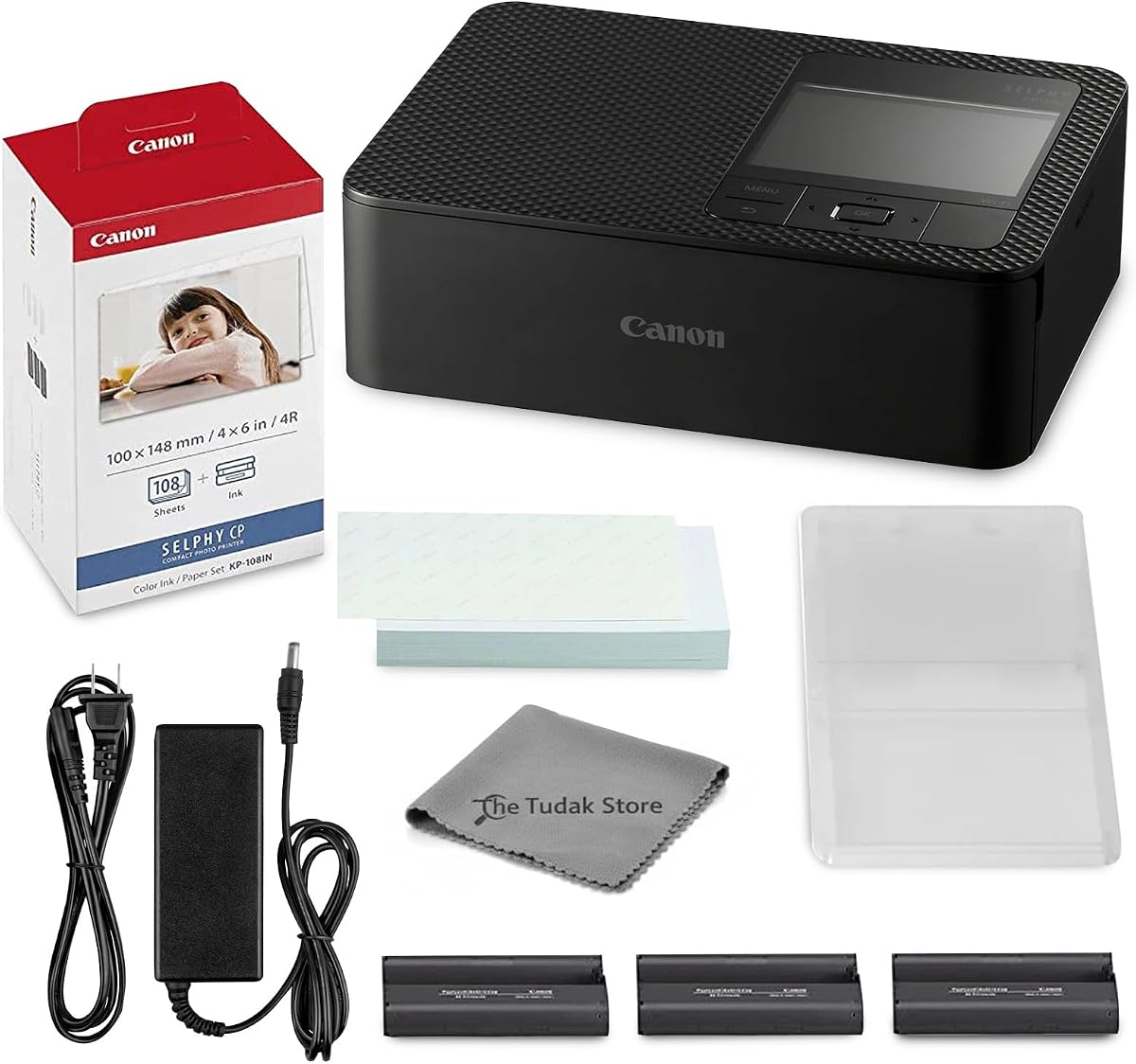
The Canon Selphy CP1500 bundle is a complete compact dye-sublimation photo-printing kit with the printer, 108 sheets of KP-108 paper, three color ink cartridges, and a cleaning cloth. Its 4.4 rating reflects a versatile package for home, event, and craft printing. The dye-sublimation process is described as producing vibrant 4 by 6-inch photographs that resist water, fingerprints, and fading.
We may earn a commission when you buy through this link, at no additional cost to you.
Wireless printing from a smartphone, tablet, or computer adds convenience, while the matched paper and cartridges simplify setup. The bundle is especially practical for parties, scrapbooking, journaling, and gifts. Its compact design also makes it easier to store than a large-format all-in-one. These are meaningful strengths when a portable event-photo station is the goal.
It does not, however, meet the defining requirements of a film-positive printer. Dye-sublimation transfers color to a dedicated print surface rather than exposing artwork through transparent, light-blocking film. The printer is limited to its supported photo format, and there is no indication that it accepts screen-print transparency stock. Adapting the workflow would therefore require entirely different equipment.
Choose the Canon Selphy bundle when you want ready-to-print color photographs and an attractive collection of accessories in one purchase. It is a solid choice for events, memory keeping, and creative photo projects. It should not be considered for screen-printing positives, even though the word printer appears in the product name; film-positive users need a compatible inkjet system and a dedicated transparent film.
The included cartridges, paper, and cloth remove the need to assemble a basic printing kit separately. Wireless connectivity and compact construction make the system convenient for parties and traveling use.
Dye-sublimation is well suited to durable small photographs, but it does not create the transparent high-density image required for a screen exposure. The technology serves a distinct role from film-positive production.
We may earn a commission when you buy through this link, at no additional cost to you.
This Mini Link 3 bundle combines a clay-white smartphone printer with 20 sheets of Instax film, an album, plastic desk frames, paper frames, and assorted stickers and hang clips. It carries a 4.8 rating, making it one of the highest-rated products in the list, but that rating reflects its appeal as a complete instant-photo package rather than its suitability for screen printing.
We may earn a commission when you buy through this link, at no additional cost to you.
Bluetooth connectivity allows printing from a phone or tablet, while the app supports text, filters, stickers, frames, QR codes, collages, and augmented-reality effects. A colorful LED light adds visual feedback during printing, and the built-in rechargeable lithium-ion battery supports portable use. The printer produces 2 by 3-inch Instax photos in about 15 seconds according to the supplied information.
The extensive accessories make the bundle engaging for events, gifts, family gatherings, and creative displays. It is also kid-friendly and easy to use. Nevertheless, it has no stated ability to print transparent film, and its small photographic output cannot function as a screen-positive sheet. The clear difference is technological and functional, not merely a matter of using different paper in the same device.
Buy this bundle if your goal is an approachable instant-photo setup with enough film and accessories to start immediately. It offers strong convenience for personal memories and social printing. For film-positive work, look instead to the 13 by 19-inch transparency film, the high-opacity refill ink, or a letter-size waterproof film package paired with a supported inkjet printer.
Bundling the printer with film, frames, stickers, clips, and an album gives users many ways to display or share the resulting photographs. It is a particularly complete package for parties and family events.
Filters, collages, QR codes, and augmented effects enrich the photographs but do not create UV-blocking positives. The output remains a small instant image rather than transparent exposure artwork.
We may earn a commission when you buy through this link, at no additional cost to you.
The Epson Expression Photo HD XP-15000 is a wireless wide-format inkjet printer built for photo and graphic output up to 13 by 19 inches. It has a 3.9 rating and combines a large maximum format with a relatively compact body. Its six-color Claria Photo HD system includes red and gray inks to broaden the color gamut and improve black-and-white output.
We may earn a commission when you buy through this link, at no additional cost to you.
The printer's 50-sheet rear tray is intended for specialty media such as cardstock, while the front tray holds up to 200 sheets for everyday documents. Automatic two-sided document printing, a scanner, and a copier make it a broader creative tool. Borderless sizes are supported from 4 by 6 inches through 13 by 19 inches, which gives screen printers a potentially useful range of positive dimensions.
The included data does not confirm dedicated UV-blocking performance or compatibility with the 5 mil PET transparency film in this guide. Cartridge-based printing may require careful ink management to avoid oversaturation, bleeding, or insufficient density on porous film. The printer should be tested with the exact media because thick, rigid sheets can behave differently from ordinary photo paper. Regular cleaning may also be necessary if the selected film leaves residue on the printhead.
This model is worth considering for a mixed home studio or creative shop that needs wide-format color printing and has validated a suitable transparency film for it. Its specialty-media tray is a meaningful advantage. However, the cartridge requirement and absence of a stated UV-blocking formula make the purpose-built ink and film options more predictable choices for dedicated film-positive production.
Support for output as large as 13 by 19 inches offers flexibility for posters, graphics, and validated film-positive work. The 50-sheet rear tray is useful for media that should not be stacked in the main paper tray.
The six-color system is excellent for photographic range, but screen-positive work depends on maximum black density rather than color gamut. Test settings and the chosen film before using the printer for production exposures.
We may earn a commission when you buy through this link, at no additional cost to you.
Choosing a film-positive setup requires separating the printer from the essential film and ink. Start with the intended artwork size and exposure method, then evaluate opacity, media thickness, print-head compatibility, and the printer's ability to handle specialty film without sacrificing image density.
A film positive works by allowing ultraviolet light through clear areas while preventing it from reaching exposed regions. Maximum black density is therefore more important than ordinary photo color accuracy. Look for ink or film specifically described as UV-blocking, high-opacity, or capable of producing complete blockage, and avoid assuming that visually dark photo output will be dense enough for a screen exposure.
Test results are especially important because printhead type, ink formulation, film coating, and printer settings can change the final density. The ideal workflow uses a matched combination of printer, ink, and transparency film that has been validated as a system.
Choose a film size that corresponds to the dimensions of the screen or exposure frame. Letter-size media is convenient for small positives, repeated work, and home printers, while 13 by 19-inch film reduces the need to tile larger designs. Also consider the printable area of the machine and whether the film can feed through it without bending or shifting.
A larger sheet is not automatically better if your printer cannot handle its thickness or weight. Match the format to the real screen dimensions and confirm the printer's maximum supported media size.
Waterproof film commonly uses a PET base around 5 mil thick. This rigidity helps the film resist curl and remain dimensionally stable from printing through exposure, but it can be more demanding than ordinary photo paper. A printer that handles heavy glossy or fine-art media is more likely to feed specialty film cleanly than a model designed only for standard paper.
Check whether the film is anti-static and remains flat after printing. Good flatness helps the positive sit evenly during exposure and reduces shifts between artwork and screen registration.
Film-positive film is commonly designed for inkjet output because the microporous coating accepts controlled liquid ink. The film listing may name Epson, Canon, HP, Kodak, and other brands, but brand-level compatibility does not guarantee that every model can handle the coating, thickness, or required ink volume. Review the printer's supported specialty media and test a sheet before ordering a large package.
Printhead cleanliness and the correct driver media setting are also essential. Using a generic paper setting can lead to under-inking, excessive ink, poor adhesion, or smearing, all of which can compromise the positive.
The dedicated UV-blocking refill in this list is formulated for high-opacity black and lists support for several SureColor SC-F models. It is an attractive option for compatible users, but it is not a universal ink. Printer manufacturers may warn against third-party supplies, and using a refill could affect warranty coverage or printhead reliability if the model is not designed for it.
Other printers may work best with their own black ink and a film rated for that system. Look for compatible, high-load or dye ink, but confirm the manufacturer's guidance before filling a cartridge or tank with any alternative formulation.
A microporous or matte coating should accept ink rapidly and dry without allowing the image to smear. Rapid drying is useful because a positive may be removed from the printer, measured, trimmed, and placed in the exposure setup soon after printing. A film that tolerates handling without smudging saves rework and reduces material waste.
Allow the recommended drying time even when the surface feels dry to the touch. A clean surface also keeps dust and fibers from creating pinholes that could transmit unwanted UV light.
Line art, lettering, halftones, and small negative spaces depend on precise edge reproduction. The film should support high ink-load capacity without forcing a heavily saturated print that spreads into adjacent areas. Look for claims about line definition, sharpness, acuity, and controlled light distribution rather than general photo realism alone.
Print at the intended final size whenever possible. Scaling artwork excessively can expose jagged edges, weak fine lines, or uneven density that only becomes apparent during exposure.
A printer is only one part of the process. You also need a reliable UV exposure unit, screen emulsion, a screen frame, masking materials, and an appropriate way to register the positive. Some workflows expose through direct contact, while others use an emulsion-coated film; the choice affects how much opacity and detail the positive must deliver.
Use a light-tight storage area for exposed screens, and keep film away from fingerprints, dust, moisture, and unnecessary UV light. A well-maintained exposure system often has a greater effect on final consistency than small differences between otherwise suitable printers.
Begin by confirming that the printer supports the selected film, and clean the printhead according to the manufacturer's instructions. Load one fresh sheet as a test, select the correct specialty-media or film setting, and use the printer driver to set the proper paper dimension and print quality. If the machine offers manual black or ink-density controls, make small documented adjustments rather than changing several settings at once.
Print a test pattern containing fine lines, small lettering, solid black areas, halftones, and the largest artwork you plan to produce. Check for edge sharpness, pinholes, streaks, banding, excessive saturation, and signs of smearing. A simple visual inspection may not reveal all density problems, so a small test exposure is the most reliable way to confirm that the image blocks UV light where it should.
After printing, allow the film to dry for the time recommended by the film manufacturer, handle it by the edges, and keep it in a clean sleeve or protected workspace. Remove the film carefully to avoid bending or scratching it. Once the screen is exposed, follow the emulsion supplier's washing, drying, and curing instructions, and store the finished screen away from light and moisture until it is ready for ink.
A desktop or wide-format inkjet printer that supports the selected specialty transparency film is usually the most practical option. The printer should handle the film's thickness, accept a high ink load without smearing, and provide enough black density for a reliable UV exposure. Compatibility should be confirmed at the model level rather than by brand alone.
Many ordinary inkjet printers can print film-positive sheets if the film is compatible with the machine and the correct media setting is selected. Specialty PET film is more demanding than standard paper, so a test print and exposure check are essential. A printer designed for glossy photo media or fine-art stock is generally a safer starting point.
The most important qualities are high black density, dependable UV blockage, sharp line definition, rapid drying, and flatness during exposure. The film must also be thin and rigid enough to feed through the chosen printer without curling. A visually attractive photograph is not necessarily dense enough to produce a clean screen.
No. Instant-photo printers in this guide produce small, opaque photographs on dedicated media rather than transparent, light-blocking artwork. A film-positive workflow requires transparent film with controlled black density and a printer capable of applying it evenly. These products may be useful for artwork previews or personal photos, but not for exposing screens.
A matte surface can help limit light scatter and produce crisp exposure results, while the best choice depends on the exposure method and emulsion. The 13 by 19-inch product in this guide specifically describes a lightly milky matte finish. Follow the screen-emulsion and film suppliers' recommendations and validate the combination with a small exposure test.
The Screen Print Direct products advise lightly touching a corner with a wet finger and using the side that feels sticky. Images may smear when printed on the wrong side. Confirm the side on a test sheet, then label the film package so future sheets are loaded consistently.
Yes, allow the time recommended by the film manufacturer, even if the image appears dry on the surface. Handling it too soon can cause smearing, distortion, or fingerprint marks that compromise image quality. Keep the print flat and protected while it dries and until it is used.
No. The refill listed in the guide specifies support for several SureColor SC-F models, including the SC-F100, 7600, 9600, 7800, 9800, 7880, and 9880. Confirm the exact printer model and the manufacturer's warranty conditions before using a third-party refill, and test the ink and film together before production.
The strongest complete positive medium in this guide is the 13 by 19-inch waterproof transparency film, with its 5.0 rating, ultra-dense black, rapid-drying matte coating, and flat anti-static PET base. The Screen Print Direct 8.5 by 11-inch package is the best budget starting point for letter-size work, while the UV-blocking 500ml refill is the premium choice for owners of compatible SureColor printers.
When choosing a system, prioritize validated printer-and-film compatibility, complete black density, clean media feeding, and rapid drying rather than general photo features. Make a small exposure test before purchasing large quantities, and confirm that the film size matches your screens. Instant-photo printers may be fun and convenient, but they are not substitutes for a true film-positive workflow.
Finally, check current prices, availability, printer support lists, and film handling instructions before buying. Product specifications and promotional details can change, and a printer that works with one brand of film may not work equally well with another. The safest approach is to build a small test package, validate the complete exposure result, and then scale up the media format and workflow.