
IWGAME Back Paddles for PS-5 Controller
4.2Editor score
Four programmable back paddles
Macro and turbo functions
No controller installation required
Works with PS5 PC Mac
Our expert guide compares the best PS5 Controller with Back Paddles, covering remapping, macros, Hall Effect sticks, connectivity, and compatibility.
A PS5 controller with back paddles can give shooters, fighting games, and action titles extra controls without forcing players to move their thumbs away from the sticks and face buttons. The best options add remapping, macros, reliable triggers, and adaptable grips, turning a familiar controller into a more personal competitive tool.
We compared all ten products by examining their back-button count, remapping capabilities, stick technology, triggers, connection options, battery support, platform compatibility, and installation demands. The list includes plug-and-play add-on kits, complete wireless controllers, and premium esports models designed for advanced control schemes.
Each review identifies the feature that makes a product distinctive, while also noting setup requirements, compatibility limitations, and practical trade-offs. Ratings reflect the supplied customer feedback, and no products are represented as personally tested. Prices and availability can change, so check the current listing before purchasing.
4.2Editor score

4.4Editor score
3.9Editor score
The comparison covers retrofit paddles, feature-rich wireless controllers, and premium esports models. The main differences are installation complexity, number of rear controls, trigger technology, customization depth, and overall platform support.


The IWGAME Back Paddles are an appealing first upgrade for PS5 owners who want rear controls without replacing their existing DualSense controller. The add-on provides four programmable paddles, identified as M1 through M4, and carries a 4.2 customer rating. Its defining advantage is a combination of four-button control, macro recording, remapping, button swapping, and turbo functionality in one wired unit.
We may earn a commission when you buy through this link, at no additional cost to you.
Programming is handled through the supplied Macro button. Players can assign individual inputs or multi-button combinations to any of the four paddles, with each paddle storing as many as 25 recorded inputs. Individual presses can be recorded for up to five seconds. Semi-automatic and fully automatic turbo modes add rapid-fire options, while the stated 8Hz output speed gives competitive players alternatives for repetitive actions.
The principal compromise is dependence on a wired connection and a required communication-method change. Players must select the Use USB Cable option in the PS5 controller settings before the paddles operate. This is not a hidden complication, because the product guidance explains the path directly, but it does mean the add-on is less convenient for players who want to move freely around a television.
The IWGAME is well suited to shooters, fighting games, and action games that benefit from face-button remapping or additional rear inputs. It supports PS5, PC, Mac, and Android TV, along with the BDM-010, BDM-020, BDM-030, and BDM-040 controller versions. For a flexible, no-solder retrofit with substantial programming power, it represents the most balanced recommendation in this guide.
Four paddles can each hold up to 25 recorded inputs, allowing users to build longer command sequences rather than assigning only one action per button. The combination of remapping, macros, turbo, and controller button swapping gives this add-on more depth than a simple four-button adapter.
The kit avoids internal installation and connects through a 7.2-foot USB cable. Players only need to change the PS5 communication method to Use USB Cable, making the system approachable for anyone who does not want to open a controller.
We may earn a commission when you buy through this link, at no additional cost to you.
The NBCP Wireless Controller combines a complete gamepad with two customizable rear paddles, making it a middle ground between a standard PS5 controller and a specialized esports model. It offers Hall Effect joysticks, programmable macros, dual vibration, a 6-axis gyroscope, RGB joystick rings, Bluetooth 5.0, USB-C wired connectivity, and a 1000mAh rechargeable battery.
We may earn a commission when you buy through this link, at no additional cost to you.
The Hall Effect sticks are designed to reduce drift and maintain consistent input over time. That makes the controller appealing for shooters and racing games where small analog corrections matter. The two rear paddles can be bound to complex actions or stored macros, while the 6-axis gyro supports motion aiming in compatible software. RGB lighting also makes the stick positions easier to identify in a dim room.
Its versatility extends beyond PS5. The product supports PS5, PS5 Pro, PS5 Slim, and Windows PC natively, with Android and iOS use available through Bluetooth or USB after consulting the setup guide. A 3.5mm audio jack supports private headset use, and the rechargeable battery is designed for extended sessions. The lack of a supplied customer rating is the main information gap, so buyers should consider recent user feedback carefully.
This controller is a good choice for someone who wants rear paddles but also values wireless freedom, anti-drift sticks, and broad device support. It is less suited to players who require four rear buttons or a highly refined trigger system. Even so, it delivers a generous feature set in a straightforward package for PS5 and PC gaming.
Two rear paddles provide enough room for common shooter and fighting-game assignments without creating an oversized layout. Macro support expands their value by allowing users to bind multi-command sequences directly to the rear controls.
Bluetooth 5.0 supports wireless play, while USB-C offers a more stable wired path for serious sessions. The 1000mAh rechargeable battery and quick charging through USB-C help balance portability with long-session convenience.
We may earn a commission when you buy through this link, at no additional cost to you.
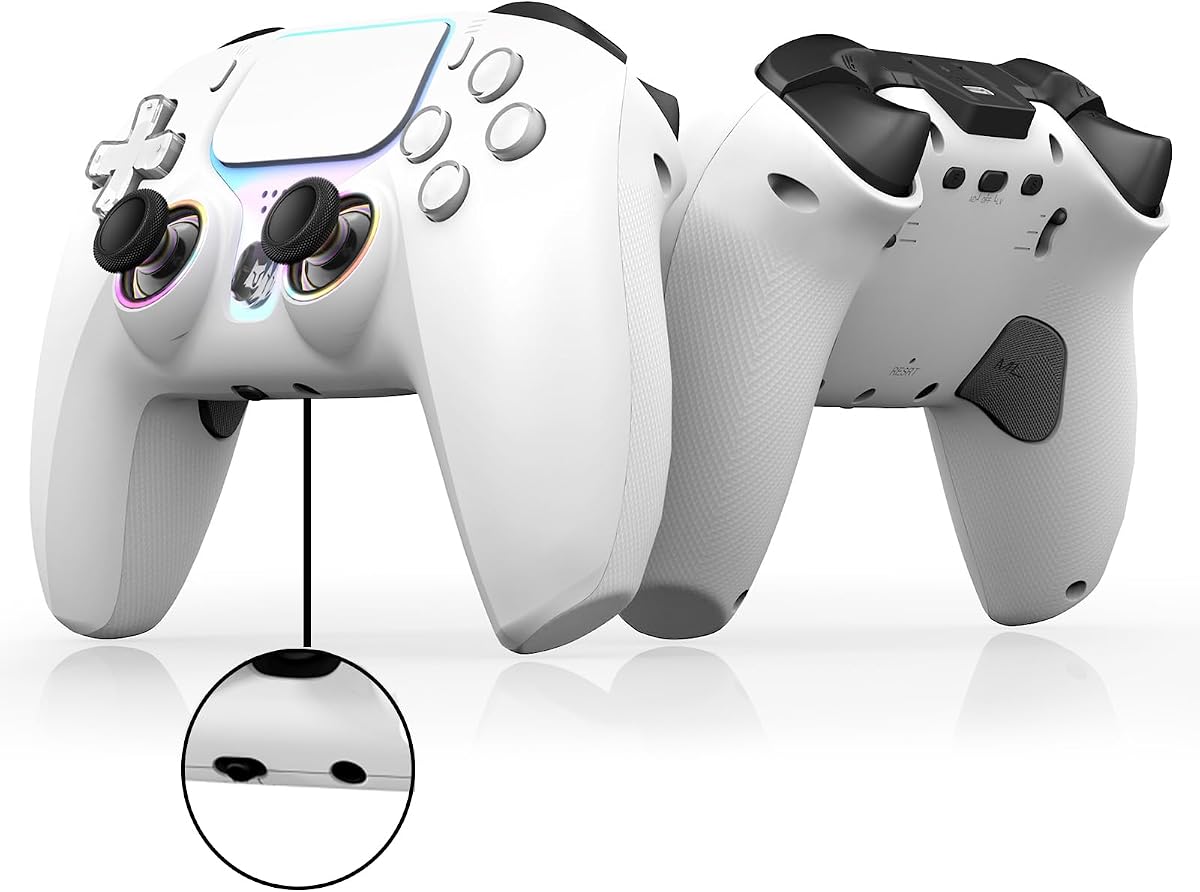
This NBCP Wireless Controller is another complete-controller option for players seeking rear paddles alongside modern stick and connectivity technology. It uses Hall Effect magnetic sensors for its analog sticks, includes two programmable rear paddles with macro keys, and provides a 6-axis gyroscope, dual vibration motors, RGB stick rings, and crystal-style face buttons.
We may earn a commission when you buy through this link, at no additional cost to you.
The controller supports PS5, PS5 Pro, PS5 Slim, and Windows PC, with Android and iOS compatibility through Bluetooth or USB. Its 1000mAh battery is rechargeable, and USB-C supplies both wired play and charging. A 3.5mm headphone jack is integrated into the body, making it convenient for players who use a wired headset or prefer not to rely on the console's headset connection.
The main limitation is that it provides only two rear paddles, so it cannot compete with four-button kits for highly specific layouts. There is also no customer rating in the supplied data, which makes long-term feedback less transparent than for the better-reviewed products. Mobile compatibility requires consulting the setup notes rather than being entirely automatic.
Despite those limitations, this is a solid option for a player who values a wireless controller with modern anti-drift sticks, macro support, motion controls, and flexible connectivity. It is particularly practical for players who switch between PS5, PC, and mobile devices and do not need the specialized modularity of a premium esports controller.
The magnetic sensing system is designed to resist the drift and jitter associated with conventional potentiometer sticks. Its value is greatest in competitive shooters, precision racing games, and long sessions where analog consistency matters.
Two rear paddles support remapping and programmable macros, giving players quick access to common commands. The restrained layout may also feel less crowded than a controller carrying four larger paddles.
We may earn a commission when you buy through this link, at no additional cost to you.
The Wireless Controller for PS5 is a full gamepad with two customizable back paddles, macro functions, turbo, Hall Effect sticks, dual vibration, a 6-axis gyro, and RGB lighting. Its 3.8 rating reflects acceptable customer feedback, while the extensive feature set makes it a credible alternative to an add-on kit for players who are ready to replace their original controller.
We may earn a commission when you buy through this link, at no additional cost to you.
The controller supports PS5, PS5 Pro, PS5 Slim, and Windows PC natively. Android and PS4 compatibility are available through Bluetooth or USB, subject to the setup notes. It provides a 1000mAh rechargeable battery, USB-C charging, and a 3.5mm audio jack. Hall Effect sticks, a gyro, and programmable rear controls form the most important gaming-oriented parts of the package.
Users should pay attention to the firmware notice. The manufacturer states that recent PS5 system updates may cause temporary vibration and audio compatibility issues and that a firmware package and full instructions are available through the product's User Guide. This update step adds some setup responsibility, but it also shows that the controller is actively being maintained for newer console software.
The controller is best for PS5 players who want wireless play, customizable rear buttons, and anti-drift sticks without moving into the premium esports tier. It is less compelling for someone who needs four rear paddles, exceptionally fast trigger stops, or a long track record of owner feedback. With its broad feature coverage and manageable caveats, it remains a strong general-purpose choice.
The rear paddles can store personalized macros, while the built-in turbo function provides an additional way to automate repeated commands. These features make the controller useful for more than standard face-button remapping.
Owners should download the available firmware package and follow the PDF guide after significant PS5 updates if vibration or audio behavior seems unusual. The requirement adds a setup step but helps keep the controller aligned with current console software.
We may earn a commission when you buy through this link, at no additional cost to you.
The SCUF OMEGA is the most complete performance package in this roundup, combining four rear paddles, two side action buttons, and dedicated G-Keys. Its 4.4 rating is the highest supplied rating among the ten products. As an officially licensed PS5 controller, it is designed for low-latency wireless play, responsive input, stable power management, and extensive competitive customization.
We may earn a commission when you buy through this link, at no additional cost to you.
The SCUF Mobile app provides extensive control over trigger and thumbstick response curves, action buttons, and a true 0% thumbstick deadzone. Endurance TMR thumbsticks are designed to resist wear-related drift and jitter, while Omron mechanical switches give the Instant Triggers, Instant D-Pad, and Instant Action Buttons a crisp, fast actuation. Together, these features make the controller particularly suitable for competitive shooters and fighting games.
The package is highly modular. Players can switch between concave or domed thumbsticks in short or tall formats, remove the magnetic faceplate without tools, and use a Tournament Lock for secure cable retention. The controller supports optimized 2.4GHz PS5 connectivity, 1K wireless or wired polling on PC, and Bluetooth 5.0 for other devices. The breadth of adjustment is impressive, although it demands a steeper learning curve than a simple add-on kit.
For a player who wants to build a personalized competitive setup rather than merely add two rear buttons, the SCUF OMEGA is the strongest overall recommendation. It suits dedicated shooters, fighting-game competitors, and players who regularly adjust deadzones and response curves. The premium cost is justified by the hardware, app-based control, modular components, and tournament-oriented design.
Response curves, action-button behavior, trigger sensitivity, and a true 0% deadzone can be adjusted from a phone in real time. This level of control allows players to tune the controller to their preferred sensitivity and game rather than accepting a fixed configuration.
Interchangeable thumbsticks, a magnetic faceplate, and distinct mechanical switches make it possible to alter the feel of the controller over time. A player can choose stick shapes and heights for movement speed or precision, then replace components without tools.
We may earn a commission when you buy through this link, at no additional cost to you.
The Wireless PS5 Controller Hall Effect Gamepad combines two programmable back paddles with a broader set of modern features, including macro recording, button remapping, turbo, Hall Effect anti-drift sticks, a 6-axis gyroscope, dual vibration, RGB lighting, and a 1000mAh rechargeable battery. It supports PS5, PS5 Slim, PS5 Pro, and Windows PC.
We may earn a commission when you buy through this link, at no additional cost to you.
Its Hall Effect sticks are intended to provide accurate deadzone control and resist drift over extended use. The rear paddles can carry remapped commands and recorded macros, while turbo supports rapid repeated actions. Bluetooth 5.0 enables wireless play, USB-C supplies wired connectivity and charging, and a 3.5mm audio jack allows a wired headset to be connected.
The biggest concern is the 3.0 customer rating, the lowest numerical score supplied for this list. Buyers should interpret that rating as a reason to examine current customer comments closely rather than as proof of a specific defect. The firmware notice also says that recent PS5 system updates may produce temporary vibration and audio compatibility issues, with an upgrade package available in the User Guide.
This gamepad makes sense for a budget-conscious player who specifically wants Hall Effect sticks and programmable rear controls in a complete wireless controller. It may not be the strongest choice for someone who places a high priority on established customer feedback or advanced esports hardware. Subject to those considerations, its feature set and platform coverage are competitive.
The Hall Effect analog system is the controller's defining feature, offering a design intended to avoid the drift and jitter commonly associated with potentiometer sticks. That makes it relevant to players who value steady aim and movement in competitive games.
Macros, turbo, RGB lighting, a gyro, vibration, wireless connectivity, and a rechargeable battery create a more complete package than a basic wired retrofit. The trade-off is that the product's customer rating gives buyers less historical reassurance.
We may earn a commission when you buy through this link, at no additional cost to you.
The GMVOX Paddles provide four programmable rear buttons for PS5 controllers, with M1 through M4 assignable to individual inputs, button remaps, or multi-button macros. Each paddle can store up to 25 recorded inputs, and an individual recording is limited to five seconds. The product also offers semi-automatic and fully automatic turbo at a stated 8Hz output speed.
We may earn a commission when you buy through this link, at no additional cost to you.
One especially useful feature is microphone support. The add-on is designed to preserve use of the controller's headphone microphone, allowing voice communication with teammates while the paddles are connected. It also uses a wired plug-and-play arrangement, so no internal controller installation is required. Players must change the console's communication method to Use USB Cable before using the paddles.
Compatibility covers the BDM-010, BDM-020, BDM-030, BDM-040, and BDM-050 controller versions, along with PS5, PC, Mac, and Android TV. That broad model range is useful for owners of several controller revisions, although it does not compensate for the low 2.7 customer rating. Buyers should review recent feedback for setup or compatibility issues.
The GMVOX is a logical alternative to the IWGAME kit for anyone who prioritizes microphone retention or owns an older listed BDM revision. It may also appeal to players who want four paddles with extensive macro capacity. However, the lower rating, wired restriction, and required communication-setting change make it a less confident recommendation than the leading budget kit.
Each M1 through M4 paddle can store as many as 25 controller inputs, with recorded presses capped at five seconds. This allows users to create several actions or longer sequences without moving away from a limited number of front controls.
The microphone function is designed to retain communication through the controller's headphone microphone. It provides a useful reason to consider this kit when squad-based voice chat is important during online play.
We may earn a commission when you buy through this link, at no additional cost to you.
The eXtremeRate SPARK is the most visually advanced retrofit in the guide, adding an OLED display, four redesigned paddles, switchable clicky trigger stops, and rubberized grips to compatible PS5 controllers. Its 4.2 rating matches the IWGAME add-on, while the on-controller display gives it a distinct advantage for players who manage several control profiles.
We may earn a commission when you buy through this link, at no additional cost to you.
Up to eight customizable mapping profiles can be stored, and as many as 15 buttons may be mapped to the four paddles. The OLED presents the mapping and graphical layout directly on the controller, reducing the need to memorize assignments or keep the screen open while configuring. The redesigned paddles are intended to simplify combination presses, while the switchable trigger stop lets users move between adaptive and clicky styles.
This is not a simple plug-in product. The controller must be taken apart and reassembled, and the listing mentions soldering options. The BDM-060 model also requires replacing the original battery bracket with the eXtremeRate kit. Buyers therefore need to confirm their controller revision and be comfortable with installation work. Compatibility covers BDM-030, BDM-040, BDM-050, and BDM-060, but explicitly excludes the BDM-010 and BDM-020 models.
The SPARK is ideal for an enthusiast who wants visual profile control, extensive remapping, and a more specialized competitive layout. It is also compatible with the official charging dock and several eXtremeRate accessories, allowing the system to become part of a broader custom build. For players unwilling to open their controller, a wired plug-in kit is the safer choice.
The OLED display visualizes button mappings and the control layout, helping players confirm assignments without navigating a separate menu. Storing up to eight profiles makes it practical to keep separate setups for shooters, fighting games, and other genres.
Installation involves opening the controller, and soldering options are included as part of the customization process. The BDM-060 revision also needs a replacement battery bracket, making model verification and careful installation essential.
We may earn a commission when you buy through this link, at no additional cost to you.
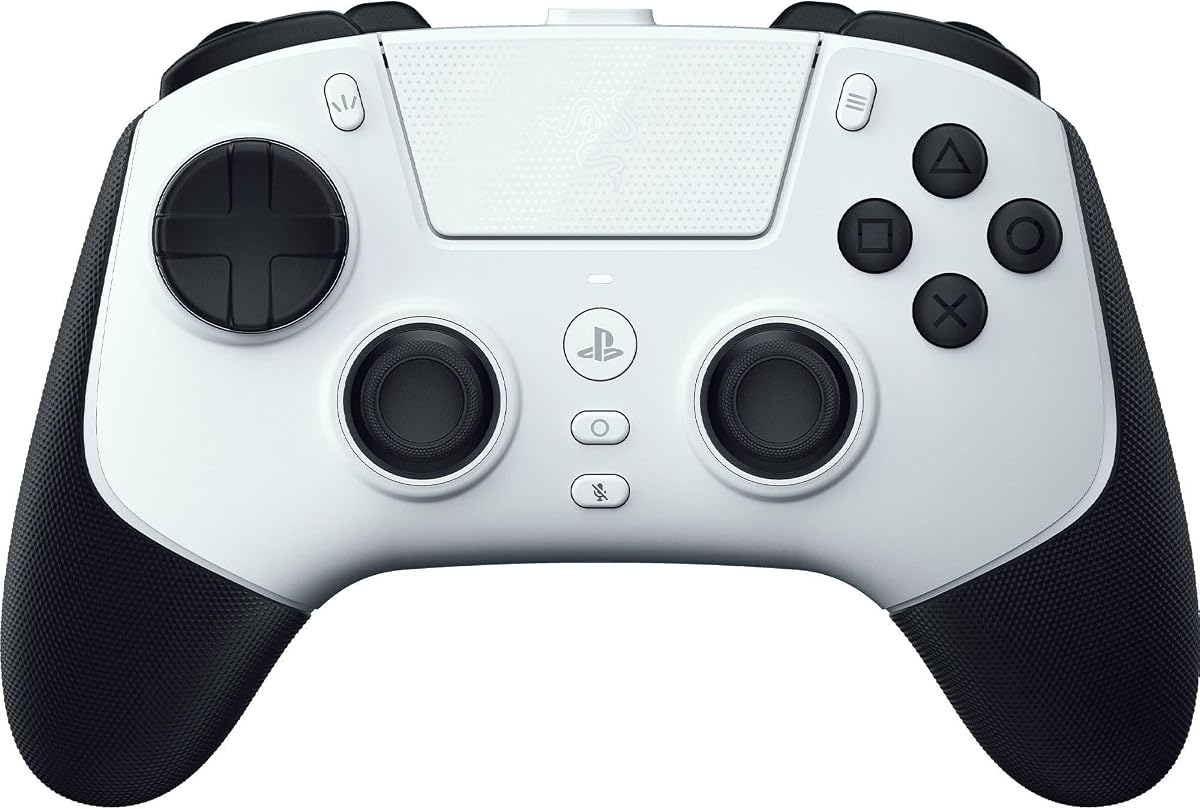
The Razer Raiju V3 Pro is an officially licensed PS5 and PC esports controller with four removable mouse-click back buttons and two claw-grip bumpers. All six controls are remappable, giving players a large rear-control palette for shooters, fighting games, and other competitive genres. Its 3.9 rating reflects solid customer feedback, though it does not lead the field numerically.
We may earn a commission when you buy through this link, at no additional cost to you.
Symmetrical magnetic TMR thumbsticks are designed for drift-free accuracy and consistent micro-adjustments, with swappable caps allowing players to tune the feel. Razer Pro HyperTriggers can switch between rapid mouse-click actuation and full analog pulls, making the controller adaptable to shooters as well as racing, sports, and precision games. Razer Mecha-Tactile PBT action buttons and an 8-way floating D-pad provide crisp physical inputs.
Connectivity is built around low-latency play. The 2.4GHz dongle supports PS5 wireless use, while PC players can use a 2000Hz wired polling rate. Razer HyperSpeed Wireless, Bluetooth 5.0, and the included two-meter USB-C to USB-A cable expand the connection options. The Razer Mobile App or Razer Synapse 4 handles sensitivity, remapping, trigger calibration, and up to four onboard profiles.
This is the premium recommendation for a player who wants a complete tournament-oriented package rather than only rear buttons. The carrying case, spare thumbstick caps, cables, and back-button removal toolkit round out the bundle. It is most convincing for competitive users who will tune the triggers and paddles, while occasional players may find simpler controllers easier to manage.
Each HyperTrigger can operate as a fast click for shooter applications or as an analog pull for racing, sports, and precision games. The ability to change the actuation style makes the controller unusually versatile across genres.
A protective carrying case, replaceable thumbstick caps, a two-meter cable, and a back-button removal toolkit support travel and competition. The four onboard profiles also reduce reliance on a phone or computer when moving between saved configurations.
We may earn a commission when you buy through this link, at no additional cost to you.
The Turtle Beach Victrix Pro BFG Reloaded is built around modular hardware, allowing a player to move between a conventional controller layout and a dedicated six-button fighting arrangement. It includes four mappable quick-action buttons, Hall Effect technology, and a six-button fightpad module fitted with Kailh microswitches. Its 3.9 rating places it among the stronger customer-rated options in the group.
We may earn a commission when you buy through this link, at no additional cost to you.
Five-stop Hall Effect clutch triggers offer different trigger travel positions and a hair-trigger mode. The controller also includes 11 interchangeable components, allowing users to alter stick shapes, D-pad style, and fightpad configuration. For fighting-game players, the six-button module provides the six face-button layout that titles such as Street Fighter demand, while quick-action buttons handle remapped actions.
The product supports both wired and wireless play. Its rechargeable battery lasts for as many as 20 hours according to the supplied information, and a 3.5mm audio jack supports private headset listening with Sony 3D Audio. The Victrix Control Hub companion app is available for PC, while the package includes a carrying case and module tool. Changing modules requires planning, and the included tool helps manage that process.
This controller is an excellent choice for a player whose library spans fighting games and standard action or sports titles and who values the ability to alter the physical layout. It is less convenient for someone who wants a permanent, simple configuration because switching modules adds complexity. Among the available options, it stands out as the most distinctly designed modular fighting and general-purpose controller.
The interchangeable fightpad and other components allow the controller to change with the user's preferred game or control style. This is especially useful for players who regularly alternate between six-button fighting games and standard console layouts.
Five-stop Hall Effect clutch triggers provide multiple travel options, including a hair-trigger setting for fast inputs. The Hall Effect system also aligns with the controller's broader focus on consistent, adjustable performance.
We may earn a commission when you buy through this link, at no additional cost to you.
The right choice depends on whether you want a simple retrofit, a complete wireless controller, or a premium modular esports setup. Back-button count, stick technology, trigger design, software, and installation requirements should be matched to your games and preferred workflow.
Choose an add-on for simplicity and compatibility with your current controller. Choose a complete controller when wireless freedom, a rechargeable battery, or a unified set of premium components matters more.
Two rear paddles are enough for common shooter and action-game assignments, and the smaller layout may feel less crowded. Four paddles provide more freedom for remapping, separate movement functions, macro access, and game-specific layouts. Larger premium controllers can add side action buttons or claw-grip bumpers, expanding the rear-control area even further.
More buttons are not automatically better. Choose the number that matches the commands you use and the grip size you prefer, since crowded rear controls can be uncomfortable during long sessions.
Remapping lets a rear button perform a different controller action than its default assignment. Macros go further by recording a sequence or combination of inputs. The IWGAME and GMVOX kits support up to 25 recorded inputs per paddle, the eXtremeRate SPARK supports up to 15 mapped buttons and eight profiles, and premium controllers often use companion software for deeper configuration.
Look for clear storage limits, profile management, and an easy way to switch layouts. A display or onboard profiles can be especially convenient for players who alternate among several games.
Hall Effect sticks use magnetic sensing and are designed to reduce the drift and jitter associated with conventional potentiometer sticks. The SCUF OMEGA uses TMR thumbsticks, while the Razer Raiju V3 Pro also uses magnetic TMR sticks. Trigger technology varies even more: some products prioritize analog travel, while others offer clicky, mouse-click, clutch, or hair-trigger modes for shooters.
For competitive shooters, fast trigger stops and stable sticks may be the priority. For racing, sports, and precision games, analog trigger travel often matters more. Choose the control feel that complements your main genres.
PS5 controller compatibility is more nuanced than the console name alone can suggest. The IWGAME kit lists BDM-010, BDM-020, BDM-030, and BDM-040 support. GMVOX also includes BDM-050. The eXtremeRate SPARK fits BDM-030, BDM-040, BDM-050, and BDM-060 but excludes BDM-010 and BDM-020. Some complete controllers are designed to work with multiple console revisions instead of attaching to one.
Check the model printed on the back of your controller before buying an add-on. For the SPARK, the manufacturer also provides an image-based method and a YouTube search reference for identifying the revision.
Plug-and-play paddles connect through USB and usually require changing the PS5 communication method to Use USB Cable. Installation-free designs are convenient, but the cable can restrict movement and may prevent normal wireless use. Kits such as the eXtremeRate SPARK require the controller to be opened and reassembled, with soldering options and a special battery bracket requirement for the BDM-060 revision.
Choose plug-in models for convenience and low installation risk. Choose an internal kit only if you enjoy controller customization and can follow the installation guide carefully.
Native PS5 support is the priority for most console players, but PC and mobile compatibility can add value. Bluetooth 5.0, 2.4GHz wireless, USB-C, and wired polling rates serve different competitive priorities. The SCUF OMEGA includes a mobile customization app, the Razer Raiju V3 Pro supports app and Synapse configuration, and the Victrix Pro BFG Reloaded includes a PC control hub application.
Check what each product supports natively and what requires setup notes. Also consider firmware requirements, particularly when a new PS5 system update has affected vibration, audio, or connectivity behavior.
Wireless play is more convenient, but it requires a dependable battery and convenient charging method. Several controllers in this guide use a 1000mAh rechargeable battery with USB-C charging. The Turtle Beach Victrix Pro BFG Reloaded supports both wired and wireless operation and lists a battery life of up to 20 hours. Wired add-on kits avoid battery concerns but trade away unrestricted movement.
For a stationary television setup, a wired retrofit may be entirely acceptable. For regular wireless play, favor a complete controller with a stated battery capacity, USB-C charging, and a quick way to monitor power.
Begin by confirming that the add-on or controller supports your exact PS5 hardware revision. For plug-in kits, connect the USB cable and open Settings, Accessibility, Controller General, or Communication Method as applicable, then select Use USB Cable. For complete controllers, follow the manufacturer pairing instructions for PS5, Bluetooth, or the included wireless receiver. Test every front and rear input before assigning advanced commands.
Configure the controller in a way that matches the game rather than mapping every available button at once. Start with one paddle for a simple action and the other for a frequently used combination, then build macros in short sequences. Premium controllers benefit from careful stick deadzone, response-curve, and trigger calibration. Save separate profiles for shooters, fighting games, and other genres so switching does not require rebuilding every assignment.
Care for the controller by keeping the rear buttons free of sticky liquids, dust, and debris, especially on models that require opening the shell. Charge complete controllers according to the product guidance and avoid leaving a damaged cable connected. If a PS5 update changes vibration, audio, or controller behavior, check the manufacturer's User Guide for current firmware instructions before troubleshooting the hardware itself.
No. Compatibility depends on the controller's BDM revision and the design of the add-on. The IWGAME kit lists BDM-010, BDM-020, BDM-030, and BDM-040, while GMVOX adds BDM-050 support. The eXtremeRate SPARK supports BDM-030, BDM-040, BDM-050, and BDM-060 but explicitly excludes BDM-010 and BDM-020. Check the model printed on the controller before buying.
That depends on the product. The IWGAME and GMVOX retrofit kits use wired USB connections, and their instructions require the console to use the Use USB Cable communication method. Complete controllers such as the SCUF OMEGA and Razer Raiju V3 Pro support wireless operation with dedicated rear controls. Check the connection method before assuming a retrofit will work wirelessly.
Neither count is inherently better. Two paddles offer a simpler layout and may feel more comfortable, while four provide more assignments for movement, actions, and macros. Competitive players often value the extra flexibility of four buttons, but the best choice also depends on hand size, game type, and whether the controller has additional rear controls.
Remapping assigns a rear button to perform a single existing controller function. A macro records a sequence or combination of inputs and plays them from one button. Macros can accelerate repetitive actions or execute a combination, but games may restrict or prohibit automated inputs in competitive modes, so players should check each title's rules.
Hall Effect and TMR systems are designed to reduce drift and jitter by avoiding the wear associated with conventional potentiometer sticks. No mechanical or electronic system can promise that an issue will never occur, but these technologies generally target better long-term consistency. Proper storage, cleaning, and firmware maintenance also contribute to reliable behavior.
It depends on the product. Plug-in kits such as IWGAME and GMVOX avoid controller disassembly, although they use a wired connection. The eXtremeRate SPARK requires the controller to be opened and reassembled and includes soldering options. The SPARK also requires a replacement battery bracket for BDM-060 controllers, so installation skill and model verification are important.
Many can. The IWGAME and GMVOX kits list PC, Mac, and Android TV support. The NBCP controllers support PC plus Android and iOS through Bluetooth or USB, while the SCUF OMEGA and Razer Raiju V3 Pro provide additional cross-device features. Mobile use may require following the setup guide, so confirm the required connection method and button behavior.
Choose a retrofit if you want to keep your current controller, avoid internal installation, and spend less. Choose a complete controller if you value wireless play, integrated battery charging, modern stick technology, refined trigger stops, modular components, or deeper app-based tuning. The most useful choice is the one that fits your games and the amount of setup you are comfortable maintaining.
The IWGAME Back Paddles stand out as the best balanced option because they add four remappable controls, macros, turbo functions, and broad compatibility without requiring controller modification. The SCUF OMEGA is the strongest all-around performance controller, offering extensive app-based tuning, TMR sticks, mechanical switches, and interchangeable components. For players seeking the most premium competitive package, the Razer Raiju V3 Pro combines removable click buttons with magnetic TMR sticks and dual-mode triggers.
Prioritize the features you will actually use. A simple player may need only two reliable paddles and a comfortable wireless layout, while a dedicated competitor may value four buttons, adjustable response curves, fast trigger stops, and multiple profiles. Anyone opening a controller should verify the exact BDM revision first, and anyone using a wired kit should be comfortable changing the PS5 communication setting to Use USB Cable.
Customer ratings, product availability, and prices can change over time, so consult the current listing and recent reviews before ordering. Also check firmware notices for newer PS5 system releases, particularly when using a third-party controller for the first time. With those final checks in mind, the right choice is the model that matches your games, grip preferences, and desired level of customization.