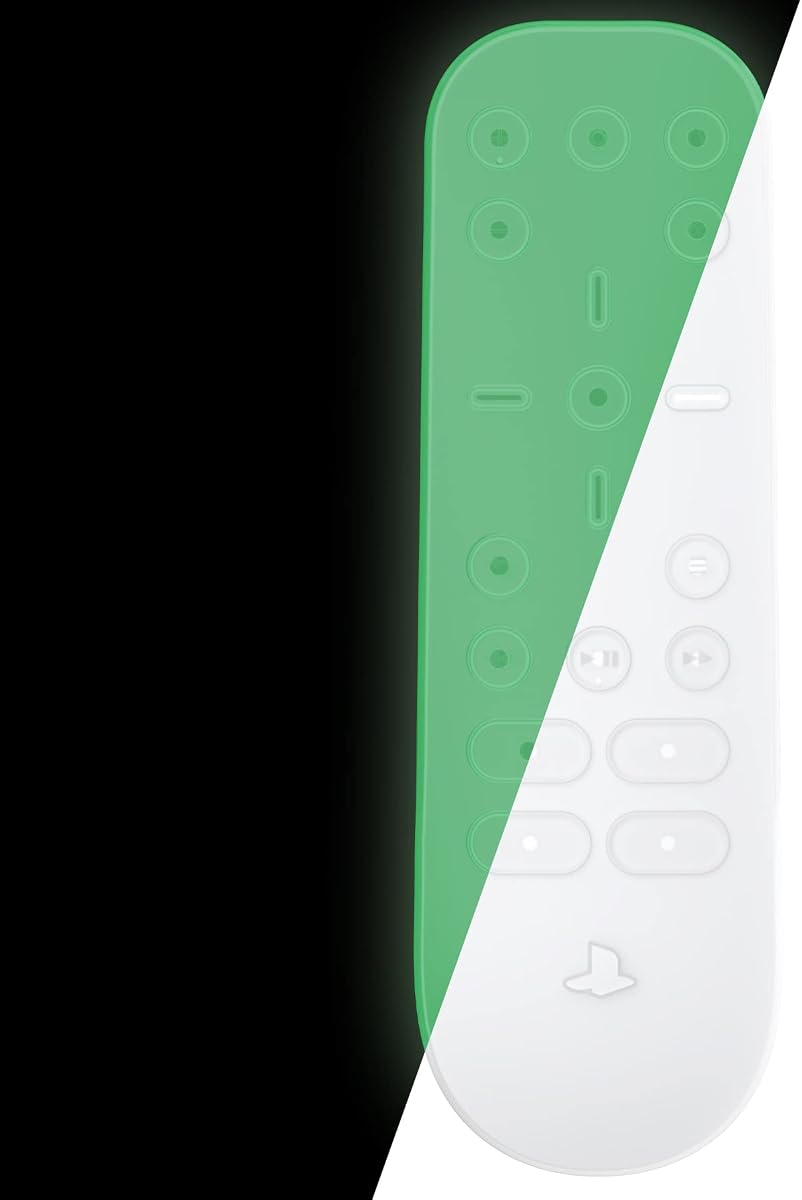
PlayVital Glow in Dark Green Silicone Case
4.4Editor score
Soft full-body silicone protection
Glow-in-the-dark green finish
Washable, anti-slip construction
Compare the best PS5 media remote skins for protection, style, grip, glow, and PS5 Slim compatibility in this expert buying guide for 2026 shoppers.
A PS5 media remote skin does more than decorate a frequently used accessory. A well-designed silicone case or precisely cut vinyl decal can add grip, shield the remote from scratches and everyday impacts, and make the controller easier to locate. The right choice depends on whether you value complete coverage, a coordinated console theme, or a simple protective layer.
This guide compares ten PS5 media remote skin and case options using the supplied product information. It considers material, compatibility, button and port access, texture, visibility in low light, installation, maintenance, and the contents of each package. Silicone covers, glow-in-the-dark designs, minimalist cases, and full-set vinyl decals are all represented so readers can compare different approaches.
Each review explains the product's strongest benefits, practical limitations, and ideal use case, while the comparison table provides a quick reference. The list begins with a standalone silicone option and includes covers with lanyards, fluorescent materials, or full-coverage skins. Availability and pricing can change, so check the current listing details before purchasing.
4.4Editor score

4.5Editor score
4.5Editor score
This side-by-side comparison highlights the differences in coverage, material, visibility, included accessories, and PS5 model support across all ten picks.


The PlayVital Glow in Dark Green Silicone Protective Remote Case is a standalone cover for the PS5 Media Remote, carrying a 4.4 rating. It combines full-body silicone coverage with a distinctive green finish that can glow after exposure to light. That combination makes it especially practical for a remote that regularly disappears between sofa cushions or gets lost among several similarly shaped devices.
We may earn a commission when you buy through this link, at no additional cost to you.
The soft silicone sleeve is designed to avoid obstructing buttons and ports, and its ergonomic shape supports everyday handling. It also provides anti-slip, anti-dust, shock-proof, and washable protection according to the supplied listing. The skin fits closely enough to act as a protective layer while remaining easy to install and remove when you want to clean the remote or change the look of your setup.
The main limitation is that this is a color-focused standalone case rather than a coordinated skin system. Buyers seeking graphics for the console, controller, headset, and charging station will need a different type of product. Also note that the package contains only the silicone protective cover and does not include the PS5 Media Remote itself.
This is a well-rounded choice for someone who wants one affordable accessory that handles grip, surface protection, and low-light locating at the same time. Choose it if you already own a compatible Media Remote and prefer a clean green appearance over elaborate printed artwork. It is especially appealing for households where losing the remote has been a recurring inconvenience.
The fluorescent green material can make the remote easier to locate in dim rooms after it has been exposed to a suitable light source. This adds practical visibility without changing the remote's buttons or core operation.
The soft silicone sleeve covers the remote more comprehensively than a small decorative decal can. It is washable and designed to guard against scratches, dirt, spills, grease, and the minor knocks associated with regular use.
We may earn a commission when you buy through this link, at no additional cost to you.
This Silicone Case for PlayStation 5 Media Remote Control is a straightforward protective cover with a 3.2 rating. Its defining feature is the included lanyard, which can be attached near a sofa or television so the remote is less likely to vanish into the cushions. The case also uses a bright color and a basketball-inspired texture to make the remote easier to spot and hold.
We may earn a commission when you buy through this link, at no additional cost to you.
Precise cutouts are positioned around the buttons, ports, and functions, while a sensor opening at the top supports unobstructed signal reception. The flexible silicone provides cushioning and helps protect the shell and battery from the effects of daily mishaps. It is also easy to clean with a damp cloth or wet wipe when food residue or other grime accumulates.
The listing is specifically made for the PlayStation 5 Media Remote and does not fit other remote brands. It also includes only the remote cover, not the controller itself. Buyers who prefer a thin decorative skin may find the enclosing silicone construction heavier in appearance, although the lanyard and textured grip compensate with added utility.
This case makes the most sense for a PS5 owner who frequently misplaces the Media Remote and wants a way to keep it close at hand. It is less appropriate for a coordinated console theme, but it offers a useful combination of grip, visibility, cleaning convenience, and anti-loss storage.
The included lanyard can be hung beside a television or sofa, giving the remote a designated place to wait. It is a simple solution to a common living-room problem and makes the cover more useful than a standard sleeve.
A basketball-style surface texture gives the palm additional purchase and adds visual character. The washable silicone can also be wiped down when it becomes dirty, which helps keep daily handling grime from accumulating.
We may earn a commission when you buy through this link, at no additional cost to you.
The glow-in-the-dark version of the Silicone Case for PlayStation 5 Media Remote Control brings together fluorescent material, a textured grip, and a lanyard. Its 3.2 rating reflects the mixed level of customer feedback available for the listing, but the stated design is aimed at remote protection and easy retrieval in busy entertainment spaces.
We may earn a commission when you buy through this link, at no additional cost to you.
The fluorescent material needs to be exposed to sunlight, a desk lamp, or a flashlight for a period before it will glow in a dark environment. Once charged, the case can help reveal the remote's location without requiring a separate light source. The lanyard adds a second retrieval method by allowing the remote to hang near the console or television.
The silicone construction flexes around the remote and cushions the shell and battery area. Precise openings preserve access to buttons, ports, and the upper sensor, while the basketball texture adds grip. The listing also notes that the case can help discourage children or pets from accessing loose batteries, although it should still be used with appropriate supervision.
This is a compelling option for a user who regularly searches for the remote in a dark room and values more than one anti-loss solution. Confirm that the Media Remote model matches before ordering, expose the case to light before expecting maximum glow, and remember that only the case and lanyard are included.
Fluorescent performance depends on prior exposure to light. Allow the case to sit under sunlight or a strong lamp before moving it into darkness to get the most noticeable result.
The luminous material improves visual detection, while the lanyard provides a physical storage point. Using both features can make a Media Remote much easier to manage in a shared household.
We may earn a commission when you buy through this link, at no additional cost to you.
The PlayVital Dragon's Elysium Full Set Skin Sticker is a coordinated vinyl decal package for the smaller PS5 Slim Digital Edition console and four associated accessories. With a 4.5 rating, it stands out for anyone who wants the Media Remote to look like part of a complete themed system rather than a mismatched standalone accessory.
We may earn a commission when you buy through this link, at no additional cost to you.
The package includes one console skin, two controller skins, one charging station skin, one headset skin, and one media remote skin. The precise vinyl pieces are intended to add scratch and dust protection while transforming the overall appearance. This broad coverage is particularly useful for a display-oriented setup where the console and accessories are visible together.
Compatibility is the key limitation. The product is specially designed for the PS5 Slim Digital Edition with the new smaller console design, so it should not be assumed to fit the original larger console. These are stickers only; none of the console, controllers, headset, charging station, or remote is included.
Choose this set if coordinated dragon artwork matters more than silicone cushioning or a glow feature. It offers the broadest visual impact in this roundup and a convenient way to theme the Media Remote alongside the rest of the specified PS5 Slim setup.
The five included decal categories give the setup a unified appearance. Matching the media remote to the console, controllers, headset, and charging station avoids the disconnected look of applying a single unrelated skin.
The durable vinyl is cut for the specified devices and is intended to help protect surfaces from scratches and dust. It provides a decorative protective layer without enclosing the remote in a bulky shell.
We may earn a commission when you buy through this link, at no additional cost to you.
This bright Silicone Case for PlayStation 5 Media Remote Control is a practical alternative to the glow versions in the list. It has a 3.2 rating and focuses on three everyday needs: making the remote easier to find, improving the texture under your fingers, and providing a designated place to hang it when it is not in use.
We may earn a commission when you buy through this link, at no additional cost to you.
The included lanyard can be attached near a sofa or TV, reducing the chance that the remote will disappear under cushions. Its bright color is also easier to recognize when several remotes are mixed together. The basketball-style texture creates a more tactile holding surface, and the flexible silicone cushions the body against drops and daily wear.
Cutouts are designed to keep all buttons, ports, and functions accessible, including an opening for unobstructed sensor reception. The cover can be cleaned with a damp cloth or wet wipe. Unlike the fluorescent products, however, visibility comes from the color rather than a glow effect, and no remote is included with the package.
This option is well suited to households that want an easy-to-spot remote case and a built-in storage solution without needing to charge a fluorescent material under a lamp. It is less suitable if your main goal is coordinated artwork for the entire PS5 Slim system.
For many users, a bold color is more dependable than a temporary glow effect. It remains visible under ordinary room lighting and makes the Media Remote easier to distinguish among other controllers.
The silicone sleeve flexes during installation and cushions the remote's shell during regular use. Precise openings maintain access to the controls and top sensor.
We may earn a commission when you buy through this link, at no additional cost to you.
The second glow-in-the-dark Silicone Case for PlayStation 5 Media Remote Control is aimed at users who lose remotes in dim entertainment rooms. It has a 3.2 rating and uses fluorescent material to help the covered remote become easier to see after the case has been exposed to light.
We may earn a commission when you buy through this link, at no additional cost to you.
The material needs a period under sunlight, a desk lamp, or a flashlight before the luminescence becomes visible in darkness. The case also incorporates the useful basketball texture, flexible silicone cushioning, and a lanyard found in the other listing variants. The combination gives a user multiple ways to manage a frequently misplaced remote.
Its precise cutouts allow access to buttons, ports, and functions, with a dedicated sensor opening at the top. The sleeve helps protect the shell, secure the battery area, and discourage children or pets from accessing loose batteries. These are physical design benefits, but the cover still requires normal care and responsible storage around young users.
Pick this version if low-light visibility is a higher priority than coordinated console graphics. Expose it to light regularly, use the lanyard as a dedicated home for the remote, and verify that you own the compatible PlayStation 5 Media Remote before ordering.
The case can emit light in dim conditions once the fluorescent material has absorbed sufficient illumination. Keeping it near a lamp or allowing regular sunlight exposure helps preserve that practical advantage.
Flexible silicone cushions the remote while precisely cut openings preserve access to buttons and ports. The top sensor opening also supports unobstructed remote operation.
We may earn a commission when you buy through this link, at no additional cost to you.
The PlayVital Neon Dragoon Full Set Skin Sticker brings a bright dragon theme to the PS5 Slim Digital Edition console, its controllers, and three key accessories. It holds a 4.5 rating and includes a dedicated media remote skin, allowing the smaller remote to blend into the rest of the setup rather than stand apart from the design.
We may earn a commission when you buy through this link, at no additional cost to you.
The package consists of one console skin, two controller skins, one charging station skin, one headset skin, and one media remote skin. These are durable, precisely cut vinyl pieces intended to protect the surfaces from scratches and dust. The set is installed as separate decals, allowing each compatible item to be themed without replacing hardware.
Users should note the strict model focus: the product is made for the smaller PS5 Slim Digital Edition console, not the original larger console design. It is also a sticker set rather than a collection of silicone sleeves, so it does not provide the same raised cushioning or grip enhancement. None of the covered devices are supplied.
Choose Neon Dragoon for a vibrant coordinated appearance and a broad set of matching decals. It is an excellent choice for a carefully arranged gaming room where the Media Remote's finish matters as much as basic scratch protection.
The neon dragon artwork gives the compatible PS5 Slim devices a recognizable shared identity. Including two controller skins also helps create a consistent look across a standard dual-controller arrangement.
The set covers the console, controllers, charging station, headset, and media remote with six decal pieces. Verify the smaller Digital Edition console design before purchasing to avoid an incompatible application.
We may earn a commission when you buy through this link, at no additional cost to you.
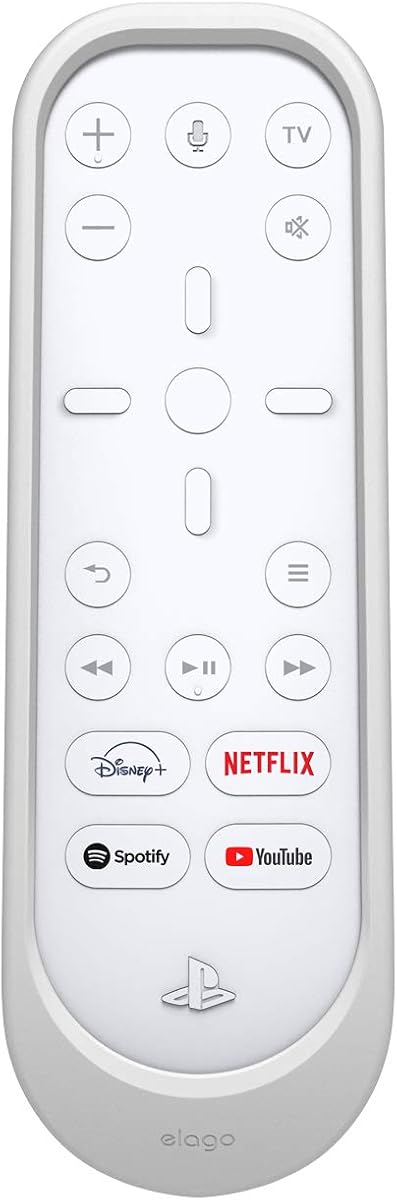
The elago Silicone Remote Case for PlayStation 5 Media Remote is a minimalist protective option with a 4.5 rating. It distinguishes itself through a thick layer of premium silicone rather than decorative graphics or fluorescent material. The goal is straightforward: preserve the remote's appearance and improve handling during ordinary use.
We may earn a commission when you buy through this link, at no additional cost to you.
The case covers the sides and back while retaining full access to the remote's functions. Its silicone layer helps protect against drops, dirt, oils, and scratches, while also preventing the covered remote from scratching the surface on which it rests. The material offers a secure grip and is described by the brand as a more substantial alternative to generic low-quality cases.
This is a focused product, so it lacks some convenience features found elsewhere in the list. There is no glow-in-the-dark treatment, attached lanyard, or bright color intended to improve visibility. The package is the case only, and it does not include the PS5 Media Remote.
Choose the elago case when understated design, premium silicone, and dependable grip are your main priorities. It is a particularly good fit for a minimalist entertainment area or for a user who prefers protection without a loud theme. Its focused construction makes it one of the most polished-looking options in this roundup.
The thicker silicone layer is designed to cushion the remote and improve the security of each grip. It also helps keep dirt and oils away from the remote's exposed surfaces.
Protecting the sides and back adds useful daily coverage while leaving the remote's functions accessible. The understated profile also avoids the more decorative appearance of a printed full-set skin.
We may earn a commission when you buy through this link, at no additional cost to you.
The PlayVital Ink Spirit Dragon Full Set Skin Sticker uses an artistic dragon design to coordinate a PS5 Slim Digital Edition setup. Its 4.5 rating reflects a well-received approach for buyers who want the Media Remote to carry the same visual identity as the console, controllers, headset, and charging station.
We may earn a commission when you buy through this link, at no additional cost to you.
The set includes one console skin, two controller skins, one charging station skin, one headset skin, and one media remote skin. Each piece is made from durable vinyl and cut precisely for the corresponding device. The decals are intended to provide a protective barrier against scratches and dust while creating a full-coverage theme.
Its strongest appeal is aesthetic coordination rather than physical cushioning. A vinyl decal will not create the same raised grip or impact-absorbing structure as a silicone sleeve. Compatibility is also specific to the new smaller PS5 Slim Digital Edition console, and the package contains only the stickers rather than any of the hardware they decorate.
This is a strong recommendation for an owner who prioritizes artwork, wants the media remote to blend into a curated environment, and owns the exact supported console configuration. It delivers more visual scope than a single remote decal while remaining simpler than a full enclosure system.
The ink-inspired dragon pattern provides a distinctive look for compatible hardware. At the same time, the vinyl pieces serve a basic protective function by helping keep scratches and dust off the covered surfaces.
Two controller skins join the console, charging station, headset, and media remote decals. That breadth makes it convenient to create a coordinated setup without sourcing separate designs for each accessory.
We may earn a commission when you buy through this link, at no additional cost to you.
The PlayVital Mistborn Dragon Full Set Skin Sticker is the final coordinated decal option in this guide. It has a 4.5 rating and is designed for the PS5 Slim Digital Edition console, DualSense controllers, charging station, headset, and Media Remote, giving buyers a consistent fantasy-inspired theme across their setup.
We may earn a commission when you buy through this link, at no additional cost to you.
The set includes six vinyl pieces in total: one console skin, two controller skins, one charging station skin, one headset skin, and one media remote skin. The decals are precisely cut and intended to help protect compatible surfaces from scratches and dust. Their thin construction preserves the original shape of the hardware more closely than a silicone enclosure.
Buyers should confirm the console model before ordering, since the set is specifically made for the new smaller PS5 Slim Digital Edition design. It also does not include any console or accessories, and it does not provide the anti-slip texture or shock cushioning offered by the silicone cases in this list.
Choose the Mistborn Dragon set for a coordinated decorative treatment that makes the Media Remote part of a larger design concept. It is a better fit for visual customization and coordinated display than for heavy impact protection or remote-storage features.
The Mistborn Dragon design gives the smaller PS5 setup a themed identity rather than leaving the Media Remote as an undecorated accessory. The same motif carries across every included piece.
The durable vinyl helps reduce the visibility of scratches and dust while preserving each device's original contours. It suits users who prefer light decoration over thick protective shells.
We may earn a commission when you buy through this link, at no additional cost to you.
The right PS5 media remote skin depends on whether you prioritize physical protection, coordinated appearance, easier retrieval, or a simple change of style. Review compatibility and package contents before choosing.
Compatibility is the first checkpoint because the products in this guide cover different needs. The PlayVital full sets are specifically designed for the smaller PS5 Slim Digital Edition console, while the silicone covers are intended only for the PlayStation 5 Media Remote. Do not assume a decal intended for the slim console will also fit the original larger console or another remote model.
Choose only a product whose stated compatibility matches your hardware, and read the listing notes before ordering. A model-specific cover is more useful than a generic skin that leaves buttons, ports, or sensors obstructed.
A silicone case wraps around the remote to provide cushioning, grip, and more substantial everyday coverage. It is the better choice when the remote is frequently dropped, handled by children, or placed on surfaces where scratches and oils are a concern. It may, however, change the remote's original appearance and add more bulk.
A vinyl decal provides a thinner decorative layer and is ideal when visual coordination matters most. Look for precise cuts and a complete set if you want the media remote, console, controllers, headset, and charging station to share one theme.
The best protection comes from coverage around the areas most likely to contact a table, cushion, or floor. Silicone sleeves commonly cover the sides and back, while full-body designs add coverage across more of the shell. Vinyl decals generally provide a lighter barrier against scratches and dust rather than impact cushioning.
Consider how the remote is used. Frequent transport or children using the Media Remote may justify a flexible case, while a carefully arranged display setup may only need a coordinated decal.
A smooth, frequently handled remote can become difficult to grip when it rests on fabric or when hands are slightly damp. Silicone cases improve handling by adding a softer, higher-friction surface. Several options in this list use a basketball-inspired texture that adds a distinctive tactile pattern as well as visual interest.
Grip is less relevant to a thin vinyl decal, which focuses on decoration and surface protection. If you often use the Media Remote from a sofa, prioritize a textured case over a smooth printed skin.
A bright color can make a remote easier to identify among several similarly shaped devices, while fluorescent material provides an additional low-light advantage. Glow-in-the-dark covers need prior exposure to sunlight or a lamp before they will emit light effectively, so the feature should be charged rather than expected to work immediately in a dark room.
Included lanyards offer a different solution by giving the remote a physical place to hang beside a sofa or television. Decide whether constant visibility, temporary illumination, or designated storage best matches your habits.
A skin should not interfere with normal operation. For silicone cases, check for precise button cutouts, accessible ports, and an opening near the top sensor. The full-protection function is diminished if the cover forces a finger into an awkward position or blocks a connection.
For vinyl decals, the equivalent concern is placement around buttons and openings. A precisely cut skin should follow the device's contours and sit in areas that do not create raised edges around frequently pressed controls.
Several listings contain only a protective cover and do not include the PS5 Media Remote. The full-set sticker products include a media remote decal along with decals for the specified console, controllers, charging station, and headset, but none of that hardware is included. Read the package contents carefully so you do not expect a complete remote or console.
Separate remote-only products can be easier to add to an existing themed setup, while bundles are more convenient when you want every device to match from the beginning.
Silicone is convenient to wipe or wash, making it a practical choice around a living room where the remote collects fingerprints, dust, grease, or food residue. A damp cloth or wet wipe is listed as a suitable cleaning method for the textured covers in this guide.
Vinyl decals require a gentler approach because lifting or rubbing the printed material can distort the fit. Follow the seller's application and removal guidance, and avoid using harsh cleaners on either material.
Before installing any skin, confirm that the remote and console match the product's stated compatibility. For a silicone case, place the remote inside the opening and work the flexible material around its edges one section at a time. Check that the buttons, ports, and top sensor opening remain unobstructed before using the remote normally.
For a vinyl decal, clean and dry the device surface before application, then align the cut piece with the product's edges. Follow the included instructions carefully and avoid pulling the vinyl at an angle, which can create a crease or lift a corner. Apply the pieces to compatible devices only, and take care not to trap dust underneath the adhesive.
Routine care keeps both styles in good condition. Wipe silicone covers with a damp cloth or suitable wet wipe, and allow them to dry fully before reinstalling. Clean vinyl gently, avoid abrasive scrubbing, and store the remote away from excessive heat or moisture. Glow-in-the-dark cases should also be exposed to a suitable light source before use when you want maximum luminescence in a dark room.
No. The standalone silicone cases in this guide are protective covers only, and the remote is not included. The PlayVital full sets include a media remote skin, but the decals are also sold without the Media Remote or other hardware. Always confirm the package contents before ordering.
The listed silicone covers are designed with precise cutouts for the remote's buttons, ports, functions, and top sensor opening. Proper installation should therefore preserve normal use. If a button feels obstructed, remove and reposition the cover rather than forcing it.
The fluorescent material absorbs light and later emits a visible glow in darker conditions. It must first be exposed to sunlight, a desk lamp, or a flashlight for a period of time. The brightness and duration of the glow depend on the preceding light exposure, so charging it before a dark-room use can improve visibility.
The supplied information identifies these full sets as specially designed for the PS5 Slim Digital Edition with the new smaller design. They should not be assumed to fit the original larger console. Check your console model and the product details before purchasing a coordinated set.
A silicone case wraps around the remote and provides cushioning, grip, and more substantial surface protection. A vinyl skin is thinner and focuses on coordinated artwork plus basic protection from scratches and dust. Cases suit practical handling, while decals suit users who want the Media Remote to match the rest of a themed setup.
The product information describes the silicone covers as washable, and the textured lanyard versions can also be wiped with a damp cloth or wet wipe. Follow the seller's care instructions for the specific item, and make sure the cover is completely dry before placing the remote inside.
A glow-in-the-dark silicone case is the strongest choice for temporary low-light visibility because its fluorescent material can reveal the remote in a dim room. A bright-colored case offers more consistent recognition under normal lighting, while a lanyard provides the most reliable physical storage solution.
The stated benefit is protection from scratches and dust, with precise vinyl cuts designed for compatible devices. They are not described as raised button guards or silicone cushions, so a controller skin may not prevent wear from repeated button presses in the same way that a controller cover can.
The PlayVital Glow in Dark Green Silicone Case is the strongest standalone option for buyers seeking protection, grip, and low-light visibility without a full console bundle. The Dragon's Elysium Full Set is the top coordinated choice for a compatible PS5 Slim Digital Edition setup, while the elago Silicone Remote Case delivers a refined minimalist design with substantial premium silicone.
Your priority should determine the category. Choose a textured silicone cover when the remote is handled frequently, dropped, or difficult to locate. Choose a vinyl full set when visual consistency across the console, controllers, headset, charging station, and Media Remote is the main goal. For a dark room, prioritize fluorescent material; for a shared living space, consider a lanyard as well.
Before purchasing, verify the exact remote or console model, inspect what is included, and consider how the skin will be installed and cleaned. Product availability, ratings, designs, and pricing can change, so review the current listing before making a final decision.