
MNN 15.6-inch FHD Portable Monitor
4.3Editor score
15.6-inch FHD IPS screen
178-degree viewing angle
Dual USB-C connections
Portrait and landscape modes
A PS5 portable monitor can turn the console into a more flexible entertainment setup, whether you want a second display for a game, a larger screen away from a television, or a dedicated panel for remote play. The best choice depends on resolution, refresh rate, audio, portability, and how neatly the display complements the console.
We compared ten monitors using the specifications and feature information supplied for each product. The list covers compact laptop-style screens, larger 4K and QHD gaming displays, high-refresh models, and rugged protective cases designed to hold a PS5, with particular attention to HDMI connectivity and console-specific functions.
Each review explains the standouts, limitations, and most suitable buyer, while the comparison table makes the core differences easier to scan. Product ratings and availability can change over time, and current prices should always be checked before making a purchase.
4.3Editor score

4.4Editor score

4.2Editor score
As an Amazon Associate we earn from qualifying purchases.
The comparison below covers ten portable displays with different balances of resolution, refresh rate, portability, audio, and protection, including purpose-built PS5 designs and general-purpose USB-C travel monitors.




The G-STORY 15.6-inch 4K portable gaming monitor is a compelling all-around choice for PS5 owners who value image detail and a console-inspired design. It carries a 4.4 rating and combines a 15.6-inch 4K IPS panel with dual HDMI inputs, built-in stereo speakers, and a folding form factor that resembles a laptop when closed. Those traits make it more purpose-built for console gaming than an ordinary travel display.
We may earn a commission when you buy through this link, at no additional cost to you.
Resolution is the main attraction. The supplied 4K specification is 3860 by 2160 pixels, and the monitor offers a stated 178-degree viewing angle. One HDMI port supports 1080p while the other supports 4K, with the product guidance recommending the 4K-capable connection. That arrangement can be useful when another device also needs an HDMI input, although PS5 owners should still confirm the output and cable arrangement they plan to use.
The display also includes practical gaming-oriented functions. Its FTG mode is described as supporting ultra-fast response, while FPS mode adds an assisted aiming crosshair. Dual 3.5 mm audio jacks and two built-in multimedia stereo speakers reduce the need for separate output equipment. Flicker-free backlighting and a blue-light filter are included for longer viewing sessions, while the stated warranty coverage is 13 months with a 30-day exchange option.
This is the right recommendation for a buyer who wants 4K detail, PS5-specific styling, flexible HDMI connectivity, and built-in audio in one package. Its 60Hz refresh rate is the principal compromise, particularly for fast competitive shooters, and many modern games will not render natively at 4K on a standard PS5. Even so, the combination of resolution, speakers, and portable construction makes this a particularly convincing general-purpose console display.
The 4K IPS panel gives the display a clear advantage when fine detail, interface text, and cinematic presentation matter. Its shape and folding cover are designed to coordinate with the visual language of the PS5, so it looks more like a dedicated gaming accessory than a generic laptop screen.
Two HDMI ports, dual 3.5 mm audio outputs, and integrated stereo speakers provide more flexibility than a minimalist single-port travel monitor. The result is a screen that can serve as the primary display for a gaming setup without immediately requiring a larger external speaker.
We may earn a commission when you buy through this link, at no additional cost to you.
The MNN 15.6-inch FHD portable monitor is the budget-focused member of this guide, offering a balanced mix of portability, familiar 1080p output, and broad device compatibility. Its 4.3 rating reflects a well-rounded product that is not designed exclusively around PS5 gaming, but its listed connections include PS5, PS4, Xbox, and Switch support.
We may earn a commission when you buy through this link, at no additional cost to you.
At 1920 by 1080 pixels, the IPS panel matches the native resolution commonly used by many games, which can provide a clean 1:1 image without downscaling. The glossy screen is stated to cover 178 degrees horizontally and vertically, and the supplied information mentions accurate, bright color. HDR mode is available, while blue-light reduction and flicker-free operation target viewing comfort.
Connectivity is particularly flexible for a portable display. It includes two full-featured USB Type-C ports, and a single USB-C cable can handle display signal and power when the source device supports Thunderbolt 3.0 or USB 3.1 Type-C with DisplayPort Alternate Mode. The product also supports copy, extended, second-screen, and portrait display modes, making it useful for work as well as gaming.
The scratch-resistant PU leather smart cover doubles as a stand and protects the screen during transport. That makes the MNN an attractive recommendation for buyers who want one portable display for a console, laptop, phone, and travel setup. Its limitation is resolution: 4K content cannot benefit from the extra detail of a 4K panel. For most PS5 gaming, however, the straightforward FHD output and useful portability make it a strong budget option.
FHD remains a practical resolution for a 15.6-inch portable screen because it delivers familiar console output without the demanding processing requirements associated with 4K. It is especially sensible for games that do not benefit from higher-resolution rendering.
Landscape and portrait orientations make the monitor more than a dedicated gaming screen. The included smart cover supports protection and viewing-angle adjustment, while multiple display modes help it function as a laptop extender or secondary workspace.
We may earn a commission when you buy through this link, at no additional cost to you.
The ARZOPA Z1FC is built around speed. Its 16.1-inch FHD IPS screen offers a stated 144Hz refresh rate, making it the fastest conventional portable monitor in this roundup. For a PS5 buyer focused on responsive motion, competitive games, or simply a more fluid-looking display, that high refresh rate is the feature that most clearly separates it from the 60Hz alternatives.
We may earn a commission when you buy through this link, at no additional cost to you.
The product information associates the 144Hz mode with lower input latency and smoother gaming visuals. Color is handled by a panel advertised at 106% sRGB, while the built-in kickstand allows the viewing angle to be adjusted for different positions. The screen can also rotate between horizontal and vertical orientations when the user wants a different aspect for a second display.
Two fully functional USB Type-C connections and a Mini HDMI port provide broad compatibility with laptops, Macs, Xbox systems, PS5, and Steam Deck. The stated plug-and-play approach requires no setup or downloads, although the manual should be consulted for console connection instructions. Importantly for this category, the listing states that adaptive sync and FreeSync are not supported.
The ARZOPA Z1FC is best suited to gamers who prioritize motion smoothness over 4K resolution. FHD is the most practical output for a 144Hz portable panel, and the larger 16.1-inch size gives games more room than a compact travel screen. Those who want variable refresh should instead consider the ARZOPA Z3FC later in this guide.
A 144Hz refresh rate can make scrolling, menus, and fast-moving action appear noticeably more fluid than a 60Hz display. It does not increase the resolution of the image, but it can make an otherwise familiar FHD picture feel more immediate.
The combination of USB-C and Mini HDMI opens the display to several device categories. Its kickstand and orientation support also make it easier to position on a desk, while a PS5 can be used as one of the listed compatible systems.
We may earn a commission when you buy through this link, at no additional cost to you.
The ARMORR GAMERSBOX is fundamentally different from a conventional portable monitor because it is a portable console environment. It combines a 21.5-inch FHD IPS screen with a rugged hard-shell enclosure designed to hold a PlayStation 5 or supported Xbox system. The console itself is not included, so buyers need to own compatible hardware.
We may earn a commission when you buy through this link, at no additional cost to you.
The enclosure is rated IP65 for dust and water resistance, with a stated maximum load resistance of 200 pounds and a 2-foot drop-height resistance. Inside are fastening straps, controller bays, a foam screen protector, and a single-cable power arrangement for the display and console system. These details suggest the product is aimed at travelers, field technicians, and other users who need to protect a valuable console rather than merely add a travel screen.
The 21.5-inch IPS panel runs at 48 to 75Hz and supports FreeSync. It offers 16.7 million colors, 250 nits of brightness, dynamic contrast, 178-degree viewing angles, and stereo speakers rated at two watts each. A detachable 100 by 100 millimeter VESA mounting pattern allows the display to be removed from the case and attached to a compatible stand or arm.
The included accessories are extensive: a desktop stand, a wheeled trolley with handle and strap, a front padlock ring, and a stability-enhancing stand. The lock itself is not included. This is the recommendation for someone who values protection, organization, and the ability to game away from a conventional entertainment unit. Its size, weight, and case design make it much less convenient than a slim 15.6-inch travel monitor.
The hard shell protects both the display and a supported console while also providing places for controllers and fastening straps. That makes it useful for users who regularly transport their gaming setup or work in locations where loose equipment could be damaged.
The removable display and 100-by-100-millimeter VESA pattern allow the screen to move between the protective enclosure and external mounting hardware. A desktop stand, trolley, and stability support provide multiple ways to establish a stable viewing position.
We may earn a commission when you buy through this link, at no additional cost to you.
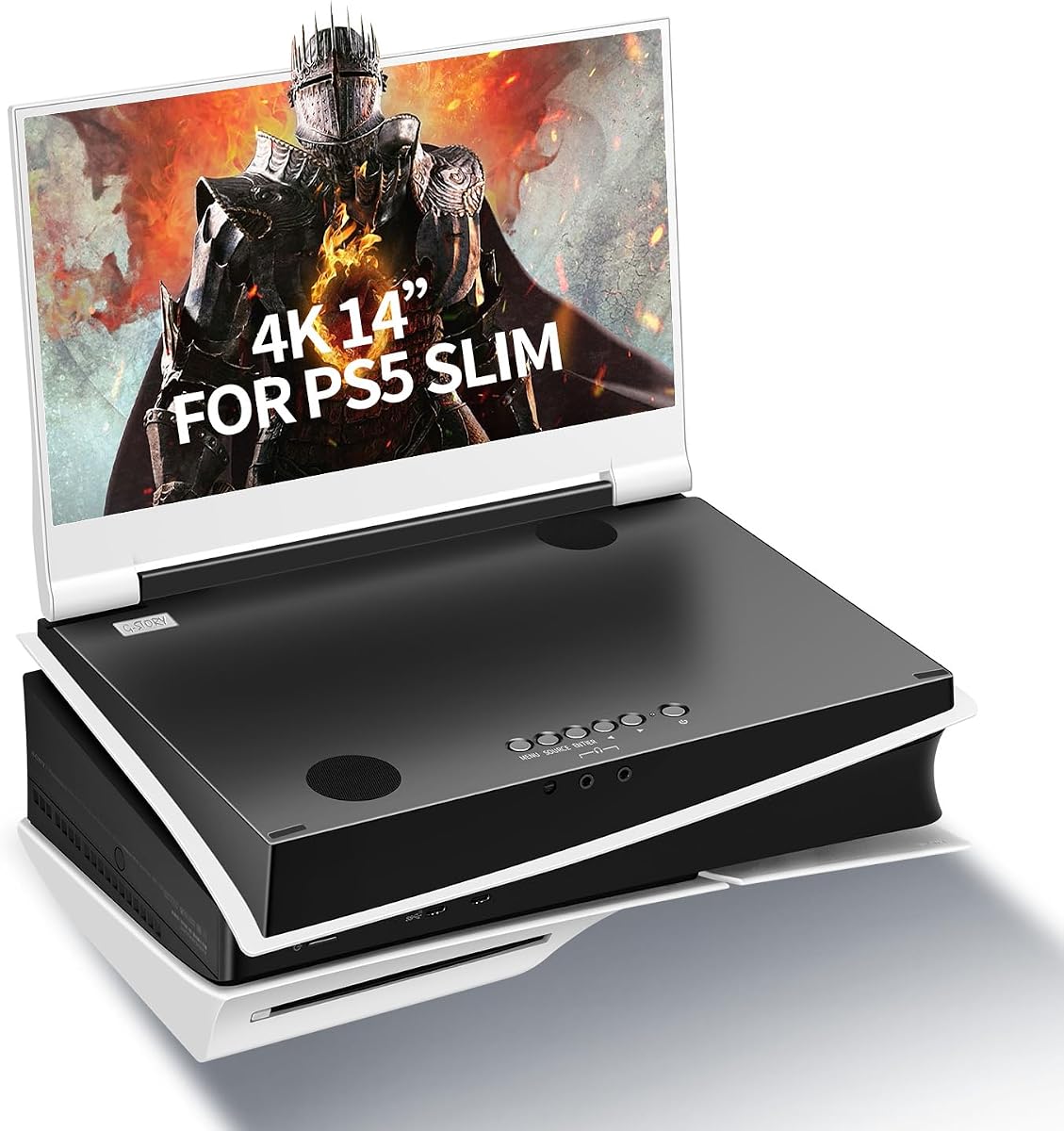
The G-STORY 14-inch 4K portable gaming monitor targets PS5 Pro and PS5 Slim users who want a compact 4K display with variable-refresh support. It has a 4.0 rating, which is the highest of the three G-STORY models in the guide, and combines a 3860-by-2160 IPS panel with FreeSync and VRR.
We may earn a commission when you buy through this link, at no additional cost to you.
Its 178-degree viewing angle and claimed 99% sRGB color reproduction make it a credible alternative to the larger 15.6-inch G-STORY model. The stated 1ms response time and FTG fast-response mode are aimed at action gaming, while the assisted aiming crosshair in FPS mode offers a console-focused feature that can be helpful for shooters.
Two HDMI ports, dual 3.5 mm audio jacks, and built-in stereo speakers make the display more self-contained than many general-purpose portable panels. Flicker-free backlighting and a blue-light filter are also included. Visually, the monitor is designed to match the PS5 and close like a laptop, improving portability without requiring a separate bulky cover.
This model is ideal for buyers who prioritize compactness, 4K clarity, and variable refresh more than screen size or maximum refresh rate. The 60Hz cap remains a limitation, and a 14-inch panel may feel cramped for some console games. Even so, the uncommon combination of 4K, VRR, speakers, and console-inspired folding construction gives it a distinct appeal.
FreeSync and VRR are valuable additions for a portable console display because they are not universally available in this category. They can help maintain a smoother presentation when the game and display are capable of working together within the supported range.
The 14-inch format reduces the amount of desk or luggage space consumed compared with larger models. Integrated speakers, two HDMI inputs, and FPS-oriented display modes keep the product focused on gaming rather than productivity alone.
We may earn a commission when you buy through this link, at no additional cost to you.
The InnoView 15.6-inch FHD portable monitor is a strong general-purpose choice for people who want one screen to serve as both a PS5 display and a productivity extender. It has a 4.4 rating, a 1920 by 1080 IPS panel, a 60Hz refresh rate, and compatibility with PS5, PS4, Xbox, Switch, laptops, phones, tablets, and other devices.
We may earn a commission when you buy through this link, at no additional cost to you.
The monitor requires no app or driver installation. Two full-function USB-C ports and one HDMI port allow different connection methods, while USB-C power pass-through can keep a compatible laptop charged while the external display is in use. A source device must support Thunderbolt 3.0 or 4.0, or USB 3.1 Type-C with DisplayPort Alternate Mode, for full USB-C operation. Otherwise, HDMI and a separate power connection are required.
Visual features include HDR support, a stated 178-degree viewing angle, low-blue-light and flicker-free operation, and accurate, vivid color. The smart PU leather cover protects the display and doubles as a stand, with grooves that help hold the screen at an angle. Landscape and portrait orientations provide flexibility for games, documents, meetings, and study sessions.
This is a strong recommendation for travelers, students, and hybrid workers who want a second screen without installing software. The PS5 compatibility makes it a credible gaming display, although the 60Hz rate and FHD resolution put it squarely in the mainstream rather than high-end performance category. Its broader usefulness gives it an advantage over monitors designed only around console features.
The ability to switch between productivity and console use makes the InnoView more versatile than a gaming-only screen. Copy, extended, and portrait arrangements support common workflows without requiring a complicated setup process.
A compatible source can receive both display signal and power through one USB-C cable, with reverse charging support. The HDMI option adds flexibility for consoles and other devices that do not expose the required USB-C video mode.
We may earn a commission when you buy through this link, at no additional cost to you.
The G-STORY 14-inch 4K monitor for PS5 Slim offers a compact 4K alternative with FreeSync, integrated speakers, and a folding design inspired by the console. It shares a 3.8 rating with no other product here, so prospective buyers should weigh the available specification information carefully and consider recent customer feedback before purchasing.
We may earn a commission when you buy through this link, at no additional cost to you.
The 14-inch display is designed to be closed like a laptop, which helps protect it during storage and transport. Its 4K IPS panel, 60Hz refresh rate, and wide viewing angle support detailed console output, although the limited screen size may make some menus or interface elements feel more compact than on the 15.6-inch alternatives.
For gaming, FreeSync is a useful addition, while FTG mode is described as providing ultra-fast response and FPS mode adds an assisted aiming cross shape. Two HDMI ports and dual 3.5 mm audio outputs provide more connection choices, while built-in multimedia stereo speakers add basic audio without requiring another device.
The main reason to consider this model is its specific fit with the PS5 Slim and its combination of 4K detail, speakers, and a protective folding structure. The 60Hz refresh rate remains the biggest performance ceiling. Buyers prioritizing stronger motion features may favor the newer G-STORY 14-inch model with VRR and a stated 1ms response time, while those wanting more screen area may prefer the 15.6-inch G-STORY.
A 4K panel in a 14-inch enclosure can deliver crisp text and dense game interfaces while occupying less space than a larger screen. The folding construction further reduces the amount of care needed during storage.
The response-oriented FTG mode, aiming assistance, and FreeSync target action-focused use. Built-in speakers and two 3.5 mm connections make it easier to choose between the built-in audio and a separate headset or speaker system.
We may earn a commission when you buy through this link, at no additional cost to you.
The ARZOPA Z3FC is the most feature-dense conventional portable display in this guide, combining 2.5K QHD resolution with a 180Hz refresh rate. Its 16.1-inch IPS-class portable format is designed for gamers and mobile workers, and the 4.2 rating reflects a broad set of capabilities rather than a single standout metric.
We may earn a commission when you buy through this link, at no additional cost to you.
Resolution is listed at 2560 by 1440, with brightness of 400 nits and a contrast ratio of 1000:1. The 180Hz rate is the highest stated refresh rate among these ten products and is presented as improving motion clarity, video presentation, and gaming smoothness. Buyers should still consider how their chosen PS5 game outputs at QHD and whether the content supports the advertised high refresh mode.
Two fully functional USB Type-C ports and a Mini HDMI connection allow use with laptops, Macs, Xbox, PS5, and Steam Deck. No software or downloads are required. A built-in kickstand provides adjustable tilt, and the display can rotate between horizontal and vertical use when it is being treated as a second workspace.
The Z3FC is the premium recommendation for a buyer who wants the strongest combination of resolution and refresh rate in a portable package. Its 16.1-inch canvas, 400-nit brightness, and 180Hz specification go well beyond the basics. The trade-off is complexity and the likelihood that not every PS5 title will use the display's full potential, especially when native console output does not match the panel's QHD native resolution.
The 2.5K panel and 180Hz refresh rate provide more headroom than the FHD models in the guide. That combination suits buyers who want a premium portable display for fast games, detailed interfaces, and mixed desktop use.
A 400-nit rating and 1000:1 contrast ratio support a punchier presentation than lower-brightness portable alternatives. The integrated kickstand adds a practical way to adjust the screen without requiring a separate full-size desktop stand.
We may earn a commission when you buy through this link, at no additional cost to you.
The G-STORY 15.6-inch 2K portable monitor offers a balanced middle ground between 4K detail and high-refresh gaming. It has a 4.2 rating, a 2560-by-1440 IPS display, and a 120Hz refresh rate. The product is designed to complement the PS5's shape and aesthetic, although the PS5 itself is not included.
We may earn a commission when you buy through this link, at no additional cost to you.
The 15.6-inch size offers more room for console menus and games than the compact 14-inch G-STORY alternatives, while QHD provides greater pixel density than FHD. A 178-degree viewing angle and FreeSync support add to the gaming-oriented specification. Because the PS5's standard output is lower than 2K, users should expect the display to scale the console image rather than render every game at its native resolution.
Dual HDMI inputs and dual 3.5 mm audio jacks offer useful flexibility, particularly for switching between a PS5 and another source. The monitor also includes two built-in multimedia stereo speakers. This makes it possible to create a more self-contained portable gaming station without immediately needing a separate audio device.
FTG mode is described as offering ultra-fast response, and FPS mode provides an assisted aiming crosshair. Flicker-free backlighting and a blue-light filter are included for eye comfort. The 120Hz specification and QHD resolution make this a strong all-around choice for console-focused buyers, although those seeking the absolute highest refresh rate should look to the ARZOPA Z3FC.
The combination gives the display more capability than a standard 60Hz FHD travel monitor without reaching the extreme refresh rate of the premium ARZOPA. It is a practical middle ground for games, video, and occasional desktop work.
The folding console-inspired enclosure, dual HDMI ports, and integrated speakers make the intent clear. It is best regarded as a display for a PS5 setup, not as a monitor that includes the console or its proprietary connection hardware.
We may earn a commission when you buy through this link, at no additional cost to you.
The MSI Pro MP165 E6 is the travel-first recommendation in this guide. It has a 4.6 rating, the highest customer rating among the listed products, and a design centered on a thin 15.6-inch FHD IPS panel. At just 1.38 centimeters thick and 0.78 kilograms in weight, it is intended to slide into a laptop bag without adding much bulk.
We may earn a commission when you buy through this link, at no additional cost to you.
The display offers 1920 by 1080 resolution at 60Hz with wide 178-degree viewing angles in both directions. TÜV Rheinland-certified low-blue-light and flicker-free features are included for extended work or travel sessions. Unlike several gaming-focused products, it does not list crosshair assistance or specialized FPS modes, keeping the feature set centered on a clean second-screen experience.
Connectivity includes HDMI and USB Type-C with DisplayPort 1.2a Alternate Mode, allowing use with laptops, PCs, Macs, phones, Nintendo Switch, PS5, PS4, and Xbox. Built-in speakers remove the need for portable audio in many situations. L-shaped cable plugs are designed to sit flush against the body, reducing unwanted side protrusion during transport.
Mounting flexibility is unusually good. A built-in 1/4-inch tripod socket supports cameras, flexible mounts, and standard tripods, while VESA compatibility allows permanent installation on a monitor arm, wall bracket, or desk mount. This is the ideal pick for frequent travelers who need the lightest-looking general-purpose display in the group. Its limitation is straightforward: FHD at 60Hz will not satisfy buyers seeking high-end console resolution or refresh rate.
The 1.38-centimeter profile and 0.78-kilogram weight make this among the easiest displays to carry. It offers enough screen area for console use without the bulk associated with larger gaming monitors or protective console cases.
The 1/4-inch tripod mount is particularly useful when the PS5 and monitor need to be positioned in a temporary location. VESA support gives buyers an option to create a fixed desk arrangement after the portable phase ends.
We may earn a commission when you buy through this link, at no additional cost to you.
The right PS5 portable monitor depends on how you play, where you use it, and which features matter most. Resolution, refresh rate, ports, portability, audio, mounting, and console-specific design should be considered together rather than one specification at a time.
Resolution determines the amount of information the display can show and how sharply text, menus, and game environments appear. The products in this guide range from 1920 by 1080 FHD to 3840 by 2160-class 4K, with 2560 by 1440 QHD offering a middle ground. A 4K portable panel looks excellent, but many games on a standard PS5 do not render natively at that level, so the resulting advantage depends heavily on the title and the console model. QHD can also be above the PS5's standard output and therefore require scaling.
FHD remains a sensible target for a 15.6-inch portable monitor because it is familiar, efficient, and broadly compatible with console output. QHD is worth considering for a higher-end mixed-use screen, while 4K makes the most sense when fine detail, larger screens, or a dedicated setup justify the added complexity.
Refresh rate controls how often the image is redrawn and can make fast movement appear smoother. Most of the products here run at 60Hz, while the ARZOPA Z1FC reaches 144Hz and the Z3FC reaches 180Hz. The G-STORY 2K model offers 120Hz. These higher rates can improve the feel of fast action, menus, and sports, but the connected game must support the appropriate output mode and the user should verify that the PS5 connection and game settings can drive the selected rate.
Do not treat a high refresh specification as meaningful in isolation. Resolution, supported game modes, connection bandwidth, and the rendering output of the PS5 all affect the result. For competitive shooters, a 144Hz or 180Hz FHD screen may prioritize motion more effectively than a 60Hz 4K display.
HDMI remains the most straightforward connection for a PS5, and every gaming-focused product in the guide includes an HDMI option. Some provide two HDMI ports, allowing another console or source to remain connected. USB-C is especially valuable for laptops, phones, and some handheld devices, but compatibility is not automatic: the source must support DisplayPort Alternate Mode and provide enough power for video and potentially charging.
A monitor with both HDMI and USB-C is more adaptable, while a model with dual HDMI is especially convenient for console switching. Check the included cable situation, the location of connectors, and whether the portable display can be powered directly from the PS5 or requires a separate power arrangement.
Portable monitors range from ultra-slim laptop-style panels to large displays enclosed in rugged carrying cases. The MSI Pro MP165 E6 is especially compact at 1.38 centimeters thick and 0.78 kilograms, while folding designs can protect the panel when closed. The ARMORR GAMERSBOX goes much further, enclosing both a monitor and a console for protection but creating a substantially larger travel package.
Consider the complete footprint rather than only the screen weight. A slim monitor still needs a stand, cable storage, and a surface to sit on. A protective case may be worthwhile for frequent transport, but buyers should verify whether the product includes a console, a carrying solution, and all required mounting hardware.
Built-in speakers can make a portable console setup more self-contained, particularly in hotels, dorm rooms, or other locations where external speakers are inconvenient. The G-STORY models include multimedia stereo speakers, the MSI includes integrated speakers, and the ARMORR display has two 2-watt speakers. A 3.5 mm headphone connection remains useful for private listening or a larger speaker system.
Do not assume built-in speakers produce the same depth or volume as a television or dedicated gaming audio system. For news, menus, and less cinematic games, they may be entirely adequate. For action-heavy titles or home-console emulation, headphones or a compact external speaker can provide a better soundstage.
A portable monitor needs a reliable way to remain upright at a comfortable viewing height. Some products include a smart cover with grooves that also serves as a stand, while the ARZOPA models use a built-in adjustable kickstand. The ARMORR GAMERSBOX includes a desktop stand, a wheeled trolley, a stability support, and a detachable VESA mounting arrangement. The MSI adds a 1/4-inch tripod socket and VESA compatibility.
For a permanent desk setup, VESA is more versatile than a fixed folding cover. For travel, a lightweight integrated stand or cover is often easier to carry. Consider controller space, cable routing, and the location of the PS5 before deciding which physical arrangement will work best.
Some portable monitors add FPS-oriented functions such as assisted aiming crosshairs, FTG response modes, FreeSync, and VRR. These can be useful for specific players, but they should complement rather than replace a good panel and stable connection. The G-STORY range concentrates on these gaming-oriented features, while ARZOPA prioritizes refresh rate and resolution.
Eye-care features are especially relevant to portable use, where a small screen may be viewed for extended periods. Flicker-free backlighting and low-blue-light modes appear across several products, and the MSI carries TÜV Rheinland certification for those functions. HDR support is also available on selected models, but it should be considered alongside brightness, contrast, and how the connected console or source implements HDR.
The total value of a portable monitor includes everything required to use it away from a desk. A smart cover can provide both screen protection and a stand, while a hard-shell gaming case can protect an entire console setup. Additional stands, tripods, controller bays, and power-management features may matter more to some buyers than a small increase in resolution.
Review the warranty and return information as well. The G-STORY models listed here cite warranty periods of 13 months, while the InnoView includes a 30-day return policy and an 18-month warranty. These terms can provide useful reassurance, but buyers should verify the current policy directly on the listing.
Begin by identifying the correct input and signal format. For a PS5, connect the console to the monitor's HDMI port with a suitable HDMI cable, then select the matching input on the portable display. If the screen offers separate 1080p and 4K HDMI inputs, use the 4K-capable connection when the intended output warrants it. USB-C setups require a source with DisplayPort Alternate Mode, and the supplied connection guidance should be followed for consoles and adapters.
Set the display and viewing arrangement before starting a long session. Use the folding cover, integrated kickstand, desktop stand, tripod, or VESA accessory to keep the panel stable and at eye level. Allow space around the PS5 for airflow, and route cables so they do not pull against the screen or interfere with the controller. Select landscape or portrait orientation based on the game and available space, and adjust brightness, picture mode, HDR, and any game-assistance features to suit the room.
Care for portable electronics by powering the screen down before folding it, removing connected cables, and placing the panel in its cover or protective case. Clean the surface with a soft microfiber cloth and avoid pushing against the screen. Keep the display away from moisture, excessive heat, and impact, especially when it is enclosed with a console in the ARMORR case. Periodically inspect the power cable, ports, stand, and mounting hardware for looseness or damage.
Yes, provided it has a compatible video input and the PS5 can output a signal that the monitor supports. HDMI is the usual connection, while USB-C requires the correct DisplayPort Alternate Mode support. Resolution and refresh-rate support should both be checked, and some adapters or cables may not carry the required signal.
It can be worth it for the sharper interface, larger viewing area, and potential detail in compatible content. However, a standard PS5 does not render every game natively at 4K, so the visual improvement varies. A QHD or high-refresh FHD display may offer a more noticeable gaming benefit when the game is optimized for those modes.
No. The game must support the desired output mode, the connection must carry it correctly, and the PS5 must be configured to use the compatible mode. A 144Hz or 180Hz monitor can make menus and supported games look smoother, but its resolution remains limited by the output and the rendering capabilities of the console.
Built-in speakers improve convenience because they provide basic audio without another device. They are usually adequate for menus, news, and many games, though a headset or dedicated speaker can provide better volume and sound quality. Checking for a 3.5 mm output or another audio option is worthwhile if you already own an external setup.
A folding cover is often simpler to carry and can double as a protective stand, making it useful for travel. A kickstand often provides more direct tilt adjustment and can look more stable on a desk. The best choice depends on how much you move the display and how much space is available around the PS5.
A high refresh rate is how many times per second the panel can redraw. FreeSync and VRR are synchronization technologies intended to reduce tearing by coordinating the display refresh with the game's output. A 144Hz screen without adaptive sync can still look smooth, but it does not automatically provide the benefits of variable synchronization.
Yes, and several products in this guide explicitly support extended, copied, second-screen, and portrait modes. The InnoView and MNN are particularly versatile for travel and productivity, while the ARZOPA models also support orientation changes. Verify USB-C video and power-delivery compatibility before relying on a one-cable laptop setup.
Check the panel resolution, maximum refresh rate, supported inputs, power requirements, and whether the ports match your PS5 setup. Also inspect the screen for scratches, dead pixels, backlight problems, and damaged hinges or covers. Confirm that the original power supply or a compatible replacement is available, and review the seller's return terms.
The G-STORY 15.6-inch 4K model is the strongest all-around recommendation because it combines sharp resolution, dual HDMI connectivity, integrated stereo speakers, and a console-inspired folding design. The MNN 15.6-inch FHD monitor is the best budget-oriented travel choice, while the ARZOPA Z3FC is the premium pick for buyers who value 2.5K resolution and a very high refresh rate.
Prioritize the features that affect your actual setup. Frequent travelers should favor a thin, light panel and reliable one-cable connectivity; competitive players may prefer 120Hz, 144Hz, or 180Hz; dedicated console gamers may appreciate 4K detail, VRR, crosshair assistance, and built-in audio. Those who regularly transport a complete console should consider the protective ARMORR GAMERSBOX rather than a slim standalone screen.
Product listings, ratings, promotions, and prices change over time, so confirm the current specifications and availability before purchasing. Read recent customer questions, check the included accessories, and verify that your preferred PS5 game and connection method support the display's resolution and refresh rate. That final compatibility check can prevent disappointment and help ensure the chosen portable monitor delivers the experience you expect.