
Dual Bay RAID SSD Enclosure
4.4Editor score
20Gbps USB-C interface
Dual 2280 M.2 support
Offline cloning function
Tool-free installation
RAID enclosures combine multiple SATA hard drives or SSDs into a compact external storage system for direct attached storage, backup, media libraries, and specialized workflows. A worthwhile enclosure balances usable drive capacity, flexible RAID configuration, dependable cooling, straightforward installation, and compatibility with the equipment and files you already use.
The products in this guide were compared by examining their stated drive support, RAID levels, interfaces, maximum capacity, cooling systems, power arrangements, and physical design. The list covers compact two-bay units, portable NVMe models, four- and five-bay HDD systems, and larger eight- and ten-bay enclosures built for demanding storage tasks.
Each review identifies the feature that most distinguishes its enclosure while also explaining the compromises buyers should consider. Ratings reflect the supplied product information, while technical details come from the manufacturers' descriptions. Availability, bundle contents, drive support, and current offers can change, so verify the latest listing before ordering.
4.4Editor score

4.5Editor score

3.8Editor score
As an Amazon Associate we earn from qualifying purchases.
This side-by-side comparison highlights each enclosure's drive format, RAID flexibility, connection method, cooling, and stated capacity so you can identify the most suitable design for your storage workload.



The CENMATE two-bay enclosure is a compact direct attached storage option for combining 2.5-inch or 3.5-inch SATA hard drives and SSDs. Its supplied rating is 3.9, and its defining qualities are broad drive-size compatibility, tool-free installation, four operating modes, and a 5Gbps USB interface.
We may earn a commission when you buy through this link, at no additional cost to you.
The enclosure uses an aluminum-alloy body and a two-inch cooling fan to help manage heat as drives work. Each bay supports up to 20TB according to the product information. RAID 0 emphasizes performance, RAID 1 creates a mirrored copy, Normal presents the drives independently, and JBOD combines available drive space.
Its central compromise is that RAID management is not available through macOS software, making the hardware-oriented configuration less convenient for Mac-focused workflows. The listed fan noise of approximately 40–50 decibels may also be noticeable in a quiet room, although continuous airflow is important when multiple spinning drives are installed.
This is a sensible choice for a creator, small business, or advanced home user who wants two externally connected SATA drives without buying a multi-bay tower. Buy it when you need RAID 1 redundancy, RAID 0 performance, or simple JBOD capacity in a relatively compact enclosure, and follow the reset instructions carefully.
RAID 0, RAID 1, Normal, and JBOD cover performance, mirroring, independent access, and combined capacity. That range makes the enclosure useful for both temporary working storage and small backup systems.
Both 2.5-inch and 3.5-inch SATA devices fit, while tool-free installation and included USB A and USB C cables simplify connecting the enclosure to different systems.
We may earn a commission when you buy through this link, at no additional cost to you.
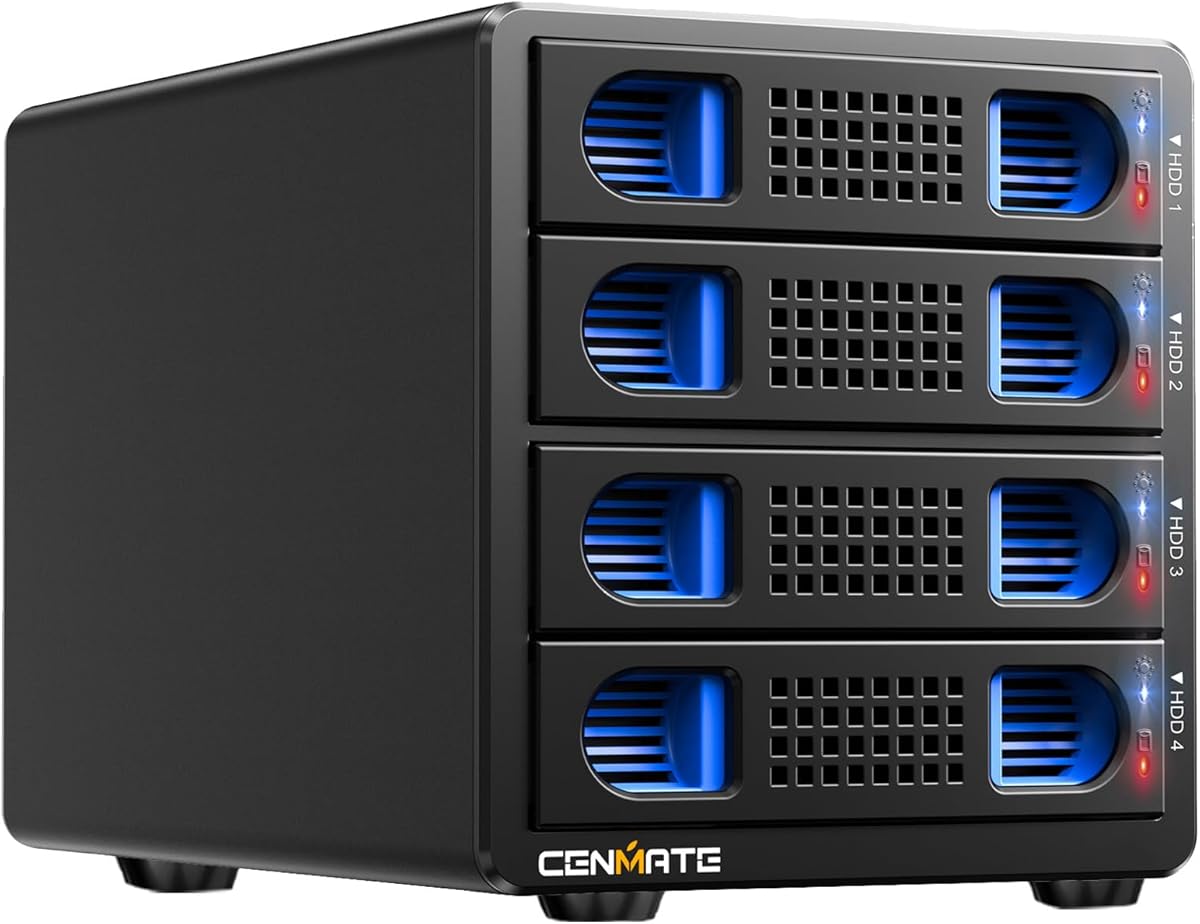
The CENMATE four-bay model expands direct attached storage while offering one of the broadest RAID selections in this guide. Its supplied rating is 3.9, and it stands out for eight configurations, 2.5-inch and 3.5-inch SATA support, USB connectivity, eSATA, and a stated capacity of up to 80TB.
We may earn a commission when you buy through this link, at no additional cost to you.
RAID 0, RAID 1, RAID 3, RAID 5, RAID 10, Clone, Large, and Normal provide options for speed, redundancy, storage efficiency, disk copying, and independent access. The aluminum enclosure includes two two-inch fans, while a 12-volt power adapter supports stable operation during high-speed transmission.
The eSATA connection requires care. It does not support a computer SATA-to-eSATA adapter, hot-swapping is unavailable, and the host's eSATA port must itself support RAID functionality to expose multiple bays. Otherwise, only one bay may be accessible through that connection.
Choose this enclosure for a workstation or home office that needs more drive flexibility than a two-bay model. It is particularly compelling for users who want RAID 5, RAID 10, or clone functionality alongside USB and eSATA options, provided the host connection and cooling noise are acceptable.
The range from mirrored arrays to RAID 5 and RAID 10 gives buyers room to balance redundancy, usable capacity, and throughput. Clone and Large modes add useful disk-management options.
USB 3.0 and eSATA provide two paths, but multi-bay eSATA access depends on a compatible host. The enclosure also uses a dedicated power adapter for stable drive operation.
We may earn a commission when you buy through this link, at no additional cost to you.
The ASM1352R-based CENMATE enclosure combines a two-bay layout with a 10Gbps USB interface, making it one of the most attractive compact options here. Its supplied rating of 4.7 is the highest in the group, while the controller, four RAID modes, mixed-drive support, and tool-free design define its appeal.
We may earn a commission when you buy through this link, at no additional cost to you.
RAID 0 favors speed, RAID 1 mirrors data between two drives, Normal treats the bays independently, and JBOD presents their combined storage. Each drive can hold up to 20TB according to the description, and the enclosure includes USB A and USB C 3.2 cables for connection flexibility.
As with the other two-bay CENMATE models, the enclosure is intended for hardware-oriented setup, and the description notes that macOS does not include RAID software. Its aluminum body and two-inch fan support heat dissipation, but the stated 40–50 decibel fan noise may not suit a silent workspace.
This is a strong recommendation for a fast desktop setup involving two NVMe-capable SATA SSDs, portable hard drives, or a mirrored backup pair. It is best for Windows or Linux users who value transfer speed and simple tool-free access more than silent operation.
The 10Gbps interface offers a clear advantage over 5Gbps models when the host, cable, and individual drives can sustain higher throughput. Actual results still depend on the complete storage path.
The ASM1352R controller is presented as a more advanced solution focused on stability and compatibility. It manages the enclosure's four operating modes without requiring routine RAID configuration software.
We may earn a commission when you buy through this link, at no additional cost to you.
The Yottamaster PS500RC3 is a well-balanced five-bay enclosure for photographers, video editors, studios, and businesses that need substantial direct attached capacity. Its supplied rating is 4.5, while its removable trays, broad RAID support, aluminum construction, and automatic fan control set it apart from simpler dual-bay designs.
We may earn a commission when you buy through this link, at no additional cost to you.
It accepts 2.5-inch and 3.5-inch SATA hard drives or SSDs and supports up to five 22TB drives, for a stated total of 110TB. RAID 0, 1, 3, 5, 10, JBOD, and Clone modes cover striped performance, mirroring, redundancy, and independent or combined access. Hardware and software RAID management options provide additional setup flexibility.
The enclosure uses USB 3.1 and a Type-C interface with transfer rates up to 5Gbps. Cooling comes from an 80mm intelligent fan that adjusts according to drive temperature, while front and rear ventilation holes help move heat through the aluminum shell. The stated operating limit is 78W total drive consumption, which matters when choosing spinning drives.
This is our top overall recommendation for buyers who need more than two bays without moving to an eight- or ten-bay tower. It suits professional media libraries and important backup workflows, provided the selected drives fit within the power envelope and the user can manage initial formatting and partitioning.
Five bays provide a practical middle ground between compact desktop use and large storage towers. The stated 110TB ceiling gives photographers and video teams room to consolidate active media.
The temperature-responsive 80mm fan adjusts as drive conditions change. Removable trays make installation and replacement easier, while included screws protect drives from movement and interface damage.
We may earn a commission when you buy through this link, at no additional cost to you.
The ASM1156R-based two-bay enclosure offers a balanced approach to compact RAID storage. It carries a supplied rating of 4.7 and combines a controller described as advanced with 2.5-inch and 3.5-inch SATA support, four operating modes, an aluminum body, and tool-free installation.
We may earn a commission when you buy through this link, at no additional cost to you.
Its RAID 0 mode prioritizes throughput, RAID 1 maintains a mirrored copy, Normal treats the drives as separate volumes, and JBOD combines their available capacity. USB 3.0 supplies up to 5Gbps, with USB A and USB C cables included for connection to different host systems.
The main limitations are modest. Compared with larger enclosures, four modes and two bays offer less expansion flexibility. The listed fan noise of 40–50 decibels may be distracting in a quiet office, and macOS users are again told that RAID software is not available for the stated hardware setup.
For a home user or small studio, this is a compelling option when a two-drive mirror, fast striped array, or simple JBOD volume is desired without a large enclosure. It is especially attractive for users comfortable with Windows or Linux and willing to follow the five-second reset procedure when changing arrays.
The ASM1156R chip is highlighted for stability and compatibility. It provides the central control for four modes without requiring a separate software-defined RAID workflow.
Two drive bays accept both 2.5-inch and 3.5-inch SATA devices. Tool-free installation keeps routine maintenance straightforward, and included USB A and C cables improve host compatibility.
We may earn a commission when you buy through this link, at no additional cost to you.
The MAIWO four-bay enclosure is built around 3.5-inch SATA hard drives and offers a stated maximum capacity of 96TB using four 24TB devices. Its supplied rating is 4.1, while its eight RAID configurations, 5Gbps USB interface, status lights, and two controllable cooling fans make it a practical desktop storage system.
We may earn a commission when you buy through this link, at no additional cost to you.
Normal, RAID 0, RAID 3, RAID 5, RAID 1/10, Clone, and Large provide an unusually broad selection for a four-bay unit. The enclosure supports SATA I, II, and III hard disks, which helps with compatibility planning when assembling a system from existing drives.
The description focuses exclusively on 3.5-inch SATA hard drives, so buyers should not assume support for 2.5-inch drives or SATA SSDs without checking current documentation. Cooling is handled by two internal fans that can be switched on or off, but that manual control is less adaptive than the temperature-responsive fan in the Yottamaster model.
This enclosure fits a business workstation, surveillance installation, or home lab that already uses 3.5-inch drives. It is most appropriate when large capacity and RAID choice matter more than a compact footprint, quiet automatic cooling, or mixed 2.5-inch and 3.5-inch support.
A 96TB stated maximum makes this enclosure suitable for large media archives and backup collections. The four-bay format keeps the system more manageable than an eight- or ten-bay installation.
Two built-in fans help control operating temperatures in a multi-drive system. Their on-off switch gives users direct control, although automatic thermal adjustment is not described.
We may earn a commission when you buy through this link, at no additional cost to you.
This dual-bay NVMe enclosure is the premium performance choice in the guide. Its supplied rating is 4.4, and it stands apart with 20Gbps transfer capability, two 2280 M.2 drive positions, offline cloning, a compact aluminum body, and tool-free installation.
We may earn a commission when you buy through this link, at no additional cost to you.
RAID 0 targets high-speed striped performance, RAID 1 maintains redundant copies, JBOD treats the SSDs independently, and Clone provides direct disk duplication. The extra USB-C power input is designed to maintain stable operation when two high-capacity drives, including 8TB and 16TB SSDs, are active together.
Its specialized format is both its greatest strength and main limitation. It is intended for 2280 M.2 PCIe NVMe SSDs rather than conventional 2.5-inch SATA hard drives or SATA SSDs. Buyers should therefore confirm the physical dimensions, protocol, and capacity requirements of their intended drives before choosing it.
This model is ideal for professionals who need very fast working sets, an NVMe-based mirror, or a convenient offline drive duplication system. It is less appropriate for buyers seeking a multi-bay SATA enclosure to archive large collections of 3.5-inch hard drives.
A 20Gbps USB-C connection provides substantially greater interface headroom than 5Gbps models. This makes the enclosure attractive for fast scratch storage, backups, and data-intensive transfer workflows.
Clone mode duplicates the contents of one SSD to another without relying on the host computer. Tool-free access makes inserting, replacing, and repeating the process more convenient.
We may earn a commission when you buy through this link, at no additional cost to you.
The ten-bay CENMATE enclosure represents the largest physical storage design in this guide. Its supplied rating is 3.9, and it offers a broad drive-count ceiling, up to 200TB according to the product description, eight RAID modes, USB and eSATA connections, and two dedicated 2.7-inch fans.
We may earn a commission when you buy through this link, at no additional cost to you.
Clone, Large, Large Times Two, Normal, RAID 0 Times Two, RAID 5 Times Two, RAID 50, and RAID 00 provide multiple array styles. The enclosure supports 2.5-inch and 3.5-inch SATA devices, although the stated compatibility information excludes certain WD 20TB drives while supporting Seagate 20TB drives.
Setup is more demanding than with a two-bay unit. At least one drive must be installed in each five-bay section, making two drives the minimum when all ten bays are used. The manufacturer recommends checking each drive individually to identify a faulty unit, and changing RAID modes can require returning to Normal or PM10 first.
Choose this model for a dedicated storage server, editing workstation, or archival system where the number of drives is the overriding requirement. Buyers should carefully follow the instructions, maintain a separate backup, and verify drive compatibility before purchasing high-capacity media.
Ten drive positions let a user consolidate a large collection of disks into one direct attached enclosure. The stated 200TB ceiling makes it relevant to high-volume archive and media workflows.
The manufacturer recommends testing drives individually and installing at least one drive in each five-bay group. This methodical setup helps identify failed hardware before creating a larger array.
We may earn a commission when you buy through this link, at no additional cost to you.
The eight-bay CENMATE enclosure offers a high-capacity middle ground between a four-bay desktop unit and a ten-bay archive system. Its supplied rating is 3.9, while its eight drive positions, stated 160TB maximum, eight RAID modes, USB and eSATA connections, and large 20A power adapter support demanding storage setups.
We may earn a commission when you buy through this link, at no additional cost to you.
The RAID selection includes Clone, Large, Large Times Two, Normal, RAID 0 Times Two, RAID 5 Times Two, RAID 50, and RAID 00. Drives may be 2.5-inch or 3.5-inch SATA devices, but the product information specifically notes that certain WD 20TB models are not compatible while Seagate 20TB models are supported.
As with the ten-bay model, initial configuration requires at least one drive in each four-bay group when the full enclosure is used. Two 2.9-inch fans provide cooling, with stated noise around 40–50 decibels. Mode changes require disconnecting power and using the described reset sequence, so the process should be completed carefully.
This enclosure is a good fit for users who need a high drive count without the footprint of ten bays. It suits professional post-production, media archives, and consolidated backup systems where power delivery, cooling, and RAID flexibility outweigh quiet operation.
Eight removable positions offer more flexibility than compact units while retaining a desktop-friendly direct attached design. The enclosure can serve as a consolidated media or backup repository.
A dedicated 12-volt, 20A adapter supplies robust power for multiple hard drives. Buyers should still use the specified adapter and confirm that the combined requirements of installed drives are suitable.
We may earn a commission when you buy through this link, at no additional cost to you.
The MAIWO dual-bay enclosure is the most compact and accessible model in the guide. Its supplied rating is 3.8, while its support for 2.5-inch SATA hard drives and SSDs, 10Gbps USB interface, four RAID modes, tool-free trays, and hot-swapping make it useful for portable or entry-level storage.
We may earn a commission when you buy through this link, at no additional cost to you.
Normal, also identified as PM, provides independent access. RAID 0 emphasizes speed, RAID 1 creates a mirror, and Large, or JBOD, combines the available capacity. The enclosure uses an ASM1352 controller and supports 7mm and 9.5mm 2.5-inch SATA devices across two bays.
It does not accept 3.5-inch desktop hard drives, and additional power is required during operation, although a power cable is included. Its stated capacity is 16TB in total, based on up to 8TB per bay. USB 3.1 Gen 2 and UASP improve the connection profile, although real throughput remains dependent on the installed drives and host system.
This model is a good choice for a laptop user, mobile creator, or home backup enthusiast who wants RAID 1 or JBOD in a small aluminum case. It is best suited to 2.5-inch SATA hardware and users who value portability over the larger capacity and cooling of a full-size HDD enclosure.
The compact aluminum case accepts 2.5-inch drives, making the enclosure more portable than larger desktop towers. It suits travel kits and laptops that lack internal multi-bay storage.
Tool-free installation and hot-swapping help users change or service drives with less effort. The independent power cable supports operation with a separate power source.
We may earn a commission when you buy through this link, at no additional cost to you.
The right RAID enclosure depends on your drive format, usable capacity, redundancy requirements, portability, host connections, cooling, and tolerance for setup complexity. Use the following factors to narrow the field before buying.
Begin with the physical media you intend to install. Most multi-bay HDD enclosures accept both 2.5-inch SATA devices and 3.5-inch SATA hard drives, while specialized NVMe products support 2280 M.2 modules. The MAIWO four-bay model is described specifically for 3.5-inch SATA hard disks, and the portable MAIWO dual-bay unit excludes 3.5-inch devices. Density also affects cooling, power draw, and usable array capacity.
Choose a model that directly supports your existing drives and intended future media. Avoid assuming that every enclosure accepts every SATA form factor.
RAID 0 can increase sequential performance but offers no redundancy, while RAID 1 mirrors two drives and protects against a single drive failure. RAID 5, RAID 10, RAID 50, and related configurations provide different balances of capacity, performance, and resilience. Normal, JBOD, Large, and Clone modes focus on independent access, combined space, or disk duplication rather than conventional striping.
Match the mode set to the task. Editors and photographers may value flexible media pools, while backup users should prioritize redundancy and straightforward recovery.
Advertised capacity depends on the number of bays, maximum supported drive size, and selected RAID layout. Raw drive totals are not necessarily usable capacity because parity or mirroring consumes space. Stated limits range from 16TB for the portable two-bay MAIWO to 200TB for the ten-bay CENMATE, with several multi-bay options supporting 80TB to 160TB.
Account for future growth and verify whether a particular drive model is supported. Some listing details contain model-specific restrictions that are easy to overlook.
USB 3.0 and 3.1 enclosures generally offer up to 5Gbps, while the selected two-bay and NVMe models provide 10Gbps or 20Gbps interfaces. Faster links can shorten transfers when the host, drives, and workload support them, but a faster enclosure cannot compensate for slow individual media. eSATA may be useful on compatible workstations, yet its multi-bay behavior depends on host RAID support.
Match the interface to your computer and consider whether you value a single fast NVMe workspace, flexible USB connectivity, or a dedicated eSATA workflow.
Spinning hard drives benefit from moving air, especially in an enclosure with several bays. The CENMATE models use aluminum construction and one or two fans, while the Yottamaster uses an 80mm fan that adjusts according to drive temperature. The MAIWO four-bay unit has two fans with a manual on-off switch. Stated fan noise of 40–50 decibels may be noticeable in a quiet room.
Choose temperature-aware cooling for sustained heavy use, but consider external silent storage or a NAS if acoustics are the priority.
Every 3.5-inch hard drive adds substantial power demand, especially when several spin up together. Larger CENMATE enclosures use dedicated 12-volt adapters, including a 12V 20A unit for the eight-bay model, while the portable MAIWO unit includes an independent power cable. The Yottamaster states that five-drive operation requires combined drive consumption to remain within 78W.
Use the specified power supply and check the startup needs of high-power drives. A separate external source may be advisable for demanding combinations.
Hardware RAID can provide configuration without downloading management software, but compatibility still matters. Several CENMATE listings state that macOS does not include RAID software for their configuration process. Other products support Windows, Mac, and Linux systems, and new drives may still need formatting or partitioning before the host recognizes them.
Read the setup instructions before inserting drives. Switching RAID modes can format data, and the larger enclosures require drive groups to be populated and tested methodically.
Tool-free installation, removable trays, and hot-swapping improve routine maintenance, especially for drive replacement or cloning. Larger enclosures provide more expansion but require more desk space, power, and cooling. The compact MAIWO two-bay enclosure is easier to transport and supports 2.5-inch drives, whereas the 2280 M.2 product is even more specialized and highly portable.
Choose serviceability for frequently changed media and portability for mobile work. For fixed installations, bay count and redundancy usually deserve greater attention.
Before installing any drives, back up all existing data, read the enclosure instructions, and confirm that the selected drives match the supported dimensions, protocol, and capacity. Add drives to a new array only when the enclosure is powered off, secure every 3.5-inch drive with the supplied screws or tray hardware, and connect the correct power supply before attaching the data cable.
Use the manufacturer's mode switch or controls exactly as described. Some models require a reset hold of five seconds, while others specify a longer power-off procedure. Because changing a RAID configuration can erase data, complete the mode change before adding important files. For larger enclosures, follow the recommended practice of testing one drive at a time and populating each required drive group.
After a new array is created, format and partition it as needed, then confirm that the computer recognizes the expected capacity and RAID layout. Use the included USB A, USB C, or eSATA cable appropriate to the host, and avoid hot-swapping unless the enclosure explicitly supports it. Keep airflow openings clear, monitor drive temperatures, and replace failed hardware promptly while maintaining a separate backup of irreplaceable data.
RAID 0 combines at least two drives into a striped volume, distributing data across them for potential speed gains. RAID 1 mirrors the same data onto two drives, reducing usable capacity but protecting against one drive failure. RAID 0 offers no redundancy if a member drive fails, so it should not be the only location for important files.
No. A RAID enclosure is direct attached storage that normally connects to one computer and manages its drives through hardware or host software. A NAS is a network appliance that shares storage across multiple clients and usually provides a more extensive management interface. The CENMATE listings explicitly describe their larger products as DAS and not NAS devices.
Many SATA HDD enclosures also support 2.5-inch SATA SSDs, but not every model does. The MAIWO four-bay listing specifically identifies 3.5-inch SATA hard disks, while the Yottamaster and most CENMATE models describe support for both 2.5-inch and 3.5-inch SATA hard drives or SSDs. Check the exact drive format before purchasing.
JBOD, also called Large in several of these products, presents the installed drives as one combined storage volume without distributing data as RAID 0 does. It can provide more usable space than a mirrored or parity-based array, but a failed drive may make the affected files difficult to recover. Users should maintain backups because JBOD is not redundancy.
No. A 10Gbps or 20Gbps interface can remove a connection bottleneck, but the drives, RAID layout, host controller, and workload determine the result. Mechanical hard drives may be limited by platter speed and seek performance, while individual SSDs can approach interface limits more closely. RAID 0 may benefit from parallelism, whereas mirrored writes still depend on both drives.
Do not assume a mode change preserves data. The product descriptions repeatedly warn that configuring or replacing a RAID array can result in data loss, and some models require returning to Normal or PM10 before selecting another mode. Back up all content, read the current manual, and follow the exact reset sequence for your enclosure.
They may not be ideal if silence is important. Several CENMATE models state fan noise around 40–50 decibels, while the Yottamaster uses temperature-responsive cooling to adjust fan speed. A compact two-bay unit placed away from your desk may produce a better acoustic experience for a quiet workspace, though it will offer less expansion.
Yes. RAID 1 can tolerate the failure of one mirrored member, but it does not protect against accidental deletion, ransomware, controller problems, power events, or loss of the entire enclosure. It also does not prevent corruption from being copied to both members. Keep an independent or off-site backup for files that cannot be reproduced.
The Yottamaster PS500RC3 is the strongest all-around choice for users who want five removable drive bays, broad RAID options, mixed 2.5-inch and 3.5-inch support, and temperature-responsive cooling. The dual-bay NVMe enclosure takes the premium position for 20Gbps performance and offline cloning, while the compact MAIWO unit offers the most accessible route to a portable two-drive RAID setup.
Prioritize the drive format, RAID level, usable capacity, power demands, and host compatibility before considering additional features. A two-bay enclosure is often enough for a mirror or portable working set, whereas four to ten bays make more sense for consolidated media libraries and large backup collections. Always follow the enclosure's drive population, reset, and cooling instructions.
Before ordering, verify the current listing, supported drive models, included cables, and power requirements. Product configurations, firmware details, bundle contents, and market offers can change, and the latest information in the manufacturer's instructions should take priority over general buying assumptions.