
CanaKit Raspberry Pi 3 B+ Clear Case Kit
4.8Editor score
Complete Pi 3 B+ bundle
Clear protective enclosure
Two aluminum heat sinks
Dedicated filtered power supply
Discover the best Raspberry Pi 3 B Plus Starter Kit options, comparing included boards, storage, cases, power supplies, connectivity, and accessories for
A Raspberry Pi 3 B Plus Starter Kit combines a compact single-board computer with the storage, enclosure, power supply, and connections needed for a convenient first setup. A well-matched bundle can eliminate guesswork, especially for beginners learning Linux, electronics, programming, retro gaming, or practical DIY projects.
This guide compares ten supplied kits and closely related Raspberry Pi options using their documented processor, memory, connectivity, included components, customer ratings, and intended project coverage. It distinguishes complete starter bundles from bare boards and also identifies newer Pi 4 alternatives for shoppers willing to move beyond the Pi 3 B Plus.
Each review explains what the product provides, who it suits, and where it falls short for a particular need. The top selections prioritize completeness, useful accessories, appropriate power, straightforward setup, and value. Ratings and availability can change, and current product prices should be checked before purchasing.
4.8Editor score
4.7Editor score

4.5Editor score
The comparison below places every kit on the same practical dimensions: processor generation, memory, bundled storage, enclosure and cooling, power, display connections, networking, and expansion options. It shows why some packages are ready-to-use starter bundles while others are better viewed as boards or alternative-generation kits.


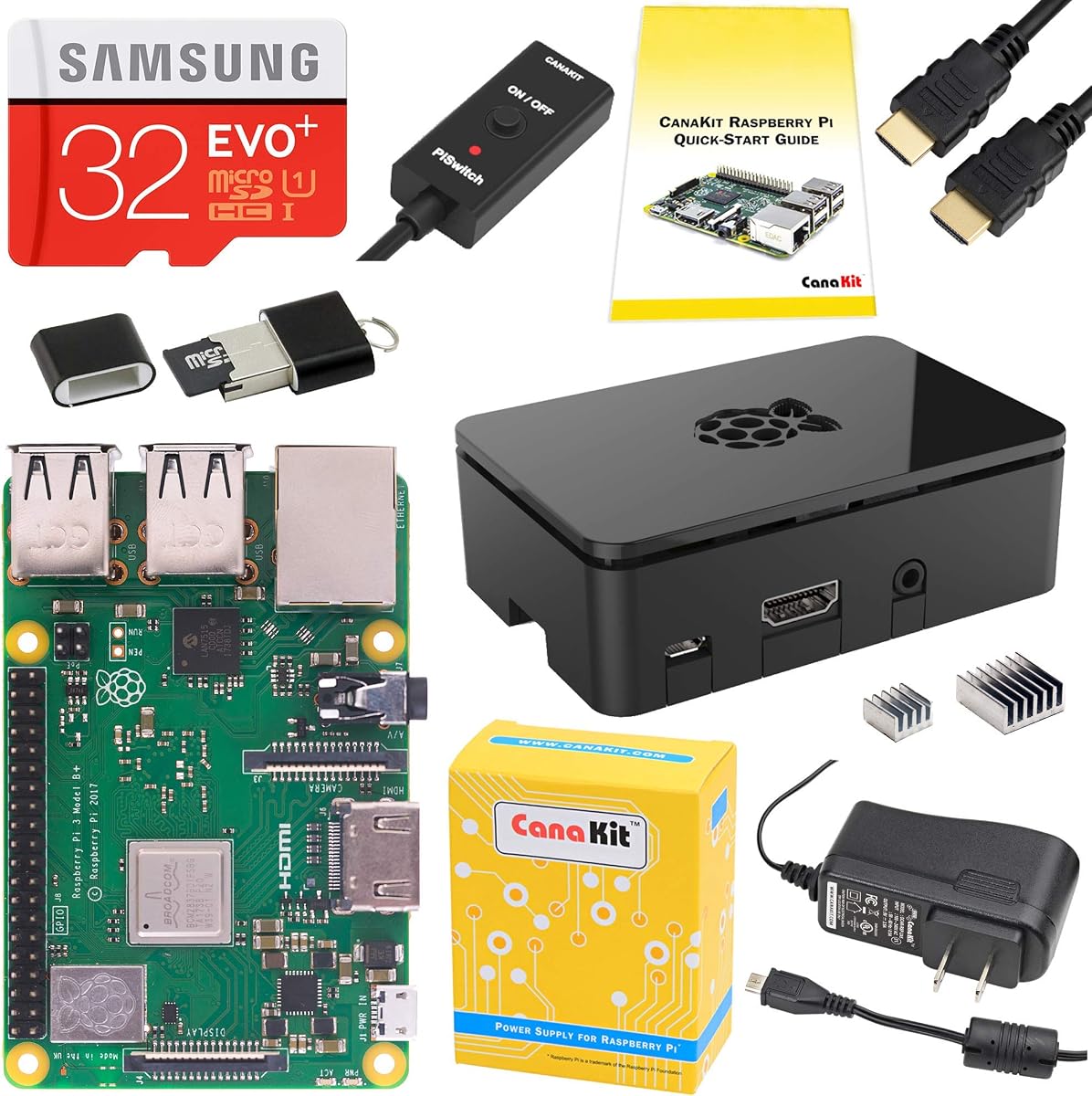
The CanaKit Raspberry Pi 3 B+ EVO+ Starter Kit is a well-balanced package for someone who wants a Pi 3 B Plus and the essential accessories needed to begin using it. Its 4.7 rating reflects a strong combination of a 1.4GHz 64-bit quad-core processor, 1GB RAM, dual-band Wi-Fi, preloaded storage, an enclosure, cooling parts, and a filtered power supply.
We may earn a commission when you buy through this link, at no additional cost to you.
The most helpful element is the 32GB Class 10 EVO+ microSD card, which arrives preloaded with the operating system and includes a USB reader. That combination reduces the number of tasks between delivery and first startup. The package also supplies a premium black case, display cable, two heat sinks, a GPIO quick-reference card, and a full-color quick-start guide.
Its 2.5A CanaKit USB power supply with micro-USB cable and noise filter is designed specifically for the Raspberry Pi 3 B+ and is UL listed. That matters because a starter set is only as convenient as its power arrangement. The case also helps protect the board, while the heat sinks provide basic cooling for the processor. The trade-off is that the bundle does not include a breadboard or a collection of LEDs, buttons, resistors, and jumper wires.
This is a strong recommendation for a first desktop-like Raspberry Pi project, coding environment, media application, or general electronics build that does not require a large accessory assortment. Someone who wants a more comprehensive experimentation kit may prefer the CanaKit Ultimate bundle. Otherwise, the preloaded card, suitable power supply, case, cooling, display cable, and quick-start material make this an especially coherent first purchase.
A preloaded operating-system card is the bundle's clearest advantage for a beginner. With the included reader, the user can begin the setup process without first sourcing and imaging storage separately.
The filtered 2.5A supply and included heat sinks give the board appropriate support for sustained use. This coordinated approach is more reassuring than assembling a starter kit from unrelated parts.
We may earn a commission when you buy through this link, at no additional cost to you.
The CanaKit Raspberry Pi 3 B+ with Premium Clear Case and 2.5A Power Supply is the most focused Pi 3 B Plus bundle in this guide. It carries a 4.8 rating and includes the board, a clear case, two aluminum heat sinks, a specially designed filtered 2.5A supply, and a quick-start guide without padding the package with unnecessary components.
We may earn a commission when you buy through this link, at no additional cost to you.
At the center is a Raspberry Pi 3 B+ with a 1.4GHz 64-bit quad-core processor and 1GB RAM. Dual-band 2.4GHz and 5GHz 802.11b/g/n/ac wireless LAN and enhanced Ethernet capability make it suitable for connected projects. The clear enclosure is particularly useful when a beginner wants to see the board, identify connectors, or follow a wiring guide while learning how the computer is assembled.
The main limitation is that no microSD card or card reader appears in the listed contents. That means the buyer still needs storage before first use, even though the core hardware is already present. There is also no listed display cable. These omissions make the kit less immediately complete than the EVO+ bundle, but they also keep the package centered on the board, enclosure, cooling, and power.
For an experienced beginner or a buyer who already owns suitable storage and display accessories, this is an efficient way to assemble a working Pi 3 B+ system. It is less convenient for someone who expects to perform setup immediately after delivery. Subject to having those two items available, the high rating, clear case, cooling hardware, and purpose-matched supply make it an attractive core kit.
The premium clear case lets users see the board and its connections. That visibility can make tutorials easier to follow and gives a new project a recognizable finished appearance.
The package does not attempt to cover every type of electronics project. It concentrates on the Pi 3 B+, enclosure, cooling, power, and quick-start information, which keeps the shopping decision simple.
We may earn a commission when you buy through this link, at no additional cost to you.
The Raspberry Pi 3 B Starter Kit 64GB Edition is the most storage-forward bundle among the close Pi 3 options reviewed here. Its 4.5 rating and included 64GB memory card make it useful for users who want more room for an operating system, applications, project files, and media than a smaller card may offer.
We may earn a commission when you buy through this link, at no additional cost to you.
The set contains the Raspberry Pi 3 B computer, a power supply, protective case, 64GB memory card, USB reader, and one-meter HDMI cable. The board is described as using a 1.4GHz quad-core processor with 1GB RAM. A heat sink is also listed in the product title, adding a basic cooling component for the board.
The important naming detail is that the listing calls this a Raspberry Pi 3 B rather than consistently identifying it as the Pi 3 B Plus. The stated processor speed resembles the B Plus description, but the package should be evaluated according to its actual listing rather than assumptions. The concise product details also identify less about the power supply and case than the CanaKit listings do, so buyers may wish to compare the included specifications carefully.
This bundle makes sense when storage capacity and having an HDMI cable at hand matter more than brand-specific documentation or a highly detailed accessory list. It is a practical choice for desktop projects, coding exercises, and general experimentation that benefits from a larger card. Confirm the board generation and accessory details before ordering if exact Pi 3 B Plus compatibility is essential.
A bundled 64GB card gives users a generous starting allocation for operating-system files, applications, and project data. It also reduces the immediate need to replace a smaller supplied card.
The one-meter HDMI cable is a practical addition for users connecting the Pi to a television or monitor. The USB reader likewise makes it easier to prepare the included storage.
We may earn a commission when you buy through this link, at no additional cost to you.
The Raspberry Pi3 B+ 1GB Starter Kit 64GB Edition explicitly identifies the Pi 3 B Plus and includes a 64GB card, power supply, official case, four-meter? No: one-meter 4K Micro HDMI cable, heat sink, and USB reader. It is a broad bundle with a 4.1 rating, placing it behind the more highly rated CanaKit options in this comparison.
We may earn a commission when you buy through this link, at no additional cost to you.
Its stated hardware includes a 1.4GHz quad-core processor and 1GB RAM. The 64GB memory card provides ample room for the operating system and installed programs, while the reader supports initial setup. The one-meter Micro HDMI cable is designed for compact connections, and the protective case and heat sink complete the basic hardware package.
The listing's product description contains some repetition and occasionally refers generically to a Raspberry Pi 3 B even though the title identifies the B+ model. That editorial inconsistency creates a small amount of uncertainty. The lower rating also suggests that buyers should examine current customer feedback and listing details with particular care, especially if the precise board revision is important to the project.
The bundle is still a credible option for a connected Pi 3 B Plus project that benefits from larger storage and a Micro HDMI connection. It may appeal to buyers assembling a compact media or display setup. The choice is less confident than the leading CanaKit bundles, but the explicit B+ designation and generous accessory list can make it convenient for the right project.
The included 4K Micro HDMI cable suits compact arrangements where a full-size HDMI connector would be inconvenient. It also removes one extra item from the initial shopping list.
The 64GB card is a meaningful upgrade over smaller starting cards for users who expect to retain more applications, media, and project files on the same microSD card.
We may earn a commission when you buy through this link, at no additional cost to you.
The Raspberry Pi 3 Model B+ Board is a bare-board option rather than a ready-made starter bundle. Its 4.6 rating reflects a board that provides the core 1.4GHz 64-bit quad-core processor, 1GB RAM, dual-band wireless LAN, Bluetooth 4.2 with BLE, and Ethernet in a compact single-board format.
We may earn a commission when you buy through this link, at no additional cost to you.
For experienced hobbyists, that simplicity can be an advantage. A buyer can choose an enclosure tailored to a specific project, select a case that supports active cooling, use a storage card prepared in the preferred way, and pair the board with accessories that match the intended build. Nothing in the board prevents it from serving the same broad categories as the complete kits, including coding, networking, and electronics experimentation.
The tradeoff is immediate: the product data lists only the board and its core capabilities. There is no included power supply, microSD card, reader, case, heat sink, display cable, or quick-start guide. These omissions make it unsuitable for a buyer expecting everything needed for first startup. The user must also take responsibility for selecting compatible accessories and handling the board carefully.
Choose this option when assembling a custom Pi 3 B Plus setup or when the board's specifications matter more than a bundled price. It is not the most convenient starter kit for an absolute beginner, but it provides a strong and flexible foundation for someone who already understands the basic components needed to build a functioning computer.
A bare board lets users coordinate storage, enclosure, cooling, and display accessories with the intended project. That flexibility is especially useful for unusual mounting arrangements or custom-built projects.
Dual-band wireless LAN and Bluetooth 4.2 with BLE reduce the need for separate network and accessory dongles. Ethernet remains available for projects that benefit from a wired connection.
We may earn a commission when you buy through this link, at no additional cost to you.
The CanaKit Raspberry Pi 4 4GB Starter PRO Kit is included because some shoppers searching for a Pi 3 B Plus starter kit may benefit from a newer generation instead. It has a 4.8 rating and pairs the Raspberry Pi 4 Model B 4GB with a comprehensive set of accessories designed around that board.
We may earn a commission when you buy through this link, at no additional cost to you.
Its 1.5GHz 64-bit quad-core CPU and 4GB RAM distinguish it from the 1GB memory configurations in the Pi 3 B Plus options. The kit includes a preloaded 32GB Class 10 EVO+ microSD card, USB reader, high-gloss case with fan mount, low-noise bearing system fan, 3.5A USB-C power supply, heat sinks, six-foot display cable supporting up to 4K60p, and a USB-C PiSwitch.
It should not be mistaken for a Pi 3 B Plus kit, and some Pi 3-specific accessories may not be suitable. That distinction matters because the included case, power approach, cooling arrangement, and cable are tailored to Raspberry Pi 4. Its active cooling and greater memory also place it in a different performance class from the older board targeted by the keyword.
This is the best choice in the guide for a buyer who can accept a Pi 4 and wants more memory or a more advanced accessory package. It is especially relevant for multi-user desktop work, heavier development tasks, or projects where newer hardware is preferable. Buyers specifically committed to Pi 3 B Plus compatibility should choose one of the directly targeted bundles instead.
The 4GB configuration provides substantially more working memory than the 1GB Pi 3 B Plus boards in this guide. That is useful when users want to run a broader mix of applications without limiting themselves to the older platform.
The case, fan, heat sinks, filtered 3.5A USB-C supply, and PiSwitch form a coordinated Raspberry Pi 4 package. The separate switch also provides a convenient way to manage power.
We may earn a commission when you buy through this link, at no additional cost to you.
The CanaKit Raspberry Pi 4 Starter Kit with 2GB RAM offers a middle path between the 1GB Pi 3 B Plus bundles and the 4GB Pi 4 PRO package. Its 4.7 rating is strong, and the kit includes a Raspberry Pi 4 Model B with a 1.5GHz 64-bit quad-core CPU and 2GB of memory.
We may earn a commission when you buy through this link, at no additional cost to you.
The package also includes a preloaded 32GB EVO+ Class 10 microSD card, USB reader, high-gloss case with fan mount, low-noise bearing system fan, 3.5A USB-C power supply with noise filter, heat sinks, six-foot display cable supporting 4K60p, and a USB-C PiSwitch. That combination gives a new user most of the common startup components in a single purchase.
The main qualification is that this is a Raspberry Pi 4 kit rather than a Pi 3 B Plus kit. A buyer who has a specific reason to use the older model may find it less relevant despite the complete package. The included 32GB card also has less capacity than the 64GB Pi 3 bundles, although it remains adequate for a conventional first operating-system installation.
It is a good alternative for someone who values a newer processor, twice the memory of the 1GB Pi 3 B Plus options, active cooling, and a coordinated power solution. The recommendation is strongest for general Raspberry Pi learning and new project development where the search intent is broader than the exact older model.
Two gigabytes of RAM gives users more flexibility than a 1GB board while remaining a straightforward starter configuration. It can suit programming practice, lightweight desktop use, and projects that need several services or applications running.
Preloaded storage, a reader, cooling hardware, a case, and a display cable cover the most common setup needs. The included PiSwitch adds convenient power control to the package.
We may earn a commission when you buy through this link, at no additional cost to you.
The CanaKit Raspberry Pi 3 Ultimate Starter Kit is the strongest choice in the list for learning physical electronics alongside the Raspberry Pi. Its 4.6 rating and broad accessory collection distinguish it from bundles limited to the computer, case, power supply, and storage. The board is the original Raspberry Pi 3 Model B rather than the Pi 3 B Plus.
We may earn a commission when you buy through this link, at no additional cost to you.
Its processor is a 1.2GHz quad-core with 1GB RAM, and it includes onboard Wi-Fi and Bluetooth connectivity. The kit adds a 32GB Class 10 microSD card preloaded with the operating system, a UL-listed 2.5A power supply with five-foot micro-USB cable and noise filter, a case, display cable, heat sink, and full-color quick-start guide.
The larger educational bundle includes a GPIO-to-breadboard interface board, ribbon cable, large breadboard, jumper wires, GPIO and resistor color quick-reference cards, an RGB LED, eight additional colored LEDs, 15 resistors, and two push-button switches. These items let users move directly into circuit-building exercises rather than purchasing separate components after getting started.
The trade-off is that users specifically seeking the Pi 3 B Plus's 1.4GHz processor, 802.11ac support, or enhanced Ethernet capability should not mistake this kit for the newer model. It remains an excellent educational option for a first Raspberry Pi 3 project involving inputs, outputs, and GPIO experiments.
The breadboard, interface board, jumper wires, LEDs, resistors, and switches provide a ready-made foundation for physical computing lessons. This is more useful for GPIO study than a simple desktop bundle.
The full-color quick-start guide and separate GPIO and resistor reference cards help users identify parts and follow project instructions. That makes the package approachable for structured experimentation.
We may earn a commission when you buy through this link, at no additional cost to you.
The RasTech Raspberry Pi 4 Model B 3GB Starter Kit is a newer-generation bundle with a perfect listed rating of 5.0. It includes a 3GB Raspberry Pi 4 board and is described as a complete ten-in-one kit intended for immediate use, although the supplied product data does not enumerate every accessory individually.
We may earn a commission when you buy through this link, at no additional cost to you.
The kit uses a USB-C power supply with an on/off switch, a protective case, copper heat sinks, and a cooling fan designed to dissipate heat during extended operation. The product information also states that the board can drive dual 4K displays at 60 frames per second and describes its performance as three times that of the Pi 3 B Plus.
Because this is a Pi 4 rather than a Pi 3 B Plus, it belongs in the guide as an alternative, not a direct substitute. Its 3GB memory and newer processor offer more headroom for demanding work, but projects designed around specific Pi 3 B Plus dimensions or accessories may need adjustment. The five-star rating should be understood as the current supplied listing value rather than a claim of personal testing.
It is a compelling choice for buyers who are simply searching for a capable Raspberry Pi starter system and are open to newer hardware. The cooling package and switched power supply are useful for sustained workloads, while the stated application range includes IoT, retro gaming, media centers, programming, and smart-home projects.
Copper heat sinks and a cooling fan form a sensible thermal solution for longer computing tasks. The fan can also be fitted directly to the case according to the product guidance.
The listing highlights IoT, gaming, media, programming, and smart-home uses. Combined with 3GB memory and dual-display capability, it serves buyers seeking a flexible modern platform.
We may earn a commission when you buy through this link, at no additional cost to you.
The Element14 Raspberry Pi 3 B+ Motherboard is a bare-board option with a strong 4.8 rating. It uses a 1.4GHz 64-bit quad-core ARMv8 CPU and 1GB RAM, providing the same broad core platform associated with the Raspberry Pi 3 B Plus but leaving the surrounding build to the purchaser.
We may earn a commission when you buy through this link, at no additional cost to you.
Its interface list is notably detailed. The board provides 802.11n wireless LAN, 10/100Mbps Ethernet, Bluetooth 4.2 with Bluetooth Low Energy, four USB ports, a 40-pin GPIO header, full HDMI, a combined 3.5mm audio jack and composite video connection, CSI camera interface, DSI display interface, and a microSD slot.
The push-pull design of the microSD slot is a practical detail for users who repeatedly insert or remove cards. However, the listing does not include a power supply, storage card, card reader, enclosure, heat sink, or display cable. That makes it most suitable for builders who already know exactly which accessories their project needs.
This is a good fit for a custom Raspberry Pi 3 B+ build requiring multiple USB devices, GPIO expansion, camera or display work, or a particular enclosure. It is less suitable as an all-in-one beginner purchase. The 4.8 rating and comprehensive interface specification are encouraging, but the final value depends heavily on the cost and quality of the additional components the buyer must source.
Four USB ports, 40 GPIO pins, camera and display interfaces, and combined audio-video output provide a versatile foundation. These connections make the board suitable for projects extending beyond basic desktop use.
The push-pull microSD mechanism differs from older push-push designs and allows the card to be inserted and removed in the conventional manner. That can simplify repeated card management.
We may earn a commission when you buy through this link, at no additional cost to you.
The right starter kit depends on whether the priority is immediate setup, physical electronics learning, custom expansion, or access to a newer Raspberry Pi generation. Compare the board, storage, enclosure, cooling, power, display connections, and learning accessories as a single package rather than judging the listing by the word starter alone.
A Raspberry Pi 3 B Plus has a documented 1.4GHz 64-bit quad-core processor, 1GB RAM, dual-band 2.4GHz and 5GHz 802.11b/g/n/ac wireless LAN, and enhanced Ethernet capability. Some closely related bundles are labeled simply Raspberry Pi 3 B and use the older 1.2GHz processor, so exact model wording matters. This guide includes both types because the search keyword can lead to closely matched listings, but buyers seeking the B Plus should verify the listing before ordering.
A complete bundle normally combines the board with power, storage, an enclosure, and at least one display or setup accessory. A bare board offers more freedom but transfers responsibility for every missing component to the buyer. First-time users generally benefit from a coordinated bundle, while experienced builders may prefer a board when they have a specific case, cooling arrangement, power supply, or card already in mind.
The 32GB cards included with several kits provide a conventional starting point for the operating system and basic software. The 64GB bundles offer more room for applications, project files, and media. Preloaded storage is especially convenient for newcomers because it removes the need to prepare the card before first use. If a kit omits storage, verify that a suitable microSD card and compatible reader are already available.
The Pi 3 B Plus bundles in this guide commonly use a CanaKit 2.5A USB supply with a micro-USB cable and noise filter. The Raspberry Pi 4 kits use USB-C power, including 3.5A supplies in the CanaKit packages, and the power solution is matched to that newer board. A power accessory designed for a different Raspberry Pi generation may not provide the appropriate connection or operating arrangement.
A case protects the board and makes a finished project look intentional. Premium black cases offer a discreet appearance, clear cases help beginners see the board, and Pi 4 cases in this guide include fan mounts for active cooling. The Pi 3 B+ bundles generally provide two aluminum heat sinks, while the Ultimate Kit includes a heat sink and larger electronics assortment. Choose cooling that corresponds to the included case and expected workload.
A starter kit intended for programming, media, or general desktop projects may be complete with the board, case, storage, power supply, and cable. A kit for physical computing should also include a GPIO interface board, breadboard, jumper wires, LEDs, resistors, buttons, and reference material. The CanaKit Pi 3 Ultimate Kit provides the broadest documented electronics selection, making it the clearest choice for structured beginner experiments.
The Raspberry Pi 4 options offer a newer 1.5GHz processor, more RAM, USB-C power, and active cooling. The 2GB and 3GB bundles may suit users who want more performance or memory than a 1GB Pi 3 B Plus provides, while the 4GB PRO kit provides the most memory in this comparison. They are not exact Pi 3 B Plus starter kits, so compatibility should take priority when an older board is required for a particular project.
Customer ratings are useful signals, but they should not stand in for a feature comparison. A 4.8-rated core kit without storage may be less convenient than a 4.7-rated bundle with a preloaded card and display cable. Review the complete contents, component specifications, compatibility details, and any customer feedback before deciding. The purpose of the rating is to inform judgment, not replace it.
Before the first startup, identify the board, power input, microSD slot, HDMI output, USB ports, and GPIO header. Connect the microSD card using the included reader or a compatible device, then place it in the board. Inspect the case and cooling parts, install the heat sinks if supplied, and route the display cable before placing the board in the enclosure.
Power the system with the supplied board-compatible supply and connect a display through the appropriate HDMI cable. Follow the operating-system steps in the included guide, complete the initial setup, and confirm that Wi-Fi, Ethernet, USB devices, audio, and video operate as expected. After shutdown, remove or replace the microSD card only when necessary and avoid moving it while the system is writing data.
For ongoing care, keep the board in a dry environment away from direct heat and dust, and do not operate it without the intended enclosure and cooling components. Shut the system down cleanly before removing power. Check the microSD card periodically for available space, keep cables seated without excessive strain, and use the GPIO quick-reference materials when working with the header so connected components remain properly arranged.
A useful starter kit should include the Raspberry Pi 3 B Plus board, a compatible power supply, a microSD card or clearly stated storage inclusion, an enclosure, and cooling hardware. Many bundles also add an HDMI cable, USB card reader, and quick-start guide. GPIO-focused kits may include a breadboard, jumper wires, LEDs, resistors, and buttons.
Yes. The Pi 3 B Plus remains suitable for coding education, light desktop use, networking, GPIO experiments, retro-gaming projects, and many IoT or automation builds. New users should consider its 1GB memory when planning demanding multitasking. A Pi 4 kit may be preferable when higher memory or a newer processor is important.
Buy the Pi 3 B Plus when your project specifically requires that platform, its dimensions, or its compatibility. Choose a Pi 4 bundle when you want more memory, newer hardware, active cooling, and a faster processor. The Pi 4 options in this guide use USB-C power and have their own cases, cables, and cooling arrangements.
Not strictly, because the Raspberry Pi requires storage to run its operating system. However, a kit with a preloaded microSD card is much easier for a first-time user. The two clear-case CanaKit bundles and the bare-board options do not list storage, so buyers should confirm whether they already have a compatible card and reader.
The board uses a 1.4GHz 64-bit quad-core processor, and cooling helps it remain stable during demanding work. The recommended Pi 3 B+ bundles include one or two aluminum heat sinks, while newer Pi 4 bundles use larger cooling arrangements and sometimes a case-mounted fan. The included cooling parts should be installed according to the guide.
A Pi 3 B Plus can support media-center use with compatible software, storage, and display connections. A bundle with a preloaded card and HDMI cable reduces initial setup work, while the 64GB options offer more local storage capacity. The 4K-capable Micro HDMI bundle may suit compatible television arrangements, though actual display support depends on the installed software and equipment.
The CanaKit Raspberry Pi 3 Ultimate Starter Kit is the strongest documented option in this guide for physical electronics. It includes a GPIO-to-breadboard interface board, ribbon cable, large breadboard, jumper wires, multiple LEDs, resistors, push buttons, and reference cards. It uses the original Pi 3 rather than the Pi 3 B Plus, so exact platform requirements should still be checked.
No. A high rating is useful, but the best choice also depends on whether the package includes storage, power, cooling, a case, display cables, and electronics accessories. For example, a bare board may earn a strong rating while requiring several additional purchases. Compare complete contents and compatibility before deciding.
The CanaKit Pi 3 B+ EVO+ Kit stands out as the most balanced direct match because it combines the 1.4GHz Pi 3 B Plus with preloaded 32GB storage, a dedicated filtered supply, a black case, cooling parts, a display cable, and a quick-start guide. For a smaller core package, the CanaKit clear-case kit offers the board, enclosure, cooling, and power at a 4.8 rating, though the buyer must provide storage and a display cable.
Prioritize the complete contents that match your project. Choose a 64GB bundle when local capacity is important, the Ultimate Kit when GPIO experimentation needs a breadboard and components, and a bare board when you already know how to build around it. Pi 4 bundles should be chosen only when compatibility with the older Pi 3 B Plus is not required and the newer platform's additional memory or processing capability is desirable.
Before purchasing, verify the exact board generation, included accessories, power connection, storage preparation, and enclosure compatibility. Ratings can change with customer feedback, product listings evolve, and prices fluctuate, so checking the current listing and current cost is an essential final step before placing the order.
