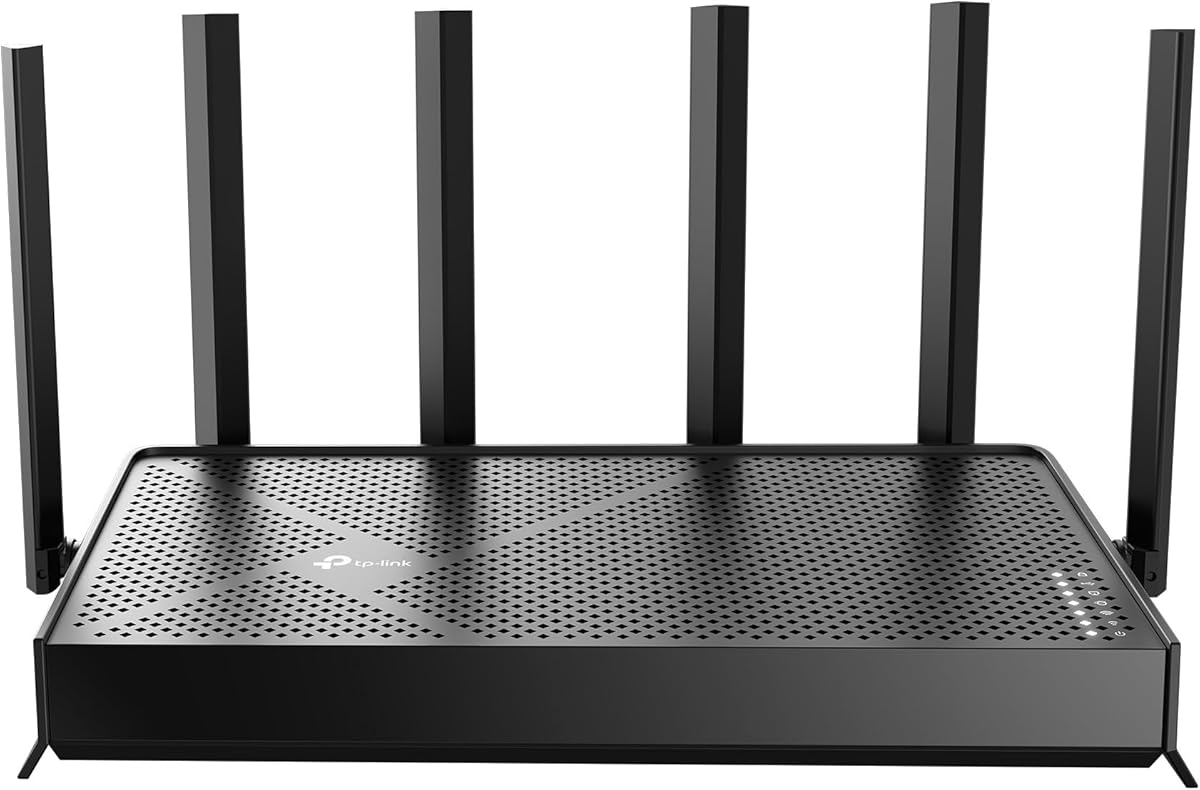
TP-Link Tri-Band BE9700 WiFi 7 Router
4.2Editor score
Tri-band Wi-Fi 7
10 Gbps multi-gig port
Coverage up to 2,600 square feet
Compare the best router for Sky Broadband in this October 2026 guide, covering Wi-Fi speed, coverage, Ethernet options, security, features, and easy setup.
Choosing a router for Sky Broadband starts with understanding how the supplied broadband equipment and your household needs fit together. A strong router should distribute your available connection smoothly, handle busy evening traffic, cover thick-walled rooms, and provide dependable wired connections where they matter most.
We compared the ten included routers by examining Wi-Fi generation, aggregate wireless speeds, band configuration, Ethernet options, VPN support, management features, device capacity, and the need for a separate modem. The list includes standalone wireless routers, a wired VPN router, and one cable modem-router combination.
Each review explains the strongest reasons to consider a model, along with practical limitations and compatibility considerations. The award labels identify our three standout selections, while the comparison table gives every product a quick side-by-side overview. Availability and prices can change, so confirm current details before buying.
4.2Editor score

4.4Editor score

4.4Editor score
This table compares all ten options by wireless standard, headline speed class, wired connectivity, and standout features. Remember that most standalone routers require a compatible modem, while the NETGEAR CAX30 includes an integrated DOCSIS 3.1 cable modem.


The TP-Link AX1800 WiFi 6 Router, also identified as the Archer AX21 V5, is our best overall router for Sky Broadband because it balances wireless capability, useful security features, and straightforward management without introducing a complicated setup process. Its 4.4 rating reflects broad customer appeal, while the supplied specifications identify support for major internet service providers.
We may earn a commission when you buy through this link, at no additional cost to you.
The router offers 1.8 Gbps of total theoretical bandwidth, divided between the 5 GHz and 2.4 GHz bands. OFDMA helps it communicate with multiple devices more efficiently, and beamforming, four high-gain antennas, and an advanced front-end module support stronger signal delivery in challenging areas. That combination is particularly useful in homes where numerous phones, televisions, consoles, and computers share the connection.
The Archer AX21 also supports OpenVPN and PPTP VPN server functions, giving connected clients access to a secure network without requiring every device to run its own VPN application. A separate modem remains necessary, and performance will still depend on the Sky plan, the supplied equipment, distances, walls, and other environmental factors. Those limitations are normal for a router rather than an integrated cable gateway.
This is the most broadly suitable selection for households that want current Wi-Fi 6 performance, useful coverage tools, and manageable administration. It is particularly attractive for owners who do not need the newest Wi-Fi 7 standard or a 6 GHz band. Choose it when a capable, balanced router is more important than having the highest possible multi-gig specification.
OFDMA, dual-band Wi-Fi 6, and beamforming help the router handle concurrent traffic while directing signals toward connected clients. The design is well suited to households that routinely stream in 4K, game online, or operate several devices at once.
Built-in OpenVPN and PPTP server support adds a way to access a private home network remotely. TP-Link also highlights its cybersecurity commitment and recommends keeping firmware current through the Tether app.
We may earn a commission when you buy through this link, at no additional cost to you.
The Linksys WRT54GL is the most unconventional selection in this guide and is best suited to an experienced user who values an open Linux-based platform over modern wireless speed. It carries a 4.1 rating, shares one internet connection across four wired LAN ports, and includes a wireless access point with two external antennas.
We may earn a commission when you buy through this link, at no additional cost to you.
Its defining strength is flexibility. Because the router is based on Linux, it can appeal to users who want an established open-source firmware ecosystem and are comfortable configuring the device themselves. Built-in WPA2 support and an SPI firewall provide basic protection, while status LEDs show power, DMZ, wireless, Ethernet, and internet activity.
The supplied specifications identify a maximum 54 Mbps link rate, four 10/100 switched Ethernet ports, and one 10/100 WAN connection. Those figures are dated for a modern broadband household. There is also a discrepancy between the product title, which mentions AC1200 and 1.2 Gbps, and the bullet-point specifications, which describe Wireless-G and a 54 Mbps maximum link. Buyers should verify the exact hardware revision and its radio capabilities.
The WRT54GL makes sense only when its open software ecosystem justifies the limitations. For typical streaming, gaming, and multi-device use, one of the Wi-Fi 6 or Wi-Fi 7 routers in this guide is a safer choice. For a technical enthusiast running a deliberately simple or specialized network, however, the older platform may still offer value.
The Linux-based operating environment is the main attraction for technically confident users. It offers a different relationship with the router than a standardized mobile-app interface, but it also requires more setup knowledge and responsibility.
The built-in four-port switch is useful for connecting computers, televisions, and other Ethernet devices. Both the WAN and LAN interfaces are 10/100, which limits performance on faster broadband plans.
We may earn a commission when you buy through this link, at no additional cost to you.
The TP-Link ER605 is a wired Gigabit VPN router rather than a conventional Wi-Fi router, making it best for homes or small offices that rely on Ethernet and separate wireless access points. It holds a 4.4 rating and distinguishes itself with five Gigabit ports, three configurable WAN connections, comprehensive firewall tools, and extensive VPN support.
We may earn a commission when you buy through this link, at no additional cost to you.
Its port arrangement is unusually flexible. One Gigabit port serves as WAN, two Gigabit ports can operate as either WAN or LAN, and two additional Gigabit LAN ports support local equipment. A USB connection can accept a compatible 4G or 3G modem as a WAN backup, providing a useful continuity option when the primary connection fails.
Security is the ER605's major strength. The supplied data lists support for up to 20 LAN-to-LAN IPsec connections and 16 OpenVPN, 16 L2TP, and 16 PPTP connections. Advanced firewall policies, denial-of-service defense, IP, MAC, and URL filtering, a speed test, and other management functions make this a strong choice for a network owner who wants control over traffic and remote access.
The ER605 should be chosen when reliable wired performance and VPN capabilities matter more than having a convenient all-in-one Wi-Fi system. It can sit at the center of a structured network, but you will need to supply or retain suitable routers or access points for wireless coverage. It is less appropriate for a typical living room where the priority is effortless whole-home Wi-Fi.
Three configurable WAN positions allow service providers or backup links to be balanced or assigned for different purposes. This makes the ER605 particularly useful for users who need more than a single broadband connection.
Support for several VPN protocols gives remote clients multiple connection methods. The USB mobile broadband backup can maintain internet access if the main broadband link becomes unavailable.
We may earn a commission when you buy through this link, at no additional cost to you.
The TP-Link Archer BE230 is a dual-band Wi-Fi 7 router with a useful blend of modern wireless features and multi-gig Ethernet. Its 4.2 rating and listed specifications make it an appealing option for users who want next-generation wireless technology without moving directly to a large tri-band system.
We may earn a commission when you buy through this link, at no additional cost to you.
The router is advertised at up to 2,882 Mbps on the 5 GHz band and 688 Mbps on the 2.4 GHz band. Wi-Fi 7 features include Multi-Link Operation, Multi-RUs, and 4K-QAM, all designed to improve speed, reliability, and capacity under suitable conditions. It also supports up to 60 devices and coverage up to 2,000 square feet, according to the supplied information.
Its wired feature set is unusually good for a dual-band model. A 2.5 Gbps WAN/LAN port, another 2.5 Gbps LAN port, and three 1 Gbps LAN ports make it suitable for a broadband plan that benefits from faster local connections. Compatibility with EasyMesh routers and range extenders also allows the system to grow across a larger home without forcing every device onto one physical unit.
The Archer BE230 is a sensible choice for households with recent Wi-Fi 7 phones, laptops, televisions, or consoles that want future-facing capabilities at a less expansive scale than a tri-band router. Remember that real results depend on the Sky plan, modem, client hardware, distance, and obstacles. A separate modem is generally required, and a capable Wi-Fi 6 model may still meet the needs of most households.
The two 2.5 Gbps ports are the standout wired feature, enabling high-speed connections to compatible computers, storage, and network infrastructure. Three additional Gigabit LAN ports support conventional wired devices.
EasyMesh compatibility allows another compatible router or extender to fill weak areas. This gives buyers a practical path to expand coverage without relying on a single unit to reach every room.
We may earn a commission when you buy through this link, at no additional cost to you.
The TP-Link Dual-Band AX3000 Wi-Fi 6 Router is our best budget selection because it delivers a high aggregate wireless class, external antennas, and useful network controls without adopting the more complex specifications of a premium Wi-Fi 7 system. It carries a 4.4 rating and lists support for major internet service providers.
We may earn a commission when you buy through this link, at no additional cost to you.
Maximum theoretical throughput is 2,402 Mbps on the 5 GHz band and 574 Mbps on 2.4 GHz. OFDMA enables multiple clients to share a band more efficiently, which can reduce contention when family members are streaming, gaming, or joining video calls at the same time. Target Wake Time is also included to help compatible devices communicate more efficiently and use less power.
Coverage is supported by four high-gain external antennas and beamforming. An improved cooling design uses a larger heat sink and revised enclosure to reduce the risk of thermal throttling. Security and management features include a security scan, IoT device identification, basic parental controls, quality of service, and weekly or monthly reports through TP-Link HomeShield.
This router is well suited to value-conscious households that still want modern Wi-Fi 6, simultaneous-device support, and a familiar app-based setup. It is less suitable for homes that specifically need multi-gig wired ports or a 6 GHz band. With a compatible modem and realistic broadband service, it represents a strong balance for everyday Sky Broadband connections.
OFDMA and beamforming address two common household problems: contention among connected devices and weak directional signal delivery. These features help the router remain responsive when several users are online together.
Basic parental controls, device identification, quality of service, and network reports make the router easier to manage without requiring advanced expertise. The Alexa compatibility listed in the specifications adds another convenient control option.
We may earn a commission when you buy through this link, at no additional cost to you.
The GL.iNet GL-MT6000 Flint 2 has a 4.5 rating, the highest among the products listed, and is built around high-throughput Wi-Fi 6, gaming, and flexible local routing. Its 8-stream design is advertised at up to 6 Gbps, making it a strong candidate for demanding homes and users who work with network-intensive applications.
We may earn a commission when you buy through this link, at no additional cost to you.
The router includes 1 GB of DDR4 memory and 8 GB of eMMC storage, creating more room for custom features and plugins. The supplied data also highlights support for more than one hundred connected devices. Two 2.5 Gbps ports allow a multi-gig connection between the router and either a modem or local network, which can benefit compatible broadband services and fast wired devices.
VPN performance is another distinguishing feature. The listing cites up to 900 Mbps for WireGuard and 880 Mbps for OpenVPN, although actual throughput depends on the service provider, network environment, VPN server location, and subscription. AdGuard Home support offers local DNS filtering for unwanted tracking and selected advertisements, while the customizable platform appeals to users who prefer more control than a basic router interface provides.
The main setup consideration is firmware. GL.iNet specifically instructs buyers to update firmware during initial setup, and the web admin panel can be accessed by connecting a computer via Ethernet. Choose the Flint 2 if gaming performance, multi-gig ports, VPN capabilities, and customization matter to you. It is less attractive for shoppers wanting the simplest possible mobile-driven setup.
The eight-stream Wi-Fi 6 platform and powerful processor target stable performance during multiplayer gaming, high-resolution streaming, and video calls. Multi-gig Ethernet also gives suitable gaming systems and computers another low-latency connection option.
AdGuard Home, VPN services, plugins, and a web administration panel provide a high degree of control. The learning curve is higher than on a conventional router, but the extra memory and storage offer room for advanced configurations.
We may earn a commission when you buy through this link, at no additional cost to you.
The NETGEAR Nighthawk RAX36 is a straightforward dual-band Wi-Fi 6 router that connects to an existing broadband modem. It has a 4.4 rating, supports up to 3 Gbps of aggregate wireless speed, and is listed for coverage of up to 2,000 square feet and approximately 25 devices.
We may earn a commission when you buy through this link, at no additional cost to you.
Its strongest appeal is a clear set of essentials without an unusually complex feature list. Four 1 Gbps Ethernet ports provide enough wired connections for a desktop, game console, streaming television, and other networked equipment. A built-in VPN server adds a useful remote-access feature, while USB 3.0 provides an option for compatible storage or peripherals.
The listing states that the RAX36 works with internet service providers up to 1 Gbps, including cable, satellite, fiber, and DSL arrangements. It does not include a cable modem, so users must connect it to a separate compatible modem. That separation can be an advantage for people who already own satisfactory broadband hardware or want to retain the option to change providers.
The RAX36 is a good fit for a typical home that wants fast dual-band Wi-Fi 6, several wired ports, and uncomplicated network replacement. Its stated capacity is lower than that of some high-end routers, so very large homes or heavily connected shared spaces may benefit from a higher-tier system or mesh expansion. For a normal connected household, it remains a focused and understandable option.
Using a separate modem gives owners flexibility over their broadband hardware and may avoid replacing a perfectly serviceable Sky gateway. The router then focuses entirely on distributing traffic through Wi-Fi and Ethernet.
Four Gigabit Ethernet ports support demanding devices without adapters, while dual-band AX3000 wireless performance handles everyday streaming, gaming, and browsing. A built-in VPN server extends secure remote access.
We may earn a commission when you buy through this link, at no additional cost to you.
The TP-Link Archer AXE75 is a tri-band Wi-Fi 6E router with up to 5,400 Mbps of aggregate bandwidth. Its 4.3 rating, dedicated 6 GHz radio, and 512 MB of memory make it an effective middle ground for homes that want more capacity than a conventional dual-band router but do not need a Wi-Fi 7 system.
We may earn a commission when you buy through this link, at no additional cost to you.
The band allocation is 2,402 Mbps on both 6 GHz and 5 GHz, plus 574 Mbps on 2.4 GHz. The 6 GHz band provides additional room for compatible modern devices and can deliver low-latency performance where client support and local conditions allow it. OFDMA helps the network handle several clients simultaneously, improving capacity in a busy household.
Processing is supported by a 1.0 GHz dual-core CPU and a housing designed for heat dissipation. The router also offers VPN server and client functionality for OpenVPN, PPTP, and L2TP, plus HomeShield features such as network scans, IoT identification, parental controls, quality of service, and periodic reports. EasyMesh compatibility provides a route to expand coverage throughout the home.
The Archer AXE75 is most appropriate for households with several Wi-Fi 6E-compatible devices and a need for dedicated high-bandwidth wireless. It can also serve as the foundation of a larger mesh system. Keep in mind that not every client benefits from the 6 GHz band, and a separate modem is required for most providers. Older wireless-only devices will still use the other available bands.
The third radio creates a separate high-capacity channel for compatible devices, reducing pressure on 5 GHz and 2.4 GHz networks. The benefit is strongest for recent phones, computers, and other Wi-Fi 6E clients.
A dual-core 1.0 GHz processor and 512 MB of memory support the router's higher aggregate bandwidth and network features. The redesigned housing helps manage heat so performance can remain stable in varied environments.
We may earn a commission when you buy through this link, at no additional cost to you.
The NETGEAR Nighthawk CAX30 combines a DOCSIS 3.1 cable modem with an AX2700 dual-band Wi-Fi 6 router. It is the only integrated cable modem-router in this guide, making it worth considering for a new setup, a replacement device, or a household that wants fewer separate boxes.
We may earn a commission when you buy through this link, at no additional cost to you.
The modem side supports multi-gig cable service, while the router provides up to 2.7 Gbps of aggregate wireless performance. Coverage is listed at up to 2,000 square feet for more than 25 connected devices. Four Gigabit Ethernet ports make it easy to hardwire gaming consoles, desktops, and streaming equipment for stable low-latency connections.
Compatibility is the decisive issue. The supplied information specifically lists Xfinity plans up to 800 Mbps, Spectrum up to 1 Gbps, and Cox up to 1 Gbps. It explicitly is not compatible with Verizon, AT&T, CenturyLink, DirecTV, DISH, or bundled voice plans. ISP activation is required, so buyers should verify support for their exact provider, package, and technology before purchase.
The CAX30 is a sensible choice if Sky's existing cable service and activation process support this device, because it combines network termination and wireless distribution in one enclosure. The Nighthawk app supports guided setup, speed tests, device pausing, and guest networks. It is not appropriate for fiber or DSL installations, and some cable providers may require their own approved gateway.
Integrating DOCSIS 3.1 cable termination with Wi-Fi 6 reduces the number of separate devices on the network. This can simplify a new installation or replace an older cable modem and router combination.
The Nighthawk app guides setup and lets users run speed tests, pause connected devices, and configure guest networks. Additional security features include WPA3, firewall protection, and denial-of-service attack prevention.
We may earn a commission when you buy through this link, at no additional cost to you.
The TP-Link Archer BE600 is our best premium router because it combines tri-band Wi-Fi 7, a 10 Gbps network port, extensive device capacity, and a 2.5 Gbps configuration. Its 4.2 rating reflects a capable high-end system, while the supplied specifications target large homes and households with many connected devices.
We may earn a commission when you buy through this link, at no additional cost to you.
Aggregate throughput is listed at up to 5,765 Mbps on 6 GHz, 2,882 Mbps on 5 GHz, and 1,032 Mbps on 2.4 GHz. Wi-Fi 7 features include Multi-Link Operation, Multi-RUs, 4K-QAM, and channels up to 320 MHz. These technologies can improve reliability and efficiency when used with compatible recent devices such as the iPhone 16 Pro, Samsung Galaxy S24 Ultra, and PS5 Pro.
Wired connectivity is equally notable. A 10 Gbps WAN/LAN port, one 2.5 Gbps WAN/LAN port, and three 2.5 Gbps LAN ports provide an excellent foundation for a multi-gig broadband plan and high-speed local networking. The router supports up to 120 devices and coverage up to 2,600 square feet, using six positioned antennas and beamforming.
The Archer BE600 is appropriate for owners with compatible Wi-Fi 7 clients, large homes, and a need for multi-gig wired connections. TP-Link HomeShield, parental controls, VPN client support, Tether app management, and a web interface round out the feature set. If the connected devices are older or the broadband plan is modest, the premium specifications may remain underused.
The 10 Gbps port is the standout for users connecting a capable modem, workstation, NAS, or switch. Three 2.5 Gbps LAN ports and an additional configurable 2.5 Gbps port support a wide range of faster wired arrangements.
Separating traffic across 6 GHz, 5 GHz, and 2.4 GHz supports many device types while reducing congestion. Multi-Link Operation can combine multiple bands to improve reliability and responsiveness for compatible clients.
Six antennas and beamforming focus signal toward difficult areas, while the stated capacity reaches 120 simultaneous devices. Actual performance still depends on floor plans, walls, client hardware, and how clients are distributed.
We may earn a commission when you buy through this link, at no additional cost to you.
The best router for Sky Broadband depends on your broadband technology, service speed, home layout, connected devices, and preferred level of control. Use the following factors to narrow the field before making a final purchase.
A standalone router usually needs a compatible cable, fiber, DSL, or other broadband modem to establish the internet connection. The AX1800, Archer BE230, AX3000, Flint 2, RAX36, Archer AXE75, and Archer BE600 all require a separate modem according to the supplied data. The ER605 is designed to connect through Ethernet, while the CAX30 includes a DOCSIS 3.1 cable modem but has explicit provider limitations.
Check the service technology, current gateway, and exact broadband package before buying. A router's headline wireless speed cannot create a faster internet connection, and a high-performance Wi-Fi system will not bypass provider activation rules. Choose a separate-modem setup if you want flexibility or already own suitable hardware; consider an integrated cable device only after confirming compatibility.
Wi-Fi 6 remains a practical standard for many households, while Wi-Fi 6E adds the 6 GHz band and Wi-Fi 7 introduces features such as Multi-Link Operation, Multi-RUs, and 4K-QAM. Faster standards only deliver their full benefits when smartphones, laptops, televisions, consoles, and other clients support the relevant generation. Older Wi-Fi 5, Wi-Fi 4, and Wi-Fi 6 devices can connect to newer routers, but they will not gain capabilities they do not support.
Check the specifications of the devices used most often. A dual-band Wi-Fi 6 router is usually sufficient for conventional browsing, streaming, and gaming. Choose Wi-Fi 6E for a meaningful number of compatible clients, or Wi-Fi 7 when newer hardware and future expansion are priorities.
Aggregate router speeds describe theoretical maximums under favorable conditions, not guaranteed home internet speeds. The AX1800 offers up to 1.8 Gbps, the AX3000 reaches 2,976 Mbps, the Archer AXE75 reaches 5,400 Mbps, and the Archer BE600 reaches 9,679 Mbps. Your Sky package, modem, Ethernet connection, client hardware, interference, and distance will all limit the result.
Match the router to your service rather than buying solely for the largest number. A less powerful router can fully handle a moderate plan if coverage and features suit the home. For very fast service, investigate multi-gig Ethernet and a compatible modem so faster local equipment is not held back by a single-gigabit link.
Antenna count, beamforming, signal processing, and band design all influence coverage, but room layout matters more than a universal square-foot figure. The Archer BE600 is listed for up to 2,600 square feet, while the RAX36, Archer BE230, and CAX30 are listed for up to 2,000 square feet. These estimates are not guarantees for every building.
Identify locations with thick walls, multiple floors, or dead zones before deciding. A single high-powered router may be sufficient for a compact home. Larger properties may benefit from EasyMesh-compatible equipment, such as the Archer BE230 or Archer AXE75, or another compatible router and range extender. Place the primary unit centrally and away from enclosed cabinets or obstructions.
Wired connections remain valuable for desktop computers, game consoles, smart televisions, network storage, and home-office equipment. The TP-Link ER605 provides five Gigabit ports and three configurable WAN positions, making it ideal for structured multi-WAN networks. The Flint 2 has two 2.5 Gbps ports, the Archer BE230 combines two 2.5 Gbps ports with three Gigabit LAN ports, and the Archer BE600 includes one 10 Gbps port alongside four 2.5 Gbps ports.
Choose based on the equipment you own now and the speed of your broadband line. More ports do not automatically mean better performance, but matching port speeds to clients prevents a Gigabit-capable device from being limited unnecessarily. Plan a modest amount of headroom for future upgrades while keeping the setup manageable.
Modern routers should provide encrypted wireless connections, firewall protection, current firmware, and manageable parental controls. The AX1800, AX3000, and Archer AXE75 support VPN server functions, while the RAX36 also includes a built-in VPN server. The ER605 provides extensive VPN protocols, firewall policies, filtering tools, and denial-of-service defense. The Flint 2 supports WireGuard and OpenVPN for high-throughput connections.
Consider how you will use remote access. A VPN server is helpful for accessing home devices from elsewhere, whereas a VPN client sends household traffic through a remote server. Other features worth checking include IoT device identification, guest networks, ad filtering, WPA3, and security subscriptions with clear terms.
TP-Link's Tether app, NETGEAR's Nighthawk app, and the Flint 2's web interface provide different levels of convenience and control. Tether-based products offer guided setup, firmware updates, parental controls, and network reporting. The Flint 2 rewards users who want AdGuard Home, plugins, and custom routing, while the RAX36 and CAX30 present focused interfaces for mainstream households.
Begin with the setup method you are comfortable maintaining. Mesh and EasyMesh support can extend coverage later, but every added access point should be placed deliberately to avoid unnecessary interference. Download the latest firmware during setup, especially when the manufacturer explicitly says an early update is important.
Device-count claims provide a useful starting point, but usage intensity changes the way a network behaves. The AX1800, Archer BE230, and AX3000 use OFDMA to help multiple clients share spectrum efficiently. The Flint 2 is listed for more than one hundred devices, the Archer BE600 for 120, and the RAX36 for 25. Larger systems also carry more powerful processors, more memory, or additional bands.
Think about simultaneous 4K streaming, cloud gaming, video calls, downloads, and large file transfers rather than counting only paired phones and laptops. For a typical family, a capable Wi-Fi 6 model is often enough. A tri-band or Wi-Fi 7 system becomes more relevant when many high-bandwidth clients are active in a larger home.
Begin by documenting the current broadband equipment, noting the service type, connection ports, and any existing Ethernet runs. For a standalone router, disconnect the old unit only after confirming the replacement is ready. Connect the appropriate WAN or Internet port to the modem, then power the modem on and allow it to synchronize before powering the router.
Use the manufacturer's app or web interface to complete initial setup, change default administrator credentials, and update the firmware. The GL.iNet Flint 2 specifically instructs buyers to update firmware during initial setup. Create separate administrator and wireless credentials, enable WPA2 or WPA3 where available, and configure guest or IoT networks when useful.
Place the router in an open, central position with space around its antennas. Avoid cabinets, television stands, microwave appliances, and tightly enclosed spaces. Review connected devices, remove unknown clients, update firmware periodically, check logs, and restart the unit occasionally. For a wired network, use quality Ethernet cables and inspect connectors for damage.
Most standalone routers need a separate compatible broadband modem, while the NETGEAR CAX30 includes a cable modem. Whether your existing Sky equipment can be reused depends on its technology and current condition. Check the router's connection requirements and confirm that your broadband package is compatible before replacing anything.
Only if your current broadband package, modem, Ethernet connection, or home Wi-Fi coverage is the limiting factor. A more advanced router cannot exceed the speed delivered by your internet service. It can, however, improve internal wireless performance, reduce contention, and provide better coverage around weak areas.
Wi-Fi 7 is most valuable when you own several compatible devices and plan to keep them for several years. Features such as Multi-Link Operation and Multi-RUs can improve responsiveness and reliability, but older clients will still operate using the standards they support. A good Wi-Fi 6 router remains a practical choice for many homes.
A dedicated 6 GHz band can provide additional capacity and low-latency connections for compatible devices, while 2.4 GHz remains useful for longer-range and less demanding equipment. If most of your connected clients are older Wi-Fi 5 or Wi-Fi 6 products, a dual-band router may deliver a more balanced result for typical household use.
Multi-gig ports are useful for very fast broadband, modern computers, network storage, and advanced home labs. They allow compatible wired devices to operate beyond Gigabit limits and give the network room to grow. If your service and hardware are limited to Gigabit, additional port speed may not produce an immediate visible benefit.
The TP-Link Archer BE230 and Archer AXE75 are explicitly listed as EasyMesh-compatible, allowing compatible routers and extenders to expand coverage. Other products may support third-party mesh systems, but the supplied information does not confirm that. Check the manufacturer's current documentation before mixing models or brands.
Place the router near the center of the home or the main area of activity, elevated above furniture and away from closed cabinets. Thick walls, floors, metal, and household electronics can weaken signals. For larger homes, use measured Ethernet or a compatible mesh system rather than expecting one router to perform equally everywhere.
Change the administrator password, use a strong Wi-Fi passphrase, and select the strongest encryption supported by your devices. Keep firmware updated, review connected-client lists, and remove unfamiliar devices. Enable guest networking or parental controls where useful, and review optional security subscriptions carefully before accepting them.
The TP-Link AX1800 WiFi 6 Router is the most balanced overall choice, combining dual-band Wi-Fi 6, OFDMA, beamforming, four antennas, and VPN server support in a broadly manageable design. The TP-Link Tri-Band BE9700 WiFi 7 Router takes the premium position with multi-gig wired connectivity, three wireless bands, and high stated device capacity, while the TP-Link Dual-Band AX3000 Wi-Fi 6 Router stands out as the budget-focused selection.
Your best decision should begin with compatibility and coverage, not a headline speed number. Confirm whether you need a separate modem, check the technology behind your Sky service, and identify areas where Wi-Fi is weak. Then prioritize multi-gig ports if your plan and devices justify them, Wi-Fi 6E or Wi-Fi 7 if enough clients support those standards, and mesh expansion if the property is larger than one router can serve well.
Finally, compare the complete specification list with your household's actual usage. The CAX30 may simplify a compatible cable setup, the ER605 excels in wired VPN environments, the Flint 2 appeals to gamers and advanced users, and the RAX36 provides focused Wi-Fi 6 networking. Prices and product availability can change, so verify the current listing, warranty terms, and ISP requirements before making your final purchase.