
HIGOLEPC Rugged Windows Tablet J4105
3.6Editor score
MIL-STD-810G rugged construction
IP67 dust and water sealing
4G LTE and dual-band WiFi
16000mAh high-capacity battery
Extensive wired port selection
Rugged Windows 11 tablets are built for people who cannot afford to stop working because of dust, rain, drops, vibration, or demanding outdoor conditions. Unlike ordinary tablets, their reinforced housings, sealed controls, glove-friendly screens, and enterprise connectivity make them practical for warehouses, construction sites, vehicles, laboratories, and field service.
This guide compares ten rugged tablets using the specifications and product information available for each model. The comparison covers processor performance, memory, storage, display size, battery configuration, wireless options, barcode scanning, ingress protection, drop resistance, ports, and practical features such as removable batteries, protected ports, hands-free straps, and PC-style connectivity.
Each selection reflects a different use case, from compact handheld scanners to larger tablets with high-brightness outdoor screens and more conventional PC specifications. The top picks are chosen for their overall balance of durability and functionality, while the remaining reviews explain who each model is likely to serve best. Prices and availability can change, so confirm current listings before purchasing.
3.6Editor score

4.6Editor score

4.3Editor score
As an Amazon Associate we earn from qualifying purchases.
The table below compares the ten featured tablets across their most consequential differences: physical size, operating platform, processing and memory, ruggedness, connectivity, battery approach, and specialist work features. It also highlights the most natural buyer for each device so the comparison is more useful than a simple specification list.


The Fusion5 FWIN232 PRO N5 combines a conventional Windows 11 Professional installation with a ruggedized 10.1-inch form factor, and its 4.0 rating reflects a broadly capable device rather than a specialist industrial scanner. Its standout appeal is balance: the Intel 13th Gen N100 processor, 12GB of memory, and 256GB SSD provide enough capability for routine business applications, while the protected design and included accidental damage coverage make it more suitable for mobile work.
We may earn a commission when you buy through this link, at no additional cost to you.
The 10.1-inch 1920×1200 IPS touchscreen uses 2.5D G+G glass and reaches up to 500 nits, offering a useful balance between field readability and manageable dimensions. Protected Micro HDMI, USB Type-C, and USB 3.0 ports help limit exposure to dust and impact. A 6000mAh battery, 30W Type-C charger, dual-band WiFi, and Bluetooth 5.0 make the tablet practical for a full shift, and the hands-free strap and rear stand improve handling in different working positions.
The main compromise is that the listing does not provide a formal IP or MIL-STD certification. It describes the tablet as shockproof and dustproof, but buyers whose work involves prolonged rain exposure, washdown areas, or regulated drop testing should not treat that general description as equivalent to a stated ingress rating. The 256GB capacity is also more modest than the 512GB versions, although the device supports expansion through a 512GB MicroSD card.
This is a strong choice for field service teams, contractors, educators, and mobile employees who want Windows, useful battery capacity, and a tough exterior without moving to a specialized barcode handheld. It is also the most balanced option in the Fusion5 range. For users who routinely handle files larger than a typical working set or want maximum local storage, the 512GB variants may be preferable, but this model offers the same core platform and warranty package.
The 12GB RAM and Intel N100 platform are well suited to document-heavy work, communication apps, web-based tools, and multitasking. The SSD also makes day-to-day application and file handling more responsive than a tablet built around slower removable storage.
A two-year full warranty with coverage for up to two accidental damage incidents adds meaningful reassurance. Protected ports, a hands-free strap, and a rear stand make the tablet easier to use in workshops, classrooms, and field environments.
We may earn a commission when you buy through this link, at no additional cost to you.
This 512GB Fusion5 is the straightforward storage upgrade to the 256GB model, sharing the same rugged Windows 11 Pro platform, 12GB of memory, Intel 13th Gen N100 processor, and 10.1-inch display. With a 4.0 rating, it offers a balanced package for users who want more room for local files while retaining a portable form factor and useful battery capacity.
We may earn a commission when you buy through this link, at no additional cost to you.
Its larger SSD is the clearest reason to choose this listing over the 256GB version. Field teams can retain more maps, forms, photos, project files, and locally installed applications without immediately depending on cloud access. MicroSD expansion is also supported, while dual-band WiFi, Bluetooth 5.0, dual Full HD cameras, dual speakers, and a 6000mAh battery cover everyday communication and media needs.
This is not a dedicated data-capture device because it does not list an integrated barcode engine, RFID reader, or GPS. Buyers responsible for continuous inventory scanning may find a dedicated scanner tablet more efficient. Likewise, the description does not provide a formal ingress-protection code, so it should not be selected solely on assumptions about immersion or washdown resistance.
It is best for organizations that want a standard Windows tablet with generous storage, a strong warranty package, and enough power for mobile productivity. Compared with the 256GB version, the additional capacity comes with little apparent sacrifice in portability, making this model the more future-proof Fusion5 option for users who retain substantial media or project data on the device.
A 512GB SSD gives field users more freedom to keep reference documents, photographs, maps, and project assets locally. That can be valuable where connectivity is inconsistent or where cloud access is not permitted.
The 1920×1200 IPS panel, dual Full HD cameras, and dual speakers make the tablet useful for video calls, demonstrations, and media as well as business applications. A 30W Type-C charger supports convenient recharging between shifts.
We may earn a commission when you buy through this link, at no additional cost to you.
The third Fusion5 listing delivers the same core combination that makes this family attractive: Windows 11 Professional, 12GB of memory, a 512GB SSD, and an Intel 13th Gen N100 processor. Its 3.9 rating places it just behind the other Fusion5 configurations, but the product information presents a capable general-purpose rugged tablet with particularly useful warranty and accessory provisions.
We may earn a commission when you buy through this link, at no additional cost to you.
The device is positioned for demanding mobile work, with a 6000mAh battery, 500-nit 10.1-inch 1920×1200 IPS touchscreen, dual Full HD cameras, and protected Micro HDMI, USB Type-C, and USB 3.0 connections. It supports 2.4GHz and 5GHz WiFi, Bluetooth 5.0, and expansion through a 512GB MicroSD card. The supplied hands-free strap and adjustable back mount are practical for field navigation or fixed presentations.
The 3.9 rating suggests that buyers should pay attention to the listing and configuration before ordering, especially because several closely related Fusion5 listings appear in the same guide. This model does not offer a barcode scanner, RFID, or an explicit numeric IP rating. Those omissions make it less compelling for specialized logistics operations but keep the focus on general mobile computing.
For schools, contractors, inspectors, and field-service organizations wanting a familiar Windows interface, sizeable local storage, and a two-year warranty with accidental damage protection, this is a compelling option. It is also a good choice for organizations standardizing on one 10.1-inch form factor while valuing replaceable working practices such as carrying a spare MicroSD card.
The two-year full warranty and coverage for up to two accidental damage incidents are particularly valuable for devices traveling between job sites. Registration through the supplied QR code is an important setup step for buyers who want the protection activated.
The hands-free strap reduces the need to grip the tablet continuously, while the adjustable back mount supports tabletop use. These small accessories can make a noticeable difference during long inspections or demonstrations.
We may earn a commission when you buy through this link, at no additional cost to you.
The Vanquisher 6.5-inch is built around a specific purpose: collecting enterprise data in warehouses, logistics centers, retail environments, manufacturing facilities, and the field. Its 4.6 rating is one of the strongest in this guide, and the combination of Windows 11 IoT Enterprise, a built-in Honeywell N3680 2D scan engine, NFC, RFID, GPS, and a compact 20:9 display makes it a purpose-built mobile terminal rather than a general tablet with a rugged case.
We may earn a commission when you buy through this link, at no additional cost to you.
The scan engine supports common 1D and 2D symbologies, including UPC/EAN, Code 128, Code 39, Code 93, Interleaved 2 of 5, PDF417, Data Matrix, and QR codes. Its all-in-one design also includes a 13.56MHz HF RFID reader, camera, GPS, WiFi, Bluetooth, and NFC support across several listed protocols. This concentration of functions can reduce the need to carry separate scanners and mobile computers.
Its IP65 sealing protects against dust and water, while the stated ability to withstand a 1.5-meter drop onto a wooden floor supports use in demanding environments. The trade-off is the 6.5-inch display, which is ideal for one-handed operation but less suitable for reviewing large forms, detailed drawings, or spreadsheets. The 8GB of memory is also modest, although expandable memory is supported.
This tablet is best for inventory teams, warehouse associates, delivery personnel, field technicians, and point-of-sale operations that value scanning speed and portability above a large display. An 18-month warranty, lifetime technical and after-sales support, handstrap, wall adapter, and USB cable make it a complete working package. It is our choice for the most convincing specialist data-capture design.
Combining the scan engine with NFC, RFID, GPS, cameras, and wireless connectivity means workers can complete more tasks without repeatedly swapping devices. The compact 20:9 form factor also feels purpose-built for extended handheld use.
Windows 11 IoT Enterprise provides a familiar interface for business applications while supporting a focused handheld form factor. The 6.5-inch screen is particularly convenient in warehouses where one-handed operation and pocketability matter.
We may earn a commission when you buy through this link, at no additional cost to you.
The HIGOLEPC J4105 is a highly connected 10.1-inch rugged tablet aimed at field work, warehouses, geological surveys, construction, agriculture, and other mobile environments. Its 3.6 rating is the lowest among the featured products, but the core configuration offers substantial utility: Windows 11 Pro, 4G LTE, dual-band WiFi, GPS, Bluetooth, a 16000mAh battery, and an unusually broad selection of physical interfaces.
We may earn a commission when you buy through this link, at no additional cost to you.
Its high-strength plastic body is described as MIL-STD-810G Grade, with resistance to a 1.2-meter fall, IP67 waterproof and dustproof sealing, and shock resistance. The large battery is stated to support approximately 10 hours of mobile work, while 4G LTE allows the device to remain connected away from fixed WiFi. GPS can support navigation, and offline maps can be downloaded in advance according to the product information.
Performance is less impressive than the newer Fusion5 models. The Intel N4120 processor and 8GB of memory are intended for lightweight tasks, and 128GB of storage leaves limited room for extensive local media. The headline 8000mAh capacity in the title conflicts with the detailed 16000mAh description, so buyers should verify the exact battery configuration in the listing and package contents before ordering.
Despite these limitations, this is a strong fit for teams needing connectivity, navigation, long runtime, and physical ports. HDMI, USB 3.0, USB Type-C 3.1, a DB9 serial port, headphone jack, and TF card slot can simplify integration with peripherals and legacy equipment. It is particularly interesting for field workers who value LTE and battery endurance more than heavyweight multitasking performance.
4G LTE, dual-band WiFi, GPS, and Bluetooth make this tablet useful in locations where a standard WiFi-only tablet would be limited. Downloading maps in advance can support navigation when a network is unavailable.
The DB9 serial port is especially distinctive and may assist with compatible equipment integration. The additional USB, HDMI, headphone, and TF card connections give users more flexibility than a minimalist tablet.
We may earn a commission when you buy through this link, at no additional cost to you.
The Arrvel I17J combines a 10.1-inch Windows 11 Pro tablet with a Honeywell N4680 scan engine, and its 5.0 rating makes it one of the most favorably reviewed products in the roundup. It is designed for inventory management, warehousing, retail, logistics tracking, ERP and warehouse management systems, field documentation, and other workflows where rapid barcode capture matters.
We may earn a commission when you buy through this link, at no additional cost to you.
The scanner supports 1D and 2D formats such as Code 128, UPC-A, EAN-13, and PDF417, with the product information emphasizing rapid reads even from damaged, smudged, or poorly printed codes. A 700-nit sunlight-readable display improves outdoor visibility, while an 8MP rear camera and 5MP front camera support inspection records and remote collaboration. Intel Celeron N5100 processing, 8GB RAM, and 128GB storage are adequate for enterprise applications.
Durability is a major strength. The tablet has IP65 sealing, protection against water sprays and dust, and a stated ability to withstand a four-foot drop onto concrete. Its removable 5000mAh battery supports quick swapping, while a battery-free mode allows operation from USB-C power in fixed installations. The 8GB memory is limited for heavy multitasking, and the removable battery adds size and handling complexity.
This is an excellent choice for organizations that need a versatile scanner and a brighter screen than most rugged models. It suits warehouse teams, construction supervisors, inspectors, and delivery operations, particularly where outdoor visibility and battery flexibility are priorities. A one-year manufacturer warranty, two years of accessory coverage, and lifetime technical assistance add useful support.
The Honeywell N4680 engine and support for widely used 1D and 2D formats make the I17J more useful than a general tablet paired with a camera-based scanning application. It is especially well suited to inventory and logistics work.
Swappable 5000mAh batteries reduce downtime by allowing a charged spare to take over. Battery-free operation is also useful for fixed kiosks, forklifts, and other installations where constant charging is practical.
We may earn a commission when you buy through this link, at no additional cost to you.
The Dell Latitude 7220 is the premium conventional-PC option in this roundup, combining an 11.6-inch full HD rugged display with a Core i5-8365U processor, 16GB of LPDDR3 memory, and a 256GB PCIe NVMe SSD. Its 4.3 rating reflects a well-specified machine that prioritizes display quality, conventional PC performance, and a large workspace over the compactness or specialist scanning found in some alternatives.
We may earn a commission when you buy through this link, at no additional cost to you.
The 1000-nit outdoor-readable touchscreen is the standout feature. It is paired with Gorilla Glass and glove-capable touch, making it suitable for field inspections, utility work, public safety, transport, and other roles where visibility and input in variable conditions are important. Windows 11 Pro licensing and a standard PC platform simplify use of familiar desktop applications and enterprise management tools.
The i5-8365U is an eighth-generation, four-core processor with eight threads, while 16GB of memory and PCIe NVMe storage are more generous than the configurations offered by most competitors in this list. The trade-off is size: an 11.6-inch tablet is less discreet and less convenient for one-hand carrying than a 6.5-inch handheld. It also lacks a listed barcode engine, RFID reader, cellular radio, or numeric ingress rating.
Dell Latitude 7220 is best for organizations that need a rugged Windows tablet to function as a compact PC, especially where outdoor screen quality and comfortable full-size productivity matter. It is a compelling alternative for government, public safety, utilities, and professional field teams that prefer a recognizable enterprise PC platform. Confirm the exact warranty, connectivity, and accessory configuration with the seller.
The 1000-nit panel is substantially brighter than the 500-nit and 700-nit screens elsewhere in the comparison. Combined with glove-capable touch, it improves usability for outdoor inspection, transport, and field engineering.
A Core i5 processor, 16GB of memory, and NVMe storage create a responsive Windows environment. The large display makes the tablet useful for forms, dashboards, maps, and desktop workflows that are cramped on smaller devices.
We may earn a commission when you buy through this link, at no additional cost to you.
The Microsoft Surface Go 4 is included as a portability-focused alternative for buyers who value the compact Windows experience over maximum industrial protection. Its 4.0 rating, 10.5-inch display, and stated 12.5-hour battery runtime make it an interesting mobile Windows option for travel, presentations, and light field use.
We may earn a commission when you buy through this link, at no additional cost to you.
The tablet ships with Windows 11 Pro, 8GB of memory, and 128GB of storage. Its slate form factor is easy to carry, while the screen remains large enough for media, web applications, documents, and communication. Bluetooth, NFC, a quad-core processor, and the claimed battery runtime support an all-day productivity focus. The Platinum finish also gives it a neutral, professional appearance.
It should not be confused with a purpose-built rugged tablet. The supplied information does not mention an ingress rating, military-standard testing, drop resistance, sealed ports, a barcode scanner, RFID, LTE, GPS, or a replaceable battery. It therefore presents more risk in warehouses, construction zones, and outdoor environments than the Fusion5, HIGOLEPC, Vanquisher, Arrvel, Dell Latitude, or Samsung Active3 options.
Surface Go 4 is best for users who need a light Windows tablet for travel, meetings, note-taking, presentations, or relatively controlled environments. Those who require the keyword's defining rugged characteristics should favor an explicitly rated or reinforced model. Even with its limitations, it remains one of the most portable and familiar Windows tablet experiences available.
The 10.5-inch form factor balances screen space with manageable weight. It works well for travel, presentations, document review, and mobile productivity when the environment does not demand industrial protection.
A stated 12.5-hour runtime makes the Surface Go 4 appealing for commuting and uninterrupted workdays. Fast-charging and a familiar Windows interface further reduce the learning curve for new users.
We may earn a commission when you buy through this link, at no additional cost to you.
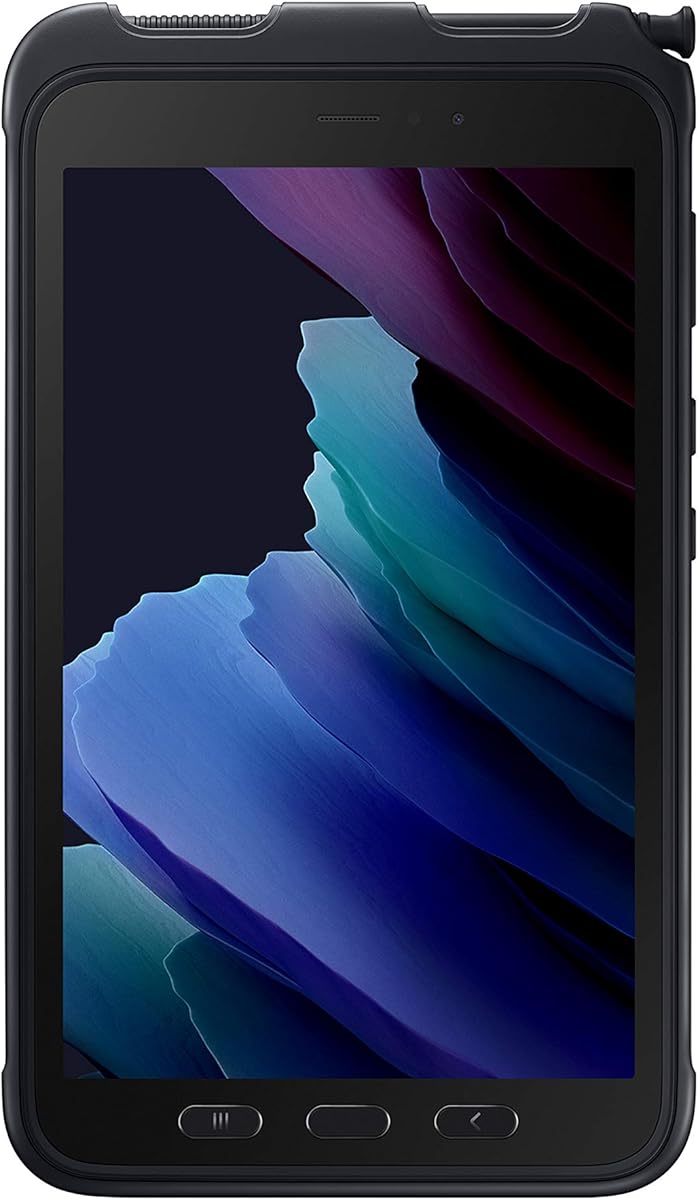
The Samsung Galaxy Tab Active3 Enterprise Edition is a compact 8-inch rugged tablet with a 5.0 rating, unlocked cellular connectivity, 64GB of storage, biometric security, and a rugged design certified to MIL-STD-810H2 and IP68 standards. It is one of the strongest options for teams that need mobility and durability but can operate through Android applications rather than requiring a full desktop operating system.
We may earn a commission when you buy through this link, at no additional cost to you.
The Active3 can withstand a stated 1.5-meter drop and is protected against dust, dirt, sand, and water. Its enhanced touch settings support glove operation, while the replaceable fast-charging battery provides flexibility for long projects. A no-battery mode allows the tablet to operate from a dedicated power source, making it useful in vehicles and fixed kiosks where continuous power is available.
Unlocked compatibility with Verizon, AT&T, and T-Mobile gives users more choice than a tablet tied to one carrier. Samsung Wireless DeX can provide a PC-like experience for supported workflows, and the 8-inch size remains more manageable than a full laptop. The important distinction is that the supplied information identifies this as a rugged Galaxy tablet, not a Windows 11 device, so it should not be selected by buyers who require native Windows applications.
It is best for field service, delivery, construction, retail, and mobile teams that value compactness, cellular freedom, glove use, and replaceable batteries. Buyers evaluating it as a keyword match should confirm that their required line-of-business applications run on Android. Where they do, this is one of the most compact and well-rounded rugged tablets in the guide.
The 8-inch display is large enough for routine work yet easy to carry one-handed. Enhanced touch support and unlocked major-carrier compatibility make it practical for mobile teams working beyond the office.
A replaceable battery supports long shifts, while no-battery mode creates an alternative for vehicles, kiosks, and other continuously powered installations. This flexibility is one of the Active3's strongest practical features.
We may earn a commission when you buy through this link, at no additional cost to you.
The Samsung Galaxy Tab Active3 Enterprise Edition with model identifier SM-T577UZKDN14 is a compact rugged tablet for organizations that need an eight-inch device with cellular flexibility, replaceable power, and strong environmental protection. Its 4.2 rating is solid, and the specific model number makes it easier for IT teams to standardize, support, and replace than an unnamed configuration.
We may earn a commission when you buy through this link, at no additional cost to you.
It supports 64GB of storage, WiFi, and unlocked LTE compatibility with Verizon, AT&T, and T-Mobile. MIL-STD-810H2 compliance covers a stated 1.5-meter drop, while IP68 protection helps resist water, dust, sand, and dirt. Replaceable fast-charging batteries and no-battery operation extend its usefulness in mobile and fixed deployments, and Samsung Wireless DeX adds a PC-style productivity option for compatible tasks.
Like the other Active3 listing, it does not provide native Windows 11, and its 64GB of internal storage is modest. Biometric security is highlighted in the title, which is useful for organizations that need a stronger authentication layer, but the supplied information does not detail the supported configuration or management options. As a result, buyers should verify app compatibility, security policies, and accessory availability before committing to a fleet.
This configuration is best for mobile enterprises that want a compact, rugged, cellular tablet with a replaceable battery and an identifiable hardware model. It offers a compelling alternative to larger Windows tablets for teams whose operational software is browser-based or Android-compatible. It should not be selected as a substitute for a Windows 11 device when Windows-specific software is mandatory.
The SM-T577 designation gives procurement and IT departments a more concrete hardware reference. That helps with device management, accessory ordering, replacement planning, and rollout consistency.
The eight-inch size, glove-enhanced touch, cellular support, and replaceable battery create a practical combination for field crews. IP68 and MIL-STD-810H2 protections add reassurance for demanding mobile environments.
We may earn a commission when you buy through this link, at no additional cost to you.
Choosing a rugged Windows 11 tablet starts with the work it must perform. Screen size, operating system, scanning hardware, connectivity, battery strategy, and verified environmental ratings matter more than generic claims of ruggedness, so the following factors help separate genuinely useful industrial tools from portable tablets with protective accessories.
Native Windows 11 is essential when the tablet must run desktop applications, Windows-based line-of-business software, VPN clients, or management tools designed for a PC environment. Windows 11 Pro is generally the most flexible option in this guide, while Windows 11 IoT Enterprise is aimed at focused enterprise workflows. Do not assume that every rugged tablet carries Windows; the two Samsung Galaxy Tab Active3 listings are rugged mobile tablets but are not identified as Windows devices. Buyers should verify the operating system and application compatibility before ordering.
Screen size affects portability, one-handed comfort, and the amount of information visible at once. The 6.5-inch Vanquisher is easy to carry and operate like a handheld terminal, while 8-inch Samsung models remain compact but do not run Windows in these listings. The 10.1-inch Fusion5, HIGOLEPC, and Arrvel tablets offer a more practical balance for forms, maps, and dashboards. The 11.6-inch Dell Latitude 7220 is best for users who value a large PC-style workspace over maximum compactness. Brightness is also important: stated figures range from 500 to 1000 nits, with the Dell offering the highest outdoor-oriented specification.
Look for a numeric IP rating, a named military-standard test, and a stated drop height rather than relying on broad words such as shockproof or dustproof. The HIGOLEPC has IP67 protection and a 1.2-meter drop claim, the Vanquisher has IP65 sealing and a 1.5-meter wooden-floor drop rating, the Arrvel has IP65 and a four-foot concrete-drop claim, and the Samsung models have IP68 and MIL-STD-810H2 protection. The Dell listing emphasizes outdoor readability and glove-capable glass but does not provide a numeric ingress rating in the supplied data. Always compare the exact rating with the hazards your workers actually face.
A built-in scan engine is a defining feature for warehouses, retail counters, delivery routes, and inventory work. The Vanquisher includes a Honeywell N3680 2D engine, while the Arrvel I17J uses a Honeywell N4680 and supports major 1D and 2D formats. The Fusion5, HIGOLEPC, Dell, and Surface models do not list dedicated scanning hardware, so using a camera and scanning application may be less efficient. NFC and RFID are separate capabilities: the Vanquisher includes both, and the Arrvel listing highlights 4G LTE rather than RFID.
Dual-band WiFi provides the best indoor and local network performance, while 4G LTE is valuable for workers traveling between sites. GPS adds route guidance and positioning for field teams, and Bluetooth supports accessories such as scanners, keyboards, and headphones. Unlocked cellular support can simplify fleet deployment, as shown by the Samsung Active3 models. The Fusion5 tablets rely on WiFi and Bluetooth, the Dell listing includes WLAN, and the Surface Go 4 lists Bluetooth and NFC. Buyers should match radio support to the locations where the device will actually operate.
Battery life depends on screen brightness, radios, workload, and battery age, so capacity alone is not a guarantee. The Fusion5 models list a 6000mAh battery, the HIGOLEPC listing describes a 16000mAh battery, and the Arrvel uses a removable 5000mAh pack rated for approximately eight hours. Replaceable and swappable batteries are valuable for long shifts, while no-battery or USB-powered modes suit fixed installations and vehicles. The Dell and Surface listings do not provide a comparable removable-battery option in the supplied data.
A newer Intel N100 in the Fusion5 models provides a more contemporary performance profile than the HIGOLEPC's N4120, while the Dell's Core i5-8365U and 16GB of memory offer the strongest conventional PC specifications. The Arrvel's N5100, the Surface's quad-core processor, and the Vanquisher's LPDDR4 configuration are more modest but suitable for targeted workflows. Enterprise ERP, WMS, ArcGIS, SAP, browser-based tools, and office applications can have different demands, so consider memory and storage alongside processor speed rather than relying on one specification.
Long-term support matters when a tablet becomes part of a managed fleet. Fusion5 includes a two-year warranty with accidental damage coverage, the Vanquisher includes an 18-month warranty and lifetime technical support, and the Arrvel provides a one-year manufacturer warranty with accessory coverage and online assistance. Expansion options include MicroSD support on several Fusion5 and Arrvel configurations and a TF card slot on the HIGOLEPC. Consider handstraps, charging docks, spare batteries, vehicle mounts, and replacement-stock compatibility before finalizing the purchase.
Start by configuring the device for the work environment before taking it into service. Complete the operating-system setup, sign in with the organization's account, install required business applications, and apply the appropriate security policies. For scanning tablets, test the barcode engine with every symbology used by the company. Confirm GPS, WiFi, cellular, Bluetooth, cameras, and removable-battery recognition, and download maps or offline files if connectivity may be unreliable.
Use the protective features as intended. Attach the handstrap for one-handed work, position the rear mount securely for tabletop use, and use gloves only when the tablet's enhanced touch settings have been enabled. Keep port covers closed when they are present, clean the scanner window and touchscreen with a soft lint-free cloth, and avoid exposing the device to harsh chemicals unless the manufacturer permits them. Removable batteries should be stored at appropriate temperatures and kept away from heat, impact, and damaged contacts.
For longest service life, establish a charging and inspection routine appropriate to the shift. Use the supplied or specified charger, avoid leaving a tablet in a vehicle at extreme temperatures, and alternate batteries when the device supports swapping. Inspect screens, seals, straps, cables, and scanner windows regularly, particularly after a drop. Keep operating-system and business software updated through the organization's management process, and document the device serial number, warranty status, accessories, and assigned user for fleet recovery.
A genuinely rugged tablet should have documented protection against relevant hazards, such as a numeric IP dust-and-water rating, a named military-standard test, and a stated drop tolerance. Rugged construction may also include reinforced housings, sealed or covered ports, glove-capable touch, and protected screens. Marketing language alone is less useful than comparing published specifications with the conditions the device will actually encounter.
It depends on the applications your technicians need. Windows 11 is preferable for Windows-specific business software, desktop workflows, and familiar file management, while Android may be sufficient for browser-based tools and mobile applications. The two Samsung Galaxy Tab Active3 models in this guide are rugged but are not identified as Windows tablets, so compatibility must be checked before choosing them.
A 6.5-inch device such as the Vanquisher is easier to carry and operate one-handed for continuous scanning. A 10.1-inch model such as the Arrvel offers more room for forms, dashboards, and detailed records while still including a Honeywell scan engine. The better choice depends on how much visual work accompanies scanning and whether battery swaps, brighter displays, or larger screens are more important.
Yes, if the required applications and data are stored locally. Several models support removable or expandable storage, and the HIGOLEPC specifically mentions downloadable maps for offline navigation. For consistent mobile connectivity, however, consider a model with 4G LTE, such as the HIGOLEPC or Arrvel, rather than relying solely on WiFi coverage.
IP65 indicates protection against dust and water jets, while IP68 indicates stronger protection against prolonged or high-pressure water immersion under the conditions defined by the relevant standard. These labels do not cover every possible scenario, and the exact test conditions matter. Buyers should also check drop resistance, screen protection, and whether exposed ports or accessories alter the protection level.
They are especially useful when a tablet must operate through back-to-back shifts without waiting for a full recharge. The Arrvel I17J supports a swappable 5000mAh battery, while the Samsung Active3 models support replaceable batteries and no-battery operation. If a device will remain in a vehicle, warehouse station, or kiosk with reliable power, a fixed high-capacity battery can be simpler.
The featured models list displays ranging from 500 to 1000 nits. The 700-nit Arrvel is explicitly positioned for outdoor job sites, while the Dell's 1000-nit screen is the brightest listed option. Brightness alone is not enough; glove-capable touch, anti-reflective performance, viewing angles, and the ability to operate in direct sun also affect practical outdoor usability.
Eight gigabytes is generally adequate for focused enterprise applications, document workflows, scanning, and a controlled number of open programs. The 16GB Dell configuration provides more headroom for complex desktop applications, extensive multitasking, and conventional PC use. Consider the required software, number of simultaneous applications, and expected service life rather than treating memory as the only measure of performance.
The strongest overall choices in this guide depend on the job. The Vanquisher stands out for compact enterprise data capture with a built-in Honeywell scanner, NFC, RFID, and Windows 11 IoT Enterprise. The Fusion5 family offers the most balanced conventional Windows experience, with a bright 10.1-inch display, modern Intel processing, generous memory, protected ports, and useful accidental damage coverage. The Dell Latitude 7220 is the premium choice for buyers who need a large, extremely bright display and traditional PC-class specifications.
Prioritize the features that directly affect the work environment. Choose verified ingress and drop protection for harsh sites, a scan engine for inventory tasks, 4G LTE and GPS for mobile fieldwork, glove-capable high-brightness displays for outdoor work, and removable batteries for long or continuous operations. A larger screen and faster processor help with detailed productivity, but they cannot compensate for the wrong connectivity, scanning capability, or physical protection.
Before ordering, verify the current listing, operating system, exact battery details, included accessories, warranty activation, and application compatibility. Prices, seller bundles, and configurations can change, and the close similarities among several Fusion5 and Samsung listings make careful model-number comparison important. Use this guide to narrow the field, then confirm the final device against your workflow and working conditions.