
HP Prime G2
4.4Editor score
Advanced CAS graphing functions
Multi-touch 3.5-inch display
Programmable 256MB memory
A scientific calculator for engineering must balance accurate numerical work with the functions, display, and portability needed for technical study, laboratory work, field measurements, and design calculations. The right model should make equations easy to enter, results easy to interpret, and routine conversions faster without adding unnecessary complexity.
We compared ten scientific and graphing calculators using the supplied feature details, focusing on display clarity, scientific functions, equation entry, graphing, programming, memory, exam approval, construction-specific tools, and portability. The guide includes general-purpose engineering options, dedicated construction calculators, and advanced color graphing models.
Each review explains the standout features, practical limitations, and most suitable user. Rankings reflect the information available for this guide, while customer ratings provide an additional reference point. Product availability and prices change, so compare current listings and confirm exam requirements before purchasing.
4.4Editor score

4.8Editor score

4.8Editor score
As an Amazon Associate we earn from qualifying purchases.
The comparison below highlights each calculator's display, functional range, graphing or programming capabilities, and strongest use case. It helps distinguish straightforward scientific models from construction-specific tools and advanced graphing systems for demanding coursework.




The Texas Instruments TI-36X Pro combines a 4.8 rating with a feature set that suits engineering students working across algebra, trigonometry, statistics, calculus, biology, and related subjects. Its defining advantage is the multi-line screen, which can show several calculations or parts of a calculation together rather than forcing the user to scroll through one compact result.
We may earn a commission when you buy through this link, at no additional cost to you.
MathPrint is particularly useful when an expression must be copied faithfully from a textbook, lecture board, or technical worksheet. Fractions, stacked forms, symbols, and textbook-style notation make the display easier to compare with the original problem. The calculator also handles conversions among fractions, decimals, and terms such as Pi, while degree and radian selection supports trigonometric and engineering-angle work.
The main limitation is that the TI-36X Pro is a scientific calculator rather than a graphing or programmable platform. It is therefore most effective for repeated numeric computation, unit-oriented work, and standard engineering coursework. Users who need to plot functions, manipulate graphs, or create reusable programs may eventually prefer one of the graphing models in this list.
It is a strong recommendation for high school students, early engineering undergraduates, and professionals who want a dependable scientific tool without a large learning curve. For routine coursework, statistics, dimensional calculations, and trigonometric analysis, its readable display and broad mode support make it an especially versatile choice.
MathPrint and MultiView help users check more of a calculation before leaving the calculator. That visibility is valuable when transcribing equations, comparing equivalent forms, or reviewing a long sequence of engineering calculations.
Support for algebra, geometry, trigonometry, statistics, calculus, and biology makes this a practical shared device. The same model can support foundational science classes and more advanced mathematics without requiring separate calculators for each subject.
We may earn a commission when you buy through this link, at no additional cost to you.
The Casio FX-115ESPLSB-WA-IT is an advanced scientific calculator with a 4.8 rating and a Natural Textbook Display that presents expressions as they appear in printed mathematical notation. That formatting helps users enter and review equations in a form that closely resembles the source, reducing interpretation differences during class and independent study.
We may earn a commission when you buy through this link, at no additional cost to you.
Its scientific focus makes it a natural companion for engineering mathematics, dimensional analysis, trigonometry, algebra, and basic statistics. Textbook-style entry is especially valuable when a calculation contains fractions, roots, exponents, or multiple operations that would be difficult to interpret from a conventional single-line display.
The supplied information does not identify graphing, computer algebra, or programming features, so users with advanced visualization or automation requirements should choose a graphing model instead. The FX-115ESPLSB-WA-IT is better viewed as a fast, focused scientific calculator than as a complete digital engineering workspace.
This model is most appropriate for students who prioritize readable expression entry and straightforward scientific calculations. It also suits professionals who want a compact tool for routine computations without navigating graph menus or programming environments, provided its listed functions cover the intended workload.
The Natural Textbook Display keeps fractions, symbols, and mathematical relationships visually close to their printed forms. This supports faster equation entry and makes results easier to verify during technical coursework.
For routine scientific work, the model provides a simpler alternative to graphing calculators. That focus can be an advantage for students who need quick calculations rather than extended visual analysis.
We may earn a commission when you buy through this link, at no additional cost to you.
The HP Prime G2 is the most advanced engineering-focused model in this group, with a computer algebra system, advanced graphing, dynamic geometry, spreadsheets, RPN, and a 3.5-inch multi-touch color display. Its 4.4 rating is solid, although it is lower than the ratings attached to several conventional scientific calculators in the comparison.
We may earn a commission when you buy through this link, at no additional cost to you.
A major strength is the ability to move between symbolic, graphical, and numerical representations. Pinch-to-zoom and direct graph manipulation can make function behavior, coordinate relationships, and mathematical models easier to explore than on a text-only scientific calculator. Users can also sketch and adjust functions directly on the screen, supporting blended learning and visual problem solving.
The premium capabilities come with trade-offs. A rechargeable battery, larger touchscreen, advanced software, and an extensive accessory ecosystem make the device more substantial than a standard scientific model. Its many menus and modes can also overwhelm a beginner who only needs trigonometric or unit-conversion functions. The listed 4.4 rating should be considered alongside the much broader feature set.
It is best suited to advanced engineering students, mathematics students, and classroom programs that value graphing, CAS, programming, or wireless collaboration. For a full laboratory, modeling, or computational workspace rather than a single-purpose exam calculator, the Prime G2 provides the deepest engineering toolset here.
The computer algebra system can solve, manipulate, and visualize symbolic relationships that would otherwise require repetitive manual operations. This is particularly useful when exploring engineering models or checking assumptions across several scenarios.
With supported connectivity kits, the Prime G2 can participate in classroom polling, screen sharing, and mobile app workflows. The 256MB of storage also gives room for programs, configurations, and instructional resources.
We may earn a commission when you buy through this link, at no additional cost to you.
The TI-30XIIS is a two-line scientific calculator with a 4.7 rating, offering statistics, advanced scientific functions, fractions, conversions, and trigonometric operations. Its clear entry-and-result display is a meaningful improvement over many basic calculators because users can see the calculation being entered while also checking the computed outcome.
We may earn a commission when you buy through this link, at no additional cost to you.
The device is approved for the SAT, ACT, and AP exams, making it a dependable option for students who need a permitted scientific calculator for standardized testing. Solar and battery power provide flexibility, while the simple physical design keeps the learning curve modest and the device easy to carry between classes.
Compared with the TI-36X Pro or current Casio ClassWiz models, the TI-30XIIS offers fewer modern display features and no graphing, CAS, or programming. That is acceptable when the priority is examination compliance and dependable scientific calculation rather than interactive visualization or advanced mathematical exploration.
This is a strong fit for students taking standardized tests, educators seeking a straightforward approved model, and anyone who values a simple two-line display. It is less suitable for advanced engineering students who need graphing, symbolic computation, or reusable programs as part of their regular workflow.
The two-line screen helps users check the expression and result together. This makes the calculator useful for learning as well as producing answers, particularly when a calculation must be entered accurately from a worksheet.
Solar and battery operation reduces the chance of arriving without power. Its listed approval for SAT, ACT, and AP exams also makes it easier for students to match the calculator to their testing requirements.
We may earn a commission when you buy through this link, at no additional cost to you.
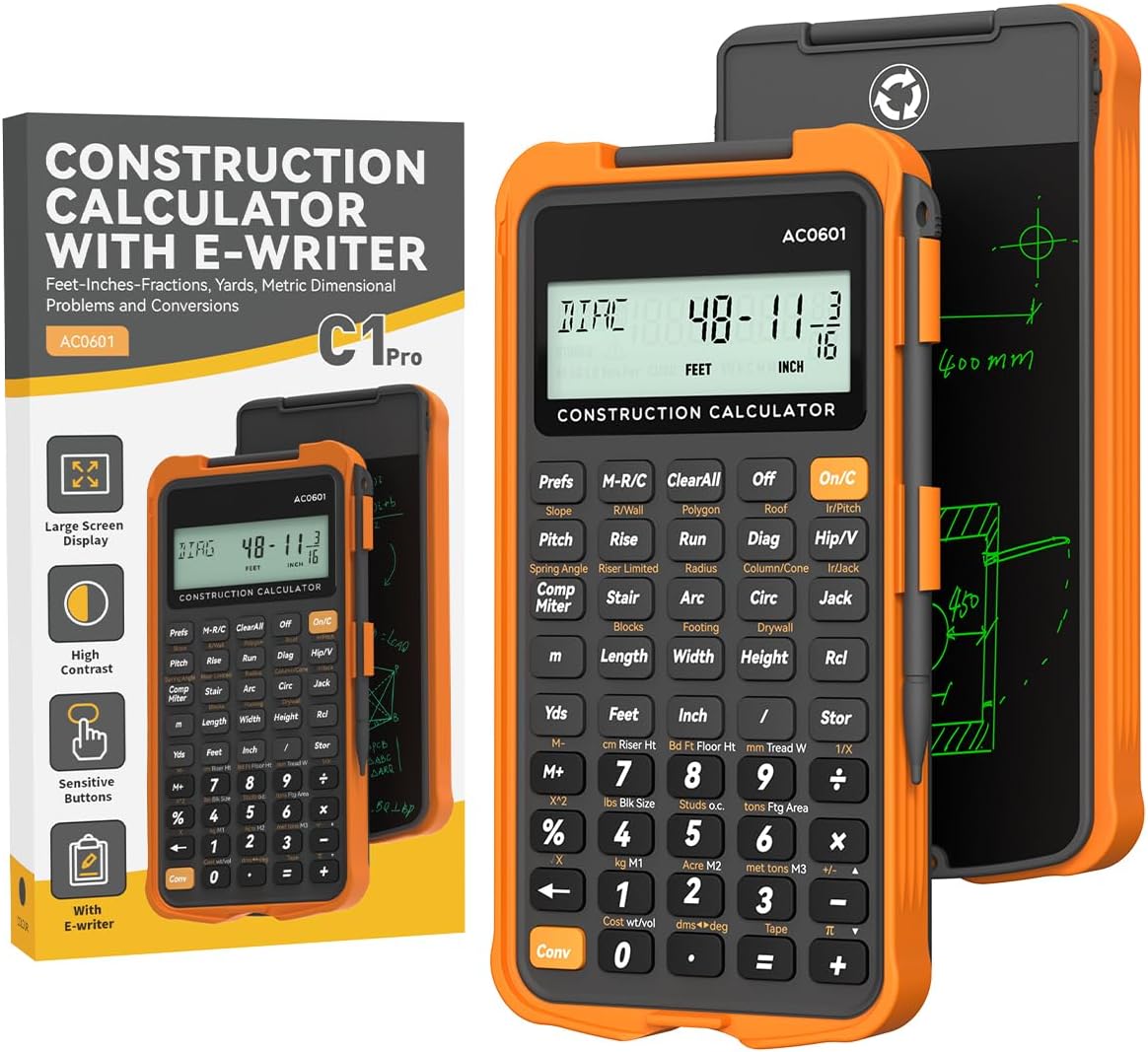
The ROATEE Construction Calculator is built for builders, contractors, estimators, architects, renovators, and engineering students who routinely need field-specific calculations. Its 4.6 rating reflects a practical package: more than 200 construction-oriented functions, a 3-inch 12-digit screen, 45 fast-rebound buttons, three storage registers, and a flip-page writing tablet.
We may earn a commission when you buy through this link, at no additional cost to you.
The function library covers mixed dimensions, area, volume, concrete, brick and block, boards, flooring, drywall, circles, arcs, compound miters, polygon tiling, roofing, foundation correction, rafters, roof pitch, stair layout, and rake walls. This breadth can reduce the need to move repeatedly between a conventional calculator, a geometry reference, and handwritten notes on a jobsite.
The specialized design is both its strength and its limitation. Users who need these construction routines may find the writing tablet and quick rebound keys highly valuable, but those same users may still need a separate scientific or graphing calculator for advanced mathematics. No graphing, CAS, or programming capability is listed, so it should not be treated as a complete engineering analysis platform.
This model is an excellent companion for contractors, estimators, carpenters, concrete workers, roofers, and engineering students involved in construction. It is best chosen for hands-on estimating and layout work, while students whose programs emphasize symbolic mathematics should pair it with a general scientific or graphing calculator.
Roofing, stair, rafter, concrete, flooring, and drywall routines go beyond the scope of a general scientific calculator. Dedicated functions can make field estimates faster and more consistent.
The integrated writing tablet allows measurements, assumptions, and supporting notes to stay near the calculator. That makes the device especially useful when work occurs away from a desk or computer.
We may earn a commission when you buy through this link, at no additional cost to you.
The CATIGA CS-229 combines scientific and graphing functions in a 4.4-rated device aimed at high school and college students. It can plot functions, analyze graphs, and show graphs and formulas simultaneously, offering useful visual support for algebra, calculus, and exam preparation in a relatively portable form.
We may earn a commission when you buy through this link, at no additional cost to you.
Its stated library includes more than 360 functions, with coverage for fractions, complex numbers, statistics, linear regression, standard deviation, and variable solving. Angle, calculation, and display modes give users several ways to approach a problem. The listed dimensions of 7 by 3.3 inches are designed to balance portability with a manageable desktop footprint.
The more detailed information supplied for established premium graphing systems is not available for the CS-229. In particular, the product description does not identify a computer algebra system, extensive programming environment, or advanced classroom connectivity. Its 4.4 rating and specification summary may also warrant more careful comparison with a premium model when course requirements are specialized.
The CS-229 is a sensible option for students who want graphing without paying for the largest advanced ecosystem. It is particularly useful for students studying algebra, geometry, trigonometry, statistics, and introductory calculus who value a combined scientific and graphing format, a protective case, and a broad collection of standard functions.
Showing formulas and graphs at the same time helps students connect an equation with its visual behavior. That feedback is useful when interpreting turning points, intersections, and function changes.
Complex numbers, regression, standard deviation, fractions, and variable solving extend the device beyond basic arithmetic and trigonometry. Multiple modes make it adaptable across common quantitative subjects.
We may earn a commission when you buy through this link, at no additional cost to you.
The Casio FX-9910CW-W-IT is an advanced ClassWiz scientific calculator with a 4.7 rating, a high-definition quadruple-graded LCD, and Natural Textbook Display. Together, these features support clearer equation input and review than a basic single-line scientific calculator can offer.
We may earn a commission when you buy through this link, at no additional cost to you.
The high-definition screen is a meaningful upgrade for reading results, especially in bright classrooms or during long calculation sessions. A quadruple-graded layout can make different portions of the display easier to distinguish, while the Natural Textbook Display keeps expressions visually aligned with printed mathematics. Equation review is particularly helpful when checking a long or multi-stage calculation.
The supplied information does not list graphing, CAS, or programming functions, so this should be considered a modern scientific model rather than a graphing workstation. It also provides less detail about the total function count than some competing descriptions. Buyers should verify the precise functions required by their engineering curriculum rather than assuming every advanced model includes them.
It is a compelling option for students and professionals who want a clear, contemporary scientific interface. It fits well for standard engineering mathematics, dimensional conversions, trigonometry, and coursework where readable expression entry matters more than graphing or programming.
The high-definition quadruple-graded LCD can improve readability during multi-step work. It is particularly beneficial for users who spend long periods comparing equations, modes, and calculated results.
Natural Textbook Display and equation-review features make it easier to inspect how a result was produced. This reduces the need to repeat an entire calculation merely to identify a mistyped expression.
We may earn a commission when you buy through this link, at no additional cost to you.
The Casio fx-991ES Plus 2 delivers a 4.8 rating, 417 functions, and a Natural Textbook Display in a compact scientific calculator. It is a compelling value-oriented choice for engineering students who need broad mathematical coverage without paying for a color graphing system or computer algebra capabilities.
We may earn a commission when you buy through this link, at no additional cost to you.
Its standout engineering-relevant features include 24 levels of brackets, regression, and correlation coefficients. Deep bracket support helps when entering long, nested expressions, while regression tools are useful for analyzing measured data and relationships. Solar and battery power provides operational flexibility, and the listed dimensions of 1.5 by 7.5 by 16.2 centimeters keep the device portable for classes and labs.
The trade-off is that it is a scientific calculator, not a graphing platform. There is no listed CAS, interactive graph analysis, or programmable workflow. It also belongs to an established display generation, so users prioritizing the newest interface, touchscreen operation, or 3D visualization may find newer alternatives more appealing.
The fx-991ES Plus 2 is a strong recommendation for budget-conscious students, exam takers, and working professionals who want a dependable, function-rich scientific tool. It is particularly suitable for statistical analysis, equations, scientific coursework, and any workflow that benefits from extensive expression handling without demanding advanced graphing.
The 417-function library covers a wide range of academic needs while retaining a compact scientific form. It is a practical middle ground for users who need more than a basic calculator but do not require color graphs.
Regression and correlation coefficients support data-oriented engineering study, while 24 bracket levels help preserve complex equation structures. These features make the model useful for measurement interpretation as well as symbolic calculation.
We may earn a commission when you buy through this link, at no additional cost to you.
The Casio Prizm FX-CG50 combines a 4.8 rating with a large high-resolution LCD supporting more than 65,000 colors. It is a strong choice for engineering students who need to visualize functions, work with coordinate systems, or program calculations beyond what a standard scientific calculator offers.
We may earn a commission when you buy through this link, at no additional cost to you.
Its graphing capabilities extend to three simultaneous 3D functions, including representations such as spheres, cylinders, and planes. Polar and rectilinear graphing, dynamic graphing, statistics, geometry, complex numbers, and advanced calculation broaden its usefulness for mathematical modeling. The color display also makes plots and menu navigation easier to distinguish than on a monochrome model.
MicroPython integration gives the calculator genuine programming value. Users can write programs directly on the device or connect it to a PC to transfer, store, and share them. That makes the FX-CG50 more relevant to repeated workflows, custom calculations, and engineering computation habits, although programming adds complexity for users who only need standard exam functions.
It is a strong recommendation for students taking AP, SAT, ACT, or IB exams who also want advanced graphing, and for engineering learners who will benefit from 3D visualization and programming. Buyers who require only routine scientific calculations can achieve the same core tasks with a smaller and less advanced scientific model.
Support for three 3D functions is valuable when exploring surfaces and spatial relationships. The color display helps distinguish plots, equations, and interface elements during complex graphing sessions.
MicroPython can automate sequences that would otherwise require repeated manual entry. PC connectivity also makes programs easier to organize, transfer, and share.
We may earn a commission when you buy through this link, at no additional cost to you.
The Casio FX-9910CW-PK-W-IT is an advanced ClassWiz scientific calculator with a 4.6 rating, a high-definition quadruple-graded LCD, and Natural Textbook Display. It offers a modern, readable approach to scientific entry and equation review for students and professionals who do not need graphing.
We may earn a commission when you buy through this link, at no additional cost to you.
The graded high-definition display can improve visibility when several lines of working are visible, and the Natural Textbook Display presents expressions in a format that resembles printed mathematics. These characteristics make the calculator useful for work involving fractions, roots, powers, and multi-step formulas common in engineering courses.
The product information does not enumerate the complete function set or identify CAS, graphing, or programming features. Its 4.6 rating is also slightly below the strongest models in the comparison, though that difference alone does not determine value because display quality and ease of use vary by user. Those requiring 3D visualization or custom programs should look to the FX-CG50 or HP Prime G2.
This calculator is a sound choice for students who want a contemporary scientific tool, readable equation entry, and a straightforward workflow. It is especially useful for foundational engineering mathematics, general science classes, and portable daily calculations.
The combination of a high-definition graded LCD and Natural Textbook Display supports both active calculation and post-entry review. It is a practical interface for students who work directly from textbook-style equations.
Users who need broad scientific functions without graph analysis can focus on the calculation experience. This reduces menu complexity and makes the device easier to carry and use across several subjects.
We may earn a commission when you buy through this link, at no additional cost to you.
The best model for an engineering workflow depends on the subjects involved, the types of calculations performed, and whether graphing, programming, or field-specific functions are essential. Review the following factors before choosing a device.
Begin by comparing the functions required by your courses or work. Most engineering mathematics relies on powers, roots, logarithms, exponentials, trigonometric functions, unit conversions, fractions, and complex-number operations. Statistical tools such as regression, correlation coefficients, standard deviation, and variable solving add value when measured data is part of the assignment. The Casio fx-991ES Plus 2 explicitly lists 417 functions, while the CATIGA CS-229 lists more than 360, providing a clear indication of broad coverage.
Choose a model with enough capacity for your curriculum without paying for advanced features you will never use. Confirm that required functions are present rather than relying only on the total function count.
A scientific calculator should show equations in a form you can check against the original problem. Natural Textbook Display, MathPrint, and MultiView all improve expression interpretation, while multi-line screens let users compare entries and results. The TI-36X Pro can show multiple calculations simultaneously, and the ClassWiz models use high-definition quadruple-graded LCDs to improve visual distinction.
Prioritize a screen that remains readable in your usual environment. Clear formatting reduces transcription errors and makes long calculations easier to audit.
Graphing is essential when a course involves function analysis, coordinate geometry, optimization, calculus visualization, or three-dimensional surfaces. The HP Prime G2 adds a computer algebra system, dynamic geometry, spreadsheets, and RPN, while the Casio Prizm FX-CG50 supports 3D graphing and MicroPython. The CATIGA CS-229 provides a more accessible scientific-plus-graphing option for students who want visual functions without a premium platform.
Use a standard scientific model for routine numerical work and choose a graphing calculator when the course or project explicitly requires plots, symbolic exploration, or spatial visualization.
Programming can save time when a calculation must be repeated with changing inputs. The HP Prime G2 is programmable and includes 256MB of memory, while the FX-CG50 supports MicroPython directly on the calculator and PC-based program transfer. These features suit students and professionals who build custom formulas, datasets, or teaching tools.
Choose a programmable model only if you are willing to learn its software environment. Otherwise, prioritize faster numerical entry, familiar menus, and a screen that makes standard engineering functions easier to use.
Exam approval should be verified for the exact test and exam year. The TI-30XIIS is listed as approved for SAT, ACT, and AP exams, the HP Prime G2 is approved for PSAT/NMSQT, SAT, IB, and select AP exams, and the Casio Prizm FX-CG50 is approved for AP, SAT, ACT, IB, and other standardized exams. Rules can change, so confirm the current policy directly with the testing organization.
Keep the calculator within the permitted category and use the required configuration. Approval does not guarantee that a course permits every advanced feature, so instructors may impose additional restrictions.
Some engineering tasks are better served by a domain-specific calculator. The ROATEE Construction Calculator includes more than 200 construction functions for roofing, rafters, stairs, concrete, drywall, flooring, circles, arcs, and dimensional conversions. Its flip-page writing tablet is designed for taking notes near the calculation, which is valuable on a jobsite or during site visits.
Choose a specialized model when its routines match your daily work. Keep a general scientific calculator alongside it if you also need advanced mathematics not included in the construction library.
A calculator that moves easily between classes, laboratories, and work locations is more useful in practice. The ROATEE model includes a protective shell, the CATIGA CS-229 comes with a case, and the HP Prime G2 includes a slide-on cover. The Casio fx-991ES Plus 2 and TI-30XIIS use solar and battery power, while the HP Prime G2 uses a rechargeable lithium-ion battery.
Match power configuration to your schedule. Dual-power models offer flexibility, while rechargeable models require routine charging and may be less convenient during long field sessions without a reliable outlet.
Engineering calculators are often carried in bags, tool cases, and laboratories. A rugged body, stable keys, and a screen that resists everyday impact can prevent interruptions. The CATIGA CS-229 lists an anti-drop body, and the ROATEE model uses a thick protective construction with fast-rebound hard keys. The HP Prime G2 offers a brushed metal design and included case, but its large touchscreen may require more care.
Consider how you will use and transport the device. For a heavily used field tool, prioritize protection and responsive physical keys; for desk-based study, a larger display may be more valuable than ruggedness.
Before starting, read the model-specific manual and identify its primary modes, including angle units, display format, exponent notation, and any graphing or programming settings. Confirm the calculator is in the correct mode before entering an equation, especially when switching between degrees and radians. For engineering measurements, write down the relevant units and show them in your working so the result can be checked dimensionally.
For long calculations, enter one stage at a time and inspect the displayed expression before advancing. Use the Natural Textbook Display, MathPrint, or MultiView features to compare the calculator's work with the source equation. When using a graphing model, label axes, set an appropriate viewing window, and confirm that the plotted behavior matches the written function. Programmers should save and document reusable programs before relying on them for time-sensitive work.
Protect the display from impact, moisture, and excessive heat, and keep the calculator in its case when it is not in use. Remove batteries from models that use them for long-term storage, and charge rechargeable models before exams or field visits. Never attempt to repair a damaged screen or keyboard; use the manufacturer's reset procedure when a model freezes, and consult the stated warranty support for covered issues.
It depends on your coursework. A scientific calculator is sufficient for standard equations, trigonometry, conversions, statistics, and many entry-level engineering classes, while a graphing model becomes more useful for calculus, function analysis, geometry, and three-dimensional visualization. Always confirm the calculator policy listed in your course or exam instructions before purchasing.
The TI-36X Pro, TI-30XIIS, and Casio FX-115ESPLSB-WA-IT focus on conventional scientific calculation rather than graphing. Their readable displays and straightforward workflows make them approachable for students who need equations, trigonometry, and scientific functions without extensive menus. The best choice still depends on the functions and approval rules required by the course.
A computer algebra system can be valuable for symbolic manipulation, model exploration, and advanced mathematics, but it is not essential for every stage of engineering study. The HP Prime G2 includes CAS along with graphing and other advanced tools. If you only need routine numerical work, a more compact scientific model may provide a better balance of simplicity and cost.
Look for routines that match your trade, such as roof pitch, rafter length, stairs, concrete, drywall, flooring, or dimensional conversion. The ROATEE Construction Calculator includes more than 200 such functions and an integrated writing tablet. A specialized model can still benefit from a companion scientific or graphing calculator when advanced mathematics is part of the project.
Several models in this guide are listed as approved for specific exams, including the SAT, ACT, AP, PSAT, and IB. Approval varies by model and exam category, and policies can change. Check the current official list for your test and follow any school or instructor restrictions before the exam date.
Storage needs depend on whether you program, save graphs, or transfer data between a computer and calculator. A standard scientific model may be sufficient for coursework, while the HP Prime G2 provides 256MB for programs, exam configurations, and images. The Casio Prizm FX-CG50 supports MicroPython and PC transfer for users who need custom tools.
Dual-power models offer flexibility because they can draw energy from sunlight or use a backup battery, although battery life still depends on usage and battery quality. Rechargeable graphing calculators require regular charging but eliminate routine battery replacement. Users should prepare either type before exams by checking power status and keeping spare batteries when the model supports them.
Choose a scientific model for standard calculations, unit conversions, trigonometry, and formulas that do not require visualization. Choose a graphing model for function analysis, calculus plots, dynamic geometry, 3D surfaces, symbolic computation, or programming. Consider the required curriculum, exam rules, display preference, and the amount of software complexity you are comfortable learning.
The TI-36X Pro stands out as the most versatile all-purpose choice, combining readable textbook-style output, a MultiView display, and broad curriculum support. The HP Prime G2 is the strongest premium option for advanced graphing, CAS, programming, and connected classroom workflows, while the Casio fx-991ES Plus 2 provides extensive scientific functions and strong data-analysis features at a restrained cost.
Prioritize the requirements that will affect daily use: clear equation entry for coursework, graphing and CAS for advanced mathematics, construction routines for field work, programming for repeatable calculations, and verified exam approval. A specialized calculator can save considerable time, but it should complement rather than replace a general scientific model when your courses demand broader mathematical coverage.
Before purchasing, compare the current product listing, confirm that every needed function is present, and check the latest examination or instructor rules. Availability and prices change, and the same model may appear through different sellers or configurations, so review the included accessories, warranty information, and exact product details before ordering.