
Amazon Basics 128GB
4.7Editor score
128GB storage capacity
A2 application performance
U3 and V30 speed classes
Full-size SD adapter included
Compare the best SD memory card for Amazon Fire HD 10 Tablet options, evaluating capacity, speed, compatibility, durability, and storage needs.
An SD memory card can give an Amazon Fire HD 10 Tablet more room for movies, music, photos, games, and other downloaded content without filling the tablet’s built-in storage. The right card should combine dependable Fire compatibility, adequate capacity, responsive performance, and a format that suits how you plan to use the tablet.
This guide compares ten microSD options ranging from purpose-designed Fire cards to high-capacity general-purpose models from Amazon Basics, SanDisk, and PNY. We considered certification, capacity, read and write ratings, application performance, video classes, included adapters, and durability features rather than relying on a single speed claim.
The list shows which card is best for everyday Fire use, larger media libraries, portable apps, and value-conscious setups. Product ratings and technical specifications can change over time, and prices fluctuate frequently, so check the current listing and your tablet’s compatibility details before purchasing.
4.7Editor score

4.6Editor score

4.7Editor score
The following comparison places all ten cards by their most relevant attributes, including capacity, intended device support, speed class, and distinguishing features. Because Fire OS behavior and supported capacities can vary by tablet generation, confirm compatibility before buying.




The Made for Amazon SanDisk 512GB is the strongest overall recommendation for an Amazon Fire HD 10 Tablet because it is explicitly described as a certified “Made for Amazon” accessory. Its 4.6 rating reflects a well-established option with a clear purpose: expanding a compatible Fire Tablet or Fire TV for photos, music, movies, applications, and games. The 512GB capacity gives the tablet considerable room for a substantial media collection and downloaded content.
We may earn a commission when you buy through this link, at no additional cost to you.
Its main advantage is not merely capacity but the assurance of intended device compatibility. The product information identifies this card as tested and certified to work with Fire Tablets and Fire TV devices. It supports downloading apps and games directly to the SD card, which makes it useful for anyone who wants to keep those items away from the tablet’s internal storage. Class 10 performance is specified for Full HD recording and playback, while the design also targets multiple simultaneous activities without lag or delay.
The trade-off is that some Fire owners may find 512GB unnecessary, particularly if they mainly stream content and keep only a few downloaded films. The listed rating of 4.6 is slightly below the 4.7 ratings attached to several highly rated general-purpose alternatives. Buyers should still confirm that their specific Fire tablet model supports expandable storage and that their intended files can be moved to an SD card, since certifications and device software can change over time.
Choose this card when the Fire HD 10 Tablet is your main entertainment device and you want a large, purpose-designed storage upgrade. It is especially attractive for users who plan to store offline movies, a music library, photographs, and installable apps on the same card. For compatibility-first purchasing, this is the pick we would shortlist first.
The “Made for Amazon” certification is the decisive feature for shoppers who prioritize Fire tablet support. It removes much of the guesswork associated with selecting a card solely on capacity or headline speed.
With 512GB of nominal capacity, the card can separate large personal media libraries and downloaded apps from internal storage, while Class 10 performance supports the listed Full HD use cases.
We may earn a commission when you buy through this link, at no additional cost to you.
The Amazon Basics 128GB microSDXC card is our best budget-oriented choice because it combines a 4.7 rating with broadly useful A2, U3, and V30 performance. At 128GB, it provides enough room for a meaningful collection of films, music, photographs, or offline files without reaching into the territory of a very large card. It also includes a full-size SD adapter, making it convenient to move files using compatible card readers.
We may earn a commission when you buy through this link, at no additional cost to you.
The card is advertised with read speeds up to 100MB/s, UHS-I U3 performance, A2 certification, and V30 video speed. These are meaningful features for a Fire tablet because they indicate suitability for high-bitrate video, burst photography, app loading, and responsive multitasking on compatible Android devices. Its listed durability features include shock resistance, IPX6 water resistance, temperature protection, and resistance to X-rays and magnetic fields.
The important limitation is that this is a general-purpose microSDXC card rather than a card explicitly certified as Made for Amazon. Compatibility should therefore be checked against the specific Fire HD 10 Tablet generation. Also, the 128GB configuration is more modest than the 256GB and 512GB options in this guide. It is a better fit for a focused media collection than for a large library of installable applications and games.
This is the sensible pick for a typical Fire owner who wants responsive performance, useful speed classes, and moderate storage. It also serves well as a general card for phones, cameras, and other Android devices, although that broader versatility should not be mistaken for explicit Fire certification. For everyday use at a restrained capacity, it offers a balanced package.
A2 application performance, U3 capability, and V30 video classification create a useful foundation for running apps and handling Full HD or 4K media on compatible devices.
The 128GB configuration is large enough for many everyday offline libraries while remaining less demanding than the 256GB and 512GB selections in this comparison.
We may earn a commission when you buy through this link, at no additional cost to you.
The Amazon Basics 256GB microSDXC card offers an attractive middle ground for Fire HD 10 Tablet owners who want more room than a 128GB card but may not need a 512GB option. It carries a 4.7 rating and retains the same strong feature set: A2 application performance, UHS-I U3 capability, V30 video support, and advertised read speeds up to 100MB/s.
We may earn a commission when you buy through this link, at no additional cost to you.
Its 256GB capacity is especially appropriate for users who save Full HD movies, music collections, family photographs, and application files on removable storage. The product is listed as suitable for high-bitrate video recording, burst-mode photography, RAW files, time-lapse sequences, and smooth 4K UHD playback. A full-size SD adapter is included, allowing use with compatible SD-enabled devices when transferring or organizing files.
Like the other Amazon Basics cards here, it is not presented as an officially certified Made for Amazon accessory. That distinction may matter if you want the strongest available assurance of Fire compatibility. It also is not compatible with the Nintendo Switch 2, according to the supplied information. Its listed speed applies under appropriate host-device and interface conditions, so the Fire tablet itself may not approach the maximum advertised read rate.
Overall, this is a good choice for a Fire tablet user who values capacity, a strong customer rating, and modern application and video classes more than device-specific certification. It is also a versatile microSD card for cameras, Android tablets, and other compatible systems. Confirm the tablet’s maximum supported capacity before ordering.
A 256GB card can comfortably serve as a central library for videos, music, photographs, and downloaded files, reducing pressure on limited internal tablet storage.
The combination of A2, U3, V30, and Class 10 specifications is a strong signal for compatible devices handling applications and high-bitrate media.
We may earn a commission when you buy through this link, at no additional cost to you.
The SanDisk Ultra 256GB earns the premium recommendation for buyers who want a well-known general-purpose card with a higher advertised read speed and a substantial capacity. Its 4.7 rating places it among the most positively rated products in the guide, while the listed 150MB/s read speed gives it an edge on paper over the 100MB/s Amazon Basics options.
We may earn a commission when you buy through this link, at no additional cost to you.
The card is described as suitable for Android smartphones and tablets, Chromebooks, and Windows laptops, making it a flexible choice for anyone who wants one microSD card for several compatible devices. It includes an adapter and supports A1-rated application performance. SanDisk’s MobileMate app is also listed for viewing, accessing, and backing up files, adding a convenient software component for file management. The product is backed by a listed ten-year limited warranty.
There are two reasons it does not replace the Made for Amazon card as the most natural Fire-specific recommendation. First, it is not identified as certified for Fire devices. Second, its A1 application rating is technically less demanding than the A2 rating offered by several Amazon Basics cards. The maximum 150MB/s transfer rate also requires a compatible host and reader, so results within a Fire tablet will depend on its interface and workload.
Despite those qualifications, the SanDisk Ultra is an excellent premium pick for a Fire HD 10 Tablet user who wants fast file transfers, 256GB of storage, a broad device ecosystem, and a strong rating. Choose it for a mixed-use card that will move between the tablet, a computer, and other compatible Android equipment.
The advertised 150MB/s read speed offers more transfer headroom than the 100MB/s options, particularly when the card is paired with a compatible high-speed reader.
The listed support for Android devices, Chromebooks, and Windows laptops makes this card useful beyond a single Fire tablet when portability matters.
We may earn a commission when you buy through this link, at no additional cost to you.
The Amazon Basics 256GB High-Speed card is the transfer-speed specialist of the group. It has a 4.7 rating and advertises read speeds up to 200MB/s and write speeds up to 150MB/s, making its specifications the most ambitious in this comparison. That performance can be valuable when moving large video files, photographs, or application data between a computer and the Fire tablet.
We may earn a commission when you buy through this link, at no additional cost to you.
The card supports UHS-I, U3, Class 10, and A2 speed classes and is listed for smartphones, tablets, action cameras, laptops, computers, cameras, drones, and gaming consoles. It is also described as shockproof, IPX6 waterproof, temperature-proof from minus 10 to 80 degrees Celsius, X-ray-proof, and magnetic-proof. The package includes one 256GB card, one microSD adapter, and a quick setup guide.
The major catch is that reaching the stated 200MB/s read speed requires the separately sold Amazon Basics USB-C 3.0 microSD card reader. A Fire tablet will not necessarily deliver that rate, even if it can read the card. The card is also not compatible with the Nintendo Switch 2. As with other large-capacity cards, compatibility depends on the maximum capacity supported by the host device.
This is a good option for a Fire HD 10 Tablet owner who also records high-resolution video, operates a drone, or regularly transfers large files and wants the strongest listed transfer specifications. If your priority is merely browsing the Amazon catalog and storing a moderate collection of films, a 100MB/s card can be more than adequate.
The 200MB/s figure represents the card’s potential with the specified compatible reader, while actual Fire tablet performance will depend on the tablet interface, files, and workload.
Support for Full HD, 4K, and 5K recording makes the card relevant to users who create media on cameras or drones before transferring files to a tablet.
We may earn a commission when you buy through this link, at no additional cost to you.
The SanDisk Ultra 128GB is a compact, fast general-purpose card for Fire HD 10 Tablet users who want solid performance without moving into larger and less portable capacity options. Its 4.7 rating and advertised read speed of up to 140MB/s place it between the 100MB/s Amazon Basics cards and the 200MB/s high-speed model in this list.
We may earn a commission when you buy through this link, at no additional cost to you.
The card is specifically described as ideal storage for Android smartphones and tablets. It offers A1 application performance, Class 10 Full HD video recording and playback, and an included adapter. The product details also note that maximum transfer speed depends on a compatible host device, interface, file attributes, and usage conditions, so a Fire tablet may deliver a lower result than the headline number.
The 128GB capacity is the card’s central compromise. It can hold a useful set of films, music, photographs, and files, but it is less appropriate for users with a large installable game library or extensive offline media collection. It is also not listed as Made for Amazon certified, and it is not compatible with the Nintendo Switch 2 according to the supplied information.
For a reader who wants a capable 128GB card with fast transfers and broad Android support, this is a strong alternative to the Amazon Basics 128GB. It is particularly attractive when the card will be used in more than one compatible device or transferred through a modern USB 3.0 reader.
At 128GB, the card offers useful media capacity while remaining easier to carry and generally simpler to manage than a 256GB or 512GB option.
The advertised 140MB/s read rate and A1 application class make this a well-rounded option for compatible Android tablets and everyday file transfers.
We may earn a commission when you buy through this link, at no additional cost to you.
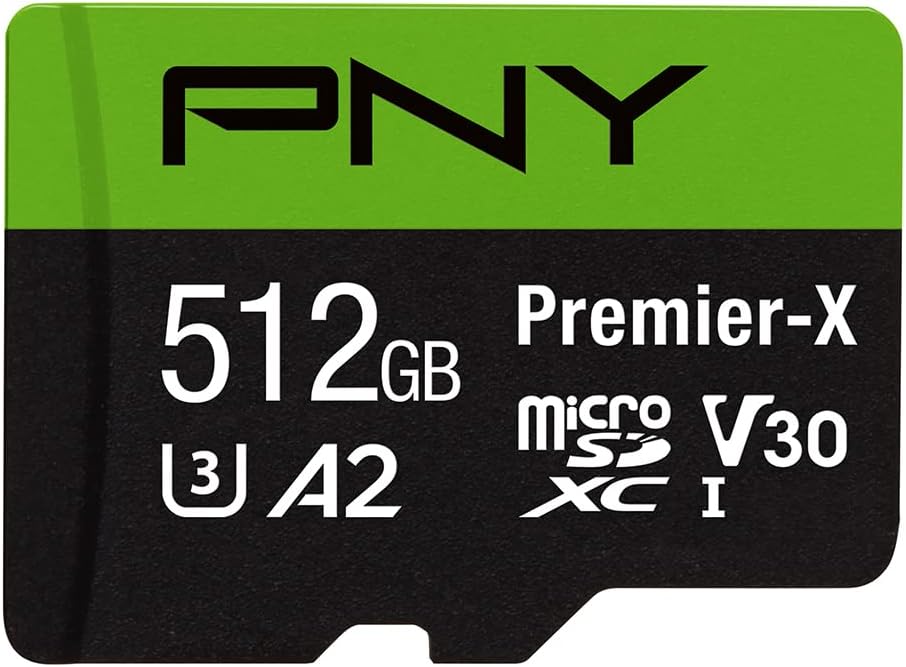
The PNY Premier-X 512GB is built for buyers who want a very large storage pool and intend to use the card across several compatible host devices. Its 4.6 rating is strong, and the combination of 512GB, Class 10, U3, V30, and A1 performance classes positions it as a versatile high-capacity microSDXC card.
We may earn a commission when you buy through this link, at no additional cost to you.
The product is advertised with read speeds up to 100MB/s and write speeds up to 90MB/s for burst photography and 4K Ultra HD videography. Its A2 application performance is listed as providing a minimum of 4,000 read IOPS and 2,000 write IOPS, enabling apps to run directly from the card on compatible devices. The card is designed for Android phones and tablets, action cameras, surveillance cameras, drones, and computers.
This is not described as a Made for Amazon Fire-certified card, so buyers should verify their tablet’s specifications. The 512GB capacity also exceeds what some older or more limited devices can address, which means a high rating does not guarantee universal recognition. A full-size SD adapter is included for use with compatible cameras, laptops, desktops, and other SD-enabled hosts.
The PNY card makes the most sense for a Fire user with a genuinely large digital library, especially one who also owns cameras or drones. It offers more room than the 256GB choices and a mature speed profile. Choose it for capacity and cross-device flexibility, but favor the purpose-certified SanDisk option if Fire-specific assurance is your top priority.
A 512GB card provides substantial room for media, app data, and documents, making it suitable for users who prefer to keep an extensive collection on removable storage.
A1 application performance and V30 video classification support direct app use and high-bitrate recording on compatible devices, while U3 adds further workload capability.
We may earn a commission when you buy through this link, at no additional cost to you.
The 128GB Fire Tablet card is the most explicitly tailored option for Amazon users who want a straightforward, device-focused memory card. Its title states compatibility with Fire Tablets in the 7-, 8-, and 10-inch categories, as well as Kids Edition models, while the product information identifies it as a Class 10 high-speed microSDXC card.
We may earn a commission when you buy through this link, at no additional cost to you.
Its use of Samsung memory chips is a notable manufacturing detail, and the package includes a full-size SD adapter. A lifetime warranty is also listed. For an owner whose priority is simply adding a 128GB card to a supported Fire tablet, this product presents a direct proposition without requiring the buyer to compare advanced application and video speed classes.
The card’s 4.3 rating is the lowest among the ten products in this guide, and its specification list is noticeably less detailed than those of the Amazon Basics, SanDisk, and PNY cards. It does not provide a headline read speed, A1 or A2 application class, V30 classification, or detailed water-resistance rating in the supplied information. As a result, buyers prioritizing maximum transfer performance or advanced workload credentials have less information to evaluate.
This card is best for a compatible Fire tablet owner seeking a simple 128GB upgrade and a clearly Fire-oriented product title. It is not the strongest recommendation for users who want to run demanding apps directly from the card, move very large files frequently, or build the largest possible library. Confirm the exact Fire model and storage support before ordering.
The product title directly names Fire Tablet sizes and the Kids Edition, which gives buyers a clear starting point when checking model compatibility.
The stated use of Samsung memory chips provides a specific component detail, while the included full-size adapter simplifies transfer to compatible SD hosts.
We may earn a commission when you buy through this link, at no additional cost to you.
The Amazon Basics 512GB microSDXC card combines the largest capacity tier in the guide with modern application performance and a 4.7 customer rating. It is a natural selection for a Fire HD 10 Tablet owner who wants enough space to separate a large collection of downloaded media, applications, music, and photos from the tablet’s internal storage.
We may earn a commission when you buy through this link, at no additional cost to you.
The card provides A2 and U3 performance, V30 video capability, and advertised read speeds up to 100MB/s. It is listed for high-bitrate recording, RAW files, time-lapse sequences, and smooth 4K UHD playback. A full-size adapter is included, and the card carries shock resistance, IPX6 water resistance, temperature protection, and resistance to X-rays and magnetic fields.
Its limitation relative to the Made for Amazon 512GB option is the lack of explicit Fire certification. Although the product is designed for compatible Android devices, some Fire tablet generations may have specific card requirements or maximum capacity restrictions. The listed usable capacity for 512GB is at least 465GB because operating systems and measurement conventions can affect the amount shown.
This is a good large-capacity option for users who prioritize A2 app performance, broad device support, and the flexibility of a full-size adapter. It may suit a Fire HD 10 Tablet setup more closely than smaller cards if you routinely download large games, keep multiple high-resolution movies offline, or carry the card between tablet and computer. Verify device support first.
The 512GB option is intended for users who want a deep removable media library rather than only enough space for a handful of downloaded films or albums.
Its A2 application class is a useful upgrade over A1 cards when running compatible apps directly from the microSD card, provided the Fire tablet and software support that workflow.
We may earn a commission when you buy through this link, at no additional cost to you.
The Amazon Basics 64GB two-pack stands apart from every other product here because it includes two separate microSD cards. That makes it useful for separating a Fire tablet’s media from work files, giving another compatible device its own card, or keeping a smaller backup card available. Each card has a 4.6 product rating, and both support the same modern speed classes.
We may earn a commission when you buy through this link, at no additional cost to you.
Both 64GB cards offer A2 performance, UHS-I U3 capability, V30 video classification, and advertised read speeds up to 100MB/s. The package includes a full-size adapter for each card. The listed usable capacity for 64GB is at least 58GB, with the difference explained by operating-system formatting and binary-versus-decimal measurement methods.
The obvious limitation is that each card has only one-quarter of the nominal capacity of a 256GB option and one-eighth of a 512GB card. That can restrict large game installs, extensive 4K media libraries, and users who want everything on one device. As with the other Amazon Basics choices, it is not described as Made for Amazon certified, and compatibility should be verified for the particular Fire HD 10 Tablet generation.
This two-pack is best for users who value flexibility and separation over maximum capacity on a single card. It can serve as a straightforward media card for the tablet plus a second card for another device, a dedicated backup, or a lightweight offline collection. Choose it when two moderate-capacity cards are more useful than one very large one.
Two cards allow a Fire tablet and another compatible device to maintain separate libraries without constantly moving files back and forth.
Keeping one populated card as a backup provides a simple way to preserve a media collection or move it to another compatible system for safekeeping.
We may earn a commission when you buy through this link, at no additional cost to you.
The most important considerations are confirmed device compatibility, usable capacity, application and video speed classes, and how you intend to use the card. Reviewing those factors before shopping prevents a technically impressive card from being unsuitable for your particular Fire tablet.
Start by checking whether the Fire HD 10 Tablet model supports removable microSD storage and what maximum capacity it can recognize. A card described specifically as Made for Amazon offers the clearest assurance because the supplied information says it was tested and certified for Fire Tablets and Fire TV. General-purpose cards may work in many Android-based environments, but compatibility is not guaranteed merely because the card is Class 10 or A2 rated.
Nominal capacity is not identical to the space visible in the tablet’s operating system. The Amazon Basics listings explain that a 128GB card has at least 116GB of usable capacity, a 256GB card at least 232GB, and a 512GB card at least 465GB because of formatting and measurement differences. A 64GB card is adequate for a light media selection, while 128GB and 256GB suit more active users and 512GB options are intended for large libraries.
If you plan to download and run applications directly from the SD card, pay attention to the Application Performance Class. A2 cards are designed to support faster random read and write operations than A1 cards, which can improve app loading and responsiveness on compatible devices. Neither class guarantees performance on an unsupported tablet, so device support and the card’s sustained performance specifications remain important.
Class 10, U3, and V30 describe different aspects of performance relevant to video. Class 10 supports the listed Full HD use, U3 identifies a higher minimum sustained write capability, and V30 guarantees a stated minimum sequential write rate of 30MB/s. For a Fire tablet that mostly plays downloaded movies, these classes may be more than adequate, but they become more important when recording, editing, or handling high-bitrate source files.
The maximum read speeds in this guide range from 100MB/s to 200MB/s, but those figures are laboratory or product claims that depend on the reader, host interface, files, and usage conditions. A Fire tablet will not necessarily operate the card at its maximum rate. Faster transfers are most useful for moving large video files, while everyday app launches and streaming depend more on random performance and sustained throughput.
All ten recommendations are microSD cards, and most include a full-size SD adapter for compatibility with SD-enabled readers and cameras. microSDXC is used for the larger-capacity options, but the physical shape matters more than the label when fitting a card into a Fire tablet. Make sure the product is a microSD card rather than a full-size SD card, and keep the adapter for transferring files to compatible computers.
Several cards are listed as shock-resistant, IPX6 water-resistant, temperature-proof, X-ray-proof, and magnetic-proof. These features can be reassuring when the card travels between a tablet, camera, drone, or outdoor setting. They do not make a card indestructible, so it should still be handled carefully, kept in a protective case during transport, and backed up when it contains important files.
A full-size SD adapter adds convenience by allowing the microSD card to fit into compatible SD card readers, laptops, and cameras. Some high-speed claims also depend on a suitable USB 3.0 reader; one Amazon Basics card lists its required reader separately. SanDisk’s MobileMate app is available for compatible file viewing, access, and backup workflows. These extras can improve convenience, but they should not replace correct formatting and backup habits.
Before inserting a new card, confirm that your exact Fire tablet supports expandable storage and that the card’s capacity falls within the permitted range. Power the tablet off before inserting the microSD card, then turn it back on and allow Fire OS to detect it. If the tablet offers an option to format or manage removable storage, review those prompts carefully and select the card you intend to use.
For the smoothest setup, use the included full-size SD adapter and a compatible card reader to format the card in the file system expected by your device. Copy only organized media and supported application files to the microSD card rather than transferring the tablet’s entire internal storage. Fire OS may require certain folders or download locations for applications, so use the tablet’s own download settings and system prompts when possible.
To keep the card healthy, eject it through the tablet’s settings before removing it, avoid moving it while files are being written, and do not use it as the only copy of irreplaceable photos or videos. Keep it away from excessive heat, moisture, and strong magnets despite the listed protective features. If the tablet struggles to read files, close apps, eject the card safely, recheck the connections, and consider reformatting it after backing up its contents.
No. Compatibility depends on the tablet model, Fire OS version, supported capacity, and the way the card is used. A card explicitly certified as Made for Amazon provides the strongest listed assurance, while general-purpose cards should be checked against the tablet’s specifications. Always confirm that the device supports removable storage and recognizes the card’s capacity.
The best capacity depends on the size of your offline media and app library. A 64GB card suits lighter use, 128GB works well for a moderate collection, and 256GB or 512GB provide more room for movies, games, music, and photographs. Your tablet may not display the card’s full labeled capacity, and older devices may have lower maximum limits.
Class 10 is generally suited to the listed Full HD recording and playback use cases. If you plan to run applications directly from the card or work with high-bitrate media, A2 and U3 or V30 classifications provide more useful performance information. You should also consider the tablet’s own interface and storage speed, which may prevent the card from operating at its maximum advertised speed.
Operating systems use different capacity measurement methods and reserve some space for formatting, file systems, and system functions. The Amazon Basics listings list usable capacities of at least 232GB for a 256GB card and at least 465GB for a 512GB card. This difference is normal, although a tablet that cannot address the full capacity may show even less available space.
Only when both the card and Fire tablet support that workflow. The Made for Amazon 512GB card explicitly supports downloading apps and games directly to the SD card. General-purpose cards may run compatible apps from removable storage, but users should follow Fire OS prompts and confirm device support rather than assuming every Android application will install or run from the card.
The adapter is not needed while the card is inserted into a Fire tablet, but it is useful for transferring files through compatible full-size SD readers, laptops, and cameras. Every listed card includes an adapter except the product whose supplied information explicitly states that a separate high-speed USB-C reader is needed to achieve its maximum read speed.
First connect the card through a compatible reader and confirm that the tablet can see it. Download supported media directly to the selected SD-card location, or use the included adapter to copy organized files from a computer. Avoid manually moving system files, and follow the tablet’s download, eject, and file-management prompts to avoid incomplete transfers.
First confirm that the exact tablet model supports the card and its capacity. Reinsert the card while the tablet is powered off, then check storage settings and try a different compatible reader to rule out a hardware or formatting issue. If the card appears elsewhere, it may need to be reformatted for the tablet after backing up any important files.
The Made for Amazon SanDisk 512GB is the best overall choice because it combines explicit Fire certification, substantial storage, direct app and game downloads, and Class 10 performance. The Amazon Basics 128GB is the best budget-balanced option for a moderate media library, while the SanDisk Ultra 256GB is the best premium pick for fast transfers and use across multiple compatible devices.
Prioritize confirmed Fire compatibility first, then select the smallest capacity that comfortably holds your media and applications. Advanced speed classes matter when running apps or handling high-bitrate files, but they cannot overcome a device that does not support the card. Buyers with large libraries should weigh 256GB and 512GB options, while those wanting two separate cards can consider the 64GB two-pack.
Ratings, product specifications, device support, and prices can change, so review the current Amazon listing before purchasing. Confirm your Fire HD 10 Tablet model, its maximum supported capacity, and the intended file workflow. Then choose the card that offers the right combination of certification, capacity, and performance for how you actually use the tablet.