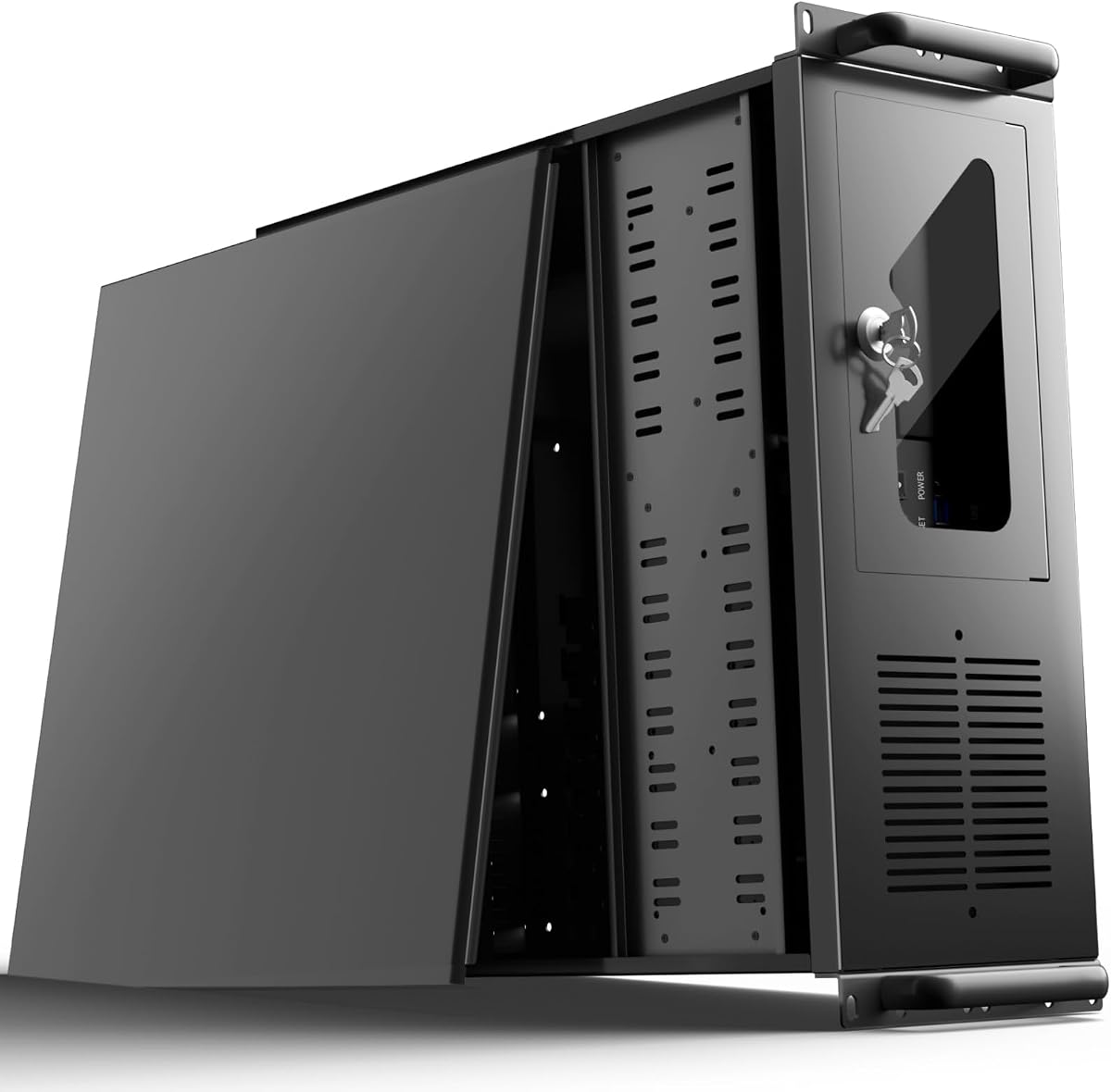
UTLGAMENG 4U Server Case
4.0Editor score
12 dedicated hard drive bays
Seven full-height PCI slots
Front USB 3.0 connectivity
A server chassis for multiple hard drives must balance storage capacity, airflow, expandability, and physical compatibility. The right enclosure can support demanding NAS workloads, media libraries, backup systems, and professional rack installations. Drive count matters, but cooling, rear clearance, front connectivity, and mounting options are equally important when planning a dependable build.
We compared ten server and NAS-oriented cases using their stated drive bays, supported motherboard formats, cooling configurations, expansion capabilities, and practical management features. The roundup includes rackmount models for data centers and home labs as well as mid-tower and compact NAS enclosures for desktop-oriented systems, covering options for different storage budgets and deployment plans.
Our top selections represent strong overall capability, a practical entry point, and a specialized high-capacity configuration. The remaining reviews explain where each chassis excels and where its specifications may require compromises. Product availability and pricing can change, so confirm the current listing, drive support, and accessory requirements before purchasing components for your system.
4.0Editor score

4.2Editor score

4.2Editor score
As an Amazon Associate we earn from qualifying purchases.
The following comparison highlights each chassis's most important storage, cooling, compatibility, and expansion characteristics, making it easier to identify the proper form factor for a home NAS, office server, or rack-based storage system.


The Rosewill RSV-L4500U is a 4U rackmount enclosure that combines an unusually high stated drive capacity with extensive cooling and expansion support. Its 4.2 rating reflects a broadly capable design, and the 15 internal 3.5-inch HDD bays make it the most storage-dense option in this comparison according to the supplied specifications. It is built for users who need more than a basic home NAS enclosure.
We may earn a commission when you buy through this link, at no additional cost to you.
Its most important strength is the combination of storage and thermal provisions. The product data lists eight included fans: three 120mm PWM fans in the front, three 120mm PWM fans in the middle, and two 80mm fans at the rear. This arrangement creates airflow paths across both the drive area and the server components. E-ATX compatibility and seven PCI expansion slots also give the chassis room for a substantial workstation or virtualization-oriented server.
Front-panel operation is another strength. Two USB 3.0 ports provide convenient access to peripherals, while indicators for power, hard-drive activity, and LAN status help administrators check the system at a glance. A built-in front lock and key adds physical security appropriate to a shared rack or storage room. The trade-off is that this is a substantial rack enclosure rather than a compact desktop case.
The RSV-L4500U is most appropriate for a home lab, small office, media archive, or managed rack where many hard drives and future expansion cards are priorities. Buyers should confirm available rack space and plan cable management before assembly, but among the products reviewed, it offers the strongest balance of raw drive capacity, cooling, and server-oriented features.
Fifteen dedicated 3.5-inch bays let a builder use more conventional hard drives than the other desktop and rack cases here. That capacity is useful for archives, media libraries, and storage pools where SSD-only configurations would not provide sufficient space.
Front, middle, and rear fans can direct air through the drive cage and across internal components. The included fan arrangement also reduces the need to source a complete cooling set immediately after installation.
We may earn a commission when you buy through this link, at no additional cost to you.
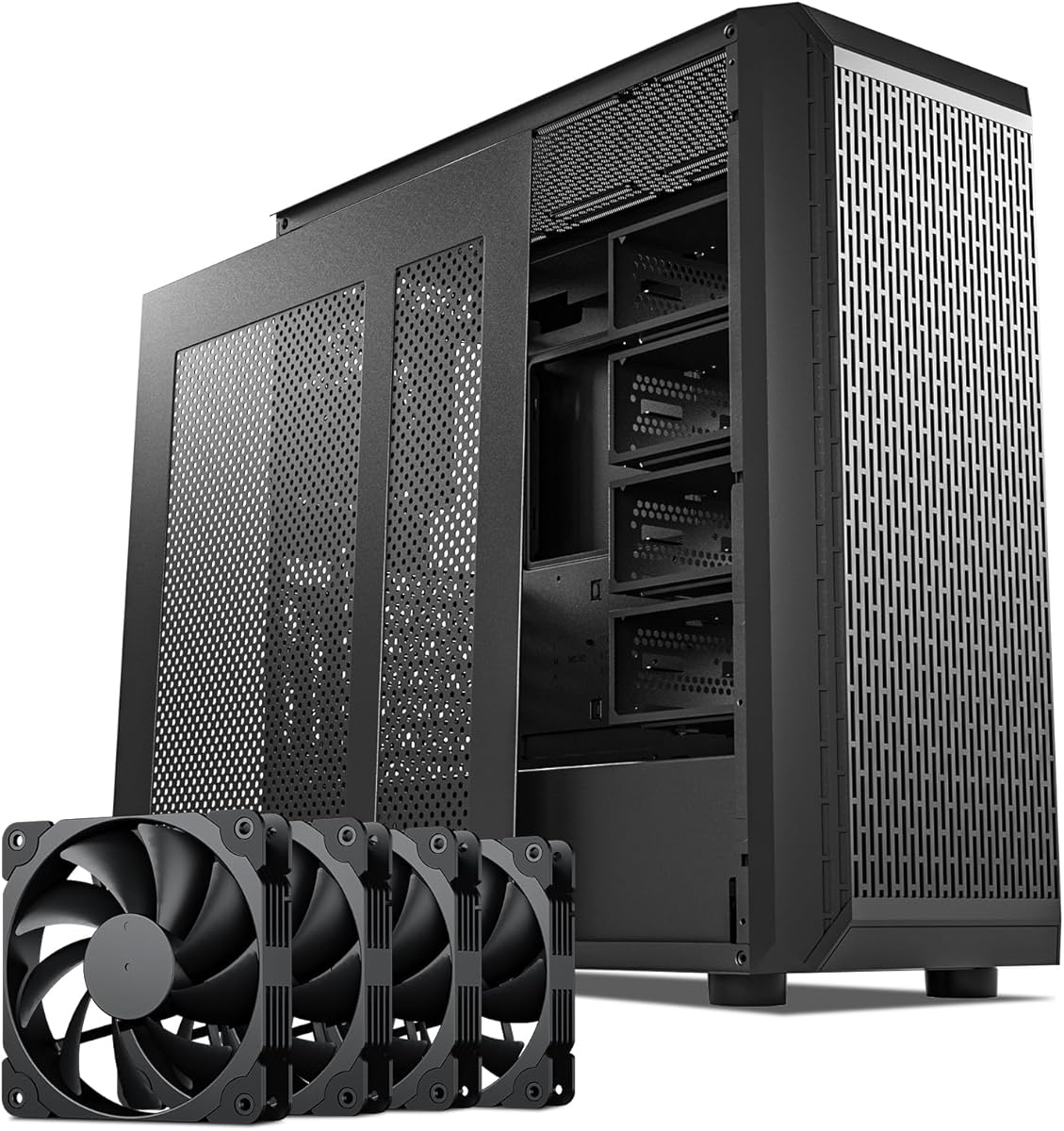
The DARKROCK Classico Storage Master is an ATX NAS enclosure aimed at users who want a large storage build with the flexibility of a desktop PC. Its 4.4 rating is the highest among the ten products included here, while the stated support for thirteen hard drives makes it a serious capacity option. The mesh front and side panels distinguish it from closed, purely utilitarian server enclosures.
We may earn a commission when you buy through this link, at no additional cost to you.
Cooling is a major selling point. Four 120mm fans are included, and the enclosure supports a 360mm radiator, giving builders options for air-cooled or liquid-cooled configurations. A vertical GPU mount can accommodate a large graphics card while helping prevent heavy card sag. These details make the Classico useful not only for file storage but also for systems that need a substantial graphics card, intensive processing, or a visually prominent build.
The principal limitation is that the supplied information describes broad drive compatibility without detailing a specific hot-swap backplane or tray format. Buyers who need quick drive replacement, enterprise trays, or tool-less service should verify the exact internal layout before committing. Its desktop form factor also lacks the keyed rack-style access and status panel found on the Rosewill rack chassis.
This is a strong option for a home office, creative workstation, or living-room NAS where a large amount of storage must coexist with a powerful GPU and advanced cooling. It may be especially attractive to builders who value appearance and open airflow alongside storage capacity, although those who require managed hot-swap behavior should confirm the hardware configuration first.
The front and side mesh panels allow air to pass through the enclosure rather than relying on a sealed metal wall. Combined with four 120mm fans, this supports sustained cooling around dense storage and high-performance desktop components.
Vertical GPU mounting and 360mm radiator support give the case more flexibility than a basic NAS box. It can serve as a hybrid storage, rendering, or compute enclosure when the operating system and workload are appropriate.
We may earn a commission when you buy through this link, at no additional cost to you.
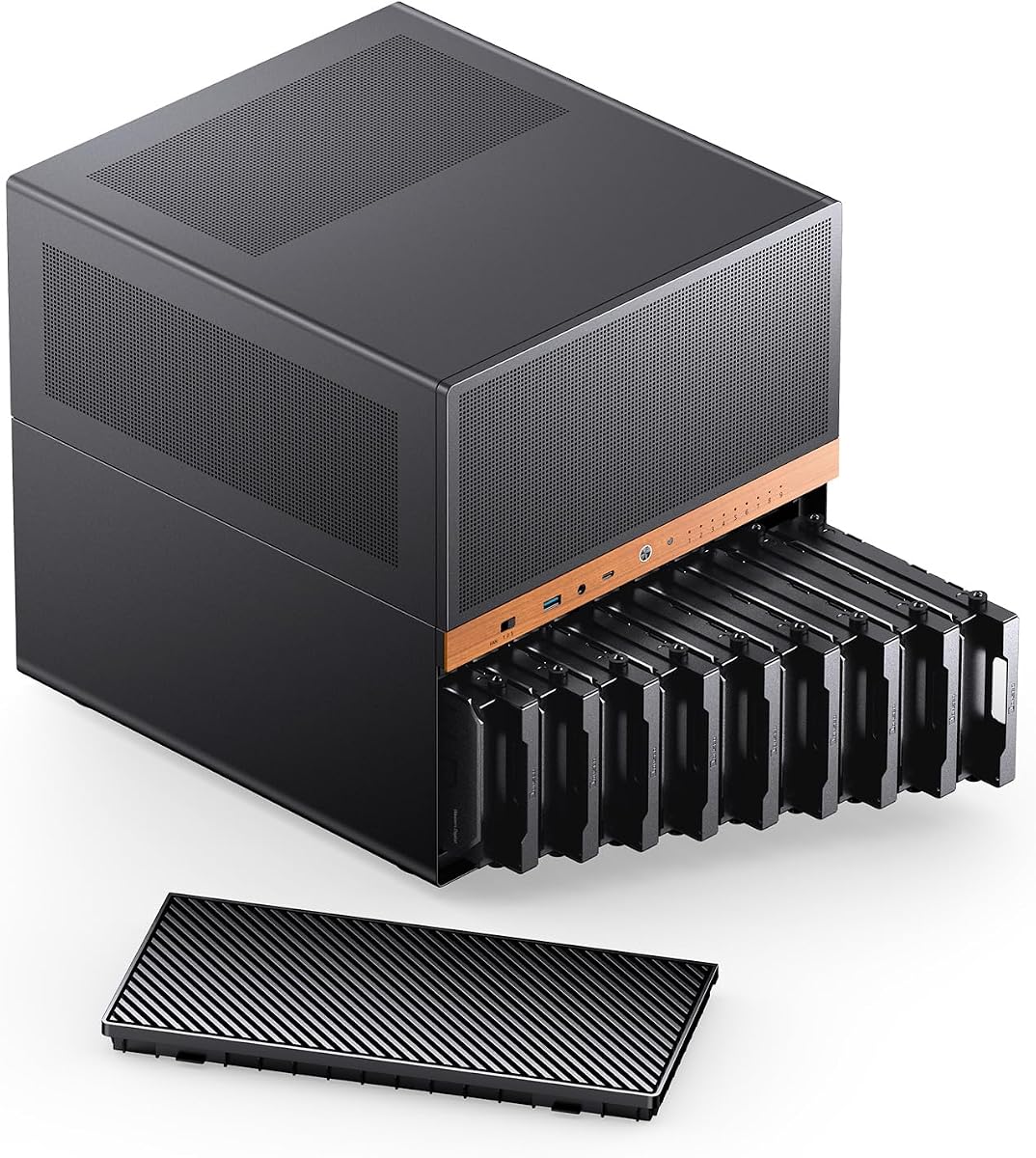
The JONSBO N6 is a compact Micro-ATX NAS chassis distinguished by nine hot-swappable HDD or SSD positions and a 4.6 rating. It combines the serviceability of a dedicated network-storage case with a wood-accented enclosure and flexible power-supply placement. It is a compelling choice for home and small-business users who value drive access and a relatively compact footprint.
We may earn a commission when you buy through this link, at no additional cost to you.
Power configuration is the N6's most distinctive feature. It supports standard ATX and smaller SFX power supplies, with multiple installation positions and room for up to three power supplies. The backplane has PATA and SATA power interfaces, and the manufacturer recommends connecting all four power interfaces for enterprise drives because their startup current can be higher. This flexibility can help builders avoid replacing a larger PSU while still supporting demanding storage.
The removable one-piece top cover and removable HDD cage simplify access during assembly and maintenance. Cooling options include numerous fan positions at the front, rear, sides, and hard-drive bay, plus 240mm AIO support. Two fans are pre-installed. A maximum CPU-cooler height of 160mm and GPU length range of up to 275mm or 320mm add useful component flexibility, while four PCI expansion slots remain available.
The N6 is best for a compact personal NAS, photo archive, or office file server where hot-swappable drives are valuable. It requires more careful planning than a simple case because power cables, backplane connections, and drive startup requirements must be coordinated. For builders who understand those details, its rating, serviceability, and compact dimensions make it one of the strongest choices in the roundup.
Nine hot-swappable bays make it easier to expand, replace, or maintain a storage pool. The removable cage and top cover also improve access compared with a fixed drive arrangement.
ATX and SFX support gives builders more choice when fitting a power supply. Enterprise-grade drives benefit from the manufacturer’s recommendation to connect all backplane power interfaces before startup.
We may earn a commission when you buy through this link, at no additional cost to you.
The UTLGAMENG 4U server case provides a notably capable storage platform without moving beyond a conventional rackmount design. Its 4.0 rating places it among the more moderately reviewed products, but the stated 12 dedicated hard-drive bays and seven PCI slots make it a practical option for a home lab, office server, or expandable storage enclosure.
We may earn a commission when you buy through this link, at no additional cost to you.
It supports standard ATX power supplies and accommodates ATX, Micro-ATX, and Mini-ITX motherboards, giving builders considerable freedom in component selection. CPU coolers up to 125mm fit normally, while removing the bracket expands that allowance to 153mm. Graphics cards up to 230mm are supported, increasing to 330mm when the hard-drive bay is removed, so the chassis can adapt to different processor and accelerator configurations.
Three 120mm front fans and two 80mm rear fans provide a basic airflow foundation. Two front USB 3.0 ports support direct connections, LED indicators offer visible system status, and a key-lock mechanism protects the enclosure. A dedicated side-panel air filter helps reduce dust intake. These are practical server-management details without the complexity of a fully hot-swappable backplane.
This is a good choice for users who need many conventional drive positions and expansion slots in a 4U rack enclosure. The main trade-offs are its basic 4.0 rating and relatively modest front-panel connectivity. Confirm the precise drive tray arrangement and cable requirements, but the listed core specifications make it a strong entry point for multi-drive server builds.
The dedicated drive positions provide meaningful capacity for bulk archives and multi-volume arrays. That makes the enclosure more suitable for storage-intensive jobs than a compact case that accepts only a few drives.
Removing the drive bay permits longer graphics cards, while the motherboard and CPU-cooler options cover several common build levels. The enclosure can therefore support a compute-focused server as well as a basic file server.
We may earn a commission when you buy through this link, at no additional cost to you.
The Rosewill Helium NAS Max is an ATX mid-tower designed to bring substantial hard-drive capacity to a desktop-style storage system. It supports up to eleven 3.5-inch hard drives and carries a 4.0 rating. The design is positioned for DIY NAS, media-server, and small-business systems where a full tower is more convenient than a rack enclosure.
We may earn a commission when you buy through this link, at no additional cost to you.
Its mesh front panel and four included 140mm PWM fans provide a strong airflow package for a high-density drive arrangement. Large fans can move useful volumes of air at comparatively moderate noise levels, although actual acoustic results depend on the selected drives, fan curves, and the surrounding environment. The all-black exterior and restrained styling allow it to fit into a home office or professional workspace.
A front USB 3.2 Type-C port provides convenient access to modern phones, tablets, and other compatible devices. ATX motherboard support, along with stated BTF motherboard compatibility, gives the case more processing-platform flexibility than a small form factor NAS enclosure. However, the supplied details do not identify a hot-swap backplane, so users should not assume that the eleven drive positions support tool-free live replacement.
The Helium NAS Max is most suitable for a desktop NAS, media library, or backup server that prioritizes storage capacity, quiet airflow, and modern appearance. It is a better fit for a single room than for a locked server rack. Users who require hot-swap service, enterprise trays, or rack security should consider a more specialized chassis instead.
Eleven 3.5-inch positions are enough for a substantial local storage pool, while the mid-tower format remains simpler to position than a rack chassis. It suits home offices, studios, and media rooms.
Four 140mm PWM fans offer considerable cooling capacity for the drive cage and internal components. Their size also leaves room for users to tune fan speeds according to drive temperatures and ambient noise.
We may earn a commission when you buy through this link, at no additional cost to you.
The Rosewill RSV-R4000U combines eight 3.5-inch hard-drive bays with three 5.25-inch device positions in a standard 4U rackmount chassis. Its 4.1 rating reflects a balanced server design that serves both conventional storage and other removable or internal device formats. It is appropriate for offices and home labs that still use optical media, tape-like devices, or other 5.25-inch components.
We may earn a commission when you buy through this link, at no additional cost to you.
Motherboard support includes ATX and CEB, and seven PCI expansion slots create room for network, storage, or accelerator cards. Two front 120mm PWM fans and two rear 80mm fans form a four-fan cooling arrangement intended to move air through the chassis. Front indicators display power, HDD, and LAN status, while two USB 3.0 ports support direct peripheral access.
The keyed front panel and included rack mounting hardware make deployment straightforward in a managed rack. Compared with a hot-swap-heavy storage enclosure, however, this chassis has a lower drive count and does not advertise hot-swap backplanes in the supplied information. The extra 5.25-inch positions also make it more specialized than a pure NAS case.
Buy the RSV-R4000U if a 4U platform and a mixture of 3.5-inch and 5.25-inch hardware are priorities. It is a sensible middle ground for small businesses, media rooms with legacy equipment, and general-purpose server racks. For high-volume array storage, one of the larger 12-, 15-, 24-, or flexible multi-bay alternatives may be a better fit.
The three 5.25-inch positions distinguish this chassis from models devoted entirely to 3.5-inch drives. That versatility can be valuable when legacy equipment must coexist with a modern server.
A front lock, status LEDs, accessible USB ports, and included mounting hardware support routine management in shared or secure rack environments.
We may earn a commission when you buy through this link, at no additional cost to you.
The Rosewill RSV-Z3100U is a 3U rackmount server chassis for users who need a compact rack footprint and a modest number of hard drives. It holds a 4.0 rating and is more specialized than the large-capacity cases in this roundup. The supplied product title mentions six 3.5-inch bays, while the detailed description specifies four internal 3.5-inch bays, so buyers should confirm the exact physical configuration.
We may earn a commission when you buy through this link, at no additional cost to you.
ATX motherboard compatibility and four PCI expansion slots provide enough flexibility for a compact storage or network server. Two pre-installed 80mm PWM fans supply the basic cooling arrangement. Front-panel LED indicators show power, hard-drive, and LAN status, and two USB 3.0 ports allow direct connections for administration or data-transfer devices.
The main compromise is storage density. A 3U enclosure naturally provides less internal volume than a 4U chassis, and its detailed capacity of four internal hard-drive bays is modest compared with the 12-, 13-, 15-, and 24-bay products here. It is also not advertised as supporting a hot-swap backplane. Expansion should therefore be planned around the existing motherboard and card support rather than assumed from the drive count alone.
The RSV-Z3100U makes sense for a home lab, small office, or branch location where rack space is constrained but standard server features are desired. Its compact form, front status controls, and expansion capability make it a practical utility server enclosure. It is less suitable for bulk storage or projects expected to grow through numerous additional hard drives.
The three-unit format preserves valuable vertical rack capacity compared with a 4U enclosure. That makes the chassis useful where several servers must share limited rack space.
ATX board support and four PCI slots permit a useful mix of networking, storage, and compute cards. The build is better suited to targeted expansion than to large arrays.
We may earn a commission when you buy through this link, at no additional cost to you.
The Rosewill RSV-L4620 is a 4U rackmount chassis designed around a compact combination of conventional hard drives and 2.5-inch solid-state drives. It supports up to two 3.5-inch HDDs and four 2.5-inch SSDs, and its 4.3 rating makes it one of the more well-regarded products in the comparison. This layout is best understood as a high-performance mixed-workload server rather than a bulk archive enclosure.
We may earn a commission when you buy through this link, at no additional cost to you.
E-ATX and SSI-EEB motherboard support gives it access to platforms intended for multi-GPU systems, virtualization, rendering, and intensive computation. The case directly accepts a 360mm AIO radiator, allowing a substantial CPU cooling solution for sustained workloads. Three pre-installed 120mm PWM fans work alongside the radiator and support airflow throughout the enclosure.
A front USB 3.2 Type-C port offers transfer speeds up to 10 Gbps according to the product data, making the chassis convenient for working with large files. The 2.5-inch SSD positions favor fast scratch space, operating systems, databases, and frequently accessed data, while the two 3.5-inch positions can supply bulk capacity. It is not designed to maximize the number of spinning disks.
Choose the RSV-L4620 for AI experimentation, rendering, virtualization, or another compute-heavy server that also needs a measured amount of persistent storage. Its specialized layout is a benefit when fast solid-state performance matters more than maximum disk count. Builders should not choose it for a large multi-user archive, where the dedicated high-bay alternatives offer much greater capacity.
The balance of HDD and SSD positions allows an operating system or database to use fast solid-state storage while larger files remain on spinning disks. This mixed arrangement is practical for mixed read and write workloads.
Native 360mm AIO support gives modern CPUs an efficient liquid-cooling path. The included 120mm fans and multi-GPU-oriented board support suit rack systems intended for demanding computation.
We may earn a commission when you buy through this link, at no additional cost to you.
The 24-bay 4U rackmount chassis is the high-capacity option in this roundup. It provides 24 hot-swappable SATA or SAS drive bays, six internal SFF-8087 Mini SAS backplane connections, and a stated 4.2 rating. This is the most specialized enclosure here, designed for storage-dense installations where drive maintenance speed, redundancy, and expandability justify careful component planning.
We may earn a commission when you buy through this link, at no additional cost to you.
Hot-swappable trays make it possible to replace or add drives without treating every service as a complete teardown, subject to correct operating-system and controller configuration. Supporting both SATA and SAS gives administrators more choice when matching drives to an existing controller or storage platform. The Mini SAS backplane provides a consolidated interface for numerous drive positions, reducing the number of separate connections reaching the controller.
Cooling consists of three 120mm middle fans and two 80mm rear fans. Their placement supports airflow through the dense drive wall and toward the rear of the chassis. With 24 drives operating, airflow, drive temperature monitoring, and appropriate controller thermals become especially important. The enclosure also has substantial power demands because each storage device contributes both idle draw and startup current.
This chassis is best for a dedicated storage server, virtualization host with abundant local storage, or enterprise-style rack deployment. It may also suit a serious home-lab enthusiast who values hot swapping. The 4U format and storage density create a specialized use case rather than an all-purpose desktop build, so administrators should confirm backplane connectors, controller support, power requirements, and drive tray compatibility before ordering.
Hot-swappable bays streamline replacement and expansion in an active storage environment. The practical benefit is strongest when the operating system, controller, and monitoring software are configured to recognize the new device correctly.
SATA and SAS support offers flexibility for storage platforms, while the SFF-8087 Mini SAS backplane simplifies connection to compatible controllers. Planning the full data and power path is essential in a 24-drive enclosure.
We may earn a commission when you buy through this link, at no additional cost to you.
The Rackchoice 4U chassis is a flexible rack platform for builders who need considerable storage and expansion without moving to a dedicated 24-bay enclosure. Its 4.1 rating indicates a generally capable design. The listed drive layouts differ by motherboard size, which allows the enclosure to adapt to ATX, Micro-ATX, Mini-ITX, and E-ATX configurations.
We may earn a commission when you buy through this link, at no additional cost to you.
For ATX, Micro-ATX, and Mini-ITX motherboards, the stated layout provides eight 3.5-inch bays plus either three more 3.5-inch positions or two 3.5-inch and two 2.5-inch positions. With an E-ATX board, the layout changes to four 3.5-inch bays plus the same additional choices. This makes the case especially relevant to builders comparing full-size and extended motherboard layouts, although the physical drive arrangement should be verified in detail.
Seven full-height expansion slots provide room for network controllers, storage adapters, and other add-in cards. The 420mm chassis depth, excluding the handle, gives a measurable constraint for rack placement and component selection. It accepts a standard ATX PS-2 power supply, and three 120mm front fans plus two 80mm rear fans provide a pre-installed cooling foundation. Two front USB 3.0 ports include USB 2.0 adapter support according to the data.
The Rackchoice is well suited to a home lab or small office that wants a conventional rack server with a meaningful number of drives. It offers more motherboard choice than many fixed-layout cases and enough expansion for specialized storage controllers. Buyers should verify the exact motherboard-dependent drive arrangement, GPU clearance, and accessory requirements, but it remains a versatile option for custom multi-drive systems.
Different board standards can use different portions of the internal bay area. This flexibility lets a builder choose a smaller or more capable motherboard without immediately abandoning a four-unit rack enclosure.
Seven full-height slots leave room for compatible networking, RAID, and storage-controller cards. The included fan arrangement and standard ATX power supply provide a practical foundation for a custom server.
We may earn a commission when you buy through this link, at no additional cost to you.
The right server chassis depends on the number and type of drives, the operating environment, expected expansion, and the level of serviceability required. Comparing these factors before buying prevents a mismatch between the enclosure, components, and storage goals.
Begin with the number of drives the system must support now and the amount of room needed later. The roundup spans four detailed internal 3.5-inch bays in the compact 3U Rosewill model to 24 hot-swappable positions in the premium chassis, with several options around eight to 15 bays. Also distinguish a 3.5-inch HDD bay from a 2.5-inch SSD position, because the two serve very different capacity and performance roles. A case with 11 large drive slots may be more appropriate for bulk storage than one with two large and four small positions.
Hot-swappable bays are valuable when drives must be replaced or upgraded without fully dismantling the system. The JONSBO N6 offers nine hot-swappable positions, while the 24-bay chassis provides a dedicated Mini SAS backplane for enterprise-style storage. Other cases list conventional drive bays without confirming live replacement, so do not assume that every numbered position is hot-swappable. Verify the backplane connector, controller, operating-system support, and power requirements for the chosen drives.
The selected case must fit the motherboard, processor cooler, graphics card, power supply, and any storage controllers. Compatibility ranges from Mini-ITX and Micro-ATX to ATX, E-ATX, CEB, and SSI-EEB in this roundup. Rack cases often include useful clearance notes: the UTLGAMENG supports 125mm CPU coolers, or 153mm with a bracket removed, and graphics cards up to 230mm, or 330mm without the drive bay. Measure unusual components before ordering rather than relying only on the board standard.
Multiple hard drives produce heat, and dense arrays also load nearby CPUs, memory, and expansion cards. Cases with front, middle, and rear fans can create a more complete airflow path than a single fan location. Pay attention to fan size, PWM support, radiator clearance, and whether the drive cage permits unobstructed intake. The DARKROCK Classico and Rosewill Helium NAS Max offer large-fan or radiator options, while the Rackchoice and UTLGAMENG provide basic five-fan rack arrangements.
A rackmount server needs compatible rack rails, sufficient depth, and clearance for cables and front handles. The 4U models in this list suit standard four-unit rack positions, while the RSV-Z3100U preserves space in a 3U installation. Rackchoice lists a 420mm depth excluding its handle, which must be considered alongside the enclosure and any rear cabling. Desktop mid-towers and compact NAS cases offer quieter room-based deployment but cannot be installed in a server rack without modification.
Storage platforms often need controllers, network adapters, RAID accelerators, or additional SSDs. Seven full-height PCI slots appear in several 4U cases, while the JONSBO N6 offers four and the 3U Rosewill offers four. Front USB ports improve maintenance and transfer convenience, while Type-C is more useful for modern peripherals and some high-speed storage workflows. Match the number of available slots to the planned controller and network hardware, leaving space for future cards.
Shared offices, data centers, and home labs may benefit from a keyed front panel and visible status indicators. Several Rosewill models include a front lock, LEDs for power, HDD, and LAN status, and accessible USB ports. Dust filters are also useful in long-running installations. These features do not replace network security or operating-system permissions, but they make physical administration and routine checks more convenient.
Every hard drive contributes steady power and can demand a substantial startup surge. The JONSBO N6 supports multiple power supplies and includes detailed backplane guidance, including a recommendation to connect all four power interfaces for enterprise drives. Dense 24-bay systems also require careful power planning. Choose a supply with suitable connectors and capacity, and use only the cable arrangements permitted by the backplane and power supply manufacturer.
Before installing components, inventory the drives, backplane, cables, power supply, and controller against the chassis documentation. Confirm that each drive fits the intended bay, record the bay number, and keep the original packaging. For a new system, install the motherboard and power connections before sliding in the drive cage, then use the supplied fasteners rather than forcing trays into alignment.
After assembly, connect the storage controller and data cables to the correct backplane ports, attach the required power connectors, and verify that the system recognizes each drive before migrating data. Hot-swap procedures should be tested only when the controller, operating system, and drive configuration support them. Keep airflow paths clear, tighten every visible fastener, and connect the chassis to an appropriate surge-protected power source.
During operation, monitor drive temperatures, fan operation, storage errors, and interface events from a stable management interface. Keep the front and side filters clean, avoid blocking intake openings, and periodically inspect cables and connections. Back up critical information in a separate location, and do not rely on the chassis itself as the sole safeguard against data loss. A disciplined monitoring and maintenance routine is especially important when many drives operate continuously.
The appropriate number depends on your current storage needs, available bay space, and expected growth. A four-bay model may suit a small personal archive, while eight to 15 bays is more practical for a busy home NAS, and 24 hot-swappable bays target larger storage deployments. Allow some spare capacity for future expansion and consider whether a failed drive can be replaced without disrupting the entire system.
No, a 3.5-inch bay and a 2.5-inch bay are different sizes and generally use different mounting approaches. Some server cases offer dedicated 2.5-inch SSD positions alongside larger HDD trays, while others may only mention a general drive capability. Confirm the dimensions, connector orientation, and mounting hardware for both SATA and SAS drives before purchasing.
A hot-swap backplane is convenient when drives must be replaced without shutting down the entire system. It also creates a cleaner centralized connection between the controller and drive array. For a lightly used archive, a conventional chassis may be adequate, but a hot-swap design is valuable for busy storage pools, remote systems, and environments where short maintenance windows are important.
Technically, a 4U chassis can operate outside a rack, but it is usually large, heavy, and noisy compared with a desktop NAS case. A mid-tower or compact NAS enclosure is more practical for an office, living room, or home studio. Rackmount cases are better matched to equipment closets, home labs with dedicated rack space, and professional data-center installations.
Multiple hard drives benefit from airflow moving through the drive cage and exiting through the rear of the enclosure. A balanced fan arrangement is generally more useful than concentrating every fan in one location. Monitor drive temperatures under sustained workload, use PWM-compatible fans, and keep intake and exhaust paths unobstructed. A radiator option can be valuable when the chassis also houses a high-power processor or accelerator.
Choose a board that suits the processing requirements and leaves enough room for storage controllers, network cards, and future upgrades. Mini-ITX and Micro-ATX can make a compact system possible, while ATX, E-ATX, CEB, and SSI-EEB provide more expansion in larger chassis. Remember that changing the motherboard standard can change the usable drive layout in some rack cases, so check both specifications together.
Enterprise SAS drives can provide features useful in demanding environments, but they are not automatically necessary for every home NAS. Compatibility requires a SAS controller or proper backplane, suitable power, and appropriate cooling. Consumer SATA drives can serve many smaller systems, while high-capacity or hot-swappable designs may be more relevant when workloads, redundancy, and uptime justify enterprise hardware.
Install and test the system with the intended drives before migrating important files. Confirm that the controller sees every disk, record each drive's bay position, and test the planned array or individual-volume configuration. After the storage layout is stable, add the necessary data, monitor the system under load, and maintain a separate backup of information that cannot be replaced.
The Rosewill RSV-L4500U stands out as the most balanced overall choice because it combines 15 internal 3.5-inch bays, eight included fans, seven PCI slots, and practical front controls. The UTLGAMENG 4U case offers a straightforward entry point with 12 dedicated drive bays, while the 24-bay hot-swappable chassis is the specialist choice for high-density storage and rapid service.
Prioritize the features that match the deployment rather than drive count alone. Desktop users should consider the JONSBO N6, DARKROCK Classico, or Rosewill Helium NAS Max, while rack installations should account for form factor, backplane, expansion, and physical clearance. High-density builds also need careful power, cooling, and cable planning, and any stated drive layout should be verified against the exact motherboard configuration.
Product listings, availability, and prices change, so check the current specifications and accessories before purchasing. In particular, confirm the bay count, hot-swap behavior, board compatibility, fan arrangement, connector requirements, and included mounting hardware. Those details determine whether a chassis remains a good fit once the full server build is considered.