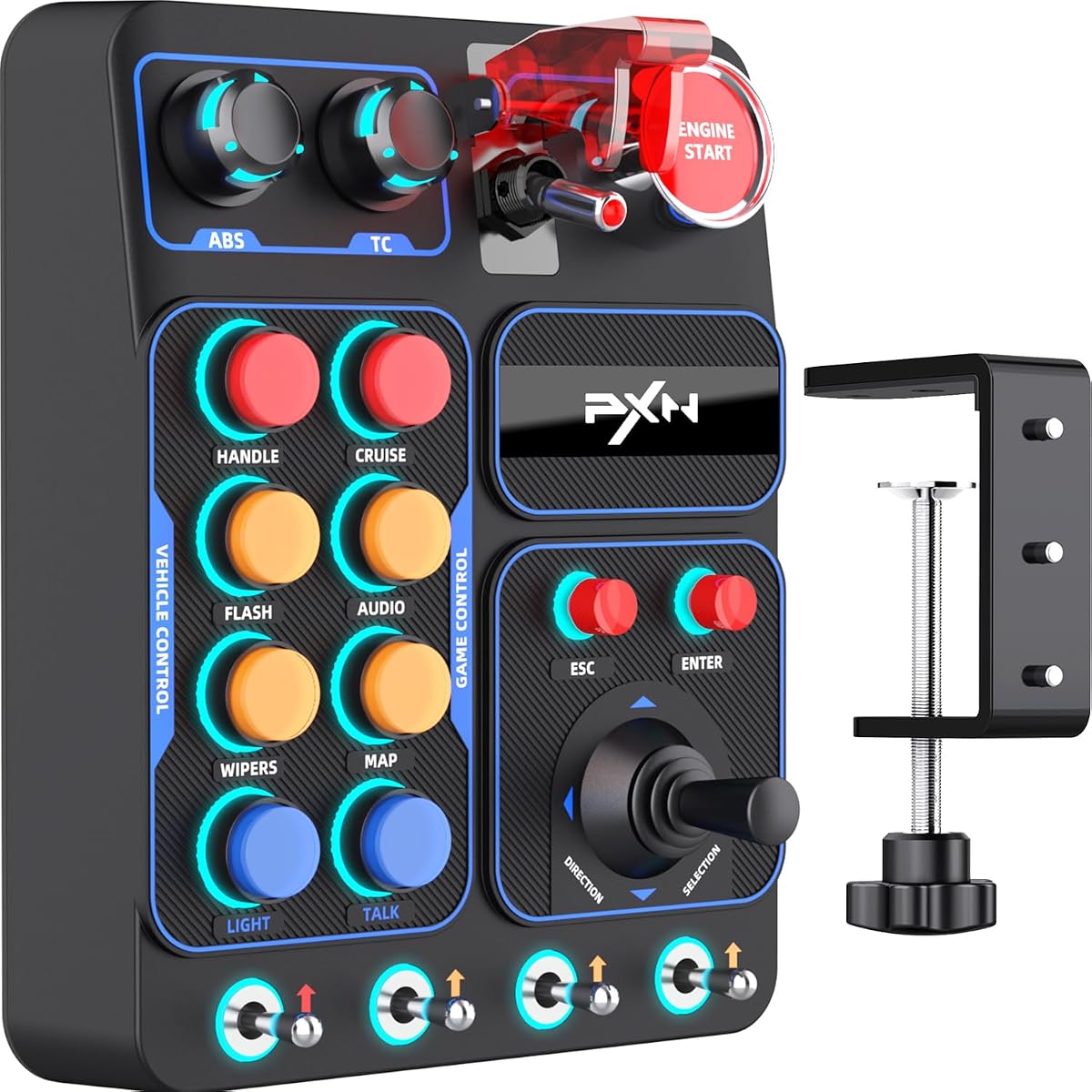
PXN CB1 Sim Racing Button Box
4.5Editor score
Nineteen physical controls
Nine input types
Adjustable RGB backlighting
Tool-free desk clamp
Our SIM Racing Button Box guide compares ten PC-focused control panels, covering programmable inputs, switch types, RGB lighting, mounting options, compatibilit
A SIM Racing Button Box brings essential commands out of the keyboard and into a physical control panel where they are easier to identify and operate. A strong model combines tactile switches, useful rotary controls, clear labeling, flexible programming, stable mounting, and compatibility with the racing, trucking, flight, and farming simulations you play.
We compared the ten options in this guide by examining their stated control layouts, programmable input capacity, connection methods, lighting, mounting hardware, supported systems, and construction. The list includes several versions of the PXN CB1, premium panels aimed at dedicated cockpits, and a customizable truck-simulator control box for Logitech and MOZA users.
Each review highlights the strongest reason to consider a particular model and also identifies limitations or setup considerations. Ratings and product details reflect the supplied listings, while availability, software behavior, and prices can change. Always verify the current listing and your simulator's control-mapping requirements before purchasing.
4.5Editor score

4.8Editor score

5.0Editor score
The table below compares all ten button boxes by their most important practical characteristics: control variety, programmability, lighting, construction, and installation. Repeated model names represent separate listings or packages, so compare the specific features and included components rather than assuming every version is identical.




The PXN CB1 Sim Racing Button Box for PC combines 19 physical controls with support for as many as 30 programmable inputs, giving it more flexibility than its headline button count might initially suggest. Its 4.5 rating reflects a well-rounded package for PC sim racers who want tactile controls without moving to a full custom cockpit. The panel is particularly appealing because it mixes familiar buttons, toggle switches, encoders, a directional joystick, and dedicated system keys in one compact unit.
We may earn a commission when you buy through this link, at no additional cost to you.
The varied control layout is the CB1's strongest feature. Rotary encoders suit incremental adjustments, push buttons suit frequently invoked commands, and latching switches can represent states such as lights or other vehicle systems. A joystick and dedicated engine-start, escape, and enter controls further reduce dependence on the keyboard. The panel supports racing, trucking, flight, and farming simulations, which makes it more versatile than a truck-only unit. Adjustable RGB lighting adds visibility in a dim cockpit while also allowing the setup to match a rig's appearance.
There are some practical compromises. It is designed for Windows PC simulation environments rather than consoles, and the controls still have to be assigned within each supported game. It also offers fewer metal components than more specialized premium panels. Those limitations are reasonable for buyers who prioritize broad input variety, straightforward USB operation, and mounting flexibility over exotic materials or truck-specific communication features. The included tool-free clamp and 100 by 100 millimeter VESA compatibility make it practical for a desk, wheel stand, or aluminum-profile rig.
This is a strong recommendation for a first button box, a mixed-genre simulator setup, or a driver who wants physical access to menus, cameras, engine functions, and auxiliary commands. It also makes sense for anyone who prefers uncomplicated driver-free USB setup over a more involved configuration process. Among the listings reviewed, the breadth of supported simulator types and the balance of switches make this version an especially accessible all-rounder.
The ability to handle racing, trucking, flight, and farming simulations makes this listing unusually flexible. Drivers can move camera views, change menus, or trigger vehicle functions with identifiable controls rather than memorizing every keyboard shortcut.
The tool-free clamp supports surfaces up to 70 millimeters thick, while VESA-compatible mounting provides an alternative for wheel stands and aluminum profiles. That makes relocation between a desk and a more permanent cockpit comparatively simple.
We may earn a commission when you buy through this link, at no additional cost to you.
This PXN CB1 listing is built around the same broad concept as other CB1 versions: a compact PC control panel that gathers physical inputs into one accessible location. Its 4.6 rating is among the stronger results in this group, and the listing specifically calls out popular racing and trucking titles. It is a sensible option for drivers who want a panel that can be introduced to several games without changing hardware.
We may earn a commission when you buy through this link, at no additional cost to you.
The stated control system supports 30 programmable buttons and includes a dial switch with a linked button-up and stop function. Seven lighting effects, adjustable color, and brightness settings add visual appeal and make controls easier to locate during extended sessions. The included installation seat can attach to a game table or another surface up to seven centimeters thick, while compatible screw holes offer a second mounting route. ABS construction is described as lightweight, heat resistant, and durable, which suits a portable panel used alongside different wheel bases.
The primary limitation is that the information centers on PC use and a specified set of simulators, including Assetto Corsa, iRacing, Project Cars, Euro Truck Simulator 2, and American Truck Simulator. Buyers should not treat game-name mentions as a guarantee that every control function will behave identically in every title. Mapping remains essential, and console users will need to confirm that their chosen platform supports the required connection method. The seven-color lighting selection is also less granular than a full-spectrum approach, although the listing states that additional colors can be customized when connected to a racing base.
Choose this version if you play a mix of PC racing and trucking simulations, already use a PXN V9 Gen2, or want an easy panel to move between a desk and a rig. The combination of 30 programmable inputs, a substantial switch variety, and straightforward installation gives it broad appeal. It may not be the most specialized option for one game, but it works well for drivers whose setup serves more than a single title.
Mentioned support for racing and trucking simulations gives buyers a practical basis for judging the panel. A short mapping session can then tailor the same hardware to different cockpit functions and control arrangements.
Seven preset effects provide quick visual changes, while stated color and brightness adjustment adds flexibility. The result is a panel that can be easier to read in a dark room without becoming visually overpowering.
We may earn a commission when you buy through this link, at no additional cost to you.
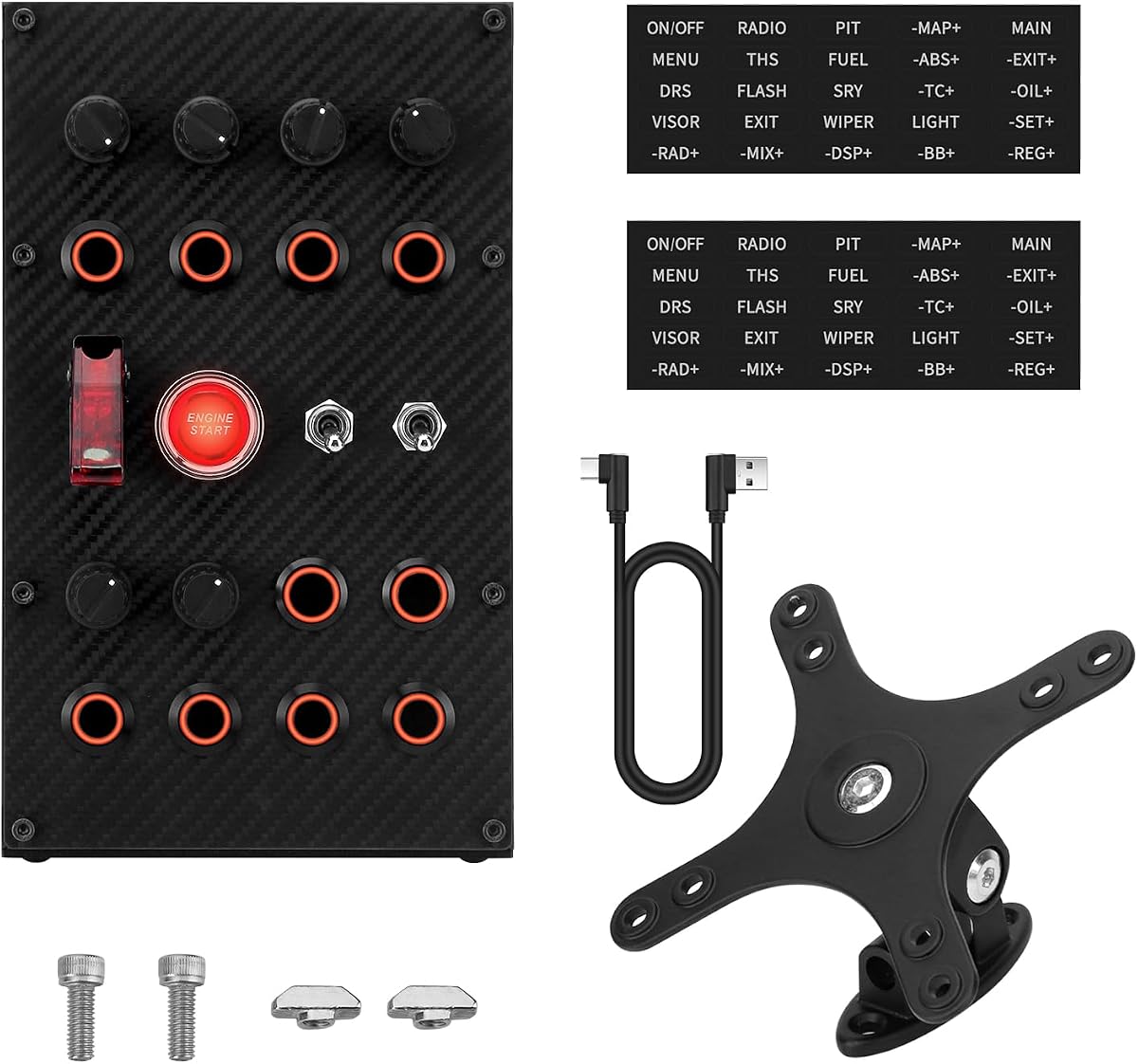
The Windows-focused CB1 listing offers 30 fully programmable keys, an eight-way joystick, toggle switches, and encoders in a panel designed to give common driving functions a physical home. Its 3.3 rating is the lowest among the ten listings, so buyers should approach it with more attention to the current customer feedback and their exact needs. The stated operating-system support nevertheless appears clear: Windows 7, 8, 10, and 11 are identified in the product title.
We may earn a commission when you buy through this link, at no additional cost to you.
Its most distinctive feature is the linked toggle switch with a safety cover and one-touch engine start. The listing says this arrangement recreates a more realistic startup procedure, and its metal contacts are described as providing crisp feedback and conductivity. Functions can be assigned to lights, cruise control, wipers, maps, and launch control, while compatibility is claimed with major racing and simulation games including Euro Truck Simulator 2, American Truck Simulator, Assetto Corsa Competizione, and Assetto Corsa.
The lower rating means this listing does not stand as confidently above its alternatives as the higher-rated CB1 versions do. It remains a capable hardware package, but buyers may find other listings more clearly documented or more strongly rated. The panel also appears dedicated to PC operation through USB rather than console compatibility. Users who need a particular style of hardware connection should confirm that their wheel base, rig, and games can accommodate the setup before ordering.
This option is most appropriate for a Windows driver who values the protected linked toggle and one-touch startup control. It is also useful for those who explicitly race or drive in the named PC simulators. The low score should encourage checking recent reviews, especially around installation and individual game behavior, but it does not erase the strong specification set.
The covered linked toggle offers a more deliberate alternative to a conventional button. That sense of ceremony may suit players who want engine start, electrical state, and related commands represented by distinct physical actions.
A desk clamp for surfaces up to seven centimeters thick, rear mounting holes, and support for monitor or rig placement give the unit several practical installation paths.
We may earn a commission when you buy through this link, at no additional cost to you.
The MiYee button box differentiates itself with a genuine carbon fiber faceplate, a full-metal unibody housing, and a dense collection of metal controls. Its 4.2 rating suggests a generally favorable reception, while the material specification makes it one of the most visually and tactilely distinctive options here. It is particularly relevant to truck-simulator users who want a panel that feels closer to a piece of vehicle equipment than a basic keyboard controller.
We may earn a commission when you buy through this link, at no additional cost to you.
The physical control inventory is extensive. There are 10 full-metal CNC-machined buttons with backlighting, three self-locking metal toggles including one protected by a dust cover, a dedicated one-touch start, and six programmable rotary encoders that can also be pressed. A 32-key customizable profile gives users considerable room to assign commands. The carbon fiber faceplate and metal housing should also integrate more naturally with premium wheel, pedal, and cockpit hardware than a basic plastic panel.
The key trade-off is that the listing specifically calls out truck-simulator PC use rather than presenting the same detailed cross-title compatibility found in several CB1 descriptions. Driver-free plug-and-play operation is attractive, but users should still check whether the simulator recognizes every control, especially the encoders and specialized toggle arrangement. Material construction also does not change the need to create a clean mapping profile. A premium-looking panel can still become frustrating if its physical functions are not supported by the chosen software.
This is a strong option for truck simulator players who appreciate metal switches, rotary controls, and a rugged-looking installation. It may also suit dedicated cockpit builders seeking visual consistency with other metal components. Confirm software compatibility first, but for a compatible setup, the combination of ten buttons, six encoders, and premium housing materials gives this MiYee panel a clear identity.
Six press-enabled encoders are especially useful for commands that benefit from a measured adjustment. Pressing an encoder also gives it a second possible function, reducing the need to fill the panel with separate buttons.
The carbon fiber faceplate and metal housing create a more specialized visual character. For a truck rig or race cockpit, that material consistency can make the panel feel integrated rather than temporary.
We may earn a commission when you buy through this link, at no additional cost to you.
The SIM-PANEL PC Sim Racing Gen 2 is organized around a wide horizontal layout that keeps controls visible and comparatively easy to reach. Its 4.2 rating reflects a positive but not exceptional result, and the product's strongest selling point is straightforward: a clean, accessible PC panel for drivers who want to identify and operate commands quickly. The orientation may be especially attractive beside a wide monitor or within a compact wheel stand.
We may earn a commission when you buy through this link, at no additional cost to you.
Each button can have individually programmable modes, allowing more than one function to be assigned where the software and control configuration permit it. That flexibility is useful for commands that differ between a racing car and a truck, or between driving and menu navigation. The listing emphasizes quick recognition and reduced distraction rather than unusual switch mechanisms. It also presents the panel as compatible with setups ranging from small desks to fully constructed racing rigs.
This listing provides less information about the physical control count, lighting, material, and connection method than the more detailed product descriptions elsewhere in the roundup. That is not necessarily a flaw, but it makes direct specification comparison harder. It is also explicitly PC-only, so console owners should not expect compatibility. Prospective buyers should look closely at the current product images and listing details to confirm that the horizontal layout and available inputs suit their cockpit.
Choose this panel when visibility, reach, and a restrained horizontal format matter more than a large inventory of specialist switches. It is a logical candidate for PC sim racers building toward a dedicated rig but who want a panel that can also fit a compact desk. Individual programmability makes it versatile, while the clean organization helps reduce the visual clutter that can occur when every function uses a different switch type.
A horizontal arrangement groups controls in a broad line, which can be easier to scan than a tall or densely packed panel. That helps when commands must be identified without looking away from the virtual road for long.
Individually programmable button modes offer room to adapt the layout as the driver moves between disciplines. The benefit is greatest for PC players who regularly change genres or vehicles.
We may earn a commission when you buy through this link, at no additional cost to you.
The PXN CB1 Programmable Sim Control Panel is one of the most clearly documented listings in the group. It has a 4.3 rating and identifies 19 buttons distributed across nine switch types, with up to 30 programmable inputs. More importantly, the description breaks the layout down item by item, making it easier to understand what the driver will actually have in front of them rather than relying on a single control count.
We may earn a commission when you buy through this link, at no additional cost to you.
The inventory includes two pushable rotary encoders, six momentary buttons, two latching buttons, a covered toggle, an engine-start button, ESC and ENTER keys, an eight-direction joystick, one momentary toggle, and three latching toggles. The panel is intended for truck, racing, and farming simulations. It supports a driver-free connection to a PC and can also connect directly to several named PXN wheel bases, making it a natural match for an existing PXN cockpit.
RGB halo lighting covers most buttons but not the joystick, and color and brightness are adjusted through a specific key combination. A rear lighting switch provides quick on and off control. Installation is flexible: nine rear mounting holes, included metal desk clamps for surfaces up to 70 millimeters thick, and 100 by 100 millimeter VESA holes cover desk, stand, and profile-based rigs. The key caveat is that initial game mapping is required, so the hardware should not be expected to arrive with every function already assigned.
This listing is well suited to drivers who want to understand the control layout before ordering and who value several distinct switch behaviors. It is particularly compelling for PXN wheel-base owners because direct connection support is explicitly stated. For other PC users, the broad simulator orientation and flexible mounting still make it a capable choice, provided they are comfortable completing the initial mapping process.
Momentary buttons suit press-and-hold functions, latching buttons preserve state, and toggles provide a physical on-or-off choice. Using different behaviors makes the panel easier to interpret once a mapping is established.
Direct connection to several named PXN wheel bases can simplify cockpit wiring. PC drivers without those bases still benefit from the standard driver-free USB approach.
We may earn a commission when you buy through this link, at no additional cost to you.
The PXN CB1 PC Racing Button Box with RGB earns the highest detailed listing rating among the CB1 versions reviewed, at 4.8. It combines 30 programmable inputs with plug-and-play USB operation, adjustable lighting, and both desk-clamp and VESA mounting. For a PC sim racer seeking a versatile control panel, those are the ingredients of a particularly balanced package: enough physical variety for quick actions and precise adjustments without requiring a complicated installation process.
We may earn a commission when you buy through this link, at no additional cost to you.
The panel supports popular racing, truck, flight, and farming simulator games on Windows 7, 8, 10, and 11. Buttons, toggle switches, rotary dials, and the joystick can be assigned to engine start, lights, wipers, the horn, and menus. Connection is straightforward: attach it by USB, open the game's control settings, and assign each control without installing extra drivers. Seven lighting effects can be selected with the knob, with additional color and brightness options for cockpit presentation.
The mounting arrangement makes the panel adaptable to more than one kind of setup. The ABS resin body includes a desk clamp for surfaces up to 70 millimeters thick and 100 by 100 millimeter VESA holes for rigs or brackets. As with other direct-input panels, users must create the mapping themselves, and the stated platform focus excludes consoles. Its appearance is also less material-driven than the MiYee or premium Sim-Panel options, but that is a stylistic trade-off rather than a functional limitation.
This is the strongest all-around recommendation in the roundup for most PC users. It suits a driver who plays more than one simulator genre, wants recognizable physical controls, and appreciates adjustable lighting without a complicated software utility. The 30-input capacity, 4.8 rating, and flexible installation make it particularly attractive for both a first dedicated button box and an upgrade to a modest desk-based setup.
The lack of a required driver or separate configuration application reduces setup friction. The practical work is assigning controls inside each game, where the panel is recognized as a standard input device.
Seven effects and adjustable color and brightness allow the panel to fit different moods and room lighting. Quick recognition of an illuminated control can also reduce the need to look away from the sim while reaching for a keyboard.
We may earn a commission when you buy through this link, at no additional cost to you.
The Sim-Panel Classic 2 is designed as a premium, truck-simulator control panel rather than a generic racing keypad. Its 5.0 rating and feature set emphasize realism, including brushed stainless steel buttons, a true-to-life ignition switch and brake knobs, enhanced backlighting, and a fully functional CB microphone. It is an especially compelling option for American Truck Simulator and Euro Truck Simulator players who want the cockpit to reproduce the working controls of a truck.
We may earn a commission when you buy through this link, at no additional cost to you.
Mounting is handled through integrated desk clamps and a 100 millimeter VESA option, supporting stable placement on a desk or compatible racing rig. The lighting system offers 11 selectable colors, while access to full-spectrum customization through Sim-Panel's Simlink software expands the options further. Brushed stainless steel buttons provide a premium tactile surface, and the ignition and brake knobs add a level of visual and operational realism beyond a standard push-button array.
The main limitation is focus. Although a truck-oriented panel can be used in other environments, the listing specifically identifies ATS and ETS2 rather than promising broad compatibility with racing, flight, or farming titles. The CB microphone is also most meaningful in a multiplayer trucking context. Buyers who do not play truck simulations may receive less value from these specialized features than from a multi-input panel with encoders, toggles, and a joystick.
This is the recommendation for truck-simulator enthusiasts who prioritize immersion, materials, and a realistic control layout over maximum generic programmability. A dedicated cockpit builder will appreciate the stable mounting options and coherent design, while multiplayer players gain a tangible advantage from the integrated communications microphone. Its 5.0 rating and premium features justify close consideration for that audience.
The ignition switch and brake knobs translate familiar truck controls into the virtual cockpit. Their presence makes the panel more visually coherent than a collection of unrelated keyboard substitutions.
Eleven readily selectable colors and broader Simlink customization make the lighting system useful for visibility as well as appearance. Users can align the panel's glow with the rest of a dark simulator environment.
We may earn a commission when you buy through this link, at no additional cost to you.
This PXN CB1 Sim Racing Button Box listing carries a 5.0 rating, making it one of the most favorably rated products in the roundup. It is the most concise listing here, however, providing only the product name and a reference to the CB1 rather than a detailed breakdown of switches, lighting, materials, or mounting options. That limited information should be considered carefully when comparing it with the extensively documented CB1 versions.
We may earn a commission when you buy through this link, at no additional cost to you.
As a member of the PXN CB1 family, it belongs to a recognizable line of PC-oriented sim-racing control panels. Other listings in this guide describe the CB1 as a USB device with programmable buttons, rotary encoders, toggle switches, a directional joystick, RGB lighting, and flexible mounting. Those details provide useful family context, although the current listing itself does not independently confirm that every feature is included in this particular package.
The principal trade-off is transparency. A short listing makes it harder to verify the exact included components, supported games, dimensions, or operating requirements before buying. Buyers should examine the package contents, current product page, and customer feedback for the specific listing. They should also confirm whether they need rotary encoders, a joystick, a protected startup toggle, RGB lighting, or particular mounting hardware before assuming that every CB1 version is interchangeable.
For a buyer who recognizes the CB1 platform and can verify the current package details, the 5.0 rating is encouraging. It is a potentially straightforward way to add physical controls without committing to an elaborate bespoke panel. The right choice ultimately depends on matching this listing's included hardware to the functions used in the driver's games and preferred rig.
The CB1 name gives buyers a recognizable design reference. It is helpful when comparing the compact panel with the more explicitly documented variants that include encoders, toggles, lighting, and mounting accessories.
Because this listing contains fewer details, checking the current package contents is especially important. Confirm the control count, connection method, mounting hardware, and game support rather than relying solely on the shared model name.
We may earn a commission when you buy through this link, at no additional cost to you.
The Obokidlyamor 27 Customizable Button Box is built for the type of player who wants recognizable vehicle controls rather than a generic field of unlabeled keys. Its 5.0 rating, 27 inputs, and customizable lettering make it an appealing option for American Truck Simulator and Euro Truck Simulator users. The panel is particularly strong for dedicated rigs because it supports a wide range of named steering wheels, bases, and mounting standards.
We may earn a commission when you buy through this link, at no additional cost to you.
The startup control is a notable specialty. Its push-to-talk design lets a user press once to activate the electrical system, press harder to start the vehicle, and press again to cut power. An electronic parking-brake switch and additional customizable switch settings extend the vehicle-oriented theme. The box is made with PLA plastic and metal switches using three-dimensional printing, and the listing openly notes that small print lines may be visible. Custom lettering is optional, allowing the panel to be personalized or left with its basic labels.
Lighting is controlled through Sim Hub software, where users can create synchronized effects for elements such as speed lights, brake lights, steering, double flashes, ABS, traction control, colored flag lighting, and pickup lights. That level of software-driven visual feedback goes beyond simple static button illumination. The trade-off is that the panel is less broadly positioned than the multi-type PXN CB1 and is most directly aimed at truck simulation. The visible print lines and PLA construction may also be less refined than machined-metal alternatives.
Choose this box if truck realism, customizable labels, and synchronized lighting are central to your setup. Its broad base compatibility, including named Logitech, Thrustmaster, MOZA, and PXN options, is especially useful for a rig that may evolve. For a general racing or flight panel with more varied hardware inputs, a model built around encoders and joysticks may be a better fit.
The pressure-sensitive ignition sequence separates electrical activation, engine start, and power cutoff. That layered action offers a more expressive alternative to assigning one ordinary button to every startup-related function.
Sim Hub support can synchronize multiple lighting patterns with virtual vehicle states. The result is more immersive than a fixed backlight, particularly in a dark truck cockpit.
We may earn a commission when you buy through this link, at no additional cost to you.
A useful button box is defined less by raw button count than by how well its physical controls, software support, and mounting arrangement fit your games and cockpit. Consider platform compatibility first, then prioritize the input types and functions you will use most often.
Start with the platform and games you actually play. Most options in this guide are designed for Windows PCs, and several explicitly target racing or trucking simulators such as Assetto Corsa, iRacing, Euro Truck Simulator 2, and American Truck Simulator. A game-name mention does not guarantee that every encoder, toggle, or lighting feature is supported, so check the current control instructions and any community documentation for the specific title. Console users should not assume that a USB button box will be recognized without a compatible connection method.
Buttons are only one part of a good control scheme. Momentary buttons suit actions that should occur while pressed, latching buttons or toggles represent persistent states, rotary encoders support incremental changes, and joysticks can cover directional menus. Several CB1 listings advertise 19 physical controls while supporting up to 30 programmable inputs, reflecting the use of different input behaviors and software modes. A 27-control truck panel may be better for broad key assignments, while six encoders can be more valuable to a driver who regularly adjusts settings.
The physical arrangement should allow you to see and reach controls without taking your attention away for long. A horizontal layout, such as the SIM-PANEL Gen 2 offers, can work well beneath a wide monitor, while a compact vertical arrangement may suit a smaller wheel stand. Look at button spacing, labeling, toggle orientation, and whether frequently used controls sit within comfortable reach. A visually appealing panel is less useful if its most important functions require awkward hand movement or are difficult to distinguish during a fast lap.
Stable placement prevents a panel from sliding during intense use. Common options include a tool-free desk clamp, an adjustable metal bracket, integrated clamps, or 100 by 100 millimeter VESA-compatible holes. PXN variants support surfaces up to 70 millimeters thick, while the Obokidlyamor model states a broader bracket spacing range of 45 to 102 millimeters. Measure the intended desktop, wheel stand, profile, or mounting point before ordering, and check whether the included hardware is sufficient for your specific rig.
RGB lighting can improve control visibility in a dark room and help a cockpit look cohesive. The PXN listings describe seven effects with adjustable color and brightness, while the Sim-Panel Classic 2 offers 11 colors and broader Simlink customization. Software-synchronized lighting can go further, with the Obokidlyamor panel supporting virtual brake, steering, ABS, and traction-control indications. Lighting should support recognition rather than distract, so assess the number of effects, brightness controls, and synchronization depth.
Construction influences tactile feel, longevity, and visual fit. The MiYee panel uses a carbon fiber faceplate, full-metal unibody housing, CNC-machined buttons, and metal toggles. The Sim-Panel Classic 2 uses brushed stainless steel buttons and vehicle-style knobs. PXN models use ABS resin and are lighter, while the Obokidlyamor unit uses three-dimensional-printed PLA and metal switches, with small print lines noted in its listing. Choose based on the feel and maintenance level you value, and consider whether a panel may be transported between locations.
Some panels are optimized for a particular kind of vehicle. Truck-oriented models may include a push-to-talk ignition, parking brake, ignition and brake knobs, synchronized indicator lighting, or a functional CB microphone. General racing panels may instead emphasize joysticks, encoders, camera controls, and mapped menu commands. Buying a specialized panel can create a more convincing cockpit, but it may add little value if your sessions focus on a different genre or do not use multiplayer communications.
Before installing the panel, identify the intended control functions and keep a written reference nearby. Connect it by USB, place it securely with the supplied clamp or compatible mounting hardware, and open the game controller settings. Test each physical input first, then assign critical driving functions such as engine start, lights, pit controls, and camera changes before configuring secondary commands.
Organize mappings by muscle memory. Place frequently used actions under the fingers that naturally rest on the panel, use toggles for persistent states, and reserve momentary buttons for actions that are only relevant while a modifier is held. If the box supports multiple profiles or programmable modes, create separate layouts for racing and trucking. After every game update, verify that essential commands still register correctly.
For care, keep the panel away from drinks, excessive dust, and direct heat. Use a dry microfiber cloth to clean the faceplate and controls, and avoid aggressive chemicals that could damage the finish. Check clamps and mounting screws periodically, particularly after moving the rig. Software-synchronized or RGB lighting should also be tested after major control changes so that the selected state always corresponds to the correct in-game function.
A SIM Racing Button Box is a physical control panel that replaces or supplements keyboard commands in racing and other simulation games. It can include momentary buttons, latching switches, rotary encoders, toggles, joysticks, lighting, and vehicle-style controls. Each input is assigned to an in-game function through the game's controller settings.
Most of the products in this guide are explicitly designed for Windows PCs, and the Sim-PANEL Gen 2 is PC-only. A console would require a separately supported input method and game configuration, so PC and console compatibility should be treated as separate buying criteria. Verify both platform and title support before purchasing.
Several models, including multiple PXN CB1 versions and the MiYee panel, advertise driver-free plug-and-play operation. You normally connect the device by USB, open the game controller menu, and assign the controls there. Individual games can still have different mapping requirements, so the device appearing automatically does not mean every advanced function is supported.
The right number depends on the commands you use and the control types you prefer. A panel with 19 physical controls can still support 30 programmable inputs when encoders, toggles, and other functions accept multiple assignments. More buttons are not automatically better if they are difficult to identify, placed awkwardly, or unsupported by your chosen games.
Rotary encoders are useful for functions that benefit from incremental adjustment, such as menu navigation or specific in-game settings. The MiYee panel provides six press-enabled encoders, while the PXN CB1 listings also include rotary controls. Their value depends on the game's support, so test each encoder and confirm that both rotation and press can be assigned where needed.
Most panels offer at least one rig-friendly installation method. Options in this roundup include desk clamps, adjustable brackets, rear mounting holes, 100 by 100 millimeter VESA compatibility, and a stated 45 to 102 millimeter bracket range. Measure your rig and confirm both the mounting pattern and included hardware before installation.
The Sim-Panel Classic 2 and Obokidlyamor 27 Customizable Button Box are the most truck-focused options. The Sim-Panel emphasizes realistic ignition and brake controls, premium buttons, extensive lighting, and a working CB microphone. The Obokidlyamor model offers 27 inputs, a staged push-to-talk ignition, custom lettering, and software-synchronized vehicle lighting.
They can, particularly in a dim room where the outlines of unlit controls are difficult to distinguish. Adjustable brightness, several color effects, and synchronized indicators can improve recognition and immersion. Lighting should not be so bright that it becomes distracting, so use the available brightness and color controls to suit the room.
The PXN CB1 PC Racing Button Box with RGB stands out as the strongest all-around option for most PC sim racers, combining a 4.8 rating with 30 programmable inputs, seven lighting effects, driver-free USB setup, and flexible mounting. The related CB1 listing offers a similarly capable mix for less money-minded priorities, while the Sim-Panel Classic 2 provides the most specialized premium experience for truck simulation and multiplayer communication.
Prioritize compatibility before feature count. Confirm that the panel works with your operating system and intended games, then choose the control types that match your routine. Encoders and joysticks help with menus and adjustments, while dedicated toggles, ignition controls, and synchronized lights can make vehicle operation feel more convincing. Stable mounting and a layout that remains visible under pressure are equally important for long sessions.
Finally, check the current listing, package contents, recent customer feedback, and present-day price before ordering. Product bundles, lighting features, and included mounting hardware can vary between versions of the same model, especially across the several CB1 listings in this guide. The right button box should fit your games, your cockpit, and the way you actually drive rather than simply carrying the largest specification list.