
Lenovo IdeaPad Slim 3X
4.4Editor score
45 TOPS neural processing unit
Expandable SSD storage slot
Physical webcam privacy shutter
Snapdragon Laptop models combine Windows 11 with Qualcomm processors designed for efficient mobility, capable on-device AI, and strong battery life. The best choice depends on whether your priority is a vivid display, compact construction, expandable storage, abundant memory, or enough processing power for demanding productivity and creative workflows.
The ten products in this guide are compared using the specifications and feature descriptions available for each model. We examine processor tier, RAM, storage, display size and resolution, wireless connectivity, ports, security features, portability, and practical extras, covering options for students, travelers, professionals, and power users.
Each numbered review identifies the strongest qualities and the trade-offs associated with a particular configuration. Ratings and specifications can change as sellers update listings, and prices fluctuate frequently, so shoppers should confirm the current configuration and cost before making a final purchase.
4.4Editor score

4.4Editor score

5.0Editor score
As an Amazon Associate we earn from qualifying purchases.
This side-by-side comparison highlights the major differences in display quality, processor capability, memory, storage, and portability across all ten Snapdragon Laptop models.




The HP OmniBook 5 16 is a well-rounded Snapdragon Laptop for buyers who want a large, polished display without moving to the most advanced premium configurations. It carries a 4.4 rating and stands out through its 16-inch 2K OLED panel, Snapdragon X X1-26-100 processor, 16GB of LPDDR5x memory, and Windows 11 Home. The result is a modern everyday machine aimed at productivity, communication, media consumption, and mobile work.
We may earn a commission when you buy through this link, at no additional cost to you.
Its display is the central attraction. The 1920-by-1200 OLED panel promises rich colors, crisp visuals, and useful sharpness for documents, streaming, web browsing, and creative work. Up to 300 nits of brightness is a sensible figure for a laptop that may often be used indoors or under moderate ambient light. Qualcomm's Adreno GPU adds capable integrated graphics without requiring a separate power-hungry discrete GPU.
Battery life is another major strength, with HP claiming as much as 34 hours and 45 minutes of operation. The included Fast Charge system can restore the battery from zero to approximately 50 percent in 30 minutes, which is helpful between meetings or before a trip. Storage uses a 512GB PCIe Gen4 NVMe drive, while Wi-Fi 6E and Bluetooth 5.3 support modern wireless access. An infrared camera, privacy shutter, fingerprint-based Windows Hello support, Otter.ai features, and a dedicated Copilot key round out the practical extras.
The principal limitation is storage. A 512GB drive is adequate for a curated installation of applications and local files, but heavy media collections or large project archives may require external storage or cloud space. There is also no touchscreen in the stated configuration. Even so, the combination of a large OLED screen, efficient Snapdragon platform, generous memory, and strong battery claim makes this a compelling recommendation for mobile professionals and students who prioritize endurance and visual quality.
The 16:10 OLED screen provides more vertical working area than a basic widescreen panel while delivering the deep blacks and vivid color associated with OLED technology. It is a particularly useful combination for document work, media viewing, and longer browsing sessions.
The long claimed runtime and rapid 50-percent charge in approximately 30 minutes mean this laptop can handle commutes and meetings without constant tethering. Actual results vary with workload, screen brightness, and wireless conditions.
We may earn a commission when you buy through this link, at no additional cost to you.
The 2025 Lenovo IdeaPad Slim 3X is a strong general-purpose pick for students and mobile workers who value practical features over premium materials. It holds a 4.4 rating and combines a 15.3-inch WUXGA 16:10 display with a Snapdragon X platform, 16GB of memory, and 512GB of storage. Its 45 TOPS NPU provides the AI foundation for Copilot+ features, while the design focuses on efficiency and durability.
We may earn a commission when you buy through this link, at no additional cost to you.
The 16:10 display supplies useful vertical space for documents, browsing, and spreadsheets, and the listing emphasizes vivid colors and strong contrast. The chassis uses premium-grade metal and has passed MIL-STD 810H testing. Privacy-conscious users will appreciate the physical webcam shutter, fingerprint reader, and Enhanced Security Suite, all of which distinguish this model from a bare-bones budget notebook.
One of the most useful features is the ready-to-expand SSD slot. Unlike configurations limited to a fixed internal capacity, this IdeaPad can gain additional storage when a project or game library outgrows the original drive. Its 60Wh battery, Snapdragon processor, and Rapid Boost charging are designed for all-day use, while three months of Xbox PC Game Pass add optional entertainment value.
The trade-offs are a non-touch display in the stated configuration and a battery capacity that is modest relative to some larger premium alternatives. None, however, undermines the core value proposition. The IdeaPad Slim 3X is particularly well suited to students, commuters, and hybrid workers who need a durable machine, useful security controls, expandable storage, and capable AI features without moving to an advanced premium tier.
The expandable SSD slot is the feature that can make the largest practical difference over time. Buyers can add capacity for course materials, project files, or a larger game library instead of replacing the entire laptop.
The physical webcam shutter is simple but effective, while the fingerprint reader provides a convenient sign-in method. These details are especially useful for students and employees who regularly join calls from shared or public spaces.
We may earn a commission when you buy through this link, at no additional cost to you.
The ASUS Vivobook 16 X1607QA-DS54 is a capable mainstream Snapdragon Laptop that emphasizes a large screen, modern integrated graphics, and a familiar 16GB/512GB configuration. Its 4.4 rating reflects a broadly appealing specification set. The 16-inch WUXGA panel uses a 1920-by-1200 resolution and 16:10 aspect ratio, offering a generous canvas without moving into the footprint of a full-size workstation.
We may earn a commission when you buy through this link, at no additional cost to you.
Qualcomm's Snapdragon X 8 Core SE processor includes a Hexagon NPU capable of up to 45 TOPS, while the Adreno GPU represents Qualcomm's sliced-architecture graphics design. The combination is aimed at efficient multitasking, communication, web work, media consumption, and compatible creative applications. A 16GB memory allowance supports several active tasks, while the 512GB PCIe 4.0 SSD provides quick loading and efficient everyday storage.
The display sustains 300 nits of brightness and runs at a standard 60Hz refresh rate. That specification is entirely reasonable for productivity, and the 16:10 format is more useful for documents than a traditional 16:9 panel. There is no touchscreen in the listed non-touch configuration, so buyers who want direct finger input should verify that feature before ordering.
This Vivobook is best for mainstream users who want an ample display, modern Qualcomm platform, and sufficient resources for daily productivity. It may not satisfy buyers seeking a high-refresh gaming panel or extensive local storage, but its core combination is balanced, approachable, and well suited to home offices, classrooms, and travel.
The 16:10 display gives documents and browser pages more vertical room, making the large panel practical for research, office applications, and side-by-side workflows. Its 300-nit brightness supports comfortable indoor use.
The Adreno GPU and 45 TOPS Hexagon NPU provide a capable platform for compatible AI tools and everyday visual workloads. PC gaming support varies by title and configuration, so compatibility should be checked for specific games.
We may earn a commission when you buy through this link, at no additional cost to you.
The Dell XPS 13 9345 is a compact premium Snapdragon Laptop built for professionals who want capable performance in a refined enclosure. It carries a 5.0 rating, a 12-core Snapdragon X Elite X1E-80-100 processor, 32GB of LPDDR5X memory, and a 1TB SSD. Those specifications position it as a strong option for intensive multitasking and professional mobile use.
We may earn a commission when you buy through this link, at no additional cost to you.
Its 13.4-inch 2K IPS display offers a 30Hz to 120Hz variable refresh rate and up to 500 nits of brightness. The anti-glare, non-touch configuration makes it practical for office work, creative projects, and travel, while the InfinityEdge design keeps the visual footprint compact. Dual-Core Boost provides additional performance when demanding workloads require it.
The CNC-machined aluminum chassis is exceptionally thin and light, starting at approximately 2.62 pounds and measuring 0.60 inches thick in the stated configuration. Qualcomm FastConnect 7800 provides Wi-Fi 7 and Bluetooth 5.4, while two USB4 Type-C ports with DisplayPort and Power Delivery handle charging, data transfer, and external displays. A fingerprint reader, 1080p RGB camera, dual-array microphones, and quad speakers add polish.
The 55Wh battery and two-port layout may feel restrained for some users, particularly those who routinely connect multiple accessories. Nonetheless, the combination of premium construction, abundant memory, fast storage, a sharp variable-refresh display, and Snapdragon X Elite performance makes the XPS 13 9345 an excellent recommendation for mobile professionals and discerning users.
At approximately 2.62 pounds and only 0.60 inches thick, the XPS 13 9345 is easy to carry without feeling undersized. The CNC-machined aluminum enclosure also gives the laptop a noticeably more refined appearance and feel.
The 30-to-120Hz variable refresh rate can make scrolling and pointer movement feel more fluid than a conventional fixed-rate panel. Its 2K resolution also provides enough detail for professional documents and creative review.
We may earn a commission when you buy through this link, at no additional cost to you.
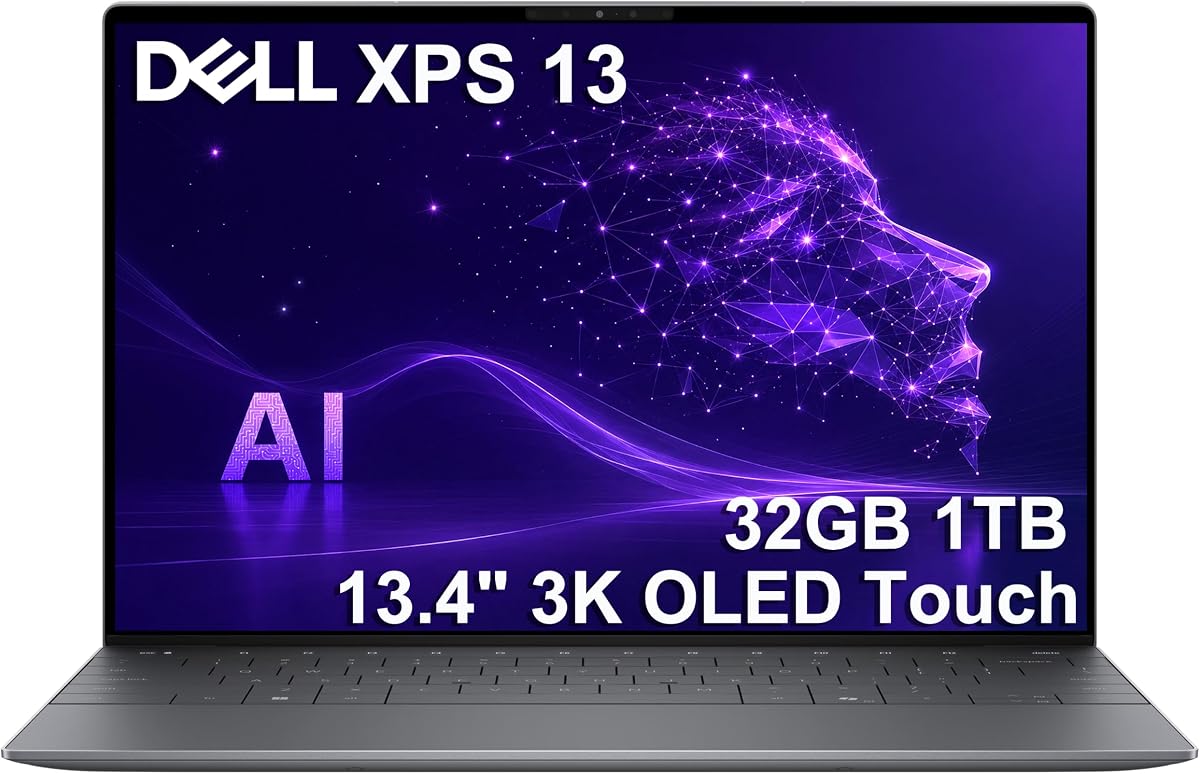
The touchscreen-equipped Dell XPS 13 9345 is the visual counterpart to the IPS XPS model. It has a 4.0 rating and features a 13.4-inch 3K OLED panel with 2880-by-1800 resolution, 400 nits of brightness, anti-reflective treatment, and touch input. The Snapdragon X Elite X1E-80-100 processor, 32GB of memory, and 1TB PCIe NVMe drive form a serious professional configuration.
We may earn a commission when you buy through this link, at no additional cost to you.
The OLED display offers excellent detail and vivid rendering, making this a compelling option for visual work, media consumption, and touch-based tasks. Qualcomm Adreno graphics support the visual experience. The laptop can also connect two external 4K monitors at 60Hz through its Type-C ports without requiring a docking station, a useful feature for desktop-style workflows.
Windows 11 Pro adds BitLocker encryption, Remote Desktop, Hyper-V virtualization, and Group Policy management. Backlit keyboard, fingerprint reader, Wi-Fi 7, Bluetooth 5.4, and two 40Gbps USB4 ports make the system suitable for office, development, and communication environments. Dell describes the device for software engineers, analysts, financial professionals, creators, architects, and business owners.
One important buying consideration is the disclosure that the computer has been resealed to upgrade the SSD, with separate warranty coverage described for the upgraded drive and remaining Dell components. Buyers should carefully review that arrangement and the seller's terms. Subject to that consideration, the combination of 3K OLED, touch, Windows 11 Pro, and premium Qualcomm performance is highly attractive for creative professionals.
The 2880-by-1800 OLED panel delivers high pixel density, rich contrast, and direct touch interaction. These qualities make it particularly appealing for photo review, illustration, presentations, and media-oriented workflows.
Windows 11 Pro supplies enterprise-oriented functions, while dual USB4 connections support two 4K external displays. That makes the laptop practical for a full desk setup when the user wants to travel with a smaller primary screen.
We may earn a commission when you buy through this link, at no additional cost to you.
The HP OmniBook 3 16 is a Snapdragon Laptop bundle built around practicality. It has a 5.0 rating, a Snapdragon X X1-26-100 processor, 16GB of LPDDR5x memory, a 512GB internal PCIe SSD, and a 1TB docking-station storage solution. The result is 1.5TB of stated storage across the laptop and included desktop accessory.
We may earn a commission when you buy through this link, at no additional cost to you.
Its 16-inch WUXGA IPS display provides wide viewing angles and a comfortable large-screen workspace for work, browsing, and entertainment. The processor uses eight cores and eight threads, includes 4MB of L3 cache, and reaches up to 3.0GHz turbo frequency. Qualcomm Adreno graphics, a backlit keyboard, an FHD infrared camera, and Windows 11 Home create a complete everyday platform.
Connectivity is unusually versatile for a mobile computer. The laptop includes two USB Type-A ports, two USB Type-C ports, HDMI 2.1, and a headphone and microphone combination jack, alongside Wi-Fi 6E and Bluetooth 5.3. The included seven-in-one docking station expands desk connectivity, while the bundled microSD card, cables, and cleaning cloth make the package convenient to set up.
At 3.65 pounds and 0.58 inches thick, it remains reasonably thin but is heavier and larger than the compact XPS and Yoga options in this guide. Some buyers may also find the docking station unnecessary. Still, for users who want abundant accessible storage, a broad port selection, and a large screen in one package, the OmniBook 3 16 is a strong and well-rounded recommendation.
The internal SSD provides fast everyday storage, while the docking station adds a terabyte of extra capacity and expands the workstation connection options. This makes the bundle particularly useful for file-heavy work or a shared desk.
Two USB-A, two USB-C, HDMI 2.1, and an audio jack cover many everyday accessories directly. The dock adds further flexibility when the laptop is used as a main desktop system.
We may earn a commission when you buy through this link, at no additional cost to you.
The 2026 ASUS Vivobook S16 is a forward-looking Snapdragon Laptop that combines the new Snapdragon X2 Elite platform with a large OLED panel and a refined portable design. It carries a 5.0 rating and offers up to 80 TOPS of NPU performance, 16GB of memory, and a 1TB SSD. It is aimed at users who want modern AI capabilities in a stylish everyday notebook.
We may earn a commission when you buy through this link, at no additional cost to you.
The 16-inch 16:10 WUXGA OLED display provides deep contrast, vivid detail, and a spacious work area. Narrow bezels make the screen feel expansive, while Dolby Atmos and ASUS Audio Booster enhance the built-in speakers. A backlit chiclet keyboard includes a convenient num key for faster number entry, and the precision touchpad supports smooth navigation.
Power comes from the Snapdragon X2 Elite processor and 70Wh battery. ASUS claims as much as 31 hours of uninterrupted use and fast charging to 60 percent in 49 minutes. Connectivity includes Wi-Fi 7, two USB 4.0 Type-C ports, two USB-A ports, HDMI 2.1 TMDS, and a 3.5mm combination audio jack. Windows Hello, an IR FHD camera, and a physical privacy shutter support secure daily use.
The main constraint is 16GB of memory. That is sufficient for mainstream work, but buyers who intend to maintain many large applications, intensive virtual machines, or professional creative projects may favor a higher-memory configuration. Even with that limitation, the S16's modern processor, OLED quality, audio, port selection, and claimed endurance make it an excellent premium all-rounder.
The Snapdragon X2 Elite's NPU can reach up to 80 TOPS, giving compatible Copilot+ features a substantial hardware foundation. Local acceleration can make certain AI-assisted workflows more responsive without sending every task to a remote server.
At 3.70 pounds and 0.7 inches thick, the S16 is not the smallest option, but it balances a large OLED canvas with portable construction. MIL-STD 810H testing adds confidence for regular travel and commuting.
We may earn a commission when you buy through this link, at no additional cost to you.
The touchscreen version of the Lenovo IdeaPad Slim 3X adds direct input to an otherwise practical design. It has a 5.0 rating and pairs a 15.3-inch WUXGA 16:10 IPS touchscreen with a Snapdragon X 8 Core processor, 16GB of LPDDR5 memory, 512GB of SSD storage, and Windows 11. A dedicated 45 TOPS NPU underpins its Copilot+ PC capabilities.
We may earn a commission when you buy through this link, at no additional cost to you.
The extra vertical screen space and touch input make this a comfortable choice for browsing, casual work, streaming, and presentations. A backlit keyboard improves low-light typing, while Wi-Fi 7 provides current wireless connectivity. The 60Wh battery is paired with Rapid Boost charging to help users recover quickly when power is limited.
Its premium metal chassis has passed military-grade durability tests, making it suitable for daily commuting and travel. A physical webcam shutter and integrated fingerprint reader support privacy and convenient sign-in. The Enhanced Security Suite adds further system protections, while the touch display can be useful for users who prefer a more interactive way to scroll, annotate, or navigate.
Its 512GB storage capacity is more modest, and unlike the related non-touch IdeaPad Slim 3X, this listing does not explicitly mention a ready-to-expand SSD slot. Buyers who anticipate significant file growth should verify expansion details. For everyone else, this model remains a well-balanced option with a useful touchscreen, efficient processor, modern connectivity, and thoughtful security features.
The 15.3-inch 16:10 panel adds room for documents while supporting direct finger interaction. It offers a more flexible interface for browsing, media, and touch-oriented applications.
The fingerprint reader, camera shutter, and Enhanced Security Suite make routine online work more convenient and private. Rapid Boost charging adds value for students moving between classes or workers handling busy schedules.
We may earn a commission when you buy through this link, at no additional cost to you.
The Lenovo Yoga Slim 7X is one of the most visually impressive Snapdragon Laptop options in this guide. It carries a 5.0 rating and combines the Snapdragon X Elite X1E-78-100 processor with a 14.5-inch 3K OLED touchscreen. Its 16GB of memory and 1TB of storage are conventional for the category, but the display and portable chassis define the experience.
We may earn a commission when you buy through this link, at no additional cost to you.
The OLED panel has a 2944-by-1840 resolution, Dolby Vision support, HDR 600 True Black certification, 100 percent DCI-P3 color coverage, and up to 1000 nits of peak brightness. It also runs at 90Hz and uses a glass surface. These specifications make the Yoga particularly compelling for photo review, video, illustration, and other work where color and contrast matter.
Lenovo describes up to 23.5 hours of video playback, while the 2.82-pound chassis makes the large display surprisingly portable. Three 40Gbps USB-C ports support USB Power Delivery 3.1 and DisplayPort 1.4. The keyboard offers 1.5mm key travel and dished keycaps, and the system has passed 21 MIL-STD 810H tests. AI Core manages performance and battery behavior.
As with many ultraportables, 16GB of memory is the main limitation, particularly for heavy multitasking or demanding virtualized workflows. The product also carries a premium feature set, so buyers should compare current pricing with similarly equipped alternatives. Even so, the combination of a spectacular 3K OLED touch display, excellent port support, and exceptional weight makes the Yoga Slim 7X a standout recommendation for mobile creators.
The 3K resolution, 90Hz refresh rate, full DCI-P3 coverage, and high HDR brightness give the display an unusually strong specification set. It is well suited to visual professionals who want serious screen quality in a small chassis.
At only 2.82 pounds, the Yoga Slim 7X offers a favorable balance between screen area and carrying weight. Its durability testing and recycled-material design details reinforce its premium travel-focused positioning.
We may earn a commission when you buy through this link, at no additional cost to you.
The ASUS Zenbook A16 is the most ambitious configuration in this guide, combining 48GB of memory with the Snapdragon X2 Elite Extreme processor and a 3K OLED display. It has a 5.0 rating and is aimed at professionals, students, creators, heavy browser users, and buyers who want desktop-class convenience in a highly portable form.
We may earn a commission when you buy through this link, at no additional cost to you.
The 18-core Snapdragon X2 Elite Extreme X2E94100 and Qualcomm Hexagon NPU with up to 80 TOPS provide substantial computing and AI capacity. Memory reaches 48GB LPDDR5x-9600, an unusually high amount for a laptop, while a 1TB PCIe 4.0 SSD supports rapid startup and file access. Together, these specifications offer considerable headroom for multitasking and professional workflows.
Its 16-inch ASUS Lumina OLED touchscreen has a 2880-by-1800 resolution, 120Hz refresh rate, 500-nit brightness, and up to 1100-nit HDR peak output. It covers 100 percent DCI-P3, offers a 0.2ms response time, and supports DisplayHDR True Black 1000. The Ceraluminum chassis weighs only 2.87 pounds and measures 0.65 inches thick.
Connectivity is comprehensive, with Wi-Fi 7, Bluetooth 5.4, two USB4 Type-C ports, USB-A 3.2, HDMI 2.1, an SD card reader, and an audio jack. A 1080p camera, facial recognition, six-speaker Dolby Atmos system, Smart Amp, backlit keyboard, and 70Wh battery complete the feature set. This is an exceptional premium choice for buyers who prioritize memory, screen quality, and a rare combination of large-screen portability.
The 48GB LPDDR5x allocation is the Zenbook's defining advantage. It gives demanding multitaskers and creators more room for applications, browser sessions, and virtualized workflows than a conventional 16GB configuration.
The 3K 120Hz OLED delivers detailed, fluid visuals with strong HDR capability. USB4, HDMI 2.1, Wi-Fi 7, an SD card reader, and rich built-in audio make it well equipped for both mobile work and a permanent desk setup.
We may earn a commission when you buy through this link, at no additional cost to you.
A useful Snapdragon Laptop choice depends on display preferences, processor generation, memory, storage, battery needs, and the kinds of applications you routinely run. The most important step is matching the hardware to your actual workload rather than treating every Copilot+ PC as interchangeable.
Qualcomm offers several Snapdragon X tiers, from the Snapdragon X 8 Core series to Snapdragon X Elite and Snapdragon X2 Elite Extreme. Higher-tier chips generally provide more CPU cores, stronger graphics, and greater NPU throughput, which can benefit demanding multitasking and compatible AI applications. However, a standard Snapdragon X system is more than sufficient for browsing, office work, communication, streaming, and many mainstream creative tasks.
Choose processor tier based on workload and software. Always verify that the applications and peripherals you use support Windows on Arm before purchasing.
The models in this guide range from 16GB to 48GB of memory. Sixteen gigabytes is adequate for typical productivity and education, while 32GB offers more comfort for numerous browser tabs, creative applications, large project files, and development work. The 48GB ASUS Zenbook A16 provides exceptional headroom for heavy multitasking and virtualized environments.
Prioritize 16GB as a sensible minimum, then consider 32GB or more if your workload regularly exceeds standard office tasks. Memory generally cannot be upgraded after purchase.
Storage choices range from 512GB to 1TB internally, with the HP OmniBook 3 16 bundle adding a 1TB docking-station solution. The Lenovo IdeaPad Slim 3X non-touch model is notable for its ready-to-expand SSD slot, allowing storage to grow without replacing the computer. Other configurations may require external drives or cloud storage.
Consider both current file needs and future projects. Choose 1TB for large libraries, and confirm expansion options before buying if you expect storage demands to change.
The guide includes 2K and 3K IPS and OLED panels in sizes ranging from 13.4 to 16 inches. OLED provides richer contrast and often higher HDR capability, while IPS can be a practical choice for office work. Touch displays add direct interaction but do not necessarily improve conventional keyboard-based productivity.
Prioritize resolution, color capability, brightness, and size according to your work. For media or visual work, OLED and wide color gamut are particularly attractive.
Snapdragon platforms are designed around power efficiency, and many models claim all-day or multi-day endurance. HP emphasizes a 34-hour-and-45-minute figure for the OmniBook 5 16, while the ASUS Vivobook S16 lists up to 31 hours. Real runtime depends on screen brightness, workload, battery condition, and wireless activity, so treat these figures as comparative guidance rather than guarantees.
Fast charging can be especially valuable for frequent travelers. Look for the promised percentage and time, and consider charger size if you will carry the laptop frequently.
Weight and thickness vary considerably. The Yoga Slim 7X and Zenbook A16 pair large premium displays with weights around 2.8 pounds, while the larger IdeaPad and OmniBook models are more substantial. Some premium laptops also use CNC-machined aluminum, Ceraluminum, or military-tested metal constructions that support long-term durability.
Choose a smaller model for frequent commuting and a larger screen for desk work or media. Balance portability against keyboard space, screen visibility, and the need for a protective bag.
Modern Snapdragon systems in this guide offer Wi-Fi 6E or Wi-Fi 7, Bluetooth 5.3 or 5.4, and USB4 connectivity. USB4 is particularly useful for external storage, displays, and power delivery. HDMI 2.1 makes desktop use simpler, while SD card readers and full-size USB-A ports can reduce adapter requirements.
Security features include fingerprint readers, IR cameras, Windows Hello facial recognition, physical webcam shutters, and Windows 11 Pro tools such as BitLocker. Include these details in your decision when privacy or business deployment matters.
Windows on Arm has grown substantially, but some specialized applications, drivers, games, and accessories may still behave differently from traditional Intel or AMD systems. This matters most for specialized engineering software, plug-in devices, anti-cheat gaming systems, and organization-managed applications.
Check the support pages for every essential application and peripheral before ordering. This verification is especially important for business, education, and creative workstations.
Begin by completing Windows setup, signing in with your preferred account, and confirming that Windows Update has installed the latest operating system, chipset, graphics, and application updates. Install the current Qualcomm and device drivers supplied by the manufacturer, then reboot. Verify your essential applications and accessories before moving files or beginning an intensive project.
For battery care, use the performance modes provided by the manufacturer and avoid leaving the computer in extreme heat or direct sunlight for long periods. Fast charging is convenient for travel, but it is not necessary for routine topping-up. Keeping the operating system current, storing files sensibly, and leaving adequate free space on the SSD helps maintain responsiveness.
When transporting a Snapdragon Laptop, place it in a padded sleeve or protective case and avoid heavy objects on the OLED or touchscreen panels. Clean the display with a soft microfiber cloth, avoid abrasive cleaners, and keep liquids away from openings. For long desktop sessions, use an approved stand, external keyboard, and mouse, and update the system regularly to benefit from security and compatibility improvements.
A Snapdragon Laptop is a notebook powered by a Qualcomm Snapdragon processor and generally running Windows 11. These systems emphasize efficient performance, integrated graphics, on-device AI features, wireless connectivity, and battery life. Their capabilities vary by processor generation, so model-level specifications remain important.
They are well suited to web browsing, email, office applications, video calls, document work, and media consumption. Compatibility with specialist software should be checked in advance, and demanding workflows may benefit from a higher-tier Snapdragon X Elite or X2 Elite Extreme configuration.
For most students and office users, 16GB is sufficient for everyday multitasking and mainstream applications. Heavy browser use, creative projects, software development, and virtual machines can benefit from 32GB. The 48GB ASUS Zenbook A16 provides the greatest memory headroom in this guide.
Some Windows games and cloud gaming services are compatible with Snapdragon systems, but native game support is not universal. Buyers should check the requirements of each title, especially for anti-cheat software, specialized drivers, and game mods. The laptops here range from efficient general-purpose models to premium configurations with stronger integrated graphics.
OLED displays offer excellent contrast, vivid color, and strong HDR performance, making them ideal for media and creative work. They may also cost more or place greater emphasis on power management. IPS alternatives can still provide sharp 2K images and may be preferable for office-focused users.
A 512GB drive works well for installed applications, active documents, and a moderate media library. Users with large archives should consider 1TB, an expandable SSD slot, or external storage. The Lenovo IdeaPad Slim 3X and the HP OmniBook 3 bundle offer particularly flexible storage arrangements.
Many common productivity, communication, and creative applications work well on Windows on Arm. Compatibility can vary for specialized engineering tools, peripheral drivers, older utilities, and certain games. Review the current support information for every program and accessory that matters to your work.
Start with application compatibility, processor tier, memory, and display needs. Battery life, weight, ports, security features, and storage expansion then determine which model fits your routine best. Verify the exact configuration and current price before purchasing because listings and deals can change.
The Lenovo IdeaPad Slim 3X is the most budget-conscious recommendation because it combines a 45 TOPS NPU, durable metal construction, useful security controls, and expandable storage. The HP OmniBook 5 16 is the strongest all-round choice, offering a large 2K OLED panel, long claimed endurance, rapid charging, and modern wireless connectivity.
The Lenovo Yoga Slim 7X stands out as the premium visual option with its 3K OLED touch display, exceptional brightness specification, and very low weight. Buyers should prioritize compatibility first, then decide how much memory and processing power their work requires. Display quality, battery life, ports, and portability are the next most important distinctions.
Finally, check the exact model configuration before ordering. The same product family may include different displays, memory capacities, storage options, operating system editions, and included accessories. Current prices and promotions change frequently, so compare the complete configuration rather than relying on a product name alone.