
Perixx PERIBOARD-512B
4.4Editor score
Wired USB connection
Curved stepped key rows
Extended tactile key travel
A split keyboard separates the left and right key groups so your hands, wrists, and forearms can adopt a more natural position than they often can on a conventional board. The best model depends on your hand size, desk space, preferred layout, connection method, and tolerance for a learning curve.
We compared ten split keyboards across ergonomic design, key feel, palm support, tilt or tenting options, wireless capabilities, compatibility, special features, and practical desk footprint. The list covers membrane, mechanical, low-force, full-size, and compact models for office work, writing, programming, and gaming.
Each numbered review explains the product's strongest qualities and trade-offs, while the summary table makes it easier to compare the complete field. Product availability and prices change frequently, so confirm the current listing and specifications before buying.
4.4Editor score

4.4Editor score

4.3Editor score
As an Amazon Associate we earn from qualifying purchases.
The comparison below highlights the major differences in layout, connectivity, adjustability, and intended use, helping you narrow the field before considering comfort preferences and desk space.



The Arteck Split Ergonomic Keyboard with Palm Rest is a straightforward wireless option for users who want a more natural typing position without navigating a complex accessory ecosystem. It carries a 4.3 rating, and its defining features are a separated key layout, a cushioned wrist and palm rest, and simple 2.4G USB connectivity. The product is particularly appealing to office users who want a full ergonomic form factor without a complicated initial configuration.
We may earn a commission when you buy through this link, at no additional cost to you.
Its split arrangement is intended to position the wrists and forearms more naturally, while the padded surface provides support during extended work sessions. Setup is refreshingly direct: the nano receiver stores at the back of the keyboard and can be inserted into a computer. A rechargeable lithium battery is rated for up to six months based on two hours of non-stop use per day, making the keyboard practical for a fixed workstation that does not need frequent charging.
The main limitation is that the feature set is intentionally lean. It does not offer the multi-device switching, extensive backlighting, mechanical switch customization, or configurable macros found in some premium or gaming-oriented alternatives. It also relies on 2.4G wireless rather than Bluetooth, so it is best suited to a computer setup that can use the included USB receiver. These constraints are reasonable for users prioritizing comfort and uncomplicated operation.
This is a compelling recommendation for office workers, students, and anyone setting up a desk who wants a wireless split design with meaningful palm support and little configuration overhead. It is less appropriate for users who need Bluetooth, dynamic lighting, hot-swappable switches, or extensive shortcut programming. For the stated goal of comfortable everyday typing, it delivers a focused and approachable package.
The soft cushioned wrist rest is one of the Arteck's most important features because it lets the hands settle rather than hovering above the keyboard. Combined with the split layout, it targets the wrist and forearm positioning that motivates many buyers to move away from a conventional board.
The stored nano receiver makes the keyboard approachable for everyday wireless use. It does not need pairing through Bluetooth software or support three connected devices, but users who work primarily at one computer can appreciate that simplicity.
We may earn a commission when you buy through this link, at no additional cost to you.
The Logitech Ergo K860 is the most complete general-purpose split keyboard in this group. It combines a curved, split keyframe with a sloping design, a substantial pillowed wrist rest, and adjustable palm lift. Its 4.4 rating reflects a balanced feature set, and the keyboard suits users who want wireless flexibility without giving up a familiar full-size arrangement or ergonomic refinement.
We may earn a commission when you buy through this link, at no additional cost to you.
Logitech emphasizes that the curved wrist rest uses a memory foam layer and provides substantially more wrist support than a standard keyboard without palm support. The sculpted keyframe, sloping profile, and three tilt positions—0, negative 4, and negative 7 degrees—allow users to adjust the angle while seated or standing. Scooped keys are designed to match fingertip contours, while the full-size layout includes a numeric keypad and a Caps Lock indicator.
Connectivity includes both a USB receiver and Bluetooth, which gives the K860 more flexibility than a receiver-only model. Logitech Options software can be used to customize Fn keys, create shortcuts, and receive battery-life notifications. The trade-offs are that this is not a detachable, freely repositioned split board: its curvature and separation are fixed. Buyers wanting independent movement of each half may prefer the Kinesis Freestyle2 or another modular design.
The K860 is our strongest all-around recommendation for office professionals, writers, students, and long-session computer users. It combines a recognizable standard layout, multiple connection options, quiet keys, and meaningful ergonomic adjustments. Even though its premium features do not include mechanical customization or advanced macro banks, it provides the most balanced foundation for everyday productivity.
The K860 retains familiar full-size navigation and numeric keys while changing the angle and separation of the main typing area. That balance makes it easier to adopt than a highly compact model and more productive for spreadsheets, data entry, and general office tasks.
Three palm-lift settings let users adjust the slope for seated or standing work. The sculpted keys and padded wrist rest add further support, making the fixed shape feel adaptable without requiring the more involved setup of a modular keyboard.
We may earn a commission when you buy through this link, at no additional cost to you.
The Perixx PERIBOARD-512B delivers the core benefits of a split keyboard at a straightforward entry point. It has a 4.4 rating, separates the keyboard into left and right zones, and uses a stepped, curved row design intended to reduce wrist bending and fatigue. Because it connects by USB, it avoids battery management and wireless setup, making it a practical choice for a dedicated desk.
We may earn a commission when you buy through this link, at no additional cost to you.
The defining feature is its extended key travel. Rather than the shallow response associated with many laptop-style membranes, the PERIBOARD-512B offers 4.2 millimeters of travel with tactile feedback and audible confirmation similar to brown mechanical switches. Curved keycaps have flatter tops and rounded back edges intended to support fingertip control, while the ABS construction is rated for up to 20 million keystrokes.
Adaptation is the main consideration. The ergonomic shape may initially feel unfamiliar, and the supplied information indicates that most users adjust within one to two weeks. There are also fewer connectivity options than premium alternatives: no Bluetooth, no multi-device switching, and no wireless receiver. The specified layout is US English, which may not suit every regional or workflow requirement.
For someone seeking a split layout without wireless complexity or premium extras, the PERIBOARD-512B is an excellent value-oriented choice. Its deep key travel, tactile response, and wired reliability make it especially appealing to typists who prefer physical feedback. Users wanting lighting, macro controls, or broad platform flexibility should look elsewhere.
The extended membrane travel provides a more substantial typing feel than many compact wireless boards. That makes the PERIBOARD-512B a good match for users who like the confirmation of a mechanical-style press without wanting a fully mechanical product.
Wired USB connectivity means the keyboard can be used without pairing, batteries, or charging. For a permanent workstation, this dependable approach can also eliminate the small delays and connection interruptions that some users associate with wireless accessories.
We may earn a commission when you buy through this link, at no additional cost to you.
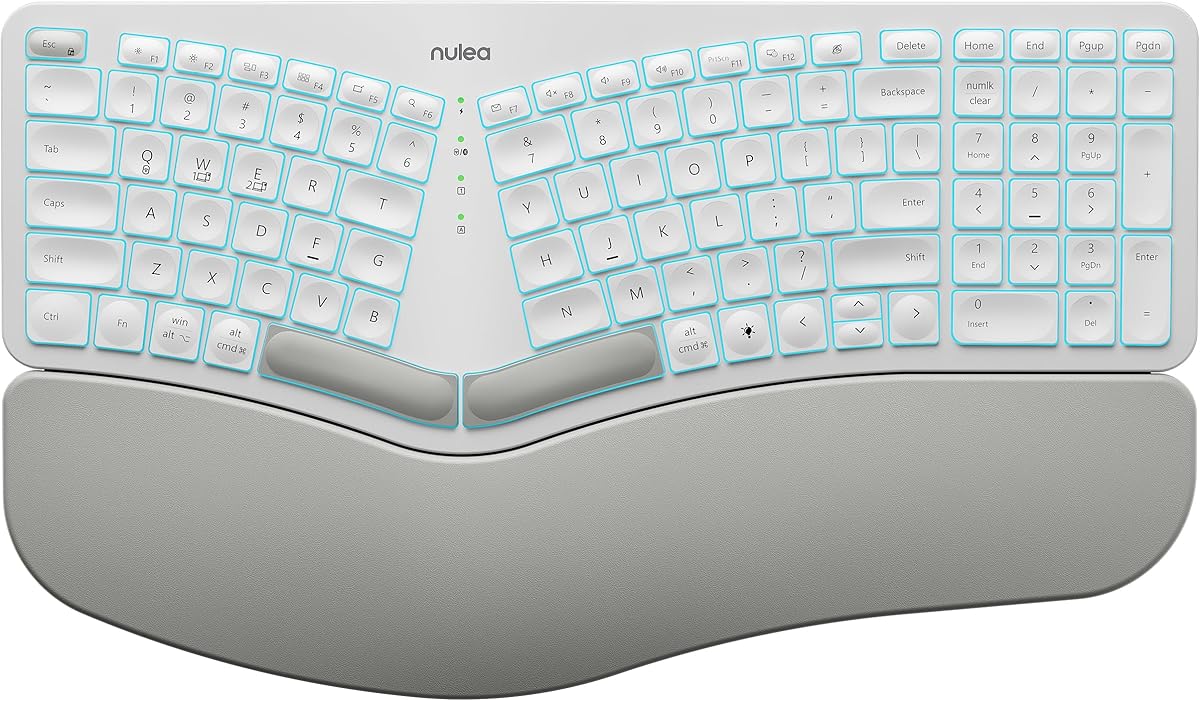
The Nulea RT05 is a feature-rich wireless split keyboard aimed at users who alternate among computers and want more visual customization than a basic ergonomic board. It earns a 4.2 rating and stands out through Bluetooth and 2.4G connectivity, three-device switching, a seven-color backlight, and USB-C charging. Its split, splayed, curved design is intended to support a relaxed shoulder position and more natural wrist alignment.
We may earn a commission when you buy through this link, at no additional cost to you.
Device switching is particularly useful for a multi-computer workflow. A dedicated button lets the user move among up to three paired devices, which could mean starting an email on a desktop, answering a short message on a phone, and switching to a laptop for another task. The lighting system offers seven colors and three brightness levels, allowing the appearance to match different working environments or personal preferences.
The 2000mAh rechargeable battery provides a useful foundation for wireless work, and four adjustable tilt legs create three angle options. The backlight switches off when the battery falls below 10% to preserve basic functionality. As with many feature-packed wireless keyboards, users should account for charging needs and avoid expecting every lighting or shortcut behavior to work identically across every operating system.
The RT05 is a strong fit for students, mobile professionals, and mixed-device users who value flexibility and appearance. It is less suitable if your priority is a completely cable-free setup, since 2.4G mode still requires the receiver. Users who prioritize a refined fixed ergonomic shape may also find the Logitech K860 more polished.
Supporting up to three simultaneous connections makes the RT05 useful for desks shared by a computer, phone, and laptop. The switching button offers a quicker path between tasks than physically reconnecting separate peripherals.
Seven colors and three brightness levels make the board adaptable to different lighting conditions. USB-C charging simplifies routine power management, while the automatic low-battery backlight shutdown helps preserve operation when power becomes scarce.
We may earn a commission when you buy through this link, at no additional cost to you.
The SABLUTE Ergonomic Wireless Keyboard and Mouse is the most complete desktop bundle in this roundup. It has the highest listed rating at 4.8 and combines a full-size split keyboard with a contoured ergonomic mouse. Rather than solving wrist position alone, the package addresses keyboard and mouse ergonomics together, making it especially relevant to users rebuilding an entire workstation.
We may earn a commission when you buy through this link, at no additional cost to you.
The keyboard uses a curved split layout, a full-size arrangement with numeric keypad, a soft memory foam wrist rest with a water-resistant surface, and four adjustable tilt legs. A dedicated system key switches between Windows and Mac layouts, while shortcut keys provide access to media controls, calculator, screenshots, and emoji functions. These conveniences support daily productivity without requiring extensive custom software.
The included mouse adds palm and thumb support, four adjustable DPI levels, and forward and back buttons. Both devices use rechargeable power and 2.4GHz wireless connectivity. The supplied specifications mention a receiver stored under the mouse and a separate USB-C adapter for devices with USB-C ports. The keyboard can sit in standby for up to 250 hours, while the mouse can reach 350 hours, with auto sleep after inactivity.
The main concern is footprint. At 19 by 10.45 by 1.88 inches, the keyboard requires significantly more desk space than a compact split model. Users should measure their work area before buying. Even with that caveat, the SABLUTE package is an appealing option for Mac or Windows users who want coordinated peripherals, a numeric keypad, and a high-rated ergonomic bundle in one purchase.
The matching mouse includes palm and thumb rests plus adjustable DPI, extending the ergonomic focus beyond the keyboard. For users who spend substantial time switching between typing and pointer work, the bundle offers a more coordinated setup.
The numeric keypad, broad split shape, and generous rest make this model productive for spreadsheets and general office work. Its dimensions also make desk planning essential, especially for compact workspaces or shared hot desks.
We may earn a commission when you buy through this link, at no additional cost to you.
The RK ROYAL KLUDGE S70 combines a split mechanical design with the customization features usually sought by enthusiasts. Its 4.3 rating reflects a capable package for programmers, writers, and gamers who want a compact board, flexible connectivity, and the ability to change switches. The two halves can be connected with a coiled cable and positioned independently using eight adjustable feet.
We may earn a commission when you buy through this link, at no additional cost to you.
The keyboard includes pre-lubed linear creamy switches and a hot-swappable PCB compatible with three-pin and five-pin switches. That makes it easier to alter the feel and sound without replacing the entire keyboard. Its 75-percent layout saves space compared with a full-size board, although users who depend on a number pad will need to make an adjustment.
Connection options include low-latency 2.4GHz, Bluetooth, and USB-C. The left half contains a 3150mAh battery and can maintain wireless connectivity and macro functions for one-handed use, offering a distinct flexibility advantage over boards that become unusable when detached. Five programmable macro keys can be remapped with RK software on Windows, and RGB lighting can also be customized there.
The S70 is best for technically inclined users who value switch customization and compactness over a full numeric keypad. Its dependence on Windows software for macro and RGB management is an important limitation for Mac or Android users, although the keyboard itself supports those systems. For the right enthusiast, the hot-swappable design and flexible half positioning provide exceptional control.
The hot-swappable PCB supports common three-pin and five-pin switches, allowing users to alter key feel over time. Pre-lubed creamy linear switches provide a smooth starting point for those who do not want to customize immediately.
Eight adjustable feet let each half be splayed or tented independently, while the coiled cable preserves the connection between them. The 75-percent footprint reduces desk demand, making the S70 practical for users who want modular positioning without a number pad.
We may earn a commission when you buy through this link, at no additional cost to you.
The Wired Ergonomic Split Keyboard with RGB Backlight and Numpad combines a separated frame, integrated wrist support, extensive lighting, and a large collection of dedicated shortcuts. With a 4.2 rating, it is aimed at office users, late-night typists, and gamers who want visual customization without dealing with wireless pairing or battery charging.
We may earn a commission when you buy through this link, at no additional cost to you.
Its split frame includes an integrated wrist rest and two pairs of adjustable kickstands for changing the typing angle. Lighting is one of the major attractions, with ten dynamic rainbow modes, seven solid colors, 17 customizable effects, and five brightness levels. The full-size layout retains a number pad and adds 17 dedicated shortcuts for media playback, volume, track control, screen brightness, calculator, emoji, search, Home, and PrintScreen.
The 5.6-foot USB-A cable provides a stable plug-and-play connection with no batteries, drivers, or charging. An included USB-C adapter supports laptops and desktops with different ports. The keyboard is rated for a ten-million-keystroke lifespan and is compatible with Windows, macOS, Chrome OS, and Linux. It does not support gaming consoles, and operating-system changes can produce normal differences in some functions.
This keyboard is a strong option for users who want a wired, full-size split board with an emphasis on lighting and shortcut access. Its cable provides dependable performance but reduces freedom when arranging the halves. Compared with the more refined Logitech K860 or the highly customizable RK S70, it prioritizes visible features, dedicated controls, and straightforward operation.
Multiple colors, dynamic effects, and five brightness levels provide far more visual choice than a conventional office keyboard. The dedicated shortcut bank adds useful one-touch access to common tasks without requiring software configuration.
The wired USB connection avoids receiver pairing and charging. It also keeps the keyboard's position relatively consistent, although the fixed cable means users need to plan the separation and angle around the available cord length.
We may earn a commission when you buy through this link, at no additional cost to you.
The Cloud Nine C989M is a premium, fully mechanical split keyboard designed for users who want fine control over layout, typing feel, and programmable commands. It has a 4.3 rating and supports separation of the key modules by as much as eight inches. Its fixed seven-degree wrist-rest angle and palm support provide a starting point that can be adapted by changing the distance between the two halves.
We may earn a commission when you buy through this link, at no additional cost to you.
Kailh tactile brown switches provide a relatively low activation force with tactile feedback, while RGB backlighting makes every character visible and allows colors to be selected through the included app. The keyboard is aimed equally at professional and gaming workloads, with a full number keypad, 10 programmable macro keys, and USB pass-through for added workflow flexibility.
This level of specialization comes with a more involved setup than a conventional split board. Users must adjust to the separation, consider the fixed seven-degree angle, and use the app for lighting customization. Macro programming also makes the keyboard most relevant to users who can benefit from shortcuts rather than those who only want a comfortable typing surface. Its PC positioning further narrows its appeal compared with broadly cross-platform wireless models.
The C989M is an excellent choice for power users, serious gamers, and productivity-focused typists who value mechanical feedback and programmable control. It is less suitable for buyers seeking a simple office keyboard, immediate wireless operation, or broad operating-system support. For the right user, the modular separation, tactile switches, and macro bank create a highly adaptable premium experience.
The two modules can be separated up to eight inches, allowing the hands and forearms to settle into a more natural position. Built-in tenting and palm support add another layer of ergonomic structure without requiring a separate accessory.
Tactile brown switches give each keystroke a defined bump, while ten macro keys can accelerate repeated workflows. RGB lighting and USB pass-through round out a feature set designed for extended desktop use.
We may earn a commission when you buy through this link, at no additional cost to you.
The Logitech Ergo K860 Split for Business is a wireless ergonomic keyboard oriented toward organizations that need manageable deployments rather than enthusiast-level customization. It carries a 4.1 rating and uses Logi Bolt wireless technology with fully encrypted Secure Connections Only mode. The design supports large-scale deployment and management through Logitech Options and device-firmware update workflows.
We may earn a commission when you buy through this link, at no additional cost to you.
It retains the familiar strengths of the Ergo K860 design: a split, curved frame that improves typing posture, a sloping profile intended to reduce wrist and forearm strain, a pillowed wrist rest, and three palm-lift positions. The full-size layout includes a numeric keypad, and the keyboard can connect to up to three devices. Its stated two-year battery life is designed to support day-long productivity without frequent charging.
The distinction is deployment. Remote mass deployment and management features make this model relevant to IT departments, distributed teams, and managed business environments. Casual buyers who simply want a comfortable wireless keyboard may find the standard Logitech K860 easier to understand, while users focused on mechanical switches or modular positioning will find more suitable choices elsewhere.
For business buyers, the K860 for Business provides a strong balance of employee comfort and centralized management. Its lower rating relative to some consumer-facing alternatives does not diminish its specific purpose. If secure wireless deployment, broad certification, and remote administration matter more than lighting, macro banks, or mechanical customization, it is a focused and professional solution.
Logi Bolt and Secure Connections Only mode provide the encrypted wireless foundation emphasized for business use. These management-oriented features distinguish the model from a typical personal wireless keyboard.
The curved split frame, palm lift, and padded wrist rest preserve the core Ergo experience. Remote deployment and firmware management add value for organizations responsible for many identical peripherals.
We may earn a commission when you buy through this link, at no additional cost to you.
The Kinesis Freestyle2 is the most modular keyboard in the selection, offering the greatest control over the position of each hand. It has a 4.3 rating, and its two key modules can be rotated and separated by as much as nine inches. This makes it a strong candidate for users whose body dimensions, desk layout, or preferred forearm angle do not match a fixed split design.
We may earn a commission when you buy through this link, at no additional cost to you.
The pre-installed V3 tenting accessory supports five-, 10-, or 15-degree positions when used without palm supports. A detachable pivot tether allows the modules to be adjusted while remaining connected, and adhesive cushioned palm pads provide optional support. Its custom membrane switches use low activation force and tactile feedback intended to reduce finger fatigue, impact, and strain.
The standard Windows layout includes common hotkeys for cut, copy, and paste, multimedia controls, and an embedded numeric 10-key for productivity. No software or special drivers are required, which keeps setup manageable. However, the design is explicitly for PC and does not offer the multi-device wireless switching found in several modern alternatives.
The Freestyle2 is ideal for users willing to spend time dialing in the perfect position and for those with persistent wrist or forearm discomfort related to fixed layouts. It is less convenient for users who want to switch between operating systems or devices throughout the day. Even so, its exceptional adjustability and low-force typing make it a benchmark split design for focused PC work.
Nine inches of separation and module rotation allow the hands to be positioned independently. This makes the Freestyle2 particularly useful when a fixed curvature or separation does not suit the user's body or desk.
Custom membrane switches provide tactile feedback with low activation force, reducing the effort required for each press. The result is designed for long sessions where finger fatigue and firm keystrokes become concerns.
We may earn a commission when you buy through this link, at no additional cost to you.
The right split keyboard depends on more than appearance. Consider your hand size, desk dimensions, typing habits, operating system, connection needs, feature priorities, and willingness to adapt before choosing a model.
A fixed split keyboard has a predetermined gap and curve, while a modular model lets each half rotate, splay, or separate independently. Fixed designs are simpler, visually tidier, and often easier to adopt because the manufacturer has already established a relationship between the halves. Modular designs offer more precise positioning but require extra effort and, sometimes, more desk space. The Kinesis Freestyle2 and Cloud Nine C989M represent the adjustable end of the range, while the Logitech K860 and Arteck use established fixed shapes.
A split keyboard redirects much of the burden away from wrist extension, but support still matters during long sessions. Look for a broad rest that supports the heel of the palm rather than a narrow strip that lifts only the wrist. Memory foam or similarly cushioned surfaces can improve comfort, although the correct height depends on your desk, chair, and forearm angle. Some models include fixed palm support, while others provide adjustable legs or tenting options that alter the relationship between the hands and the rest.
Tenting raises the inner edges of the two halves so the forearms approach the keyboard at a more natural angle. Splay rotates the halves outward, while tilt or palm-lift changes the overall height and slope. These adjustments are not interchangeable: one user may need more splay, another more tenting, and a third mainly a negative tilt. Look for enough adjustment to move between seated and standing positions, and remember that fixed tenting can be less useful if your preferred angle changes throughout the day.
Key feel can determine whether a split keyboard becomes a long-term productivity tool. Membrane boards are generally straightforward and can offer long travel or a lighter feel. Mechanical boards provide more pronounced feedback and often allow switch replacement. Low-force membrane designs can reduce finger effort without requiring mechanical construction. If you are sensitive to noise, pay attention to switch type and the company's description of sound. If you enjoy customization, a hot-swappable board gives you more options as preferences change.
Wired USB offers simplicity and dependable operation without batteries, pairing, or charging. A 2.4G receiver provides a wireless experience while preserving a straightforward connection to one computer. Bluetooth makes multi-device switching convenient, but compatibility and power management may vary by operating system. Some of the listed keyboards support three devices, while others are designed around a single receiver. Choose based on how often you move between a desktop, laptop, tablet, or phone rather than on the highest possible device count.
Split keyboards occupy more width than standard boards, and the total footprint varies considerably. Full-size models include a number pad and are useful for spreadsheets, accounting, and data entry. A 75-percent layout saves space but removes the number pad. Low-profile or compact layouts may suit small desks, while broad rests and separated halves require clearance for your forearms. Measure the available width and depth before buying, and check the listed dimensions if the keyboard must fit between other peripherals.
Backlighting can improve visibility in dim rooms and adds visual customization, while dedicated macro keys can speed up repetitive tasks. Both features increase complexity. Some lighting and macro controls depend on Windows software, and app-based customization takes time to learn. Software may also provide battery notifications, Fn-key remapping, or shortcut assignment. If you need these capabilities, confirm the required operating system and review the setup process before choosing a board.
Every split keyboard changes muscle memory. The separated groups, curved rows, and altered key angles may feel awkward during the first days, particularly if you touch-type heavily. A gradual transition can make the adjustment easier: begin with short sessions, keep the familiar key arrangement visible, and avoid moving the halves repeatedly. A board with tactile feedback and a comfortable wrist rest may help users establish confidence, but the best ergonomic choice is one whose shape and adjustments you can comfortably maintain.
Begin by placing the keyboard where your elbows can rest naturally and your shoulders can remain relaxed. Set each half close to the position where your forearms would naturally land, then adjust the gap, rotation, and tilt gradually. Keep the wrist supported without pressing the middle of the wrist into an elevated edge. Spend the first several sessions using short blocks, and avoid repeatedly changing the setup before your hands have had time to adapt.
For a wireless model, charge it fully before the first extended session and learn how its battery indicator or status lighting works. Pair only the devices you intend to use, and confirm that the selected connection mode matches the computer shown by the keyboard. Wired models require far less configuration, but you should still route the cable so it does not pull against either half. Users of macro or lighting software should save a working configuration before experimenting with shortcuts.
Keep the keyboard free from crumbs, dust, and sticky residue by turning it off or disconnecting it before cleaning. Use a soft, lightly dampened cloth and avoid spraying liquid directly onto the keys or switches. Clean the palm rest and keycaps separately according to their surface materials. For mechanical models, remove loose debris carefully and allow every part to dry fully before reconnecting or powering the keyboard.
A split keyboard can reduce wrist extension and help users keep their forearms in a more neutral position, but it is not a medical treatment. Comfort also depends on desk height, chair setup, typing technique, and how long you work. If pain persists or affects daily activities, consult a qualified healthcare professional.
Most users need an adjustment period because the separated key groups change familiar hand positions. The supplied Perixx information suggests many typists adapt within one to two weeks. Begin with short sessions, keep the layout consistent, and make small positional changes rather than repeatedly resetting the keyboard.
A fixed split keyboard is usually simpler to set up and works well for users who like a manufacturer's established curvature. An adjustable or modular model is better when you need precise control over separation, rotation, or tenting. Adjustable models demand more desk space and setup effort but can fit a wider range of body proportions.
Many models support both operating systems, but the physical key labels may be designed for one platform. The SABLUTE keyboard includes a dedicated system key for switching layouts, while other models may require remapping or changing modifier functions. Check the listed compatibility, included software, and expected modifier behavior before purchasing.
Wireless models require either a USB receiver, Bluetooth pairing, or both, but setup is usually brief. Devices that support several connection methods can be especially convenient for users moving between a desktop and laptop. Battery charging and occasional connection changes are the main additional considerations compared with a wired board.
That depends on your work. A number pad is useful for spreadsheets, accounting, data entry, and rapid numeric input. If you type primarily in documents or code, a compact 75-percent layout may free valuable desk space. A separate numeric keypad can also provide the best of both approaches, although it adds another peripheral.
A wrist rest supports the lower wrist, while a palm rest supports more of the palm and heel of the hand. Split keyboards commonly use broad palm rests to encourage a neutral hand position. Height matters: if the support is too high, it can increase wrist pressure, so the keyboard angle and desk height should be evaluated together.
No. Mechanical switches can offer distinct feedback and customization, while membrane and low-force designs may provide a lighter, quieter, or more familiar experience. The best choice depends on your sensitivity to feedback, the software required for lighting or macros, and whether you value switch customization over a simple setup.
The Logitech Ergo K860 stands out as the most balanced all-purpose option, combining a familiar full-size layout, wireless and Bluetooth connectivity, a supportive palm rest, and multiple palm-lift positions. The Perixx PERIBOARD-512B is the strongest budget-oriented choice for users who value tactile membrane feedback and dependable wired operation, while the Kinesis Freestyle2 represents the most adjustable premium design.
Other priorities lead to different recommendations. The Arteck model emphasizes soft support and simple wireless setup; the Nulea RT05 serves multi-device users who want lighting; the SABLUTE bundle covers both keyboard and mouse ergonomics; the RK S70 targets switch customization and a compact footprint; the Cloud Nine C989M provides macros and modular mechanical positioning. Choose the features that match your work rather than paying for capabilities you will never use.
Before ordering, measure your desk, check the required operating system, confirm connection options, and consider whether you prefer fixed or adjustable positioning. Product specifications, listings, and prices can change, so review the current Amazon page and manufacturer details before making your final purchase.