
JSAUX 2-Pack Ultra HD Screen Protector
4.6Editor score
Two tempered glass protectors
LCD and OLED compatibility
Guided edge-to-edge installation
99.99% transparency
Anti-fingerprint oleophobic coating
Steam Deck Accessories can transform a capable handheld into a more comfortable, protected, and versatile gaming setup. The right additions may improve screen visibility, cooling performance, portability, desktop connectivity, or ergonomics without changing the core hardware inside the device.
We compared these ten products across their stated compatibility, protective features, connectivity, cooling functions, portability, and everyday usability. The list covers screen protectors, modular cases, docking stations, cooling fans, a travel case, and two hands-free pillow stands designed for the Steam Deck.
Each recommendation highlights a different way to improve your setup, from basic scratch protection to a complete travel and cooling kit. Product ratings are included for reference, while current prices and availability can change, so confirm the latest listing details before purchasing.
4.6Editor score

4.8Editor score

4.1Editor score
As an Amazon Associate we earn from qualifying purchases.
This side-by-side comparison organizes every recommendation by its primary benefit, stated device compatibility, and standout functions, making it easier to identify the accessory that best matches your gaming habits.






The JSAUX 2-Pack Ultra HD Screen Protector is a straightforward way to protect the Steam Deck's seven-inch display from scratches and everyday wear. It has a 4.6 rating and supports both the original Steam Deck LCD and Steam Deck OLED. Its main appeal is the combination of high transparency, edge-to-edge coverage, and two included tempered glass protectors.
We may earn a commission when you buy through this link, at no additional cost to you.
The protector is described as reinforced at 500℃ for several hours and as five times sturdier than conventional protectors reinforced only once. A 99.99% transparency specification supports a clear viewing experience without intentionally sacrificing display clarity. Its oleophobic coating helps reduce the appearance of fingerprints and keeps the screen looking cleaner between sessions.
Installation is one of the main practical benefits. The included guiding frame helps users align the protector instead of repeatedly adjusting the edges by hand. The trade-off is that this is a clear protector rather than an anti-glare model, so it may be less suitable if harsh reflections are a frequent problem in your gaming environment. It also provides no scratch protection for the body or controls.
This is an appealing choice for owners who want a straightforward, two-pack screen upgrade compatible with both major Steam Deck display versions. Choose it when clarity, touch responsiveness, and preserving the original screen appearance matter more than reducing reflections or adding a case around the console.
The protector's 99.99% transparency and edge-to-edge design are intended to preserve the look of the Steam Deck display. Reinforced tempered glass and an oleophobic coating add useful day-to-day durability while keeping routine fingerprint wiping simple.
The supplied guiding frame is a meaningful convenience when applying a full-screen accessory to a handheld with narrow bezels. It helps maintain consistent placement and reduces the need for repeated edge alignment.
We may earn a commission when you buy through this link, at no additional cost to you.
The JSAUX PC0104 ModCase Basic Set combines body protection, a detachable front cover, a metal kickstand, and a mounting strap. It has a 4.7 rating and is engineered for both the original LCD Steam Deck and the OLED model. That broad device compatibility makes it easier to use as a shared household accessory set.
We may earn a commission when you buy through this link, at no additional cost to you.
The hard front cover is designed to shield the thumbsticks and OLED display from scratches and pressure. It also provides a more enclosed structure when placing the handheld in a backpack, though users who value minimal bulk may choose to leave the front shell detached during shorter trips. The rear body shell is made from PC-ABS and shock-absorbent TPU.
A detachable zinc-alloy kickstand offers more substantial support than a lightweight built-in flap, making the set practical for tabletop play. The modular silicone strap can hold a power bank, USB-C hub, or compatible JSAUX cooling fan. This creates a flexible foundation for building a more personalized kit without replacing the base case.
The Basic Set is best for users who want visible protection and useful stand and mounting features but do not need active cooling. Its main limitation is the absence of a fan; anyone planning long sessions in a demanding environment may prefer the Cooler Set instead. Textured edges also support a steadier grip during extended handheld sessions.
Precision-engineered cutouts maintain access to buttons, triggers, and the updated OLED power button. The detachable front shell adds a useful barrier around the screen and controls without changing the underlying handheld form.
The removable bracket and strap turn the shell into a platform for compatible accessories. Owners can add cooling, power, or connectivity equipment while retaining the protective base.
We may earn a commission when you buy through this link, at no additional cost to you.
The JSAUX PC0104 ModCase Cooler Set is the most complete all-in-one option in this guide. It combines a protective back case, face cover, GP0200 cooling fan, metal bracket, and strap. Its 4.8 rating is the highest among the ten products, reflecting a well-rounded combination of protection, modularity, and cooling.
We may earn a commission when you buy through this link, at no additional cost to you.
The set is designed for the Steam Deck and includes aligned cutouts for its ports. Its modular structure allows owners to configure the case for different activities, whether that means using the metal bracket for a stand, attaching the included cooling fan, or carrying compatible accessories with the strap. The face cover adds protection for the display and controls when the device is packed away.
The biggest advantage is avoiding the need to source several related products separately. The included fan is intended to increase airflow and reduce temperatures during gaming, while the protective materials help guard against scratches and cracks. The trade-off is that this larger ecosystem introduces more parts than the Basic Set, and fan operation may create sound during demanding play.
This Cooler Set is the strongest recommendation for someone who wants one organized accessory bundle addressing protection, tabletop support, and active airflow. It is particularly suitable for extended gaming sessions and owners who appreciate being able to alter the configuration as their needs change.
The back case, face cover, stand, strap, and fan cover the main ways the Steam Deck is used. This reduces the need to coordinate separate accessories with different mounting systems.
The GP0200 fan attaches through the case's modular rear system. The design gives users a way to add airflow while retaining the protective shell and kickstand.
We may earn a commission when you buy through this link, at no additional cost to you.
The JSAUX Six-in-1 Docking Station is aimed at players who want to connect their Steam Deck to a desktop display and a broader range of peripherals. It has a 4.3 rating and includes HDMI 2.1 output with support for 4K at 120Hz, 100W power delivery, three USB-A 3.0 ports, and Gigabit Ethernet.
We may earn a commission when you buy through this link, at no additional cost to you.
The high-refresh HDMI output is the defining feature for compatible games and displays. It also provides a practical wired network option, which can be useful for stable online sessions, rapid downloads, and file transfers. The three USB-A ports allow room for controllers, storage, or other desktop accessories without requiring a larger hub.
Charging support is another central benefit. With an appropriate charger, the dock can provide up to 100W power delivery and is designed to support the Steam Deck in Turbo Mode. Compatibility extends to the ROG Ally, ROG Ally X, Legion Go, Legion Go S, and MSI Claw, although the ROG Xbox Ally and ROG Xbox Ally X are expressly excluded.
This dock is a strong fit for a clean desktop setup centered on one high-refresh monitor. It may not be the most expansive option, but the combination of 4K at 120Hz, 100W charging, fast USB ports, and Ethernet covers the essentials of a versatile gaming station.
HDMI 2.1 support enables the listed 4K at 120Hz output, making the dock useful for owners with a compatible high-refresh television or monitor. The upgrade is most valuable when the game and display both support the selected mode.
Up to 100W power delivery, three USB-A 3.0 ports, and Gigabit Ethernet consolidate common desktop requirements. This makes it easier to move between handheld and docked play with fewer separate connections.
We may earn a commission when you buy through this link, at no additional cost to you.
The Mechanism Gaming Pillow takes a different approach to Steam Deck comfort by supporting the handheld in a soft, flexible mount. It is compatible with both LCD and OLED versions and has a 4.1 rating. Rather than improving display protection or connectivity, it focuses on positioning, relaxed play, and reduced arm fatigue.
We may earn a commission when you buy through this link, at no additional cost to you.
The included Deckmate grip holds the console securely while the 360-degree ball socket allows the screen and controls to be repositioned. A separate extra mounting point is provided for compatible accessories such as a battery or phone mount. These features allow the display to be placed directly in the user's line of sight while they recline.
Comfort comes from lightweight beaded filling and high-performance Lycra fabric that conforms to the user's shape. The pillow is machine washable, which is useful for a product likely to pick up sweat, crumbs, and other signs of regular use. It is less versatile than a conventional desktop stand, however, and is intended specifically for relaxed, supported gaming positions.
Choose this pillow when your priority is a hands-free experience while sitting back or lying down. It is especially compelling for long play sessions in which holding a handheld for extended periods becomes tiring. Users who want a conventional gaming desk should consider a rigid stand or dock instead.
The ball socket can be tightened for stability or loosened to accommodate movement. That flexibility is useful for changing from seated play to a reclined position without rebuilding the entire support.
Beaded filling and Lycra construction create a conforming surface around the Deckmate grip. The removable, washable design also makes the pillow easier to maintain after frequent use.
We may earn a commission when you buy through this link, at no additional cost to you.
The JSAUX 2-Pack Anti Glare Screen Protector is designed for gamers who regularly encounter distracting reflections. It carries a 4.5 rating, works with both Steam Deck LCD and OLED displays, and uses a matte texture intended to reduce harsh reflections under ambient light.
We may earn a commission when you buy through this link, at no additional cost to you.
Its 0.33mm thickness is a key selling point because it is designed to preserve a responsive screen experience. Full-screen edge-to-edge coverage and a supplied guiding frame make the application process more manageable, especially around the handheld's compact borders. Two protectors provide a spare if the first sheet is damaged or removed.
The main trade-off is visual. A matte surface inherently differs from the clarity of a completely transparent glossy protector, so users who value pristine color and sharpness above reflection reduction may prefer the Ultra HD alternative. The product also includes an anti-fingerprint coating, but the texture of an anti-glare sheet can change how oils and smudges appear.
This is a sensible pick for travel, bright rooms, or gaming locations where overhead lighting creates glare. It delivers the protective benefits of tempered glass while prioritizing a more readable, low-reflection viewing experience for both supported Steam Deck models.
The anti-glare texture is intended to soften harsh reflections without requiring a separate screen filter. It is particularly useful when playing away from a controlled home setup or under strong lighting.
The 0.33mm profile and edge-to-edge fit are intended to maintain normal screen sensitivity. A guiding frame assists with initial placement during installation.
We may earn a commission when you buy through this link, at no additional cost to you.
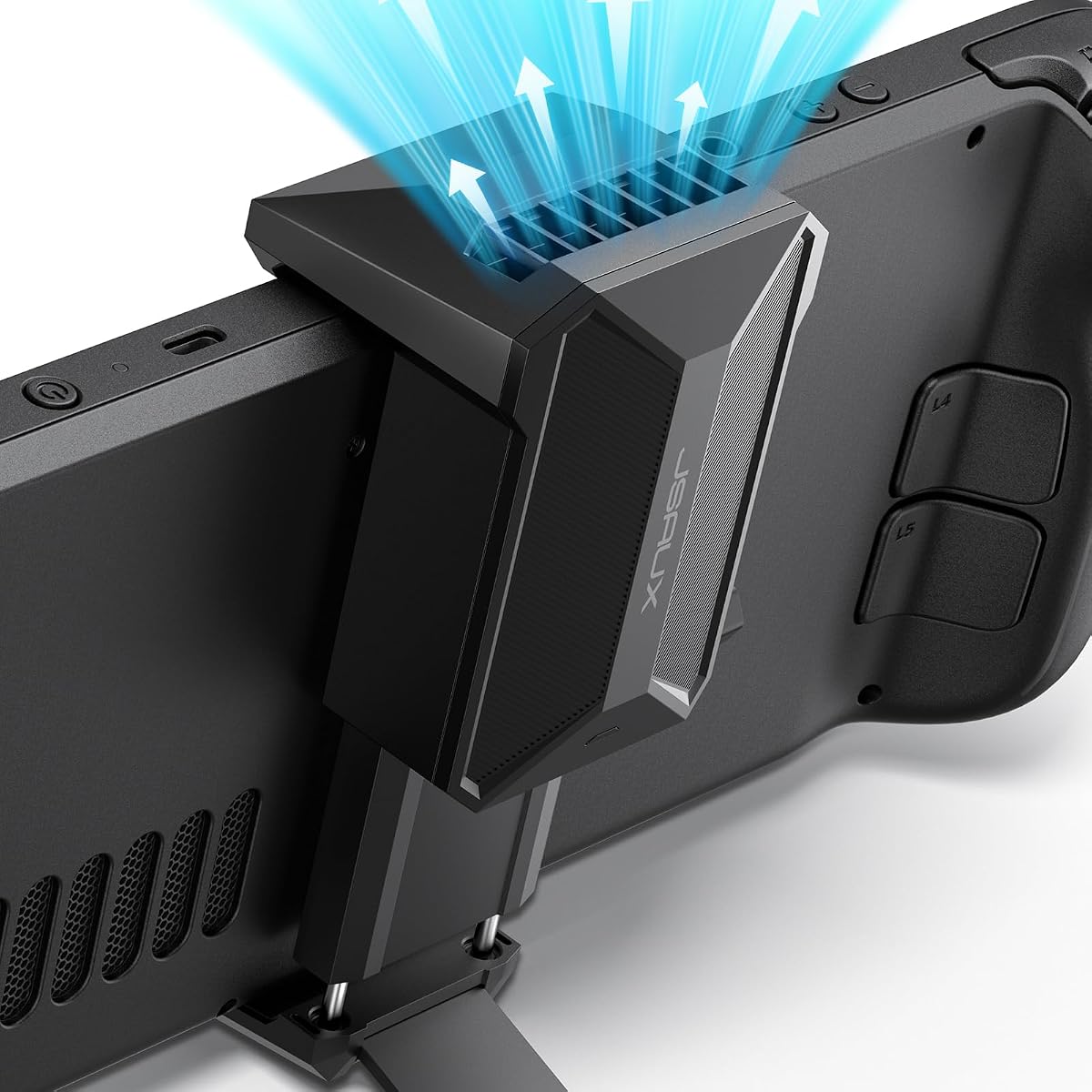
The JSAUX Cooling Fan is a dedicated cooling accessory tailored to the Steam Deck and Steam Deck OLED. It has a 4.7 rating and directs airflow toward the handheld's vents to improve internal air circulation. Its integrated stand also provides a convenient place to rest the console during desktop-style play.
We may earn a commission when you buy through this link, at no additional cost to you.
The stated cooling performance is a temperature reduction of 8–15 degrees Celsius after four to eight minutes of operation. A control knob adjusts speed from zero to 100 percent, allowing users to balance cooling and sound according to the game or environment. At full speed, the fan is rated for more than three hours, while the minimum setting can run for up to five hours.
The most obvious compromise is acoustic. The manufacturer notes that higher wind speeds produce louder sound, which is normal for this type of active cooler. The device also requires a power source, so it is less convenient for truly portable sessions than a passive case or screen protector. Still, it offers focused functionality without requiring a full modular case system.
This fan is a strong pick for owners who play demanding games for extended periods, already use the Deck near a television, or want more control over cooling than the integrated system provides. It works well as a standalone stand-and-fan unit or alongside a compatible JSAUX modular case.
The speed control lets users increase airflow during demanding sessions and reduce it when noise matters. The stated operating ranges make the fan flexible for both shorter and longer gaming periods.
Because the fan includes its own support structure, it can serve as a practical resting place for the handheld. That dual function is especially useful on a desk or in front of a larger display.
We may earn a commission when you buy through this link, at no additional cost to you.
The YCE Twelve-in-1 Steam Deck Dock is built for users who want a broad collection of ports in one desktop accessory. It has a 4.2 rating and includes HDMI 2.0 with 4K at 60Hz, Gigabit Ethernet, three USB 3.0 ports, three USB 2.0 ports, and USB-C Power Delivery 3.0 for up to 100W charging and 40Gbps data.
We may earn a commission when you buy through this link, at no additional cost to you.
Two five-centimeter RGB cooling fans distinguish it from a basic port hub. Their larger size is intended to provide more airflow than very small alternatives, while a rear switch lets users turn off the fans and lighting. The aviation aluminum housing and open fan area are also designed to encourage passive heat dissipation and unrestricted airflow.
Compatibility extends across Steam Deck LCD and OLED, Switch and Switch 2, ROG Ally and Ally X, Legion Go and Legion Go S, and MSI Claw. The included joystick caps add grip and help limit dust around the sticks, while the Type-C extender can absorb repeated plugging and unplugging. The primary drawback is that 4K output tops out at 60Hz, below the JSAUX six-in-1 dock's listed 120Hz capability.
Choose this model when port variety and integrated cooling matter more than high-refresh HDMI. It is a comprehensive desktop hub for owners of several supported devices, though owners with a 120Hz display should verify whether the reduced refresh rate meets their priorities.
The mixture of USB-A speeds, wired Ethernet, display output, and high-power USB-C creates a broad peripheral hub. It is useful for users who alternate among several compatible handhelds and related devices.
Two five-centimeter fans provide active cooling around the docked device, and a rear switch disables them when unnecessary. Silicone joystick caps and a sacrificial Type-C extender help address common handling and connection concerns.
We may earn a commission when you buy through this link, at no additional cost to you.
The JSAUX Carrying Case is built for commuters and travelers who want the Steam Deck and its related gear organized in one protective shell. It has a 4.6 rating and fits both LCD and OLED models. The exterior resists daily wear and light splashes, while a soft padded lining cushions the console against bumps, scuffs, and minor scratches.
We may earn a commission when you buy through this link, at no additional cost to you.
Storage is divided into two layers. The upper section holds the Steam Deck and microSD cards, while the lower area accommodates a charger, power bank, cables, dock, earbuds, and other accessories. A removable hook-and-loop divider allows users to customize the arrangement. Accessories themselves are not included with the case.
A built-in cable port enables charging from a compatible power bank while the case remains open, and a right-angle USB-C to USB-C cable helps reduce connector bending. The center panel folds into a stand for desk-mode play, while a recessed top groove is designed to reduce pressure on the thumbsticks. Secure straps and a comfortable handle help keep everything in place during transit.
This case is a strong recommendation for anyone who regularly carries the Deck away from home. It combines device protection with cable, storage, and charging organization. Those who only need a simple sleeve and value minimal weight may prefer a less structured alternative, but the travel features are thorough.
Separating the console from cables, power supplies, and other gear helps prevent scratches and tangled accessories. The removable divider provides flexibility when the number or size of carried items changes.
The fold-flat center panel, retaining straps, and recessed joystick area let the case function beyond simple storage. A built-in cable port adds charging convenience for compatible power banks.
We may earn a commission when you buy through this link, at no additional cost to you.
The LULULOOK Gaming Pillow Stand combines hands-free Steam Deck support with storage and a second-device mounting system. It has a 4.4 rating and is intended for Steam Deck LCD and OLED models as well as tablets from 4.7 to 14.6 inches. A dedicated Deck clamp and universal clamp provide flexible mounting options.
We may earn a commission when you buy through this link, at no additional cost to you.
The adjustable arm uses customizable damping resistance, allowing the joints to remain stable and resist drooping. Combined with a high-density memory foam core, this creates a soft support that can be positioned for sitting up or lying down. A breathable fabric cover surrounds the foam for longer sessions, while the entire cover can be removed and machine washed.
The multi-purpose compartment provides room for snacks and small gaming accessories such as earbuds, chargers, or controllers. This is a practical benefit during long gaming or streaming sessions because essentials remain close at hand. The universal clamp can hold a phone, tablet, or Kindle alongside the Steam Deck, creating a convenient two-screen arrangement.
The important limitation is case compatibility. The product explicitly does not work with a Steam Deck that has a protective case, silicone sleeve, or other third-party accessory installed. Choose it for relaxed, hands-free play where the bare device and accessory storage are priorities, and remove incompatible protection before attaching the clamp.
Damping resistance in the adjustable arm helps prevent unwanted movement and drooping. The mount can be repositioned for seated or reclined use while retaining a secure hold.
The storage compartment keeps snacks and small essentials within reach, while the universal clamp supports another compatible screen. Together they reduce interruptions during extended gaming and streaming.
We may earn a commission when you buy through this link, at no additional cost to you.
The right Steam Deck accessory depends on where and how you play. Begin with the problem you want to solve, then confirm device compatibility, attachment methods, and the features that matter in your routine.
The Steam Deck has shipped in LCD and OLED configurations, and some accessories are designed for one model while others support both. Screen protectors should state whether they fit the seven-inch LCD and OLED displays, while cases and pillow grips should account for the location of controls, ports, and the updated OLED power button. A close fit can also be affected by third-party shells or sleeves, so check the dimensions and installation requirements before ordering.
Choose accessories that explicitly support the display or case version you own, and avoid assuming every accessory works with every Steam Deck revision.
A useful accessory should solve a specific problem. Screen guards focus on scratch and reflection control, docks expand connectivity, cooling fans manage airflow, cases protect the body, and travel cases organize a mobile kit. Trying to make one product handle every task can lead to unnecessary bulk or compromises in comfort and convenience.
Prioritize the accessory category that addresses the inconvenience you encounter most often, then consider complementary products separately.
Protection is valuable during travel, but a full set of rigid covers can make a compact handheld less convenient. Look for detachable front shells, textured grips, padded interiors, and materials that resist scratches and light splashes. Cases with adjustable or removable stands can provide tabletop support without becoming a permanent part of the daily carry setup.
Balance impact protection against weight, pocketability, grip, and whether the added parts interfere with the controls or charging ports.
Docks vary significantly in video refresh rate, wired networking, USB speeds, and power delivery. A 4K at 120Hz output may suit a high-refresh monitor, while 4K at 60Hz can be sufficient for a television or secondary display. For reliable docked play, look for 100W USB-C charging, especially when using Turbo Mode, and confirm the charger and cables are available separately.
Match the dock's HDMI, charging, and network features to your display and power setup rather than judging only by total port count.
Active cooling can improve airflow during lengthy or demanding sessions, but it introduces noise, power requirements, and another component to maintain. Stand-style coolers may also eliminate the need for a separate basic stand. Adjustable fan speeds are useful because maximum airflow is not necessary in every game or room. Modular case systems can be convenient when the cooler attaches directly to the rear accessory platform.
Consider cooling as a session-length and workload decision, and choose a speed range that balances thermal support with acceptable sound.
The best support accessory depends on whether you play upright at a desk, recline on a sofa, or lie in bed. A rigid kickstand works well on a stable surface, while a pillow stand or 360-degree mount is more appropriate for relaxed positions. Hands-free systems should provide a secure hold without blocking the screen, buttons, vents, or controls. Adjustable damping can also help a mounted device remain stable during movement.
Choose a support that matches your usual posture and keeps the display at a comfortable, consistent viewing angle for the length of a session.
Traveling with a Steam Deck often means carrying more than the console itself. A useful case should fit the device securely while providing space for microSD cards, a charger, a power bank, cables, and earbuds. Soft padding, adjustable dividers, retaining straps, and a built-in cable port improve organization and protection. Fold-flat panels can add value if the case will also support desk-mode play.
Look for a travel solution that organizes the accessories you actually carry and permits charging without removing the handheld from its protective compartment.
Some docking stations support many handheld brands, while others exclude specific variants. Nintendo systems can also limit USB data behavior regardless of the dock used, and pillow stands may not work when a protective shell is installed. Note warnings such as incompatibility with ROG Xbox Ally models or third-party Steam Deck cases. Checking these details before purchase helps prevent a frustrating fit or feature mismatch.
Treat compatibility notes as essential requirements, especially when the product supports several devices or depends on direct physical attachment.
Begin by confirming that the accessory is intended for your exact Steam Deck display or case version. Clean the handheld and all attachment points with a soft, dry cloth, then follow the manufacturer's installation directions. Screen protectors benefit from a clean, dust-free environment, while cases and docks should be fitted without forcing connectors or pressing against obstructed ports.
Use cooling accessories in a ventilated area and adjust fan speed according to game demand and ambient noise. Docks require compatible cables and display connections, and the device should remain properly supported while the handheld is docked. Pillow stands should be tightened gradually so the arm supports the console without pressing against the screen, buttons, or thumbsticks.
Clean removable covers and cases according to their material and care instructions, and avoid exposing electronics to moisture. Inspect protectors for bubbles, cables for damaged connectors, and mounts for looseness before each trip. When a third-party case conflicts with a pillow grip or cooling system, remove the conflicting accessory rather than forcing it into place.
Some are, while others are designed for one display version. The JSAUX screen protectors and several cases explicitly support both LCD and OLED models, while other pillow grips and docks list particular device families. Always check the compatibility section and account for any protective shell already installed on your Steam Deck.
The OLED model's screen can benefit from the same daily protection used on other displays, including scratches and fingerprints. JSAUX offers both an Ultra HD clear protector and an anti-glare matte version for supported LCD and OLED devices. The clear option emphasizes visibility, while the anti-glare model is intended to reduce harsh reflections in bright environments.
It depends on your games, session length, and environment. The JSAUX cooling fan is designed to direct air toward the vents and provides adjustable speed, while the PC0104 Cooler Set combines active cooling with a modular protective case. Active cooling adds a fan, power connection, and some operational noise, so it is most useful for longer or more demanding sessions.
The dock must have a compatible connection, and the selected resolution and refresh rate must be supported by both the dock and display. The JSAUX six-in-1 dock lists HDMI 2.1 output at up to 4K 120Hz, while the YCE twelve-in-1 dock lists HDMI 2.0 at up to 4K 60Hz. Check the display specifications before choosing an output mode.
That depends on the pillow stand's stated limits. The LULULOOK Gaming Pillow Stand explicitly does not support a Steam Deck with a protective case, silicone sleeve, or third-party accessory installed. The Mechanism Gaming Pillow uses its own included Deckmate grip, so owners should follow that product's attachment instructions rather than assuming every shell is compatible.
Look for a secure fit, padded interior, and room for the accessories you regularly carry. The JSAUX Hard Shell Travel Case uses two storage layers, a removable divider, a built-in cable port, and a fold-flat panel that can act as a stand. Accessories such as the power bank, cables, dock, and earbuds are not necessarily included.
A dock that supports up to 100W USB-C power delivery is well suited to maintaining power while gaming, including Turbo Mode on compatible handhelds. The exact charging behavior still depends on the handheld, charger, cable, and dock. A suitable 100W charger is recommended when using higher-power Turbo Mode on supported devices.
They serve different gaming styles. Screen protectors, cooling fans, and protective cases support portable play, while docks are more relevant to external displays and desktop arrangements. Pillow stands are designed for hands-free use while seated or reclining, and travel cases focus on transporting the console and its gear safely.
The JSAUX 2-Pack Ultra HD Screen Protector is the straightforward top pick for everyday display protection, while the PC0104 Cooler Set offers the most complete combination of shell, stand, strap, and active fan. The Mechanism Gaming Pillow stands out for users who want an adjustable, relaxed hands-free setup with the console positioned directly in front of them.
Prioritize the accessory that solves a real problem in your routine. Choose the clear or anti-glare protector according to your lighting conditions, select a modular case or dedicated fan for protection and cooling, and choose a dock based on display refresh rate, charging needs, and required ports. For travel, prioritize organization, padding, and secure retention.
Ratings, product availability, and prices can change over time, so check the current listing and compatibility notes before placing an order. Taking a few minutes to verify your Steam Deck model, intended use, and included accessories will help ensure that the purchase integrates cleanly into your setup.