
ZealSound K66 USB Microphone
4.4Editor score
Driver-free USB connection
Real-time zero-latency monitoring
Adjustable gain and echo
Explore 10 of the best streaming equipment for beginners in 2026, comparing microphones, audio mixers, webcams, lighting, and DJ controllers to help new
Streaming equipment can seem intimidating to a beginner because every creator faces a different mix of audio, video, lighting, and control needs. A useful first setup should be simple to connect, easy to adjust, and capable of producing clear sound without demanding advanced technical knowledge before your first broadcast.
This guide compares ten beginner-friendly options spanning complete audio bundles, USB microphones, webcam kits, multi-person podcast systems, and a DJ-style streaming controller. The comparison emphasizes included accessories, device compatibility, microphones, mixing controls, lighting, monitoring features, ease of setup, and suitability for different creator formats.
Each pick highlights a particular path into streaming, from a simple desktop microphone to a polished all-in-one studio or a controller for live music mixing. Ratings and product details reflect the supplied information, while current pricing, availability, and compatibility can change, so confirm the latest listing before buying.
4.4Editor score

4.2Editor score

4.7Editor score
This side-by-side comparison covers the microphones, mixers, video components, lighting, accessories, and controls that determine which option is easiest to use for a first stream.



The TENLAMP G10 Creator Audio Mixer Bundle is a broad, all-in-one option for beginners who want a microphone, mixer, and sound-effect tools in one coordinated setup. Its supplied rating is 4.1, and the most appealing qualities are the range of operating-system support, built-in noise reduction, real-time controls, and modes designed for both spoken content and live singing.
We may earn a commission when you buy through this link, at no additional cost to you.
The condenser microphone and integrated mixer make the G10 appealing to creators who would rather configure one system than research individual components. Follow Singing mode is particularly distinctive: it lets a performer monitor the original track while the audience hears a blended vocal and music mix. Voice styles, applause, laughter, reverb, pitch, bass, and treble controls can also make a plain stream more interactive without requiring a complicated software chain.
The trade-off is that the number of options may feel excessive for someone who has never mixed audio. Built-in effects can be fun, but they should support a clear goal rather than become the focus of every broadcast. A beginner will also need to learn the relationship between microphone gain, monitoring levels, and the mix sent to the stream. Fortunately, the plug-and-play approach and driver-free setup reduce the initial technical barrier.
Choose the G10 if you want one package to support gaming chat, podcast-style commentary, short videos, TikTok-style live sessions, and streaming with music. It is especially attractive for a creator who values singing support and physical sound controls but does not need separate microphones for multiple speakers. For a solo beginner, it is a versatile foundation with room to experiment.
Instead of buying separate pieces for commentary, music, and effects, the G10 centralizes common controls in one audio system. That makes it useful for creators whose format is still evolving.
Follow Singing mode separates what the performer hears from what viewers receive, giving live singers a clearer way to monitor a performance without sending every backing track to the audience unchanged.
We may earn a commission when you buy through this link, at no additional cost to you.
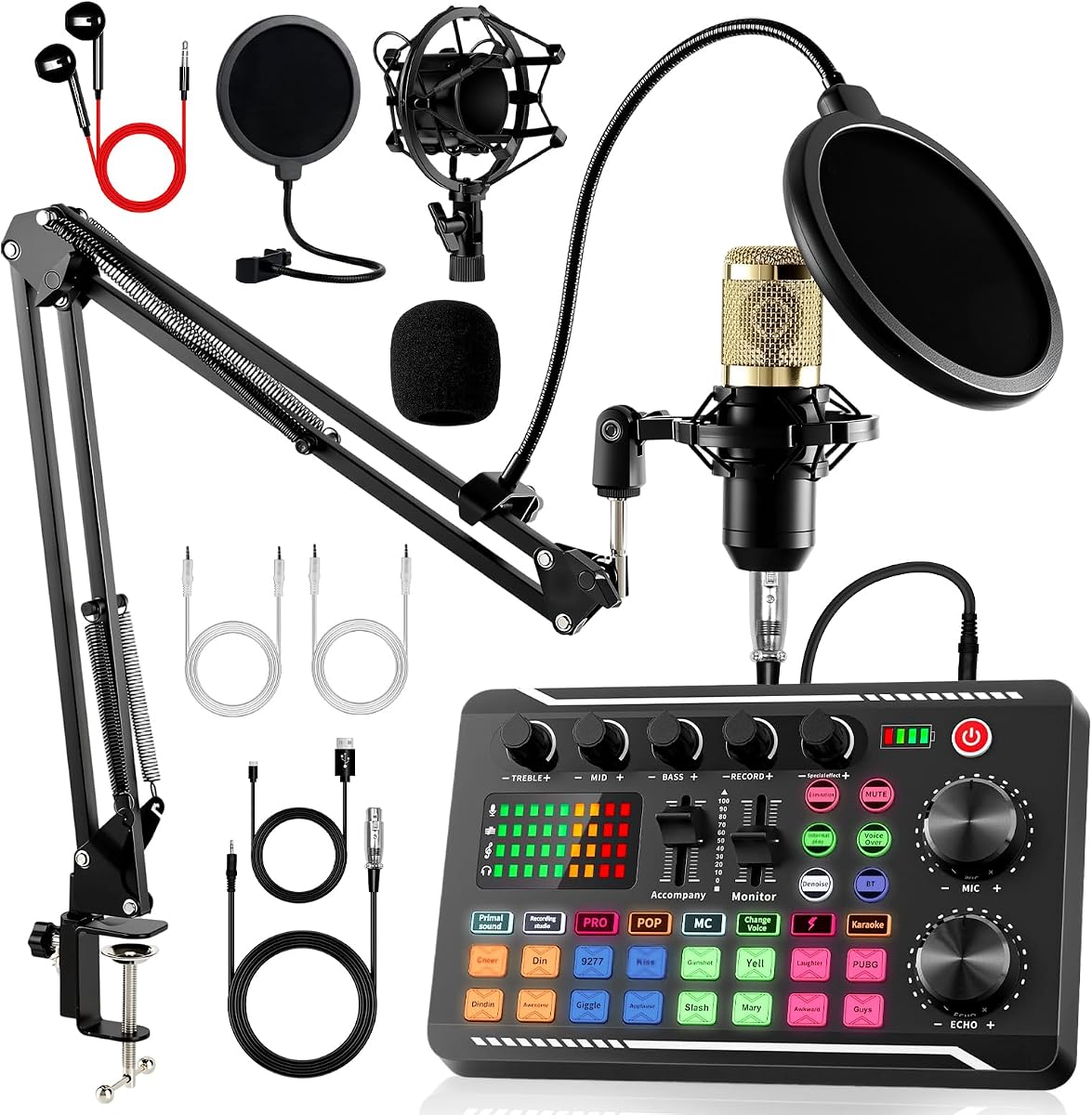
The Also GO F998 Podcast Equipment Bundle is a comprehensive starter package for a beginner building a first podcast, voice-over station, or livestream desk. It carries a supplied rating of 4.2 and combines a BM-800 microphone, an audio-interface mixer, boom arm, shock mount, pop filter, foam cover, earphones, and several connection cables.
We may earn a commission when you buy through this link, at no additional cost to you.
Its strongest selling point is completeness. A new creator can assemble a functional recording arrangement without separately sourcing a stand, cable, filter, or mixer. Cardioid pickup, noise-reduction features, and the dual-layer pop filter are intended to improve vocal clarity, while the F998 sound card provides sound effects, recording modes, voice changes, and adjustable knobs for live control.
The inclusion of both wired and Bluetooth options makes the bundle adaptable to different workflows. The product guidance notes that Bluetooth can be simpler for phones and tablets, while the included cables may be more straightforward with computers. That flexibility is useful, although new users still have to charge the mixer before first use, select the correct connection route, and position the microphone properly. A condenser microphone can also capture more room noise than a dynamic model if the room is untreated.
This is a strong choice for one-person podcasters and general-purpose beginners who want a complete desk setup in a single box. It may be less suited to someone already owning a microphone and mixer, or to a two-host show, because it is designed around one BM-800 microphone. For a first serious streaming or podcast setup, however, the convenience is considerable.
The boom arm, shock mount, pop filter, foam cap, earphones, and cables cover much of the physical setup normally required for a new vocal station. This reduces both cost and assembly complexity.
Wired and Bluetooth operation allow the same mixer to serve a desktop setup, phone recording, or tablet-based stream. The simpler method depends mainly on the creator's device and preferred workflow.
We may earn a commission when you buy through this link, at no additional cost to you.
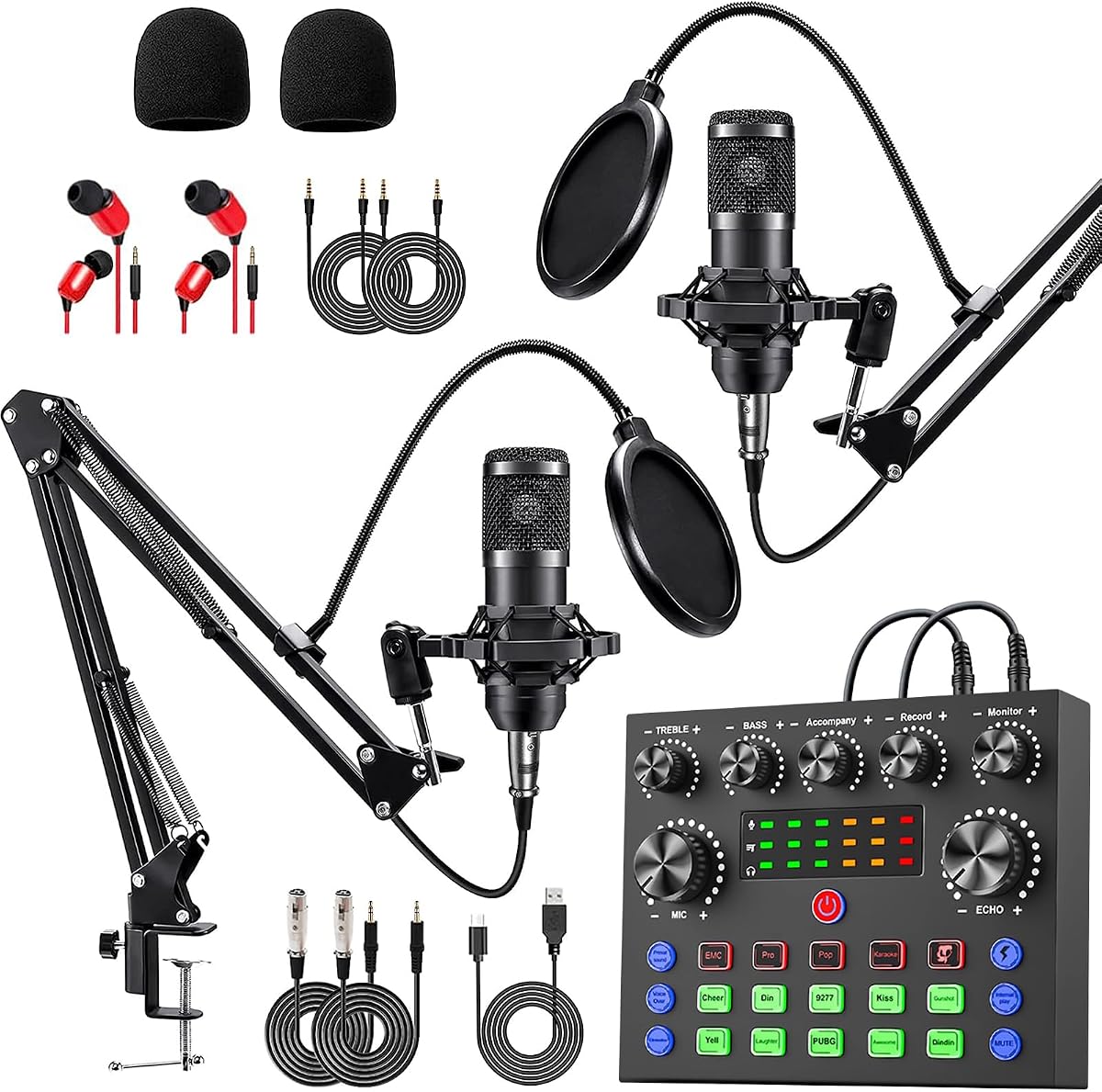
The Brvomussy Podcast Equipment Bundle for 2 is aimed at creators who want to bring more than one voice into a stream from the beginning. Its supplied rating is 4.2, and it includes two condenser microphones, two hanging or boom-style arm attachments, shock holders, pop filters, foam covers, earphones, XLR and 3.5 mm cables, and a USB cable.
We may earn a commission when you buy through this link, at no additional cost to you.
The two-microphone arrangement is the defining feature. The audio interface mixer supports two people broadcasting at the same time, making it suitable for conversational podcasts, interviews, gaming commentary with another host, or collaborative live sessions. Cardioid pickup, intelligent noise reduction, a double-layer pop filter, and DSP processing are designed to keep voices clear in shared rooms.
The kit also supports instrument input, allowing a guitar, bass, or another instrument to be incorporated into a live stream or recording. That is a meaningful creative advantage over a basic microphone package, although the ten effects, four voice variations, four sound modes, and thirteen functions can initially make the mixer look complicated. The creator will need to balance levels and decide which effects improve the program rather than distract from it.
The Brvomussy bundle makes the most sense for a two-person project that is already planned, such as a co-hosted podcast or interview series. A solo creator may find the second microphone and expanded controls unnecessary. It is also worth remembering that the product guidance recommends fully charging the device before first use or after a long period of storage.
Two microphones, independent arm hardware, and matching cables provide a practical foundation for a co-hosted show. This reduces the need to assemble a second recording position after the channel is already underway.
The mixer can accept a guitar, bass, or similar instrument, opening the door to music demonstrations and mixed live content. The creator must still monitor levels carefully to maintain a balanced program.
We may earn a commission when you buy through this link, at no additional cost to you.
The AM100-V8 Podcast Equipment Bundle is a straightforward entry point for creators moving from a phone or built-in computer microphone to a dedicated vocal setup. The supplied rating is 4.0, and its main appeal is the combination of a BM-800 condenser microphone, adjustable suspension arm, shock mount, pop filter, foam cap, power cable, and live sound card.
We may earn a commission when you buy through this link, at no additional cost to you.
The sound card provides multiple voice effects and different connection methods, making it practical for livestreams, short videos, vlogs, singing, and casual online interaction. Its compatibility list includes Windows, Mac OS, Android, and iOS, along with tablets and game platforms including PS4, Xbox, and Switch. That breadth lets a beginner move between content types without committing to a narrow device ecosystem.
The package is less comprehensive than some multi-microphone bundles, but it covers the basic physical needs of a one-person studio. The supplied information also instructs new owners to charge the microphone bundle after delivery. A more serious creator should expect to refine gain settings, microphone placement, and room treatment over time. The older-style BM-800 and bundled effects are best treated as accessible tools rather than substitutes for professional post-production.
The AM100-V8 is a reasonable pick for a first streamer or short-form creator who wants dedicated hardware, physical controls, and voice-changing entertainment in a manageable package. It is better suited to a single host than a panel discussion and may feel less refined than the ZealSound K66 for voice-first recording. Its strongest value is turning a basic computer setup into a more interactive broadcast station.
Adding a dedicated condenser microphone, stand, filter, and sound card creates a more professional starting point without requiring the creator to select every component individually.
Voice-changing and sound-effect controls can give a new channel a distinctive style. They work best when used selectively and at levels that keep the speaker understandable.
We may earn a commission when you buy through this link, at no additional cost to you.
The Webcam Streaming Kit is the most balanced choice for a beginner who needs both video and audio. Its supplied rating is 4.2, and the package combines a 1080P webcam, an RGB USB microphone, and an adjustable LED panel. This gives a new creator the three most visible elements of a polished stream without assembling each one separately.
We may earn a commission when you buy through this link, at no additional cost to you.
The webcam captures 1920 by 1080 at 30 frames per second and uses automatic brightness and color compensation. The microphone has a cardioid 14 mm condenser capsule, an integrated pop filter, a gain control, a shock mount, and real-time headphone monitoring. The lighting panel adds a CRI 90+ output, five color modes, five brightness levels, a memory function, 180-degree rotation, and a monitor-mounted hook.
This all-in-one approach is not as specialized as a dedicated audio bundle, and the fixed webcam may not be ideal for a creator who wants extensive camera movement. Console use also requires a separately sold capture card. Lighting can still look flat if it is placed directly in front of the creator, and the microphone needs to remain close enough for its cardioid pattern to work effectively. Even with those limitations, the kit reduces the number of separate purchases and setup decisions.
The Webcam Streaming Kit is best for a first Twitch, YouTube, TikTok, Zoom, or Teams setup, especially when the creator values a coordinated look. It is less suited to a professional multi-person podcast or a highly mobile production. For a beginner who wants a visible and audible upgrade quickly, it provides the most complete first-broadcast package in this list.
Matching video, audio, and lighting in one bundle prevents a new creator from overlooking basic presentation elements. The adjustable panel also makes it possible to improve illumination as the room changes.
Real-time headphone monitoring lets the streamer hear the microphone signal before and during a broadcast. That makes it easier to correct unwanted noise, clipping, or an overly quiet voice immediately.
We may earn a commission when you buy through this link, at no additional cost to you.
The Pioneer DJ DDJ-FLX4 is the premium and most specialized option in this guide. With a supplied rating of 4.7, it targets creators who want to mix music during a stream rather than simply speak into a microphone. Its two-channel, two-deck layout includes 16 performance pads and a layout derived from professional Pioneer DJ equipment.
We may earn a commission when you buy through this link, at no additional cost to you.
Smart Fader is the most beginner-relevant feature. It automatically adjusts volume, bass, and BPM to help blend tracks, reducing the pressure to master traditional beat matching immediately. The pads support functions such as Hot Cues, Pad FX, Beat Jump, and Sampler. The built-in sound card allows the controller to connect to speakers, while USB and Bluetooth connectivity extend compatibility across PC, Mac, iPhone, iPad, and Android devices.
This is a substantial leap from a simple microphone bundle, and a creator should not expect it to solve ordinary video, microphone, or lighting requirements. Music-mixing software and some streaming services may also impose their own setup or licensing conditions. The physical controls feel more advanced than a beginner's microphone, but the simplified layout and Smart Fader are expressly designed to make learning more approachable.
Buy the DDJ-FLX4 if music performance is central to your channel and you want tactile control over tracks, effects, and cues. It is best suited to a creator who will invest time in learning the controller rather than someone who only needs a microphone and webcam. For that focused purpose, it offers the strongest feature depth and highest supplied rating in the group.
Smart Fader adjusts volume, bass, and tempo as tracks are blended. This gives a beginner a way to create smoother transitions while learning the fundamentals of DJ-style control.
Sixteen pads can trigger cues, effects, jumps, and samples, making the controller useful for a live music segment. Assignment and practice remain essential for smooth performance.
We may earn a commission when you buy through this link, at no additional cost to you.
The Also GO Podcast Equipment Bundle for 2 is a strong feature-rich choice for a co-hosted podcast or conversational livestream. Its supplied rating of 4.5 is among the highest in the list, and it combines two BM-800 podcast microphones, a V8s audio interface mixer, boom arms, shock holders, pop filters, foam covers, and earphones.
We may earn a commission when you buy through this link, at no additional cost to you.
The mixer uses a DSP chip to provide noise reduction, reverb, treble, bass, and other sound effects. Four voice changes—female, male, child, and monster—plus four voice modes and thirteen functions give creators a sizable palette for entertainment. Compatibility includes PCs, smartphones, Xbox, Windows, Mac OS, iOS, and Android, which suits a creator who may move between gaming, podcasting, and mobile recording.
Both wired and Bluetooth connection methods are supported. As with the single-person Also GO bundle, the product guidance suggests Bluetooth for a simple phone or tablet pairing and the included cables for a computer connection. New users should charge the mixer before using it for the first time or after long storage. With two microphones, careful level balancing will also be important so one speaker does not dominate the mix.
This kit is a good fit for creators who already have a two-person concept or expect to form one soon. It offers a higher rating and a more expansive effect set than many competing microphone bundles. A solo streamer may prefer a simpler option, but the included second microphone, arm, and accessories make this one of the stronger co-host bundles in the guide.
Matching microphones, arms, filters, and holders create a more consistent two-host arrangement. This is especially useful when both speakers need separate physical space.
The V8s interface consolidates effects, voice modes, and level controls, allowing a creator to add character without relying entirely on post-production.
We may earn a commission when you buy through this link, at no additional cost to you.
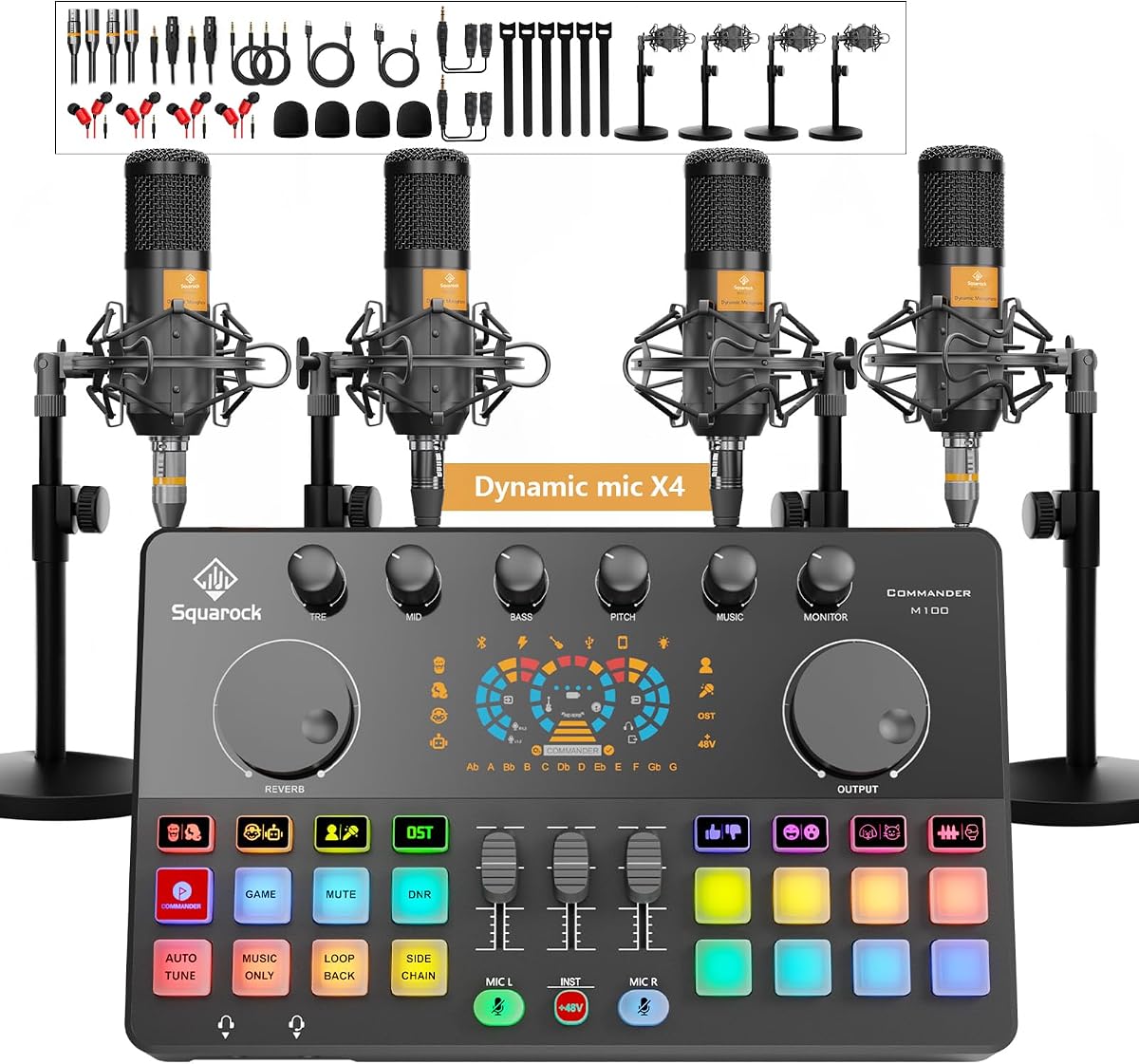
The Four-Person M100 Podcast Equipment Bundle is built for a different level of production than the other microphone kits. Its supplied rating is 4.3, and it includes four dynamic microphones, desktop stands, monitor earphones, cables, shock mounts, foam covers, earphone splitters, and a multi-channel audio interface mixer for group podcasting, group livestreaming, vocal recording, and voice-over work.
We may earn a commission when you buy through this link, at no additional cost to you.
Four independent channels each support separate volume adjustment and one-click mute. The mixer provides dual XLR and dual 3.5 mm microphone inputs, along with smart noise reduction, treble, mid, bass, reverb, pitch correction, loopback, side-chain controls, voice-changing modes, presets, and customizable sound pads. A built-in 4000mAh battery and Bluetooth support add mobility for indoor or outdoor streaming.
The use of dynamic microphones is notable because they are generally less sensitive to room noise and stray sound than condenser microphones. That can be advantageous in an untreated home or shared recording space. The trade-off is that the bundle is large, needs room for four microphones and stands, and includes more controls than a first-time solo creator can reasonably master. Individual channel management becomes essential to keep the final mix consistent.
The M100 is best for a creator with an established multi-host project, a small gaming team, or a group that wants one coordinated system. It can support podcasting, live streaming, singing, and mobile use without relying on separate interfaces for each person. For a one-person channel, a simpler microphone would leave more desk space and reduce setup complexity.
Per-channel volume and mute controls make it practical to balance a four-person discussion. These controls are particularly important when speakers have different speaking volumes or sit at different distances.
Dynamic microphones can be more forgiving in a home with fan noise, traffic, or reflective surfaces. They still benefit from close placement, pop protection, and quiet room treatment.
We may earn a commission when you buy through this link, at no additional cost to you.
The sktome Podcast Equipment Bundle for 2 is a versatile dual-microphone system designed for podcasting, recording, singing, streaming, and gaming. Its supplied rating is 4.1, and the package includes two podcast microphones, two hanging arm clippers, a V8s sound card, two 3.5 mm earphones, shock holders, spray protection, foam covers, XLR-to-3.5 mm cables, a USB charging cable, 3.5 mm audio cables, and a manual.
We may earn a commission when you buy through this link, at no additional cost to you.
The microphones use cardioid pickup patterns and a metal construction, while the integrated interface brings sound shaping onto one panel. Available functions include reverberation, treble and bass adjustment, noise reduction, accompaniment, dodge, and voice change. It is also described as offering 12 electrical sounds, 12 sound effects, and 10 modes, giving creators more variety than a minimal recording kit.
The controls are extensive for a bundle aimed at beginners, and a new user will need to understand the microphone, sound card, computer, and streaming application as one system. The product guidance also advises charging the bundle after delivery. Because the microphones are condenser models, they can pick up keyboard clicks, fans, and room reflections, making placement and room management more important than they would be with dynamic microphones.
Choose the sktome kit when two voices are part of the plan and you want ready-made microphone positions with extensive creative controls. It is a good match for a co-hosted show, gaming commentary, or live performance practice. A solo creator who values simplicity may find the single-person or USB-microphone alternatives easier to operate.
The sound card integrates the audio interface and adjustment controls into one operation panel. This makes effects and microphone handling more convenient than assembling separate utilities.
Voice changes, accompaniment, noise reduction, and multiple sound modes allow the same kit to support interviews, gaming, singing, and short-form video.
We may earn a commission when you buy through this link, at no additional cost to you.
The ZealSound K66 USB Microphone is the most approachable single-device choice for a beginner who wants a clear upgrade from a computer's built-in microphone. Its supplied rating of 4.4, broad compatibility, and driver-free USB operation make it a compelling first step for podcasts, livestreams, gaming, online classes, meetings, and voice-over work.
We may earn a commission when you buy through this link, at no additional cost to you.
The top-addressed condenser microphone uses cardioid pickup and a stated 40Hz–18kHz frequency response with 46kHz sampling. It includes separate controls for microphone volume, headphone volume, and echo. A hold on the mute button activates an intelligent noise-reduction mode intended to reduce keyboard clicks, PC fan noise, air-conditioning hum, and background chatter. A clear red indicator shows the normal mute state.
Real-time zero-latency monitoring through the 3.5 mm headphone jack gives the creator immediate feedback and helps identify distortion or inconsistent levels. The 360-degree rotatable body and weighted metal base make positioning straightforward. Adapters for USB-C and Lightning extend use to modern phones and tablets, while the long USB cable allows some distance from the computer. As a condenser microphone, it is still most reliable in a reasonably quiet room.
The K66 does not include a full audio mixer, boom arm, or multi-person arrangement, so a co-host or music creator may eventually need additional hardware. For a solo beginner, however, it minimizes setup friction and delivers the most important controls in a single unit. It is an excellent choice for someone who wants better sound now and can add production features later.
The microphone requires no driver, app, or software installation. Connecting it to a compatible device and selecting it as the input is substantially easier for a first-time creator.
Independent microphone, monitoring, and echo knobs give the user quick control over a clean vocal signal. Real-time monitoring makes it easier to hear problems before they reach the audience.
We may earn a commission when you buy through this link, at no additional cost to you.
The right beginner setup depends on your content, number of speakers, device, room, and comfort with controls. Use the following factors to narrow the list before committing to a bundle.
Begin by identifying what your channel will actually contain. Talking-head streams benefit from a webcam and dependable microphone, while gaming commentary may prioritize a headset, USB mic, or audio mixer. A music-focused creator may need a controller with multiple decks and pads, and a podcast requires enough microphone positions for the number of hosts. A complete bundle is convenient when the format is not yet certain, but a focused setup is usually easier to learn and operate.
A single-person channel can begin with one microphone, but two people require separate capture positions and enough mixer inputs to control each voice. The Brvomussy, Also GO V8s, and sktome bundles include two microphones and related accessories. The M100 extends that concept to four speakers with individual channel controls. Buying for the actual number of participants prevents level imbalance and avoids the need to rebuild the setup after the first episode.
Condenser microphones generally capture detailed, expressive vocals and are common in podcast bundles, but they are more sensitive to room noise, fans, traffic, keyboard sounds, and reflections. Dynamic microphones are often more forgiving in untreated spaces and may be better for group conversations, although they can require more gain and careful positioning. A top-addressed USB microphone is convenient for a solo desk, while an XLR or bundled interface offers more connection options at the cost of a larger setup.
Compatibility should be checked at three levels: the physical connection, the operating system, and the streaming or recording application. Several bundles support Windows, Mac, iOS, and Android, while some also list game consoles and mobile devices. USB plug-and-play systems are particularly attractive to beginners, but Bluetooth may add another pairing variable. Make sure the included cable or adapter matches the port on the computer, phone, or tablet you plan to use.
A useful beginner mixer should make sound adjustment understandable rather than bury it behind complex software. Physical gain, volume, bass, treble, reverb, pitch, and mute controls provide immediate feedback. Voice-changing modes, sound effects, instrument inputs, loopback, and accompaniment can be valuable for entertainment, but each added feature also creates another setting to test. Start with clean, balanced audio and add effects only after the basic mix is working.
Monitoring lets a creator hear the signal as the audience receives it, making it easier to identify echo, clipping, hiss, or an overly quiet voice. The K66 provides independent headphone and microphone controls with zero-latency monitoring, while the webcam kit also offers real-time headphone monitoring. Bundled earphones are useful for monitoring but may not provide the isolation or comfort required for long sessions. A creator should also be able to mute quickly when a private conversation or unwanted sound occurs.
A microphone cannot compensate for a dim, uneven, or poorly positioned camera. The webcam streaming kit combines 1080P capture, a USB microphone, and an adjustable LED panel, making it a convenient visual starting point. Its lighting includes multiple color temperatures and brightness levels, while the webcam offers automatic brightness and color compensation. Creators who already own a satisfactory camera can instead invest that attention in audio. Console streaming may also require a capture card that is not included with some kits.
A bundle can save time when it includes the necessary stand, boom arm, pop filter, shock mount, cables, earphones, and adapters. It can also create clutter and setup complexity if every component is unfamiliar. Review the package list, desk-space requirements, charging instructions, and assembly process before purchasing. A smaller, clearly organized system is often easier for a first broadcast, while a larger multi-person kit makes more sense when the group format is already established.
Begin by assembling the setup away from the computer, placing the microphone in a stable shock mount or on its included stand and positioning it about a hand's width from your mouth. Attach the pop filter if one is included, route cables behind the desk, and keep fans, keyboards, and other noisy devices away from the pickup area. For a webcam kit, set the camera at eye level and angle the LED panel slightly away from the screen to reduce glare.
Connect the microphone or mixer using the method recommended for the device, then select it as the audio input in the recording or streaming application. Set gain conservatively, speak at a normal volume, and use headphones or the supplied earphones to check for clipping, echo, and background noise. Add effects only after the clean vocal level is balanced. When using multiple microphones, have each person speak independently and adjust channel volume until every voice sounds equally clear.
Before each stream, charge any rechargeable components, test the recording for a few minutes, and confirm that mute, monitoring, lighting, and camera settings work. After use, mute the microphone, disconnect the cables carefully, and store accessories in an organized place. Keep foam covers and wind protection clean, avoid pulling cables by their connectors, and update device or streaming software when compatibility improvements become available.
Most beginners need a reliable microphone, a stable connection, and a way to monitor their voice. A webcam and lighting improve the presentation, but clear audio is often the first upgrade worth making. Choose equipment that matches your content and avoid adding many effects or complex mixers until the basic recording and monitoring process feels familiar.
A bundle can be a practical choice when you want a coordinated setup without researching every component. It is especially useful for a solo creator who also needs a stand, pop filter, interface, and cables. If you already own strong equipment or need several microphones, individual purchases may produce a less cluttered and more flexible setup.
A USB microphone is usually simpler because it connects directly to a computer and requires fewer setup decisions. An audio mixer is more useful when you need multiple microphones, physical mixing controls, effects, or instrument input. A beginner who is uncertain about the format may prefer a complete mixer bundle, while a confident solo speaker may find a dedicated USB microphone sufficient.
Several bundles support phones and tablets through wired adapters or Bluetooth, and the K66 includes USB-C and Lightning adapters. Check the exact connector and operating-system requirements before purchasing. For a computer-based stream, a wired connection is often more consistent, while Bluetooth can be convenient for a mobile setup.
They can, because their sensitivity captures more of the surrounding environment. Place the microphone close to your mouth, use the included pop filter and foam cover, turn off nearby fans, and add soft furnishings to reduce reflections. Dynamic microphones are often a better first choice for a noisy or untreated room.
Keep the microphone close, use a directional microphone, and avoid placing it near reflective walls or hard desk surfaces. The K66 includes a dedicated echo control, while other bundles provide noise-reduction and sound-card functions. Earbuds can also prevent your voice from being picked up by the microphone again, although a comfortable fit is essential for long sessions.
No. Voice changes, applause, laughter, and other effects are optional creative features rather than requirements for good streaming. Many established creators rely on clear speech, balanced levels, and restrained music. If you choose a bundle with effects, test them in a private recording and use them only when they support the format.
Not necessarily. The webcam streaming kit explicitly states that PS5 or Xbox streaming requires a capture card sold separately. Other products list console compatibility, but their included connection accessories may differ. Verify whether the package contains the exact cable and adapter needed for your console and whether the streaming software supports that connection method.
The ZealSound K66 is the simplest way for a solo beginner to obtain a dedicated microphone with real-time monitoring, independent level controls, and broad device support. The Webcam Streaming Kit is the most well-rounded all-in-one choice for creators who need video, audio, and lighting, while the Pioneer DJ DDJ-FLX4 stands apart as the premium option for creators whose streams depend on live music mixing.
For two-person work, the Also GO V8s, Brvomussy bundle, and sktome V8s provide two microphone positions and an integrated effects mixer. The M100 is more appropriate when four people need individual channels and a portable, rechargeable system. In every case, prioritize a clean vocal signal, straightforward connection, comfortable monitoring, and a setup you can understand before adding advanced effects.
Ratings provide a useful point of comparison, but they should not replace a compatibility check or realistic look at your recording space. Confirm the current product details, included accessories, device support, and current pricing before purchasing, since specifications and availability can change over time.