
Akai Professional MPK Mini MK3
4.6Editor score
Twenty-five velocity-sensitive keys
Eight backlit MPC-style pads
Built-in arpeggiator controls
Eight assignable rotary knobs
Complete production starter kit
Our Synthesizer for Beginners guide compares 10 compact, portable, and studio-ready synths for learning keys, sound design, MIDI, sequencing, and music
A beginner-friendly synthesizer should make learning intuitive, sounds inspiring, and setup requirements minimal. The best models offer familiar piano layouts, approachable presets, useful sequencing tools, and enough connectivity to grow from simple melodies into full music production without overwhelming the user.
We compared these ten synthesizers by examining their keys, sound engines, built-in sounds, arpeggiators, sequencers, effects, speakers, displays, and MIDI or USB connections. The list covers pocket instruments, portable performance keyboards, MIDI controllers, FM synths, and hybrid instruments for different learning environments and creative goals.
Each pick reveals what it is best suited for, from hands-on sound exploration to computer-based production. Ratings reflect the supplied product information, while practical trade-offs help clarify where beginners will find the easiest path forward. Availability, software bundles, and prices can change over time.
4.6Editor score

4.5Editor score

4.7Editor score
This side-by-side comparison highlights each instrument's key count, synthesis approach, creative tools, and connectivity, helping beginners identify the right balance between simplicity, portability, and expandability.



The Akai Professional MPK Mini Plus is a USB-powered MIDI keyboard controller with a 37-key dynamic keybed, eight RGB MPC pads, eight assignable rotary knobs, and a built-in 64-step sequencer. Its 4.5 rating reflects a versatile instrument that gives beginners more ways to make music than a basic controller while remaining far less intimidating than a large studio synthesizer.
We may earn a commission when you buy through this link, at no additional cost to you.
Three octaves are unusually valuable in a compact beginner controller because they provide room for two-handed melodies, simple bass lines, and chord voicings without requiring a full-size keyboard. Velocity sensitivity makes notes respond to how firmly they are played, while the MPC pads provide a practical bridge between melody and rhythm. The dedicated transport section can arm recordings, start and stop playback, and move through a DAW session without requiring constant mouse use.
The included MPC Beats software, NKS integration, complimentary Native Instruments bundle, and Splice access make the package especially useful for a new producer. The sequencer also means someone can create ideas without immediately opening a computer. The trade-off is that the MPK Mini Plus is primarily a controller: its most expansive sounds and effects depend on compatible software instruments, and the display and menus require some initial learning.
This is our top overall recommendation for a beginner who wants to develop keyboard skills, beat-making instincts, and DAW workflow in one compact device. It is especially suitable for students, songwriters, and home producers who need expressive keys and tactile control without committing to a large standalone instrument. Those seeking numerous internal presets may prefer the MPK Mini Play MK3, but the Mini Plus offers the more complete controller experience.
The combination of a three-octave keybed, pads, sequencer, and transport controls gives learners several ways to work. A beginner can sequence a drum pattern, play a virtual instrument over it, record the result, and adjust software parameters without building a complicated hardware setup.
CV/Gate and MIDI I/O make the Mini Plus more than a basic computer accessory. Those connections are especially attractive for students who may later explore modular synthesizers, external sound modules, or hardware instruments.
We may earn a commission when you buy through this link, at no additional cost to you.
The original Stylophone is a pocket electronic synthesizer rated 4.6, combining a touch-sensitive metal playing surface, a connected stylus, three octaves, an optional vibrato effect, a built-in speaker, and a headphone socket. Its immediate appeal comes from how quickly it can turn a beginner's curiosity into a playable musical result without a display, menu, or complex setup.
We may earn a commission when you buy through this link, at no additional cost to you.
Each segment of the surface corresponds to a note, and moving the stylus between segments plays them. Although this is not conventional keyboard playing, it teaches basic pitch relationships, melody construction, and phrasing in a tactile way. The distinctive analog-style voice and compact body also make it engaging for songwriting, sound effects, and experimentation, particularly for someone who wants to experiment before committing to a conventional synthesizer.
Its limitations are equally clear. The touch surface provides little tactile feedback about note boundaries, so players accustomed to piano keys may need time to adapt. It offers a narrow palette compared with a modern polyphonic synthesizer, and the 3.5mm connection is intended for sending its sound to a computer or other equipment rather than providing extensive MIDI control.
The Stylophone is best for beginners who prioritize portability, simplicity, and character over realistic keyboard feel or deep sound design. It is a compelling first instrument for children, casual learners, and creative thinkers who want to make immediate sounds anywhere. For formal piano practice or extensive sequencing, a keyed instrument would be more suitable, but as a gateway into synthesis, the Stylophone is unusually approachable.
The stylus method makes pitch relationships visible and physical. New players can hear how notes connect before they develop traditional keyboard technique, making the instrument a playful supplement to lessons rather than a replacement for a full keybed.
Its compact dimensions, battery operation, built-in speaker, and headphone socket remove almost every logistical barrier. A learner can carry it in a bag, use it in a classroom, or record it into a computer without relying on an amplifier.
We may earn a commission when you buy through this link, at no additional cost to you.
The Akai Professional MPK Mini MK3 is a USB MIDI controller with 25 velocity-sensitive mini keys, eight backlit MPC-style pads, eight rotary knobs, and a four-way thumbstick. Its 4.6 rating and extensive software package make it one of the most practical ways for a beginner to begin producing electronic music on a computer.
We may earn a commission when you buy through this link, at no additional cost to you.
The keys are smaller than those of a standard piano, so this is not the ideal choice for someone whose main goal is serious classical technique. For learning synth programming, beat production, and electronic composition, however, the size is a major convenience. Velocity sensitivity adds expression, the pads support drum programming and sample triggering, and the arpeggiator can turn single notes into repeating patterns.
Its 360-degree knobs can be assigned to virtual-instrument and effects parameters, letting users shape sounds without reaching for a mouse. The Editor software allows further customization of mappings, the joystick, arpeggiator, and stored programs. MPC Beats, three virtual instruments, and more than 1,500 included sounds create a ready-made learning environment.
The main limitation is that it is a controller rather than a self-contained synthesizer: the computer supplies the sounds. Beginners who want immediate built-in audio should examine the MPK Mini Play MK3. For those ready to use a laptop or desktop, though, the MPK Mini MK3 provides a well-rounded, approachable package for learning performance, sequencing, and production.
The combination of mini keys, velocity-sensitive pads, and included MPC software lets a new user start experimenting quickly. Even a simple one-note pattern can become a complete beat, providing a satisfying progression from pressing a key to arranging a full composition.
Assignable knobs and a built-in arpeggiator make parameter changes part of the performance. This helps beginners understand that a synthesizer can be played and shaped dynamically rather than used only to select ready-made presets.
We may earn a commission when you buy through this link, at no additional cost to you.
The Akai Professional MPK Mini Play MK3 is a standalone mini keyboard with internal sounds, a built-in speaker, an OLED display, eight velocity-sensitive backlit pads, four encoder knobs, an arpeggiator, and note repeat. Its 4.5 rating makes it a strong choice for beginners who want to hear a complete instrument without turning on a computer.
We may earn a commission when you buy through this link, at no additional cost to you.
More than 100 internal drum and instrument sounds include acoustic and electric pianos, synth leads, and pads. This focused collection is useful because it gives learners recognizable starting points for different musical roles. The OLED provides more visual feedback than a controller without a display, while the encoders support quick adjustments to the selected sound and related parameters.
The 25-key dynamic keybed is compact but enough for melodies, basic chords, and portable composition. Eight pads provide a tactile alternative for rhythms, and the arpeggiator can generate patterns from held notes. The educational Melodics download includes 60 lessons covering MIDI keyboards, pad controllers, and electronic drums, adding structure for users who are unsure where to begin.
Its main compromise is limited key range and the depth of editing offered by a dedicated sound-design synthesizer. It also relies on batteries when used away from a USB power source, and batteries are not included. Despite those limitations, it is ideal for someone who wants the reassurance of internal sounds, speaker, display, and lessons in a single approachable package.
The internal sound library transforms the controller into a self-contained instrument. Beginners can explore pianos, leads, pads, and drums immediately, then decide later whether they want to add a DAW and virtual instruments.
The included lessons cover three closely related skills: keyboard control, pad performance, and electronic drums. That makes the MPK Mini Play MK3 useful as a practice tool, not simply a novelty sound device.
We may earn a commission when you buy through this link, at no additional cost to you.
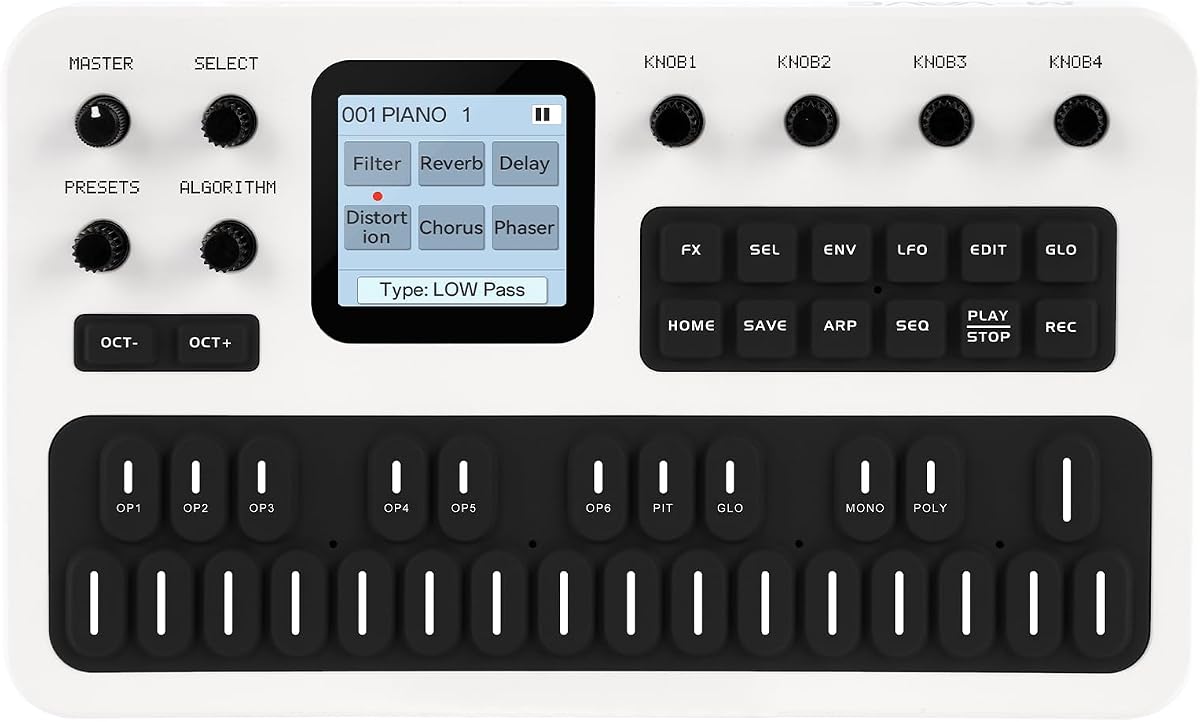
This M-VAVE portable FM synthesizer has a 4.4 rating and combines 27 full-range silicone keys, a six-operator FM engine, 32 algorithms, 128 factory presets, six effects, an arpeggiator, and a 16-step sequencer. Its built-in speaker and battery operation make it a capable standalone instrument for practice, sketching, and portable performance.
We may earn a commission when you buy through this link, at no additional cost to you.
The standard piano-style layout is a major advantage for beginners because familiar note positions reduce the initial learning burden. The factory presets cover broad categories such as pianos, strings, brass, basses, and electric synths. FM SYSEX support also allows compatible sound banks to be imported, extending the possibilities beyond the included material.
The sequencer supports recording, playback, and looping, while a row of LEDs indicates the current step. The arpeggiator offers seven modes and real-time speed and range control. These are valuable pattern-making tools for a learner who may not yet know how to arrange a full song. The six effects add further timbral variety without requiring separate hardware.
Six-operator FM synthesis is sophisticated, and its many parameters can intimidate someone starting from zero. The supplied silicone keys also produce a different feel from traditional piano keys. Still, the presets let a beginner explore before learning the deeper architecture, making this a strong pick for a portable instrument that offers genuine sound-design capability.
The familiar black-and-white key arrangement helps new players transfer basic keyboard knowledge directly to the instrument. Battery operation and a built-in speaker then make it easy to take that practice away from the desk.
The arpeggiator and 16-step sequencer can turn a simple held chord into a repeating musical idea. Beginners can use them to develop timing, arrangement, and an understanding of how short patterns develop into songs.
We may earn a commission when you buy through this link, at no additional cost to you.
The Arturia MicroFreak is a compact hybrid synthesizer rated 4.6, featuring 17 paraphonic oscillator modes, a resonant analog filter, four digital oscillator controls, a modulation matrix, and an unusual pressure-sensitive printed-circuit-board keybed. It is less conventional than most beginner keyboards, but that distinctiveness is exactly what makes it rewarding for curious learners.
We may earn a commission when you buy through this link, at no additional cost to you.
Its oscillators include seven bespoke Arturia engines, seven modes from Mutable Instruments, and three designed with Noise Engineering. The supplied information also highlights Vocoder, Noise, Superwave, Harmo, Karplus-Strong, Wavetable, and BasicWaves. That variety allows a player to move between fundamentally different sounds while staying within one compact instrument.
The keyboard detects note pressure and aftertouch independently, allowing performers to alter a note after striking it. Four automations, per-step note editing, Spice and Dice sequencing, randomization, and a user-assignable 5-by-7 modulation matrix make it possible to generate evolving sounds without rigidly repeating patterns. CV outputs can send pitch, gate, and pressure signals to compatible modular or external equipment.
A newcomer may find the terminology and dense control layout challenging, while the flat key surface requires a different technique from a piano. Even so, the MicroFreak rewards curiosity and makes experimentation intuitive through its sound-changing controls. It is best for a beginner who wants to understand synthesis through discovery rather than start with a conventional preset-focused keyboard.
Independent aftertouch lets performers shape a note after it starts, much like adding vibrato or filtering movement to a sustained sound. This feature is unusual in a compact instrument and can make an ordinary phrase feel expressive.
The Spice and Dice sequencer functions and extensive modulation matrix turn preset variation into a creative process. Rather than memorizing every control, beginners can let the instrument produce starting points and then refine the results.
We may earn a commission when you buy through this link, at no additional cost to you.
The M-VAVE FM-1 is a six-operator FM synthesizer with 27 keys, 128 factory presets, a color TFT display, 12-voice polyphony, six effects, a seven-mode arpeggiator, and a 16-step sequencer. Its 5.0 rating is the highest listed among these products, although that figure should be treated as a customer-rating snapshot rather than proof of universal suitability.
We may earn a commission when you buy through this link, at no additional cost to you.
The sound engine supports 32 algorithms and FM SYSEX importing, while the factory collection includes leads, pads, basses, brass, and strings. The TFT display is valuable because it visualizes algorithm structures and waveforms, making complex FM sounds easier to understand. User-friendly knobs give beginners a direct way to adjust selected parameters.
Connectivity is unusually broad for a portable synthesizer. USB-C, Bluetooth BLE MIDI, and 3.5mm MIDI input can be used simultaneously, allowing the FM-1 to function as a controller or sound module in different setups. Its rechargeable battery, built-in speaker, compact measurements, and auto-mute behavior also make it suitable for busking, guitar-oriented practice, or mobile production.
The instrument is dense for a first synthesizer, and its silicone keys and menu-driven editing may not suit someone focused on piano technique. The product information's reference to a broad key span should be evaluated in person if exact range is important. Even so, the FM-1 offers a strong package for a learner who wants polyphony, sequencing, effects, and flexible connectivity in a portable format.
Seeing waveform and algorithm information provides an important learning aid. New users can connect a visible change in the interface with an audible change in the sound, making otherwise abstract FM concepts more concrete.
Simultaneous USB-C, Bluetooth MIDI, and wired MIDI connections provide flexibility for computer production, mobile control, and external gear. A guitarist or producer can also use the internal sounds without routing every part of the setup through a computer.
We may earn a commission when you buy through this link, at no additional cost to you.
The white M-VAVE portable FM synthesizer shares the core design of the black version, offering 27 silicone keys, 128 factory presets, six operators, 32 algorithms, six effects, an arpeggiator, and a 16-step sequencer. With a 4.4 rating, it is a capable compact instrument for learning FM synthesis, sequencing, and portable performance.
We may earn a commission when you buy through this link, at no additional cost to you.
Its standard piano layout lowers the barrier to entry for learners who already understand where notes sit. The factory presets include familiar categories such as piano, strings, brass, bass, and electric synth sounds. These provide functional starting points, while the ability to import FM SYSEX banks broadens the instrument's potential library.
The 16-step sequencer supports recording, playback, and looping, and its LED display follows the playback position. A seven-mode arpeggiator is controlled by dedicated knobs, allowing patterns to change while playing. The TFT screen presents the architecture behind each sound, which can help users understand how operators and algorithms shape the final tone.
Its 3.5mm MIDI input, USB MIDI, and wireless Bluetooth MIDI allow use as a controller or sound module, potentially at the same time. The trade-off is that the white model has essentially the same features as the black version, so choosing between them may come down to appearance or availability. It remains a strong option for a beginner who prioritizes portability and sequence-based learning.
The compact sequencer, arpeggiator, and step-position display create a self-contained way to learn rhythm and arrangement. A learner can build a pattern, change it, and perform over it without depending on a computer display.
The white version provides the same functional design as its black counterpart. For a buyer who prefers a lighter visual style, that cosmetic distinction can be useful without requiring a different feature set.
We may earn a commission when you buy through this link, at no additional cost to you.
The Arturia MiniFreak 37 Key is a six-voice polyphonic hybrid synthesizer with a 37-key keybed. Its 4.7 rating is the highest among the non-FM models in this guide, and the supplied description emphasizes an instrument designed to let players move freely between different sonic approaches without imposing strict musical rules.
We may earn a commission when you buy through this link, at no additional cost to you.
The larger keybed provides a useful two-handed playing area and a more natural range for basic harmony, bass, and melody than a 25-key controller. Polyphony allows notes to overlap, making chord pads, layered sounds, and sustained arrangements possible. As a dedicated synthesizer rather than only a controller, it also gives a beginner direct access to its internal sound architecture.
Its premium status comes with complexity. A first-time owner is likely to spend more time exploring the interface than simply choosing a preset. That is not a flaw for the right learner: an instrument capable of deep sound design can support years of development. It is less suitable for someone who wants a simple device with only a handful of obvious functions.
For a beginner with room in their setup and a willingness to learn, the MiniFreak 37 Key offers a premium path into serious synthesis. It is particularly compelling for students who want expressive two-handed playing, broad sound exploration, and a modern instrument without moving immediately to a large analog-style workstation. The MPK Mini Plus is more accessible and controller-focused, but this model is the stronger long-term standalone instrument.
A 37-note range, polyphony, and a hybrid synthesis engine provide more headroom for study and composition. Beginners can begin with simple sounds while gradually discovering why the instrument can support increasingly complex arrangements.
The invitation to move between sonic areas encourages users to form their own techniques instead of following a narrow workflow. For an ambitious learner, that exploratory character can be more motivating than a permanently simplified interface.
We may earn a commission when you buy through this link, at no additional cost to you.
The Akai Professional MPK Mini IV is a USB-C MIDI controller with 25 velocity-sensitive mini keys, eight assignable knobs, a color display, a push-and-turn encoder, and eight velocity- and pressure-sensitive RGB MPC pads. Its 4.6 rating reflects a modern, approachable controller designed for beginners, mobile users, and producers who value compact hardware.
We may earn a commission when you buy through this link, at no additional cost to you.
The display and encoder reduce the need to navigate software with a mouse. They can expose settings, presets, and DAW functions, while the assignable knobs provide tactile control over virtual instruments and effects. Velocity- and pressure-sensitive pads make drum programming and finger-drumming more expressive than a simple on/off grid.
Its arpeggiator includes Pattern, Freeze, and Mutate functions, along with chord and scale modes that can assist beginner songwriters. Pre-mapped DAW integration and compatibility with Ableton Live Lite 12, Logic Pro, and FL Studio shorten the path from unboxing to a working setup. The included virtual suite contains more than 1,000 drums, keys, synths, bass sounds, and effects.
The main limitation is that a MIDI controller does not provide a full internal synthesizer by itself. The 25-key range is also constrained for advanced classical repertoire. Within its intended category, though, the MPK Mini IV is a polished, modern choice. It is especially attractive to learners who want a compact controller, a large software starting point, and direct control over a computer-based production setup.
A full-color display and push-turn encoder make important settings visible and accessible. This is valuable for beginners who would otherwise spend significant time hunting through small software menus.
The combination of mini keys and RGB pads supports both melodic and rhythmic work. Chord and scale modes add guidance, while the arpeggiator's Pattern, Freeze, and Mutate functions make it possible to begin with a simple note and discover a larger musical idea.
We may earn a commission when you buy through this link, at no additional cost to you.
The right beginner synthesizer depends on whether your priority is playing, immediate sounds, portable practice, computer-based production, or long-term sound design. These factors help narrow the options before you commit to a device.
In short, choose more keys for musical range and fewer keys for portability, but consider key size before making a final decision.
Beginners should choose built-in sounds for immediate playability or a controller if they already have a computer-based production workflow.
Use presets to learn the interface first, then choose a synthesis style that matches the kinds of music and sound-design challenges you want to pursue.
Choose at least one built-in pattern tool, but favor deeper sequencing if experimentation and composition without a computer are central to your plans.
For regular travel or bedside practice, prioritize a built-in speaker, reliable battery operation, and a body small enough to carry comfortably.
Begin with the connection you need now, but favor standards such as USB MIDI or CV/Gate if you expect to expand into hardware synthesis.
A clear display is valuable once you are ready to edit sounds, while a simple interface can be beneficial if your first goal is immediate musical enjoyment.
Good tutorials and a usable starter sound library can matter more than a huge catalog, so check the learning resources before choosing a bundle.
Begin with a small number of factory sounds rather than editing every parameter at once. Choose a warm pad, a clear lead, an acoustic-style piano, and a basic bass, then learn how each responds to velocity, effects, and the arpeggiator. On a controller, install the supplied software, connect the keyboard by USB, select a virtual instrument, and confirm that the DAW receives notes before attempting a full arrangement.
Practice in short sessions that focus on one skill. Spend part of the time playing scales and simple melodies, another section sequencing one bar, and the remainder recording short ideas. Save useful patches and patterns with clear names. Using the built-in arpeggiator or sequencer can reveal musical structure quickly, but return to manual keyboard playing so that technique and listening skills continue to develop.
Protect the instrument by keeping it away from excessive heat, moisture, dust, and unstable power. Clean key surfaces and touch controls with a soft, lightly dampened cloth rather than harsh cleaners, and avoid liquids near openings or connectors. For portable models, follow the manufacturer's battery or charging guidance and disconnect cables carefully. Before moving an instrument with a mechanical keybed, secure loose connections and avoid placing heavy objects on top of it.
The easiest choice depends on the learner's goals. The MPK Mini Play MK3 is approachable because it has internal sounds, a display, and a built-in speaker, while the Stylophone offers the simplest physical operation. Beginners interested in computer production may prefer the MPK Mini MK3. Trying several layouts in a store or using detailed demonstrations can help reveal which interface feels most natural.
No. A MIDI controller can send notes and performance data to virtual instruments in a DAW, often providing access to a much larger range of sounds. Built-in sounds are still useful for immediate practice, portable use, and reliability. If you want a simple standalone learning experience, choose a self-contained model; if your goal is music production, a controller plus software may be more versatile.
A 25-key keyboard is sufficient for basic melodies, simple chords, bass exercises, and electronic production. It covers roughly two octaves, so advanced harmony and two-handed pieces may require a larger instrument. Beginners using a small keybed can also rely on octave shifting. Those learning traditional piano technique may prefer a standard-size keybed, while compact controllers are excellent for portable composition and beat making.
FM synthesis creates tones through operators that modulate one another, producing characteristic electric pianos, bells, basses, and bright leads. Hybrid synthesis combines multiple digital synthesis methods with analog-style processing, often including a resonant filter. Both approaches provide substantial creative control, but the terminology and parameter relationships can feel more involved than those of a simple preset instrument.
Most models in this guide provide MIDI connectivity, although the exact connection format varies. USB MIDI is common, while some instruments also support Bluetooth MIDI, wired MIDI, CV, or Gate. A controller still needs compatible software instruments, whereas a standalone synth can be recorded through its audio output. Check the DAW's MIDI compatibility and the included connection cable before making a final choice.
Use both. Manual playing develops touch, timing, note recognition, and musical phrasing, while the arpeggiator demonstrates how a simple note can become a repeating pattern. Alternating between them helps beginners hear harmony, rhythm, and arrangement relationships. If an arpeggiator dominates practice, reduce its complexity and return to basic scales and melodies.
Portability is valuable if you want to practice away from a desk, travel with the instrument, or record ideas anywhere. Built-in speakers and battery operation make that convenience much greater. A desktop model may offer larger keys, more controls, and a more detailed display, which can be beneficial for extensive sound design. The best choice depends on where and how you expect to play.
Install only what you need to begin. The included drum software and one or two virtual instruments are enough to test the controller, create simple loops, and learn the workflow. Additional libraries can be valuable later, but installing a large collection at the outset may make setup confusing. Learn how the bundled instrument handles velocity, notes, and effects before expanding the setup.
The Akai MPK Mini Plus stands out as the best overall option because it combines a useful three-octave keybed, MPC pads, a standalone sequencer, DAW transport, and expandable connections. The Akai MPK Mini MK3 is the budget-focused choice for beginners building skills on a computer, while the Arturia MiniFreak 37 Key is the premium recommendation for a learner ready to explore polyphonic hybrid synthesis in depth.
Prioritize the experience you want to have. Choose internal sounds and a speaker for immediate standalone practice, a MIDI controller for a computer-based production workflow, a larger key range for chords, and an arpeggiator or sequencer for pattern-based learning. Portability, visual navigation, and included lessons can be just as important as the underlying sound engine during the first months of ownership.
Before purchasing, verify current specifications, software compatibility, connection requirements, and availability. Features and promotional bundles can change, and prices fluctuate over time. Reading recent owner feedback alongside a hands-on demonstration will give the best picture of how a particular model will fit your learning style and musical goals.